Session Flow — Hermes Desktop Plugin
English · Deutsch
Smooth line-by-line chat animation, Ctrl+Scroll session cycling, Firefox-style
session groups, glass readability for the composer, and sidebar-style content
tabs, and full personalization — six features in one plain-ESM plugin, all
live-configurable from a
built-in settings page.
Developed and used on Linux (Wayland/KDE) with Hermes Desktop and its plugin
SDK (~/.hermes/desktop-plugins/). No build step, no dependencies, one file.
A project by AGANTILA — Deniz Yilmaz ·
Contact: info@agantila.com.
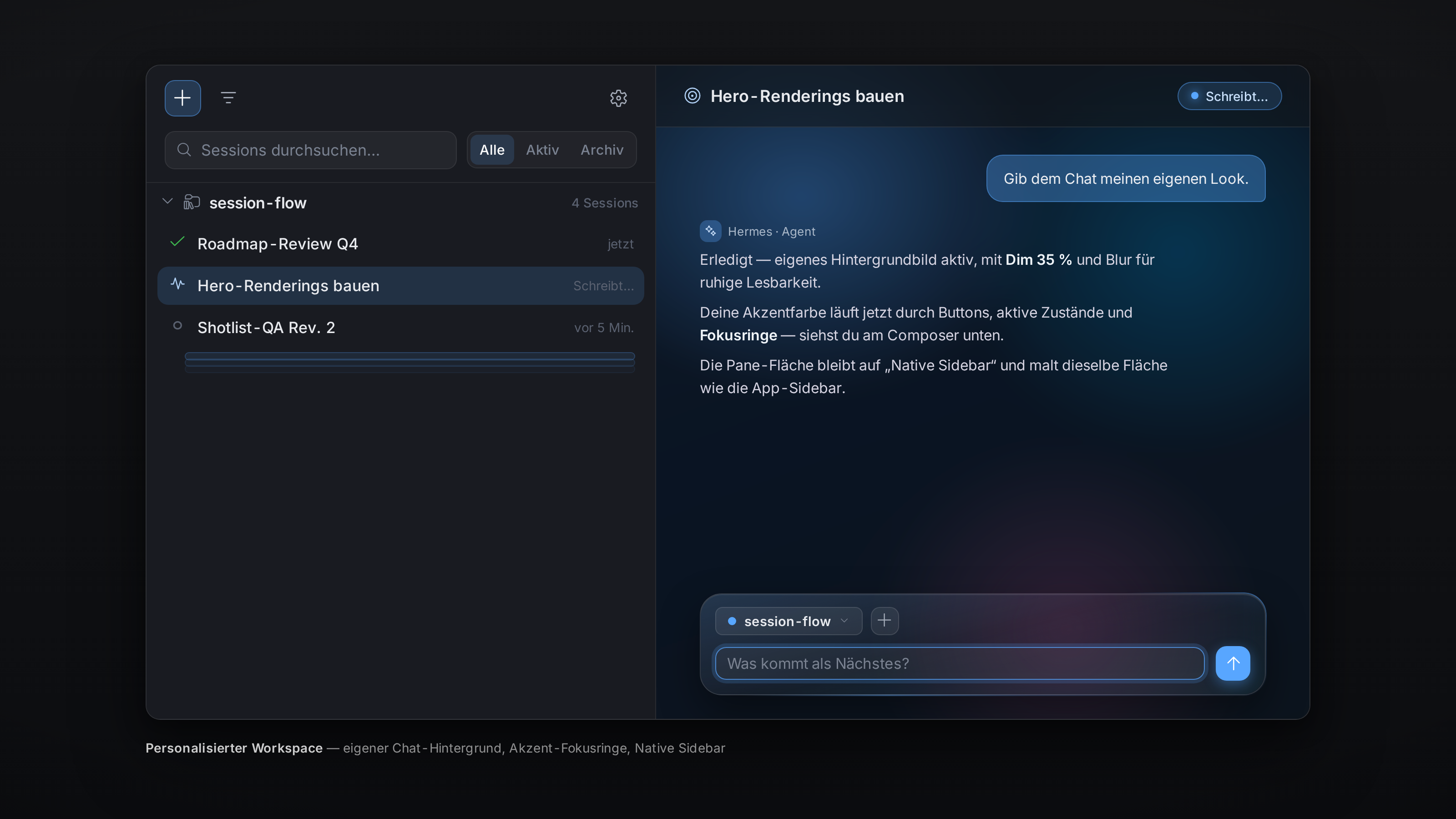
Showcase
| | |
|---|---|
|  |
 |
|  |
 |
|  |
 |
|  |
 |
| 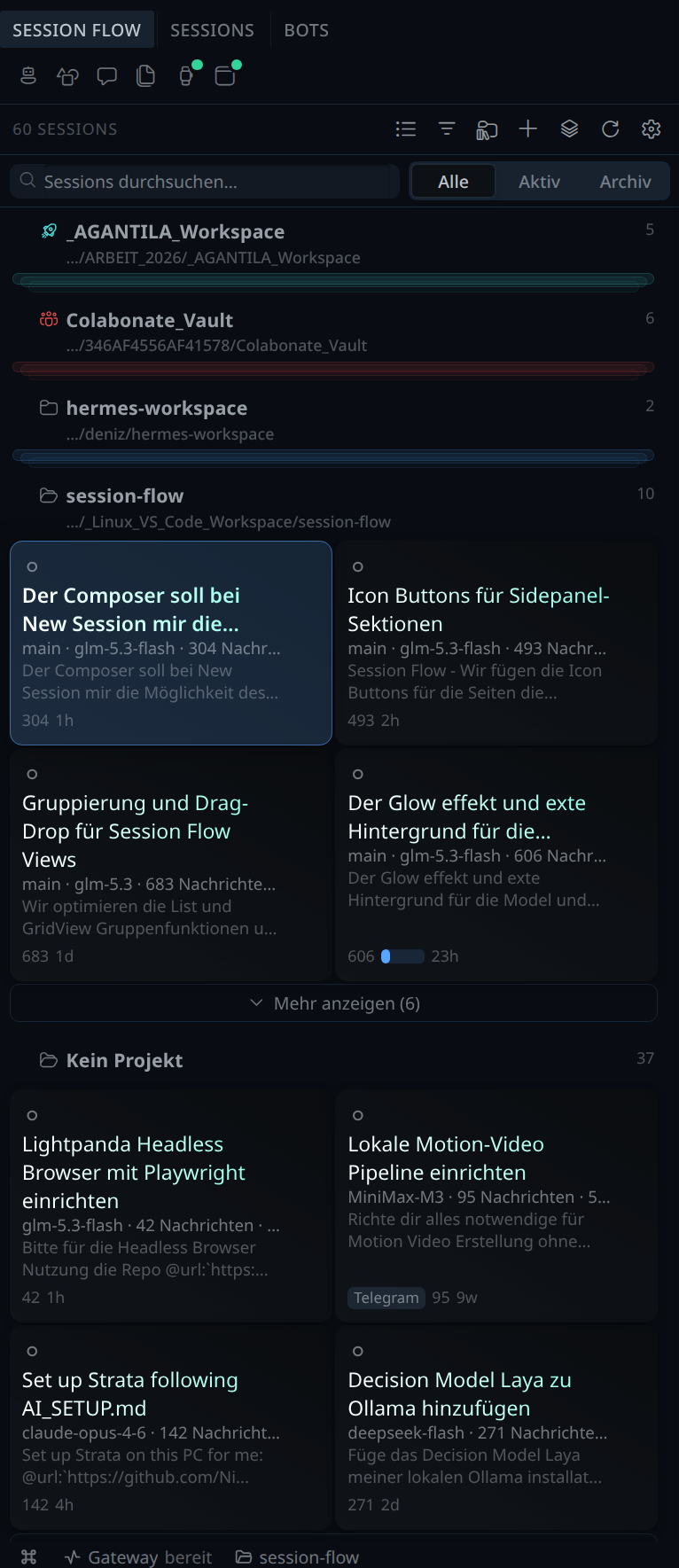 | |
Real-app screenshots
Two additional screenshots were taken from a live Hermes Desktop session
(sf-hero-a9-sidebar-kanban-files-16x9.jpg, sf-hero-a10-sidebar-grid-9x16.png)
to show the plugin in real-app context — the rendered showcase shots above are
pixel-perfect compositions reproduced from HTML sources for the marketplace
gallery.
▶ See it move: the 5-second Hyperframes animation
(MP4 ·
WebM ·
GIF)
shows the cascade, the project chip, the Ctrl+Scroll HUD and the context donut
in one short loop.
19 component cards (1:1) — every UI element that shapes the new look, each
in its own card, ready to drop into docs, slides or the marketplace listing:
docs/marketing/components/. The full inventory is
in docs/marketing/INVENTORY.md.
All 30 images are reproducible from the HTML sources under
docs/marketing/src/. Re-render with
docs/marketing/src/heroes/render.shand
docs/marketing/src/components/render.sh.
Features
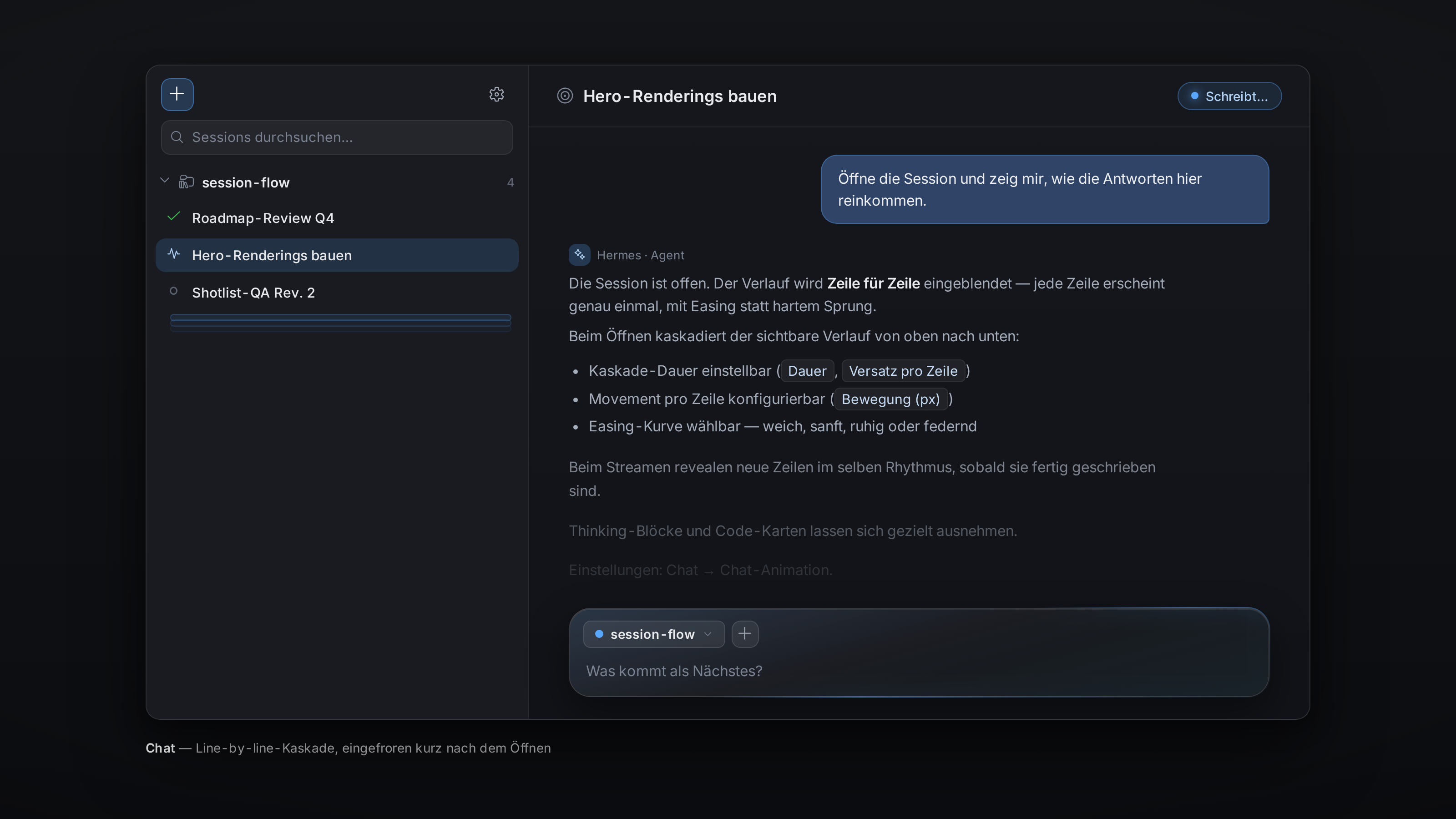
- Line-by-line chat animation — Assistant answers ease in instead of
popping. Opening or switching a chat cascades the visible lines top to
bottom; while streaming, each line animates exactly once as soon as it is
fully written. Duration, stagger, travel, easing presets, thinking/code/list
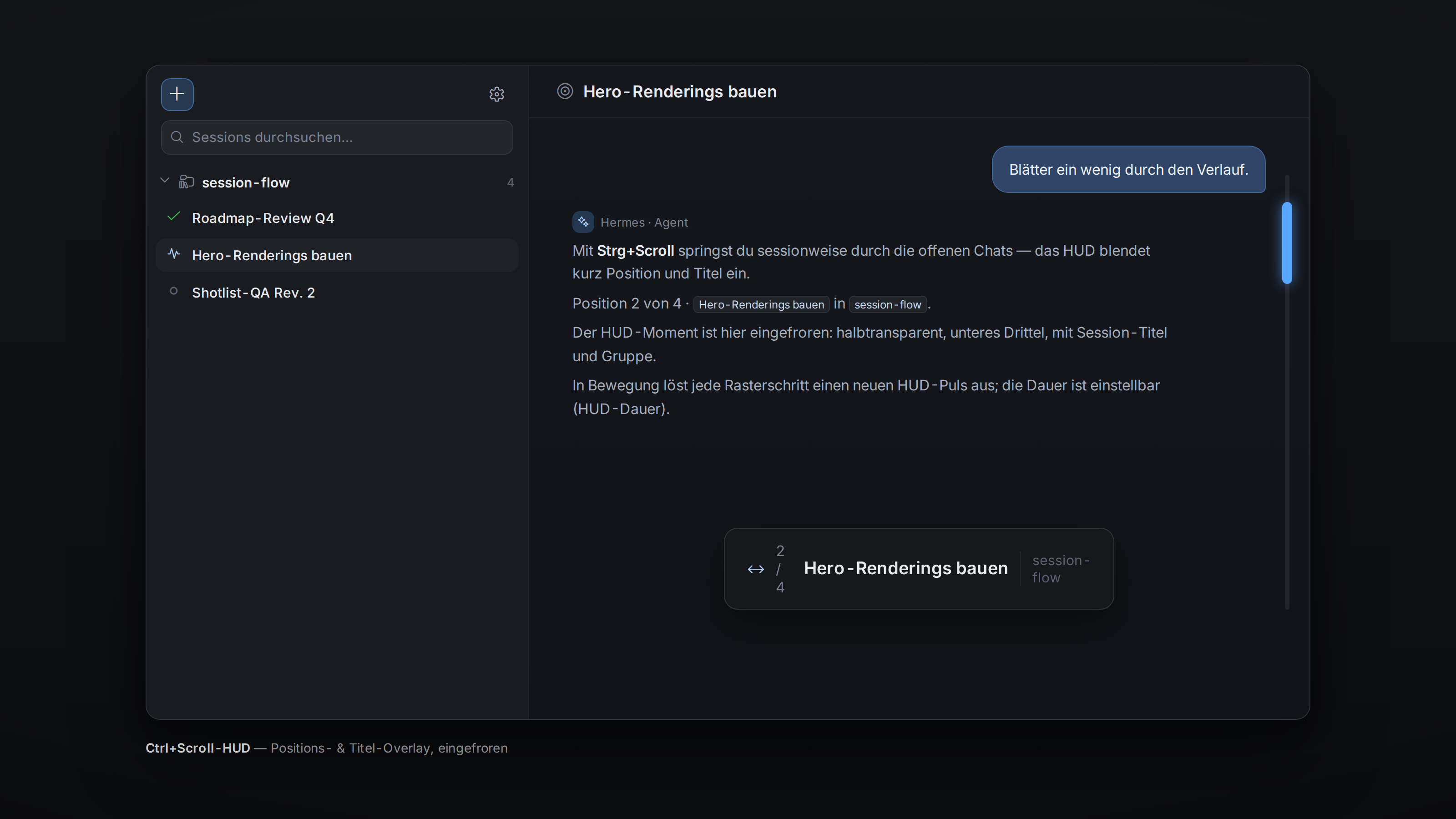
options — all adjustable. - Ctrl+Scroll = session cycling — Hold a modifier (Ctrl by default) and
scroll through your active sessions, with a HUD showing position and title.
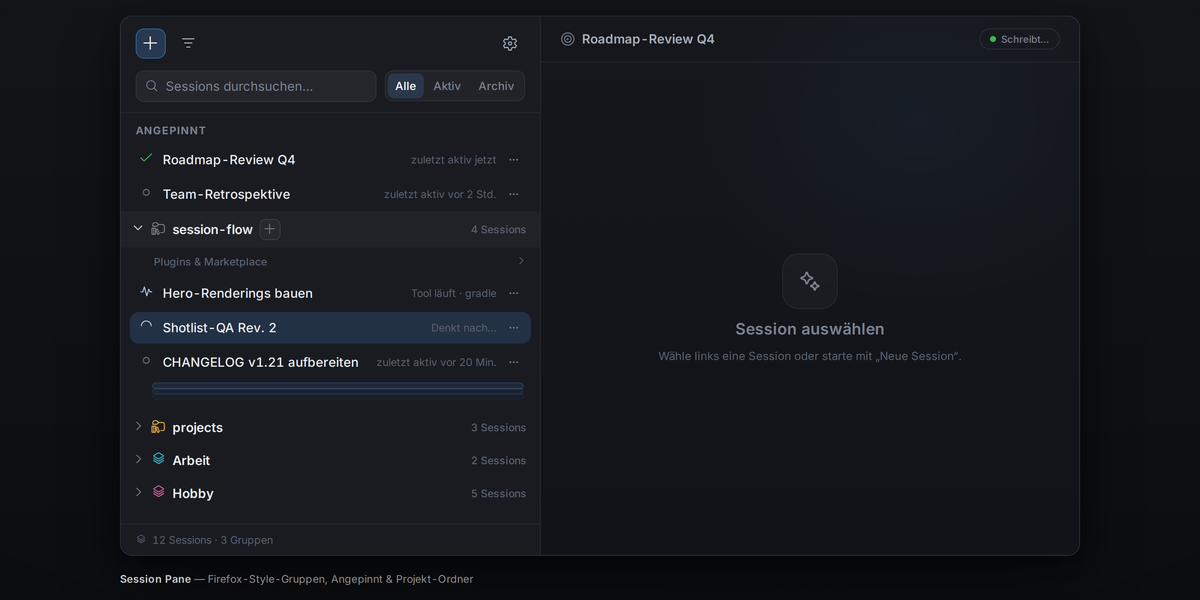
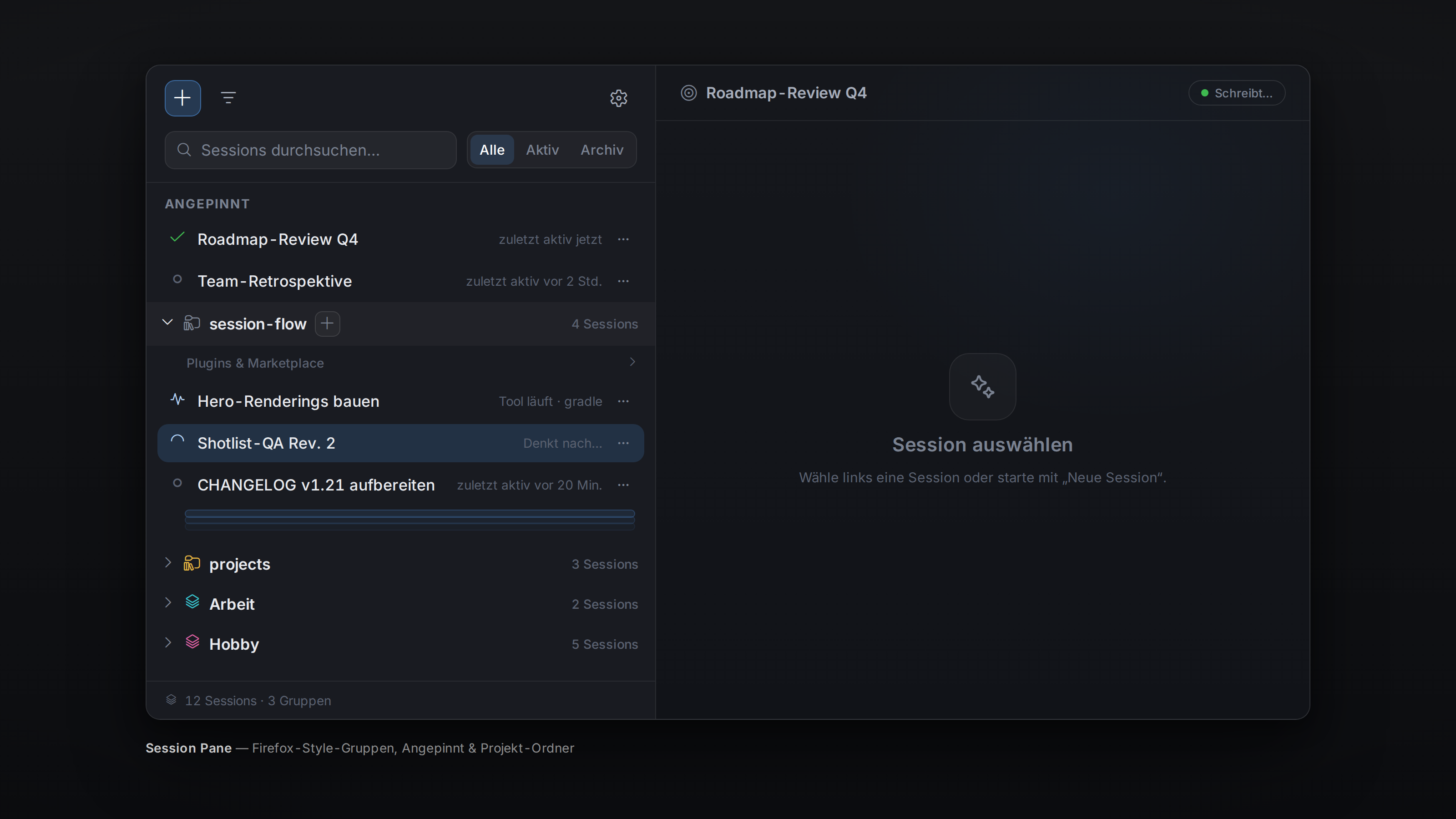
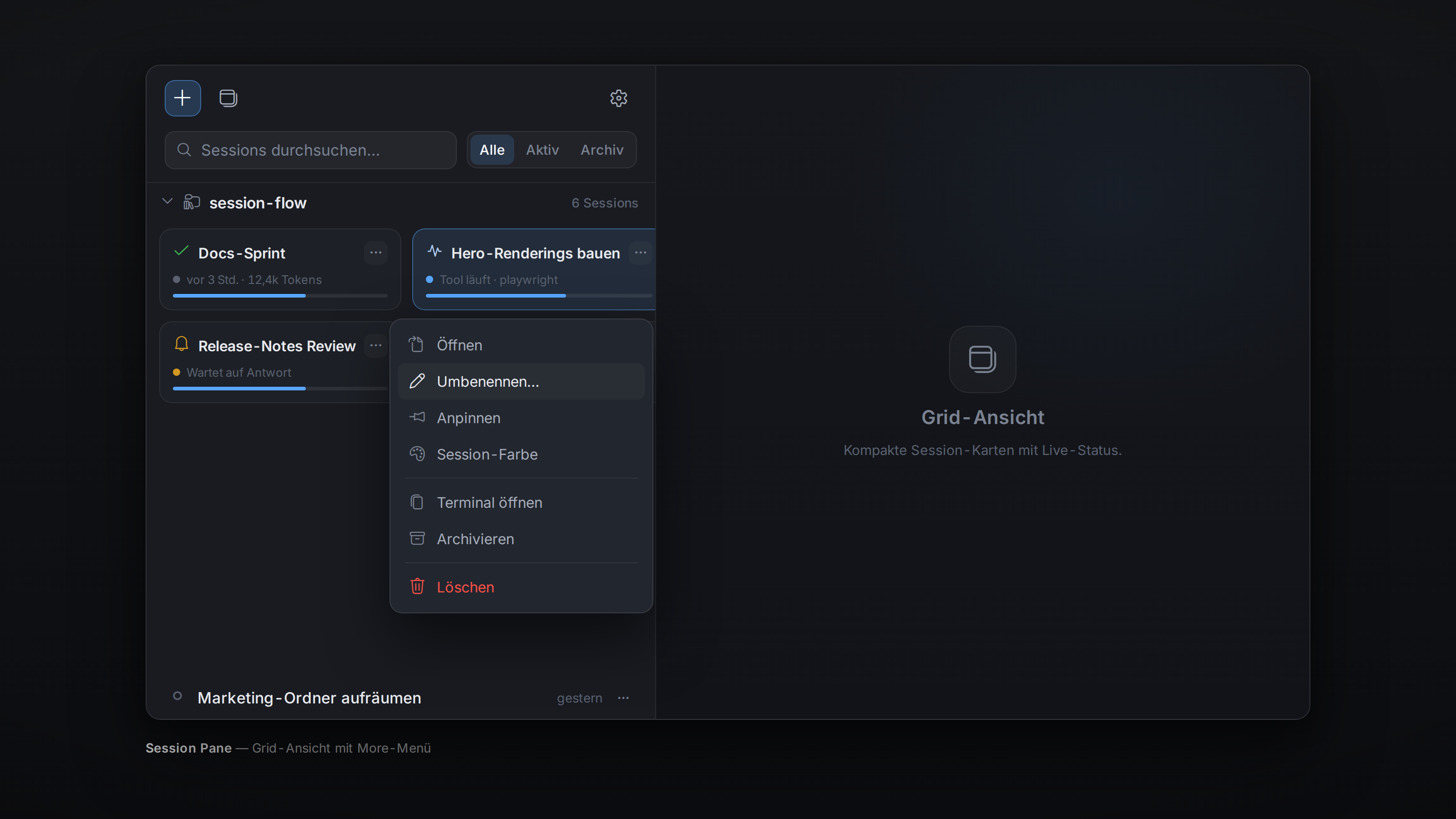
Zoom surfaces (image lightbox, Monaco editor) keep their own behaviour. - Session pane with Firefox-style groups — A pane lists every session as a
compact tab with an activity icon (thinking / writing / tool running /
waiting / done / error). Sessions go into named, coloured groups (drag &
drop or right-click), groups collapse into a stack (spine / fanned /
pill); optional auto-grouping by date, source, or project folder
(mirrors Hermes Desktop's own Projects tree — folder icon, hover caret,
hover "+" to start a session right there; dropping a tab on a project
header really moves it, with live drop-target highlighting and a landing
flash). A search + quick filter bar (all / pinned / active) narrows the
list on the fly. Every row/card carries a More (⋯) actions menu — open
variants, terminal, rename, colour, pin, branch, move to project, archive,
delete, copy ID — and the toolbar + starts a new session in your last
chosen project. The pane renders as a list or a grid (card options in
the settings), and can optionally replace the native tab strip
(tabs.asTabSelector) once it already covers switching between sessions.
Above the toolbar sits the app quick-start row: icon buttons for New
session, Skills, Messaging, Artifacts, Scheduled jobs and Kanban (the same
order and icons as the app sidebar's first section), wrapping into more
rows when the pane is narrow — with live status pips on Kanban and
Scheduled jobs (running / blocked / review / error, fed by the app's own
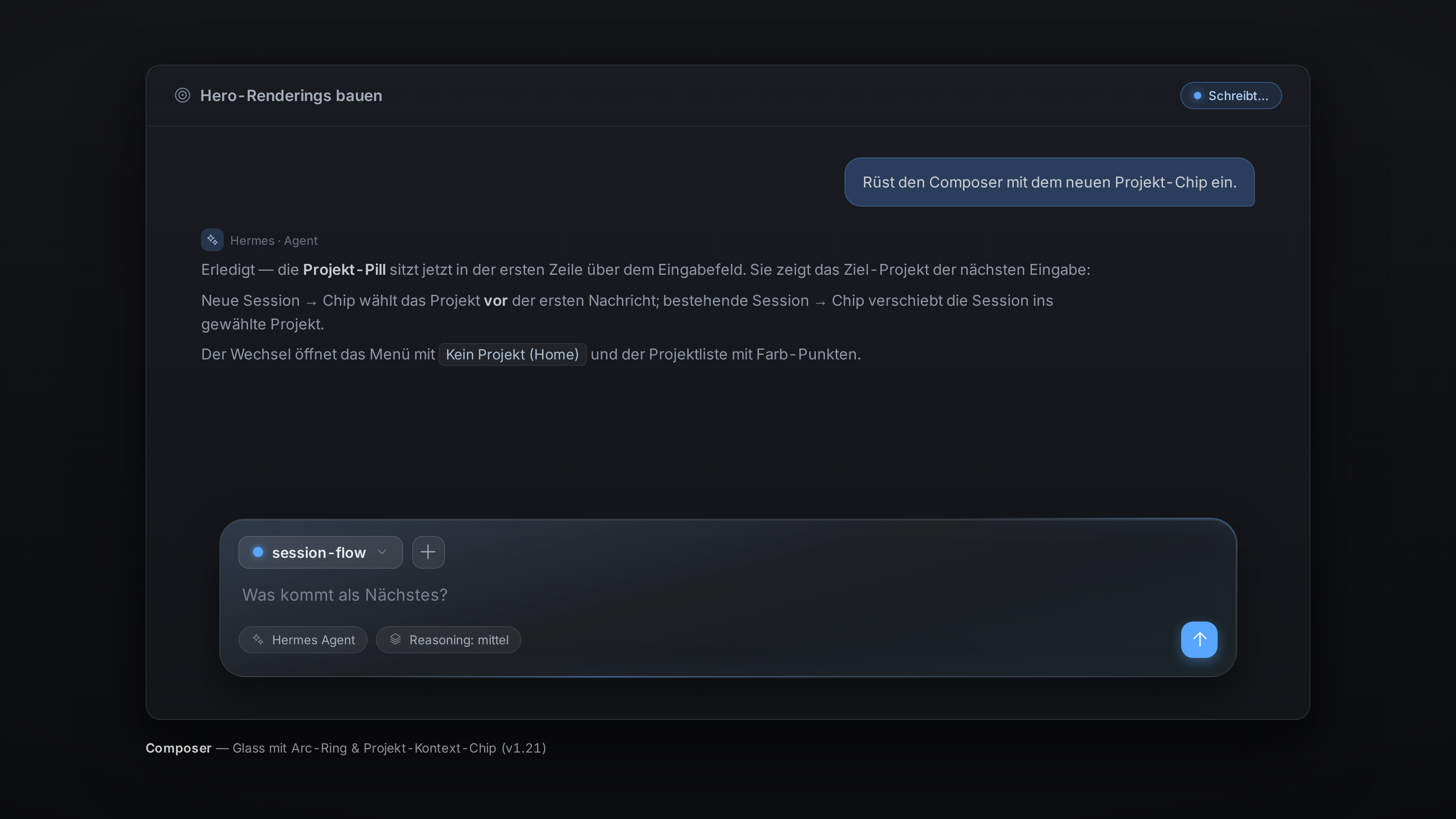
endpoints; Kanban only appears while the Kanban plugin is active). - Glass & readability — An optional frost effect for the input field
and UI chips: a soft blur with a subtle accent-tinted gradient overlay
fading to transparent, so labels stay readable even without their own
background. Blur, saturation, opacity, tint, gradient angle/strength and
scopes (composer / chips / status bar) are fully configurable — including a
travelling glow ring on the border (the same effect Hermes uses on running
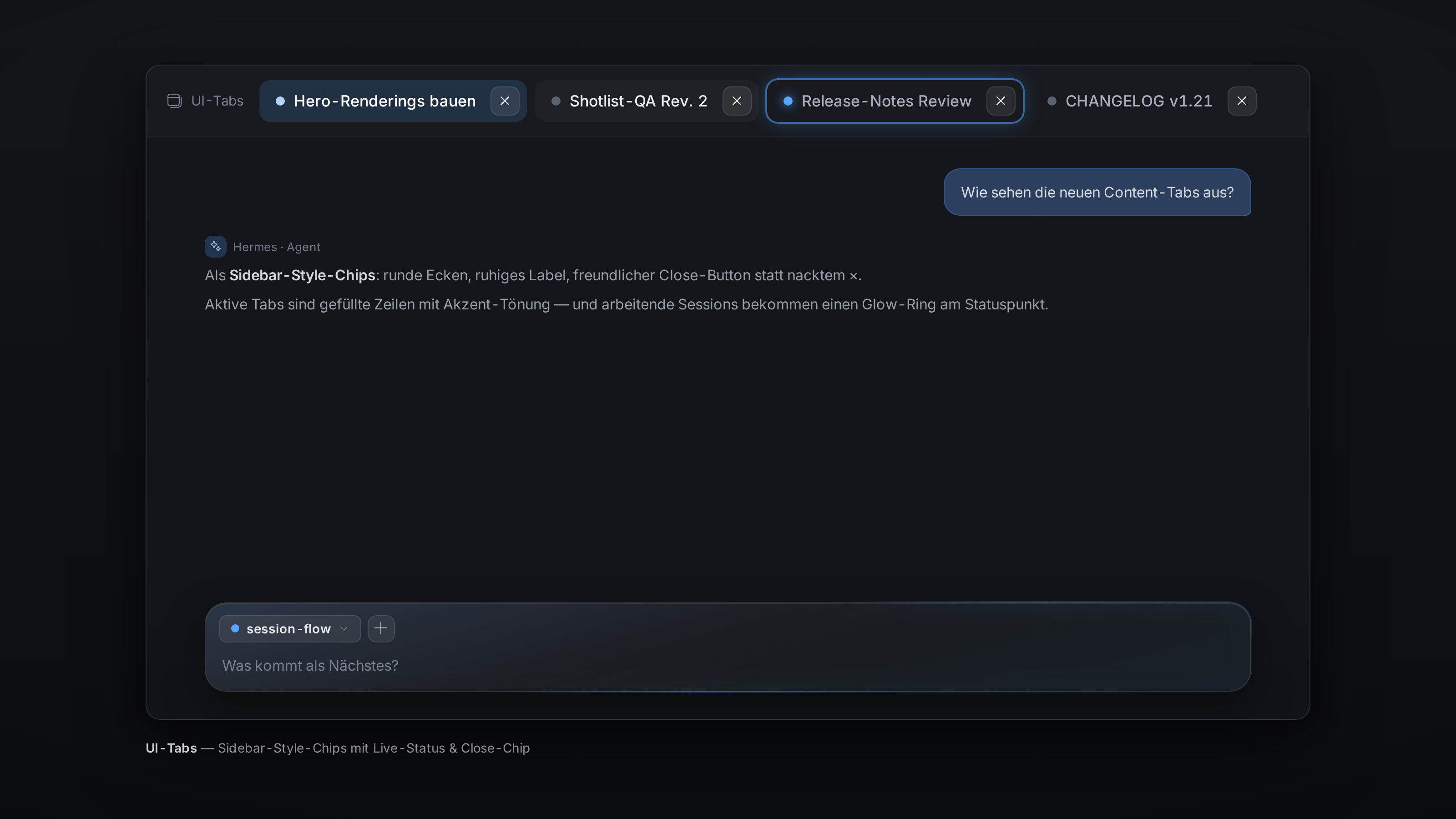
session rows). - Sidebar-style UI tabs — The content-area tabs become gently rounded
chips like the sidebar session rows: calm hover/active states, a better
label (case, size) and a friendlier close button (hit area, hover
chip, visibility: on hover / always / active tab only). Live session info
from the sidebar engine: sessions that are working (thinking / writing /
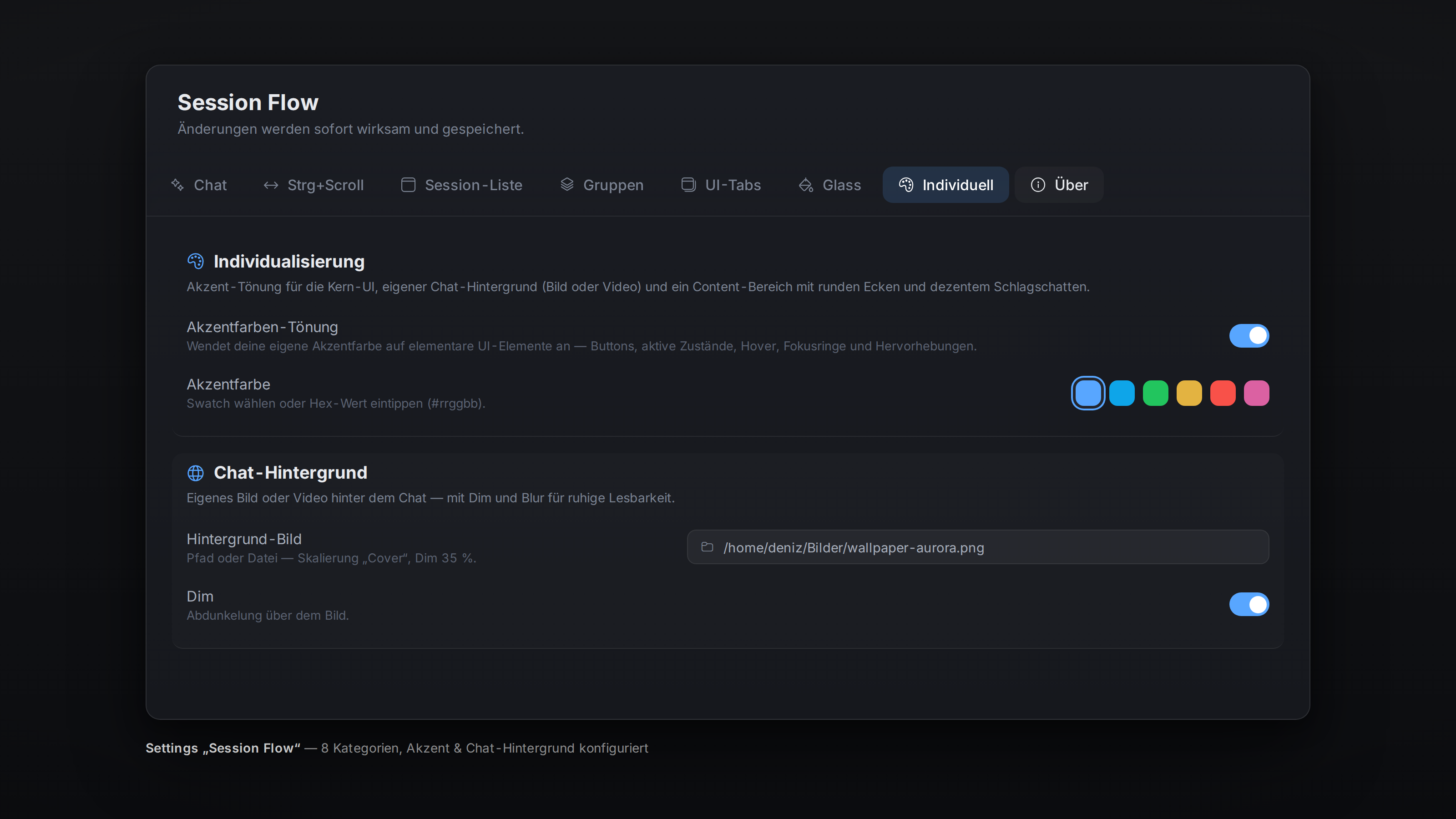
tools) get the travelling glow ring on their tab. - Personalization — pick your own accent color for core UI elements
(buttons, active states, hovers, focus rings), set a chat background
(your own image or video file, with fit / dimming / blur and scope), and
choose the pane surface of the Session Flow pane itself: the native
sidebar color (Hermes default), the chat color (previous look), or no own
fill at all.
Everything is adjustable on the plugin settings page — Session Flow in
the sidebar, ⌘K/Ctrl+K → “Session Flow: Einstellungen”, or the gear icon in the
pane. The page has a sticky category bar (Chat · Ctrl+Scroll · Session list ·
Groups · UI tabs · Glass · Personal · About) and one-click presets for the UI tabs.
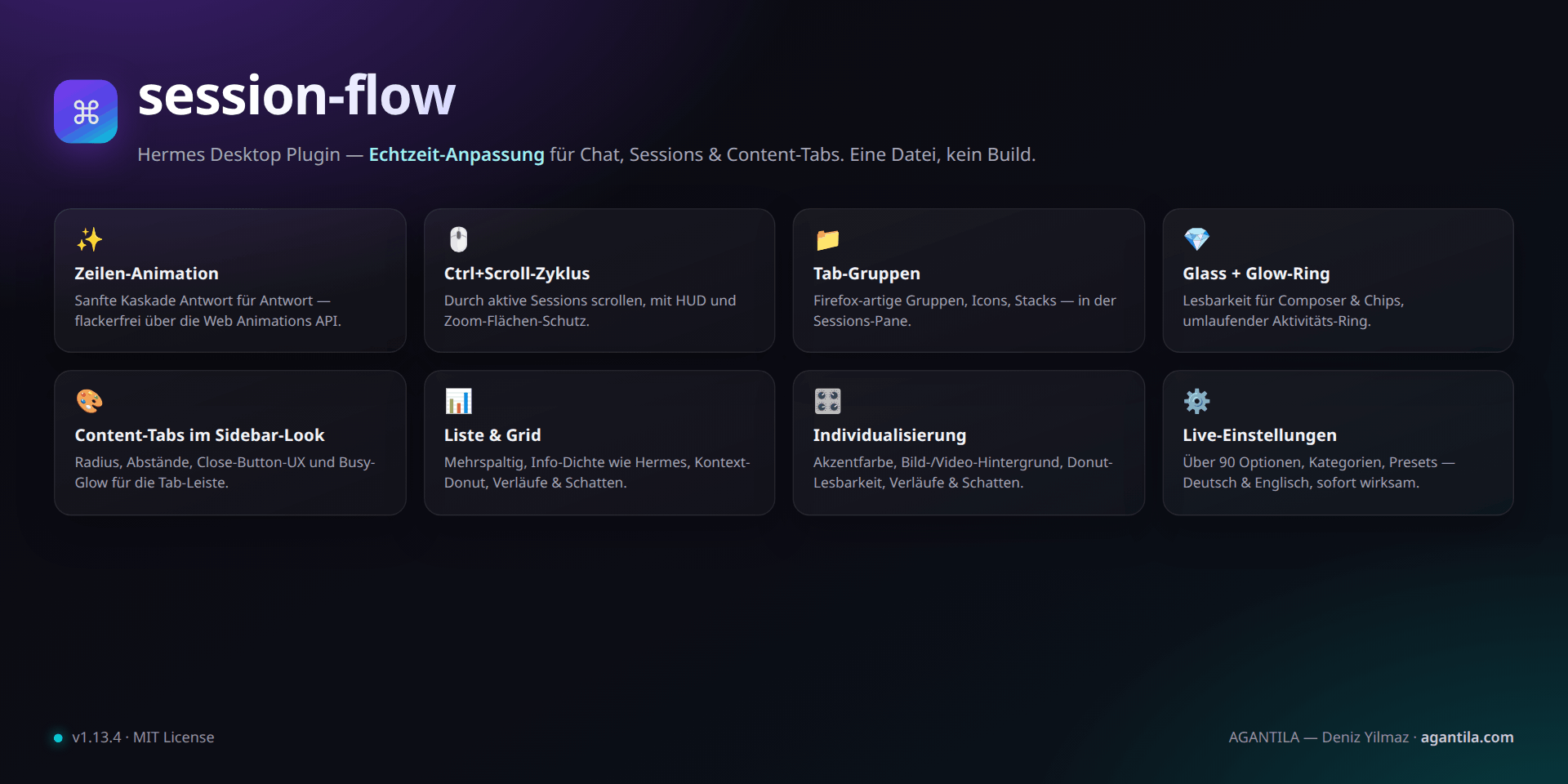
docs/overview.pngis optional — drop your own screenshot there.
Two builds — catalog (desktop/plugin.js) and full (full/plugin.js)
Both builds come from one source (full/plugin.js), like the
catalog-listed pinned-folders plugin:
| | Catalog build desktop/plugin.js | Full build full/plugin.js |
|---|---|---|
| Session pane, groups, DnD, search, list/grid | ✓ | ✓ |
| Session actions (rename/branch/pin/move/archive/delete) | ✓ | ✓ |
| Project management (projects.* RPCs) | ✓ | ✓ |
| Ctrl+Scroll + HUD | ✓ | ✓ |
| Status pips (Cron; Kanban via endpoint answer) | – (waits for SDK REST door, #116305) | ✓ (Desktop-Bridge REST) |
| Settings page, palette, keybinds, EN/DE | ✓ | ✓ |
| Chat line animation | – (waits for SDK message-render hook) | ✓ |
| Composer project chip | – (waits for SDK composer-accessory slot) | ✓ |
| Glass & readability (composer/chips/status bar) | – (waits for SDK theme door) | ✓ |
| UI-tab restyle + "as tab selector" strip hiding | – (waits for SDK tab-decoration slot) | ✓ |
| Chat background image/video | – (waits for SDK workspace-background door) | ✓ |
| Pinned/archived quick-filters | – (waits for SDK REST door, #116305) | ✓ (Desktop-Bridge REST) |
| Native file picker, reveal-in-file-manager, open-in-terminal | – (menu entries hidden, honest degrade) | ✓ (Desktop-Bridge doors) |
The catalog build is SDK-only (Hermes Plugin Catalog rule 8: no app-markup
access, no document.body observers, no core-CSS overrides, no
window.hermesDesktop doors). It is what the marketplace lists and loads at
the pinned SHA. The full build keeps every feature for standalone use and
discloses its extra surfaces below; the missing SDK slots are requested
upstream (hermes-agent #116305),
and the features migrate onto the SDK as the slots land.
Regenerate the catalog build after changing the source:
node scripts/build-catalog.mjs (CI fails on a stale desktop/plugin.js).
Disclosure (catalog build)
Reads the local Hermes gateway via public RPCs (projects.*, session.*,
session.active_list, session.context_breakdown, state atoms); writes
only via user-initiated public RPCs. Settings and groups live in the app's
local plugin storage (ctx.storage). No app-markup access, no DOM
observers on app containers, no core-CSS overrides, no
window.hermesDesktop doors, no synthetic focus/visibilitychange events,
no outbound network calls, no telemetry, no shell commands, no stored
credentials, no self-update.
Disclosure (full build — extras beyond the catalog build)
Uses the documented Desktop-Bridge doors of a standalone install:
hermesDesktop.api (local REST mirror for pinned/unread/costs and folder
sizes), hermesDesktop.selectPaths / revealPath /
openSessionInTerminal (native file picker, file manager, terminal), and —
like the catalog build — public gateway RPCs. After its own mutations
(project change, pin, archive) it fires synthetic focus /
visibilitychange events so the app sidebar refreshes instantly (the
catalog build never does this). The UI decorations above
restyle or annotate core surfaces (composer, chips, status bar, content
tabs, chat surfaces) and inject their own background layer into chat
panes. No prototype patching, no eval, no dynamic imports beyond
SDK/react, no telemetry, no stored credentials.
Installation
Requirement: Hermes Desktop recent enough to support the plugin SDK and the
~/.hermes/desktop-plugins/ directory.
# From the repo directory (full build — every feature):
./install.sh            # copies full/plugin.js to ~/.hermes/desktop-plugins/session-flow/
./install.sh --link     # dev mode: symlink to full/ (hot reload on save)
./install.sh --variant catalog   # the SDK-only catalog build instead
Then in the app: ⌘K / Ctrl+K → “Reload desktop plugins” — or simply restart
the app once. After that the plugin loads automatically on every start.
Manual: copy the wanted build to
~/.hermes/desktop-plugins/session-flow/plugin.js.
The folder name must be session-flow (= the plugin id).
Uninstall: ./uninstall.sh (removes the installed copy, not the repo).
Sharing
- Hand over the repo URL plus the install steps above.
- Or use a Hermes deep link:
hermes://plugin/install?repo=<owner>/<repo>—
the user gets a confirmation dialog and picks the components.
Usage
| Action | How |
|---|---|
| Open a session | Click a tab |
| Context menu (pin, group, colour, open as…) | Right-click a tab |
| Create / edit / delete a group | Gear / “+” button in the pane header — or right-click / double-click a group header |
| Move a session into a group | Drag & drop onto a group — or right-click → “In Gruppe verschieben” |
| Pin / unpin a session | Drag onto the Pinned section header, or right-click → “Anpinnen” / “Lösen” |
| Pin / unpin from the flat list view | Drag onto the Pin / Ungrouped drop-bar that appears at the top of the list while dragging |
| Collapse a group | Click the group header |
| Cycle through sessions | Ctrl + mouse wheel |
| Settings | Sidebar “Session Flow” or ⌘K → “Session Flow: Einstellungen” |
Settings
Full reference incl. defaults: docs/SETTINGS.md.
The page has a sticky category bar (Chat · Ctrl+Scroll · Session list ·
Groups · UI tabs · Glass · About) — clicking jumps to a section, scrolling
highlights the current one. The UI-tabs section additionally offers one-click
presets (“Sidebar-Look”, “Minimal”, “Hermes-Standard”).
- Chat animation: on/off, cascade on open, line-by-line while streaming,
duration, stagger, max steps, travel (px), easing (4 presets), skip thinking
blocks, code blocks, list items. - Ctrl+Scroll: on/off, modifier key, threshold, cooldown, invert, wrap,
HUD on/off + duration, ignore selectors (CSS). - Session-Tabs: density (compact/cozy), view (list/grid — columns, card
width, gap, title lines, preview, info density like Hermes, top-aligned
text, compact context-window donut for live sessions, max visible entries
per group with “show more”), row/card design
(gradient background, drop shadows, gradient titles, selected-state
tint/outline/shadow incl. hover strength, live glow with the app’s
glowing ring, hover lift — all colors via native color picker,
swatches or hex, with alpha #RRGGBBAA), status style
(icon/dot/both), time, preview, message
count, source badge, open-as (replace/stack/tab), max sessions, hide cron,
live poll, refresh. - Tab groups: on/off, auto-grouping (off/date/source), stack style,
“ungrouped” bucket. - UI tabs: sidebar look, radius/gaps, dividers, active state, label
(case/size), status dot, close button (mode/hit area/hover chip), glow on
working tabs. - Glass & readability: on/off, blur, saturation, fill opacity, accent tint,
gradient (on/off, angle, strength, fade point), hairline ring, scopes. - Personalization: accent tint (swatch or hex), chat background (image or
video via native file picker, fit/dim/blur/scope), content-area frame
(radius, shadow strength, hairline outline, scope).
Project structure
session-flow/
├── desktop/plugin.js            # Catalog build (SDK-only, generated — what the marketplace loads)
├── full/plugin.js               # SOURCE OF TRUTH (full build, all features, standalone)
├── plugin.yaml                  # Package manifest (name/version/requires_hermes)
├── scripts/
│   ├── build-catalog.mjs        # full/plugin.js -> desktop/plugin.js (strips #full regions)
│   └── check.mjs                # Syntax + i18n + hook audit (both builds) + surface tripwire
├── tests/
│   ├── surface-test.mjs         # Catalog rule-8 tripwire (desktop/plugin.js)
│   ├── render-test.mjs          # Headless render smoke test (both builds)
│   └── style-test.mjs           # Computed-style test (Playwright, optional)
├── install.sh                   # Installer (full default; --variant catalog; --link dev)
├── uninstall.sh                 # Removes the installed copy
├── package.json                 # npm scripts only — no dependencies
├── plugin-catalog/              # Mirror of the upstream catalog entry (NousResearch/hermes-agent)
├── marketplace.json             # Marketplace listing manifest
├── docs/                        # Guides, plans, integration notes (German)
├── CHANGELOG.md                 # Keep-a-Changelog style (German)
└── LICENSE (MIT)
Development
Everything lives in one source file: full/plugin.js.
No JSX, no npm install — desktop plugins are loaded as plain ESM at runtime
and hot-reloaded on every save. Full-only regions are wrapped in
/* #full */ … /* #end */ markers; the catalog build is generated from them.
npm run check          # syntax + locale audit + hook audit (both builds) + surface tripwire
npm test               # render smoke test against BOTH builds
npm run test:full      # render smoke test, full build only
npm run test:catalog   # render smoke test, catalog build only
npm run build:catalog  # regenerate desktop/plugin.js from full/plugin.js
./install.sh --link    # set up once (symlinks full/); then: save -> the app reloads
House rules that must not be broken (otherwise the plugin refuses to load):
- No JSX — only
jsx()/jsxs()fromreact/jsx-runtime(the file is
loaded uncompiled). - Only three imports:
@hermes/plugin-sdk,react,react/jsx-runtime. - No hard-coded colours — theme variables only (
var(--ui-…)/var(--dt-…)). - No backticks inside the CSS template literal — not even in comments; a
stray backtick terminates the template and breaks the plugin (npm run check
catches it). - Clean up timers/listeners via
ctx, DOM observers + injected<style>tags
viactx.onDispose. - Catalog rule 8 (only enforced for
desktop/plugin.js): no app-markup queries,
nodocument.bodyobservers, no core-CSS overrides, no
window.hermesDesktop, no synthetic window/document events —npm run checktrips on violations in the catalog
build; keep such code inside#fullregions or behind SDK doors.
Architecture (controllers, animation dedupe, stores, verification recipes):
docs/DEVELOPMENT.md ·
App hooks & fragile selectors: docs/APP-INTEGRATION.md ·
Planning a feature? Start at docs/AGENT-GUIDE.md —
the entry point for the plan/documentation system under
docs/plans/.
Known limits
- Profile scope: the session list reads the active profile (gateway RPC
session.list). Multi-profile view is planned. - Group ordering: manual groups keep creation order; free reordering of
groups and tab order is on the roadmap. - Animation applies to assistant messages (markdown blocks); user messages
and tool cards stay untouched on purpose. prefers-reduced-motiondisables all animations automatically.- More in docs/ROADMAP.md.
Contributing
See CONTRIBUTING.md (German) — dev loop, conventions, PR
checklist and how to publish the repo to GitHub.
Listing in the Hermes Plugin Catalog
- Status: submitted — v1.28.1 was reviewed and declined in
hermes-agent #134760
(catalog rule 8); v1.29.0 was the compliance resubmission, reviewed again
(round 2): all four remaining points are addressed in v1.29.1 —
documenteddesktop/plugin.jslayout, no synthetic focus/visibilitychange
events in the catalog build, catalog description matched to the catalog
build, composer-pill toggle hidden there. See
docs/PLUGIN-CATALOG-PR.md for the full
response and the SDK-slot requests on upstream #116305. - The catalog entry lives in
plugin-catalog/session-flow.yamlin
the upstreamNousResearch/hermes-agentrepo (PR only — human-merged).
shamust be an exact 40-hex commit pin of this repo; bumping the pin is a
new PR whose diff reviewers re-review. requires_hermesis a SemVer floor (">=0.21.5"),versionmatches the
pinned code. Contact for the submission: info@agantila.com.
Security
See SECURITY.md — plugins run unsandboxed in the renderer; report
issues via GitHub.
License
MIT (open source) — © 2026 AGANTILA — Deniz Yilmaz
(agantila.com) · info@agantila.com. See LICENSE.
README from the reviewed commit 359f9af; it updates when the author re-pins.