
 metamindedu
Smart Dictation
A community Hermes plugin for local speech recognition and bounded proofreading. Version 0.5.2 adds a common Contextual UI mode with explicit per-profile exceptions. That preference does not install or activate a backend. Hermes' existing microphone remains available through Native mode; Contextual provides selected conversation references, review, original-text recovery and protected insertion. Native advanced request/recovery policy is not certified tool-free.
The plugin does not submit chat messages. Ordinary native dictation inserts text; separately selected Hermes voice-conversation modes keep their own submission behavior. Native follows stock Hermes insertion/undo, not Contextual's stricter session/unchanged-draft guarantees.
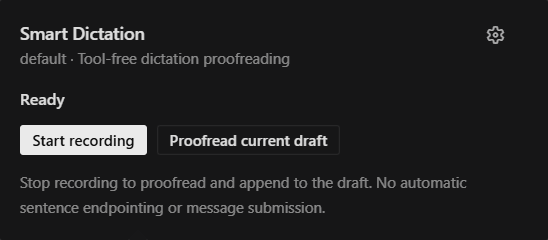
Contextual recording/review interface. The existing Voice dictation microphone and stop controls are retained; no extra Native options launcher is added. The screenshot does not establish that this working candidate is publicly available.
Requirements and installation
- Hermes 0.23.0 or newer, with the Desktop app, for the existing voice workflows. Baseline compatible-host fixtures pin
2bd378ed1b8d6bf2192cb26e0a55ff3091e6bd19. The optional original-context setup check additionally needs the public namespaced plugin-RPC interface assessed atb3746e35ddd32079697728e2df57a9d78f1e9e32; missing/older endpoints show unverified and do not reroute or disable existing correction. - Select
stt.provider: smart_dictationfor Native after reviewing the provider change. Contextual acceptslocalorsmart_dictationand performs raw ASR directly, without double correction. An already-cached faster-whisper model is required. Normal dependency admission installs libraries, not model weights. Missing/partial model or tokenizer files are errors, never an automatic download, runtime installer or cloud-STT fallback. - A configured correction provider/account in Hermes. Choose a lightweight model for this auxiliary task; no vendor/model/language-specific default is shipped.
- Local faster-whisper support follows its native wheels: Windows x64, supported Linux architectures and Apple Silicon macOS. Windows ARM64, Intel macOS and Android are excluded by the dependency marker; no support is claimed for their local decoder.
Before catalog listing, install this public repository with an exact reviewed commit:
hermes plugins install https://github.com/metamindedu/hermes-smart-dictation --ref <full-reviewed-commit-sha> --enable
For a named local profile, use hermes --profile <name> plugins install ... --ref <sha> --enable. Follow Hermes' normal dependency/activation prompts. Python registration/backend activation is per profile; the Desktop JavaScript asset is app-wide. Other and future profiles are not automatically enrolled. A submitted catalog PR is not a listing until maintainers merge it.
First use: prepare the profiles you choose
Open Settings → Plugins → Smart Dictation, or the Smart Dictation: settings and microphone status palette command. The mode cards separate the common mode from this profile's explicit choice. The recording card explains the current workflow and distinguishes the larger voice-conversation control. Check setup and registration is an explicit read-only observation for the current conversation's profile; the separate native Applies-to selector does not retarget it. Longer preparation instructions work without an enabled Python backend or focused conversation. Select local profiles, optionally include Native correction preparation, then copy the request and send it yourself to your Hermes agent with access to the intended computer. Selection edits the request only: it does not activate profiles, insert a draft, invoke an agent or send a message. If discovery fails, the general request asks the agent to confirm targets first.
The agent should use normal installation/activation and configuration admission, preserve explicit OFF/other providers/models/accounts, and report prerequisites separately per target. Later profiles are not automatically enrolled. A visible panel or saved UI preference is not proof of backend readiness.
In Prepare local profiles, load the profiles on the current local connection, choose the targets, then Check registration to read their status together. An unavailable or older backend shows Unverified, not Not installed. Open Hermes Plugins takes you to Hermes' own management screen; select the intended profile there to see the available management options. Neither button performs unattended setup, changes saved settings, downloads a model, or tests dictation. Newly created profiles can be checked from the same page after refreshing the list.
Common mode and profile exceptions
Fresh, absent client preferences follow Contextual dictation as the common UI mode on that local connection. Save common mode writes only that common value; it does not create per-profile records. A profile can explicitly choose Follow common mode, Existing Hermes microphone or Contextual dictation, then use Save settings for this profile. Unrelated reference/recording saves preserve inheritance. Existing explicit Native/Contextual choices, legacy preferences, unknown fields, model/accounts and backend consent are retained. Changing the common value does not replace explicit exceptions. Later profiles inherit a UI mode, not backend installation or voice readiness.
The setup check reports declarations and a registration-handle observation separately from library presence, Native consent and model assignment. Cache files, model loading, transcription and correction are not tested by that RPC. It provides no aggregate ready/safe result, no current registry-identity guarantee and no fixed payer/final-wire guarantee. Missing/unknown/denied/malformed responses remain unverified; no ambient REST or model fallback is used. The existing cache-file observation remains available under Existing microphone and cached-file details. Neither check hides the idle Core microphone or rebases unsaved preferences.
Native microphone
After reviewing the old-to-new provider transition, the current default profile can select the provider through normal configuration:
hermes config set stt.provider smart_dictation
The released 0.23.0 public config RPC cannot write STT selection, and the stock STT picker can omit plugin rows even when dispatch works. This UI therefore offers an honest copied setup request, not a nonfunctional Connect button or a private configuration proxy. Use the supported configuration procedure/copied request, not an invented dropdown. Preserve local model/device/language settings and an explicit STT OFF unless separately approved. Provider selection applies to other voice processing in that profile, including gateway voice input; it is not current-Desktop-conversation-only.
Fresh Native correction defaults to ON and new preparation requests include it by default. Actual correction still requires recorded profile-wide transmission consent; a checked preparation draft, installation, provider selection and UI mode are not that consent. Until consent is recorded, a fresh policy preserves the complete raw transcript with a warning and makes no correction-model call. Existing explicit OFF remains OFF. After explicit profile-wide consent, its own configuration shape is:
plugins:
  entries:
    smart-dictation:
      settings:
        native:
          correction_enabled: true
          consent_version: native-v1
Apply through normal configuration procedures; do not overwrite existing config with this partial example. Model download, paid tests and microphone capture need separate approval. The copied preparation request makes these boundaries explicit.
Use the small Voice dictation microphone in the composer and press it again to stop; a narrow composer exposes the same action in its voice menu. The larger Start voice conversation control is separate and can submit turns automatically. Keep the intended conversation selected until transcription finishes. Native has no selected session context, original/corrected comparison or plugin restore after success; use Contextual when those guarantees matter. If enabled correction fails or is skipped after ASR, a fixed warning line and the complete original transcript are inserted as text. Review/remove the warning before sending. Deliberately disabled correction returns plain recognition; silence stays empty.
Check setup for this profile reads provider selection, library/cache metadata and correction consent only. The card names its actual current-conversation profile; the native Settings window’s separate Applies-to selector does not change this plugin’s owner. Open the intended profile’s conversation first. It does not load a decoder, record audio, run inference or prove actual model/provider access.
Contextual dictation
Existing saved context/recording preferences stay in Contextual until explicitly changed. Fresh/absent records inherit the common Contextual mode; malformed records are retained without repair writes or an automatic microphone shortcut. The public SDK collapses unparseable serialized storage and absence to its fallback, so that distinction cannot be proved by the reader. Reading never writes or starts recording. Explicit Native uses only the Core microphone. Mode saves do not select a speech provider or grant correction consent; inactive and unknown own fields are retained. Mode changes are blocked during active/pending plugin operations.
The compact Contextual toolbar has a main recording button and a panel-only arrow, with localized action names in tooltips/accessibility labels. The public actions slot does not identify each surrounding composer's owner, so global focus or active work cannot prove which Core control belongs to it. The renderer therefore never injects a Core-microphone hiding marker or rule: Core's idle/stop controls and neighbouring composers remain available, including during Contextual work. The settings check does not change this. Smart Dictation: Advanced contextual recorder is reachable from the palette/Settings even in Native mode. Click Stop and proofread to transcribe, correct and append to the original draft. Proofread current draft operates on text already in the input. A result applies only while its connection, profile, conversation, generation and original draft remain unchanged.
In Contextual, Start recording from the toolbar retains its independently configured default. Explicit OFF is preserved; malformed values fail closed. It never starts the plugin recorder in Native mode. Only an explicit Contextual recording-button gesture can start capture after owner/context checks and microphone permission. Mount, install, settings, saving, mode switching, palette and the panel-only arrow never acquire the microphone. Each mounted composer has its own popup owner.
Choose the correction model in Hermes
The plugin's Open Hermes model settings button opens the native model page at the Smart Dictation correction auxiliary row. Select the intended connection/profile and check the native save targets before applying. Select a lightweight correction model and the lowest suitable reasoning level offered by Hermes. Do not change the main-model row unless that is what you intend.
Hermes owns model/provider/account selection, supported effort choices, validation, cost confirmation and saving. This plugin neither writes model settings nor replaces credentials, endpoints or advanced overrides. Model settings are separate from the plugin's recording/context preferences. Unpinned auxiliary settings may inherit the main route; provider default is not necessarily reasoning OFF. Catalog availability is not proof of entitlement, speed or a successful request.
Neutral defaults and optional reference context
Custom instructions start empty and disabled. SOUL, title and history are initially OFF. No language, product name, organization or personal style is baked into correction preferences. UI has English fallback and Korean localization; saved preferences are preserved.
These are Contextual-only sources, not imported into Native. Each is independently selectable; OFF prevents its fetch and transmission:
- Additional correction instructions: up to 2,000 characters.
- The captured owner's saved SOUL.md: first 4,000 characters, as untrusted reference.
- The captured conversation title: up to 300 characters.
- Recent completed user/final-assistant turns: 1–5 turns, up to 6,000 characters. Tools, system/developer messages, hidden reasoning and incomplete turns are excluded. Native canonical display
textis used, not private sidecars.
The fixed proofreader contract preserves meaning, language, negation, numbers, names and paths, and prohibits translation, answering or execution. Spoken text and reference fields are data, not permission to follow embedded commands. The history RPC reads the display transcript before filtering, so long conversations may take longer. A new conversation may have no title/history.
Local transcription policy
Only the owner's explicitly configured local provider is used; a saved STT OFF is respected. The backend freezes a restricted copy of effective local settings before dispatch. Language follows Hermes' local/global configuration, including host defaults; clear both language hints for automatic detection. Legacy environment-only language overrides are not read. Device/compute settings are honored; unsupported runtime/device failures do not trigger another provider. This release uses public faster-whisper APIs, not Hermes' private decoder or error-string retry helpers. Its confidence filter drops a segment only when no_speech_prob is strictly above the configured threshold (default 0.6) AND avg_logprob is strictly below its threshold (default -1.0). VAD defaults ON with a 500 ms minimum silence; decoding uses beam size 5 without previous-text conditioning.
Decoding happens in an owner-bound worker; its lazy segment generator is consumed there. Cached models are partitioned by owner/effective settings. One decode per owner, bounded result retention and scheduled two-minute expiry limit background state. Cancellation discards a result but cannot necessarily interrupt a decoder already running.
The Contextual recorder stops nominally at three minutes; the server admits up to 185 seconds of retained PCM, including a bounded five-second scheduling/encoding grace. In-grace speech is not truncated; genuinely longer input is refused. File/retained-data bounds are not an OS sandbox, adversarial-codec peak-memory bound or hard C++ deadline. Native forwarding can buffer before plugin validation, so no pre-buffer Gateway ingress guarantee is claimed. There is no plugin-provided automatic sentence endpointing or continuous hands-free mode.
Local means the selected Hermes backend host. Core transports such as messaging/remote Desktop can first deliver audio there; this provider does not call cloud STT. Contextual recording supports local connections only. Native processes the core-supplied file without another upload/job server; Contextual keeps its bounded async jobs and raw-only ASR, without double correction.
Correction, cost and privacy
Native uses the original registration context's public ctx.llm.complete on its owned correction task, with bounded transcript-only input and no new route-override/trust grants. Contextual uses owner/session-routed llm.oneshot with the selected bounded references. The plugin supplies no tool schemas, constructs no agent and dispatches no tools/skills. An explicit auxiliary model can override the conversation model in Contextual.
With a remote model, the transcript and selected context leave the device for that provider. Hermes may apply native recovery, credential rotation or fallback; one plugin invocation is not necessarily one network attempt, a frozen payer or a hard cost ceiling. The plugin does not automatically repeat uploads or correction calls. Polling retrieves the existing transcription job only.
The 0.23 Contextual one-shot envelope does not expose final-provider/tool-call/finish-reason provenance and can fall back to reasoning text when visible content is empty. The Native facade likewise omits mixed-tool/finish-reason details. No tool dispatcher is supplied, but arbitrary host/provider extensions are not certified sandboxes. Review corrections; Native failures preserve labelled raw, while Contextual failures retain reviewable raw without silently applying it. Client timeout is not proof of server cancellation or zero billing.
Preferences alone are saved in plugin storage. Transcript, correction and restore snapshots stay in volatile app memory; job-query data is removed after use. Temporary audio uses the owner's scratch directory and is removed in cleanup on normal/error paths. A crash or OS cleanup failure can leave a temporary file. Server job text is scheduled to expire two minutes after completion. Hermes/provider logging and retention policies are separate.
In Contextual, Use original text and Restore the previous draft are owner/draft-fenced, not global undo. Foreign captured results are not displayed as the current conversation's results. A late permission callback releases only its own attempt, never a newer stream. Automatic future-profile enrollment, remote installation and hidden account/provider substitution are unsupported. Core owns Native temporary-file cleanup and ordinary draft persistence; crash/OS cleanup and host/provider logging remain separate boundaries.
Upgrades and development
0.5.2: common modes and profile registration checks
Plugin-only changes; no Hermes Core change, shared audio engine or correction-owner migration. Current Native correction execution, per-profile task defaults, model/account selection and selected-reference processing are unchanged. The optional read-only RPC uses the original registration context and never loads a model, reads private references or writes settings. Its registration observation does not verify the current registry identity, actual dictation, or final correction request enforcement. The new profile selector checks registration and opens Hermes Plugins; it does not install or enable backends or enroll future profiles.
0.5.2: Native correction preference
New Native policies and new preparation requests default to correction ON. Existing explicit OFF stays OFF. The default never manufactures profile consent or transmits text on install/mount. A fresh policy without consent returns a warning plus the complete raw transcript; explicit ON with missing/malformed consent remains invalid. Current profiles can be explicitly enabled together through normal configuration after user approval. Models/accounts are not replaced by this default.
0.5.1: existing microphone UX and Windows decoder fix
Ordinary dictation uses the existing Core microphone; the extra Native options launcher is removed. Advanced contextual recording remains optional and reachable from Settings or the command palette. Saved reference choices and optional correction consent are preserved.
Model files are supplied through the public bytes-map input rather than Python file objects. On the exercised Windows Python 3.14 / CTranslate2 4.8.1 runtime, the old file-like path caused a native access violation during threaded model construction; the bytes map completed the same cached Korean fixture. CPU selection alone did not fix that failure. Bytes are materialized during construction, so large models can require substantial transient memory; this is not a native-crash sandbox or a hard model-memory ceiling. No host library upgrade, model download or cloud fallback is introduced.
The loader namespace and API entry are versioned for this fix. A previously mounted in-process 0.5.0 API must not be mistaken for 0.5.1 adoption; use the supported idle lifecycle and verify the live version before enabling use or replacing the app-wide UI.
Backend registration, Python API adoption and app-level JavaScript loading have distinct lifecycles. Already-mounted in-process routes may require an idle restart of their actual owner; registry reload/file replacement alone is not proof. The manifest uses a versioned host API entry. Never restart a busy shared Gateway or hot-swap a recording/permission wait. Preserve explicit enable/disable choices and local edits. The plugin has no self-updater.
Development uses Node 26 and an isolated Python test environment:
npm ci --ignore-scripts --no-audit --no-fund
npm test
npm run build
uv run --isolated --with pytest --with 'jsonschema>=4.23,<5' --with fastapi --with httpx --with python-multipart --with av==18.1.0 --with numpy==2.5.4 python -m pytest -q --basetemp=<owned-scratch-directory> tests
Set HERMES_NATIVE_SOURCE=/path/to/the-compatible-hermes-checkout for native composer, controls, query-client and settings contracts; otherwise those cases explicitly skip. Native-control screenshots use synthetic data and declared host/theme/clipboard substitutions, not installed-app, physical-microphone, latency or real-provider certification. CI uses no credentials, paid inference or physical microphones. See the Native acceptance criteria.
See CONTRIBUTING.md, SECURITY.md, and catalog evidence. Licensed under MIT. This is a community project, not a Nous-maintained or automatically approved catalog entry.
README from the reviewed commit c9e9faf; it updates when the author re-pins.


