All plugins

snooze

A reminder that repeats in your chat (Telegram, Discord) until you answer it exactly: Ok, your word, an emoji, a Telegram reaction, or one of several choices; reply later to postpone. A wrong answer gets the list of valid answers from the plugin's code, never from the LLM. Then it can hand a follow-up to the agent. Created with /snooze in plain words ("Stop the GPU at 19:00 every 10m then shut it down"), by the agent through the snooze_create tool, or with hermes snooze add. Zero LLM calls per reminder. Disclosure — no network call of its own, no subprocess, no credentials, no telemetry. A timer task in the gateway checks every 15 s and sends due reminders, each showing its follow-up ("Then: ..."), through Hermes's send path to the snooze's chat or home channel. The pre_gateway_dispatch hook sees every inbound gateway text message before Hermes authorization, but acts only on messages from the snooze's owner in that snooze's chat: an answer, a reply to a reminder or the first message after one is consumed, and an answer with a follow-up becomes the follow-up prompt. The post_gateway_admission hook handles snoozes with no owner (created from the CLI for a channel or group), where any sender Hermes has admitted in that chat may answer. The gateway_platform_event hook reads Telegram reactions on reminders in private chats. Follow-ups after a reaction, /snooze ok or an admitted answer are queued with ctx.inject_message, which needs allow_gateway_injection, and in a cron run snooze_create refuses a follow-up unless cron.allow_agent_scheduling is true. It stores snoozes.json and lock files in its plugin data dir, writes only its own notification_platform setting, and reads private Hermes internals (tools.send_message_tool.send_message_tool, agent.estop.is_engaged, and the gateway runner reference and event loop in gateway.run), so a Hermes release can break it.

AIverflow3Automationv0.3.2Updated 7 days ago

About

A reminder that repeats in your chat (Telegram, Discord) until you answer it exactly: Ok, your word, an emoji, a Telegram reaction, or one of several choices; reply later to postpone. A wrong answer gets the list of valid answers from the plugin's code, never from the LLM. Then it can hand a follow-up to the agent. Created with /snooze in plain words ("Stop the GPU at 19:00 every 10m then shut it down"), by the agent through the snooze_create tool, or with hermes snooze add. Zero LLM calls per reminder. Disclosure — no network call of its own, no subprocess, no credentials, no telemetry. A timer task in the gateway checks every 15 s and sends due reminders, each showing its follow-up ("Then: ..."), through Hermes's send path to the snooze's chat or home channel. The pre_gateway_dispatch hook sees every inbound gateway text message before Hermes authorization, but acts only on messages from the snooze's owner in that snooze's chat: an answer, a reply to a reminder or the first message after one is consumed, and an answer with a follow-up becomes the follow-up prompt. The post_gateway_admission hook handles snoozes with no owner (created from the CLI for a channel or group), where any sender Hermes has admitted in that chat may answer. The gateway_platform_event hook reads Telegram reactions on reminders in private chats. Follow-ups after a reaction, /snooze ok or an admitted answer are queued with ctx.inject_message, which needs allow_gateway_injection, and in a cron run snooze_create refuses a follow-up unless cron.allow_agent_scheduling is true. It stores snoozes.json and lock files in its plugin data dir, writes only its own notification_platform setting, and reads private Hermes internals (tools.send_message_tool.send_message_tool, agent.estop.is_engaged, and the gateway runner reference and event loop in gateway.run), so a Hermes release can break it.

hermes-snooze

hermes-snooze is a plugin for Hermes Agent. It repeats an LLM-free reminder in your chat until you answer it or a configured limit is reached.

Add a follow-up and your agent acts after you answer. Add choices and it acts on the option you pick. The command is /snooze.

https://github.com/user-attachments/assets/88a98031-fcbe-4a38-b203-22e5a15b81d9

Before you start

hermes-snooze sends its reminders through a messaging platform, so Hermes needs at least one platform configured (for example Telegram or Discord). Without one there is no chat to remind you in. Requires Hermes Agent 0.22.7 or later and Python 3.11+ (the same as Hermes).

PlatformStatus
Telegram✅ Tested (private chat)
Discord✅ Tested
Other Hermes platforms (Slack, Signal, …)❔ Untested, may work

Install

hermes plugins install AIverflow/hermes-snooze
hermes plugins enable snooze
hermes gateway restart

Or clone this repository into ~/.hermes/plugins/snooze, enable the plugin, and restart the gateway.

Start

In a Telegram private chat or Discord chat already connected to Hermes, check delivery first:

/snooze test

Reply Ok to the test reminder. Once the test passes, try your first snooze:

/snooze Drink a glass of water in 1m every 1m

About a minute later you receive a message like this, and a new one every minute until you answer:

🔔 Snooze #12: Drink a glass of water  (reply "Ok" | later)

Reply Ok when done: Snooze answers ✅ Done: Drink a glass of water and stops. Reply later 15 to postpone by 15 minutes. To cancel instead, use /snooze cancel 12 with the ID in your reminder.

You can also ask Hermes in plain language: "Remind me to update Hermes in 1 hour, then every 10 minutes until I confirm."

For setup, commands, confirmations, recurrence, and script use, see the user guide.

What you can do

Every example repeats its reminder every 5 to 30 minutes until you answer (Ok, or the word or choice the command asks for), or until a limit is reached.

1. Simple

/snooze Polish Zeus's thunderbolts in 20m every 10m
→ reply: Ok | later
/snooze Take a break, stand up in 50m every 5m ok done
→ reply: done | later
/snooze Cancel the streaming trial before it bills at 10:00 every 30m ok cancelled
→ reply: cancelled | later

2. With a follow-up action (then)

Reply Ok: the agent gets the then text and does it, with the tools you gave it: write files, send email, edit Google Docs, run scripts, run skills…

/snooze Stop the rented GPU at 19:00 every 10m then shut down the instance and tell me what it cost
→ reply: Ok | later
/snooze Check last night's backup at 08:30 weekdays every 15m then run ./verify-backup.sh and show me the result
→ reply: Ok | later

3. With choices (ok a|b|c)

Each reminder lists the options. Reply with an option or its number: the agent gets your choice.

/snooze Refactor done. Merge? in 30m every 10m ok merge|review then do what I picked
→ reply: merge | review | later   (or 1 | 2)
/snooze Ship to production? at 17:30 every 10m ok ship|hold then if I chose ship, run ./deploy.sh prod and announce it with my release-notes skill
→ reply: ship | hold | later   (or 1 | 2)

Keywords

Type these after /snooze <what>, in any order; put then last. Details: user guide.

KeywordWhat it doesExample
at <time>First reminder at a time of dayat 16:00
in <duration>First reminder after a delayin 30m
every <duration>Time between reminders (default 10m)every 5m
daily (or everyday) / weekdays / every <days>Repeat every day, Monday to Friday, or on listed days (monday-friday is a range; mon works too)at 8am daily, at 8am weekdays, at 8am every monday,thursday
on <day>One time, on the next such dayat 9am on monday
until <time>Stop reminding at this timeuntil 18:00
via <platform>Send to that platform's home channel (telegram or discord)via discord
ok <answer>Confirm with a word, an emoji, or choices (a|b|c); the reply must be exactly thatok done, ok ✅, ok merge|review
then <action>The agent does this after you confirmthen run ./deploy.sh

Reply later (or later 15) to a reminder to postpone it.

Snooze or Hermes cron?

Hermes cron runs a job on a schedule. Snooze reminds you until you answer.

Hermes cronSnooze
RepeatsEvery N minutes, forever or N timesEvery N minutes, until you answer or until a set time
Stops whenYou run /cron remove <id>You reply Ok, a word, an emoji or a reaction
PostponeEdit the jobReply later
ChoicesNot built inok merge|review: your answer is the choice
After the answerA continuable job passes your reply to the agent, which decidesthen … gives the agent a set next step
LLM calls per message0 in no-agent mode (a script file per job), else 1 per run0
Where it sendsAbout 20 platforms, or several at onceOne chat per snooze: Telegram and Discord tested, other Hermes platforms untested

Use cron for reports, scripts and agent tasks on a schedule. Use Snooze when someone must answer.

What Snooze runs and stores

  • A timer task inside the Hermes gateway checks every 15 s and sends due reminders through Hermes' own send path. No LLM call, no network call of its own, no telemetry, no credentials.
  • The pre_gateway_dispatch hook reads each incoming gateway text message before the agent, for snoozes that have a user; the post_gateway_admission hook does the same for snoozes with no user (made from the CLI for a home channel), after Hermes has admitted the sender. They act only in a chat with a running snooze: an answer, or a message that replies to a reminder or comes first after one, is handled by Snooze and does not reach the agent. Everything else passes untouched. The gateway_platform_event hook reads Telegram reactions.
  • A then action asks the agent to act: your answer is rewritten into the request, or, after a reaction, /snooze ok or an answer to a snooze with no user, one agent turn is queued with inject_message (needs allow_gateway_injection).
  • Data: snoozes.json and two lock files in the plugin data folder, and the notification_platform setting in config.yaml.
  • Two private Hermes names are used (send_message_tool, estop.is_engaged); a daily GitHub check runs the plugin against new Hermes releases.

Limits

  • The Hermes gateway must be running on an awake machine for reminders and replies to work.
  • Snooze does not support voice-note confirmations or WhatsApp Cloud API.
  • Reaction confirmations are supported only in Telegram private chats.
  • Reminders arrive in the chat you talk to your agent in. The first message after a reminder is read as its answer: if it is not one, Snooze replies with the valid answers and the agent does not see it.
  • Snoozes belong to the Hermes profile: /snooze list, /snooze ok and /snooze cancel act on every snooze of the profile, whatever chat it was sent to, and anyone Hermes authorizes in that profile can use them. Replies in the chat only count in the reminder's own chat.
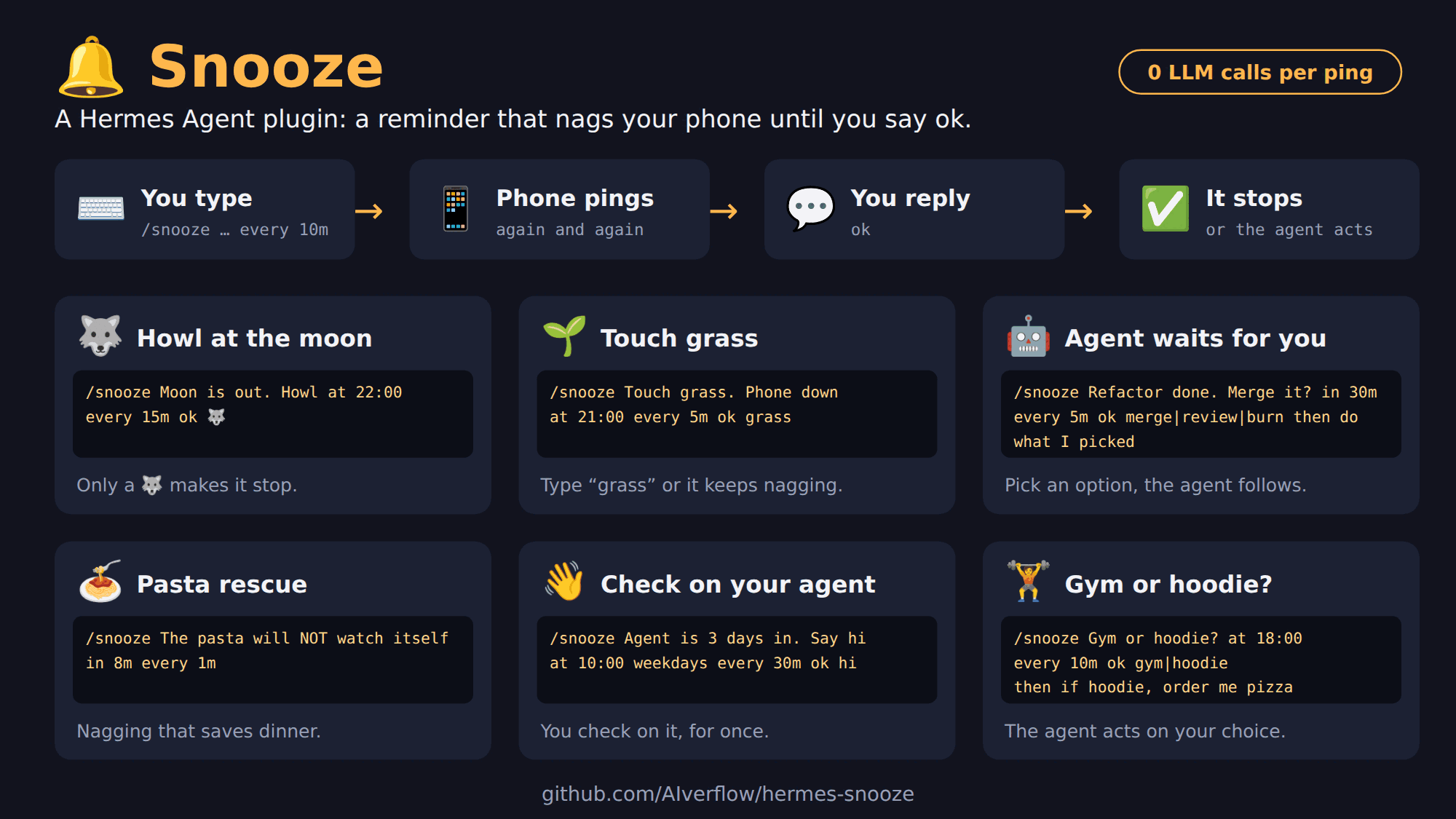
Snooze at a glance: how it works, with six example snoozes

README from the reviewed commit c462b01; it updates when the author re-pins.

More by AIverflow

3 plugins by AIverflow in the catalog.

AIverflowhouse-rulesHouse rules your agent can't forget. Refuses tool calls that match your rules (a command with flags such as git push --force or rm -r, or a regex on a tool argument such as a .env path) or that leave the folders you allow. The refusal tells the agent why and to ask you; you lift a rule for the current session with /rules unlock <n>. /rule turns plain words into a rule draft as YAML and replays it on past tool calls; you paste it into the profile config.yaml yourself, the plugin never writes it. Rules apply from the next session. For an agent that forgets or ignores instructions; it is not a security boundary (scripts, aliases and indirect effects are not seen). Disclosure — no network call of its own, no subprocess, no credentials, no telemetry, no background task. Hook pre_tool_call reads each tool call's name and arguments and refuses matches; a refusal notice (tool name and reason, never the arguments) is posted to the conversation with ctx.post_message. /rule makes one LLM call through ctx.llm.complete_structured with the user's words, and reads the profile's state.db read-only to replay the draft (other profiles' state.db only if the user picks them). Reads its settings with ctx.get_config and the profile config.yaml read-only. Writes nothing to disk.Communitygeneral5AIverflowcacheguardWarns or blocks a large chat message sent after a pause, when the provider's prompt cache may have expired. Afterwards it shows how many tokens were reused or rebilled, and /cacheguard shows how often your cache was lost after pauses of each length. Modes (off, warn, block) are set per surface (terminal, desktop, gateway), and a model can have its own pause, size and mode. In block mode the message is not sent: the reply says so, and you send it with /retry or by sending the same text again. If the plugin fails, the message is sent. Disclosure — no network call, no LLM call, no subprocess, no credentials, no telemetry. Middleware llm_request reads every message of the request to hash the start of the chat (sha256, only the hash is kept) and removes cacheguard's own "message not sent" replies from what the model receives. Middleware llm_execution reads the token usage of each response; the provider call is Hermes's own next_call(), never repeated. Hook pre_llm_call returns a block for a large message after a pause. Hook transform_llm_output posts a result line with ctx.post_message and never changes the reply. Reads config.yaml (its own settings through ctx.get_config) and the environment variables HERMES_SINGLE_QUERY_SESSION, HERMES_KANBAN_TASK, HERMES_PLATFORM, HERMES_INTERACTIVE. Writes its settings with ctx.set_config (/cacheguard set and setup) and, under <HERMES_HOME>/cacheguard/, observations.jsonl (token counts, times and model name of calls after a pause; no message text, no session id) and one small json file per chat (times, token counts, hash). /cacheguard reset deletes them. Unattended runs (cron, kanban, subagents, curator, API server, webhooks) pass through untouched; one-shot runs (-Q, -z, --oneshot) are never blocked and show no line (a -Q run may be counted in the stats); with chat -q, block acts as warn. Private Hermes names: tools.approval_context._is_single_query_approval_context (a run with no screen only warns) and agent.usage_pricing.normalize_usage (read the cache token counts). If one is missing, the plugin says so in /cacheguard and degrades: it only warns, or result lines are missing.Communitytools4

Developer Mode

Explore built-in Hermes toolsets and actions.

HermesAgent

Developer?

Create a Hermes extension for Desktop or agent workflows.

Developer Section

