Sochen
 plugin
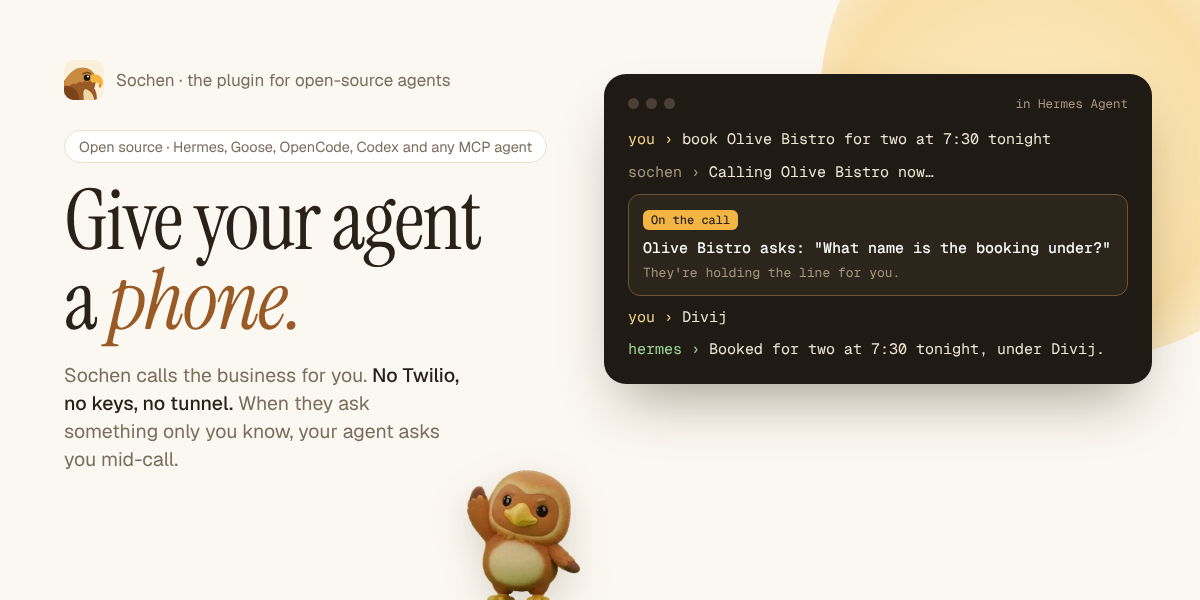
Hand Sochen the jobs your agent can't do on its own, and hear back when they're done.
Sochen gives any open-source agent a phone, a computer in the cloud, and the
email and calendar you connect to it. Your agent hands it a job:
- phone a US business and bring back what they said, with nothing to set up (no Twilio account, number
or voice keys) - research or browsing that keeps running after you close the laptop
- an email or calendar job that waits for your OK
This repo is the Sochen plugin. Its first native home is Hermes Agent (everything below). Goose,
OpenCode, Codex CLI, Cline and other MCP agents get the same jobs, mid-call questions included, from
Sochen's MCP server: the setup for each is at sochen.dev/agents.
When the business asks something only you can answer, you answer it in your agent. Mid-call, "what name
should I put the booking under?" comes to your Hermes chat while the business holds the line; your reply
goes straight back into the call, and Sochen says it. No answer within about a minute, and Sochen tells
them you'll follow up.
Hermes keeps talking to you while Sochen works, and tells you when the job is done.
Three Indian paperwork tools work straight after install, with no account: GST invoices, rent receipts
for HRA, and UPI bill splits.
hermes plugins install N-45div/sochen-plugin --enable
What you get
| | What it does | Account |
|---|---|---|
| sochen_handoff | Hands Sochen a job: a phone call, a long research job, an email or calendar task. Returns the answer, or "working" with a link. | Sochen key |
| sochen_job | Checks a job without sending it anything: working, needs your OK, answered or failed. While a call goes on, it waits up to a minute for news, so Hermes stays with the call. | Sochen key |
| sochen_answer | Passes your answer to a question the business asked mid-call; Sochen says it on the line. | Sochen key |
| sochen_desk | Your Sochen desk: what waits for your OK, what's running, what finished today. | Sochen key |
| sochen_gst_invoice | An Indian GST tax invoice as a PDF: CGST and SGST within a state, IGST across states, and a UPI QR for the total. | None, free |
| sochen_rent_receipts | Monthly house rent receipts for an HRA claim, three to an A4 page. | None, free |
| sochen_upi_split | A shared bill split per person, with a UPI QR for each share. | None, free |
The plugin also adds:
- Hermes asks before a job uses your credits.
sochen_handoffgoes through Hermes's own approval
prompt (once, for the session, or always). In unattended runs like cron, nobody can answer the
prompt, so Hermes's approval rules decide. - Finished jobs come back to you. On your next message, Hermes hears which jobs it handed off have
finished, stopped or now need your OK, and tells you once. You don't need to keep asking. - Hermes stays on a call with you. While a call goes on, Hermes follows it, and any question from
the business reaches you in the same chat, in the terminal, Telegram or Hermes Desktop alike. /sochenworks in the terminal, Telegram, Discord, Slack and Hermes Desktop:/sochenon its own shows your desk./sochen jobsshows the jobs Hermes handed off and how each one stands./sochen creditsshows what's left to spend./sochen <a job>hands a job straight to Sochen, through the same approval prompt.
- A Sochen page in Hermes Desktop, in the sidebar:
- your desk, with a link to each job
- a status-bar count when something needs you
- a line from your Hermes pet when a job finishes or needs you
- A "Sochen morning desk" blueprint:
/blueprint sochen:morning-desksends you a short summary
each morning of what waits for your OK. - A skill (
sochen:sochen) that tells Hermes when a job is worth handing off and how to write it.
Connect your Sochen account
The free tools need nothing. For everything else:
-
Make a key at sochen.dev/agents. Every account gets 100 free API credits,
spread over as many jobs as you like. -
Give the key to Hermes:
hermes config set SOCHEN_API_KEY sk_sochen_your_keyOr in Hermes Desktop: Settings → Plugins → Sochen → API key.
-
Ask Hermes for something it can't do alone, for example:
Have Sochen call Joe's Pizza at +1 415 555 0134 and ask if they're open until 11 tonight and
whether they deliver to 94110. Don't order anything.Or type
/sochento see your desk.
Phone calls go to US businesses, with nothing to set up: no number to add or verify. They need paid
API credits (a pack or a monthly plan), not the free ones. Sochen says on each call that it's an AI
calling for you. Asking for a business in another country (India included) puts you on that
country's waitlist, and you're emailed when calls there open.
Credits
Jobs run as ordinary Sochen chats and use your Sochen API credits, which are apart from the
Sochen app's plans (neither pays for the other):
- Every account gets 100 free API credits, spread over as many jobs as you like (one free start
per inbox). - After that, packs of API credits that never expire, or a monthly Builder or Scale plan with more
jobs at once: API pricing. Billing on sochen.dev lists
every turn. - Checking a job, your desk or your credits costs nothing. The invoice, rent receipt and bill split
tools are free, with no account. - Replies carry
credits_left,/sochenand the Desktop page show what's left, and when it runs out
Sochen's reply links to where to get more.
You stay in charge
- Hermes asks first. Before
sochen_handoffruns, Hermes shows the job and asks you. You can turn
this off in the plugin's settings. - Sochen asks on your phone. Anything that pays, orders, books, sends or deletes waits for your OK in
the Sochen app, with the details shown first. Hermes can't approve it, and the plugin has no way to. - Your key stays in Hermes. The plugin reads it through Hermes's secret store for the active profile.
It never reads files, and never sends the key anywhere but Sochen's API.
Settings
Under plugins.entries.sochen.settings in config.yaml, or in Hermes Desktop under Settings → Plugins → Sochen:
| Setting | Default | |
|---|---|---|
| api_key (secret, SOCHEN_API_KEY) | none | Your Sochen key. The free tools work without it. |
| ask_before_handoff | true | Hermes asks before handing Sochen a job. |
| report_finished_jobs | true | Hermes hears about finished jobs on your next message. |
| base_url | https://sochen.dev | Change only if you run Sochen yourself. |
What it does on your computer and the network
-
Network: HTTPS to
sochen.devonly:- the Agent API (
/api/v1/run,/api/v1/jobs/…,/api/v1/desk) with your key - the public tools endpoint (
/api/mcp) for the free tools, with no key
It sends the job Hermes writes for Sochen, or the invoice, receipt or bill details you ask for. It
doesn't send your Hermes chats, files or memory. - the Agent API (
-
Checks on jobs:
- When you send a message and a job Hermes handed off is still open, the plugin checks up to two
jobs. It waits at most 4 seconds per check, and checks each job no more than every 20 seconds. - While Hermes Desktop is open with the plugin enabled, the Sochen page reads your desk every 30
seconds. - There are no other background processes and no shell commands.
- When you send a message and a job Hermes handed off is still open, the plugin checks up to two
-
Stored on your computer: a short list of the jobs Hermes handed off (id, a short label, status),
in the plugin's own state for the active profile. It keeps 40 at most, each for 7 days. No secrets
are stored there. -
Telemetry: none. Requests name the plugin (
hermes-sochen/<version>) so Sochen can count runs by
the tool that sent them. Nothing about what a job says is counted. -
Your Sochen account: jobs run as ordinary Sochen chats on your API credits, and appear in your
chat list at sochen.dev. Files from the free tools are kept for 24 hours behind their link. Sochen's
privacy policy applies.
Develop
python3 -m unittest discover -s tests
node --import ./tests/desktop/register.mjs --test tests/desktop/plugin.test.mjs
hermes plugins validate . --install-deps
The tests drive the plugin through a stand-in Hermes context and a stand-in Sochen server, and the
Desktop page through stand-ins for its SDK. To try it against a Sochen running on your own computer,
set base_url to http://localhost:3210. Only https addresses, or http on this computer, are
accepted.
Sochen's Agent API is documented at sochen.dev/developers/agent.
License
MIT. The plugin is open source. Sochen, the service it talks to, is run by the Sochen team.
README from the reviewed commit b785f91; it updates when the author re-pins.