 blackopsrepl
SolverForge Workbench for Hermes
Optimization models you configure, solve and explain from Hermes, on your own
machine. Pick a model, load a dataset, tune what matters with constraint
weights and profiles, solve in the background, and read which rule cost what
and why. The Desktop shows each solved plan as a schedule, or on a map along
the roads.
https://github.com/user-attachments/assets/9b1a7415-4194-413d-9456-95e36495e4b8
Try it
You need Hermes Agent 0.22.2 or newer.
hermes plugins install blackopsrepl/hermes-solverforge-workbench --enable
hermes solverforge-workbench install
The second command downloads the engine for your computer (22 to 28 MB) and
checks it against a fingerprint pinned in the plugin. There is nothing else to
install: no Rust, no database, no account.
Current Hermes builds a session's tool list from the plugins it saw at the
previous launch, so run hermes chat -q hi once after installing. Then ask:
“Show me the employee scheduling demo for a small ward and solve it.”
“Why is Amina penalized in that run?”
“Make a profile that cares twice as much about preferred hours and compare it with the standard one.”
“Ines is sick on Wednesday. Replan from the published roster and keep everything else.”
In the Desktop app, open Capabilities → Plugins and turn on
SolverForge Workbench's Desktop features. SolverForge Workbench in the
sidebar then opens the same models, datasets and runs.
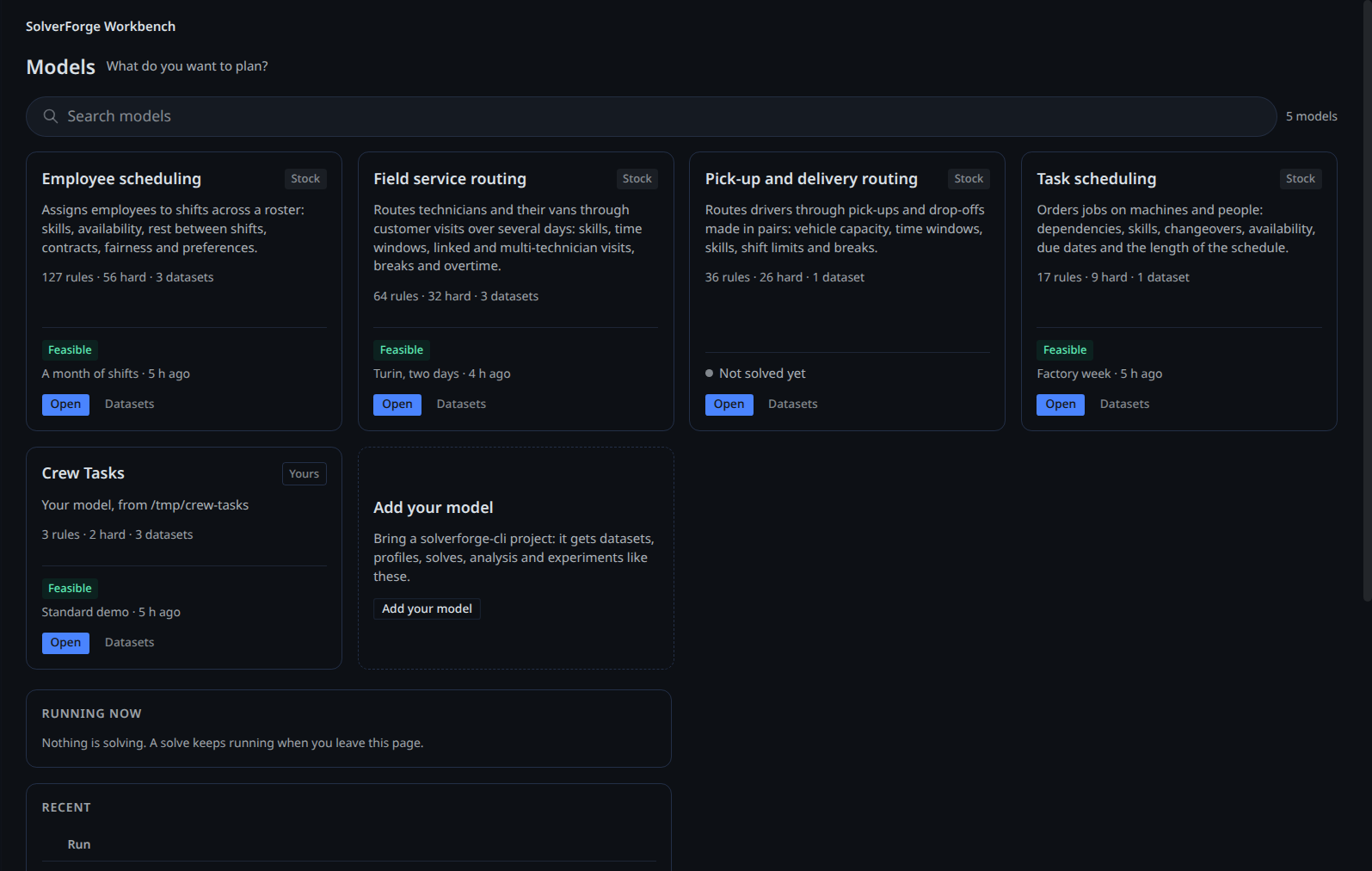
Models
| Model | Constraints | What it plans |
|---|---|---|
| Employee scheduling | 127: 56 hard, 3 medium, 68 soft, in 14 groups | Shifts to employees: skills and risks, availability, contract work limits over periods and rolling windows, time off, rotations and shift patterns, rest, travel and locations, teams and pairings, hourly demand, alternative shifts, cost, fairness and replanning |
| Task scheduling | 18: 10 hard, 1 medium, 7 soft, in 8 groups | Tasks to machines and people over time: time windows, dependencies, resource fit and hand-overs, parts in stock, changeovers, due dates, makespan and idle time |
| Pick-up and delivery routing | 39: 27 hard, 1 medium, 11 soft, in 12 groups | Multi-stop jobs to drivers' shifts and their order: stop order, vehicle capacity, parts in stock, time burden and pooling, skills and tags, breaks and appointments, time windows and SLAs, priorities, overtime, drivers used and work balance, and replanning |
| Field service routing | 66: 34 hard, 3 medium, 29 soft, in 17 groups | Visits to technicians' shifts and their order: skills and levels, tags, parts in stock, shared tools, time windows and SLAs, breaks, visit dependencies, multi-technician visits, linked multi-day shifts, coverage areas, shift limits, cost, fairness and replanning |
Every constraint has a name, a group, a level and a description you can read
in the model's page or ask Hermes about. Each model ships one large demo that
uses its rules: a hospital month (50 employees, 536 shifts, three wards on two
sites), a factory week (24 machines and people, 409 operations), two days of
Milan patient transport and medical courier work (15 drivers, 155 jobs), and
two days of Turin building services (30 technicians, 223 visits and 8 joint
visits).
The two routing models travel on real roads: each dataset's travel times and
distances are measured along the OpenStreetMap road network with
solverforge-maps, at each road's
own speed, and the map draws every route along the roads. A demo's network is
downloaded from the engine release the first time that demo is used; any
other dataset fetches its area's roads once and keeps them. A dataset may bring
its own travel matrix instead. Road data © OpenStreetMap contributors, ODbL.
Busy periods make travel depend on the hour. A period names its hours and
days and the roads it slows: a factor for chosen road classes (motorways,
primary roads, residential streets…), anywhere or inside an area. The engine
measures each period's travel on the same roads with those slowdowns, and a
leg that runs into a rush hour slows down from the moment it does, so leaving
later never arrives earlier. A dataset with its own travel matrix brings one
matrix per period.
Technicians and drivers may also go by bicycle or on foot: each mode travels
its own paths (cycleways, footways and steps), at its own speed, and is not
slowed by busy periods.
Parts are kept in stock. A routing shift loads parts before it sets off and
each visit or stop uses up its own along the route; in task scheduling, tasks
use parts up when they start and make them when they end, from a stock with
deliveries over time. A visit, stop or task that finds its parts missing costs
an hour per unit short.
Field service technicians can share tools, such as a lift or a test rig. A
tool serves one visit at a time and is carried from site to site, so a visit
that needs it waits until it is free and brought over.
A routing shift can carry a driving rest: after so long at the wheel the
driver stops for a set time before going on, and a break or a wait at least
that long counts as the rest.
In employee scheduling an employee on a break does not cover demand. A break
can float inside a window, and the engine places it where the demand misses
the employee least, so a ward's staff stagger their breaks.
Your own models
A project made with solverforge-cli
becomes a model beside these: ask Hermes to register it, and the workbench reads
the project, builds its engine with cargo and gives it datasets, profiles,
solves, analysis, fill, a plan view of who holds what, experiments and trends.
It needs a Rust toolchain and the SolverForge release the workbench is built on;
constraint descriptions come from the doc comment on each constraint, and
constraint weights from a #[constraint_weights] field on the plan.
What you can do
- Datasets. Each model's demos are ready as datasets; add yours from a JSON
file or JSON in the chat. Change a
dataset with a patch that addresses records by id
(/shifts/[id=S12]/employee); the original stays and the new one records it
as its parent. Replan from a solved run's plan. - Profiles. Constraint weights (1 is as designed, 0 switches a rule off,
10 makes it ten times as important), model parameters and solve settings
(time limit, stop after no improvement, step limits, target score). Every
model has a read-only Standard profile. Profiles export to and import from
JSON. - Settings order. Later wins: model defaults, parent dataset, profile,
one-off overrides, the dataset's own settings. - Solving. Solves run in a background worker, so they keep going after the
chat turn ends; several can run at once and queue by priority. Stopping a
solve keeps the best plan found. A dataset with errors is refused with each
error named. - Evaluating. Score a plan as it stands, without solving, to check a
hand-made or real-world roster. - Explaining. Per constraint: its score and the matches that caused it.
Per entity: every match that involves an employee or a shift. - Comparing. Two or more runs side by side: score, every constraint, the
KPIs, profile and solve time.
The Desktop
SolverForge Workbench in the sidebar opens every model, dataset, profile,
run and experiment; the command palette also opens it beside the chat. Every
list has a fuzzy search (rst btwn finds Rest between shifts).
-
A run shows a verdict in words, the score and how far it moved, a
score-over-time chart per level, the KPIs, the plan, and every constraint
with the matches it blames. From there: replan with a change (a technician
off for a day, a new visit, a moved time window), export, or compare.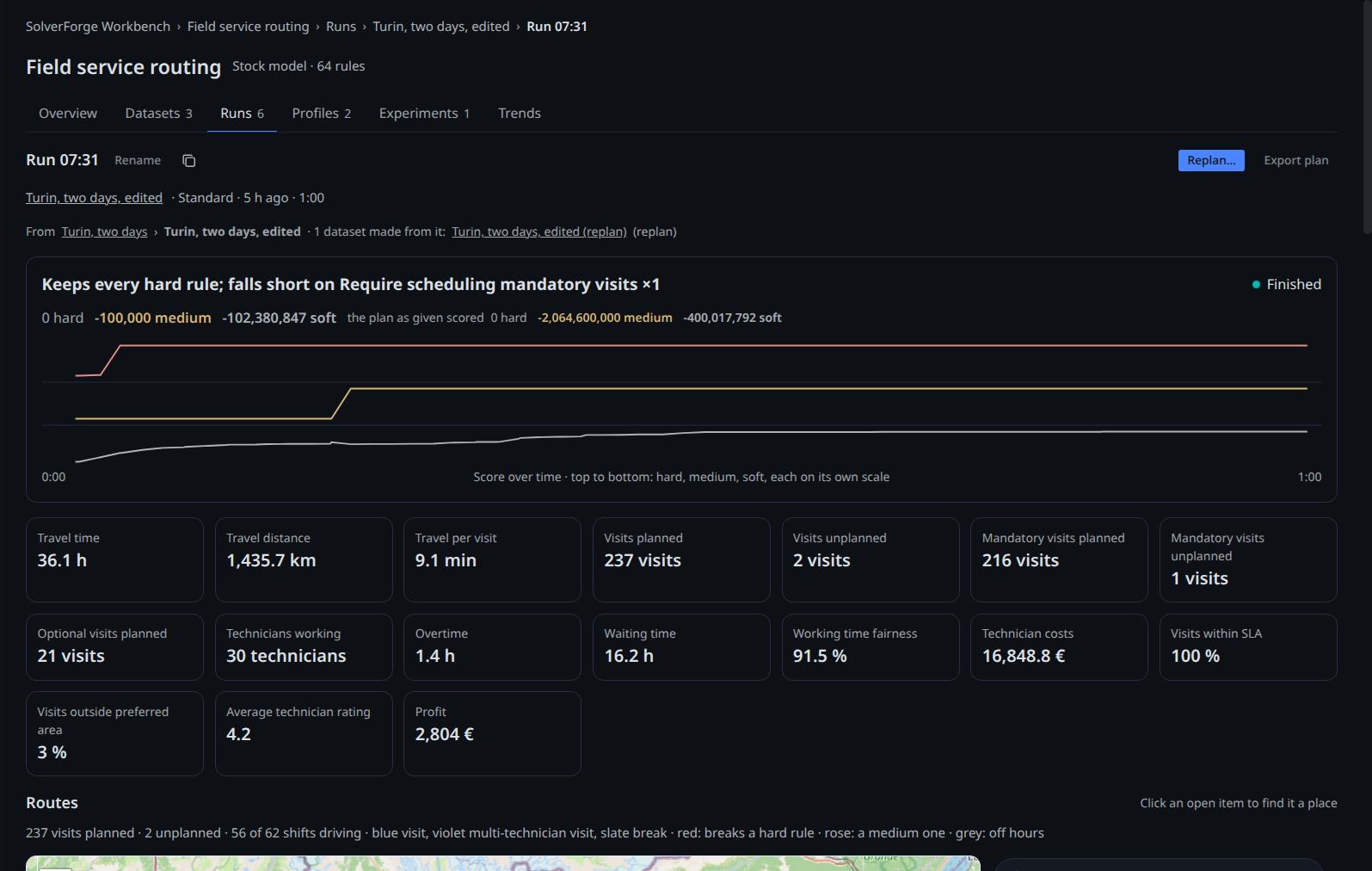
-
Routes fill the page on a map, along the roads, beside a searchable list
of routes with their visits, distance and driving time. Picking a route zooms
to it and dims the rest; an unplanned visit offers the best places for it.
The day-by-day timeline follows below.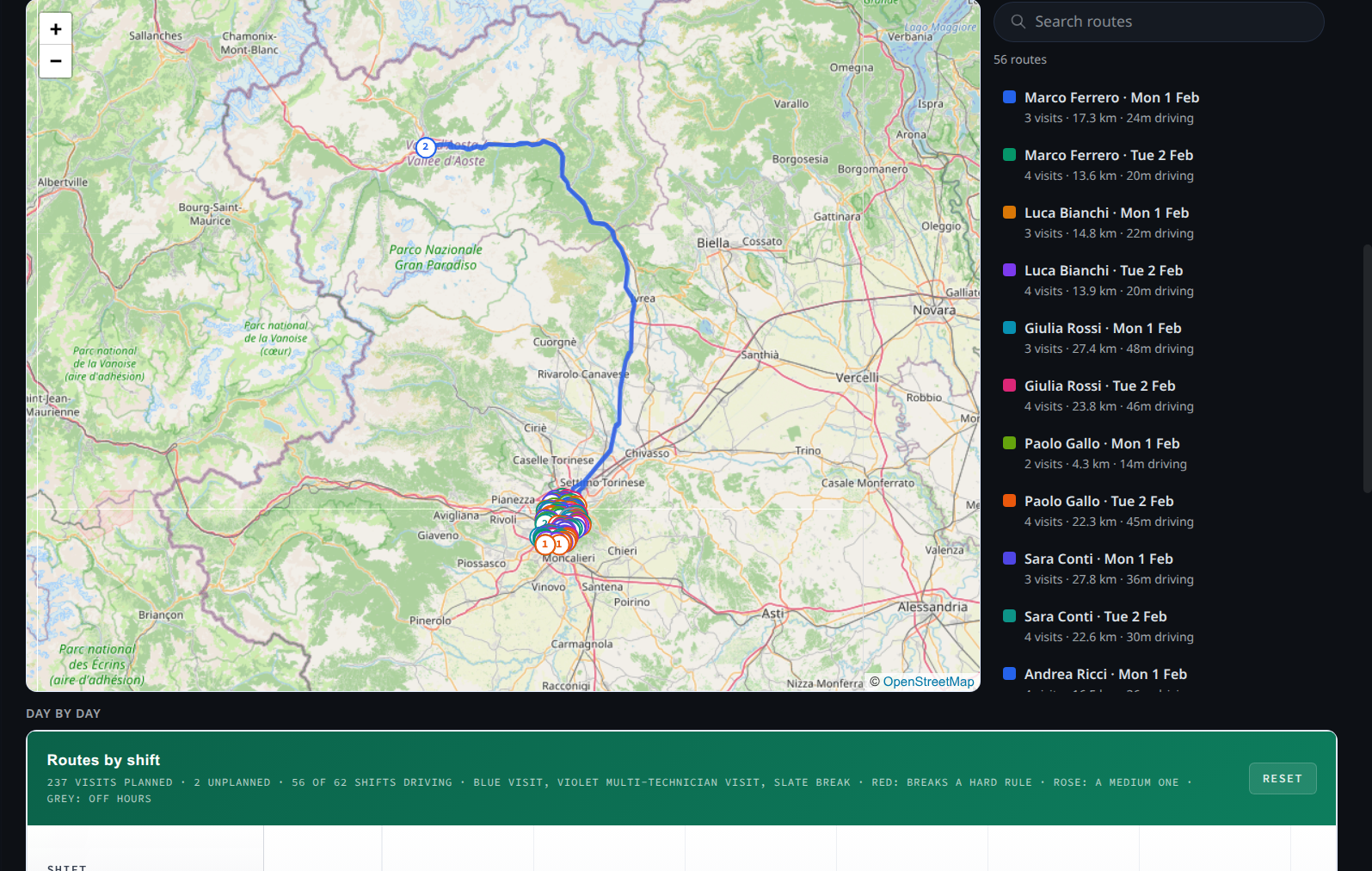
-
Fill ranks the best places for an open item, each with what it changes
per level and the rules it moves, and applies the one you pick as a new
dataset.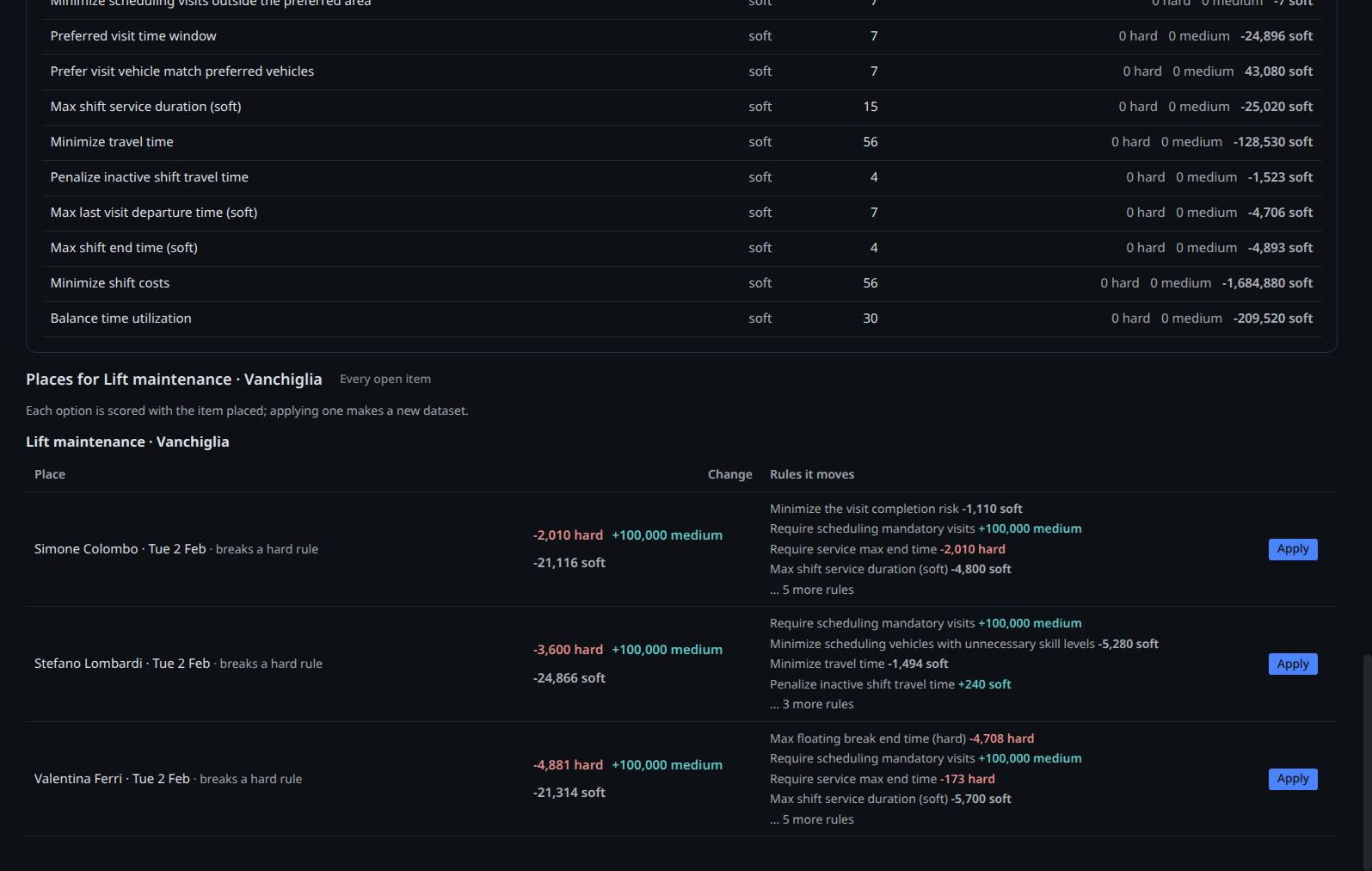
-
Rosters and schedules show one lane per employee or machine: red marks
an assignment that breaks a hard rule, rose a medium one, grey is time off. -
A dataset's data opens as one grid per table (technicians, shifts,
visits, breaks, contracts, calendars...) with typed cell editors for every
field the model reads: working hours, lunch breaks, limits and costs
included. Changes are staged, checked by the engine and saved as a new
dataset, or in place while no run has used it.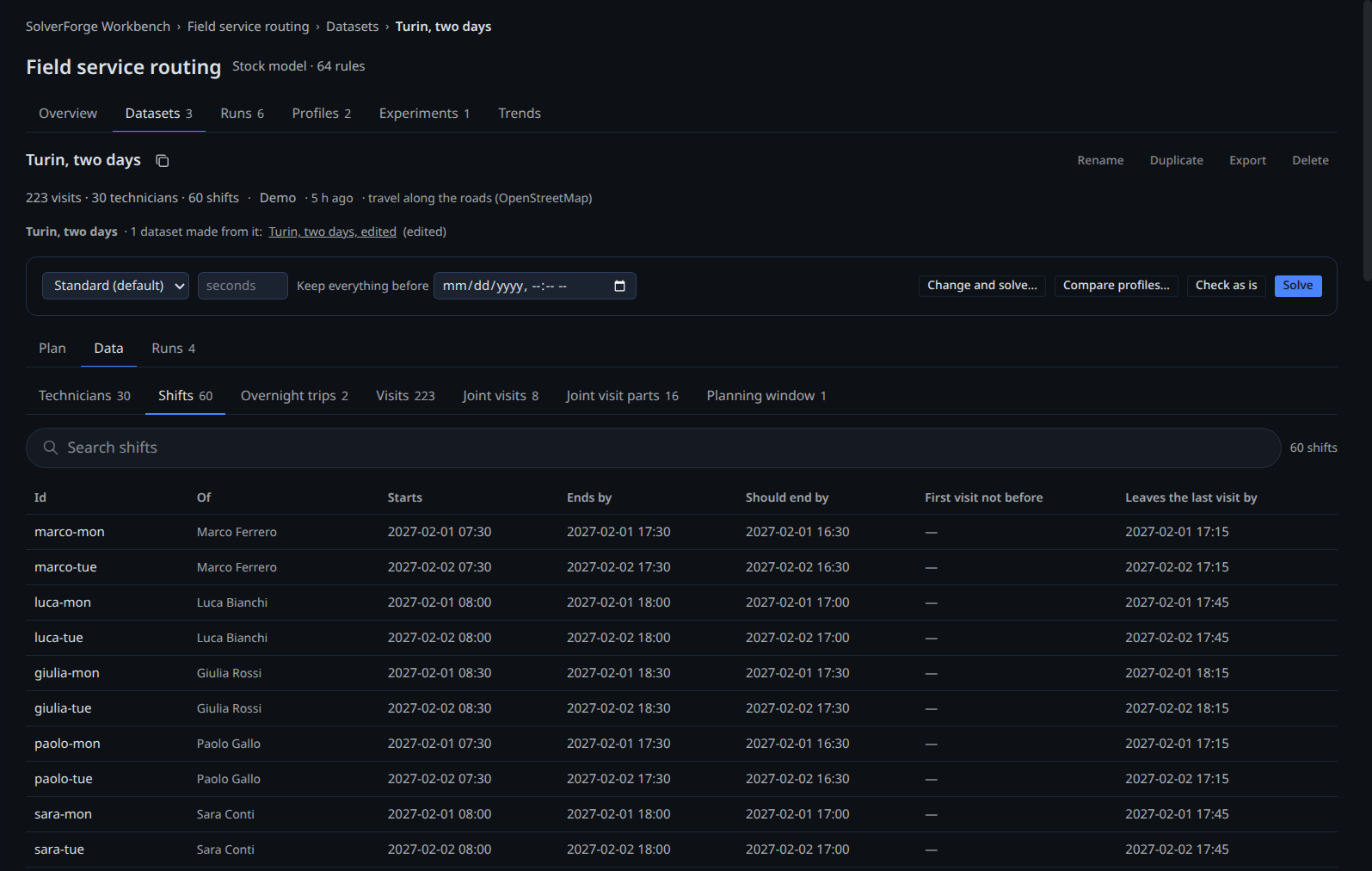
-
Profiles edit weights and parameters in place, each setting typed with
its unit, and show what differs from Standard.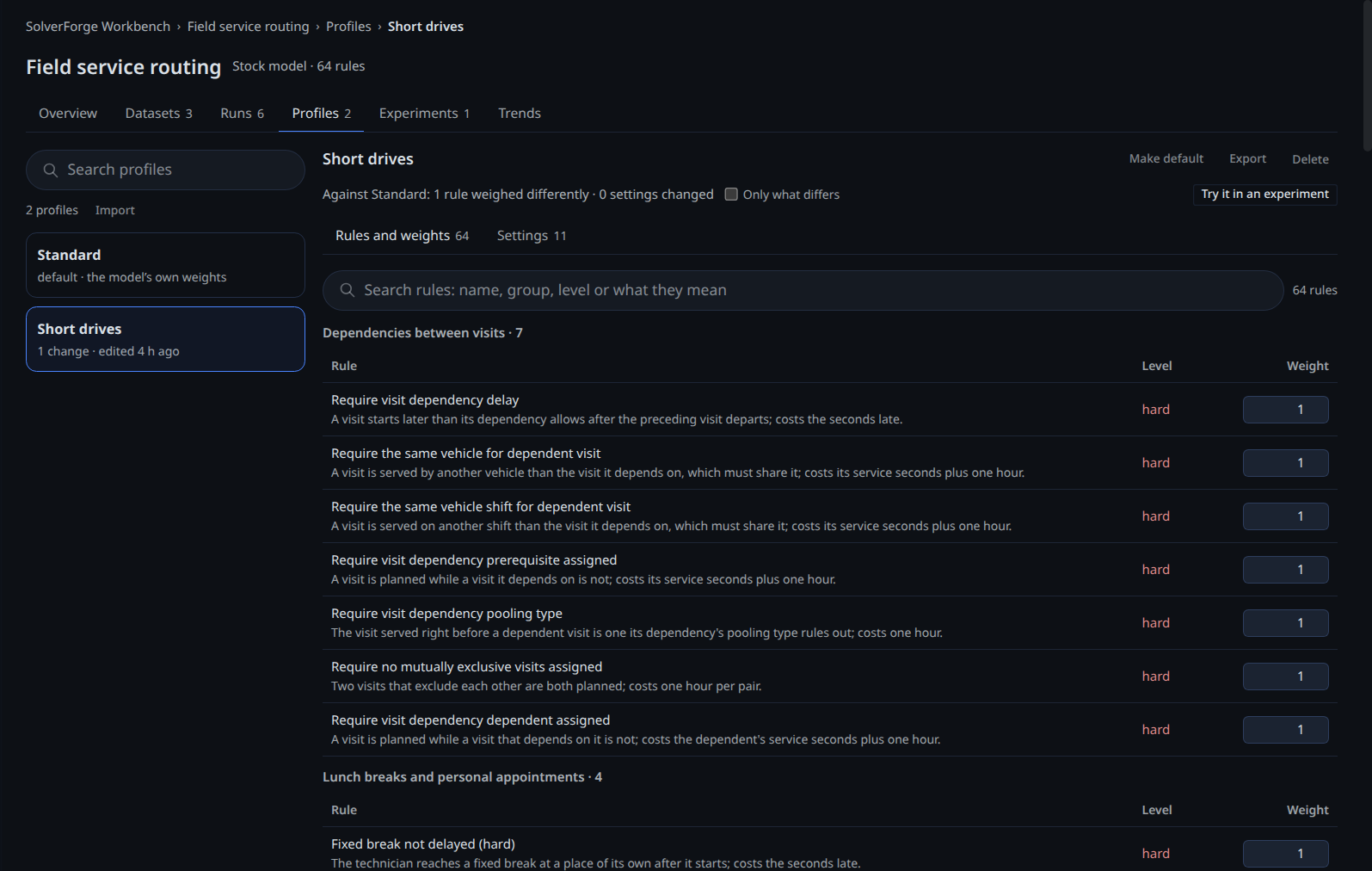
-
Experiments solve every dataset under every profile, rank the profiles
and show what each profile's plans come to in the model's measures;
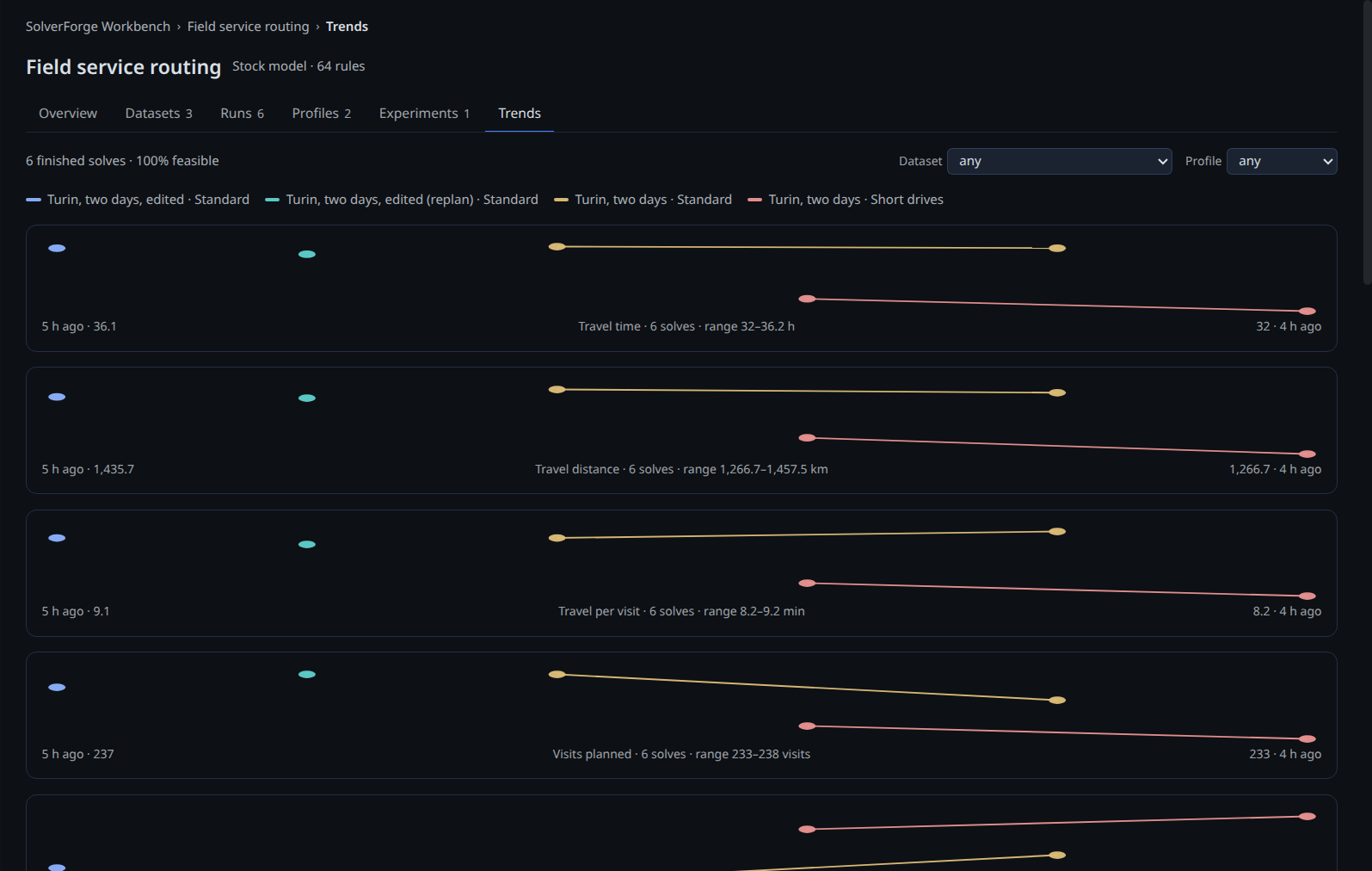
trends chart a model's solves over time, one series per dataset and
profile.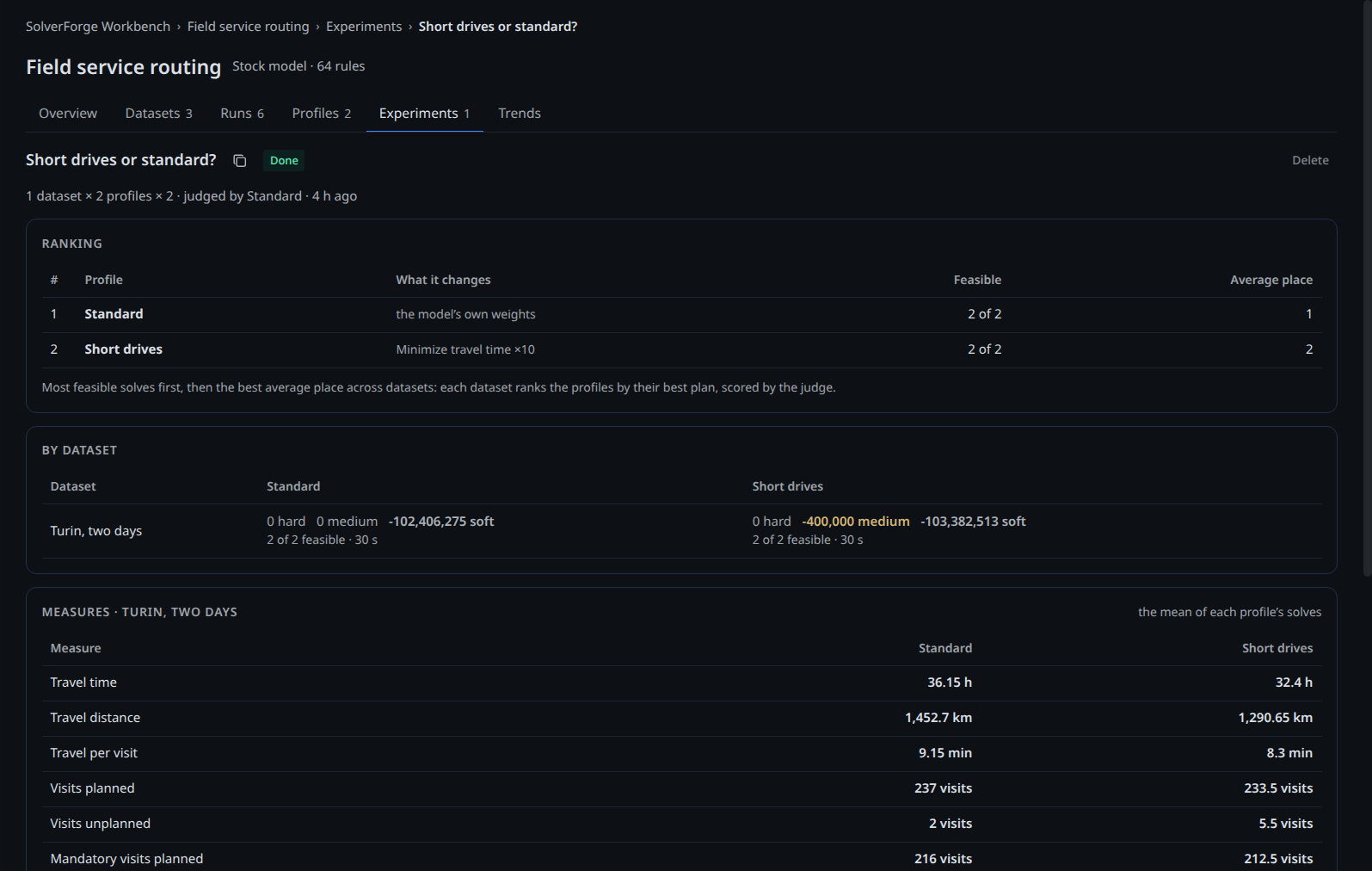
-
A
::solverforge-workbench{run="…"}card in the chat shows what costs score
in a run, and a status-bar chip counts running solves.
Settings
Under Settings → Plugins → SolverForge Workbench
(plugins.entries.solverforge-workbench.settings):
| Key | Default | Meaning |
|---|---|---|
binary | empty | Use this engine binary instead of the installed one |
parallel_solves | 0 | Solves at once; 0 picks a quarter of the machine's cores |
What it downloads, runs and stores
- The engine.
hermes solverforge-workbench installor
/solverforge-workbench installdownloadssolverforge-workbench-<platform>
from this repository'sengine-v0.3.0release and refuses it unless its
SHA-256 matches the value pinned inengine_bin.py. Each
binary carries a build attestation:
gh attestation verify solverforge-workbench-<platform> --repo blackopsrepl/hermes-solverforge-workbench. - One program per solve. The engine reads one JSON request on standard
input and writes JSON lines on standard output. It starts with only the
environment a process needs (no API keys reach it). The scheduling models
make no network calls. - Road data, for the routing models only. Opening a routing demo
downloads its road network once from the same engine release, refused
unless its SHA-256 matches the value pinned inengine_bin.py. Any other
routing dataset sends its area's bounding box to the Overpass API once, and
the roads are kept in the plugin's folder. The places themselves are routed
on your machine. - Map tiles. The Desktop's route map loads OpenStreetMap tiles; the tile
servers see the visible area and your IP. - Custom models are built on your machine. Registering a project runs
cargo build --releaseon it and on the engine host shipped with the plugin;
cargo downloads the crates they depend on from crates.io. The build gets only
the environment cargo needs (paths, the cargo and rustup homes, proxies).
Building runs the project's own code (build scripts and macros), so a
registration from the chat asks you first, once for each project folder;
picking the folder on the Desktop is that approval. - Files the agent names. Importing a dataset or profile from a path, and
exporting one to a path, go through Hermes's own file guard first: a file
Hermes keeps from the agent (its secrets, credentials) is refused, as with
its own file tools. - One folder.
<hermes home>/plugin-data/solverforge-workbench/holds
the SQLite database (models, datasets, profiles, runs), the engine, and each
custom model's generated engine crate and build.
Removing the plugin keeps it; delete the folder to erase everything. - Deleting a dataset, profile or experiment, or removing a custom model, from
the chat asks you first, every time: the plugin'spre_tool_callhook holds
it until you approve that one record. On the Desktop, the same delete asks
in a dialog showing what goes with it. - No credentials read or stored, no telemetry, and no process left running
after a solve.
How it works
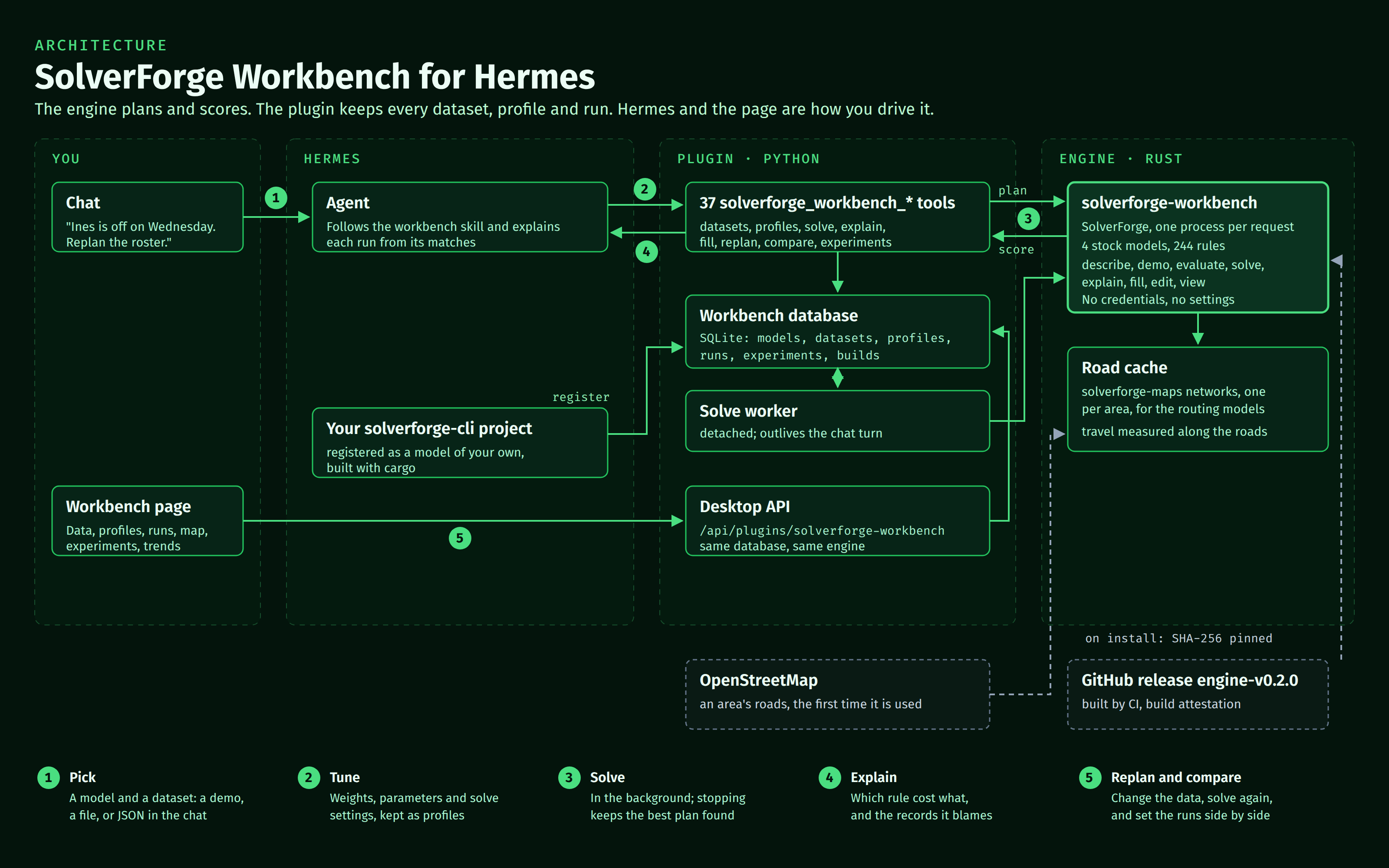
engine/is a Rust workspace on the publishedsolverforge
crate.host/runs any SolverForge model behind one JSON-lines contract
(describe, demo, solve with progress and cancel, evaluate); each stock model
is its own crate undermodels/;app/is thesolverforge-workbench
binary that registers them. Scores, matches and KPIs come only from the
engine.- The Python plugin keeps the records, applies settings in their fixed order,
queues solves for the detached worker and serves the Desktop half from the
same tool handlers the agent uses. - Score format
hard/medium/soft, closer to zero is better. Hard rules must
hold for a plan to be feasible, medium counts work left undone, soft weighs
preferences and costs.
Development
make check        # rustfmt, clippy, engine tests, plugin tests, Desktop tests, hermes validate + doctor
make install-dev  # install this checkout into Hermes, with the locally built engine
make dist-all     # cross-build every release binary with cargo-zigbuild
make              # all targets
The plugin tests run against workbench-testkit, a small real model in its own
engine binary, in real processes. The roster and search tests use the employee
scheduling engine's own output, captured by
tests/fixtures/make_roster_fixture.py.
License
Apache-2.0. Copyright 2026 Vittorio Distefano.
README from the reviewed commit 16d5016; it updates when the author re-pins.