 jarrett-del
Stoa
A lightweight CRM you talk to, inside Hermes Agent.
A two-person sales team does not need a CRM with forty tabs. It needs to know who to sell to,
the pipeline kept honest, the follow-ups written, and the calls turned into next steps, in the
places the team already works. Tell it what happened, send it a list, or press a button, and it
keeps the pipeline. Stoa is that, in one plugin:
Map the market → find the leads → run the pipeline.
- Map any market. Tell Hermes what you sell. It segments the market, researches companies,
scores each against your brief with the evidence, and posts the map. One tap on a company puts
it in the pipeline and sets Hermes to finding the buyer and drafting the first note. - Send it anything. A PDF of leads, a spreadsheet, a photo of a sign-up sheet. Hermes reads it,
Stoa shows what it would add and what it would change, and nothing is written until you press Apply. - Click a button, the stage changes at once. No model in the loop, no waiting, no wrong stage.
- Then Hermes does the writing. The same click hands the follow-up (the outreach note, the
proposal email, the decline) to the agent, in the card's thread. - One file fits it to your business. A playbook names your stages, your button labels and
what gets drafted at each step. Recruiting, B2B sales and agency playbooks ship with it, and
Hermes can interview you and write a new one.
It grew out of a setup a recruiting agency runs its searches on every day. This is that idea,
rebuilt as a plugin anyone can install.
hermes plugins install stoa                        # from the Hermes plugin catalog
hermes plugins install jarrett-del/hermes-stoa     # or straight from this repository
hermes plugins enable stoa
hermes stoa demo saas     # optional: a worked example to try it on (or: hermes stoa demo recruiting)
hermes gateway restart    # so the Slack buttons bind
Then, in any Hermes chat: "Map the market for us", "What's on my plate?", or /gtm.
In Slack the command is !gtm (Slack keeps the slash for its own commands), and
!gtm Dana Whitfield or !gtm map posts the card or the map itself, buttons included.
Any pipeline, and two worked examples
A playbook describes a pipeline: what a record is called, the stages it moves through, what the
buttons say, and what Hermes drafts at each step. It can be any pipeline. Three playbooks ship
(b2b-sales, recruiting, agency), and Hermes will write one for your business from a short
conversation.
The sample data shows two businesses at a realistic size. Everything in it is made up.
| | A recruiting agency | A B2B software company selling a fraud prevention tool |
|---|---|---|
| Load it | hermes stoa demo recruiting | hermes stoa demo saas |
| A record is | a candidate in a client's search | a deal with a buyer at an account |
| Stages | Sourced → Contacted → Screened → Submitted → Client interview → Offer → Placed | Lead → Qualified → Discovery → Proposal → Negotiation → Closed won |
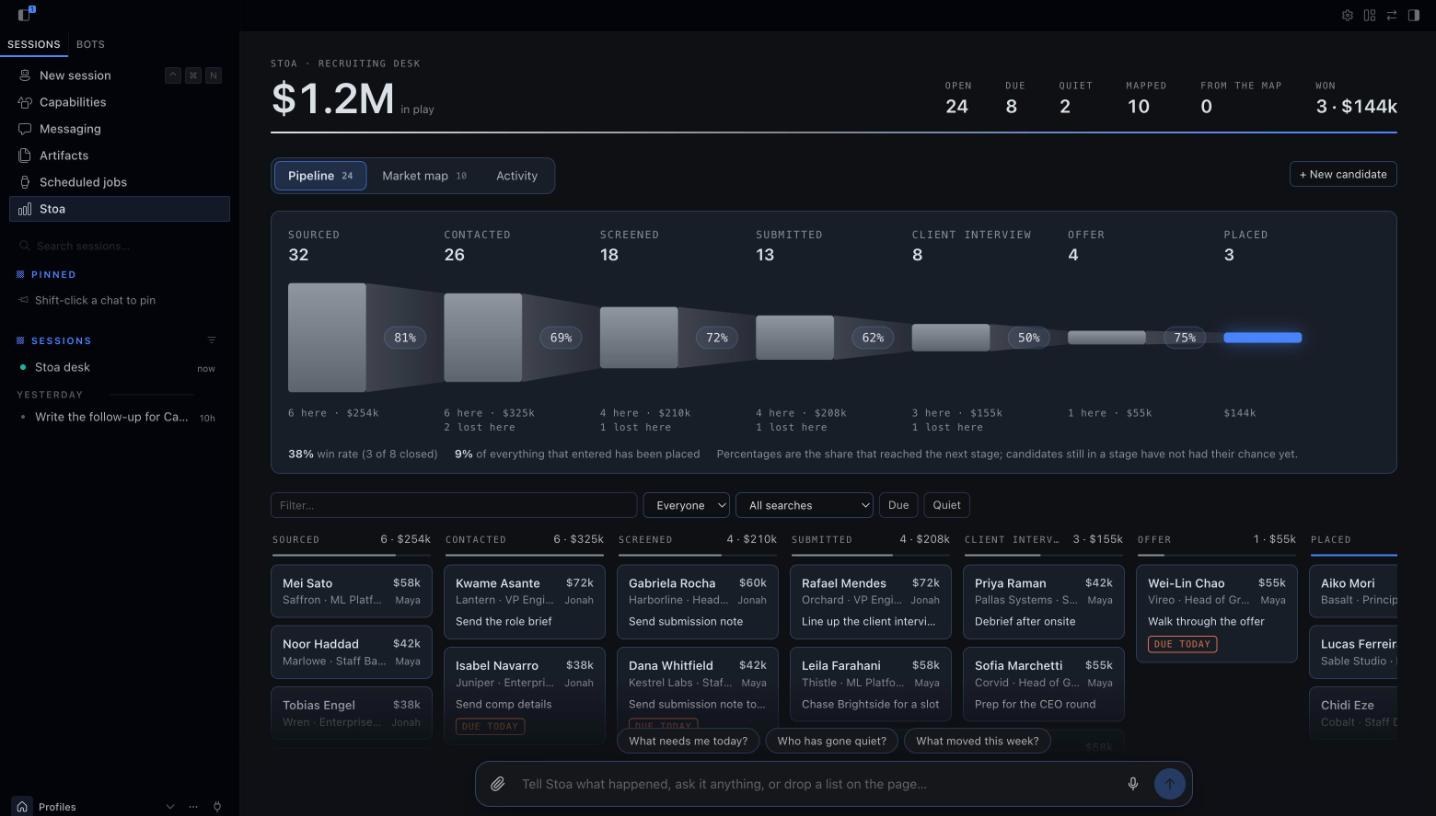
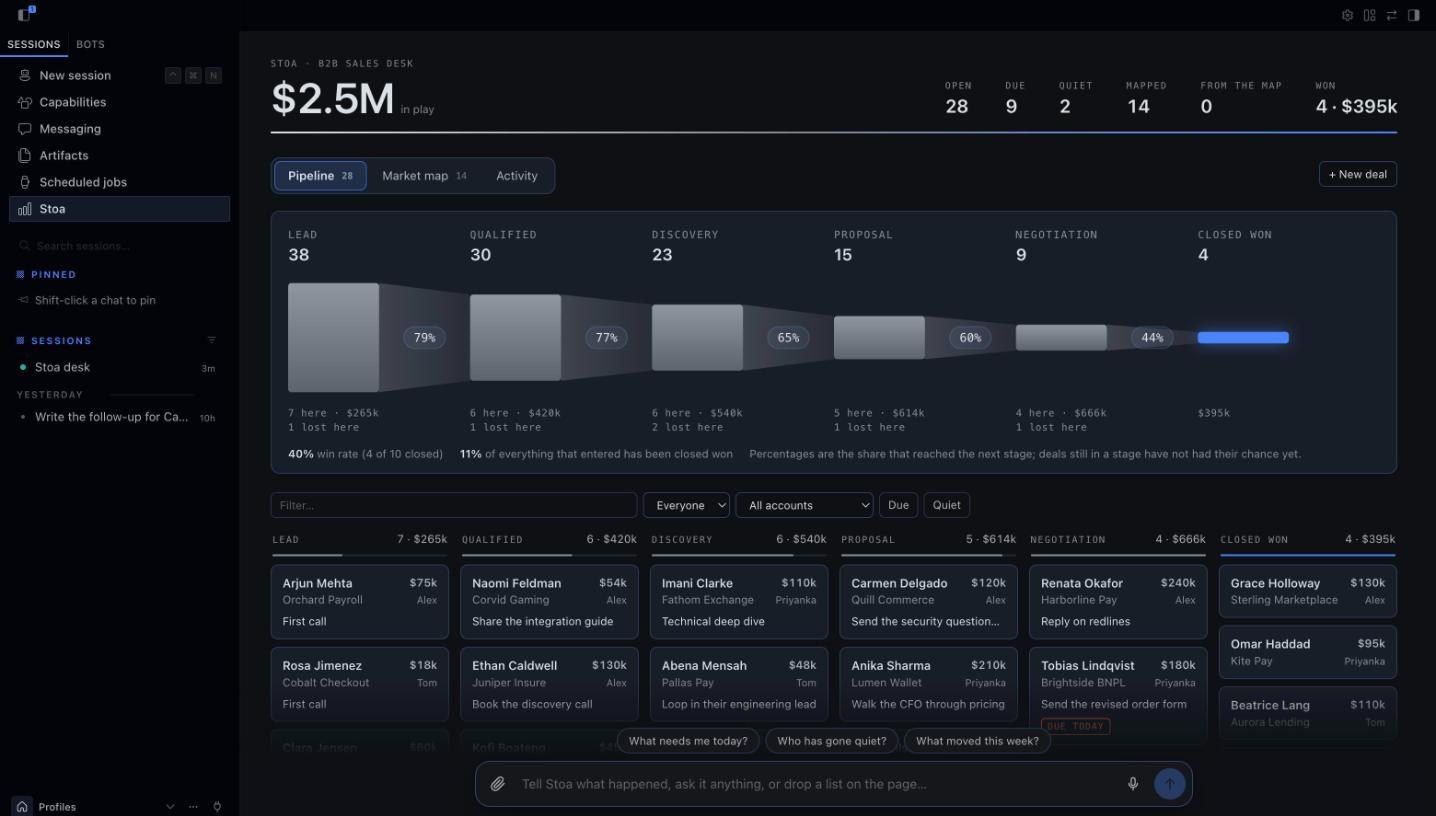
| On the desk | 24 open candidates across 8 searches, $1.2M in fees, plus 3 placed and 5 passed | 28 open deals, $2.5M, plus 4 won and 6 lost |
| Its market map | Where the candidates for one search work now: 10 companies, and adding one puts its named person in that search | Fintechs and marketplaces exposed to payment fraud: 14 companies, what each uses today, and who to call first |
Loading one switches the desk to its playbook and replaces the other, so the board always reads
as one business. hermes stoa demo --clear removes the sample data and leaves your own records.
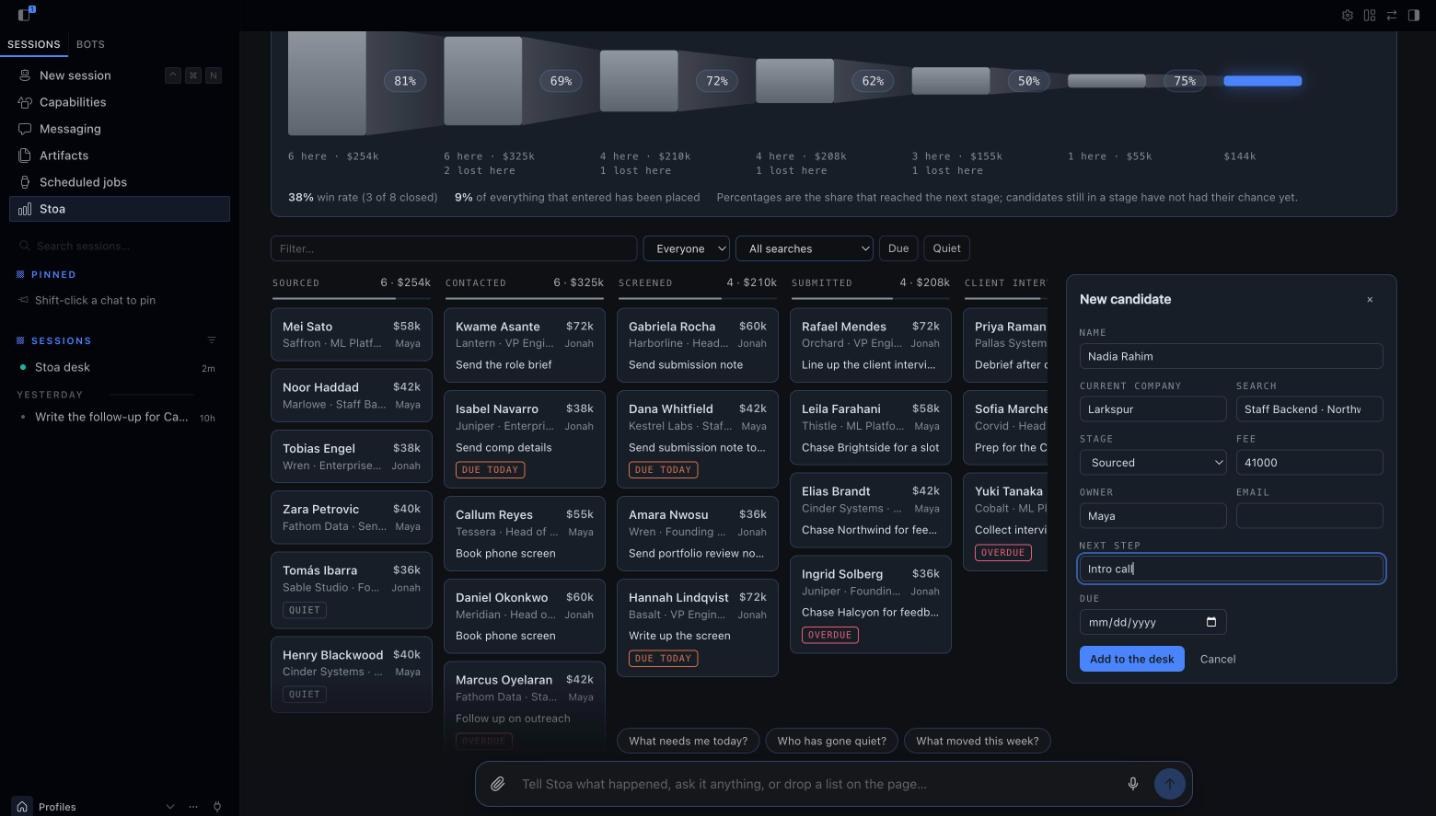
The recruiting agency:
The company selling a fraud prevention tool:
Talk to it, and watch the desk change
In the Hermes Desktop app and the Webapp, Stoa sits beside the conversation.
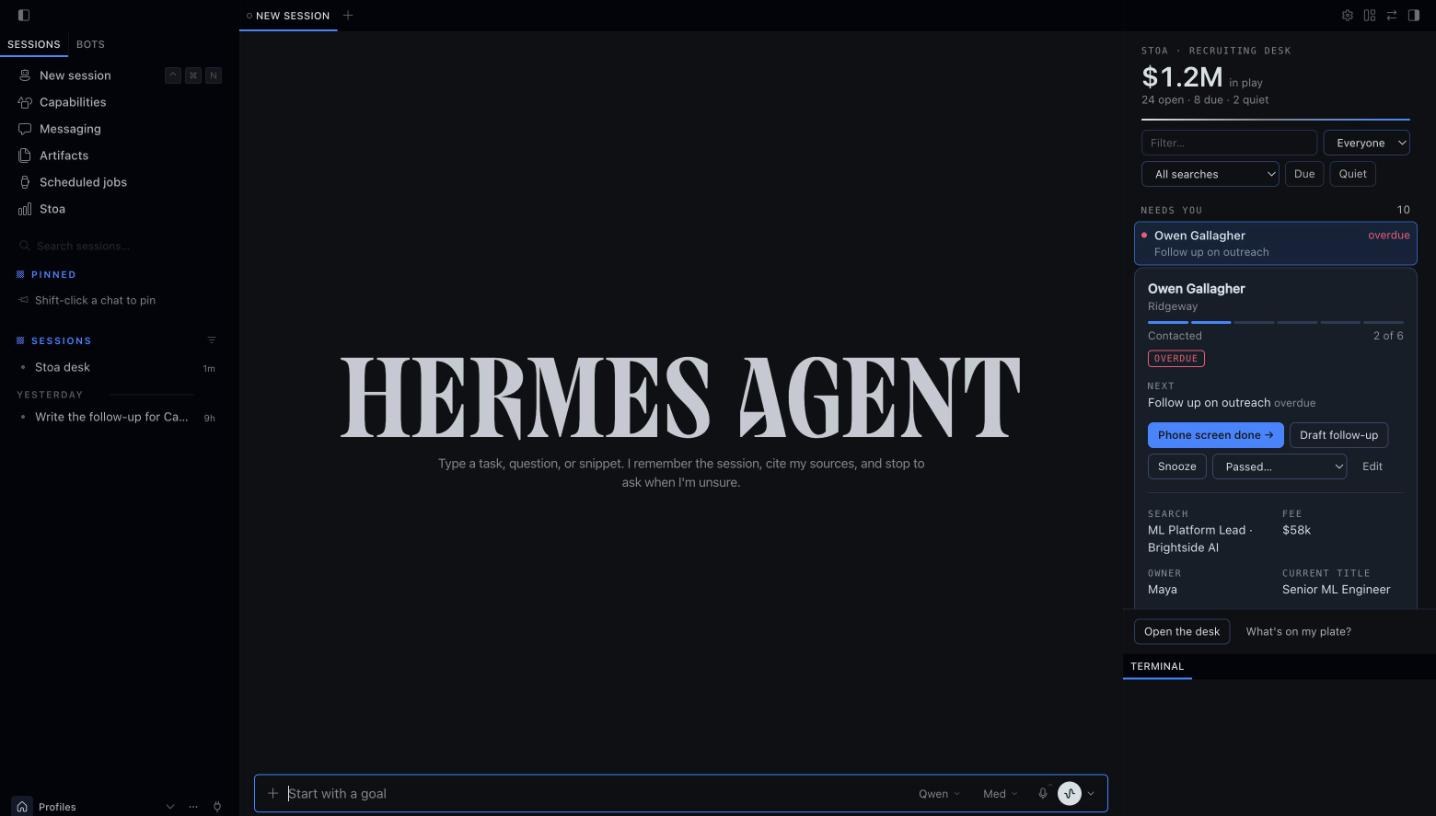
- A pane beside the chat. What needs you today, every stage, the first calls from your map.
Tell Hermes "I spoke to Marcus, follow up Thursday" and the pane redraws as the agent saves it.
Narrow it by owner, by search or account, to what is due or what has gone quiet, or by any text. - A click saves, then Hermes writes. Press Draft follow-up or the stage button on a
record. The change is saved at once, one line goes into the open chat as if you had typed it,
and the draft comes back in the conversation. - Cards in the conversation. Ask "show me Dana" and the reply contains the live card, with
its buttons, not a description of it. "Show me the market map" draws the map the same way. - A page of its own. Stoa in the sidebar opens the funnel with its conversion rates, the
pipeline board with the same filters, the market map with its reading, and the activity log. - Talk to the page. A dock at the foot of the page takes the same sentences the chat does:
"Add Nadia Rahim from Larkspur to the Northwind search", "what needs me today?". The
conversation opens above the dock and the board redraws behind it. The page keeps its own
conversation for this, called Stoa desk, listed in the sidebar like any other, one click
away when you want the full chat. - Say it or hand it over. The microphone dictates into the dock where the browser has speech
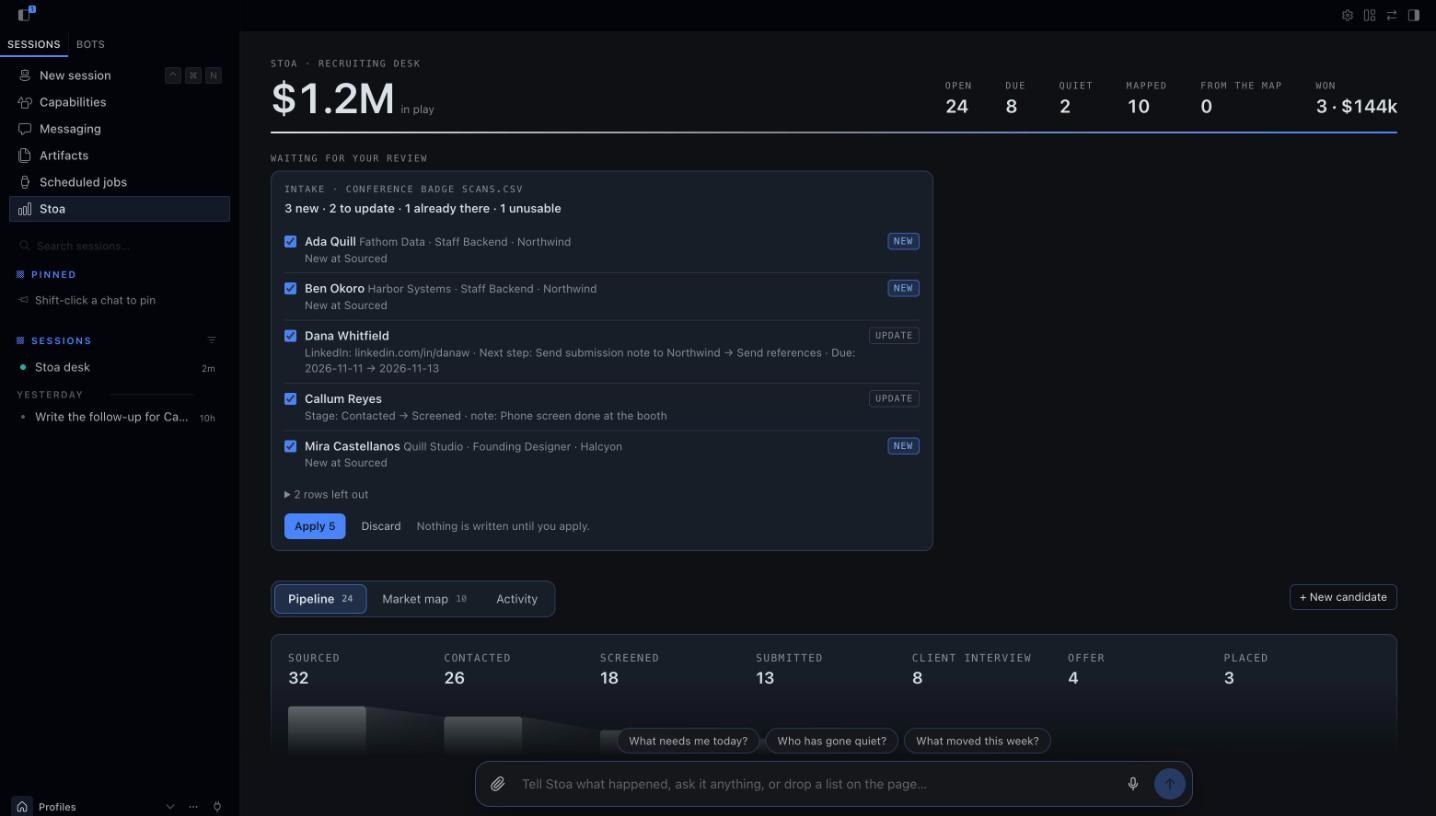
recognition. Drop a CSV anywhere on the page, or attach one, and the desk reads it itself and
shows the review, with no model in between. A small text file goes along with your message. - Or do it by hand. Drag a card to another column to move it. + New adds a record from a
short form. Edit on any record changes its next step, stage, value, owner and the rest, and
adds a line to its log. Press a stage in the funnel to narrow the board to it. No model involved.
- Lists you send in. Drop a file into the chat. The review appears in the conversation and in
the pane: a tick box per row, what each one would add or change, and one Apply button.
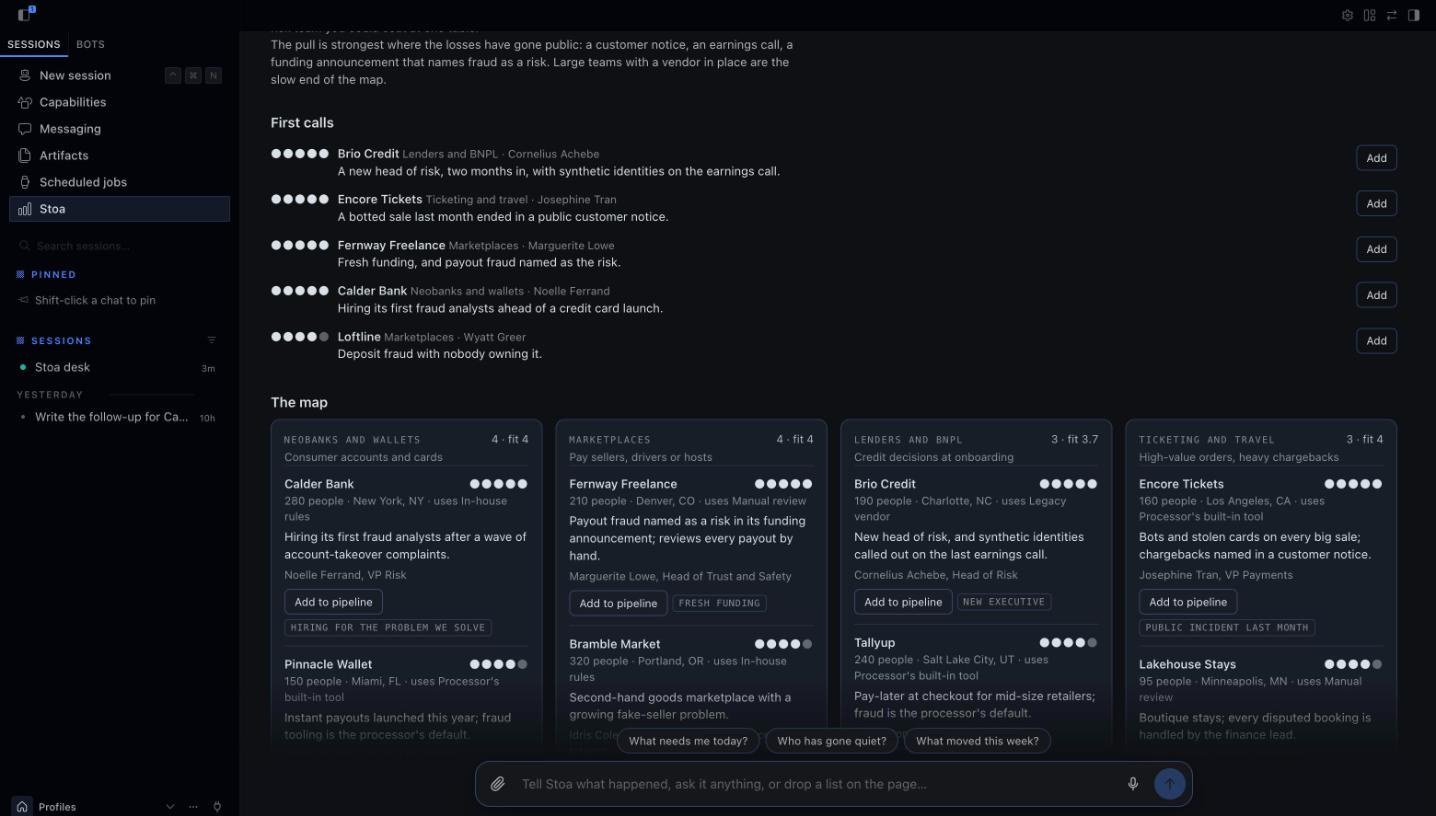
Switch it on once under Capabilities → Plugins → Stoa. Every colour comes from the app's own
theme, accent included, so it looks like part of Hermes in whatever theme you run.
The web dashboard tab
Stoa also adds a tab to the Hermes web dashboard (hermes dashboard). It refreshes every few
seconds, so when someone taps a button in Slack you watch the card move. If the dashboard was
already running when you installed Stoa, restart it once and the tab appears.
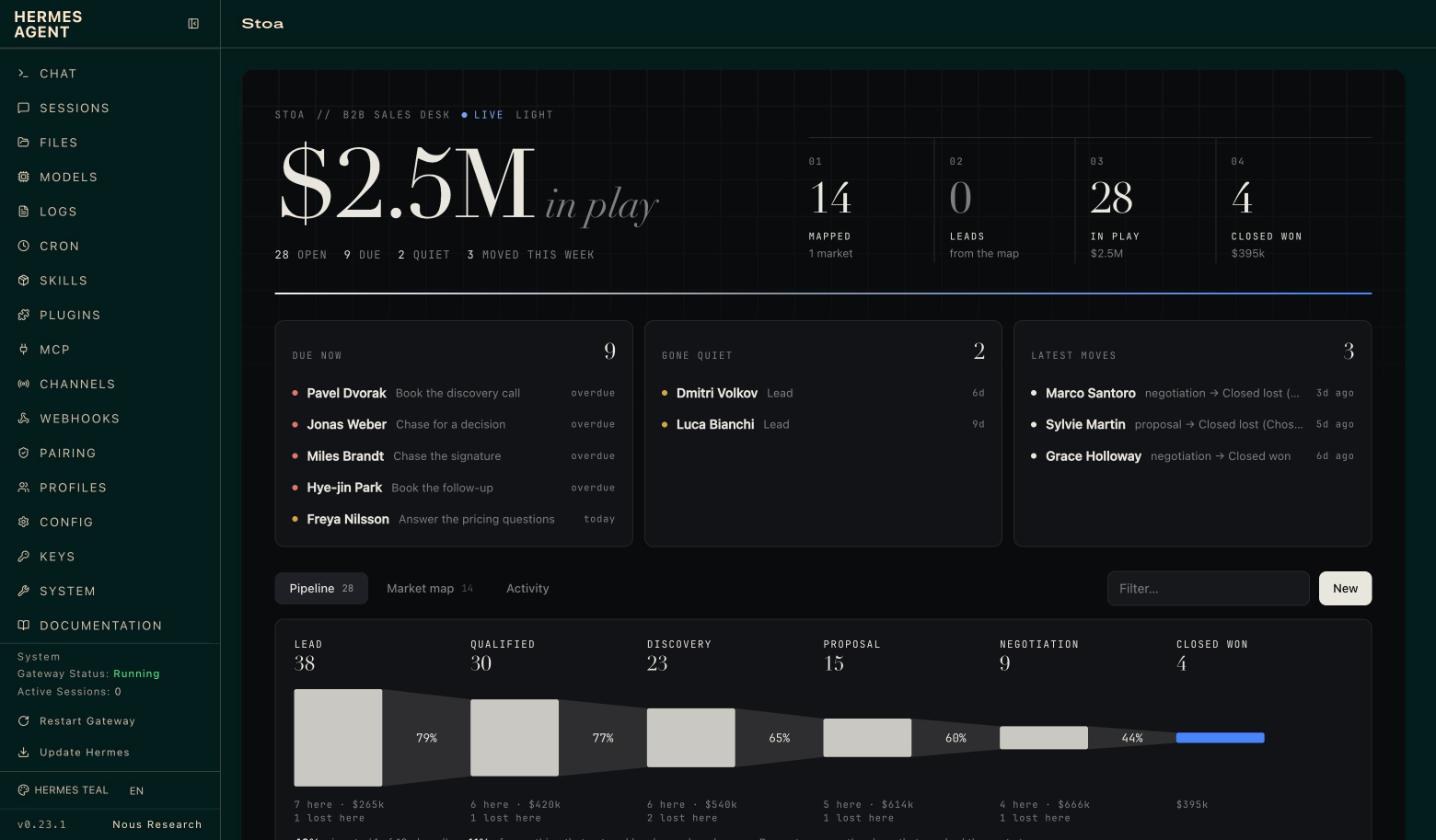
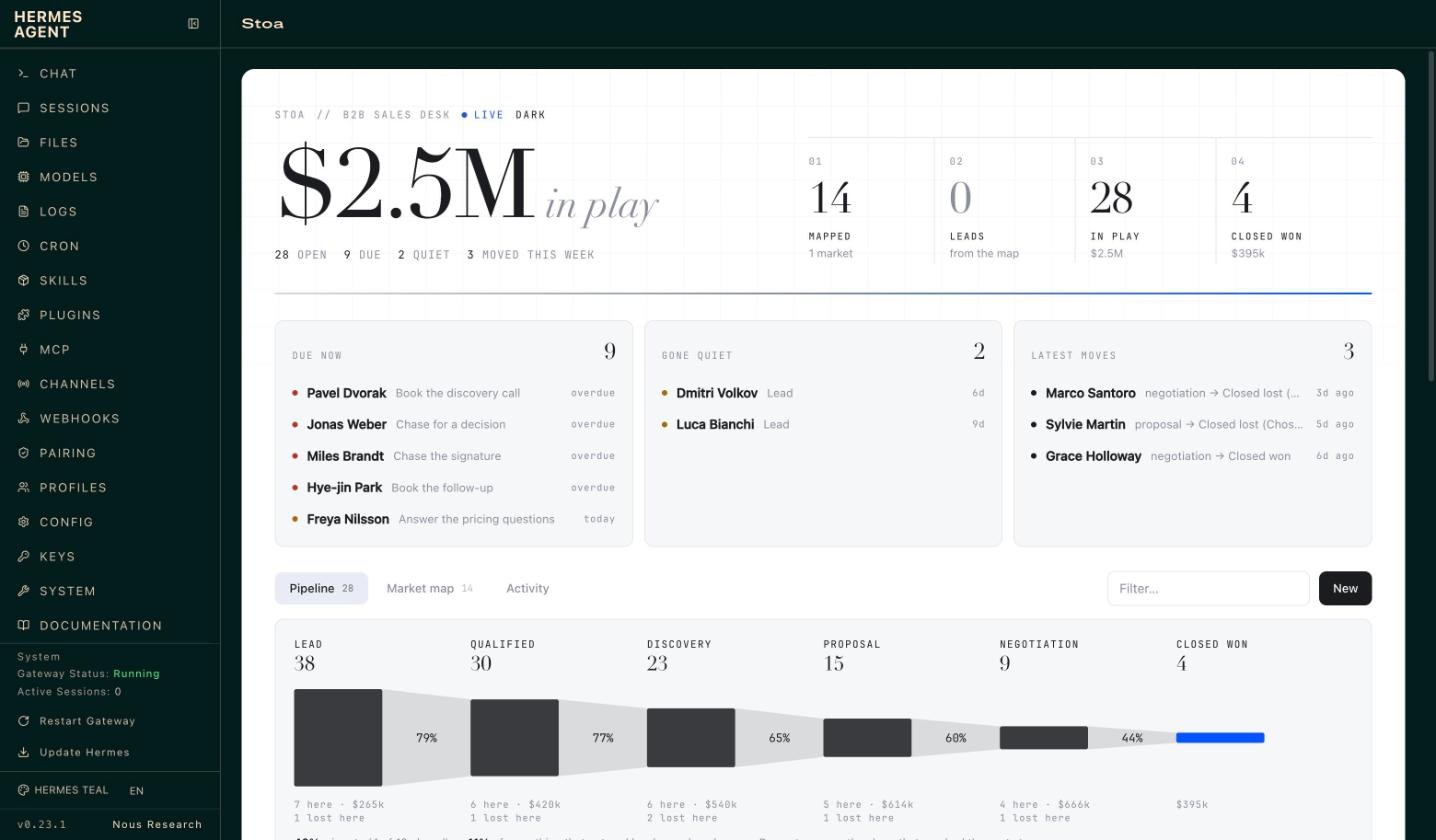
- The number that matters, live: what is in play, beside mapped → leads → in play → won,
with what is due and what has gone quiet underneath. - Funnel: how many records reach each stage, the share that moves on to the next, what is
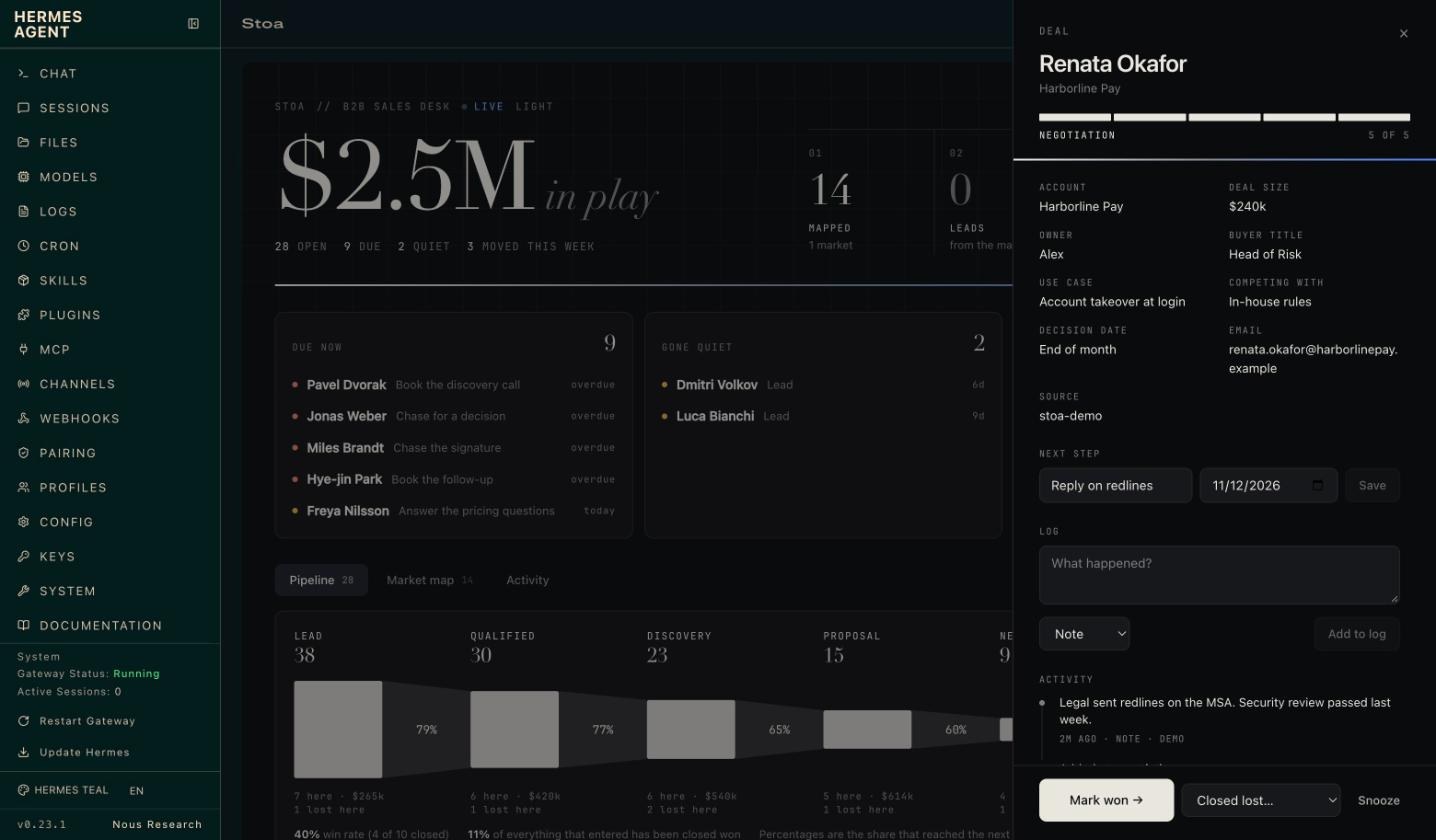
sitting in each stage and where records are lost, with the win rate beneath it. - Pipeline board: a column per playbook stage. Open a card to see its log, set the next
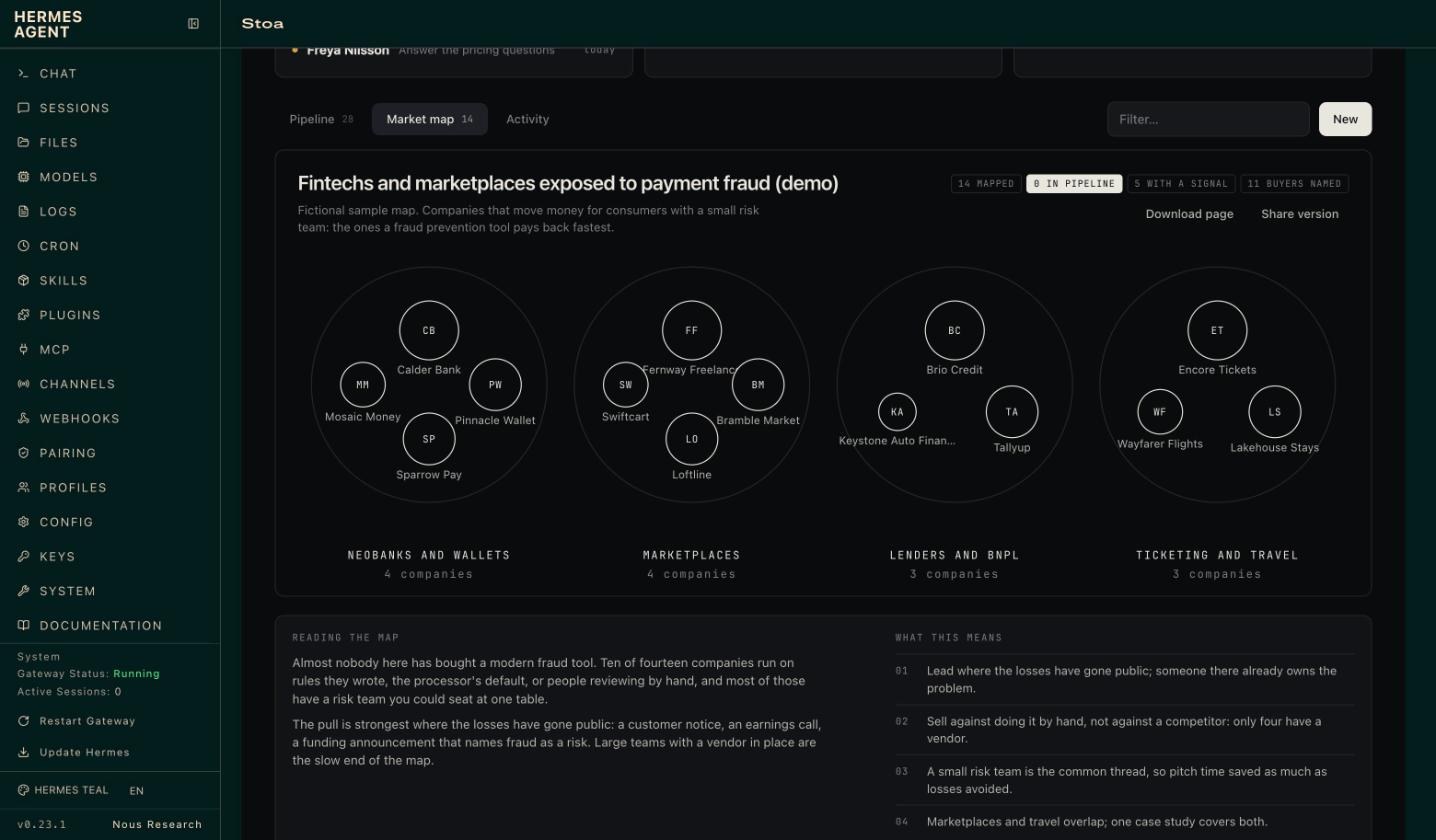
step, log a call, advance it, close it with a reason, or snooze it. - Market map: every segment as a cluster, each company sized by fit and filled in once it
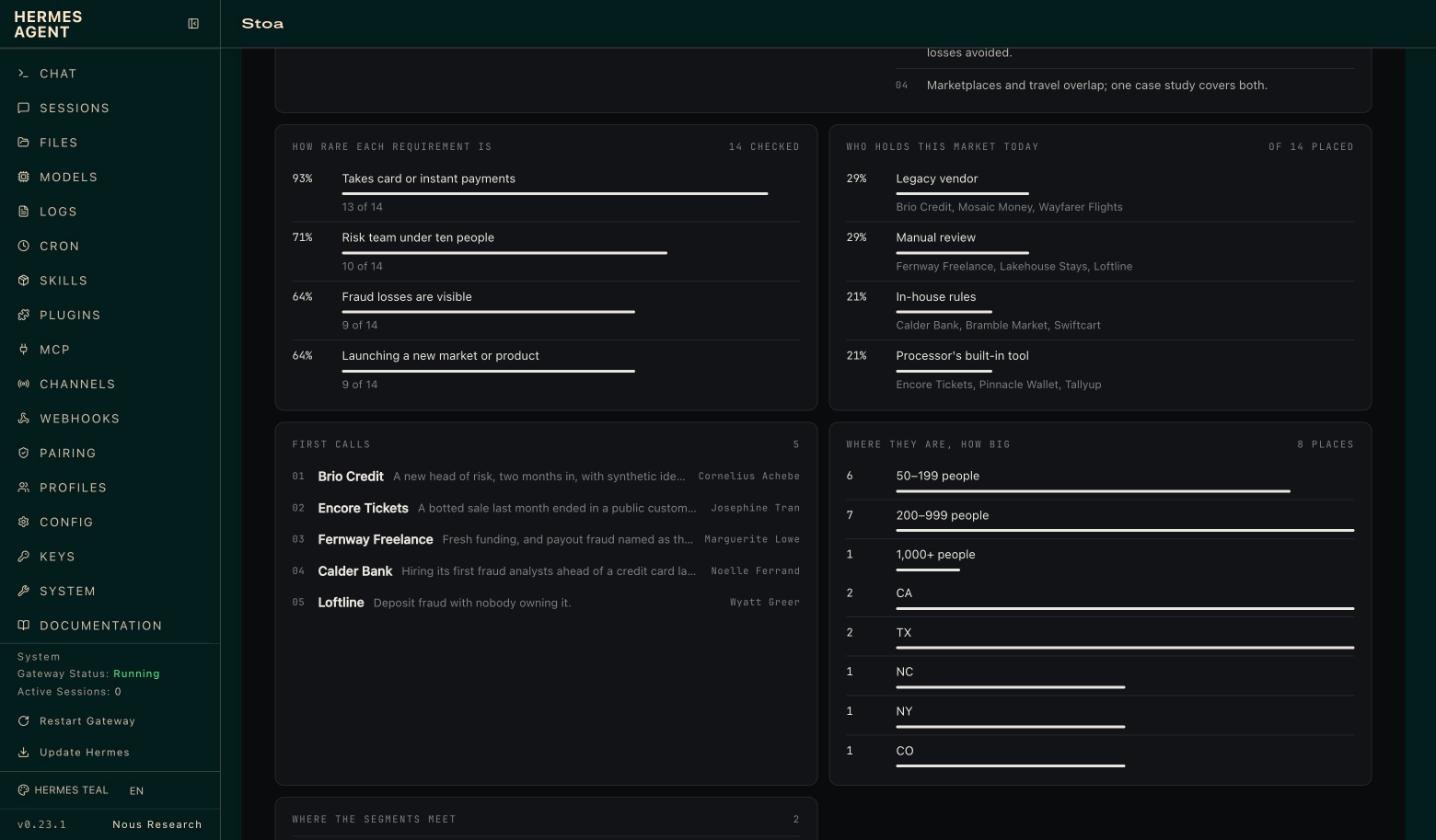
is in the pipeline, with the map's reading beneath it: requirement rarity, who holds the
market, first calls, where segments meet, and a flow diagram from segment to what each
company uses today. Open a company for its requirements checklist, buyers and source, then
Add to pipeline. Download page saves the map as a web page. - Activity: everything that happened, from Slack clicks, the agent and the web alike.
- Paper and ink. Neutral in light and dark, with one quiet line that ends in the Hermes blue.
A switch picks the mode, whatever dashboard theme you run.
Buttons on the web do the same instant, deterministic work as the buttons in Slack. The web
cannot start an agent turn, so when a click calls for a draft the task waits on the record
(the card shows draft waiting) and Hermes writes it the next time that record comes up in chat.
| | |
|---|---|
|  |
 |
What it looks like in chat
A card in Slack (shown here as the text version every other surface gets):
Dana Whitfield · Kestrel Labs
▰▰▰▱▱▱  Screened · 3 of 6
Search: Staff Backend · Northwind
Fee: $42k
Current title: Senior Backend Engineer
Comp expectation: $210k base
Next: Send submission note to Northwind (due 2026-11-10)

[ Submit to client ]  [ Draft follow-up ]  [ Enrich ]  [ Passed… ▾ ]  [ ⋯ ]
Press Submit to client and three things happen, in this order:
- The record moves to Submitted and the activity log records who clicked. Instant, in SQLite.
- The card redraws itself, in every channel it was posted to.
- Hermes gets a turn in the card's thread with the playbook's instruction for that stage
("Draft the submission note to the client: three bullet points on fit, comp and
availability, and one honest risk") and replies with the draft.
Two people clicking the same button at once move the stage once, not twice: the check and the
change are one database transaction, so it holds across Slack, the web tab and the agent.
What you get
| | |
|---|---|
| 9 tools | gtm_market, gtm_pipeline, gtm_deal, gtm_card, gtm_intake, gtm_enrich, gtm_notes, gtm_playbook, gtm_export |
| Intake | Send a list in any form; review what is new and what would change; apply what you tick |
| Market maps | Segments, fit scores, evidence and sources, with an Add to pipeline button per company |
| Slack cards | Advance, Draft follow-up, Enrich, close with a reason, snooze, reopen |
| Desktop app and Webapp | A live pane beside the chat, a Stoa page, and cards and maps drawn inside the conversation |
| Web dashboard tab | Live funnel, pipeline board, market map, activity feed, record side panels with actions |
| /gtm | The board, the brief, a map or one record, on every surface Hermes runs on (CLI, Telegram, Desktop…). In Slack, !gtm, where a record or a map arrives with its buttons |
| hermes stoa | Status, board, brief, map, sample data, CSV import and export from a terminal |
| 7 automations | Morning brief, email-call-and-Slack activity sweep, meeting-notes sweep, weekly market watch, Friday review, mirror to a Google Sheet, bring Sheet edits back, under /blueprint |
| 3 skills | stoa:desk (how the agent runs the desk), stoa:market-map, stoa:playbook-authoring |
| 3 playbooks | b2b-sales, recruiting, agency, plus any you or the agent write |
Market maps
"We sell a fraud prevention tool to fintechs and marketplaces. Who should we go after?"
Hermes names the market, splits it into segments that would each get a different pitch, and
agrees a short list of requirements with you: the things a fit company shows. Then it researches
companies for each segment, with its own web search or with Exa if you add a
key, and checks every one against those requirements. Each company goes on the map with:
- a fit score from 1 to 5, read off the requirements unless Hermes has reason to set it;
- the evidence for each requirement it shows, and the ones it does not;
- a buying signal, what it uses today, and the likely buyers;
- the source link.
Market map · Fintechs and marketplaces exposed to payment fraud
14 companies · 1 in the pipeline · 5 with a signal

Lenders and BNPL (3)
  ●●●●● Brio Credit · 190 people · Charlotte, NC  [in pipeline]
        New head of risk, and synthetic identities called out on the last earnings call.
  ●●●●○ Tallyup · 240 people · Salt Lake City, UT
        Pay-later at checkout for mid-size retailers; fraud is the processor's default.

Ticketing and travel (3)
  ●●●●● Encore Tickets · 160 people · Los Angeles, CA
        Bots and stolen cards on every big sale; chargebacks named in a customer notice.
The map then reads itself back. This is the part a list of names never gives you:
| | |
|---|---|
| How rare each requirement is | The share of checked companies that show each one. A scarce requirement is either too strict or the first question on every call. |
| Who holds this market today | What the companies use now. If most review by hand, you are selling against doing it by hand, not a competitor. |
| Where the segments meet | Companies that could sit in two segments: the second pool when one runs thin. |
| Where they are, how big they are | By region and headcount band. |
| First calls | The few to approach first and why, chosen by Hermes or, failing that, the strongest fits spread across segments. |
| Reading the map | Hermes's short interpretation and what to do about it, saved with the map. |
A map does not have to be of customers. In the recruiting example it is a talent map: the
companies where the candidates for one search work now, each with the people worth approaching.
In Slack each company has an Add to pipeline button. A tap creates the record at the first
stage of your playbook with the first known buyer as the contact, carries the evidence into its
activity log, and asks Hermes to confirm the buyer (or find one) and draft a first-touch note.
The Market watch automation re-checks a map every week and adds at most five new companies.
A page to send. gtm_market(action="export"), or Download page in the web tab, writes the
whole map as one self-contained web page: no scripts, no outside requests, nothing to host. The
share version leaves out buyers' names and what is in your pipeline.
Intake
"Here's the attendee list from the conference." (with a PDF attached)
Hermes reads the file and hands Stoa the rows. Stoa then works out, with no model involved, what
each row would do:
| | |
|---|---|
| New | Nobody like this on the desk. It would be added at the first stage, or the stage the file gives. |
| Update | Already on the desk, and the file knows something the record does not, or says something different. Every change is listed: stage Contacted → Screened, LinkedIn added. |
| Already there | On the desk with nothing new. Left alone. |
| Unclear | Could be more than one record. Stoa asks which. |
A person is matched by email first, then LinkedIn, then name and company. The same person in a
different account or search is a new record, not an update. Nothing is written until you press
Apply in the app or in Slack, or say "apply all but 3". Two people pressing Apply write the
list once. A CSV on disk is read by the desk itself, in Excel's encoding too.
The pipeline
Everything lives in one SQLite file under <hermes home>/plugin-data/stoa/desk.db: records,
their activity log, which cards were posted where, and the enrichment cache. It is per profile,
it survives plugin updates, and you can open it with any SQLite tool.
Talk to it in plain language. "Add Dana from Kestrel to the Northwind search." "I spoke to
Marcus, he wants 210 base, follow up Thursday." "We lost Lumen on price." The agent writes each
of those to the desk in the same turn; the bundled skill teaches it to treat the desk, not its
memory, as the source of truth.
Playbooks
A playbook is a short YAML file:
name: recruiting
terms: {deal: candidate, deals: candidates, group: search, groups: searches, value: Fee}
stages:
  - {id: screened, label: Screened, stale_days: 3, advance: Submit to client}
  - {id: submitted, label: Submitted, stale_days: 4, advance: Client interview}
won:  {id: placed, label: Placed}
lost: {id: passed, label: Passed, reasons: [Not a fit, Comp mismatch, Client passed]}
drafts:
  on_enter:
    submitted: >
      Draft the submission note to the client for {name}: three bullet points on fit, comp and
      availability, and one honest risk. Quote only what is in the notes.
stale_days decides when a record counts as gone quiet at that stage. advance is the label on
the button. drafts.on_enter is what Hermes writes when a record arrives at a stage.
To make your own, tell Hermes how you sell: "We install commercial solar. Set the desk up for
us." It asks a few questions, shows you the stages, and saves the playbook. Or copy one from
playbooks/ into <hermes home>/plugin-data/stoa/playbooks/ and edit it.
Meeting notes
Point notes_dir at any folder of Markdown or text call notes (an Obsidian folder, the export
folder of an open-source meeting recorder, files you drop in by hand), or add a Granola API key.
gtm_notes lists the notes that have not been filed and which record each one is probably
about. The agent reads a note, files a short summary on the right record with the next step,
and recommends a stage change for you to confirm. The File meeting notes automation does this
a few times a day.
Enrichment
With a People Data Labs key, the Enrich button and
gtm_enrich look up a person or company and fill the record's blank fields. It never overwrites
what a person typed, results are cached for 90 days, and a monthly cap (default 50 lookups)
keeps the bill predictable. A playbook with enrich: none removes the button and refuses the
lookup, for teams that do not want it at all.
Gmail
Stoa writes drafts and never sends. When the Google Workspace skill (or any Gmail tool) is
connected to Hermes, the agent saves what it drafts as a Gmail draft addressed to the record's
email, ready for you to read and send. Without it, drafts arrive in the chat.
Email, calls and Slack, logged for you
Switch on the Log email, call and Slack activity automation and, a few times a day, the agent
looks through whatever you have connected to Hermes (Gmail, a calendar or call recorder, Slack)
for anything that happened with the people on the desk.
- It logs what it finds on the right record, as a one or two sentence summary. Each email,
message or call is logged once, however often the sweep runs. - It asks before moving anything. When an email says the interview is booked or the contract
is signed, the stage change and the new next step arrive as a review with a tick box per
record, in Slack or in the app. Nothing moves until you apply it. - It proposes newcomers the same way. Someone who writes in and is not on the desk yet is a
row in that review, not a record.
Stoa has no mail or chat code of its own and holds no Google or Slack credentials for this: the
agent reads with its own tools, so it sees exactly what your Hermes can already see.
Google Sheets
Connect Google to Hermes (its Google Workspace skill covers Gmail, Drive, Sheets and Docs) and
the desk can live in a Sheet as well:
- "Mirror the desk to my Google Sheet." Hermes writes the whole pipeline to a tab called
Stoa: one row per record, in your playbook's own column names. The Mirror the desk to a
Google Sheet automation keeps doing it a few times a day. - "Pull my Sheet edits." Hermes reads the tab back and Stoa shows what people changed there
(a stage, a fee, a new row) as a review to approve, the same card as any other list. The
Bring Sheet edits back automation does that once a day.
The records themselves stay in Stoa's own database, which is what keeps a button click instant.
The Sheet is as fresh as its last mirror, and a Sheet edit reaches the desk when you approve it,
not the moment it is typed.
Spreadsheets
gtm_export writes the whole pipeline to a CSV that opens in Google Sheets or Excel, and reads
one back in (with a dry run first). That is how you move in from a spreadsheet, and how you get
a copy out for a board meeting. Import reads the files spreadsheets actually produce: Excel's
encoding, a stray comma in a row, due dates written as 12/01/2026 or Dec 1. A row it cannot
use is reported with its row number and the rest still come in.
Due dates are stored as dates. Say "tomorrow", "Friday" or "+3d" and the desk works it out; say
something it cannot read and it tells you, and nothing is saved.
Settings
All optional. Set them in the Desktop app under Settings → Plugins → Stoa, or in
config.yaml under plugins.entries.stoa.settings.
| Setting | Default | What it does |
|---|---|---|
| playbook | b2b-sales | Which playbook the desk runs on |
| channels | empty | Chat ids where the desk is available; empty means everywhere. Add cron to let scheduled jobs use it too. Button clicks are refused outside these chats as well |
| slack_users | empty | Slack user ids (they start with U) who may press the buttons on any card, review or map. Empty means only the person a card was posted for can press its buttons |
| import_dir | empty | A folder the agent may read CSV files from by path, besides the plugin's own imports/ folder and the working directory |
| notes_dir | empty | Folder of call notes to watch |
| notes_days | 7 | How far back the notes inbox looks |
| pdl_monthly_cap | 50 | Most paid lookups per calendar month (0 = no cap) |
| PDL_API_KEY (secret) | empty | Turns on enrichment and buyer lookup |
| EXA_API_KEY (secret) | empty | Lets the market map search for companies directly |
| GRANOLA_API_KEY (secret) | empty | Adds Granola notes to the inbox |
One permission is worth granting. For a button click to start the agent's writing turn, Hermes
needs to let the plugin queue a message:
plugins:
  entries:
    stoa:
      allow_gateway_injection: true
Without it everything else still works: the stage moves, the card updates, and the card's thread
gets a line saying "Saved. Reply here and I'll write it up."
Hermes lets a plugin continue a conversation a person started, never open one. So a card you
asked the agent for hands its drafts straight back to that conversation. A card that arrived
another way (from !gtm, or a scheduled job) waits for your reply in its thread; the task is
picked up the moment you answer.
A click is answered at once and a writing task is never lost. The card says Drafting… under
its buttons the moment you press one, and pressing the same button again while that draft is
being written changes nothing. The task is saved on the record before the hand-off and cleared
when the agent opens the record to do it. If no draft turn has started within 45 seconds, the
card changes to Draft waiting and the thread is told how to ask.
Disclosure
What the plugin does that you would want to know before installing it:
- Network calls. Only when you add the matching key, and only to three hosts:
api.peopledatalabs.com(the name, email, LinkedIn URL or company of the one record being
enriched, or a company name and job titles for a buyer lookup),api.exa.ai(the search
phrase for a market-map search) andpublic-api.granola.ai(reads your note list and note
summaries; transcripts are never requested). No telemetry, no usage reporting, no other
outbound requests. Research the agent does with its own web tools is Hermes's, not the plugin's. - Dictation. The microphone in the page's dock uses your browser's own speech recognition,
not anything of the plugin's or the agent's. In Chrome that means the audio goes to Google's
speech service while you dictate. It listens only while the button is on, and the button is not
shown where the browser has no speech recognition. - Paid lookups. People Data Labs charges per result. Every lookup counts against
pdl_monthly_cap, and a buyer lookup returns at most five people. - Slack. Cards are posted and updated through the Slack app Hermes is already connected
with. The plugin never reads, stores or sees the Slack token. A button moves a stage, applies a
list and can spend a paid lookup, so a press is taken only from the person the card was posted
for, or, when you list people inslack_users, only from them, and only in a chat the desk is
available in. Anyone else gets a private "Not allowed" and nothing changes. - Credentials.
PDL_API_KEY,EXA_API_KEYandGRANOLA_API_KEYare read through Hermes's secret scope
(agent.secret_scope.get_secret). The plugin reads no.envor credential file. A button click
or a web-tab request arrives outside any chat turn; on a gateway serving several profiles the
plugin then installs its own profile's scope around the read, the way Hermes does for its own
background work (set_secret_scope(build_profile_secret_scope(home))), and removes it after. - Desktop app and Webapp.
desktop/plugin.jsis one file with no build step. It imports only
the Hermes plugin SDK and React and calls the plugin's own backend (/api/plugins/stoa/). After a
click that calls for writing it sends one line into the open chat throughhost.composer.submit,
the same as typing it. The dock on the page keeps one conversation of its own, named Stoa
desk: it is created and resumed through the gateway (host.request:session.create,
session.resume,prompt.submit), it is sent only what you type or dictate there (with one line
of context on its first message, which you can read in that conversation), and the page listens
to the gateway's events for that conversation alone to show you the reply. A file is read only
when you pick it or drop it on the page: a CSV's text goes to the plugin's backend to be held as a
review, and a small text file goes to the agent with your message. It does not touch the app's
DOM or other plugins' storage, and it checks in with the backend every 30 seconds while open so
the agent knows a card can be drawn in the conversation. - Web dashboard. The tab's backend adds routes under
/api/plugins/stoa/, behind the
dashboard's own sign-in. They read and change the pipeline; they call no model and no outside
service, except that the Enrich button makes the same People Data Labs lookup as in Slack. - Files outside the plugin's own data. It reads Markdown and text files in the folder you
set asnotes_dir. By path it reads only.csvand.tsvfiles, and only from the plugin's
ownimports/folder, the folder you name inimport_dir, and the working directory when that
is a project folder; a path the agent passes anywhere else is refused. (At a terminal,
hermes stoa import <file>reads the CSV you name.) It writes nowhere outside its own data
folder: exports (the pipeline as CSV, a market map as a web page) always go to itsexports/
folder, and a file name is all the agent can choose. - Messages to the agent. With
allow_gateway_injectiongranted, a button click queues one
instruction for the agent in the card's thread. The agent drafts; it is told not to send. - Stored data. Names, emails, notes and enrichment results for the people in your pipeline
sit unencrypted inplugin-data/stoa/desk.db. Treat that file like the customer list it is. - No shell commands, no background processes, no self-updates, no Python dependencies.
Limits in 0.9
- Buttons are Slack-only. Other platforms get the text card, the text map and
/gtm. - In the Desktop app and Webapp the half ships switched off, like every plugin's: turn it on under
Capabilities → Plugins. A click there needs an open chat to send its line into; with none
open, the task waits on the record. - If your agent already keeps people somewhere else, it may look there first. Naming the desk ("on the Stoa
desk") or using!gtm <name>settles it. - A map is as good as the research behind it. Fit scores are the agent's judgement against your
brief; the source link is there so you can check. - One Slack workspace per profile.
- The Google Sheet is a mirror, not the database: it updates when Hermes mirrors it, and edits made
in it come back when you approve them. Deleting a row in the Sheet does not remove the record. - After updating the plugin, restart the gateway so the Slack buttons bind to the new code.
- A team shares one desk. There are owners on records, but no per-person permissions.
- A card posted by a scheduled job, or before 0.9, has no one on record as having asked for it:
list the people who may press such cards inslack_users, or ask for the card again. - The activity sweep is only as good as the tools your Hermes has connected and the model reading
the mail. It summarises; check the record's log against the email when it matters. - The dock on the page runs a turn of your agent's model, the same as typing in a chat. It takes
CSV and small text files; a PDF, an image or a spreadsheet goes through the full chat, which is
one click away. Dictation is not available in the Desktop app; the full chat's microphone is.
Development
Standard library only. The desk logic has no Hermes imports, so the tests run anywhere:
python3 -m unittest discover -s tests     # 132 tests, no network
hermes plugins validate . --install-deps
hermes plugins doctor . --ci
| File | What it holds |
|---|---|
| __init__.py | register(ctx): tools, Slack handlers, /gtm, CLI, blueprints, skills |
| desk.py | Everything the desk can do |
| store.py | The SQLite ledger |
| playbook.py, playbooks/ | Playbook loading, validation, and the built-ins |
| cards.py | Block Kit cards and their text twins |
| slackdesk.py | Posting cards and answering button clicks |
| intake.py | Lists sent in: matching rows to records, the review, and applying what was approved |
| market.py | Market maps: segments, requirements, what the map adds up to, and the step into the pipeline |
| page.py | A market map as one self-contained web page |
| sources.py | People Data Labs, Exa and meeting-note sources |
| dashboard/ | The web tab: plugin_api.py (routes, shared with the app half), dist/index.js and dist/style.css (hand-written, no build step) |
| desktop/plugin.js | The Desktop app and Webapp half: the pane, the page, and the card and map drawn in a conversation |
License
MIT
README from the reviewed commit 93d03c2; it updates when the author re-pins.


