 devorun
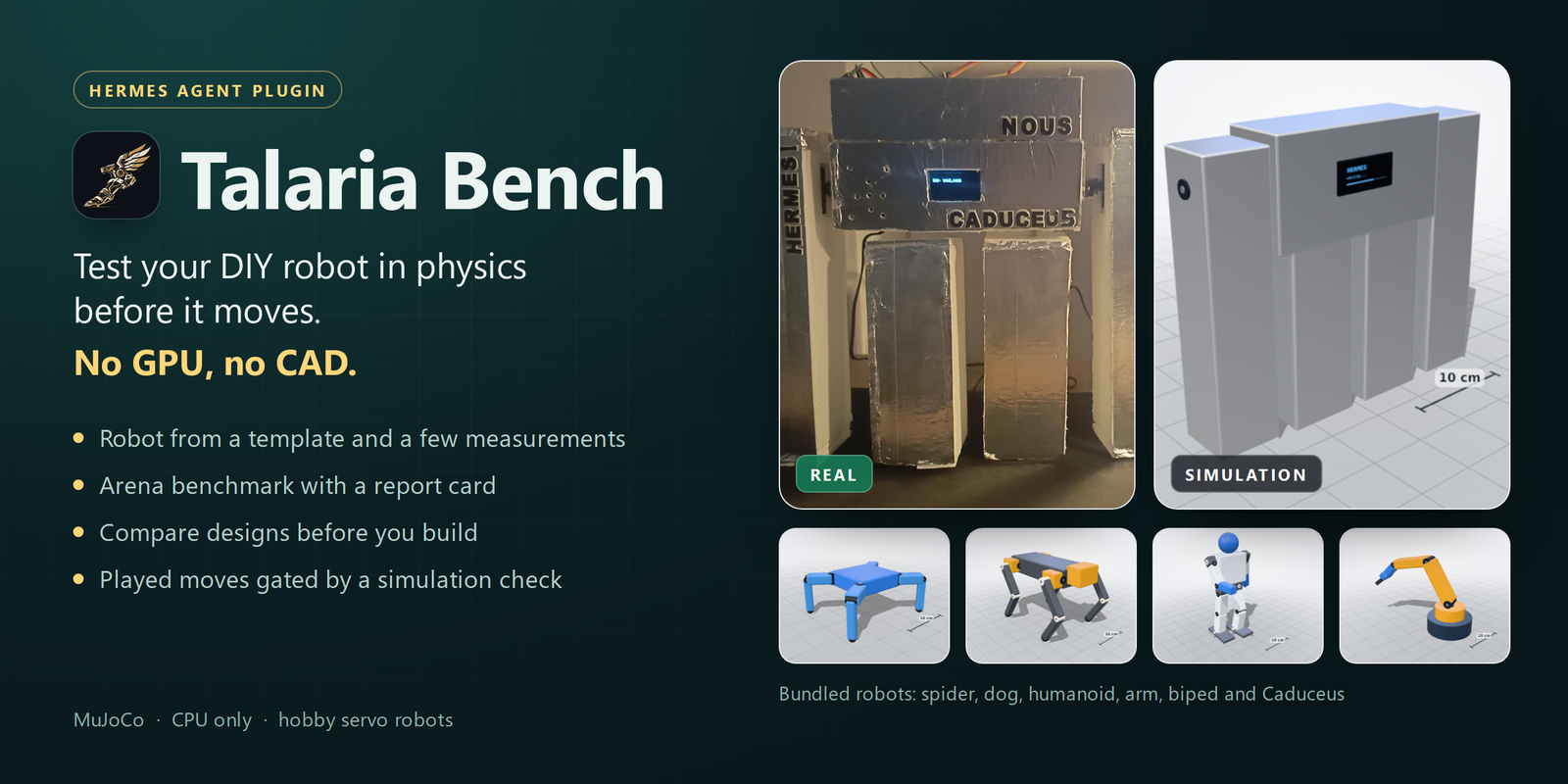
Talaria Bench




Talaria Bench tests your DIY robot in physics before it moves. No GPU, no CAD.
A Hermes Agent plugin for hobby servo robots (SG90, MG90S,
MG996R and friends), built on MuJoCo. In Greek myth, talaria are Hermes's winged sandals: the thing that
makes him move.
- Build your robot from a template and a few measurements, and see it in 3D inside Hermes, next to its photo.
- One click: flat ground, ramp, obstacles, push and slippery-floor tests, with a report card that says why it fails.
- Compare design variants (longer legs, stronger servos) before you build or print anything.
- Arena: put a robot and a resized, reweighted or re-servoed version of it on the same ramp, bar or push test and
watch both side by side in the same world. - Moves Hermes plays on your robot (
robot_play,robot_pose) are screened in simulation first.
Demo video: https://x.com/Devran1An/status/2120553652175736847 ·
Article: https://x.com/Devran1An/status/2120555033800348074
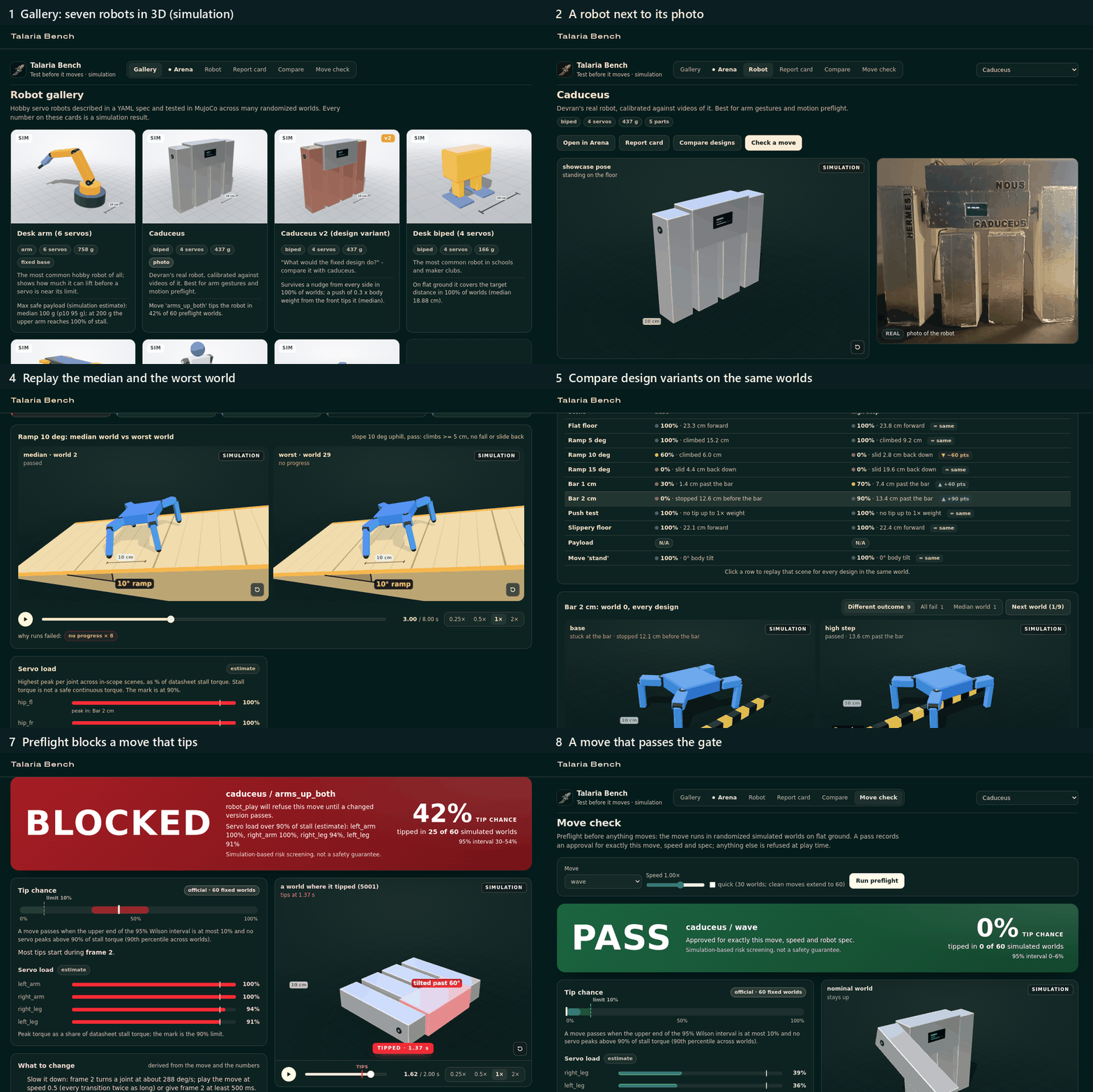
Every number Talaria Bench shows comes from simulation and is labelled that way. It is
simulation-based risk screening, not a safety guarantee.
Quick start
hermes plugins install devorun/talaria-bench --enable --yes-deps
This clones the plugin, installs its Python dependencies (mujoco, numpy, pyyaml) into Hermes's
environment and enables it. Without --yes-deps Hermes asks before installing them.
- Hermes Desktop: Capabilities -> Plugins -> make sure Talaria Bench is enabled, then open the
Talaria Bench page in the sidebar (light and dark themes). - Web dashboard: run
hermes dashboardand open the Talaria Bench tab. - Chat:
/talaria demogives a guided tour without hardware: a quick benchmark of the spider, then the
preflight of two Caduceus moves (one is blocked, one passes) and a play on the virtual robot.
/talaria status | gallery | bench | report | check | play | demo;/talaria helplists them. - Tools: Hermes calls 14 tools on its own:
robot_list,robot_define,robot_show,bench_run,
bench_status,bench_report,bench_compare,move_check,move_save,move_list,robot_play,
robot_pose,robot_stop,robot_status. - Terminal:
hermes talaria status | gallery | bench | report | check | play | demo | firmware | sim
(hermes talaria --help).
Or just ask Hermes: "Benchmark the spider and tell me where it fails", "Add my robot" (with a photo),
"Write a dance for Caduceus and check it".
A two-minute tour
Arena
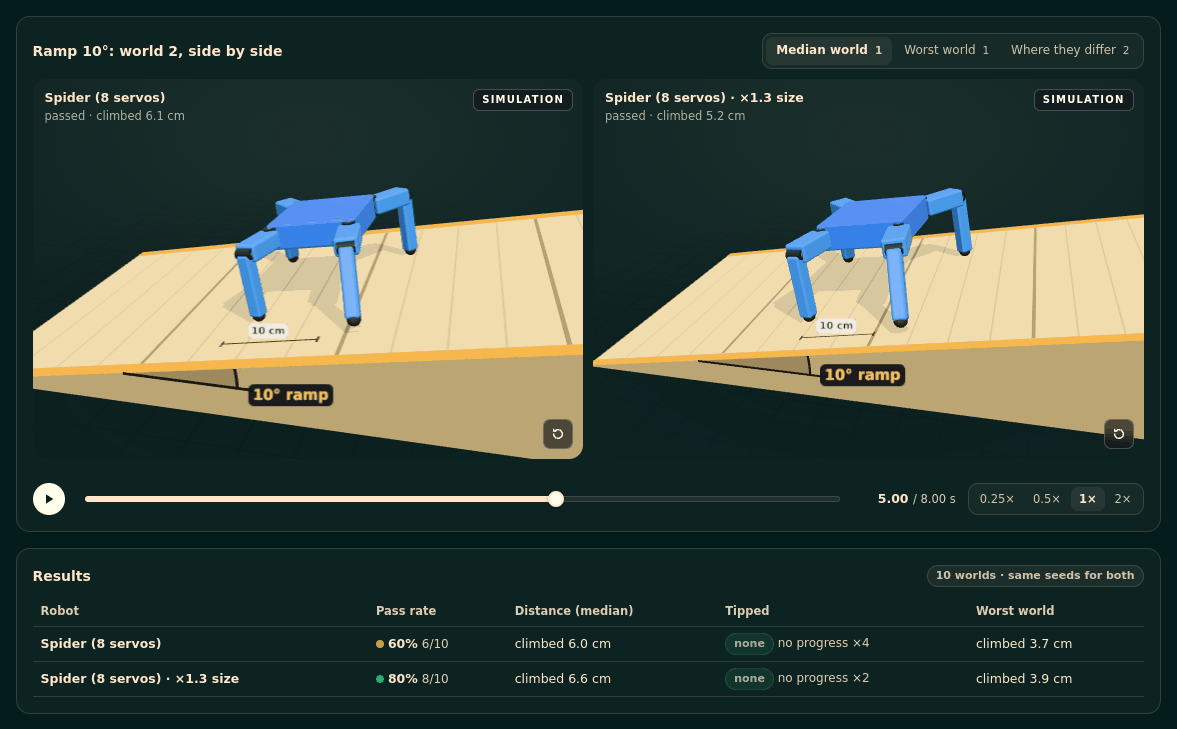
The Arena page puts a robot and one changed version of it (size x0.6 to x1.8, total mass, servo model) on one
scene: flat floor, a 5, 10 or 15° ramp, a 1 or 2 cm bar, a push, a slippery floor or an arm payload. Both run
in the same 10 randomized worlds. Their 3D replays play side by side in one world (the median world, the worst
world, or a world where the two differ), with the terrain drawn, and a results table gives each one's pass rate,
median distance, tip count and worst world. Without a change it simulates the robot alone. An Arena run never
touches the robot's report card.
How it works
- Robot spec. Parts (box, cylinder, sphere), sizes in cm, masses in g, joints with ranges
and hobby servo models from a small servo catalog. See docs/robot-spec.md. - Arena benchmark. Flat floor, ramps of 5, 10 and 15 deg, bars of 1 and 2 cm, a push test (0.05 to 1 x body
weight from four sides), a slippery floor (foot friction 0.08-0.15), payload steps for arms, and the
robot's own moves. Each scene runs in 30 randomized worlds by default (10 withquick; 10 to 200 on
request). Benchmarks run as background jobs with progress and a log (bench_status); a full benchmark of
one robot takes about one to two minutes on a 4-core laptop CPU. - Report card. GREEN / AMBER / RED per scene with the pass rate, the median and p10 of the scene's
main metric, the worst world, the top failure reasons and servo load estimates. Distances count only
steady progress, so a one-time lurch earns nothing. Click a scene to replay its median world and its worst
world side by side. Scenes a model cannot simulate honestly (Caduceus's foam-foot walk, for example) are
marked OUT OF MODEL SCOPE instead of being scored. Format: docs/report-format.md. - Design comparison. Up to six variants (
legs +1.5 cm, another servo, more mass) on the same worlds. - Moves. A move is a list of keyframes (time and joint angles). Hermes can write one (say, a dance for
your robot), check it and save it withmove_save;move_listshows a robot's moves. - Motion preflight. A move runs in 60 fixed randomized worlds. It passes when the upper end of the
95% Wilson interval of its tip chance is at most 10% and no servo peaks above 90% of its stall torque
(90th percentile across worlds). A quick check starts with 30 worlds and extends a clean run to 60; it
never blocks on fewer than 30. Speed-limit stretches, self and ground collisions are reported too. The
Move check page also checks a custom pose: go there, hold it, come back home. - The gate. A
pre_tool_callhook letsrobot_playandrobot_posethrough only when that exact
move (frames, loops, easing), speed and robot spec passed. Any change needs a new check. The same rule
holds for/talaria playandhermes talaria play.
Robot gallery
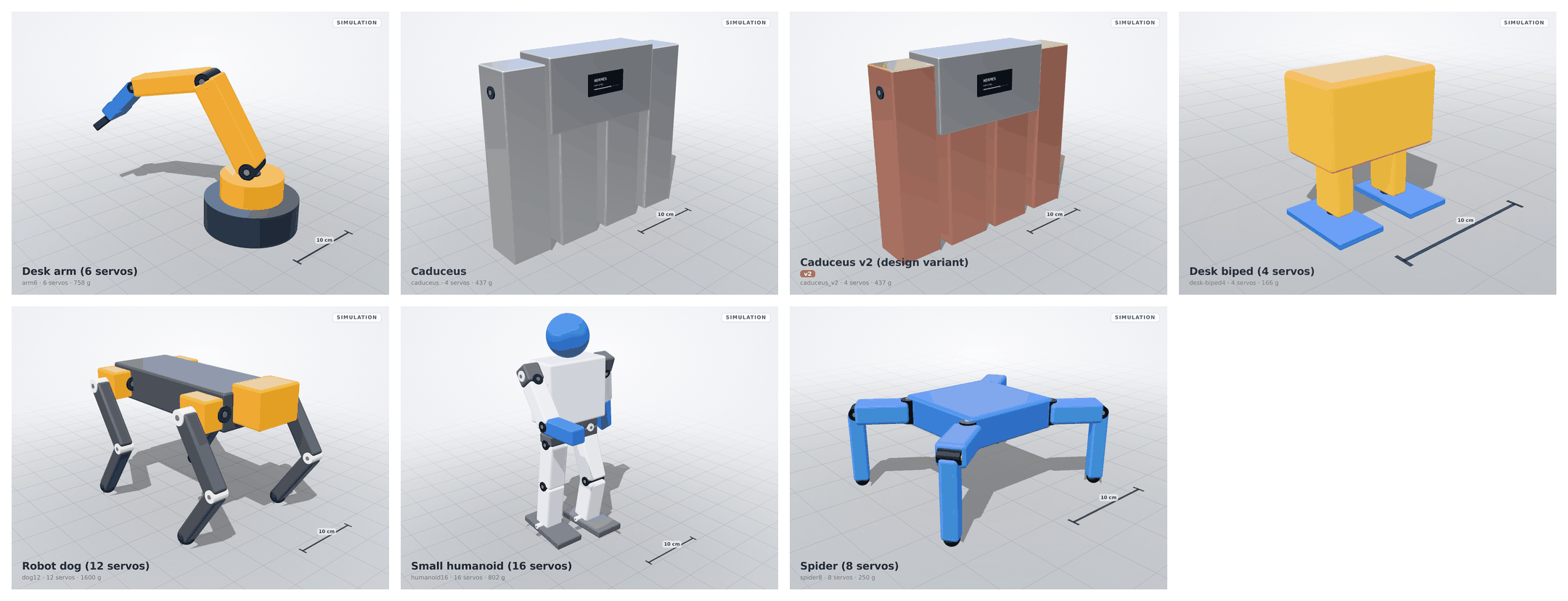
Seven robots ship in examples/robots/. Headlines from the arena benchmark (simulation, 30 worlds per
scene; full cards in examples/reports/, more in docs/gallery.md, how
Caduceus was calibrated in docs/calibration-caduceus.md):
| Simulation render | Robot | Servos | Mass | Benchmark headline (simulation) |
|---|---|---|---|---|
| | spider8 Spider | 8 | 250 g | Covers the flat-ground target distance in 100% of worlds (median 23.3 cm); climbs 10 deg in 73%, slides back on 15 deg. |
| | dog12 Robot dog | 12 | 1600 g | Trots the flat target in 97% of worlds (median 45.1 cm); on the slippery floor its feet skate. |
| | desk-biped4 Desk biped | 4 | 166 g | Walks the flat target in 100% of worlds (median 18.9 cm); stuck at both bars. |
| | humanoid16 Small humanoid | 16 | 802 g | dance_safe stays upright; dance_risky tips it in 95% of 60 preflight worlds. |
| | arm6 Desk arm (fixed base) | 6 | 758 g | Max safe payload median 100 g (p10 95 g); at 200 g the upper arm reaches stall (estimate). |
| | caduceus Caduceus | 4 | 437 g | arms_up_both tips it in 42% of 60 preflight worlds; wave passes. Walking is out of model scope. |
| | caduceus_v2 Caduceus v2 (design variant) | 4 | 437 g | Tighter joints and a lower centre of mass: survives a nudge from every side in 100% of worlds. |
Bring your own robot
- In chat, with a photo. Send Hermes a photo and say "add my robot". The bundled
robot-onboarding
skill reads the photo for structure only (family, limbs, servos) to pick the closest template, asks for
the three or four measurements that matter most, and builds the model from that template and your
numbers. Sizes and masses come from you; anything estimated is named as an estimate. The 3D model is not
made from the photo: the photo is shown next to it for comparison. - From a template.
block_robot(Caduceus-like),biped4,quadruped(8 or 12 servos),hexapod,
arm,humanoid, each with a few numbers. The dashboard has a New robot form for the same templates. - From a spec file. Write the YAML yourself: docs/robot-spec.md. Your robots are
stored in the plugin data folder; the bundled examples are never modified (edits make your own copy).
Real hardware
Several layers stand between a move and the servos: the preflight gate (for robot_play and robot_pose),
the robot token, the spec-hash check, the firmware's own angle and speed limits, and a slow return to home
before every move. Together they lower the risk; none of them is a guarantee (see
Scope and assumptions).
- Firmware.
firmware/talaria_robot/is an ESP32 + PCA9685 sketch.hermes talaria firmware <robot> <folder>writes the sketch plus arobot_config.hgenerated from the robot spec (I2C pins, servo
channels, joint ranges, speed limits, home pose, spec hash) and a random 128-bit robot token, and prints the
hermes config set TALARIA_ROBOT_TOKEN <token>line. Copysecrets.example.htosecrets.h, add your
Wi-Fi, build with the ESP32 core and the Adafruit PWM Servo Driver and ArduinoJson 7 libraries.
Moves are sent as data (keyframes) to the robot's small HTTP API (/info,/state,/play,/pose,
/stop), so there is no reflashing per move. The firmware clamps
every angle to its joint range and stretches every transition to the joint's speed limit on its own. - Settings (Hermes Desktop: Settings -> Plugins -> Talaria Bench, or
plugins.entries.talaria-bench.settings):robot_url(for examplehttp://192.168.1.8),
real_robot(which spec the robot is),robot_token(a Hermes secret,TALARIA_ROBOT_TOKEN),
timeout_s,check_worlds. - A person approves every real move. A preflight is a simulation check, not consent. When the agent
callsrobot_playorrobot_posewithtarget: realand the move passed its preflight, Hermes shows
its approval prompt (in the terminal, or as an approval card on a messaging platform) and the move waits
for your answer; a denial or no answer blocks it. Cron jobs,hermes chat -qand other unattended runs
refuse real moves (Hermes'sapprovals.cron_mode/single_query_mode/unattended_mode,denyby
default). A "session" or "always" answer covers only that exact checked move on that robot. Hermes's
own/yoloandapprovals.mode: offskip this prompt, as they skip every approval./talaria play --real,hermes talaria play --realand the Move check page's "Play on real robot" button are typed or
clicked by you, so they are the confirmation. - What the plugin checks before a real move. The robot must report the same robot name and joints
as the checked spec and the same spec hash in its firmware; a robot without a token is refused. Both
refusals can be turned off explicitly (allow_firmware_mismatch,allow_unauthenticated_robot, both
off by default).robot_stopandrobot_statusalways work. - Every move starts from home.
robot_playandrobot_posefirst ease the robot back to its home
pose at half of each joint's speed limit (taking at least 3 seconds) and wait until it is idle there, then play.
The preflight simulates moves from the home pose, so this keeps the real start pose equal to the
simulated one. This return to home is not simulated itself. It is skipped when the robot already
stands still at home; a robot that does not reach home in time gets no move.robot_stopwith
home: truealso moves the robot home without a preflight (stop is the safety action). - No hardware? Everything works with the virtual robot:
target: virtualin chat, the Play buttons
in the UI, orhermes talaria simfor a local virtual robot with the firmware's HTTP API.
The Caduceus story
Caduceus is Devran's foam-board robot: an ESP32, a PCA9685 driver and four MG90S servos. Its model was calibrated against videos of the real robot, which also revealed the firmware's real servo speed. On the real robot, the gate held back a move the simulation predicted would tip it, and approved moves (a left-arm lift, a wave) played exactly as checked.
Scope and assumptions
- Rigid-body approximation: foam, soft feet and cable drag are approximated; servo loads are estimates.
- Results are probabilities across randomized worlds. A PASS lowers the risk; it is not a guarantee.
- Tested on real hardware: on Caduceus, fast two-arm moves where an arm drags on the table can still tip the robot even when the simulation passes them, because arm-to-surface friction on soft foam is not modelled yet. Use slow moves and keep a hand nearby on first runs.
- Walking gaits are outside the model's scope today.
- arms_up_alternating passed simulation but tipped the real Caduceus during testing, because arm-to-table friction on the foam body is not modelled yet.
- Talaria gates robot_play and robot_pose with exact-motion preflight checks. The automatic return to home, before a move and on robot_stop, is speed-limited (at least 3 s) but not simulated on its own.
Security and privacy
What Talaria Bench does on your machine and network (the disclosures the Hermes plugin catalog asks for):
- Robot motion. Talaria gates robot_play and robot_pose with exact-motion preflight checks. The automatic return to home, before a move and on robot_stop, is speed-limited (at least 3 s) but not simulated on its own.
- Approval of real moves. An agent's
robot_play/robot_poseon the real robot goes through Hermes's
approval prompt after its preflight passes, and is refused in cron and other unattended runs (see
Real hardware).robot_stop, including its slow return home, is never held back. - Preflight approvals expire. A stored approval is tied to the robot spec, its hardware mapping, the
exact move and speed, the model builder's version and the preflight's rules (world count, seeds, tip and
load thresholds). An update that changes any of them needs a newmove_checkbefore a move plays. - Files. It writes only inside the plugin data folder Hermes gives it,
$HERMES_HOME/plugin-data/talaria-bench/(outside Hermes:~/.cache/talaria-bench/): your robots and
their photos, saved moves, preflight approvals, benchmark jobs (command, log, progress), reports and
result caches. The 3D trace cache is not pruned automatically; delete thecachefolder to free space.
hermes talaria firmwarewrites the firmware into the folder you name. - Reading your files.
robot_definewithphoto_pathreads one image file (JPEG, PNG or WebP, at
most 10 MB) that must be under your home folder or the Hermes folder, and copies it into the data
folder. It reads no other files of yours. - Background processes. Benchmarks and design comparisons run as background Python subprocesses of
the plugin's owndevcli.py, each with a worker pool of up to N-1 CPU cores (at most 8). At most two
jobs run at once, each limited to 10-200 worlds per scene. A job's environment is built from an
allowlist, not copied from Hermes:PATH,HOME,USERPROFILE,LANG,LC_*,TMPDIR,TEMP,TMP,
SYSTEMROOT(Windows only),TALARIA_MP_START,PYTHONUTF8andPYTHONIOENCODING(Hermes runs Python
in UTF-8 mode and the job log is read as UTF-8),MUJOCO_GL(MuJoCo reads it on import), plus the
PYTHONPATHandTALARIA_CACHEthe plugin sets. Provider API keys and other secrets in the Hermes
environment never reach a job or its workers. - Local servers. Playing on the virtual robot starts a small HTTP server on
127.0.0.1on a random
port, in the Hermes process, with no token (only local programs can reach it).hermes talaria sim
listens on127.0.0.1:8765unless you pass--host. The virtual robot accepts a POST only with
Content-Type: application/json(anything else gets 415), so a web page cannot drive it with a blind
form ortext/plainrequest. - Network. Plain HTTP requests (bypassing HTTP proxies, since the robot is on your local network) go
only to therobot_urlyou set, and only fortarget: real. The robot token travels unencrypted on
your LAN. The firmware joins your Wi-Fi, serves HTTP on port 80 and announces itself over mDNS. - Credentials. The only credential is the optional robot token, stored and read through Hermes
secrets (TALARIA_ROBOT_TOKEN). Your Wi-Fi password stays in the firmware'ssecrets.hon your
machine and is never read by the plugin. - No third-party services, no telemetry, no downloads, no shell commands. Nothing is sent anywhere
else, and the plugin never updates itself.
Development
python -m pip install "mujoco>=3.1.6,<5" "numpy>=1.26,<3" "pyyaml>=6.0,<7" pytest fastapi httpx
python -m pytest -q                  # the full suite
python -m pytest -q -m "not slow"    # what CI runs on every OS
- The folder name has a dash, so tests and
devcli.pyload the plugin as the packagetalaria_bench.
python devcli.py --helpruns benchmarks, comparisons and calibrations without Hermes. - UI: one source in
ui/srcbuilds both the Desktop page (desktop/plugin.js) and the dashboard tab
(dashboard/dist/index.js):cd ui && npm ci && npm run build. The bundles are committed unminified
so they can be reviewed. - CI (
.github/workflows/tests.yml): pytest on Ubuntu, macOS and Windows with Python 3.11, 3.13 and 3.14,
plus the full suite with thespawnstart method. hermes plugins validate . --install-depschecks the plugin the way the catalog does.- README media:
scripts/render_gallery.py(robot renders with the app's renderer),scripts/ui_screens.py
(screenshots through Playwright; use a temporaryHERMES_HOME),scripts/readme_media.py(banner, tour GIF)
andscripts/diagrams.py(the SVG diagrams). They need Playwright and Pillow, which the plugin does not.
Licence: MIT. The UI bundles include three.js (MIT); see
THIRD_PARTY_NOTICES.md. MuJoCo (Apache-2.0) is installed as a dependency, not
bundled.
README from the reviewed commit ca0b44d; it updates when the author re-pins.


