bablobanov
hermes-agent-telegram-dashboard
English · 简体中文

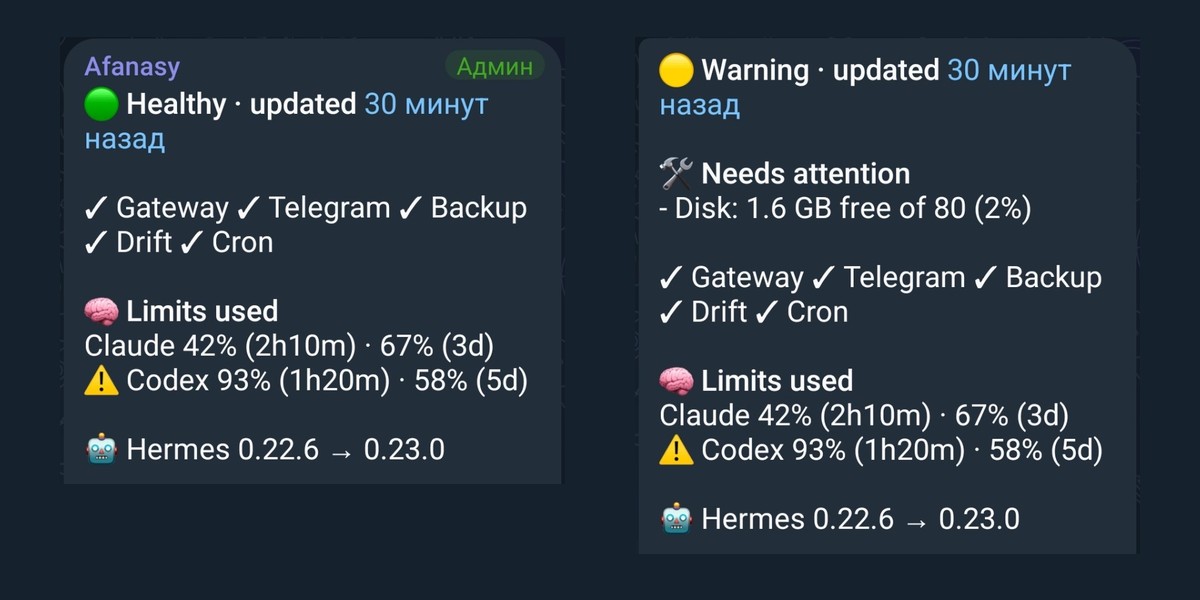
1.1.1 on Telegram for Android, demo data. The time in the top line is Telegram's own, written in
the language of the client ("What the message shows").
Read-only status dashboard for Hermes Agent as one
pinned Telegram message, edited in place on a schedule. No Mini App, no LLM call.
The updater lives inside the gateway as a plugin (plugin/): the bot token never leaves the
engine, the message is edited through the engine's own Telegram adapter. A cron tick with a
separate bot (python -m telegram_dashboard) remains as the fallback for installations without
the plugin API. That standalone CLI is for running from cron outside Hermes and the plugin never
runs it: it reads the bot token from the environment variable its JSON config names
(HERMES_DASHBOARD_BOT_TOKEN by default) and calls api.telegram.org itself (sendMessage,
editMessageText, pinChatMessage).
What the plugin reads, writes and sends, and which engine internals it touches, is in one
place: Disclosure.
Install
The plugin is listed in the Hermes Plugin Catalog
under its manifest name; the catalog pins the reviewed commit, and the install checks out exactly
that commit into the gateway's plugin directory:
hermes plugins install telegram_dashboard_probe
The plugin folder plugin/telegram_dashboard_probe/ is self-contained: the telegram_dashboard
package lives inside it (module paths below, like telegram_dashboard/external.py, are relative to
that folder). Without the catalog, one line puts the folder in place from a clone:
git clone https://github.com/bablobanov/hermes-agent-telegram-dashboard.git && cd hermes-agent-telegram-dashboard && install -d "${HERMES_HOME:-$HOME/.hermes}/plugins" && cp -r plugin/telegram_dashboard_probe "${HERMES_HOME:-$HOME/.hermes}/plugins/"
Either way, then enable it in config.yaml (plugins.enabled, the chat_id setting; the table
under "Deploying on a gateway" below), restart the gateway, pin the message it sends. Nothing is
installed into the engine's environment; SHA256SUMS in the repository root lists every file of
the plugin folder, so sha256sum -c SHA256SUMS run from plugin/ (or from the gateway's
plugins/ directory) verifies a copy.
What the message shows
One phone screen in blocks, a blank line between two, then the details, which Telegram shows as
a collapsed quote. The example is the showcase state as python -m telegram_dashboard --demo 14
prints it, the plain form; the message is the HTML form of the same text, where the top line and
the headings are bold, the headings keep their case (🧠 Limits used) and the details stay
folded until tapped. The width is a guide, not a law: a phone sets a proportional
font, so a line fits or wraps by what is on it (an emoji or a Cyrillic letter is wider than a
Latin one). An event names a cron job by its label in full and a long one wraps; the time of a
limit is never rounded for the width:
🟢 Healthy · updated Sep 26 21:00 UTC    the status and when the data was read; the
                                        pinned bar shows this line (under the
                                        freshness banner when that is up), and
                                        Telegram may say "3 minutes ago" instead of
                                        the date

✓ Gateway ✓ Telegram ✓ Backup ✓ Drift ✓ Cron
                                        what works, in one row: the gateway process,
                                        the Telegram channel, the last state.db backup,
                                        config drift, the cron ticker and its jobs

🧠 LIMITS USED                           a line per provider: the spent share and the
Claude 42% (2h10m) · 67% (3d)           time to its reset of every window, in the
⚠️ Codex 93% (1h20m) · 58% (5d)          provider's own order; ⚠️ from 90% spent; a
                                        provider without a number never shows a zero,
                                        the reason is in the details; one not set up
                                        here has no line, and Gemini has one only
                                        while Google's last refusal is recent

🤖 Hermes 0.21.3 → 0.21.5                the version the gateway runs → the latest
                                        upstream release; 🆕 and its age for a day
                                        after a release came out

DETAILS                                 a collapsed quote in HTML, in full in plain
                                        text: a group per source, a blank line
                                        between two (the plans, logins, providers
                                        not configured and Gemini refusals; the
                                        agent's rules; its memory; the Telegram
                                        channel; backup, drift, the disk and cron;
                                        the Hermes version; every "no data" with
                                        its reason)
Gemini refusals seen by Hermes: none

✓ Telegram last update seen Sep 26 20:30 · polling ok 20:58
Telegram send errors: none in the log

✓ Backup Sep 26 11:00 · 10 h ago · integrity ok
✓ Drift 0 of 481 · checked 08:00
Disk: 61 GB free of 80                  the partition HERMES_HOME lies on; under
                                        10% of it or 2 GB, ⚠️ here and an event
Cron 27 active · 3 paused · ticker 20:58

Hermes 0.21.3 of Sep 14, latest 0.21.5 of Sep 24
2 releases behind · checked Sep 26 21:00

Screen Sep 26 21:00 UTC                 the screen's time, the confirmation, the odd
Confirmed 20:58                         data minute, the period, the coverage
Period 5 min
Profiles 1/1 · sources 8/8

Dashboard 1.1.1                         the dashboard's own version, last
When something is off, 🛠 Needs attention comes between the top line and the ✓ row, and
❔ Not checked after the row, before the limits (the state --demo 21, here with no Gemini log
on the installation and the cron history not answering):
🟡 Warning · updated Sep 26 21:00 UTC

🛠 NEEDS ATTENTION                       up to five events in the collectors' order,
- Cron run failed: daily-digest         then the line of every item of the row that
Cron ⚠️ 1 of 27 failing                 is not well, even one an event already names

✓ Gateway ✓ Telegram ✓ Backup ✓ Drift   the row keeps what is well
❔ Not checked: Gemini log (not on this installation), cron history (unavailable)
                                        what the screen could not check: a source not
                                        on this installation, one that did not answer
                                        or is stale, profiles not seen
The limits are a line per provider that has one (⚠️ Codex 93% (1h20m) · 58% (5d),
Claude · no data with its reason in the details). The cron lines sit in the details with backup,
drift and the disk, and no table of the jobs is drawn: the rich view of 1.1.0 had one ("Rich view: retired
in 1.1.1" under "The plugin"). In HTML the top line and the headings are bold and the details are
one collapsed quote; in plain text the headings are upper case and the details are shown in full.
Both forms come from the same snapshot.
The dashboard is one pinned message in the agent's private chat or in a topic of its
group. The plugin inside the gateway edits it in place every few minutes through the engine's
own Telegram adapter, so the pinned-message bar at the top of the chat always shows the current
top line (the freshness banner first, while it is up), and the message under it carries the
rest: gateway and Telegram state (and whether
the connected channel is deaf), the last backup, config drift, the cron ticker and its jobs,
whether the agent sees its rules (the context files in its system prompt), whether its
memory works (the notebooks against their limits, the writes waiting for approval), the
account limits of every provider with the time to each reset, the
Hermes version the gateway runs next to the latest upstream release, and a collapsed details
block with the reasons and the timestamps. Nothing to open, nothing to install
on the reader's side, no second bot, no LLM call: it is there every time the chat is opened.
1.1.1 on Telegram for Android, a demo state; more screens, the details open among them, are in the
repository's README.
Up to five events that need attention come right after the top line, under 🛠 Needs attention.
Account limits: Claude and Codex from the Hermes usage facade (see "Limits" below), and any
other provider from a local process of your own (see "External limit sources"). Gemini has no
number without billing, never a zero: it has a line only while the last time Google refused the
engine a call is recent, and the details always say that last refusal (see "Gemini refusals from
the engine log"). A provider this installation shows no sign of having (Claude or Codex without
an account here) has no line at all, and the details name it once: Not configured: Claude (see
"Limits: three kinds that never mix"). The one-screen layout moved lines to the
details rather than dropping them: a line without a number still names its reason there. 1.1.0
does drop two limit lines, the ones the dashboard used to read from vendor CLIs' private
endpoints; an operator's limits_sources can bring such lines back (see
External limit sources).
A source that cannot prove a value says unknown. A source that does not exist on this
installation says unsupported. Both lower coverage; neither turns green (one exception, the
cron run history: it only adds to a line that stands on its own file, see "The cron line").
Coverage itself (Profiles 1/1 · sources 8/8) lives in the details and comes up to the screen
only when it is incomplete, as one line:
❔ Not checked: Gemini log (not on this installation), Mistral limits (stale), profiles 2/3 (and
2 sources unavailable for failed sources the line does not name). An item of the ✓ row with no
source on this installation, or no data from a source that line names, is left out of the row
and said by that line once. A provider that is not configured here is not counted at all: no
line, no place on the ❔ line or in the coverage; when neither Claude nor Codex has a line, the
limits source itself is gone, so an installation without either does not stay grey (on the
launch profile of a gateway that multiplexes profiles, where no silence is judged,
limits_providers says which to leave out). The
details close with the dashboard's own version (Dashboard 1.1.1), so the installed copy can be
told from the pinned message at a glance.
Rich view: retired in 1.1.1; the setting rich does nothing ("Rich view: retired in 1.1.1"
under "The plugin").
Freshness is a load-bearing requirement
A pinned dashboard with a dead updater looks exactly like a calm system. Therefore:
- the message always carries the absolute data time and the last Telegram confirmation time
- a message not confirmed for two periods gets a loud banner on its first line; a confirmation
within one period plus a little slack (min(60 s, period/2), timer jitter of an updater that
reads its own record one period later) still counts as confirmed python -m telegram_dashboard --config c.json --checkreports message freshness with exit code
0 (confirmed), 1 (lagging), 2 (stale, lost, never) for an external watchdog. A confirmation
time ahead of the clock by more than a minute isstale, not "very fresh"- the check reads the record of whichever path delivers:
plugin_state_pathfor the plugin
(the engine'splugin-data/<namespace>/state.json), otherwisestate_pathof the cron tick.
The two paths never write the same file, and a check pointed at the wrong one saysnever
message is not modified from Telegram is treated as a confirmation, not a failure. A missing
message is logged at ERROR, recorded, recreated once, and announced in the new message.
Compatibility across Hermes versions
The dashboard probes capabilities, never version numbers. The version line shows a number and
decides nothing by it (see "The Hermes version line"). telegram_dashboard/compat_matrix.json
records per source how it is probed and on which versions it was verified. A new release lowers
coverage and names what is missing instead of breaking.
What "verified" means here, honestly. Supported is Hermes 0.22.2 or newer (the floor below), and
these are the three releases the CI engine job runs the whole suite against:
| Hermes | How |
|---|---|
| 0.22.2 (v0.22.2, d923a5eb48) | the production engine and the floor: the whole suite against the engine installed from its own lock (Python 3.14, the telegram extra) with REQUIRE_ENGINE_TESTS=1, so a test that skips there fails the job unless tests/conftest.py allows it; the plugin path against the real engine objects (tests/test_probe_plugin.py, tests/test_probe_reload.py: send, the HTML edit through _edit_text, an edit the engine holds back for a busy chat, a lost message, a reconnect, a forced re-discovery, served profiles, the engine's own plugin discovery), the engine's own requires_hermes gate put to the manifest at the job's release (the checkout is a commit with no tags, so the engine itself reports unknown, which passes any requires_hermes; the job hands the test the release from its matrix as HERMES_ENGINE_TAG), the version line, the key of an external source through the engine's get_secret (not yet on a live gateway), the rules line and the memory section against the engine's own functions (compat_matrix.json, the 0.22.2 entries) |
| 0.22.7 (v0.22.7, b200f5bc60) | the last 0.22 release: the same suite in the same job (the 0.22.7 entries) |
| 0.23.0 (v0.23.0, 2bd378ed1b) | the current release: the same suite in the same job (the 0.23.0 entries) |
Sources that run does not reach (the usage facade, which would call the providers' APIs, the
gateway state, the cron files, the Telegram counters, Gemini's log) keep the verification their
rows in the matrix name. Up to 1.0.0 the plugin was verified on the engines below, all older than
today's floor; the rows stay as the record of what was checked and how, not as a claim of
support:
| Hermes | How |
|---|---|
| 0.21.1 (2237be3559) | the plugin path executed against the real engine objects (tests/test_probe_plugin.py) and a continuous pilot on a live gateway since 2026-09-11 (1.0.0 on it) |
| 0.21.3 (v2026.9.14) | the pilot gateway after its update; the adapter's _edit_text read in the engine source; the plugin edits the pinned message as HTML through _edit_text on that gateway since 2026-09-25 (screen_format: html in its record, no fallback to plain taken); the public edit_message read in the source takes no parse mode, so the signature check picks _edit_text (html_verb: _edit_text); for 0.9.0 the cron files, the
ticker stamps, the run history's schema and the adapter's traffic counters read in the engine
source (compat_matrix.json, rows cron, cron_runs, telegram_traffic); for 0.10.0 the saved prompt in state.db, its context block and the runtime line naming the agent's directory read in the source, built by the engine's own functions and read back in tests/test_context_files_engine.py (row context_files) |
| 0.21.5 (v2026.9.24) | _edit_text and edit_message read in the engine source: same signatures and bodies as 0.21.1 and 0.21.3; for 0.10.0 the saved prompt's context block and runtime line read in the source and built by the engine's own functions in tests/test_context_files_engine.py, as on 0.21.3 (row context_files) |
| 0.21.6 (v0.21.6, 2026-10-08) | the whole suite against the installed engine on Python 3.14.6, the interpreter 0.21.6 requires; hermes plugins validate: ok: true, no warnings; every engine touchpoint of every source read against 0.21.5 (the matrix's 0.21.6 rows): the same or compatible, except three the plugin now reads as 0.21.6 does (the config through the engine's own YAML parser, the version without a constant, a context file's BOM); the plugin loaded by the engine's own plugin discovery in process, the default, and refused under plugins.isolation: host (below) |
| main (485979ddf4, 2026-09-28) | edit_message and _edit_text read in the engine source: same signatures, the public verb still without a parse mode |
| main (6ec05205a9, 2026-09-30) | the cron files (the heartbeat now carries the pid; the first token is read), the run history's schema and the adapter's traffic counters read in the engine source: the same fields and attributes as 0.21.3 |
| 0.20.5 | read in the source of a desktop install: the sources degrade, the plugin API is absent (see the floor below) |
Anything else is not verified. On a release after 0.23.0 the sources are probed at runtime and
degrade to unsupported; nothing here promises "works on all versions".
Delivery has a floor: Hermes 0.22.2. It is the production engine and the oldest one the
plugin is tested against; the manifest says requires_hermes: ">=0.22.2". From 0.21.3 on the
engine skips a plugin whose requires_hermes rejects the running version before it imports it
(Plugin '…' skipped: requires hermes >=0.22.2, running 0.21.6 in the gateway's log), so on an
older engine nothing is delivered and the only path is the fallback cron tick with its own bot
token. An engine that cannot tell its own version (a checkout with no tag and no install stamp)
lets the plugin through that gate; below 0.22.2 it is not supported all the same. 0.21.x has the
plugin API and ran the plugin up to 1.0.0 (the record above), but is no longer tested. 0.20.x
lacks the API itself: PluginContext.register_platform_handler and the adapters'
_wire_plugin_handlers are absent there (checked on a 0.20.5 install: not present anywhere in
the tree; spawn_task and PluginState exist but nothing would ever call the factory). The
compatibility principle still holds for the sources (gateway state, limits, drift degrade per
version); it does not extend to delivery, and this README does not promise otherwise.
In process only. Hermes 0.21.6 added plugins.isolation. Its default, in_process, loads
the plugin into the gateway as before. With plugins.isolation: host the engine runs
third-party plugins in a separate host process and refuses there the one call delivery rests
on, register_platform_handler (its factory receives the adapter's native SDK client): the
plugin does not load, and the engine says so (ctx.register_platform_handler() cannot run in the plugin host; hermes plugins validate reports the verdict in_process). The plugin
cannot fix that on its side: the message is edited through the live Telegram adapter, which
stays in the gateway. A gateway under host has the fallback cron tick with its own bot token.
Three prohibitions, learned from a predecessor that died of them: no replacement of core files,
no rebinding of engine objects, no post-merge hooks or assume-unchanged. Engine internals are
used only where a capability needs them, and never changed; each one the plugin touches is
named under "Disclosure" below.
Two documented engine modules are imported. Account limits come from
agent.account_usage.fetch_account_usage, a public function the plugin calls the same way on
every verified version, as the gateway's own /usage calls it (in a worker thread, failures
never propagate; limits.py), with two differences: the plugin adds a 45 s deadline /usage
does not have, and it passes the provider's name alone, where /usage also passes the session's
base_url and api_key. Both leave read_only at its default, and the engine may refresh the
account's OAuth token while it answers (an expired login is refreshed whatever read_only says;
the flag only stops Codex's retry after a 401). Each provider is asked once per
facade_refresh_seconds (5 minutes by default; an attempt due within 5 s goes out on the tick at
hand, so a tick that wakes a moment early does not push it a whole period). An import failure
makes the source unsupported. The key of a limits_sources entry is read with
agent.secret_scope.get_secret, so that the active profile's value is the one used
(external.py). Each of the two is a row in the matrix (limits, external_limits), not a
habit. They are not the only engine touchpoints: one undocumented module (hermes_yaml, the
engine's YAML parser), two private values read from modules the gateway already imported and
private members of the live Telegram adapter are listed under "Disclosure".
Disclosure: what the plugin reads, writes and sends
Everything the plugin does outside its own code, in one list; the sections named in quotes
carry the full story.
How it runs
register()registers one Telegram handler factory and an unload callback (ctx.on_unload),
nothing else: no tool, hook, middleware or command.- When the engine's Telegram adapter connects, the factory starts one task through
ctx.spawn_task, one per profile, until the gateway stops or unloads the plugin; a reconnect
adds none. The native SDK client handed to the factory is not used. - A reload of plugins registers the plugin again, and the new registration takes the loop over:
it cancels the earlier task and starts its own throughctx.spawn_task. What it takes over
lives in a registry of the plugin's own insys.modules,_telegram_dashboard_probe_live, a
module object that is not a Hermes module: keyed by the resolved path of each profile's state
file, it holds references to the registration, the adapter and the gateway runner (weak where
the object takes one), the adapter's platform key, the gateway's event loop, the task, the
adapter generation and whether it is the launch profile ("Restarts, reloads and profiles").
Nothing removes the registry: after an unload or a disable it stays in the process, holding
the event loop and the last task, until the gateway exits. - Every tick (
period_seconds, default 60 s) reads the sources below, renders one screen and
edits one message. Slow reads run in worker threads of the gateway's default executor under a
deadline; a thread that misses it runs on until it returns, and its source is not started
again before that.
What it sends over the network
- Telegram, through the engine's adapter only. The message is created with the adapter's public
sendand edited with its publicedit_message; HTML goes through
edit_message(..., parse_mode="HTML")when its signature has that parameter, else through the
adapter's private_edit_text. Nothing goes past the adapter's verbs: no Rich Message and no
raw Bot API call since 1.1.1 (1.1.0 sent the rich view through_bot.do_api_request; "Rich
view: retired in 1.1.1"). These calls have no deadline of the plugin's own. An edit the engine held back for a busy chat
(raw_response{"skipped": true}) is recorded asdeferredand made again on the next
tick. The record keeps the id of the bot that sent the message, and a bot with another id does
not edit it: a new message is sent. A record from before 1.1.0 names no sender: on a gateway
that serves one profile its message is edited and the sender recorded; on a multiplexing one
the launch profile's message is edited the same way, a served profile's (1.0.0 sent it
through the launch profile's bot) is replaced, and while the runner cannot tell yet which
profile it is, the tick waits, at most five minutes from the start, then replaces it. A
replaced message stays in the chat; the plugin pins and unpins nothing ("The plugin",
"Updating from 1.0.0"). - Account limits, through Hermes. While
limits_enabledis on (the default),
agent.account_usage.fetch_account_usage("anthropic")and("openai-codex")are called in one
worker thread with a 45 s deadline, each provider once perfacade_refresh_seconds
(default 300 s, at least 60 s), not on every tick. That engine function asks Anthropic's OAuth
usage endpoint (api.anthropic.com, only for an OAuth login) and Codex's usage endpoint
(chatgpt.com/backend-api/wham/usage, unless Hermes' Codex base URL or a pooled key's route
points elsewhere) with the account's own credentials. To find them it may read, outside
HERMES_HOME, Claude Code's~/.claude/.credentials.json(underCLAUDE_CONFIG_DIRwhen set)
and, on macOS, the login Keychain (it runssecurity find-generic-password), and when Hermes'
own Codex login is missing or its refresh is refused, the Codex CLI's~/.codex/auth.json
(CODEX_HOME). An expired login is refreshed on the way, whateverread_onlysays (the plugin
leaves it at its default; it only stops Codex's retry after a 401): a request to
platform.claude.com(fallbackconsole.anthropic.com) orauth.openai.com, the new token
written as under "What it writes".auth.adopt_external_logins: falsein Hermes'config.yaml
keeps Hermes off the Claude Code and Codex CLI logins. A provider with no sign of an account
here is still asked on that cadence;limits_providersis what stops the asking: a provider it
leaves out is never asked, and with neither Claude nor Codex listed the facade is not even
imported ("Limits: three kinds that never mix"). - GitHub. At most once per 15 minutes (later when GitHub's rate limit asks for it), an
unauthenticated GET ofhttps://api.github.com/repos/NousResearch/hermes-agent/releases/latest
with the last ETag, and ofreleases?per_page=100when Latest names another version than the
last answer. Headers:User-Agent: hermes-agent-telegram-dashboardand
X-GitHub-Api-Version. Proxies from the environment apply; a redirect is followed only within
api.github.com; 10 s socket timeout, 25 s tick deadline, the body cut at 16 MB, an error
answer's body read up to 2,000 bytes to tell a rate limit. No setting turns this check off
("The Hermes version line"). limits_sources, only if configured and whilelimits_enabledis on: up to 4 entries, each
asked with one GET perlimits_refresh_seconds(default 900 s, at least 60 s) at anhttpURL
on127.0.0.1,localhostor[::1]with no credentials in it; no proxy, no redirect, an
answer over 64 KB refused (no more is read), timeout 1 to 120 s (default 20 s), tick deadline
25 s. Any other entry is refused at start and never asked ("External limit sources").- Nothing else: the plugin's own code contacts no other host, opens no port, calls no LLM and
reports no telemetry.
Secrets
- The plugin never reads the Telegram bot token; it stays inside the engine's bot. To tell whose
message it edits it keeps the bot's numeric Telegram id (bot_id), read off the adapter's
private_bot, which holds it from getMe at the bot's start: no request, nothing secret (the
id is the bot's public user id). - The only secret its own code uses is the optional key of a
limits_sourcesentry
(key_env), sent asAuthorization: Bearer <key>. It is read with
agent.secret_scope.get_secret; only where that module does not exist at all (the standalone
CLI outside the engine's interpreter, CI) is the process environment read.
TELEGRAM_BOT_TOKEN,HERMES_DASHBOARD_BOT_TOKENand any name ending in_BOT_TOKENare
refused, and so is a key shorter than 8 characters or one with whitespace or a control
character, which a header cannot carry; nothing is requested then.config.yaml, which can
hold API keys (delegation.api_keyand the like), is parsed whole, so such values pass through
memory unused; none is shown, logged or kept. - Scope. A gateway that serves one profile reads the process environment. On a gateway that
multiplexes profilesget_secretanswers in the profile scope the dashboard's loop was started
in: Hermes connects a secondary profile's adapter inside that profile's scope and the launch
profile's outside any, so a secondary profile's dashboard reads its own key, and on the launch
profile's dashboard a keyed source shows no data withkey not readable outside a profile scope. Names Hermes treats as process-wide (TERMINAL_*,HERMES_TELEGRAM_*,PATHand the
like) come from the process environment even there. The limits facade looks up Claude's
login the same way, so on the launch profile's dashboard of a multiplexing gateway Claude only
ever gets the facade's empty answer; there no provider is taken as not configured by its
silence, and a silent one keeps itsno dataline with the reason ("Limits: three kinds that
never mix"). - Text a keyed source sends back is scrubbed before it is shown or kept:
Bearer <key>or the
key becomes[key], and a text that still holds any 8 characters of the key in a row becomes
[key hidden]. A failed request that carried the key is named by its exception class only.
Known limits: a key the source re-encodes (base64, URL escaping) is not recognised; a key that
is itself a time or a number from 0 to 100 can come back through a time field or
used_percent, which are read as values, not as text; a key equal to a protocol word (a
stateorseverityvalue) is not hidden, as that word does not depend on the key. - A failed request without a key is named the same way,
request failed:with the error's
class alone: an error's text can quote the URL, its query among it. A reason stays in the
record until the source's next attempt. - No key is stored, and a source's URL is not written to the record.
Engine internals it touches
- Imported at call time:
agent.account_usageandagent.secret_scope(documented for
plugins) andhermes_yaml, the engine's YAML parser (not documented for plugins; PyYAML is the
fallback), which the import loads if the gateway has not. - Looked up in modules the gateway already imported, without importing them, and never changed:
hermes_cli's version (as a value of the module, else last through its__getattr__, which
may importhermes_cli.stewardandpm.pathsand reads the install stamp from disk), the
privatehermes_cli.version_info._cached_version_info(itssourceand
base_version, and the module's__file__), and the signature, never a call, of the private
agent.prompt_builder._read_text_with_timeout. - On the live Telegram adapter: the private method
_edit_text(called as above), the private
attribute_bot(only_bot.idread, for the sender; nothing of it called), four private
counters read as
attributes (_updates_received_total,_polling_generation,
_polling_last_progress_monotonic,_polling_generation_started_monotonic), and the public
send,edit_message(its signature too),send_path_degraded,is_connected,platform
andgateway_runner. Of the runner:adapters(the adapters it publishes) and
config.multiplex_profiles(whether it serves one profile). Each private member is a
capability read off the object on every tick; an adapter without it costs a line or a form,
never the tick. - Of the plugin API:
ctx.register_platform_handler,ctx.spawn_task,ctx.on_unload,
ctx.get_configandctx.state. - Nothing in the engine is assigned, patched or replaced; the one module the plugin creates in
sys.modulesby hand is its registry (above), beside what its imports load, and Hermes' own
no core overridecheck, the onehermes plugins validateruns, passes the plugin.
What it reads
Under the profile's HERMES_HOME (the hermes_home setting, else the home of the plugin's own
state file, else the HERMES_HOME variable, else ~/.hermes), only read:
gateway_state.json: the pid and start time,updated_at,gateway_stateand the
platformsentries (state, error code, attention flag, writer stamps); the recorded pid is
probed withos.kill(pid, 0)on POSIX, which sends no signal.config.yaml, parsed whole by the engine's YAML parser, once for the rules line and once for
the memory section; used: thememorylimits, switches,write_approvalandprovider,
skills.write_approvalandgateway.platforms.<name>.skip_context_files.cron/jobs.json, parsed whole; used: each job's id, name, enabled flag, state,paused_at,
schedule, run times,last_statusandfailure_streak, andlast_errorand
last_delivery_errorreduced to a one-word kind.cron/ticker_heartbeatand
ticker_last_successfor their epoch,cron/ticker_last_errorreduced to a kind ("The cron
line").cron/executions.dbandstate.db, openedmode=rowithPRAGMA query_onlyin a worker: the
failed or undelivered runs, never theerrorcolumn; the newest saved system prompt of each
platform the running gateway lists (up to 12), no other session's ("The rules line"). Nothing
in them is written by the plugin (SQLite may still keep its-shmfile current for a database
in WAL mode).logs/errors.log, the last 256 KB every tick (for the Gemini line the whole file, up to 4 MB,
until its first successful read): Gemini HTTP 429 lines (time, limit, retry, model), the
engine'sFailed to send Telegram messagelines (time) and, with a memory provider
configured, the warnings about it (time, whether one says unavailable).memories/MEMORY.mdandmemories/USER.md(up to 4 MB each, to count characters); the names
and times of everypending/memory/*.jsonandpending/skills/*.json, and of the first 2,000
memory ones (up to 256 KB each) the action, target and length of each add; the time of
skills/.curator_ledger.jsonl("The memory section").- The partition
HERMES_HOMElies on: its size and the space the gateway's user may still
write, oneshutil.disk_usagecall (statvfs) every tick; no file is opened ("The disk
line").
Outside HERMES_HOME:
- The project context files the engine would load, from the directory the saved prompt names,
else the engine'sTERMINAL_CWD, else the gateway's working directory:.hermes.mdor
HERMES.mdthere or in a parent up to the git root, theAGENTS.override.md/AGENTS.md/
agents.mdchain from the git root down to it,CLAUDE.mdorclaude.md,.cursorrulesand
.cursor/rules/*.mdcthere; any directory on the host, links followed. Finding them, the
plugin checks for.gitin that directory and each parent and for the
engine's own source tree in each directory it looks in and its parents..hermes.md,
HERMES.mdand the AGENTS names are also read in the gateway's working directory and in
HERMES_HOME("The rules line"). backup_statusanddrift_report, if set: a JSON file at the path the operator gives, read
every tick.- Beside the engine's code: whether a
.gitdirectory is there ("The Hermes version line"). - Environment variables:
HERMES_HOME,TERMINAL_CWD, theHERMES_DASHBOARD_PROBE_*
fallbacks of the settings and the variable alimits_sourcesentry names inkey_env(see
"Secrets").
Of all this, the screen and the record carry names (of jobs, files, providers), numbers, times,
one-word kinds and a few short texts a source gives as its reason (a backup status's phase and
reason, an external source's or the facade's reason, a platform's error code), cleaned and
cut; never the text of a prompt, a context file, a notebook, a pending write or a log line.
What it writes
- Only its record, through the engine's plugin state, on every tick:
plugin-data/<namespace>/state.jsonunder the engine's profile home (whateverhermes_home
says), one keyprobe, written by Hermes atomically (a temporary file, then a replace) with
mode 0600, with a lock file.state.json.lockbeside it. It holds the chat, topic and message
ids, the sending bot's id, the last status and the adapter's own error text of a failed edit or
send (last_error, in full), times and counters, the screen format and why, and the caches
release_cache,facade_cache,external_cache,gemini_log_cache,cron_cache(job names
andcron_noteslabels among them) andtraffic_cache, each described under "The plugin". A
facade provider that is not configured keeps its entry and its count of empty answers; one left
out oflimits_providersgets no new entry. - The gateway's journal gets the adapter's error text of a failed edit or send (WARNING; a lost
message at ERROR with its id), the record's path at start (INFO) and, for an unforeseen failure
of a tick, a collector or the render, a traceback. Since 1.1.1, at start: one WARNING when the
settingrichis true, and one with the message id when the record says 1.1.0 sent that message
rich ("Rich view: retired in 1.1.1"). - Hermes' auth code behind the limits facade may write a refreshed login back where it came
from: Claude Code's~/.claude/.credentials.json(mode 0600, with a.credentials.lockbeside
it) and, on macOS, its Keychain item (throughsecurity), or Hermes' ownauth.json, whose
auth.lockevery Codex call takes; a Codex CLI login it takes up is copied into Hermes'
auth.json. The plugin's own code writes no credential, no file underHERMES_HOME/cron, no
memory or pending file and no database.
Processes
drift_command, if set and nodrift_reportis: run every tick in a worker as argv without a
shell, in its own process group with stdin from the null device, 30 s limit, then killed with
its process group (POSIX) or its process tree (taskkill /T /F, Windows). It inherits the
gateway's environment and working directory and runs with the gateway user's rights.- The plugin's own code starts no other process (but that
taskkill); the limits facade may run
securityon macOS (above).
Where it runs and what it imports
- In the gateway's process only: under
plugins.isolation: hostHermes refuses
register_platform_handlerin its plugin host, and the plugin does not load ("In process
only"). The floor isrequires_hermes: ">=0.22.2". - The
telegram_dashboardpackage is imported from beside the plugin; if that copy is missing or
broken, atelegram_dashboardpackage installed in the gateway's interpreter is imported
instead.
The standalone CLI
python -m telegram_dashboardis for running from cron outside Hermes, and the plugin never
runs it. It reads the bot token from the environment variable its JSON config names
(HERMES_DASHBOARD_BOT_TOKENby default), callsapi.telegram.orgitself (sendMessage,
editMessageText,pinChatMessage) with the token in the URL throughurllib's default
opener (proxies from the environment apply, redirects are followed), writes its own delivery
record to thestate_pathits config names, and, in an interpreter where
agent.account_usageimports, calls the limits facade in its own process on every run. It
also asks everylimits_sourcesentry (whilelimits_enabledis on) and runsdrift_command
(when nodrift_reportis set) on every run, reads the same files as the plugin, and does not
ask GitHub.
The plugin: the screen inside the gateway
plugin/telegram_dashboard_probe/ is the plugin. Every tick it collects, renders the first screen
and edits the same message; the counter text of the vertical slice is gone.
register(ctx) → ctx.register_platform_handler("telegram", wire)
             → adapter.connect() calls wire(app, adapter)
             → ctx.spawn_task(tick loop)            (one per profile; reconnects and reloads
                                                     do not add loops)
             → each tick: the traffic counters read off the adapter as attributes, then
               collect_all_async → render_dashboard → to_telegram_html and
               to_telegram_plain, then adapter =
               runner.adapters["telegram"] if connected and handed to wire (the launch
               profile also takes up one it was not handed), else the adapter wire was
               handed last, the message created once by adapter.send(plain), then every
               tick the HTML form through the verb the adapter has for it:
               edit_message(html, parse_mode="HTML") when its signature takes a parse mode,
               else the adapter's own _edit_text(html, "HTML"), and
               adapter.edit_message(plain) in the same tick when the HTML edit is refused
Two traps found by reading engine 0.21.1 and built into the plugin: connect() runs the factory
again on every reconnect with a new adapter instance, and TelegramAdapter.edit_message does not
forward to the replacement adapter (send does). A loop that keeps its first adapter would report
"Not connected" forever while looking alive. tests/test_probe_plugin.py executes the chain
against the real engine objects with the Telegram Bot mocked and simulates the reconnect.
Restarts, reloads and profiles. A gateway restart edits the same message (the record below).
A reload of plugins in a running gateway (hermes plugins install/enable/update asks for one, so
may a tool's forced provider lookup) unloads the plugin, which stops its loop, and registers it
again; the new registration takes the loop over on the adapter the old one had, so the screen
keeps moving without a restart, one loop per profile (issue #12). In a gateway that serves
several profiles, each profile that enables the plugin has its own loop and its own message,
sent through that profile's bot. The limits:
- the registry that hands the loop over first ships in the 1.1.0 release: the first reload onto
it from 1.0.0 or earlier, or from a copy ofmaintaken before it (that copy already says
1.1.0), has nothing to take over, and the screen stands still until the adapter reconnects or
the gateway restarts; restart the gateway once after such an update. On Hermes 0.23.0 the
opt-inplugins.auto_apply(off by default) also updates catalog installs unattended, but it
only replaces the plugin's folder: the new code loads at the next gateway start or at the
next forced re-discovery (anyreload-plugins: a Desktop or dashboard Update, an install or
enable of another plugin), and from a version without the registry that re-discovery leaves
no loop until a reconnect or a restart (measured on 0.23.0) - a stop that lands in the middle of a send may leave one extra message, as a gateway stop at
that moment would - when Telegram reconnects while the plugin is being loaded again (after the unload and before
the new registration, when no factory of the plugin is registered), the launch profile's loop
takes the new connection up, unless the reload comes before the first tick that sees the
runner publish Telegram's adapter. The runner publishes the launch profile's adapters once
every platform of that profile has answered its connect: that tick comes within 30 s of
Telegram connecting when Telegram is the last of them to connect, and otherwise up to one
period (period_seconds) after the slowest one. A secondary profile's loop never takes up a
connection it was not handed. Both then wait for the next reconnect or a restart
Updating from 1.0.0. Restart the gateway once after the update (the first limit above). The
record now keeps, next to the message's id, the id of the bot that sent it, and only that bot
edits the message: one another bot sent is taken as lost, and a new one is sent and announced.
On a gateway that serves one profile (the engine does not multiplex: a single-profile home, or
a standalone profile) the dashboard keeps its message: the first tick edits it and keeps the
bot's id, with no wait. On a gateway that serves several profiles, 1.0.0 sent a secondary
profile's screen through the launch profile's bot, and 1.1.0 sends it through the profile's own
bot: that profile's dashboard starts a new message, from its own bot (in a private chat, in the
conversation with that bot). The gateway plugin pins and unpins nothing: pin the new one and
unpin the old one, which the launch profile's bot sent; the profile's own bot cannot edit it,
and nothing edits it any more. The launch profile's dashboard keeps its message. There, while
the gateway starts, until it has installed the adapters that connected, a record from 1.0.0
waits (waiting, with the
reason) rather than guess which profile it belongs to, for at most five minutes from the
plugin's start. When the gateway installs no adapter of the launch profile at all (a platform
whose token is only in a secondary profile's .env is skipped for the launch profile, or the
launch profile's only platform failed at start), the wait runs out: a served profile's
dashboard then takes its message as another bot's and starts a new one from its own bot,
announced the same way. A message whose sender is unknown is never edited. Once the record
names the sender (1.1.0 on), a profile whose bot is replaced by another bot starts a new message
the same way. A launch profile whose bot was replaced while it still ran 1.0.0 cannot be told:
its record names no sender, so the new bot is kept as the sender and edits that message id as
1.0.0 did. Where Telegram refuses the edit, the message is taken as lost and a new one is sent;
in a private chat the number may name one of the new bot's own messages, which the edit
overwrites.
One view, two forms. The screen is built from blocks (render_parts) of one snapshot, as
text: HTML when the adapter has a verb for it (bold headings, the details in one
<blockquote expandable>), else plain (upper-case headings, the details in full); the limits are
a line per provider, the cron lines sit in the details with backup and drift, and no job table is
drawn. The rich view of 0.12.0 to 1.1.0 is retired (below). The top line is bold in the HTML form
and carries its time as <tg-time unix="…" format="r">Sep 26 21:00 UTC</tg-time>: Telegram shows "18 minutes
ago" where the client supports it (Telegram Desktop) and the words inside otherwise (Android), so
the words are the full date with the zone; the plain form writes them as they are.
The screen is HTML when the adapter has a verb for it, plain text otherwise. Which verb is
read off the adapter object on every tick, never off a version number, in this order:
- the public
edit_messagewhen its signature has a parameter namedparse_mode
(positional-or-keyword or keyword-only;**kwargsdoes not count, a verb that swallowed the
keyword would send the markup as plain text and answer success). Called with
parse_mode="HTML"; aSendResultwithsuccess=Falseis a refusal of the form - otherwise the adapter's own
_edit_text(chat, id, text, parse_mode), the same on every
engine read (0.21.1 to 0.23.0, and main), which takes a parse mode and raises on refusal - otherwise plain, with
html_error: no HTML verb (edit_message without parse_mode, no _edit_text)
On every engine known today the public verb takes no parse mode: without finalize it sends
plain text (the engine builds its PTB application without Defaults), and its finalize=True
path converts to MarkdownV2 and, when the escaped payload exceeds 4096 UTF-16 units, splits it
into NEW continuation messages, which a pinned dashboard must never do. So today the form goes
through _edit_text; the day the public verb takes a parse mode, the plugin switches to it
without a release. The HTML form is bold headings and the details in one
<blockquote expandable>, both Bot API 7.4 features that any bot may use, and the top line's
<tg-time> (above). On any refusal but
"not modified" the same tick edits plain through the public verb. A plain edit that succeeds
right after a failed HTML one means the form was refused: the screen stays plain (upper-case
headings, the details shown in full), the record says screen_format: plain with the reason in
html_error (the exception class, or edit_message: <its error>), one warning goes to the
journal, and HTML is tried again twelve ticks later. A plain edit the engine holds back is no
edit: while a reply in the same chat holds that chat's outbound slot (the engine paces a chat's
sends and edits through it to keep clear of Telegram's flood control), edit_message edits
nothing and still answers success, so the tick records deferred, keeps the last confirmation,
draws no verdict on the form and edits again on the next tick, never asking for finalize to
get past the slot. The record also names the verb that carries
the HTML while it does (html_verb: edit_message or _edit_text, null while plain). The
private method is a capability, never a promise (compat_matrix.json, row screen_html).
The one send that creates the message (and a recreation after a loss) goes through the
adapter's own markdown conversion as plain text; the next tick edits it into the HTML form. The
cron path sends the HTML form with its own bot.
Rich view: retired in 1.1.1. From 0.12.0 to 1.1.0, with rich: true, the message could be a
Rich Message (Bot API 10.1+): the limits as a table, the cron jobs in a fold grouped by how often
they run, a titled section per source. No verb of the adapter carries a pre-built rich message,
so 1.1.0 sent it through the raw Bot API call of the adapter's private _bot
(_bot.do_api_request), past the adapter's per-chat outbound slot and flood handling. The review
of the catalog entry asked to remove that call. The public edit_message(..., finalize=True)
sends rich only as markdown and only when the operator turned rich_messages on; markdown has no
spanning cell, no section row inside a table, no <tg-time> and no switch for Telegram's own
entity detection, and a finalize edit the engine does not send rich goes out as MarkdownV2,
which splits an over-long payload into new messages. So 1.1.1 sends no Rich Message. The view
comes back once Hermes has a public way to send a pre-built one
(NousResearch/hermes-agent#151881).
Its renderer, telegram_dashboard/rich.py, stays in the package with its tests; the plugin neither
imports nor sends it (compat_matrix.json, row screen_rich, says where 1.1.0 read the call).
- the setting
richdoes nothing; set to true it is named once in the journal at start
(the setting rich does nothing since 1.1.1 ...), any other value says nothing - the record's
rich_errorandrich_render_errorare dropped when 1.1.1 loads it - a message 1.1.0 sent rich keeps its id and is edited like any other, HTML, then plain, with one
warning at start naming it. Telegram may refuse that for a rich message, in words this release
has not seen yet: when it says the message can't be edited, the tick takes it as lost and sends
a new one, which you pin, and you unpin the old one (the plugin pins nothing). Any other
failure isedit_failedand the id is kept, which--checkreports as the screen goes stale;
deleting the old message makes the next tick send a new one
A tick that cannot build the screen still edits the message. Whatever fails while composing
(a collector, the render, the package import), the message gets a loud one-screen notice with
the exception class and the time, and the record carries last_render_error. Yesterday's text
on a pinned dashboard looks exactly like a calm system, which is the failure this project exists
to prevent. Inside the gateway the drift command, the usage facade and the read of the engine's
error log run in worker threads with deadlines (collect_all_async), so a slow provider or a
hung disk never stalls the Telegram event loop. The facade has one worker for Claude and Codex
and calls each of them once per facade_refresh_seconds (an attempt due within 5 s goes out on
the tick at hand), not on every tick.
Deploying on a gateway (Hermes 0.22.2 or newer, the floor above):
-
hermes plugins install telegram_dashboard_probe(the catalog pin), or copy
plugin/telegram_dashboard_probe/to$HERMES_HOME/plugins/telegram_dashboard_probe/,
with thetelegram_dashboard/package inside it as the repository keeps it. The engine loads a
directory plugin as a package with__path__, so the package beside the plugin is imported as
a relative package and nothing is installed into the engine's environment. A
telegram_dashboardinstalled in the interpreter is the fallback; with neither the message
says so instead of showing a screen -
in
config.yaml: addtelegram_dashboard_probetoplugins.enabledand set
plugins.entries.telegram_dashboard_probe.settings:| setting | env fallback | meaning |
|---|---|---|
|chat_id|HERMES_DASHBOARD_PROBE_CHAT| required; no chat, no handler |
|thread_id|HERMES_DASHBOARD_PROBE_THREAD| forum topic; omit for General |
|period_seconds|HERMES_DASHBOARD_PROBE_PERIOD| default 60; finite, clamped to [0.01, 86400]; while the Telegram adapter is not connected yet (right after a start) the next try comes in 30 s, not a period later |
|hermes_home|HERMES_HOME| unset: the profile home the plugin's own state file lives in, else the variable, else~/.hermes; where the engine's files are read:gateway_state.json,config.yaml,state.db,cron/,memories/,pending/,skills/andlogs/errors.log, which the Gemini, Telegram and memory lines read |
|drift_report|HERMES_DASHBOARD_PROBE_DRIFT_REPORT| JSON withchecked_at,exit_code,stdout|
|drift_command| (config only, a list) | argv ofcheck_drift.py; run off-loop on EVERY tick, 30 s limit, never two at once |
|limits_enabled|HERMES_DASHBOARD_PROBE_LIMITS| default on;0/false/no/offturns it off |
|display_timezone|HERMES_DASHBOARD_PROBE_TZ| IANA name; unknown degrades to UTC |
|limits_refresh_seconds|HERMES_DASHBOARD_PROBE_LIMITS_REFRESH| default 900, floor 60; how often yourlimits_sourcesare asked (not every tick) |
|facade_refresh_seconds|HERMES_DASHBOARD_PROBE_FACADE_REFRESH| default 300, floor 60, no ceiling; how often Claude and Codex are each asked through the usage facade (not every tick: the default gives 288 calls a day per provider at a 60 s period; an attempt due within 5 s goes out on the current tick); see "Limits: three kinds that never mix" |
|limits_sources| (config only, a list) | up to 4 local sources of limits:urlon loopback, optionalkey_envandtimeout_seconds; see "External limit sources" |
|limits_providers| (config only, a list) | optional: the built-in limit providers to ask,claude,codex,geminiin any case. Unset, every one is asked and one with no sign of an account here has no line. Set, exactly the listed ones are asked and each always keeps its line (Claude · no datawith the reason, Gemini's line with no refusal too); one left out is never asked (the facade is not called for it, the Gemini log is not read: no source, no event) and the details sayOff in the dashboard settings: Gemini. An empty list, written as[], asks none of them. An unknown name is skipped with a warning in the log that names its place in the list; a list in which no name is known (a typo such as[codx]) is ignored as if unset, so the automatic rule holds, with that warning; anything but a list is ignored with a warning.limits_sourcesare not subject to it. The fallback tick reads the same list from its JSON config; see "Limits: three kinds that never mix" |
|backup_status|HERMES_DASHBOARD_PROBE_BACKUP_STATUS| JSON status of the laststate.dbbackup (see "The backup line"); unset = the ❔ line saysbackup (not on this installation)|
|disk_low_percent|HERMES_DASHBOARD_PROBE_DISK_LOW_PERCENT| default 10; the disk is low when its free space is under this share of the partitionHERMES_HOMElies on; from 0 (off) to below 100, anything else is the default with a warning in the log; see "The disk line" |
|disk_low_gb|HERMES_DASHBOARD_PROBE_DISK_LOW_GB| default 2; the disk is low when its free space is under this many GB (10^9 bytes), whichever floor comes first; from 0 (off), anything else is the default with a warning in the log; the fallback tick reads both floors from its JSON config |
|context_files|HERMES_DASHBOARD_PROBE_CONTEXT_FILES| default on;0/false/no/offturns the rules off, no event and no details line per platform (the details then sayRules: off in the dashboard settings); see "The rules line" |
|rich|HERMES_DASHBOARD_PROBE_RICH| does nothing since 1.1.1: the rich view is retired ("Rich view: retired in 1.1.1" under "The plugin"). Set to1/true/yes/on, it is named once in the journal at start; the screen is HTML or plain either way |
|memory|HERMES_DASHBOARD_PROBE_MEMORY| default on;0/false/no/offturns the memory section off, no event and no details lines (the details then sayMemory: off in the dashboard settings); see "The memory section" |
|cron_notes| (config only, a mapping) | job id → label, the owner's name for a cron job: the label replaces the job's name under "Needs attention" and in the details (and in the cron table of the rich view, retired in 1.1.1). Sanitized like a name (a secret, a path or a chat id typed into it is masked) and whole up to 80 characters; an entry whose id or label is not a non-empty string is skipped, anything but a mapping is ignored with a warning; the fallback tick reads the same mapping from its JSON config; see "The cron line" |cron_notestakes the job'sidfromcron/jobs.json; quote an id YAML would read as a
number:cron_notes: # in plugins.entries.telegram_dashboard_probe.settings "a1b2c3d4e5f6": Checks the nightly backup "0f1e2d3c4b5a": Sends the morning digestNeither drift source configured means
drift (not on this installation)on the ❔ line,
never zero. The drift reader takes numbers, never words: adrift_commandprints a line
keys_changed=N keys_total=M(positions that differ, keys in the baseline) and exits 0 when
clean, 1 on drift, 2 when it could not check; our owncheck_drift.pyprints it last. Output
without that line falls back to numbered sections[N] …: countand has no total
(Drift ⚠️ 3 keysunder "Needs attention",✓ Drift 0 keys · checked 08:00in the details);
output with neither is no data when the exit code says drift (drift (unavailable)on the
❔ line,Drift: drift present, output not parsedin the details), and exit 0 without them
still reads as clean (✓ Drift,0 keysin the details).
A source that hangs is not started again until its worker returns (one worker per
source across ticks), so a stuck facade or command cannot fill the gateway's executor. The
facade's late worker writes its answer to the record, and the next tick shows it. -
restart the gateway; the message appears in the configured chat and its screen moves
Use a chat you can sacrifice. The plugin writes its delivery record to the plugin state
($HERMES_HOME/plugin-data/<namespace>/state.json, one key probe) so a gateway restart edits
the same message. Next to the message's id it keeps bot_id, the numeric id Telegram gives the
bot that sent it, as the engine's bot holds it from getMe at its start (nothing of the bot's
token): only that bot edits the message (see "Updating from 1.0.0"). The directory name carries
a digest of the plugin id (agent-plugin-telegram_dashboard_probe-<8 hex>); the plugin logs the
exact path at start (probe: delivery record for --check plugin_state_path: ...) at INFO, which
a gateway that journals WARNING and above never shows: take the path from disk
(ls $HERMES_HOME/plugin-data/ | grep probe). The plugin's observability rests on that state
file, not on the journal; an empty grep probe: in the journal means nothing.
A record written by 1.0.0 may still carry limits_cache (the old per-provider cache of two
built-in readers that 1.1.0 no longer has); 1.1.0 drops that key when it loads the record.
release_cache holds the check of the latest Hermes release (at most one per 15 minutes, see
"The Hermes version line") the same way: attempted_at and its item (Latest and up to 100
releases, each as its version and publication date, the ETag, GitHub's remaining requests and
retry time, when the check ran and why it failed, if it did). external_cache holds the
external limit sources: one entry per source under the first eight hex digits of its URL's
SHA-256 (the URL itself is not written), with the last attempt (attempted_at and its item: the
provider, the status, the reason, fetched_at, the plan, the login date and the windows, each
with its label, share, reset, scope and severity) and the provider, the plan and the login date
it last named. facade_cache keeps the usage
facade's providers the same way, one entry each (claude, codex): the last attempt
(attempted_at, the moment that provider was asked), its item (the provider, the status, the reason, the source's name,
fetched_at, the plan, and the windows, each with its label, share and reset; every text
cleaned and cut to the length the screen shows), the last time the facade answered with a
snapshot at all (answered_at), how many attempts in a row since then got the facade's empty
answer (none_attempts, gone again with the next answer) and the plan it last named. Never the
account's identity, the raw answer, the details the facade reports beside the windows (a credit
balance), or an exception's text, only its class. gemini_log_cache keeps the last
Gemini 429 the engine's log showed (last_429: its time, limit, retry and model, never the
message; the limit and the retry are kept, not shown) and when the log was last read
(checked_at), so a 429 that rotated out of the log is still the last one. cron_cache holds
where the run-history read left off (runs_checked_at), the last tick that looked
(checked_at) and the failures the engine erased that the details still hold (held, by job
id: the kind, the time, the job's name or its cron_notes label, the kind of the error in a
word, the streak, how many ticks shown). traffic_cache holds the polling generation and the
update counter last seen, the last tick that saw the counter grow, the longest gap between
updates per day of the last seven, the first sighting of a blocked send path, the time of the
last failed send the engine logged (never its text) and when the log was last checked.
The cron line
✓ Cron                              in the ✓ row: the ticker beats and no active job fails
Cron ⚠️ 2 of 27 failing             under Needs attention: a run failed, a result was not delivered, a job is blocked or overdue
Cron ⚠️ ticker silent 12 min        no heartbeat for longer than the engine's own threshold (200 s)
Cron ⚠️ ticks failing 2 h           the ticker beats, but every tick ends in an error
❔ Not checked: cron (unavailable)   the files could not be read; the reason in the details
❔ Not checked: cron (not on this installation)
                                    no cron directory, or no jobs.json, on this installation
The counts open the cron lines of the details: Cron 27 active · 3 paused · ticker 20:58, the
active jobs (enabled and without a pause marker: scheduled or running; or enabled and parked in
error), the paused ones and the ticker's last heartbeat.
The sources are the engine's own files under HERMES_HOME/cron/, read only: jobs.json
(every job with the outcome of its last run: last_status, last_error, last_delivery_error,
failure_streak, next_run_at, last_run_at, state, paused_at; since 0.12.0 also its
schedule in the engine's own words, schedule_display, else the stored schedule's own words in
the order hermes cron list falls back to them (schedule.display, schedule.value,
schedule.expr, schedule.run_at); since 1.0.0 also how often it runs, from schedule.kind
with schedule.expr or schedule.minutes, below), the ticker's stamps
(ticker_heartbeat and ticker_last_success for the epoch in their first token, which is why
main's <epoch> <pid> heartbeat reads the same; ticker_last_error for its message, reduced
to the kind of the error in a word), and executions.db, the run history, opened mode=ro
with PRAGMA query_only in a worker under the tick's deadline (cron_jobs.py,
cron_runs.py). Never used: prompt, script, deliver (chat ids live there), skills and
the model; jobs.json is parsed whole, so they pass through unread. The error column of the
history is never selected. The cron line does not open state.db; the rules line does (see
"The rules line").
What counts as a failure is the engine's own rule set (hermes cron status): a last_status
outside ok, delivery_failed, delivery_queued is a failed run (a literal the plugin does not
know is named as it is and is never green); a last_delivery_error is a run whose result never
reached its chat, a failure like any other (decision of 01.10: a job that ran but nobody heard is
not green); blocked_config is blocked; a next_run_at more than 15 minutes in the past while
the ticker lives is overdue. A failed run's streak is the engine's failure_streak; the delivery
streak the engine does not keep is counted from the history (delivery_outcome = 'failed' rows
in a row). A paused job carries no failure: its last run is history. A pause is read as the
ticker reads it (is_job_runnable): a job off, in the paused state or stamped paused_at is
paused, so an enabled record with the stamp alone (a half-pause the engine itself self-disables
on its next loop, and hermes cron list shows active until then) is never overdue here (0.9.1).
The fields are read as the ticker reads them (0.9.2): enabled: null is off, a number in
paused_at is a stamp, a Paused state written by hand is no pause marker, and a job the
ticker may fire is active whatever its state short of completed.
The engine's terminal error state is a failure on an enabled job whatever its stamps, counted
among the active. Only a job counted among the active carries a failure, so the line never reads
1 of 0 (0.9.2): a job switched off carries none in any state and is counted paused (one that
completed in neither column), as hermes cron status does not read it.
A failure the next successful run erased from jobs.json between two ticks is still a failure
nobody saw: the history shows it, and the details keep it for two ticks with the run that
replaced it (Cron daily-digest: run failed Sep 30 11:35, ok since 11:40; cron_cache.held in
the record). A history that cannot be read, or one the installation does not keep, is one
source that did not answer: the line and the events stand on jobs.json, the delivery
streak reads streak unknown, the ❔ line says cron history (unavailable) (a chronos cron
provider keeps no history: not on this installation), and the status is left to the other
sources. The history is the one source that lowers the coverage and never the status: it only
adds to a line that stands on jobs.json, and an installation that keeps none would otherwise
never be green. The jobs file that cannot be read is cron (unavailable) on the ❔ line and
turns the status ⚪ like any source.
The engine's error texts never reach the screen. last_error, last_delivery_error and the
ticker's error are reduced to the kind of the error in a word, in the order the engine's own
health projection uses (auth, rate limit, timeout, not connected, chat unavailable,
network, permission denied, fd exhaustion, stale code, else error): (rate limit) in
the details, the text nowhere, not even in the record. The shared sanitizer, which since 0.9.0
also masks chat ids ([id]) and delivery targets ([target]), is the second line, not the
first.
Severity: a failed run, an undelivered result, a blocked or an overdue job is a warning; a dead
ticker, or one whose every tick fails, is critical, because nothing scheduled runs. At most
three cron events on the screen; the line carries the full count; the details name every job
with its time, its streak and the kind of its error. An event names the job by its label in
full, as the details do (and the cron table of the rich view did): whole up to 80 characters, a long one wraps on the
phone (accepted on 23.10). The thresholds are the engine's own: 200 s
for the heartbeat (three ticks plus slack), 15 minutes for an overdue job. The layered order of
the checks (ticker alive, record consistent, run recorded, delivery confirmed) follows
itpartypattaya/hermes-cron (MIT); no code is
taken from it. python -m telegram_dashboard --demo 3, 21, 22 and 24 show the forms.
How often a job runs comes from its stored schedule as the engine keeps it (cron/jobs.py,
v0.22.2): kind, and the expr of a cron job or the minutes of an interval one; a once
job (a run_at) is Once. Never from the display words, which can disagree with the
expression (a job shown as "every monday 6am" runs 0 6 * * 1; cron_frequency.py):
interval: whole minutes, at most a year, in the largest unit that divides them
(Every 45 min,Every hour,Every 6 h,Daily,Every 3 days), else in minutes
(Every 90 min)cron, five fields with every month: a step of minutes that divides the hour, every other
field open (*/15 * * * *:Every 15 min); a fixed minute every hour (Every hour), every N
hours with N dividing the day (0 */6 * * *:Every 6 h) or at listed hours (Daily,
Twice a day,3 times a day); one hour on listed weekdays (Weekly,Twice a week,
Weekdaysfor Monday to Friday) or on one day of the month (Monthly)- anything else is
Other: a step that does not divide its cycle (*/45fires at :00 and
:45), another shape, a malformed or a missing schedule
The cron fold of the rich screen (1.0.0 to 1.1.0; retired with the rich view in 1.1.1, its
renderer kept in rich.py for the release that sends it again) comes collapsed after the main
screen, titled with the counts (🕒 Cron · 27 active · 3 paused · 2 done; done only when a job completed). It
opens with the cron lines of the details (the counts and the ticker, every failure), then one
table in the look of the limits table:
- a shaded header row per frequency, ordered from the most frequent by the minutes between two
runs (Oncefirst, as a one-shot has no second run;Otherlast; one period with two
labels,Every 12 handTwice a day, by the label), and under it the active jobs of that
frequency, what fails now first, then by the next run. UnderOthera job's schedule follows its name in the
engine's own words, set in<code>up to 24 characters (*/30 9-17 * * 1-5), since the header
does not say how often it runs ⏸ Pausedand the paused jobs by their next run, then✅ Doneand the completed ones, the
latest run first- the date right-aligned in one short form: an active job's next run as the time on the
screen's day (21:15), the weekday and the time within the week ahead (Sun 02:00), else the
day (Oct 3); a paused job's next run and a done job's last run as the day (Sep 19);—
when there is none to read - ⚠️ before a job that fails now (a failed or undelivered run, a blocked job) or is overdue, and
a line under the table that says what the mark means
A paused job whose next run is already behind keeps that date, and one line under the table
says why that is no alarm: a paused job does not fire, its date is the one set before the pause
(decision of 22.10: a mark, never a failure; the line and the status do not change). A job is
named by its label from cron_notes, else by its name; both pass the shared sanitizer and are
whole up to 80 characters, a schedule up to 24, and a word where Telegram would find a mention,
a hashtag or a cashtag (@ops, report-#weekly, $BTC) goes to <code>. A long list is cut
with how many are left out (… 5 more; 60 active, 30 paused, 20 done). The HTML and plain forms
draw no job table: their details carry the cron lines with backup and drift.
Connected but deaf: the Telegram line
✓ Telegram in the ✓ row says the adapter is running: is_connected on the engine's adapter is
literally "the adapter was started", nothing about updates arriving or replies leaving. The
adapter keeps counters of its own for that, and the plugin reads four of them off the live
adapter object it already holds, as attributes, once per tick, calling nothing on it:
_updates_received_total, _polling_generation, _polling_last_progress_monotonic and
_polling_generation_started_monotonic, plus one public property beside them,
send_path_degraded (declared on BasePlatformAdapter, overridden by the Telegram adapter;
telegram_traffic.py).
Three verdicts take Telegram out of the row while the adapter says connected; its line goes under
"Needs attention", after the events:
Telegram ⚠️ no sends                the adapter's own send gate is closed past the 120 s reconnect
                                    grace: every reply fails while this message may still move (critical)
Telegram ⚠️ stalled                 no successful getUpdates round-trip for five minutes (critical)
Telegram ⚠️ quiet                   no update seen for longer than this installation usually waits (warning)
The quiet threshold is relative: twice the longest gap between updates seen in the last seven
days, at least 6 hours and at most 48, and never before the first update was seen at all. An
absolute threshold lies at night on a one-person bot; a relative one without a floor shouts on a
chatty group at lunch; one without a ceiling never surfaces a dead bot on a quiet installation.
A new polling generation (a reconnect) resets the counter: a lower number is a reset, not
silence, and the first update of the new generation counts.
The details always carry the times: ✓ Telegram last update seen Sep 30 12:30 · polling ok 12:30
(the mark is the Telegram item's: ✓ in the row, ⚠️ under "Needs attention", none when it is not
checked; plus sends blocked since … and quiet 9 h, usual gap up to 4 h when they apply) and
Telegram send errors: last Sep 30 11:58 or none in the log. "Last update seen" is the tick
that saw the counter grow, not the update's own time. Failed sends are the engine's own
Failed to send Telegram message lines in the last 256 KB of logs/errors.log, read
every tick in a worker of its own while the adapter's counters can be read, whether the limits
are on or off; three in an hour are an event. Successful sends are not logged
at that level: the last successful send the plugin can vouch for is its own confirmed edit
(Confirmed in the details). Without the counters (an adapter of another shape, or the cron
path, which holds no adapter) Telegram keeps the verdict of the gateway state, the ❔ line names
Telegram traffic, and the details say Telegram traffic: … with the reason. python -m telegram_dashboard --demo 23 shows the form.
Four private attributes, read as a capability, not a promise; one public property. The send
gate, send_path_degraded, is the adapter's public API since 0.21.1 and is read as such. The
four polling attributes are not part of the engine's public contract: like _edit_text for the
HTML form, a future adapter that renames or retypes them degrades the line to no data with the
reason and never raises inside the adapter (tests/test_invariants.py pins that nothing is
called on it). The plugin's catalog entry discloses the property and the four attributes by
name, and a public
snapshot of the polling state on the adapter is the upstream change that would turn the
capability into a contract.
The rules line: does the agent see its context files
An AGENTS.md the agent never sees looks exactly like one it follows: nothing fails, the
answers are just worse. Hermes looks for its project context files (.hermes.md or HERMES.md
up to the git root, the AGENTS.override.md / AGENTS.md / agents.md chain from the git root
down, CLAUDE.md or claude.md, .cursorrules and .cursor/rules/*.mdc) from the agent's
working directory, and for a gateway with terminal.cwd: . (or unset) and the local backend
that directory is the service user's home,
not the service's WorkingDirectory (hermes gateway install sets that to HERMES_HOME). A
file put next to the service, or next to SOUL.md, is silently never loaded. The dashboard
judges it per platform of the gateway, from the system prompt the engine saved for that
platform's latest session, and comes up to the screen only when an agent does not see its rules,
as one event per platform under "Needs attention" that turns the status to a warning (the
healthy screen gets no line for them; there is no separate rules line beside the event).
Of the five events the screen shows, one place is kept for the rules when other sources fill
them: those sources have lines of their own, the rules do not:
- Telegram: rules not loaded        no file in the prompt, while one is there for it
- Telegram: rules outdated          the prompt holds another text than the file: /new
- Telegram: rules truncated         over context_file_max_chars, the middle cut out
- Telegram: rules blocked           the engine's injection scan refused the file
The details always carry one line per platform:
✓ Rules Telegram: AGENTS.md · 11,162 chars · session Oct 7 14:32 when the agent sees them,
otherwise the files and what to do (AGENTS.md only in the gateway's directory, the agent works in another, only in HERMES_HOME, changed …, after session …: /new, in the agent's directory, not in the prompt of session …, not UTF-8, the engine skips it in silence, in the prompt, no such file now, differ from the prompt of session …), and also no context file where the agent works (never an alarm), context files off for it in the engine's config, the agent's directory not known here (a sandbox prompt with no host directory to
compare), or the reason of a no data (the ❔ line names that source on the screen).
A /new there is for the chat of the platform it names, sent by hand: in the HTML message the
file names and /new are code, which Telegram turns into neither a link (AGENTS.md ends in a
top-level domain) nor a command a tap would send to the dashboard's own chat.
- how it judges: the files are found on disk by the engine's own rules, never by headings
read out of the prompt: in the agent's directory, the nearest.hermes.mdorHERMES.md
there or in a parent up to the git root, else theAGENTS.mdchain from the git root down
(the first ofAGENTS.override.md,AGENTS.md,agents.mdin each directory), else
CLAUDE.md(orclaude.md), else.cursorrulesand.cursor/rules/*.mdc; the first kind
found wins, and a link is followed as the engine follows it. They are rendered the way
the engine renders them and compared with the prompt right after its# Project Context
header: the same text is loaded, the engine's own cut of that text (its marker with this
text's length, the head and the tail it kept) is truncated, the scan's notice under the
file's heading is blocked, anything else outdated. The agent's directory is the one the
prompt's runtime block names, read back the way the engine reads it to check a stored prompt - a snapshot, not the files this minute: the engine builds the prompt on a session's first
turn and keeps it until a compression, a model switch or/new. When the prompt holds the
current text, its end is proven by the engine's next part right after it (the skills index,
the workspace snapshot, the memory block, the timestamp line or the runtime block): then the
file's time does not matter, atouchor a rebuild after an edit reads loaded. Without that
proof a file changed after the session started is outdated until/new: a saved prompt cannot
otherwise say where an older, longer text ended, so a rule removed from the end must not read
as loaded. The change time is the newest of the file's and its link's modification times; a
time ahead of the clock is no time. One case slips through: a copy that keeps an old time
(rsync -a,cp -p), made after the session started, that removed a rule from the very end
of the file, with no known engine part after the text in the prompt - where else rules may wait: only
.hermes.md,HERMES.mdand the AGENTS names
(AGENTS.override.md,AGENTS.md,agents.md) count in the gateway process's working
directory and inHERMES_HOME, where the agent does not look; a
CLAUDE.mdor.cursorrulesthere is taken to be another tool's (anAGENTS.mdkept there
for another tool raises the alarm too; turn the line off for such a gateway). A file of
whitespace is no file, as for the engine; a file that is not UTF-8 (a Windows editor's ANSI or
"Unicode") the engine skips in silence, and the line says so. The Hermes source tree is never
taken for a place of rules (its contributorAGENTS.mdis not loaded for a messaging platform
on purpose) - which platforms: the entries of
gateway_state.jsonthat the running gateway wrote
(their writer stamps are the record's own pid and start, the way the engine's status tells
live from preserved), so a platform switched off long ago is not judged forever; another
profile's entries belong to its ownstate.db; Telegram right after a start and when there is
no record. A platform
whosegateway.platforms.<name>.skip_context_filesis set is off, not an alarm - a sandbox backend (docker and the like) names no host directory in the prompt; discovery
then ran in the engine'sTERMINAL_CWDwhen that exists on the host, else in the process's
own directory, and so does the verdict; with neither (the cron tick withoutgateway_dir)
rules in the prompt areunknown, never an alarm - what is read:
HERMES_HOME/state.db, openedmode=rowithPRAGMA query_only(like
the cron history, on a connection of its own): the schema (two queries), then one to three
short statements per platform, the newest session row with a saved prompt (its start and the
prompt's hash, by the source index) and that one prompt (from the table of saved prompts,
else the session's own column). No other session's prompt is read, and the connection is
closed before any file is, so a database in rollback-journal mode holds its writer back for
milliseconds. In the prompt: the header, the block right after it and the runtime block's
working directory.
On disk: the context files by the names the engine loads, in the directory the prompt names
(else the engine'sTERMINAL_CWDor the gateway's working directory, either of which may be
outsideHERMES_HOME), and the.hermes.md,HERMES.mdand AGENTS names also in the
gateway's working directory andHERMES_HOME: their text (up to 4 MB, to compare; a larger
file is only stat'ed) and change time. To find them the plugin checks for.gitin that
directory and each parent (the git root, as the engine finds it), and for the engine's own
source tree (hermes_cli/main.pybesideagent/) in each directory it looks in and its
parents. A leading BOM is read the way the running engine reads it (0.21.6 drops it before
strip, earlier versions after it; told by the defaultencodingin the signature of the
engine's privateagent.prompt_builder._read_text_with_timeout, looked up in the module the
gateway already imported and never called, both ways tried where no engine is loaded). In
config.yaml: only
gateway.platforms.<name>.skip_context_files, through the engine's own YAML parser
(hermes_yamlfrom 0.21.6, else PyYAML); a file that is there and cannot be read makes a
missing blockunknown, never an alarm. In the gateway process: the engine'sTERMINAL_CWD.
All in a worker under the tick's deadline - what is never shown or logged: the prompt and the files' text, session ids, paths. The
screen carries file names as the engine labels them, lengths, times and verdicts; nothing of the line
is kept in the plugin's record; a failure is the exception's class only
(tests/test_context_files.pyplants a phrase in every file and prompt and counts it in the
screen, the snapshot and the log: zero) - what is never read: messages, any other column of
sessions, other sessions' prompts,
any other key ofconfig.yaml,.env,auth.json. Nothing is written anywhere - only the latest session per platform: after an edit and
/newin one chat the line is
calm while another chat of the same platform still runs on the old text - off:
context_files: falsehides the line and drops it from the coverage; the details
sayRules: off in the dashboard settings, so off by choice never looks like a line that
vanished
tests/test_context_files_engine.py builds the context and runtime blocks with the installed
engine's own functions and reads them back (0.21.3, 0.21.5 and 0.21.6 before 1.1.0, 0.22.2,
0.22.7 and 0.23.0 in the CI engine job: every kind of file, a
BOM-only file and a BOM before blank lines, a chain in
a repository, a chain with a cut file, a chain cut twice, a cut cursor bundle, an override file,
a directory reached through a link); it skips where Hermes is not importable.
The memory section: does the agent keep what it writes
Hermes keeps a profile's built-in memory in two notebooks, MEMORY.md (the agent's notes) and
USER.md (what it knows of the user), each held to a character limit (2,200 and 1,375 by
default). With memory.write_approval on (skills.write_approval for skills), a write from the
gateway, a cron job or the background review waits as a file in pending/ until someone sends
/memory approve, and nothing tells anyone; a background review's replace or remove waits there
even with the gate off. A queue can stand for weeks while the agent believes it remembered. Like
the rules, the memory has no line of its own on the screen, and a place of its own among the five
events; it becomes an event when it fails:
Memory: 58 writes stuck 24d(Skills: …likewise): the oldest waiting write is older than
3 days. Approval and rejection both delete a write's file, so a write that old has had neither,
whatever landed beside itMemory: USER.md over limit: more text than the limit, the engine's own warning on load (every
add refused until the agent frees room);not UTF-8: a file the engine cannot decode (it loads
none of it and refuses every write);bad limit: a limit no add can pass (zero, below zero, or
not a number). A notebook near its limit is no event: the engine runs notebooks close to their
cap, and a refused add asks the model to consolidate in the same turnMemory provider: unavailable: the engine said in this gateway process that the configured
provider reports unavailable (0.21.6 says so once per process, so it stands until the next
start);Memory provider: 3 errors: the engine's warnings about the provider in the errors log
over the last day
The numbers are in the details, always:
> Memory: MEMORY.md 1,934/2,200 (87%) · USER.md 1,301/1,375 (94%, one entry 71%)
> Memory queue: 58 waiting since Sep 2 · last write Aug 30 16:05 · approval on
> Waiting adds: USER.md 6,410 chars, 74 free: they do not fit
> Skills queue: 12 waiting since Sep 10 · approval on
> Memory provider honcho: no errors logged in 24 h, last Sep 24 10:12
- counted the engine's way: the entries split on the line holding
§, stripped, empty and
repeated ones dropped, joined with the delimiter; the engine's ownMemoryStoregives the same
count (tests/test_memory.py, on 0.21.3 and 0.21.6, and on 0.22.2, 0.22.7 and 0.23.0 in the
CI engine job). The share of one entry shows when it
holds half the limit or more - the last write is the notebooks' modification time: the engine keeps no journal of applied
writes, so a hand edit moves it too; for skills, the curator's ledger. A waiting write's time
is its file's, which nothing rewrites - the waiting adds are measured, not replayed: the characters each add would write against
the room left, at most (an add the engine finds already there writes nothing); a replace or a
remove is not counted, nor an add to a notebook the engine has switched off - a provider leaves no status, only warnings in
logs/errors.log; no warning is not proof it
works (0.21.3 logs a provider it cannot find at debug level only) - what is read:
config.yaml(memory.*limits, switches, the gate and the provider's name,
skills.write_approval) through the engine's own YAML parser, each value as the engine takes it
(write_modeof old configs is not read at run time, so neither here; the managed overlay and
${VAR}references are not applied), unread = limits and gate unknown, never guessed; the two
notebooks,memories/MEMORY.mdandmemories/USER.md(up to 4 MB each), decoded as strictly as
the engine decodes them; the names and times of every waiting file,pending/memory/*.jsonand
pending/skills/*.json, and of the first 2,000 memory ones (up to 256 KB each) the action, the
target and the length of each add; the time ofskills/.curator_ledger.jsonl; the last 256 KB
oflogs/errors.logfor the provider's warnings, their time and whether one says unavailable.
All underHERMES_HOME, in a worker under the tick's deadline. Nothing is written anywhere
(tests/test_invariants.py, 13) - what is never shown or logged: the text of a notebook, an entry, a waiting write or its
summary, a log line, a path.tests/test_memory.pyplants a phrase in every one of them and
counts it in the screen, the HTML, the snapshot and the log: zero - one profile: the gateway's own
HERMES_HOME; an empty home (no config, notebook or queue)
isunsupported - off:
memory: falsehides the section and drops it from the coverage; the details say
Memory: off in the dashboard settings
The backup line
✓ Backup sits in the ✓ row while the last run is good and younger than 26 h, and the details
carry the backup in every state: a screen silent about the norm makes silence indistinguishable
from confirmation. The details give the absolute time, the age and the integrity verdict
(✓ Backup Sep 24 05:31 · 6 h ago · integrity ok). The source is a
JSON status a backup job writes on every run (ok, phase, reason, integrity,
finished_epoch or finished_at); the dashboard reads that file only and never opens the
database or the copy. A failed run is loud: its line goes under "Needs attention"
(Backup ⚠️ failed 6 h ago, the <phase>: <reason> in the details) with an event; a status
older than 26 h likewise (Backup ✓ 30 h ago ⚠️ older than 26 h) with an event, and the
❔ line says backup (stale); a missing or
unreadable file is backup (unavailable) on the ❔ line, the reason in the details, and an
event; no backup_status configured is backup (not on this installation) there. The status shape is
the one our own timer writes (state_db_publish.py in the operator repository); any writer that
produces the same keys works.
The disk line
Since 1.1.1 the details carry the free space of the partition HERMES_HOME lies on in every
state, after backup and drift: Disk: 61 GB free of 80. The number is what the gateway's user
may still write, not the blocks only root may take; GB is 10^9 bytes, one decimal under 10. It is
one shutil.disk_usage call per tick; nothing is opened, written or run. When the free space is
under either floor, 10% of the partition or 2 GB by default (disk_low_percent, disk_low_gb;
0 turns one off), the details line takes ⚠️ and an event goes under "Needs attention", which
turns the status yellow (the state --demo 30):
🛠 NEEDS ATTENTION
- Disk: 1.6 GB free of 80 (2%)
The disk has no item in the ✓ row and no place in the coverage: it is the host's, not a source of
Hermes. Like the rules and the memory, its event keeps a place among the five shown when more
events are up. A partition the system refuses to report says why in the details (Disk: not read (PermissionError)), never a zero and never an event; a failure nobody foresaw is the usual
Collector disk crashed event. The free figure is rounded down, so a disk shown with 2.0 GB free
is never under the 2 GB floor.
The Hermes version line
🤖 Hermes 0.21.3 → 0.21.5 sits after the limits: the version the running gateway serves, then
the release upstream (NousResearch/hermes-agent) marks Latest. The same release reads
🤖 Hermes 0.21.5 ✓; no answer from upstream reads 🤖 Hermes 0.21.3 · no data, with the reason
in the details. The details carry both release dates, how many releases lie between them and
when upstream was last checked (Hermes 0.21.3 of Sep 14, latest 0.21.5 of Sep 24,
2 releases behind · checked Sep 25 16:40). For a day after Latest came out the line carries
🆕 and the release's age (🤖 Hermes 0.21.5 → 0.21.6 🆕 3h), and the details the time it came
out (New release: Hermes 0.21.6 out Oct 8 11:51). The mark goes with Latest: a line too narrow
for Latest beside a long version of ours leaves both to the details, so the mark never dates ours.
The line informs, nothing more. Updating Hermes is a process, not a restart: the line carries no
threshold, no button, no command and no advice to update, and the new-release mark says only
that a release is new. Update by your own process.
- The version is the one of the code the gateway imported at start-up, looked up in
sys.modules: a capability, not a version gate. Up to 0.21.5 that is the constant
hermes_cli.__version__. From 0.21.6 there is none: the module reads its install stamp from
disk on every access, so after an update on disk it names the new code, not the running one,
and without a stamp it says0.0.0. There the identity the gateway resolved at start-up comes
first (the privatehermes_cli.version_info._cached_version_info, read as process state from
the module the gateway already imported; nothing on it is called or changed), unless git gave
it for another tree (no stamp and no.gitof its own: 0.21.6 then asks the process home's
hermes-agentclone, whatever that holds); the stamp last;0.0.0reads
no version stamp on this installation, never a version, and an error of the engine's lookup
version lookup failed. Notimportlib.metadata(an editable install keeps the dist-info of
install time), not the engine'sbuild_info.get_code_identity(refresh=True)(inside the
gateway it would restamp the gateway's owncode_sha) - The latest release comes from unauthenticated GETs to
api.github.com:releases/latest
with the last answer's ETag (a stored one a header cannot carry is dropped), andreleases?per_page=100(about 1 MB, the list carries every
release's notes) only when Latest names another version than the last answer. A new ETag alone
is no new release: upstream edits a release's notes after publication. The version is the one
in the release name (Hermes Agent v0.21.6,Hermes Agent v0.21.5 (v2026.9.24)), else a tag in
the release scheme (v0.21.6, used since 0.21.6), never a date tag (v2026.9.24, the scheme
before it); releases behind are positions on upstream's list, never arithmetic on version
numbers; drafts and pre-releases are not counted. Of each release only its version and
publication time are kept, and the check downloads, installs or replaces nothing. The
engine's own update check (check_for_updatesinhermes_cli/banner.py) counts commits
behindmainand is not used - No LLM, no agent. The request is plain stdlib
urllib, made by the plugin itself in its
own worker thread, under a single-flight deadline (Flights, 25 s). The agent, its sessions and its tools
take no part. A GitHub that hangs costs this line its answer for the tick
(no answer within 25 s) and nothing else: the check starts with the tick and runs beside
every other source, the gateway's event loop keeps running, the tick waits for it no longer
than that deadline, and a hung request is not started a second time.
tests/test_hermes_version.pypins each of these; a crash of the check waits for the next
interval like a failed answer, so a bug cannot ask GitHub on every tick - At most every 15 minutes; a failure keeps the last answer. The last answer and attempt
live in the record underrelease_cacheand survive a restart. A check goes out at most once
per 15 minutes, whatever the tick's period: every tick at a period of 15 minutes or more, so a
new release is on the screen within one tick of a 30-minute gateway, and within 15 minutes at
the 60-second default. Without a token GitHub allows an address 60 requests an hour, and a
304 counts too (measured): 4 an hour plus one list per new release leave the rest to whatever
else asks from the address, the engine included; fewer than 10 left in GitHub's window, or
none, waits for its reset (Retry-Afterfirst, an hour at most). A failed check
(GitHub rate limit,HTTP 503,request failed: URLError,answer shape: …) keeps the last
answer on the line, and the details say since when it stands
(Hermes latest as of Oct 8 12:10: GitHub rate limit · checked Oct 8 12:40); with no answer
yet the line isno data. A reason never quotes the answer: GitHub's rate-limit message
carries the caller's IP - Not a source. The line moves neither the status nor the coverage, so a GitHub outage does
not turn the screen ⚪. A crash of the collector itself is still an event, like any
collector's - The cron fallback tick (
python -m telegram_dashboard) has no version line: it runs outside
the gateway, where there is no gateway version to read, and keeps no durable cache
Limits: three kinds that never mix
Every limit line is one of three things, and the caption says which: an official quota
(a number the provider itself reports, with its own reset date), local accounting (tokens
this installation counted; it never knows the remaining quota, nor spend outside the agent), or
"no data" with a reason. "Official" means the number came from the provider, not
the surface is in the provider's docs: the engine's own Anthropic and Codex fetchers read
undocumented surfaces (api/oauth/usage, the ChatGPT backend).
A documented surface would be preferable; an undocumented provider number is still the
provider's number, and a local count is not.
A refusal is an event, not a number. Google gives a free-tier Gemini key no quota figure on
any surface, so the Gemini line has no number and never a zero. What the installation does have
is the HTTP 429 the engine logs when Google turns a call down, and it is said as what it is, in
plain words: a per-minute refusal is ⚠️ Gemini hit limit 5 min ago on the line, which moves
no status, like the mark from 90%; a daily one is ⚠️ Gemini paused till 23:00 and an event
until the reset; the last one is always in the details (see "Gemini refusals from the engine
log"). Between refusals there is nothing to say on the screen, and Gemini has no line.
An official line is one line: ⚠️ Codex 98% (1h21m). Every window the provider reports is on
it, in the provider's own order, as N% (time to reset): the spent share (every percent on the
screen is spent, never remaining, from every source; the heading says 🧠 Limits used) and the
time to that window's reset, never earlier than the real one: the time is when the quota is
back. Under a day it goes to the minute, rounded up (45m, 1h21m, 23h59m); from a day on to
the hour, the hour rounded up (1d, 1d5h, 4d3h for four days, two hours and 37 minutes); a
zero second unit is not written (3h, 4d); (?) when the reset date cannot be read. The time
of a limit is never rounded for the width: a line with two windows and the warning mark can pass
the phone line and wraps on a narrow phone (⚠️ Claude 29% (3h34m) · 87% (4d)), a number and a
time stay whole. The mark comes from 90% spent in any window, or from a window the provider
itself calls warning or critical. A window carries no length label: the share and its reset
are what the reader acts on, the plan
(where the provider names it) is in the details, and a length the source does not state would
be a guess (the engine names Codex's windows Session and Weekly by position, and on some
plans the first one is the week). A limit for one model keeps its scope
(Claude 37% (3h) · 12% (4d) · Opus 5% (4d)). A model's own limit from an external source gets
a line of its own under the account's line, Claude Fable 9%, without the time when it resets
together with the account's window of the same label (see "External limit sources"). A state the provider reports in words is never
turned into a number or a zero (Claude · login expired). The plans the providers name are
one details line, Plans: Claude Max 5x · Codex Prolite; a plan nobody
reports is not guessed. The rich view of 1.1.0 wrote the same lines as a table (Provider,
Used · resets in): a row per line, a cell per window (⚠️ 93% · 1h20m), a state in words
across the row (no data), and a model's own limit in a row of its own with its reset spelled
(retired in 1.1.1, "Rich view: retired in 1.1.1").
There is no bar: Telegram draws the block glyphs from a fallback font, and a bar by fifths says
less than the number after it; Telegram has no text colour either, so the mark is the only
emphasis. The countdown counts from the data time on the first line: a message that stopped
updating is the freshness banner's business, not the countdown's. A number from the facade
and an external source's number are each read on their own cadence and must not borrow the
screen's stamp: the details line Data 12:21 · Codex 12:18 · Mistral 12:16 names every number
read at another minute than the screen. quota_cache.tick decides when a provider is asked
again: Claude and Codex once per facade_refresh_seconds (5 minutes by default), an external
source once per limits_refresh_seconds, and for both an attempt due within 5 s goes out on the
tick at hand; one attempt per interval, success or failure, so a
failed attempt is no data with its reason until the next one, and a failing provider is not
asked on every tick. The record keeps the last answer (facade_cache, external_cache), which
stands in for a missed one (the deadline, a worker still running) with its own stamp while it
is younger than two ticks or two intervals, whichever is longer; a facade provider whose own
attempt is still inside its interval keeps that attempt's line, a failure as much as an answer,
since one worker asks both. No number older than that passes for fresh: a number older than its
interval is cached number too old, and an external source that hands over a number read
longer ago than that is named on the ❔ line as stale (Mistral limits (stale)). The facade's limits
source stands on its freshest number with a ttl of at least two cadences, so it stays fresh
between attempts; with no number at all it is limits (unavailable). A stale number under a
fresh stamp looks like knowledge, which is the one thing a limits block must never do.
Codex comes from the facade like Claude, on the same cadence, and so does its plan
(plan_type, title-cased: Prolite), in the details beside the others; the plan stays there
through a failed attempt. The engine names Codex's first window Session whatever its length,
so the line shows the share and the reset only.
A provider this installation does not have has no line. The facade answers with the same
empty value whether there is no credential or the call failed (it swallows every error of the
provider's API, on every engine version read), so one answer cannot tell the two apart, and the
record decides (facade_cache):
- a provider that has never answered since the record began is
no datawith
no answer: no credential or the call failedin the details for its first two attempts; from
the third empty answer in a row (10 to 15 minutes after the install at the default cadence) it
has no line, no place on the ❔ line or in the coverage, and the details name it once:
Not configured: Claude - a provider that answered before and then went quiet stays a
no dataline while its last
answer is at most 7 days old (the longest window these providers report), then is treated the
same way. A last answer stamped ahead of the clock (the clock was set back) counts as none:
the empty answers in a row decide, as above - any answer brings the line back at once and starts the count again. Claude on an API key
answers (the engine's reason,Anthropic account limits are only available for OAuth-backed…)
and keeps its line. A missed deadline or a worker still running is no answer and no empty one:
it changes nothing, and a provider without a line stays without one - when neither Claude nor Codex has a line there is no
limitssource at all, so an
installation with neither (OpenRouter, Nous) does not stay grey onlimits (unavailable);
on the launch profile of a multiplexing gateway (next point)limits_providersleaves them
out - the launch profile's dashboard on a gateway that multiplexes profiles judges no silence. Its
tick runs outside any profile scope, where Hermes refuses the facade's lookup of Claude's
login and the facade answers empty whatever the account has; so there a provider without an
answer keeps itsno dataline with the reason and is never taken as not configured. Until
the runner shows that a dashboard serves another profile (at a start, before it publishes the
adapters), the tick counts as the launch profile's. A served profile's dashboard, whose tick
runs in that profile's scope, and a gateway that serves one profile judge as above
limits_providers makes it explicit: a listed provider keeps its line whatever it answers (a
login broken from day one stays in sight), one left out is never asked. A local source that
answers for Claude takes the line's place, shown or not (see "External limit sources").
python -m telegram_dashboard --demo 29 shows an installation with Codex alone: one limits line,
and Not configured: Claude in the details.
The check for the plugin path is the same --check, pointed at that file:
{ "plugin_state_path": "~/.hermes/plugin-data/<namespace>/state.json", "period_seconds": 300 }
period_seconds here is the tolerance the check grants, not the plugin's period: with the
plugin editing every 60 s, 300 means five missed ticks before the first alert (confirmed up to
one period plus slack, lagging up to two, stale past that). The record also carries
tick_failed when a tick raised, so a loop that dies every tick does not keep an old edited
on disk, and deferred when the engine held the edit back for a busy chat, which the check
judges like any tick that is not a failure: by the age of the last confirmation. The check's
line (and the watchdog's) ends with the plugin's last_status, one of the statuses the plugin
writes (any other value is printed as None), so a stale ... error=None status=deferred says
the edits are being held back, and the plugin's journal has one WARNING once such a run
outlasts the screen's lagging threshold.
External limit sources
A provider the plugin has no reader for, or one this installation reads some other way, can be
answered by a local process of your own. limits_sources lists up to 4 sources; each is a URL on
loopback that answers one GET with a small JSON document, contract 1 below. The plugin knows
nothing about who answers.
limits_sources:                   # in plugins.entries.telegram_dashboard_probe.settings
  - url: http://127.0.0.1:8080/v1/usage
    key_env: USAGE_SOURCE_KEY     # optional: sent as "Authorization: Bearer <its value>"
    timeout_seconds: 90           # optional: default 20, from 1 to 120
The answer is 200 with a JSON object of at most 64 KB:
{
  "contract": 1,
  "provider": "Claude",
  "state": "ok",
  "reason": null,
  "plan": "Max 5x",
  "login_expires_at": "2026-10-27T21:00:00Z",
  "fetched_at": "2026-09-28T18:16:00Z",
  "windows": [
    {"label": "session", "used_percent": 42, "resets_at": "2026-09-28T21:00:00Z", "scope": null, "severity": "normal"},
    {"label": "week", "used_percent": 86, "resets_at": "2026-10-01T23:00:00Z", "scope": null, "severity": "warning"},
    {"label": "week", "used_percent": 100, "resets_at": "2026-10-01T23:00:00Z", "scope": "Fable", "severity": "critical"}
  ]
}
contractis1; another number isno datawithunsupported contract, anything else
withanswer shape: contract(a reason never quotes the value it refuses)provider, up to 24 characters, names the line. A name the screen already has (Claude, Codex)
takes that line's place, a line the screen does not draw (not configured, off in
limits_providers, Gemini without a recent refusal) included; any other gets a line of its own
before Gemini.limits_providersdoes not apply to these sourcesstate:okputs the windows on the screen;login_expiredreadsClaude · login expired
and raises the eventClaude login expired;unavailableisno datawithreason(up to 60
characters) in the detailswindows, up to 6, in the order the screen shows them:used_percentfrom 0 to 100 ornull;
resets_atornull;scope, the model a limit applies to,nullfor the account's own
limit;severity, one ofnormal,warning,critical, ornull;labelis optional and
not shown (windows carry no length label). The account's windows share one line. Every
model's limit gets a line of its own after it (⚠️ Claude Fable 100%); the time to its reset is
left out when the account's window with the samelabelresets within the same minute, and
said otherwise (Claude Fable 9% (2h)).warningandcriticalput the mark on the line as
90% doesplan, optional, up to 24 characters: the details linePlans: …login_expires_at, optional: when the login behind the numbers ends. The details say
Claude login until Oct 27; from three days before it the event
Claude login expires in 2 days, counted from the last date the source gave, so a source that
fails in those days still warnsfetched_at, optional: when the source read its numbers; the details name it when it differs
from the screen's minute (Data 07:21 · Claude 06:51). A stamp ahead of the clock is replaced
by the time of reading- unknown keys are ignored, and every string is cleaned like any other text on the screen
The guards, and why:
- the URL is
httpon127.0.0.1,localhostor[::1], without credentials in it. Any other
entry is refused when the settings are read: the plugin's log names it at start, its line says
no datawith the reason, and nothing is requested. The request ignores proxies from the
environment and follows no redirect: a redirect would carry the key to wherever it points. An
answer other than 200, over 64 KB or not JSON isno datawith the reason; the body of an
error answer is not read. A request that fails isrequest failed:with the error's class
alone, with or without a key (a refused connection names the class urllib wraps,
ConnectionRefusedError): the error's text can quote the URL, its query among it key_envnames a variable, never a bot token. The key must have at least 8 characters and no
whitespace or control character, otherwise the source shows no data with the reason. It is
read with Hermes'get_secret: the process environment on a single-profile gateway. On a
gateway that multiplexes profiles the key is the one of the profile whose Telegram connection
started the dashboard, when that connection ran in a profile's scope; where the dashboard's
tick carries no profile scope,get_secretrefuses and the source shows no data. Hermes
connects a secondary profile's adapter inside that profile's scope and the launch profile's
outside any, so a secondary profile's dashboard reads its own key and the launch profile's
dashboard gets none (key not readable outside a profile scope). Only where
agent.secret_scopedoes not exist at all (the standalone CLI outside the engine's
interpreter, CI) is the process environment read; the CLI run with the engine's interpreter
reads throughget_secrettoo.
TELEGRAM_BOT_TOKEN(the engine's Telegram adapter reads it),HERMES_DASHBOARD_BOT_TOKEN(the
fallback tick's token) and any name ending in_BOT_TOKEN, in any case, are refused and never
read: the plugin does not read the bot token itself, and a setting must not become a way to
send it to a local port. The variable is read intelegram_dashboard/external.pyand nowhere
else- the tick waits for a source no longer than 25 s. The request itself runs on in its worker with the source's own
timeout_seconds,
never two at once for one source. On a miss the screen keeps the source's last line with that
line's own stamp in the details while it is younger than two ticks or two
limits_refresh_seconds, whichever is longer; the late answer is the next tick's line. A slow
source never holds the tick back - a source is asked once per
limits_refresh_secondsand is a source of
its own in the coverage (Claude limitson the ❔ line):okandlogin_expiredare answers;
unavailable, silence and a shape the contract does not allow areunavailable limits_enabledoff turns the sources off too. The fallback tick reads the same list from its
JSON config and asks each source on every run, one after another, within its own timeout; it
needs no engine for them
python -m telegram_dashboard --demo 17 shows a source with a model's limit, the plans and a
login that ends in two days; --demo 18 the same source after the login expired.
Gemini refusals from the engine log
Google reports Gemini quota only to a project with billing enabled (Cloud Monitoring answers 403
without it), the Rate Limit page of AI Studio needs a browser login, and the engine reads no
limit by key. The one trace a free-tier key leaves is the HTTP 429 the engine writes to its own
log when Google refuses a call, and that refusal is what the Gemini line shows, in plain words
(telegram_dashboard/gemini_log.py).
- what is read: the last 256 KB of
$HERMES_HOME/logs/errors.log(WARNING and above,
rotated by the engine at 2 MB), from the first whole line to the last. Until the first
successful read (the record then holdslast_429, null when nothing was seen) the whole file
is read, so a 429 from before the plugin arrived is the last one at once; a file over 4 MB is
not the engine's rotation and is read by its tail even then, as is a first read that cannot be
decoded. An entry counts when its first line holdsGeminiandHTTP 429: the text-to-speech
tool's error, the native Gemini adapter's summary and a failed streamed call all do, a 400 or a
403 does not. From it the plugin keeps four things: the time, and thelimit, themodeland
the seconds to retry when Google's message names them. The screen shows the time, the model
and the kind of limit the retry tells, never the limit's number or the retry itself.
The engine logs one refusal up to three times within a second, the later copies cut short;
entries within ten seconds of the newest are one refusal and lend each other the fields - what is never read: the message's text beyond those fields (it never reaches the screen),
tracebacks, session ids,agent.log,gateway.log,auth.json,state.dband the rotated
errors.log.1and.2. No network - seen by Hermes only: a script that calls Gemini on its own, such as a skill's, is not in
the engine's log. The details say so on every screen:Gemini refusals seen by Hermes: … - per minute or per day: Gemini's free quotas are per minute and per day, and a per-minute
window ends within a minute, so a retry longer than two minutes is the daily quota. A daily
refusal is the eventGemini daily limit used upand⚠️ Gemini paused till 23:00on the
line until the reset Google named, in the screen's zone; any other refusal, one without a
retry among them, is the mark only, for an hour:⚠️ Gemini hit limit 5 min ago. After that
the Gemini line is gone until the next refusal (aGemini · no dataline would say nothing),
and the details keeplast Sep 29 14:03, per-minute limit, model gemini-2.5-flash-preview-tts(a daily one saysdaily limit till …, one without a retry
names no kind). A daily quota spent just before Google's reset asks for a short retry and
looks per-minute - the line: drawn only while a refusal is active, as above. With
limits_providersnaming
geminiit stays on every screen (Gemini · no databetween refusals); a list without it
leaves the log unread: no line, no source, no event, and the details say
Off in the dashboard settings: Gemini. A tick that cannot read the log (nologs/, a file
that cannot be read, a read past its deadline) goes by the record: once the log was read, the
line is drawn only while the refusal the record remembers is active. Where the log has never
been read (limits off, or no successful read in the record yet) the line stays
Gemini · no datawith the reason, as before - memory: the record keeps the last 429 (
gemini_log_cache), so one that rotated out of the
tail is still the last one. The fallback cron tick keeps no record, so each of its runs reads
the whole file, up to 4 MB - time: the engine stamps its log in the host's local time without an offset; the plugin
runs in the same process on the same host and converts with the process's zone. The hour
repeated when summer time ends adds an hour to the age of a 429 from that hour, once a year - source:
Gemini logon the ❔ line when it does not answer. Nologs/directory isnot on this installation; the directory withouterrors.logis a log with no 429 (the engine on Windows
creates the file at the first warning); a file that cannot be read isunavailable, and the
line keeps what the record remembers. The read runs in a worker under the tick's 25 s deadline,
like an external source.limits_enabledoff leaves the log unread - an external source that answers for Gemini (contract 1) takes the line's place with its
numbers; the 429 the log saw stays in the details and in the event
python -m telegram_dashboard --demo 19 shows a per-minute 429, --demo 20 a daily one.
The watchdog: watchdog/dashboard_probe_check.py
A dead plugin cannot edit the message to say it is dead, so the check must run outside the
plugin. watchdog/dashboard_probe_check.py is that check in the shape of a Hermes cron job with
--no-agent --script: the scheduler runs it as python <path> from $HERMES_HOME/scripts/
(scripts are accepted from nowhere else), delivers whatever it prints, and treats empty stdout
as silence. Cron passes no arguments, so the config is dashboard_probe_check.json next to the
script (plugin_state_path, period_seconds, check_interval_seconds; a path as the first
argument serves manual runs, --verbose prints the state line even when silent).
hermes cron create "*/5 * * * *" --name dashboard-probe-check --no-agent --script dashboard_probe_check.py --deliver telegram:<chat_id>:<alert_topic>
Repeat policy, and why: the durable state lives in the message itself, whose freshness stamp is
what the dashboard is for; an alert is an interruption, not an indicator, and twelve an hour
teach the reader to stop reading the watchdog. So confirmed is silence; lagging and stale
speak on the first tick past the confirmation threshold and then once an hour; never and
lost speak every tick, because there is no message to carry the state and silence there would
be indistinguishable from health. The repeat is stateless (counted from the confirmation stamp,
the watchdog stays read-only) and its hourly window is exactly one tick wide, so a tick the
scheduler skipped swallows that hour's alert; the next hour speaks again. Exit code is 0 in
every judged state; non-zero only when the watchdog itself is broken (config or package
missing), which the scheduler reports as a failed script.
Deployment ships a cut of the package next to the script, not the whole thing:
telegram_dashboard/ with __init__.py, schema.py, freshness.py, timeparse.py only
(PACKAGE_MODULES in the script). tests/test_watchdog_script.py runs the script in a
subprocess with -I against a directory holding exactly that cut, so an import creeping past it
fails the test, not the server. The plugin and the cut are two artifacts of one commit; nothing
but their sha256 ties them together on the server, so check both at delivery.
Coverage boundary: the job runs inside the same gateway as the plugin and alerts through the
same channel. It covers "plugin dead, gateway alive" and not "gateway dead": there both are
silent, and that silence looks exactly like health. Acceptance therefore needs one real run from
the scheduler with the alert actually arriving (hermes cron run bypasses the scheduler's
dispatch), not only a manual run that prints.
Running the fallback tick
The package runs from the plugin folder; point Python at it (or at a deployed copy):
export PYTHONPATH=plugin/telegram_dashboard_probe
python -m telegram_dashboard --demo 2                 # render static verification state 2
python -m telegram_dashboard --config c.json --dry-run
python -m telegram_dashboard --config c.json          # edit the pinned message
python -m telegram_dashboard --config c.json --check  # freshness of the message itself
Config is JSON. Every deployment-specific value (chat id, topic id, paths, token variable name)
lives there, not in code:
{
  "hermes_home": "~/.hermes",
  "chat_id": "-1001234567890",
  "thread_id": "17585",
  "period_seconds": 300,
  "state_path": "~/.hermes/scripts/dashboard-delivery.json",
  "token_env": "HERMES_DASHBOARD_BOT_TOKEN",
  "drift_command": ["python3", "/path/to/check_drift.py"],
  "backup_status": "/path/to/daily-status.json",
  "display_timezone": "UTC",
  "limits_enabled": true,
  "context_files": true,
  "memory": true,
  "disk_low_percent": 10,
  "disk_low_gb": 2,
  "gateway_dir": "/path/the/gateway/runs/in",
  "recreate_on_loss": true
}
Limits are only available when the tick runs in an interpreter that can import the engine (the
gateway's own); elsewhere they degrade to unsupported. Where it can, each run asks the facade
once per provider: the fallback tick keeps no record of it, so it has no memory of an earlier
answer either, and a provider the facade answers with nothing for is not configured at once (no
line, out of the coverage) unless limits_providers in the JSON config names it. The cron tick
runs in a directory of its own, so the rules line looks for rules left beside the gateway only
in the gateway_dir it is given (the service's WorkingDirectory); context_files: false (or
"off") turns the line off, memory: false the memory section.
Tests
python -m pytest tests             # plus `pip install tzdata` on Windows
ruff check . && ruff format --check . && mypy --strict -p telegram_dashboard
pyproject.toml points pytest and mypy at the package inside the plugin folder. Every run prints
telegram_dashboard.__file__ in the header: a green run that does not say which tree it tested
proves nothing. Run it without -q: pytest hides the header in quiet mode. No test reaches a provider: the GitHub attempt is stubbed by an autouse
fixture in tests/conftest.py unless a test passes its own fake, and the running Hermes version
there is a fixed one; external sources are loopback by contract, and each test passes its own
fake get or external_fetch, or runs a local server; a plugin loaded by the test
helpers takes that same patched package, not a second copy of it under the plugin's name
(tests/probe_fakes.py, load_plugin). tests/test_probe_plugin.py skips unless the Hermes engine is
importable; to run it, use an interpreter with the engine and python-telegram-bot installed
(for example uv sync --extra messaging in an engine checkout with UV_PROJECT_ENVIRONMENT
pointing outside the checkout, then that venv's python -m pytest tests/test_probe_plugin.py).
tests/test_invariants.py reads the plugin's own source and pins seventeen properties a later change
cannot undo quietly: the bot token is never read, no port is listened on, the drift command
runs without a shell, state goes through the engine's plugin state only, the one task is
spawned through ctx.spawn_task, the run history and state.db are opened read-only and
query-only through one connection function (the only SQLite the plugin opens), nothing under
HERMES_HOME/cron is ever written and the cron and traffic modules import no network client,
the entry registers no hook, tool, middleware or command, the traffic probe reads the adapter's
counters without calling anything on it, and the rules line writes nothing, imports no network
client and logs no text, the memory section opens files to read bytes only, opens no database,
imports no network client and logs nothing, the usage facade's answer is read field by field (its
identity, its raw answer, its details and an exception's text never reach the record), the entry
never asks for finalize and touches nothing of the engine's per-chat outbound slot, no file of
the plugin folder carries an invisible character (the
catalog validator warns on one), and no word of any demo screen, in the HTML form or in the rich
form rich.py still builds, becomes a
link, a command, a mention, a hashtag or a cashtag outside <code>: a word that looks like a file name
(name.ext, the extension starting with a letter) or a /command is code by its form, not by a
list. Since 1.1.1, the entry makes no raw Bot API call and reads the engine's bot for its id
only, and the disk line's module makes one call, shutil.disk_usage, and opens, writes, runs
and logs nothing. The plain fallback has no code: there Telegram may still link a file name and make /new
a command a tap would send to the dashboard's own chat.
License
MIT.
README from the reviewed commit 07dd2ca; it updates when the author re-pins.