mchevatheachiever
TickList
A checklist for Hermes where the direction of travel is unusual: you tick, the agent is told.
Hermes' built-in todo_list is agent-authored and user-read. TickList is the inverse —
checkboxes in a desktop pane, and every tick is posted into the conversation as it happens,
so the model knows something is finished without you saying it.
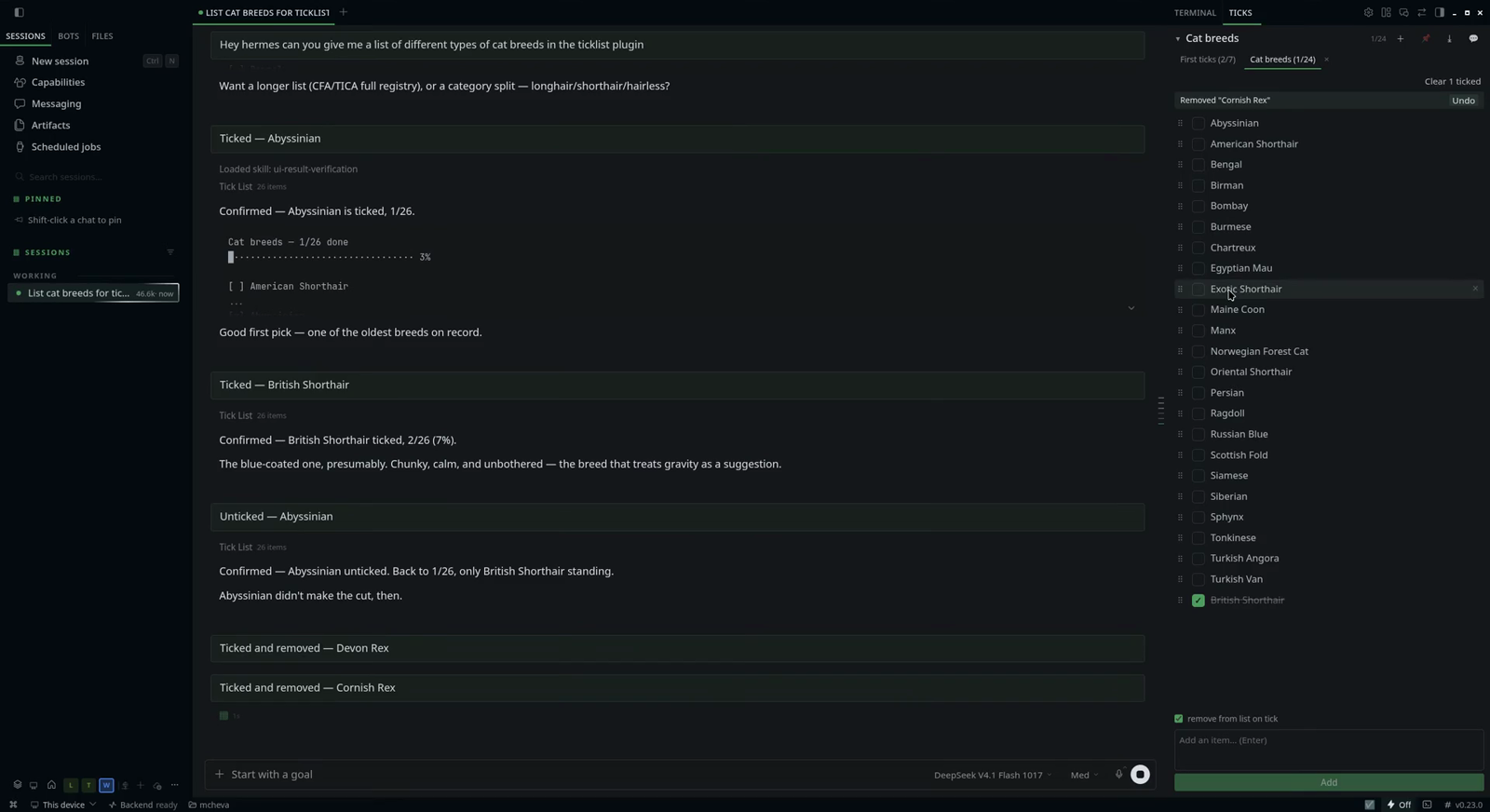
Demo: demo/ticklist-demo.mp4 — 70 seconds, silent, recorded in
the Desktop app: a list is requested, ticks land in the chat as they happen, then tabs, pin,
export, drag-reorder and the announce toggle in one pass. The screenshot above is a frame from it.
- Source: https://github.com/mchevatheachiever/hermes-ticklist
- License: MIT
Requirements
| | |
|---|---|
| Hermes | >=0.21.5 |
| Python | 3.10+ — stdlib only, no dependencies |
| Desktop app | any. The docked-pane behaviour is feature-detected; older desktops fall back to a right-docked pane |
Install
hermes plugins install mchevatheachiever/hermes-ticklist
Enable it in Settings ▸ Plugins, then restart the desktop app. Enabling publishes
the agent half immediately, but the pane's plugin.js is copied into
<hermes home>/desktop-plugins/ticklist/ by the app at startup — with the app already
running there is nothing to show until then.
If you are updating an existing install, restart the Hermes process serving your
dashboard — that is what serves /api/plugins/ticklist/, and it is rarely the messaging
gateway. On a systemd install systemctl --user list-units 'hermes*' names them; the
desktop one is usually hermes-serve-<profile>.service. Restarting only the desktop app
is not enough: routes and tool schemas come from that process, so the pane keeps calling
endpoints it cannot reach and shows a 404.
The pane opens beside the terminal pane as a sibling tab. If you close it, open the command
palette (Ctrl+K, or ⌘K on macOS) and run TickList: show checklist.
On first run you get one example list, First ticks — seven rows that each demonstrate
something. It is seeded once, so deleting it is final.
Use
Ask Hermes:
make me a shopping list: milk, bread, coffee, dish soap
tick off the coffee
what's still on my list?
Or type straight into the pane. Ticking posts Ticked — <item> into the chat, which is what
makes the agent see it.
The pane
| Control | What it does |
|---|---|
| Tabs | one per list, showing done/total; they wrap, and scroll past five rows. The tab you were last on is remembered |
| + | create a new list — type a name, Enter. It opens empty and becomes active; if the name already exists it switches to that list instead |
| 📌 header button | pins the list you're on. Pinned lists sort to the front of the strip and show a 📌 on their tab; pinned tabs reorder among themselves |
| × on the tab | deletes that list. Asks first, then offers undo for 12 seconds |
| Drag a tab | reorders the strip — drop on the left or right half of a tab to land before or after it |
| Checkbox | ticks or unticks the row and announces it in the chat |
| ⠿ grip | drag to reorder a row |
| ✕ on a row | removes that one item, announced as Removed — <item>, with undo |
| Add bar | type and press Enter. Multi-line paste adds one item per line, in one request |
| Clear N ticked | appears once something is ticked; removes the finished rows, with undo |
| ⤓ | export: text, Markdown, CSV, JSON, or copy to the clipboard |
| Undo | a 12-second bar after deleting a list, clearing ticked rows, removing a row, or a tick that removes its own row |
| ▾ | collapses the pane to its header |
| 💬 / 🔇 | whether ticks are posted to the chat. On by default, per pane session |
| ☐ remove from list on tick | off by default; with it on, a tick deletes the row instead of striking it through. The choice is remembered |
| ☑ status bar | opens or closes this pane's tab; dimmed when closed. The whole side panel is collapsed by the terminal pill, which takes this pane with it |
Rows sit unticked-first, with ticked ones collected at the bottom and your own order
preserved inside each group.
Keyboard
| Where | Keys | What it does |
|---|---|---|
| Add bar | Enter | add what you typed |
| Add bar | Shift+Enter | new line, so one entry can hold several items |
| New-list row | Enter / Esc | create / cancel |
| ⠿ grip, focused | ↑ / ↓ | move the row up or down |
| Tab, focused | ← / → | move the tab left or right |
| Tab, focused | Enter / Space | switch to that list |
| Export menu | Esc | close it |
What the agent sees
Announcing is on by default. Each of these is posted as a user turn, so the model reads it
like anything else you type:
| You did | Chat gets |
|---|---|
| ticked a row | Ticked — <item> |
| unticked a row | Unticked — <item> |
| added from the bar | Added — <item>, or Added N items for a multi-line paste |
| removed a row | Removed — <item> |
| ticked with remove-on-tick on | Ticked and removed — <item> |
| cleared the finished rows | Cleared N ticked from <list> |
| deleted a list | Deleted list — <name> (N items) |
| hit undo | Restored — <name> |
Toggle 🔇 when you want to tick things quietly — the list still changes, the agent just
isn't told.
Export
⤓ in the header offers four files and a clipboard copy:
| Format | Good for |
|---|---|
| Text | pasting into a message or a terminal |
| Markdown | - [ ] task list — Obsidian, GitHub, Notion |
| CSV | spreadsheets, spreadsheet-style imports |
| JSON | the stored list verbatim, including ids and timestamps |
CSV cells that a spreadsheet would otherwise evaluate (=, +, -, @) are prefixed with
an apostrophe so they stay text.
Tools
| Tool | Purpose |
|---|---|
| tick_add | Add items; keeps existing, skips duplicates |
| tick_set | Tick or untick by id or text |
| tick_list | Read a list, plus every list's name, pinned state and done/total |
| tick_remove | Delete one item |
| tick_clear | Empty a list, or done_only: true |
| tick_delete_list | Delete a whole list |
A bundled skill (ticklist:ticklist) and /tick [list] print the list without spending a
model turn.
Privacy and access
- No network calls. Nothing leaves the machine except the tick notices in the chat.
- Local state only:
<hermes home>/plugin-data/ticklist/lists.json, written atomically
under a lock so the pane and the agent can't clobber each other. - Limits: 240 characters per item, 200 per list name, 2,000 items per list, 50 lists.
Every row is drawn, so a list of a couple of thousand will feel heavy — fine in the
hundreds. - Ticked text goes to your model provider when announcing is on — that post is a real
user turn and lands in the session transcript. - No credentials, no environment variables, no telemetry.
- API access is the dashboard's, not the plugin's: routes are mounted at
/api/plugins/ticklist/behind Hermes' own auth.
API
| Route | Purpose |
|---|---|
| GET /lists | every list with counts, plus the active list's rows |
| GET /lists/{name} | one list with its rows |
| GET /lists/{name}/export?fmt= | txt, md, csv or json → {filename, mime, content} |
| POST /lists | add items, or create an empty list with create_empty |
| PATCH /lists/{name} | pin or unpin |
| PATCH /order | reorder the tab strip |
| PATCH /lists/{name}/order | reorder items within a list |
| PATCH /lists/{name}/items | write a list's rows verbatim (undo) |
| PATCH /items/{id}?list= | tick or untick |
| DELETE /items/{id}?list= | remove one row |
| DELETE /lists/{name} | remove a list |
| POST /clear?list= | empty a list, or only its ticked rows |
| GET /health | {ok, lists} |
License
MIT — see LICENSE.
README from the reviewed commit 464c69a; it updates when the author re-pins.