
 counterposition
Tinfoil for Hermes Agent
Tinfoil runs open models such as Kimi, GLM
and gpt-oss inside hardware enclaves: neither the cloud host nor Tinfoil can
read your prompts or the replies. This plugin adds Tinfoil as a model
provider in Hermes. Before any prompt leaves your machine, Tinfoil's local
proxy checks the enclave's attestation, and if that check fails the request
is refused rather than sent anywhere else. The proxy starts itself when
Hermes needs it, and the model list comes live from Tinfoil.
Quick start
You need a Tinfoil API key (dashboard),
tinfoil-proxy installed, and
Hermes v0.23.1 or later.
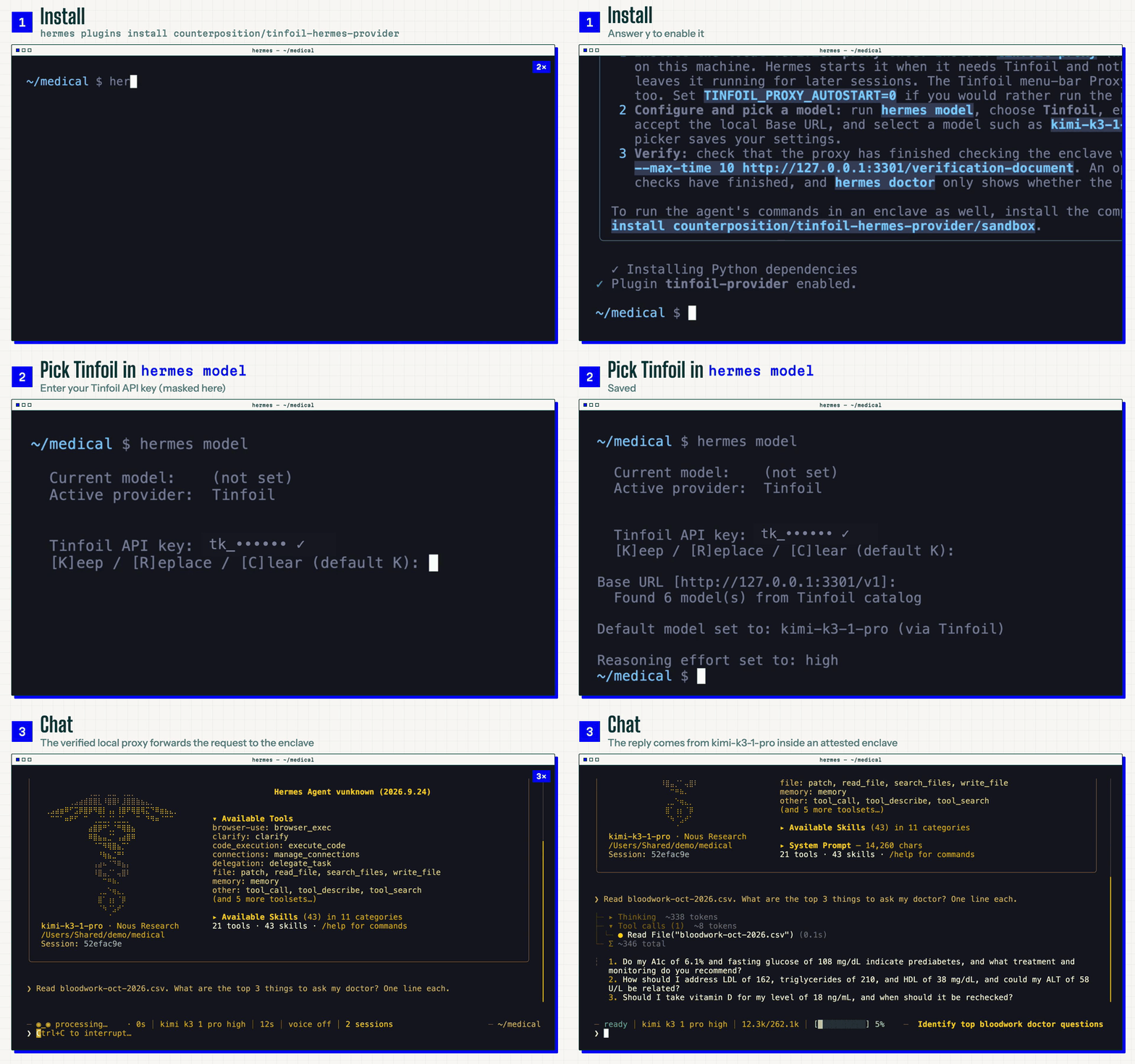
hermes plugins install counterposition/tinfoil-hermes-provider
Answer y when it asks to enable the plugin. Then run:
hermes model
Choose Tinfoil, paste your API key, accept the local Base URL, and pick a
model. Tinfoil now appears in hermes model, /model, hermes setup and
hermes doctor.
Want the agent's terminal, file and code tools sealed in an enclave too? A
second plugin in this repository does that: see
Run tools in a Tinfoil Container.
Model provider
Tinfoil's privacy guarantee only holds when the client verifies the
enclave's attestation on every connection. This plugin therefore routes
Hermes through the locally running
tinfoil-proxy, which performs
that verification and forwards plain OpenAI-compatible requests. Hermes
itself never talks to Tinfoil directly.
The local proxy starts itself
Install tinfoil-proxy once, on every machine that runs Hermes, following
Tinfoil's installation guide. You
do not have to keep it running: when Hermes needs Tinfoil and nothing is
listening on the proxy's port, the plugin starts the installed binary and
waits until it has finished attestation.
- It looks for
tinfoil-proxyonPATH, then in~/go/bin,~/.local/bin,
/usr/local/binand/opt/homebrew/bin. SetTINFOIL_PROXY_BINto point
somewhere else. The plugin never downloads a binary. - The proxy keeps running after Hermes exits, so later sessions start
instantly. Its log is$HERMES_HOME/plugin-data/tinfoil-provider/proxy.log. - The proxy attests against the public transparency log, so startup needs
network. If it cannot attest, Hermes reports a connection error. The
plugin never falls back to an unverified connection. - Set
TINFOIL_PROXY_AUTOSTART=0to manage the proxy yourself. A proxy that
is already running is used as it is: Tinfoil's menu-bar Proxy app serves the
same endpoint, andscripts/sh.tinfoil.proxy.plistis a macOS LaunchAgent
that keeps the CLI proxy up from login.
The proxy binds loopback only (127.0.0.1:3301), so a proxy on one machine
does not serve another.
A bound port is not proof of attestation. This is:
curl --fail --silent --show-error --max-time 10 http://127.0.0.1:3301/verification-document
Tinfoil's direct endpoint, https://inference.tinfoil.sh/v1, skips
attestation; Tinfoil documents it for debugging only. Pointing
TINFOIL_BASE_URL at it works but forfeits Tinfoil's guarantees, and the
plugin never defaults to it.
Configuration
| Variable | Required | Meaning |
| --- | --- | --- |
| TINFOIL_API_KEY | yes | Your Tinfoil API key. The proxy forwards it per request as Bearer auth; the proxy itself takes no key. |
| TINFOIL_BASE_URL | no | Override the proxy URL. Default http://127.0.0.1:3301/v1. For a non-default port, or a proxy on a private host (that hop is not attested, and Hermes will not start it). |
| TINFOIL_PROXY_BIN | no | Path to tinfoil-proxy when it is not in one of the usual places. |
| TINFOIL_PROXY_ARGS | no | Extra tinfoil-proxy flags for the proxy Hermes starts, for example -e inference.tinfoil.sh -r tinfoilsh/confidential-model-router to pin an enclave and its config repository. |
| TINFOIL_PROXY_AUTOSTART | no | 0 stops Hermes from starting the proxy. |
Setting only model.provider: tinfoil by hand is not enough: Hermes does not
yet choose a model automatically for plugins, so use the picker.
Models
The pickers show the chat models in
Tinfoil's catalog that support tool
calling. Embeddings, speech, safety and retired models are left out; you can
still use one by typing its ID.
The plugin reads each model's context window, image support and reasoning
levels from that catalog and remembers the last catalog it saw. A model
Tinfoil releases after this plugin therefore works without a plugin update.
When the proxy cannot be reached, the pickers fall back to a short list of
stable models, starting with kimi-k3-1-pro.
Summaries and tool helpers default to gpt-oss-120b. Automatic image analysis
uses gemma4-31b through the same proxy when the main model is text-only.
If you set your own provider or model under auxiliary, Hermes uses your
choice instead.
Reasoning effort
Tinfoil takes reasoning_effort as a top-level request field, and the
accepted values differ per model. The plugin clamps your Hermes
reasoning.effort to the levels the catalog lists for the model (see
Tinfoil's reasoning guide). For
models that accept exactly low, high and max, medium rounds up to
high and xhigh to max. Models with no levels get no effort field.
Disabling reasoning sends none where supported, otherwise the model's
lowest level: always-on models cannot stop thinking, and omitting the field
can select their most expensive default. Unset or invalid effort settings omit
the field. A model the plugin has never seen in a catalog gets no effort
setting, and does not inherit assumptions from similarly named models.
Run tools in a Tinfoil Container
With the model in an enclave, the commands the agent runs are the remaining
place your data is handled in the clear. The tinfoil-sandbox plugin moves
those into a Tinfoil Container:
your own image running in an attested enclave.
hermes plugins install counterposition/tinfoil-hermes-provider/sandbox
hermes plugins enable tinfoil-sandbox
hermes config set terminal.tinfoil_container my-box
hermes config set terminal.backend tinfoil
From then on terminal, execute_code and the file tools run inside
my-box. Each connection is opened with tinfoil ssh, which carries SSH over
the enclave's attested TLS connection, so verifying the enclave and connecting
to it are one step. There is no host key to accept and nothing is written to
~/.ssh.
You need:
- The Tinfoil CLI (
tinfoil) and an
OpenSSH client on the machine that runs Hermes. - A running container that serves SSH and authorizes your key. The
hermes-tinfoil-workspace
template sets one up: a small Ubuntu workspace with Python and git. Copy
it, put your SSH public key in its config, publish a release and create
the container; its README has the commands. The authorized keys are part
of the measured config, so the attestation also covers who can log in. tinfoil logindone once, so the CLI can look the container up by name.
To skip the lookup, setterminal.tinfoil_containerto the enclave's
hostname andterminal.tinfoil_repoto its config repository.TINFOIL_API_KEY. The enclave's tunnel checks an inference key, and the
plugin passes yours along. An admin key is never used for this.
| Setting (terminal.…) | Meaning |
| --- | --- |
| tinfoil_container | Container name, or an enclave hostname. Also TINFOIL_CONTAINER. |
| tinfoil_repo | Config the enclave must be running, owner/repo[@tag]. Pins the workload; required with a hostname. |
| tinfoil_user | Login user. Default root. |
| tinfoil_ssh_port | SSH port, when it is not the one the container publishes. |
| tinfoil_identity_file | SSH private key to log in with. Default: your usual identities and agent. |
| tinfoil_allow_debug | true to accept a debug-mode enclave. Debug enclaves are not confidential. |
hermes doctor and the hermes setup terminal step report what is missing.
What to expect:
- Hermes still asks before dangerous commands. The container is your
workspace, not a disposable sandbox. - Hermes does not create, start, stop or bill containers. If the container is
stopped, commands fail with a connection error that names
tinfoil container get. - Skills and files cached under
~/.hermeson your machine are not copied
into the container. ~in a file-tool path means the home directory inside the container, as
it does in the terminal. Hermes would otherwise expand it to your home on
this machine, so the plugin rewrites those paths before the tool runs.- The backend runs in-process only (
plugins.isolation: in_process, the
default), like every terminal backend plugin.
What the plugins do on your machine
tinfoil-provider
- Network. Hermes sends requests only to the local proxy
(127.0.0.1:3301, orTINFOIL_BASE_URL), including a/v1/models
request for the model list. The proxy is what contacts Tinfoil: it fetches
and checks the enclave's attestation, then forwards inference. - Background process. The autostarted
tinfoil-proxydescribed in
The local proxy starts itself, run in its
own session. - Credentials.
TINFOIL_API_KEYcomes from Hermes' configuration and is
sent to the proxy as the request's bearer token. The proxy gets only an
allowlist of Hermes' environment:PATH, home and temp directories, user,
locale and time zone, certificate locations (SSL_CERT_FILE,
SSL_CERT_DIR) and HTTP proxy settings (HTTP(S)_PROXY,NO_PROXY), plus
Windows system directories. Nothing else reaches it, including every
TINFOIL_*variable.
tinfoil-sandbox
- Commands. Every terminal, file and code tool call runs
tinfoil ssh, which runs your OpenSSH client. The Tinfoil CLI contacts
Tinfoil's control plane to look the container up, then the enclave
itself. The plugin passesTINFOIL_API_KEYto the CLI as the tunnel key,
andTINFOIL_ADMIN_KEYif you set one in Hermes. It never reads the
CLI's saved login. - Background process. An SSH control socket under the system temp
directory (hermes-tinfoil/) keeps the verified connection open for five
idle minutes. - Tool arguments. A
pre_tool_callhook does the~rewrite described
above, only whileterminal.backendistinfoil.
Neither plugin sends telemetry or contacts any service other than Tinfoil.
Installing
hermes plugins install clones this repository into
$HERMES_HOME/plugins/tinfoil-provider/ and asks whether to enable it.
Answer y: Hermes loads only enabled plugins, and without this one
hermes model has no Tinfoil entry. If you answered n, run
hermes plugins enable tinfoil-provider.
The /sandbox form installs only that subdirectory, as
$HERMES_HOME/plugins/tinfoil-sandbox/. Enable it the same way
(hermes plugins enable tinfoil-sandbox).
Per profile. Each Hermes profile has its own HERMES_HOME, so install
once per profile that should see Tinfoil:
hermes -p <profile> plugins install counterposition/tinfoil-hermes-provider
Upstream issue #88143
tracks profile creation not seeding plugins/.
Verify. Once TINFOIL_API_KEY is set, hermes doctor reports whether the
proxy is reachable. Doctor does not start the proxy; hermes model and any
chat do. A passing check proves reachability, not that your key is valid: the
proxy's catalog is public. Check /verification-document to see whether the
proxy has finished checking the enclave.
Removing
hermes plugins remove tinfoil-provider
hermes plugins remove tinfoil-sandbox
Tinfoil disappears from the picker on the next invocation. If it was selected,
run hermes model to choose another provider, and set terminal.backend back
to local if you used the container backend. Remove the saved key with
hermes config unset TINFOIL_API_KEY if no longer needed. A proxy the plugin
started keeps running until you stop it or log out.
Development
Use Python 3.14, uv, and a Hermes Agent
checkout. The tests were verified against Hermes Agent main at 1c8dcdb8
(2026-11-09). They load both plugins from a temporary HERMES_HOME through
Hermes' own discovery, and use local stand-ins for the proxy and the Tinfoil
CLI, so they need permission to bind loopback ports. From the plugin
repository, run:
export HERMES_AGENT_SRC=~/c/vendor/hermes-agent
(
  set -e
  deps="$(mktemp)"
  trap 'rm -f "$deps"' EXIT
  uv export --project dev --locked --only-group dev --format requirements.txt > "$deps"
  PYTEST_DISABLE_PLUGIN_AUTOLOAD=1 uv run --project "$HERMES_AGENT_SRC" \
    --frozen --no-dev --with-requirements "$deps" python -m pytest -q
)
uv run --project dev --locked ruff check .
hermes plugins validate . and hermes plugins validate sandbox run the
checks Hermes' plugin catalog runs, including the installer's security scan.
e2e/ holds a container harness (Docker or OrbStack) that installs the
provider plugin into an upstream checkout with the real
hermes plugins install and walks the install, list, picker, doctor,
precedence, and remove steps. See e2e/README.md.
README from the reviewed commit 6b17328; it updates when the author re-pins.


