
 maksymhs
tmux-live
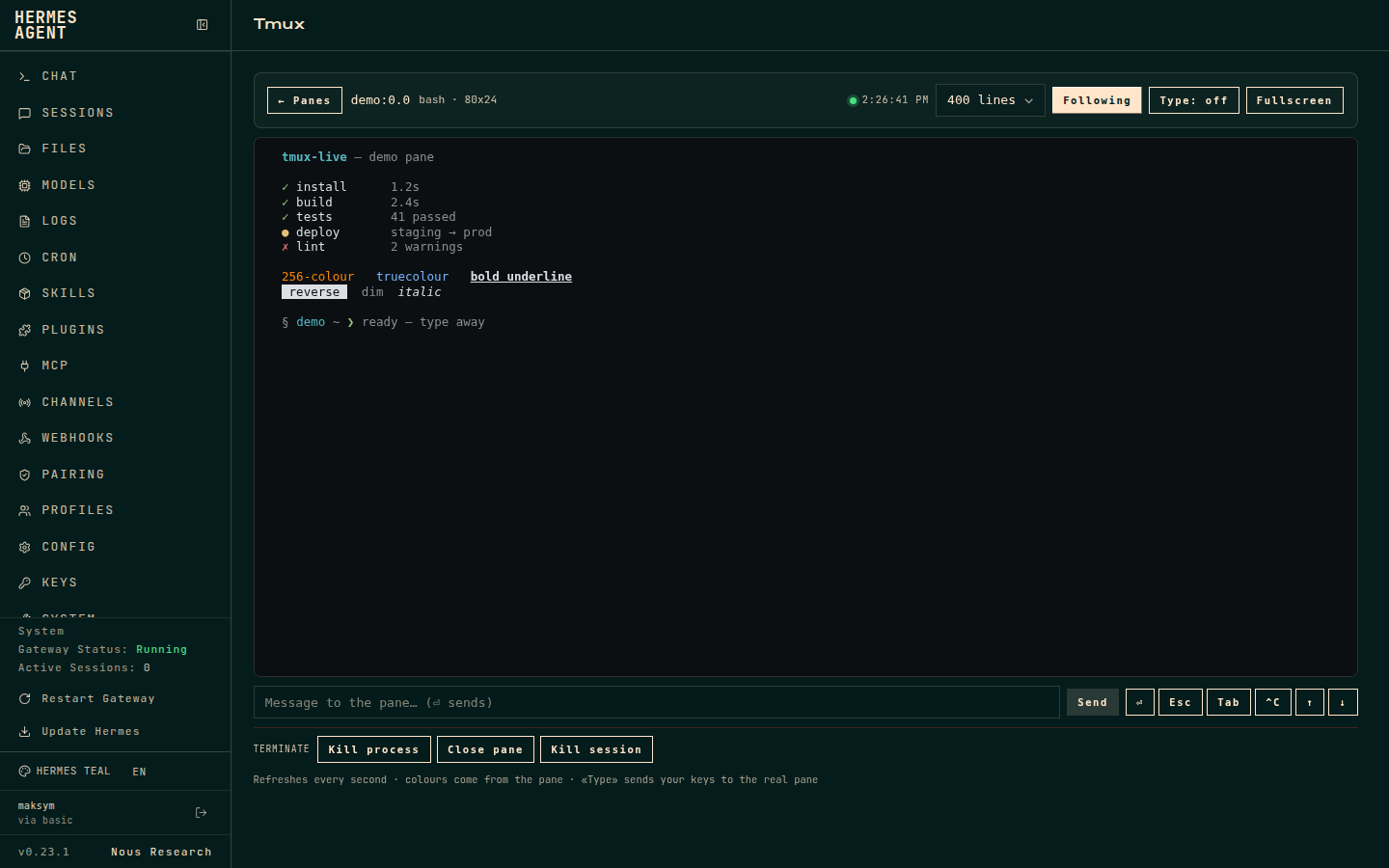
A live tmux tab for the Hermes Agent dashboard:
pick a pane, watch it in real colour, type into it when you need to, and close
it when you are done.
Español · MIT · unofficial community plugin
┌ tmux ───────────────────────────────────────────────────────────┐
│ ● 2 live panes                          ● 14:32:07   [Refresh]  │
├─────────────────────────────────────────────────────────────────┤
│ ┌ oceans-api:0.0        [active] ┐  ┌ worker:0.1               ┐ │
│ │ python3 · 120x40               │  │ bash · 80x24             │ │
│ │ ~/projects/oceans-api          │  │ ~/code/worker            │ │
│ │ Open terminal →                │  │ Open terminal →          │ │
│ └────────────────────────────────┘  └──────────────────────────┘ │
└─────────────────────────────────────────────────────────────────┘
Features
-
Pane picker — one card per tmux pane (session / window / pane) with the
running command, geometry and working directory. No polling of pane contents
on the grid, so it stays cheap with many panes.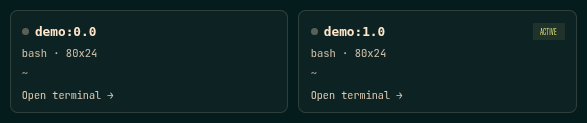
-
Colour terminal — ANSI SGR rendering with 16, 256 and truecolour support,
bold / dim / italic / underline / reverse / strikethrough. No external
terminal library, no CDN. -
Native keyboard input — click the terminal (it focuses automatically) and
type directly into the real pane. Keystrokes travel over a WebSocket and are
written withtmux send-keys: printable text, Enter, Backspace, Tab/Shift-Tab,
Esc, Delete/Insert, Home/End/PageUp/PageDown, F1–F12, arrows and Ctrl
combinations. Paste is supported and the socket reconnects on its own. -
Server overview / management — the pane picker lists every terminal on the
host with its command, geometry and working directory. A compactManage
toggle reveals per-pane close and per-session kill actions. All destructive
actions ask for confirmation. -
Scrollback — 120 / 400 / 800 / 2000 lines, autoscroll toggle, fullscreen.
-
Terminate — kill the pane's foreground process (
SIGTERMorSIGKILL),
close the pane, or kill the whole session. Every action asks for confirmation. -
Bilingual UI — Spanish or English, chosen from
navigator.language.
Requirements
- Hermes Agent with the web dashboard (
hermes dashboard), v0.23 or newer. tmuxon the same host and user as the dashboard.
Install
Dashboard plugins are installed by directory layout, not by pip:
git clone https://github.com/maksymhs/hermes-tmux-live.git ~/.hermes/plugins/tmux-live
hermes plugins enable tmux-live
Restart the dashboard once so the plugin's API routes are mounted (the JS tab is
picked up on reload):
systemctl --user restart hermes-dashboard # or however you run it
Open the dashboard and the Tmux tab appears after Skills.
Uninstall
hermes plugins disable tmux-live
rm -rf ~/.hermes/plugins/tmux-live
How it works
The plugin is a single directory with three layers:
tmux-live/
├── plugin.yaml                  # Hermes plugin metadata (no tools/hooks)
├── dashboard/
│   ├── manifest.json            # tab registration + API file
│   ├── plugin_api.py            # FastAPI routes, mounted at /api/plugins/tmux-live/
│   └── dist/
│       ├── index.js             # pre-built IIFE, uses window.__HERMES_PLUGIN_SDK__
│       └── style.css
| Method | Route | Purpose |
|---|---|---|
| GET | /api/plugins/tmux-live/health | tmux version, resolved socket, pane count |
| GET | /api/plugins/tmux-live/panes | sessions, windows, panes |
| GET | /api/plugins/tmux-live/capture?target=session:0.0&lines=400&ansi=1 | pane contents with ANSI escapes |
| POST | /api/plugins/tmux-live/send | {target, text?} or {target, key?} |
| WS | /api/plugins/tmux-live/ws?target=session:0.0 | input ({text} / {key}) and live screen frames ({type: "watch"}) |
| POST | /api/plugins/tmux-live/kill | {target, mode: process|pane|session, signal?} |
While a pane is open the frontend keeps a WebSocket to the server. The server
captures the pane about eight times a second and pushes a frame only when its
content hash changes; the client renders the SGR sequences itself. The same
socket carries keystrokes. If screen frames stop arriving (for example after a
backend/frontend version mismatch), the client automatically falls back to HTTP
capture; the HTTP capture / send routes also remain available for scripts.
Nothing is bundled: React and the UI primitives come from the dashboard's plugin
SDK, so the whole plugin is a few KB.
Security
This plugin can type into and terminate processes, so treat the dashboard as the
sensitive surface it is.
- Every tmux call is an argv list through
subprocess— there is no shell. - Pane targets are validated with
^[A-Za-z0-9_][A-Za-z0-9_.:@%+-]{0,79}$. - Writing is limited to literal text (control characters stripped) or a fixed
whitelist of key names. The WebSocket validates its target and uses the same
whitelist; there is no command-execution endpoint. killaccepts onlyprocess/pane/sessionandTERM/KILL/INT.
The process is found from#{pane_pid}and its foreground process group
(tpgidin/proc/<pid>/stat).- All routes sit behind the dashboard's own auth gate. Do not expose the
dashboard to the public internet without it.
The PrivateTmp caveat
A dashboard started by systemd with PrivateTmp=yes gets its own /tmp, so it
cannot see /tmp/tmux-<uid>/default. The plugin probes, in order:
TMUX_TMPDIR, /tmp, /proc/<pid>/root/tmp/... for same-user processes,
/proc/1/root/... and $XDG_RUNTIME_DIR. It caches the first socket tmux
accepts and re-probes if that process disappears.
If you prefer the simple route, drop the private tmp for the service:
sudo systemctl edit hermes-dashboard.service
# [Service]
# PrivateTmp=no
sudo systemctl daemon-reload && sudo systemctl restart hermes-dashboard
Development
No build step. Edit dashboard/dist/index.js (a plain IIFE) and refresh the
dashboard; node --check catches syntax errors. After editing
plugin_api.py, restart the dashboard — API routes are mounted at startup.
Limitations
- The view is a mirror: input is sent immediately over the WebSocket, but
the screen is sampled about eight times a second, so it can trail the real
pane by a frame. It is not a PTY attachment. - Attaching a real PTY client was deliberately avoided: tmux resizes a window
for every attached client, which would change the layout of the session you
are watching. - Only panes on the same host and user as the dashboard are visible. For a
remote machine, run the dashboard there or open an SSH terminal.
License
MIT — see LICENSE.
README from the reviewed commit deae4ff; it updates when the author re-pins.


