Prabhusekaran
Treasury Cash Forecast for Hermes Agent
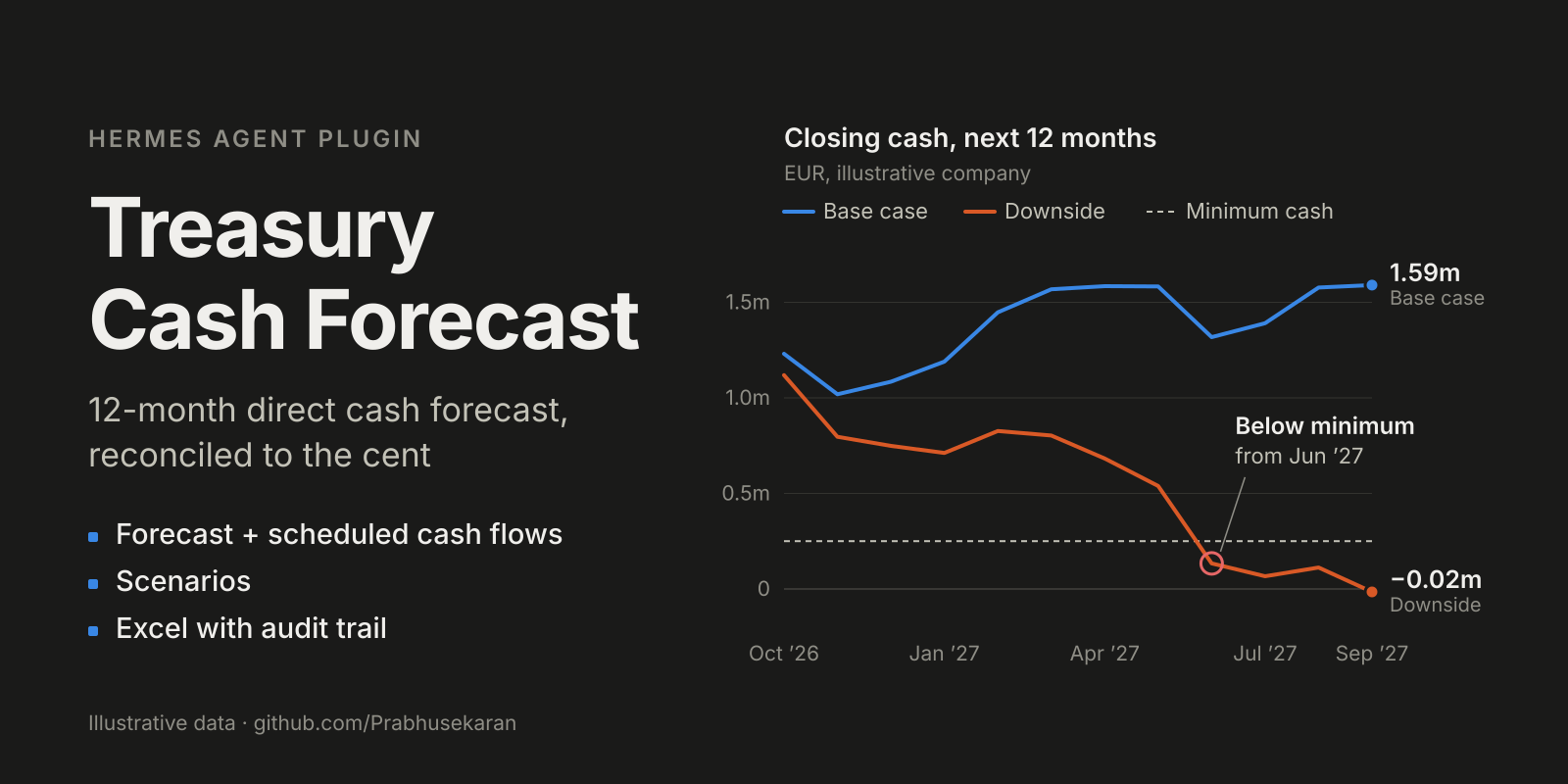
A 12-month monthly cash-flow forecast for corporate treasury, as a Hermes plugin.
It uses the direct method: receipts and payments by type, from opening cash to
closing cash. You fill a template with your past cash-flow statement, the future
payments you already know, and your what-if scenarios. Hermes checks it, runs
the forecast, and returns one Excel workbook: a summary comparing the base case
with every scenario, and a cash-flow statement per scenario showing your last 12
actual months followed by the 12 forecast months, tied to the cent.
The language model never calculates a number. It picks the tool and
explains the result. All figures come from a tested forecasting engine.
What it does
Every cash-flow line has one of two treatments:
| Treatment | Meaning | Example |
|---|---|---|
| forecast | A statistical model projects it from monthly history | Customer receipts, supplier payments, salaries |
| known | You supply the future amounts; nothing is predicted | Rent, tax instalments, loan repayments, approved capex |
Principle: forecast what needs forecasting; supply what is already known.
A line can mix the two. On a forecast line, a known amount for a month either
replaces the model's figure (the next payroll run is already approved) or
comes on top of it (a new contract that is not in the history). When your
amounts cover the first months of the forecast, the later months keep the
model's pattern but start from the level of your last amount, so the line does
not fall back to its old level.
For each of the 12 months, in every scenario, the engine enforces:
operating + investing + financing = net cash flow
opening cash + net cash flow      = closing cash
closing cash (month N)            = opening cash (month N+1)
If anything does not tie, the run stops and nothing is written.
Tools
| Tool | What it does |
|---|---|
| cash_forecast_template | Writes the template (Excel or CSV), with a made-up example company or empty |
| cash_forecast_validate | Checks a filled template and lists every problem and warning in plain language |
| cash_forecast_run | Runs the base case and every scenario, reconciles them, saves the Excel workbook and the audit files |
| cash_forecast_compare | Runs several models on the same inputs and shows how far the results differ |
A bundled skill, treasury-cash-forecast:cash-forecast-mapping, guides Hermes
through mapping your own spreadsheet into the template. The mapping is shown to
you for confirmation before anything runs.
Install
hermes plugins install Prabhusekaran/hermes-treasury-cash-forecast
hermes plugins enable treasury-cash-forecast
Hermes installs the plugin's two libraries (statsmodels, openpyxl) with it.
Then restart Hermes. A Hermes process that was already running only sees
new libraries after a restart, and Hermes runs more than one process:
| You chat through | Restart, on the machine where Hermes is installed |
|---|---|
| Telegram or other messaging, scheduled jobs | hermes gateway restart |
| The Desktop app | its backend server, the hermes serve process (on a Linux server usually systemctl --user restart hermes-desktop-backend.service) |
| The Hermes CLI | close and reopen it |
If the plugin reports that a library cannot be loaded, this restart is the fix;
do not pip install it.
Try it
You:    Create the cash forecast example in ~/cash and run it.
Hermes: (cash_forecast_template -> cash_forecast_validate -> cash_forecast_run)
        Opening cash EUR 1,180,000.00, taken from your September 2026 closing balance.
        Base case: closing cash stays positive; the low point is about EUR 1.02
        million in November 2026, the month of the equipment purchase, and the
        year ends at about EUR 1.59 million.
        Downside (domestic receipts -4%, export receipts -8%, material prices +4%
        from January, a 20,000 monthly contingency): closing cash is below your
        minimum of EUR 250,000 from June 2027 and just below zero in September.
        Upside: about EUR 2.18 million at year end.
        Customer pays late (EUR 300,000 of export receipts arrives in July
        instead of June): the year ends on the same balance, but the lowest
        month moves from November 2026 to June 2027.
        One item was left out: the EUR 1,000,000 refinancing drawdown, because it
        was only agreed after the forecast date. The "with_refinancing" scenario
        shows the forecast with it: exactly EUR 1,000,000 more from March 2027.
The example is a made-up manufacturer with 20 lines (examples/synthetic_company,
rebuilt by examples/build_example.py). Your own file can have as many lines as
you need.
The template
Four tables: sheets in one .xlsx, or four .csv files in one folder.
| Table | Columns |
|---|---|
| inputs | key, value: currency, origin_month (last month of actuals), data_kind (synthetic, actual, unspecified); optional model and minimum_cash |
| history | Your past cash-flow statement and the definition of every line: an opening_cash row, one row per line, a closing_cash row. Columns: line_id, label, section (operating / investing / financing), treatment (forecast / known), then one column per month (2024-01, 2024-02, ...) |
| known_events | line_id, month, amount, optional effect (replace / on top), known_from, note |
| scenarios | scenario, line_id, percent or amount, optional from_month, to_month, note |
Money in is positive, money out is negative. One currency per file.
Opening and closing cash. The history carries the opening and closing cash
of every month. The plugin checks that each month ties (opening cash + all lines
= closing cash, and closing cash = next opening cash) and warns where it does
not. The closing cash of origin_month becomes the opening cash of the forecast.
Known amounts on a forecast line. effect says what happens to the model's
figure for that month. replace (or empty) uses your amount instead. on top
adds your amount to it, for something new that the history does not contain.
On a known line there is no model figure, so effect is ignored.
Scenarios are percentages. percent changes the size of a line: -4 on
receipts means 4% lower receipts, 4 on supplier payments means 4% higher
payments. The percentage is taken from the line's base-case figure for that
month. Leave from_month and to_month empty for all 12 months. Use amount
for a fixed monthly sum, such as a contingency. A payment that arrives late is
two amount rows: minus the amount in the month it was due, plus the amount in
the month it arrives. Every scenario is run and shown next to the base case.
known_from is the month you learned about an item. An amount learned
after origin_month is left out of every scenario and listed on the Summary
sheet: a forecast as of a date uses only what was known then, so a back-test
cannot use hindsight. To see its effect anyway, add it as a scenario (the
example does this with its refinancing drawdown).
minimum_cash is the balance you do not want to fall below. The result
lists the months below it for each scenario and shows them in red.
model picks the model for the forecast lines. Leave it empty for ETS, or
simply tell Hermes which model to use.
Keeping the sheets in step. Each line is defined once, in history. A
known line needs its future amounts in known_events. When you remove a line,
remove its rows from known_events and scenarios too. The check names every
row that no longer matches, and lists the known amounts and scenarios it found
for each line, so leftovers from the example or from an earlier forecast are
easy to spot. Delete the example's rows in known_events and scenarios
before entering your own.
Models
| Model | Needs | Notes |
|---|---|---|
| ets (default) | 24 months | Holt-Winters, additive trend and seasonality |
| sarima | 36 months | Fixed (1,1,0)x(0,1,1,12); most reliable with five or more years of history |
| baseline, seasonal_drift | 24 months | Simple, transparent |
| seasonal_naive | 12 months | Same month last year |
| previous_month | 1 month | Sanity check |
| chronos_2 (optional) | 1 month | Amazon Chronos-2. Not installed by this plugin |
Chronos-2 runs only if you have installed chronos-forecasting yourself and
the amazon/chronos-2 model is already on your machine. The plugin loads it
from local files and never downloads it.
Warnings raised by a model (for example when SARIMA has little data) are not
hidden. They come back in the result as model_notes.
Same input, same forecast? The four simple models are plain arithmetic and
give identical figures on every machine. ETS and SARIMA are fitted by numerical
optimisation, so another machine or library version can give figures that
differ by small amounts; the library versions are recorded in the result. ETS
in this plugin starts from a level, trend and seasonal pattern computed from
the first years of history, which keeps those differences to a few currency
units on the example (see engine/__init__.py, change 5, for why).
Outputs
cash_forecast.xlsx is the main result:
- Summary: closing cash by month for the base case and every scenario, the
lowest point, any month below zero or below your minimum cash, what was left
out and why, and what each scenario changes. - How this is built: one page in plain language for a reader who is not
technical: the starting balance, what the model does, what comes from your
schedule, how scenarios are applied, and what the forecast does not tell you. - One sheet per scenario: a cash-flow statement from opening cash to closing
cash, with every line, section totals and net cash flow, for your last 12
actual months and the 12 forecast months. The Treatment column says how each
line was built (for example "known 2026-10 to 2026-11, then forecast from
that level"), and each forecast cell is shaded by its source: model, your
known amount, model plus your amount on top, or changed by the scenario.
Amounts are shown to the cent. - Where numbers come from: for every forecast figure, the model part, the
known part and the scenario part, and the model's own figure where your
known amount replaced it. - Notes: what was left out and why, and the warnings.
An audit/<scenario>/ folder holds four files per scenario: forecast.md
(readable report), cash_bridge.csv (monthly totals), lines.csv (every line
and month with its source) and forecast.json (full audit trail: inputs, model
per line, the model's original figures where a known amount replaced them,
items left out and why, file hashes).
By default everything is saved in cash_forecast_output/ next to your input.
Limits
- Monthly, 12 months ahead, one currency, one entity.
- No uncertainty range for closing cash. Chronos gives a range per line only.
- The model comparison shows sensitivity to the model. It is not an accuracy test.
- A forecast from thin or unrepresentative history will be poor, whatever the model.
data_kindis your declaration. The plugin cannot verify it.
What the plugin touches
- Network: none.
- Credentials: none.
- Files read: only the workbook or folder you name.
- Files written: the template where you ask, and outputs next to your input or where you ask.
- Shell commands, background processes, telemetry: none.
Where the engine comes from
engine/ is a copy of the forecasting engine from
Treasury-AI-Lab, tag
v0.1-generic-12m-cash-forecast. That project validated it on synthetic data
only: a 17-fold rolling benchmark of eight models and ten stress scenarios. The
five changes made to the copy are listed in engine/__init__.py; one of them
changes how ETS is started. The plugin's tests confirm that, for the
deterministic models, the lab's own example still produces the lab's own
figures.
No claim is made about accuracy on any real company.
Development
pip install statsmodels openpyxl pytest
python -m pytest -q
hermes plugins validate . --install-deps
Licence
MIT. Not financial advice.
README from the reviewed commit bc36c28; it updates when the author re-pins.