
 NeelM0906
Vape Coach
Your agent writes the code. You reach for the vape. Vape Coach notices, and tapers you off.
You ask the agent for a refactor and, while it works, your hand goes to the vape. Again. Nobody
counts those hits, and "I'll cut down tomorrow" never comes with a plan.
Vape Coach is a Hermes plugin that turns the time you spend waiting on your agent into a quit plan:
- It sees the hit. A local webcam watcher spots the hand going to your lips and the exhale
after it, including the stealthy exhale into your shirt. - It sets the pace. It spends a day just watching, then asks you to wait a little longer
between sessions each day: about 10% more. - It holds you to it. Hit early and the nudges escalate: first a roast, then a fake threat to
your PR, then a protein-shake order, then jumping jacks that the camera counts by itself. - It never gets in the way of your work. The agent always answers in full first, then teases
you about the jacks you owe.
▶ Watch the 77-second demo: a hit on camera, the roast, the countdown, and jumping jacks counted hands-free.
How it works
-
Start the camera. Click Start camera in the Vape Coach pane, or run
hermes vape watch.
Pose tracking runs at 2 fps while you work. The heavier face and hand models wake up only when
your hand comes near your face. -
Day one is a baseline. Hits are logged and nothing is said. Vape Coach learns your natural
gap between sessions. -
Then the gap grows. Each day's target gap is the baseline × 1.1^day. The status bar counts
down to your next allowed hit. -
Hit early, climb the ladder. Each early session today moves you one rung up:
Rung Nudge Example 1 Roast "Real 10x devs: ship features. You: ship flavor pods." 2 PR "threat" "Hit that again and your PR description becomes a 4,000-word essay on mango ice. /s - your code is safe." 3 Protein shake "Protein shake. Now. Replace the hand-to-mouth habit with 25g of something useful." 4 Jumping jacks "Penalty: 15 jumping jacks. Step back: the camera counts them automatically." Hitting at under 40% of the target gap skips a rung. Rung 4 and beyond add 10 reps each, up to 60.
-
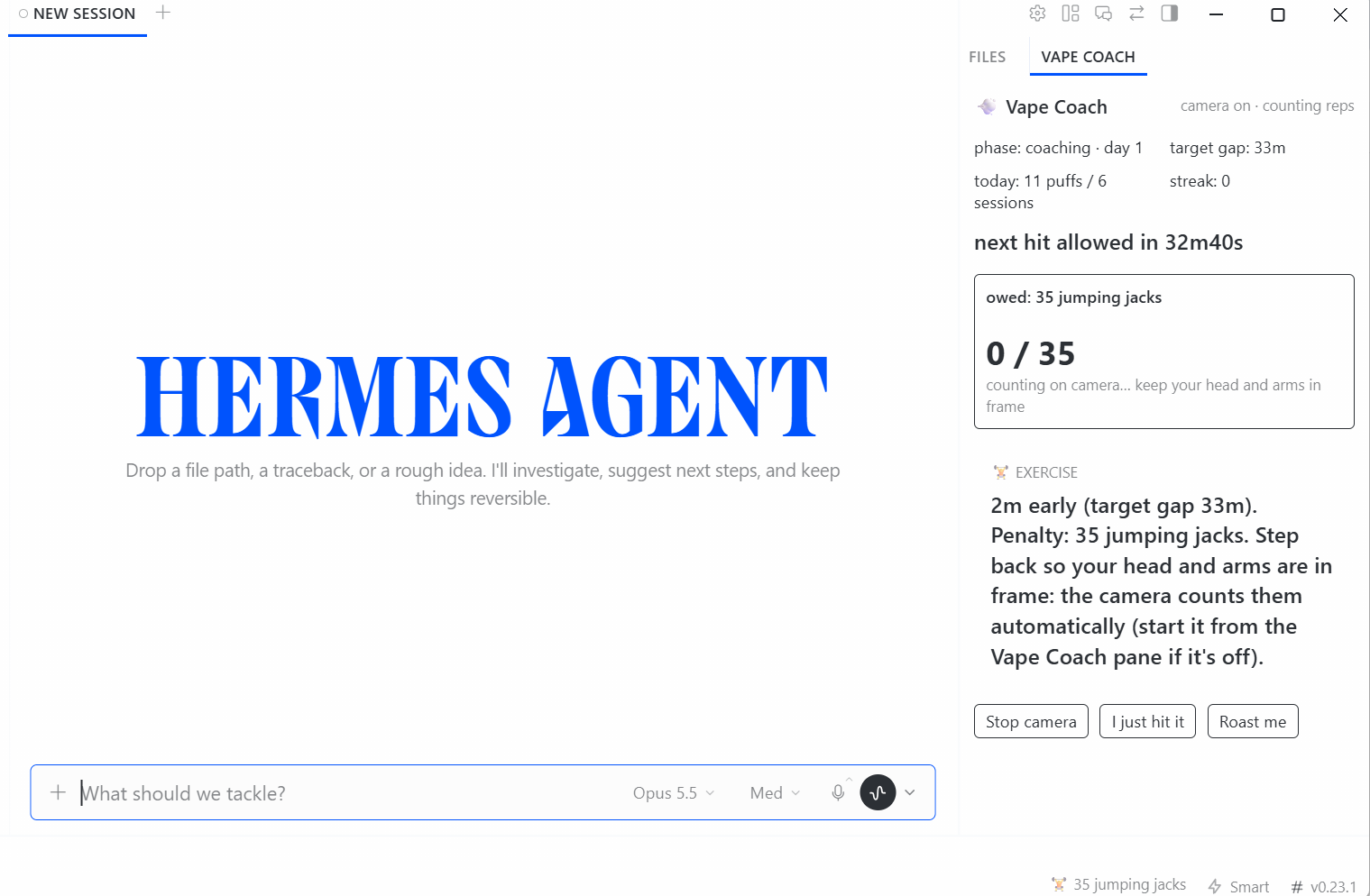
Step back and pay up. When reps are owed, the same watcher switches to rep counting. The
pane fills live and the challenge clears itself. You never type a command. -
Make the gap, earn a streak. On-time sessions get praise and an on-time streak.
Example watcher output (lines from real runs, trimmed):
camera open (dshow). Frames are processed in memory only.
[puff] t=17.1s dwell=2.95s exhale=1.0 grip=0.154 score=1.0
  >> [exercise] 12m early (target gap 33m). Penalty: 35 jumping jacks. Step back so your head and arms are in frame: the camera counts them automatically.
[reps] 35 jumping jacks owed. Step back so your head and arms are in frame: counting automatically.
  rep 1 (34 left)
  rep 2 (33 left)
  ...
  >> Challenge cleared: 35 jumping jacks (camera). Respect. Now stay off it for 33m.
[reps] all done: back to watching for hits.
And this is what the agent receives with your next message. It always does the work first:
[vape-coach] The user just vaped. Queued nudge: "2m early (target gap 33m). Penalty: 35 jumping
jacks. ..." They still owe 35 jumping jacks. Answer their request fully first, then add ONE short
playful line about it. Never refuse, delay, or degrade the work; never modify code as a 'punishment'.
Install
hermes plugins install vape-coach      # or: hermes plugins install https://github.com/NeelM0906/Vape-Coach
hermes plugins enable vape-coach       # installs mediapipe, opencv-contrib-python, numpy
Then restart Hermes (or run hermes gateway restart) so the gateway loads the plugin's backend.
Do this after every hermes plugins update vape-coach too; if you forget, the pane tells you.
In Hermes Desktop, open Capabilities (left sidebar) → Plugins → Vape Coach and switch
on the Desktop half. A VAPE COACH tab appears in the right panel and a countdown chip appears in
the status bar.
You need Hermes 0.23.0 or later and a webcam. On first start the watcher downloads three MediaPipe
models (about 30 MB, SHA256-pinned).
Use it
In Hermes Desktop. Click Start camera and get back to work. The pane shows:
- your phase and the target gap
- a countdown to your next allowed hit
- any reps you owe, with a live progress bar
- the latest roast
Its buttons are Start/Stop camera, I just hit it (for a hit off camera) and Roast me.
There's no undo button: a hit you took stays logged.
In chat:
/vape status      phase, target gap, time until your next allowed hit, reps owed
/vape hit [n]     log an off-camera hit
/vape stats       the last 7 days
/vape roast       a free roast
The agent also gets three tools (vape_status, vape_log_hit, vape_stats) and a bundled skill.
The skill sets the tone: roast the habit, not the person; never refuse or delay work; PR threats are
jokes only.
In a terminal:
hermes vape watch       the same watcher as the Start camera button (Ctrl+C stops it)
hermes vape status      the same as /vape status
hermes vape undo        the camera got it wrong: void the last hit and the penalty it created
hermes vape reset --yes delete all Vape Coach data
Settings
All settings live under plugins.entries.vape-coach.settings in config.yaml. You can also edit
them on the Settings page.
| Setting | Default | What it does |
|---|---|---|
baseline_hours | 24 | Observe-only window. Set 0 to start coaching right away (handy for a demo). |
gap_growth_per_day | 0.1 | How much the target gap grows each day. |
session_gap_s | 300 | Puffs closer together than this count as one session. |
exercise | jumping_jacks | Or squats, or pushups. |
reps_base / reps_step / reps_max | 15 / 10 / 60 | Penalty size. |
verify_reps_with_camera | true | false switches to the honor system: a Done button and /vape done. |
interventions | all four | Drop the rungs you don't want; the nearest enabled one is used instead. |
camera_index / camera_backend | 0 / auto | On Windows, auto tries DirectShow and then Media Foundation. |
On Windows, if the camera won't open, go to Settings → Privacy & security → Camera and turn on
Camera access, Let apps access your camera and Let desktop apps access your camera. Close
Teams or Zoom if they're holding the camera. If DirectShow shows a black frame, set
camera_backend: msmf.
Under the hood
webcam → Pose lite @2 fps ── hand near face? ──► Pose + Face (blendshapes) + Hand @12 fps on a head crop
                                                 │
        hand→mouth distance · pinch grip · pursed lips / vapor cue · jaw · head tilt
                                                 │
        IDLE → APPROACH → DWELL (0.35–7 s at the lips) → RELEASE → EXHALE window (5 s) → score
A hit has to look like one. Each gate below rules out a common look-alike:
- A device in a pinched grip. An open hand gets rejected, which rules out snacks and scratching.
- At least 0.3 s with the hand actually at the lips. A brush past the mouth doesn't count.
- A face that stays visible. A mug or bottle hides it.
- A level head. Drinking tilts it back.
- A dwell under 7 s. Longer is a chin rest or a phone call.
- Evidence of an exhale. Pursed lips, or the texture loss and brightening of vapor in front of
your mouth.
Puffs closer than 8 s apart count as one. The rep counter uses joint angles and switches to
arms-only mode automatically when your legs are out of frame. Puff detection pauses while you
exercise and for 15 s afterwards.
How well it works
| Test | Result |
|---|---|
| Live desk test: normal, stealth and double puffs | 11 of 11 detected |
| Live: automatic rep counting | 5 jacks done, 5 counted, challenge cleared with no command |
| CPU at 640×480 | About 20% of one core idle, more while a hand is near your face |
Known weak spot: snacking, face-scratching and phone calls can still set off false alarms. In
the live test, the open-hand gate and score threshold would have caught 5 of 13. When one slips
through, hermes vape undo removes it along with its penalty. To measure accuracy on your own
recordings, see eval/RECORDING_GUIDE.md.
Privacy and what it touches
- Camera: on only while the watcher runs. That's after you click Start camera (the plugin's
backend then runspython -m vapecoach.cli watchas a child process, with a minimal allowlisted
environment that carries none of Hermes' provider keys) or whilehermes vape watch
runs in your terminal. Stop camera or Ctrl+C turns it off, and the pane always shows the
camera's state. - Frames: processed in memory, never written to disk, never sent anywhere. The one exception is
--debug-out, and only on a replay of your own video file. - Stored locally: timestamps, scores and counts in
<hermes home>/plugin-data/vape-coach/data.db, plus the watcher's text log,watcher.log.
hermes vape reset --yesdeletes the data. - Network: a one-time download of three MediaPipe models from
storage.googleapis.com/mediapipe-models, checked against pinned SHA256 hashes. Nothing else. - Never blocks you: it doesn't block requests or gate tools, and it has no tool that can touch
your code. The PR threats are jokes. - None of these: LLM calls, credentials, telemetry, self-updating.
Development
python -m pytest                          # 69 tests: detector, reps, auto-reps, taper, coach, glue, Desktop contract
hermes plugins validate . --install-deps
Not medical advice. If quitting is hard, talk to a doctor or call 1-800-QUIT-NOW (US). MIT licensed.
README from the reviewed commit c767187; it updates when the author re-pins.


