clientamp
Waiting On You
A Hermes plugin that watches your agent chats and builds a live task list of what each agent is waiting on you for. Tasks are sorted into Covey quadrants so you can see what matters first.
Features
- Live list from all chats after each turn (and on a schedule you control)
- Answer from the list: Yes, No, Reply, Later or Open on the selected task, with single-key shortcuts and five seconds to undo before the answer is sent into that chat
- Catch up on one project: every chat in that project that is waiting on you, in one view
- Right-click a chat card (or Shift-F10, or the … menu) to Close all tasks in that chat, with confirm and undo
- A Working badge on the chat you are looking at while its agent is mid-turn
- Covey quadrants (urgent/important)
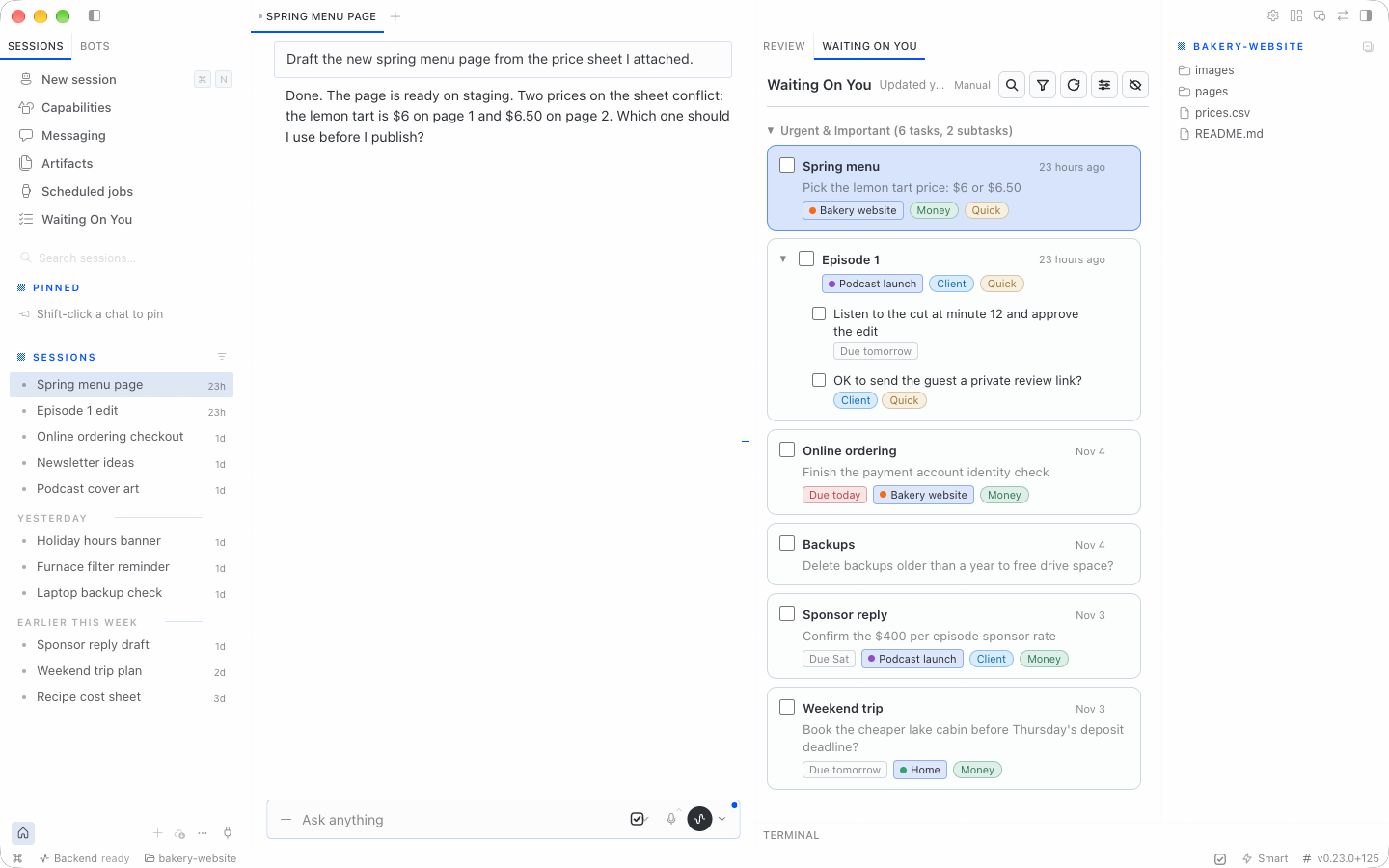
- One entry per chat with nested asks grouped together
- Done, not-a-task, snooze (presets + custom date), and move between quadrants
- Undo last action, plus ⌘Z in the panel
- Filters by agent, project and tag behind one Filter button; sort newest or oldest
- Three layouts: Cards, Compact and Next up
- Read-only Hermes Projects, assigned from each chat’s working folder
- Tags with colors and optional hints; automatic tagging is opt-in with a decision provider
- “Why is this here?” shows the agent reply that triggered the task
- Optional archive of a chat when its last unfinished task is marked done
- All Hermes profiles on this Mac, plus optional read-only SSH collection from other machines (see Other machines)
All screenshots use made-up demo chats.
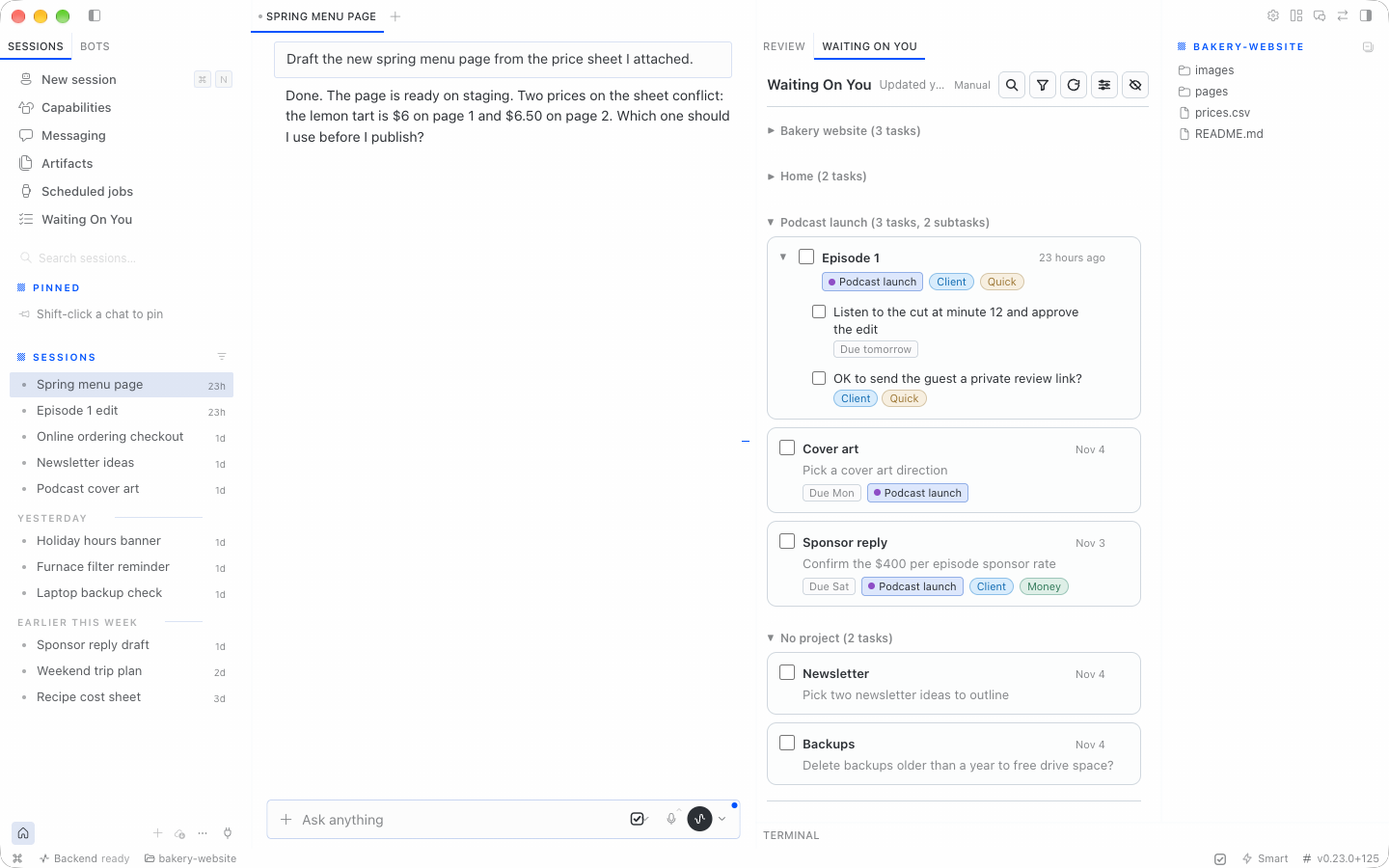
One chat, two asks. Asks from the same chat nest under one card. Group by Project to see each Hermes project together, with a No project section for chats outside a project folder.
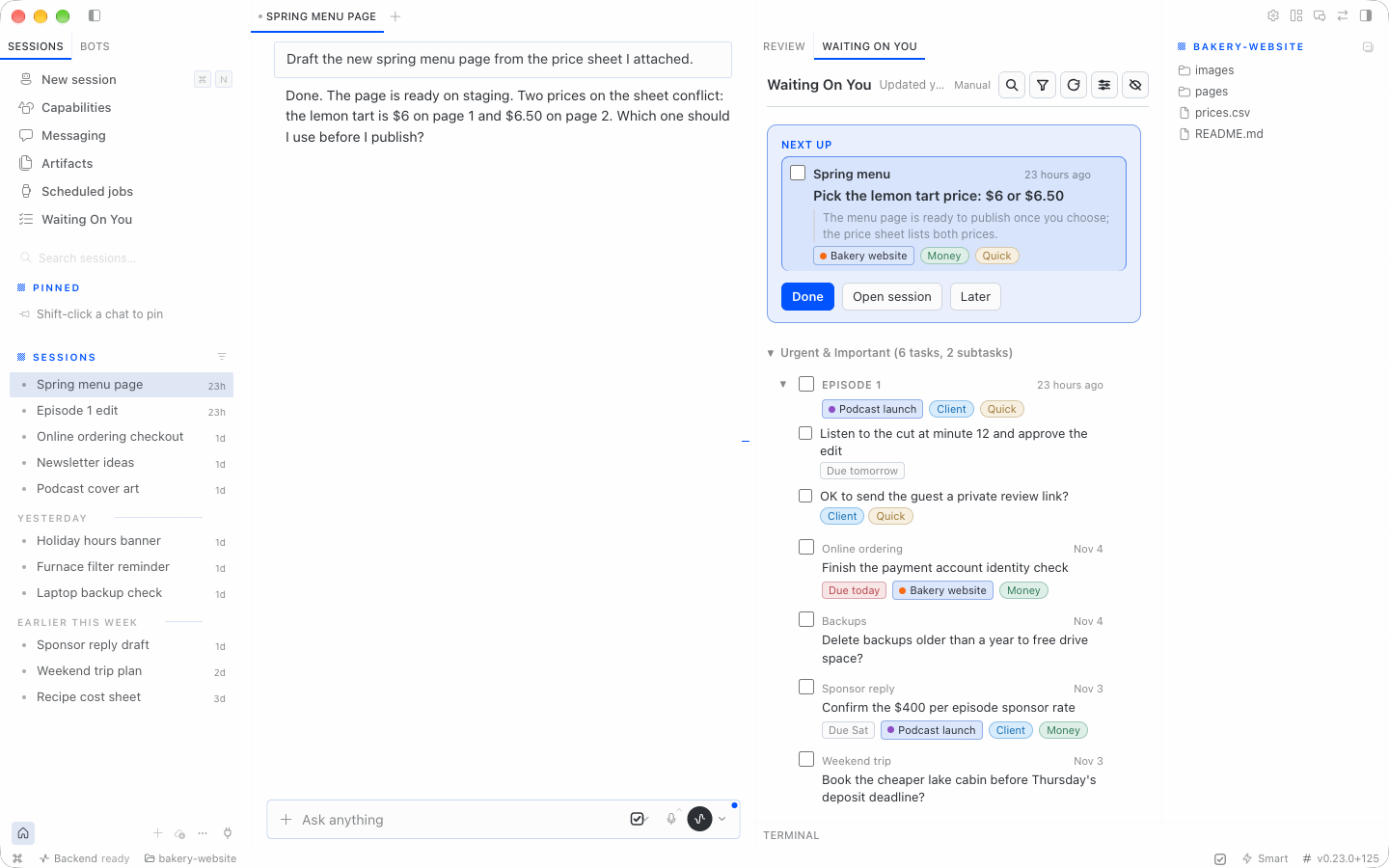
Next up. One of three layouts. It puts the first task in a box with Done, Open session and Later. Cards (the default) and Compact are the other two.
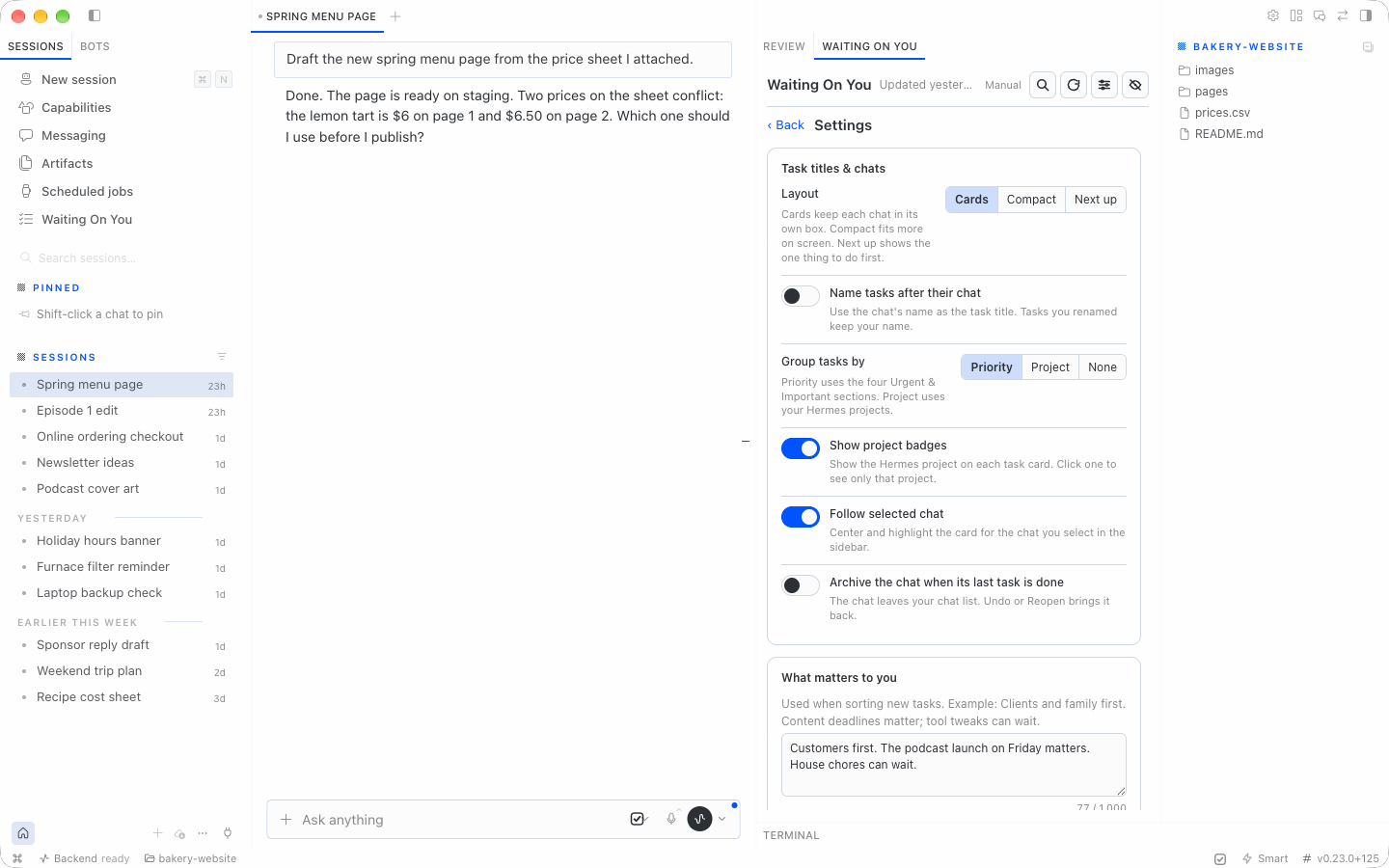
Settings. Pick a layout, choose how tasks are grouped, describe what matters to you, and turn on an optional decision model.
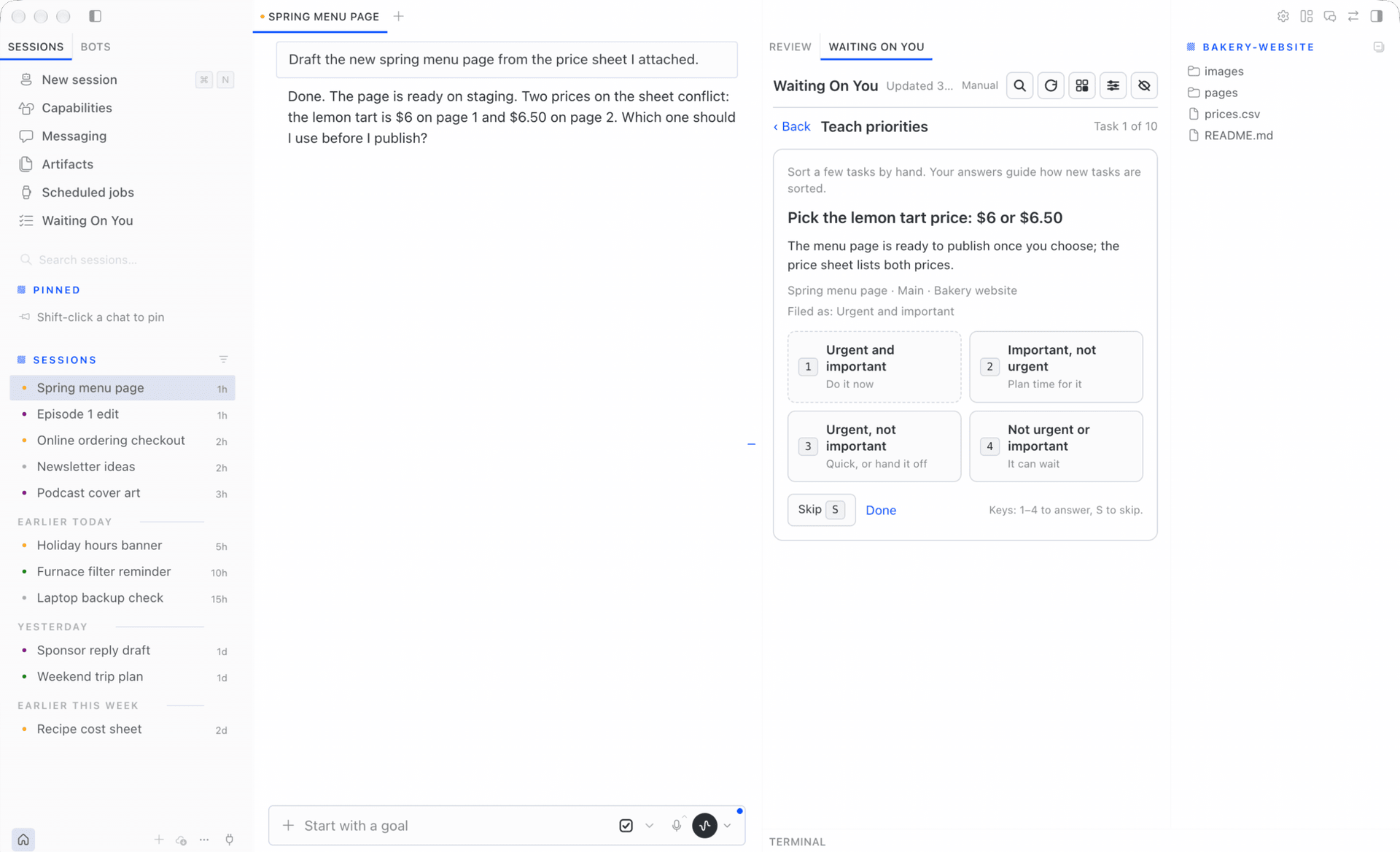
Teach priorities. Sort a few tasks by hand so new tasks land in the right quadrant.
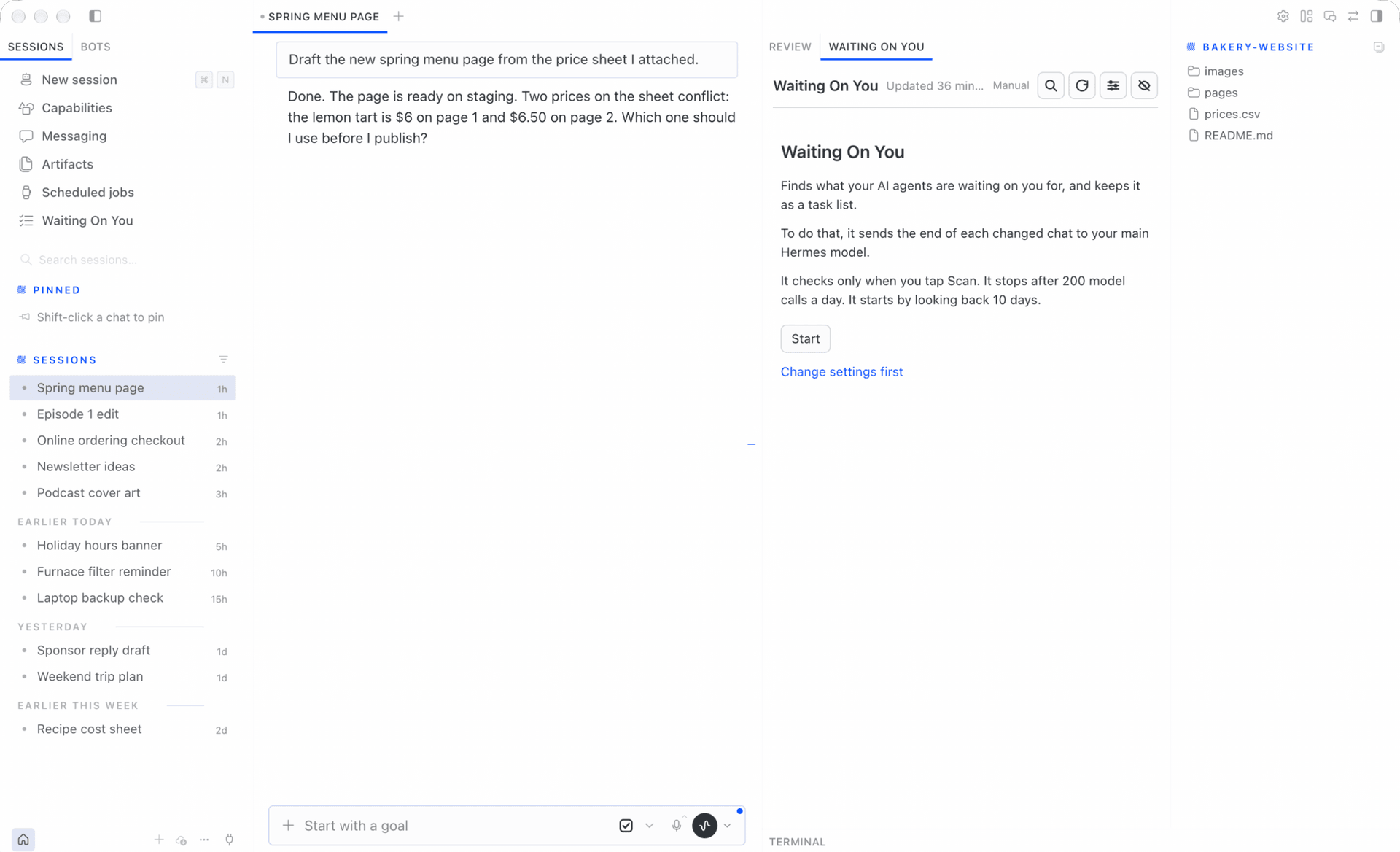
First run. Nothing is read until you press Start. The side pane explains what is sent to your model and how often.
Requirements
- Hermes ≥ 0.21.5 on macOS or Linux (Windows scanning is untested; use WSL)
- Hermes Desktop for the side panel (the list UI)
Install
hermes plugins install clientamp/waiting-on-you-desktop --enable
If Hermes asks to install Node dependencies, answer N. The panel ships pre-built; those packages are only for building it from source.
Public source: github.com/clientamp/waiting-on-you-desktop.
Once this plugin is listed in the Hermes catalog, you can also use:
hermes plugins install waiting-on-you-desktop --enable
The catalog name is waiting-on-you-desktop because another plugin already uses waiting-on-you. Your tasks and settings still live in ~/.hermes/plugin-data/waiting-on-you/, so an earlier install keeps its list. Panel view choices (filters, collapsed groups) start fresh under the new name. If you installed it earlier as waiting-on-you, remove that copy first with hermes plugins remove waiting-on-you; your task list stays.
In Hermes Desktop, open Capabilities → Plugins and turn on Waiting On You.
Restart once so the gateway and panel load the plugin:
hermes gateway restart
Also restart the Hermes dashboard / Desktop app.
Remote Desktop: Hermes Desktop loads panel JavaScript from the Mac where Desktop runs. If you use Desktop on another Mac, copy desktop/plugin.js from this repo to ~/.hermes/desktop-plugins/waiting-on-you-desktop/plugin.js on that Mac.
First run
Before you tap Start, the panel explains what the plugin does, which model will read chat endings, how often it checks, the daily call cap, and how many days of history it scans. Chat data is not sent to a model until you choose Start (that sets consent and runs the first scan); Test connection uses synthetic data only. Use Change settings first if you want to adjust mode or limits before scanning.
Privacy — what is sent where
Outbound paths (no telemetry):
- Classifier: sends the last user message (up to 300 characters), last agent reply (up to 1500), chat title/date/project, unfinished (open or snoozed) task text, ten recent closed asks, your priority note, and up to eight priority corrections to Hermes’s configured
waiting_on_youmodel (main model by default). - Priority calibration: each classification prompt can include up to 8 of your own priority corrections from other chats or this one (task ask + chosen quadrant, plus its context) as calibration examples. It uses the most recent ones. These go to the classifier model and optional decision provider.
- Rename with AI: sends the first two and last 30 chat messages, up to 600 characters each, plus task/group naming context to that Hermes model.
- Suggest tags: sends up to 200 recent chat titles, project names, and existing tag names to that Hermes model.
- Priority evaluation: on explicit confirmation, sends chat excerpts and task context through the classifier and optional decision provider to compare predictions with labels. Evaluated tasks’ labels are held out of calibration examples.
- Optional decision provider: receives chat excerpts for gating; asks, context, due dates, projects, priority note/corrections, and tag names/hints for priority/tag scoring. Preset hosts:
api.typesafe.ai,api.cloudflare.com,api.perplexity.ai,api.openai.com; Ollama/custom uses your configured endpoint. Connection tests send synthetic data only. - SSH collection (optional, off by default): runs
python3over SSH on hosts you list underremote_hoststo read that host'sstate.dbandprojects.db, read-only. Nothing is written on those hosts. - Card action handlers (optional): commands you configure can make their own network calls. See Card actions.
Model-backed chat features require first-run consent. Choose providers and SSH hosts you trust.
The daily limit applies to background scans and Scan now. It does not stop Rename with AI, Suggest tags, priority evaluation or decision provider calls.
The plugin also reads Hermes projects.db beside each state.db and the waiting_on_you model setting in config.yaml. It writes decision provider settings through Hermes plugin config. See SECURITY.md for every read and write.
Tasks and settings live under ~/.hermes/plugin-data/waiting-on-you/ (files are created mode 0600 where the OS allows).
Choosing a model
In ~/.hermes/config.yaml, point the auxiliary task at a fast, inexpensive model:
auxiliary:
  waiting_on_you:
    provider: xai-oauth   # example — use your provider id
    model: grok-4.6-fast
    reasoning_effort: low
A small, fast model is enough; classification does not need your heaviest reasoning model.
Decision models (optional)
A decision model adds three checks alongside your normal Hermes model:
- Gate: skips the normal model call when the chance that a chat needs your reply is below 15%. Chats with open tasks always reach the normal model so answered tasks can close.
- Priority: scores urgency and importance together, using your “What matters to you” note and recent corrections. Scores replace the normal model’s values only at 50% confidence or above. Manually locked quadrants stay locked.
- Automatic tags: when enabled, applies only tags you already created, at 80% confidence or above. Removing an automatic tag keeps it removed. It never invents tags.
Leave the decision provider empty to turn these checks off. Gate and priority checks default to on when a provider is configured; automatic tagging defaults to off. If a decision request fails or times out, the normal Hermes classification still runs and its tasks are kept. Decision calls and input tokens are counted separately from normal model usage; the normal daily call cap does not cap decision calls.
Providers and keys
Enter keys in Hermes Desktop → Settings → Plugins → Waiting On You. You can also open that page with the gear on Waiting On You’s Capabilities → Plugins row. These are Hermes-managed masked credential fields, not keys to paste into this panel or a chat. The plugin reads them only through Hermes’s supported secret API and never returns them in its API responses.
| Provider | Default model | Where to get the key | Hermes credential field |
|---|---|---|---|
| TypeSafe Jev | jev-latest | TypeSafe | WOU_TYPESAFE_API_KEY |
| Cloudflare Clef / Clef Flash | clef / clef-flash | Cloudflare API tokens, with Workers AI access; also enter your account ID | WOU_CLOUDFLARE_API_TOKEN |
| Perplexity / Perplexity Flash | pplx-decider-latest / pplx-decider-flash-latest | Perplexity API settings | WOU_PERPLEXITY_API_KEY |
| OpenAI | gpt-6-luna | OpenAI API keys | WOU_OPENAI_API_KEY |
| Ollama / custom endpoint | Enter the served decision model | Your own service; bearer key optional | WOU_DECISION_API_KEY |
OpenAI publishes $0.10 per million input tokens, with free output, for gpt-6-luna. For all other providers, see provider pricing; prices and model access can change.
Provider, model, endpoint, account ID, and timeout stay in Hermes’s plugin configuration (plugins.entries.waiting-on-you-desktop.settings; an older plugins.entries.waiting-on-you.settings block is still read). The plugin reads all five from Hermes’s configuration. When you save decision settings, it writes only provider, model, endpoint and account ID through ctx.set_config(); the timeout (decision_timeout, default 20 seconds) is read but never written by the plugin. The panel’s gate, priority, and automatic-tagging switches stay in the plugin’s settings.json. Keys stay only in Hermes credential storage, never either settings file.
Privacy: enabling a decision provider sends chat titles and message excerpts to that provider for the gate. Priority and tag scoring send task text, context, due dates, project names, your priority note, and up to eight recent priority corrections. Choose a provider you trust with that information. Decision errors are stored only as short codes such as timeout or http_401, never request content or keys.
For self-hosting with Ollama, enter your server’s base URL and a model/service that supports the System One decision protocol; the plugin appends /v1/systemone. A normal chat-only Ollama model endpoint is not sufficient. A custom endpoint is used as entered. Public endpoints require HTTPS; HTTP is allowed only for localhost or literal loopback/private/CGNAT IP addresses; hostnames require HTTPS. Test connection sends synthetic data only, not your chats.
A future native Hermes decision adapter is probed first when configured. The reserved adapter stays disabled until Hermes releases a supported decision contract; merely finding a method does not make the plugin guess that contract. External providers remain the working path today.
Suggestions and live priority checks
Suggest tags makes one normal Hermes model call using up to 200 recent chat titles and Hermes project names from the last 30 days, across watched profiles. Existing tag names are included to avoid duplicates. Suggestions are cleaned and are never saved automatically.
The in-host POST /eval-priorities route requires first-run consent and {"confirm":true} because it spends model calls. It compares stored model predictions (not user-corrected quadrants) with fresh classifications and optional decision scores for up to 25 labeled tasks, without changing tasks or labels. Optional labels use [{"task_id":123,"quadrant":2}]; otherwise it uses the latest stored correction per task. Unavailable chats/predictions appear as after: null. These calls and tag suggestions count as manual model use.
Cost
A typical classification call is approximately 1.2–2.5k input tokens and 100–400 output tokens for a few asks. A character-count estimate (characters ÷ 4, not a tokenizer measurement) gives about 1,155 input tokens with full message excerpts and no history, or 2,090 with a maximum-length priority note and eight full calibration examples. Open/closed task history can add more; ten detailed asks can approach the 1,800-token output cap. The model is only called when a chat has a new message since it was last read. On top of that, a few chats that still have open tasks get one re-check a day (at most 5 per scan), to refresh context and detect answered asks. Due-date urgency rises automatically without a model call when the local end-of-day deadline is within 48 hours (including overdue tasks). Scan now re-reads every chat with an open task.
As a guide: if you get new agent replies in about 40 chats a day, expect roughly 50–80 calls; at the estimates above that is around 65k–230k input + output tokens a day, depending on history and ask count. The default daily limit is 200 model calls. Confirmed forced scans may use up to twice your daily limit, never more; 0 keeps unlimited use. Usage for today and the past seven days appears in Settings. If usage is far above your number of active chats, lower the limit and tell us.
wou_list tool
Read-only, compact output: {"total": N, "tasks": [...]}. Returns the 20 most important open tasks by default (quadrant first, then newest). Each task has id, agent, chat, topic, ask, quadrant, and optional context, due (local YYYY-MM-DD), project (Hermes project name), and tags (tag names).
Optional arguments: quadrant (1–4), limit (1–200), project (exact name or key, case-insensitive), and tag (exact name, case-insensitive). Filters combine; total counts all matching tasks before the limit. Example: {"project":"default:project-id","tag":"Client","limit":10}.
Projects come only from Hermes, never the classifier. Keys are <profile>:<project_id>. No manual project override exists. The first time a task database opens without the Hermes Projects marker, the plugin backs it up beside itself as wou.db.bak-pre-hermes-projects-<timestamp>, then removes the plugin’s old project assignments. The old table is retained empty. This runs once per database; later upgrades do not take a backup.
Settings
Editable in the panel (stored in settings.json in the plugin data directory):
| Setting | Default | Range / values |
|---|---|---|
| Mode | auto | auto — after each chat turn plus periodic sweep; hourly — sweep only every 60 min; manual — only Scan now; off — no background scans (list still works) |
| Wait after a chat turn (seconds) | 90 | 30–600 |
| Check every (minutes) | 30 | 15–240 (sweep interval in auto / hourly) |
| Chats per scan | 25 | 5–100 |
| Daily limit (model calls) | 200 | 0–2000 (0 = no limit) |
| Look back (days) | 2 on new installs; 10 for legacy settings files without a consent field | 1–30 |
| Keep unanswered tasks (days) | 0 (Forever) | 0–365 (0 = forever) |
| Archive chat when last task done | off | on / off |
Automatic tags (auto_tag) | off | on / off (requires a configured decision provider) |
Decision gate (decision_gate) | on | on / off (used only with a configured decision provider) |
Decision priority (decision_priority) | on | on / off (used only with a configured decision provider) |
Layout (layout) | cards | cards — each chat in its own box; compact — one line per ask, no boxes; focus — Next up box with the first task and Done / Open session / Later, the rest listed below |
| Name tasks after their chat | off | on / off |
Group by (group_by) | priority | priority, project, or none; old show_priorities: false migrates to none |
| Show project badges | on | on / off |
Lookback controls new-chat discovery, not whether an unanswered task is kept. Unanswered tasks are kept forever by default, including existing settings files without retention_days. Expiry is opt-in: set a positive retention period to clear an unanswered task only when a successful source read confirms the chat has had no activity for that many days. These tasks appear in history as Cleared for age · not answered, with status expired, and can be reopened. They are not counted as resolved or done. Missing or unavailable sources are not completion evidence. Manual tasks, tasks with a future due date, future snoozes, and user-locked priorities do not expire this way. When a snooze wakes, its wake time starts a fresh retention window.
Consent is stored explicitly in settings.json. Missing, unreadable, or old settings without a consent value require Start again; creating a manual task never grants model access. Existing consented: true settings are preserved. The legacy 10-day discovery default is retained only for valid pre-consent settings files, not inferred from task data.
Model (read-only in Settings): resolved from auxiliary.waiting_on_you in config.yaml, or “your main Hermes model” if unset.
Advanced config (config.json)
Plugin config JSON (Hermes plugin config, not settings.json) nests collection options under collect. action_handlers stays at the top level.
{
  "collect": {
    "agent_names": { "default": "Alice", "work": "Bob" },
    "skip_title_prefixes": ["Subagent:"],
    "skip_title_contains": [],
    "local_profiles": [
      { "name": "default", "state_db": "~/.hermes/state.db" },
      { "name": "work", "state_db": "~/.hermes/profiles/work/state.db" }
    ],
    "remote_hosts": [
      { "name": "workstation", "ssh_host": "workstation", "state_db": "~/.hermes/state.db" }
    ]
  },
  "action_handlers": {
    "support:inbox:": {
      "command": ["/absolute/path/to/handler"],
      "timeout_seconds": 60,
      "env": []
    }
  }
}
Inside collect:
agent_names— map profile or remote host name → display name in the panelskip_title_prefixes/skip_title_contains— chat titles to skip when scanninglocal_profiles— the complete list of{name, state_db}entries to watch when overriding the default~/.hermeslayout; it replaces discovery, rather than adding to itremote_hosts— legacy SSH collection, off unless you add entries.{name, ssh_host, state_db}, read-only from the remotestate.db. If the host is down the panel shows a warning, and the old cached copy is never sent to the model again.
When local_profiles is omitted, the scanner uses HERMES_HOME or ~/.hermes: root state.db as profile default and each profiles/<name>/state.db.
Card actions
External producers (for example a support-mail sync script) can attach up to four buttons per task. Store them on upsert as JSON actions:
| Field | Required | Notes |
|---|---|---|
id | yes | ^[a-z0-9_-]{1,32}$, unique per task |
label | yes | Button text, max 40 characters |
confirm | no | If set, the panel asks before running (max 200 characters) |
style | no | primary, default (default), or danger |
kind | no | run (default) calls your handler; details toggles the source excerpt |
In config.json, map a chat_key prefix to a local handler (no shell):
"action_handlers": {
  "support:inbox:": {
    "command": ["/absolute/path/to/handler"],
    "timeout_seconds": 60
  }
}
Longest matching prefix wins. Only open tasks with a stored run action can execute a handler. The command must be a non-empty argv list starting with an absolute executable path; it runs without a shell, with a timeout clamped to 1–300 seconds (60 by default). Both stdout and stderr are capped at 64 KiB; oversized output fails the action.
Handlers start with a small environment: PATH, HOME, USER, LOGNAME, LANG, LC_*, TMPDIR and TZ. Other variables from the Hermes process, including API keys, are not passed. To pass more, list exact variable names in env (default []). The list can hold up to 32 names. Each name is at most 128 characters of uppercase ASCII letters, digits and underscores, and cannot start with a digit ([A-Z_][A-Z0-9_]*). There are no wildcards. An invalid env list drops the whole handler. Every name you add is handed to that command, so a credential or a variable that changes how a tool behaves gives the command that power. Add only what the handler needs.
A handler does whatever its command does, including its own network calls and file changes. The plugin does not limit them.
On Run, the plugin executes command with argv: action_id, chat_key, source_msg_id (or empty). A source id must be empty/None or at most 128 characters from A-Z a-z 0-9 _ . : @ < > + = , -, must not start with -, and cannot contain whitespace or control characters. This accepts producer ids such as cc_reminders:123, client_questions:42, and comma-separated reminder ids. Read the last non-empty stdout line as JSON: {"ok": bool, "message": str, "close": bool}. When ok and close are true, the task is marked done (chats are not archived for non-chat keys).
Keyboard shortcuts
Desktop keybinds (customize in Hermes Desktop). All use ⌘ on macOS and Ctrl on Windows/Linux:
| Shortcut | Action |
|---|---|
| ⌘⌥Y | Show or hide the panel (persists) |
| ⌘⌥R | Scan now |
| ⌘⌥P | Toggle show priorities |
| ⌘⌥B | Toggle show project badges |
| ⌘⌥E | Expand or collapse all groups |
| ⌘⌥A | Show answer buttons on every task, not just the selected one |
| ⌘Z | Undo last action (when the panel is focused) |
When the panel has focus: Y yes, N no, R reply, L later, O open the chat, J/K move between tasks. Typing in a text box never triggers these.
Inline answers go only into a chat this window is showing. Chats on another machine or another profile get Open and a note instead, so an answer never lands in the wrong chat. See docs/known-gaps.md for what Hermes does not expose to plugins yet.
The same actions are available from the command palette.
Troubleshooting
| Problem | What to try |
|---|---|
| Panel missing | Enable the plugin under Capabilities → Plugins in Desktop. On a Mac that is not your Hermes host, copy desktop/plugin.js to ~/.hermes/desktop-plugins/waiting-on-you-desktop/plugin.js on that Mac. |
| Sidebar gone on another agent's chat | That Hermes does not have Waiting On You. The list stays on the profile that has it. Switch back to that profile. |
| Settings or projects return 404 | The dashboard may still be running old code — restart the Hermes dashboard / Desktop app and hermes gateway restart. |
| “Can't reach Hermes. Retrying…” | Gateway or network issue; confirm hermes gateway is up and Desktop can reach it. |
| Nothing appears | Finish Start on first run, set mode to something other than off, or check whether the daily limit was reached (you can still Scan now with confirmation). |
| “… can't be reached” banner | That SSH host's chats are not coming in. Check that ssh <host> works without a password prompt. |
Other machines
Waiting On You reads every Hermes profile on the Mac where it runs. To include chats from another machine, add it under remote_hosts in config.json (see Advanced config). The plugin then reads that machine's state.db over SSH, read-only. SSH collection is off until you add a host.
SSH starts with a small environment plus SSH_AUTH_SOCK, so your SSH agent still works. Other variables from the Hermes process are not passed.
Satellite pairing, where a small plugin on another Hermes pushed its chats to this one, is not part of this release. No pairing or push endpoints ship, and Settings has no Other machines section. Pairing can return only after Hermes supports token-authenticated plugin routes through a public API (hermes-agent#151760, hermes-agent#143507). If you paired machines with an earlier version, remove the satellite plugin from them. Existing satellite records in wou.db are left in place and ignored.
What is read: chats from Hermes Desktop, the terminal UI and WebUI. Chats in messaging apps (Telegram, Slack and so on) and cron runs are not read.
Uninstall
hermes plugins remove waiting-on-you-desktop
Your task database stays in ~/.hermes/plugin-data/waiting-on-you/ until you delete that folder.
License
MIT — see LICENSE if present in the repo.
Security
See SECURITY.md for what the plugin reads, writes, and reports.
Priority learning and evaluation
Tasks expose context, due_at (epoch seconds), urgency (0–3), and importance (0–3).
A due date means 23:59:59 in the host's local timezone, including date-specific daylight saving time.
Urgency ≥2 or a deadline within 48 hours makes a task urgent; importance ≥2 makes it important.
Manual moves lock the quadrant against rescans and date escalation. Contextual rewrites keep renamed titles.
Older classifiers returning only quadrant remain supported.
GET /settings and PATCH /settings include settings.priorities_note (“What matters to you”),
a string up to 1000 characters (default empty). It and the eight most recent corrections calibrate future calls.
Backend quiz routes (relative to the plugin API prefix):
GET /quiz?limit=10returns{tasks: [...]}with open, unlocked, unlabeled, unskipped tasks spread across quadrants (limit 1–100).
Fields:id,ask,context,chat_title,agent,project(name or null),quadrant,due_at.POST /quiz/{task_id}with{"quadrant": 1}records a quiz label and locks that task.POST /quiz/{task_id}/skipwith an empty body skips that task. Unknown/closed tasks return 404.
Offline evaluation does not spend model calls:
python3 -m wou eval-priorities --labels .hermes/labels/labels.json
python3 -m wou eval-priorities --from-db
Label files contain {"labels":[{"task_id":1597,"label":1},{"task_id":2094,"label":null}]}.
Null labels are skipped. Output includes agreement, missing IDs, and a 4×4 matrix (rows=user, columns=prediction).
Use --db PATH for a copied/test database. --live explicitly spends model calls to compare fresh predictions
without changing stored tasks; it requires the Hermes configured classifier to be available in the process.
README from the reviewed commit 19526a6; it updates when the author re-pins.