 kruxarth
Wake Me When
Tell Hermes what you're waiting for in a live stream, and it pings you the moment it happens:
with the quote, a jump-in link, the clip, and a catch-up when you tune in.
Keynotes, earnings calls, press conferences, Twitch streams, council meetings, rocket launches,
nature cams: most live audio and video has no feed and no alert. Wake Me When listens (local
speech recognition) and looks (on-screen text, optional vision model) and wakes you up only when
your moment arrives, in the chat you asked from (Telegram, Discord, Slack, …).
Real output from a development run (Nov 7 2026, judge = the maintainer's model through Hermes):
👀 Watch #1 started · planning…
Condition: they announce the price
/wakeme list for status · /wakeme stop 1

📋 Watch #1 · Acme Phone X launch keynote (synthetic demo) (demo stream)
Listening for: “the price is”, “priced at”, “price point”, “the cost is”… · Watching the screen for: price on screen
I'll ping you here.

🔔 It's happening: they announce the price
“Acme Phone X starts at just seven hundred and ninety nine dollars.” (18:53, 0:52 into the stream)
▶ Jump in: demo://keynote (at 0:49)
Reply “clip”, “not it” or “stop”.
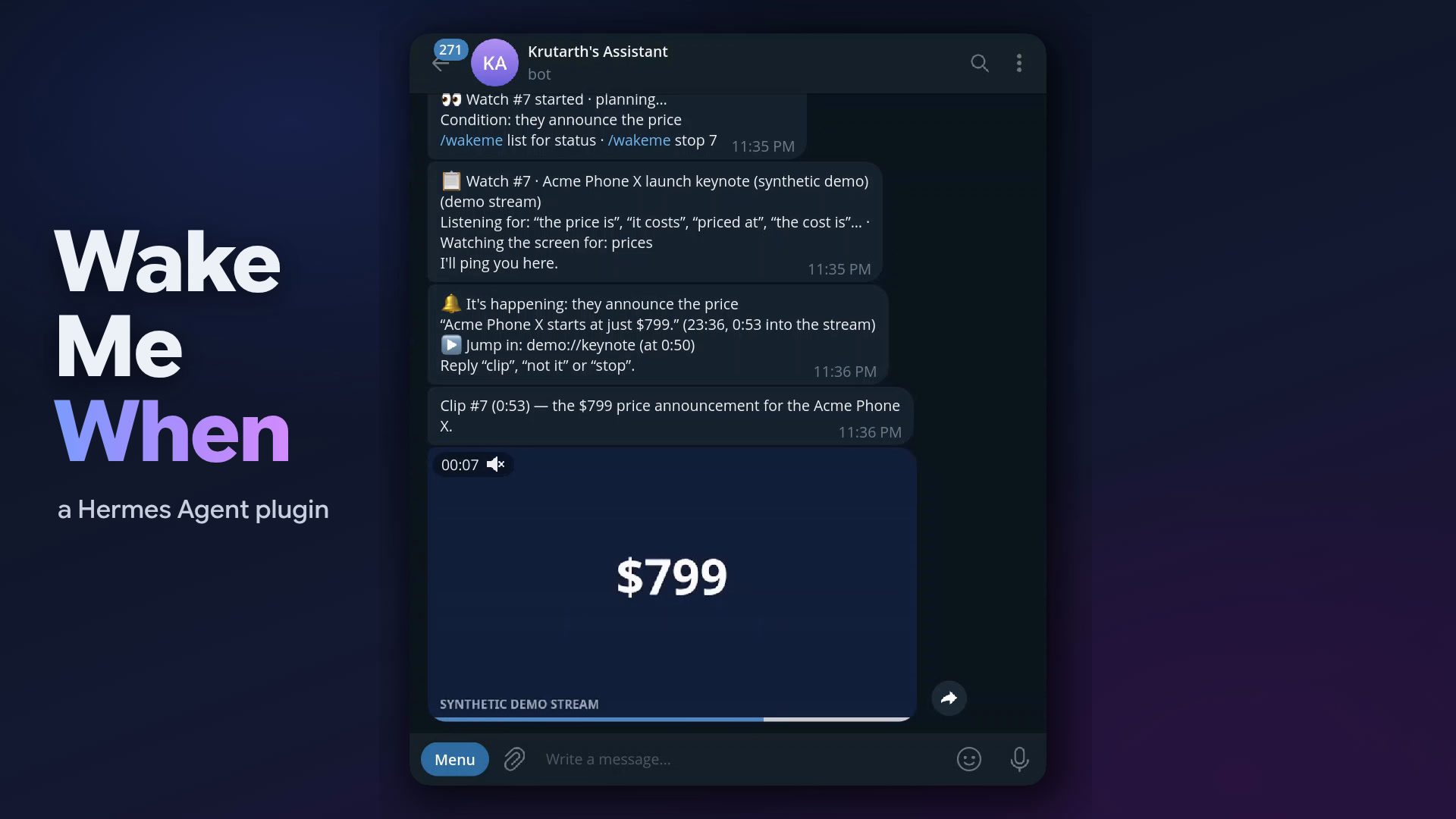
The chat screenshots are frames from the demo video: the plugin running in a real Telegram chat on Nov 7–8 2026.
30-second quickstart
Prerequisites: Hermes ≥ 0.23.0 and ffmpeg on your PATH. For YouTube add
yt-dlp, for Twitch and direct HLS or web-media links
streamlink, for on-screen text tesseract (all optional):
uv tool install yt-dlp && uv tool install streamlink
Install and check:
hermes plugins install wake-me-when          # from the catalog (or: hermes plugins install kruxarth/wake-me-when)
hermes plugins enable wake-me-when
hermes wakeme doctor
doctor checks every tool, installs and warms speech recognition (Hermes's own stt-whisper
extra, one-time ~150 MB model download), runs a 20-second demo watch and prints a pass/fail report.
Try it (no network needed — the demo is a bundled synthetic keynote):
/wakeme demo://keynote when they announce the price
Add ?speed=4 to the demo link to run it four times faster. When the alert arrives, reply
clip, not it or stop; /wakeme list and /wakeme catchup show what's going on. Or just ask
the agent: "wake me when the keynote gets to pricing https://youtube.com/…".
On live streams
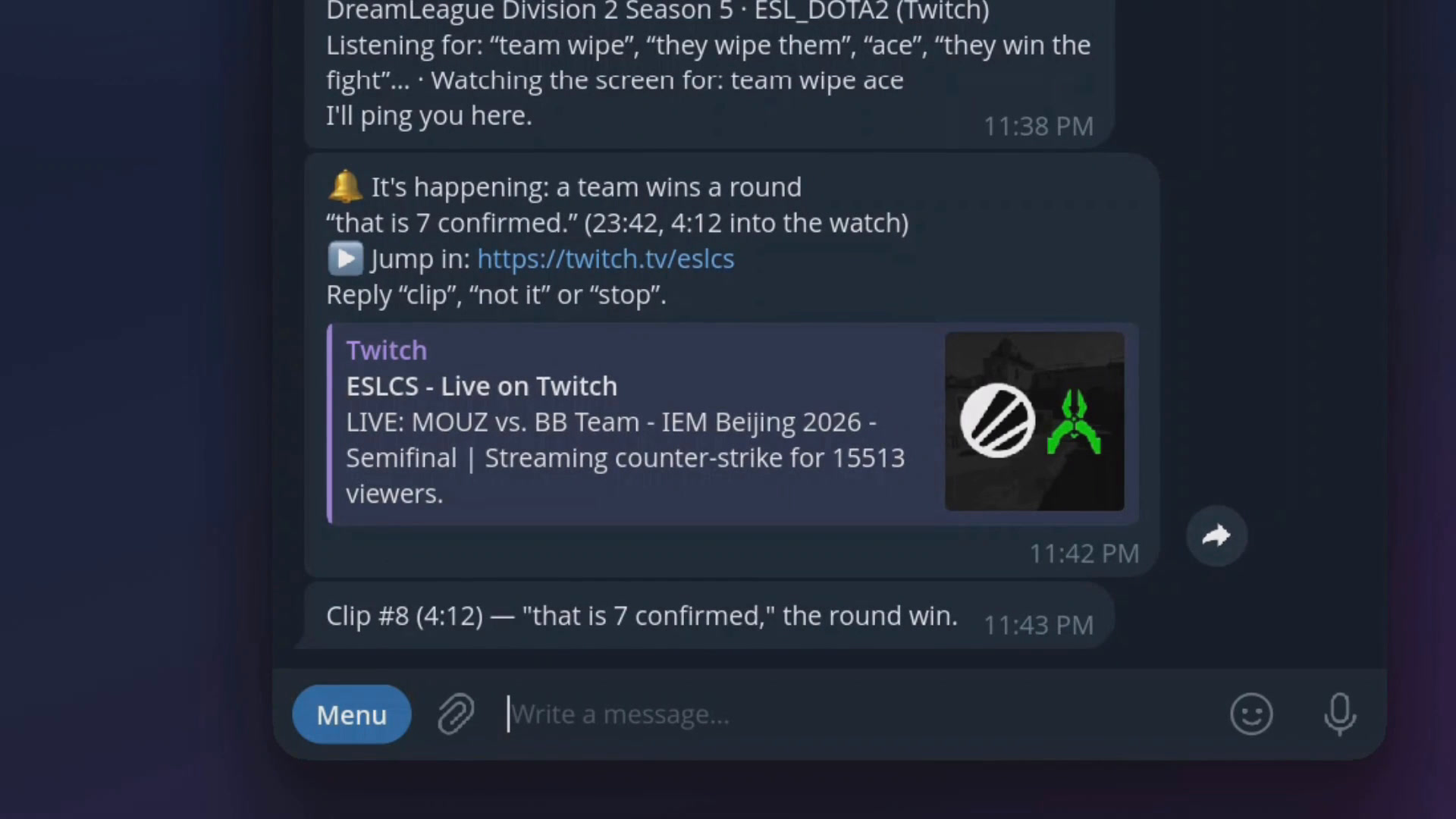
Counter-Strike on Twitch, when a team wins a round: the casters' words, a jump-in link, then the clip.
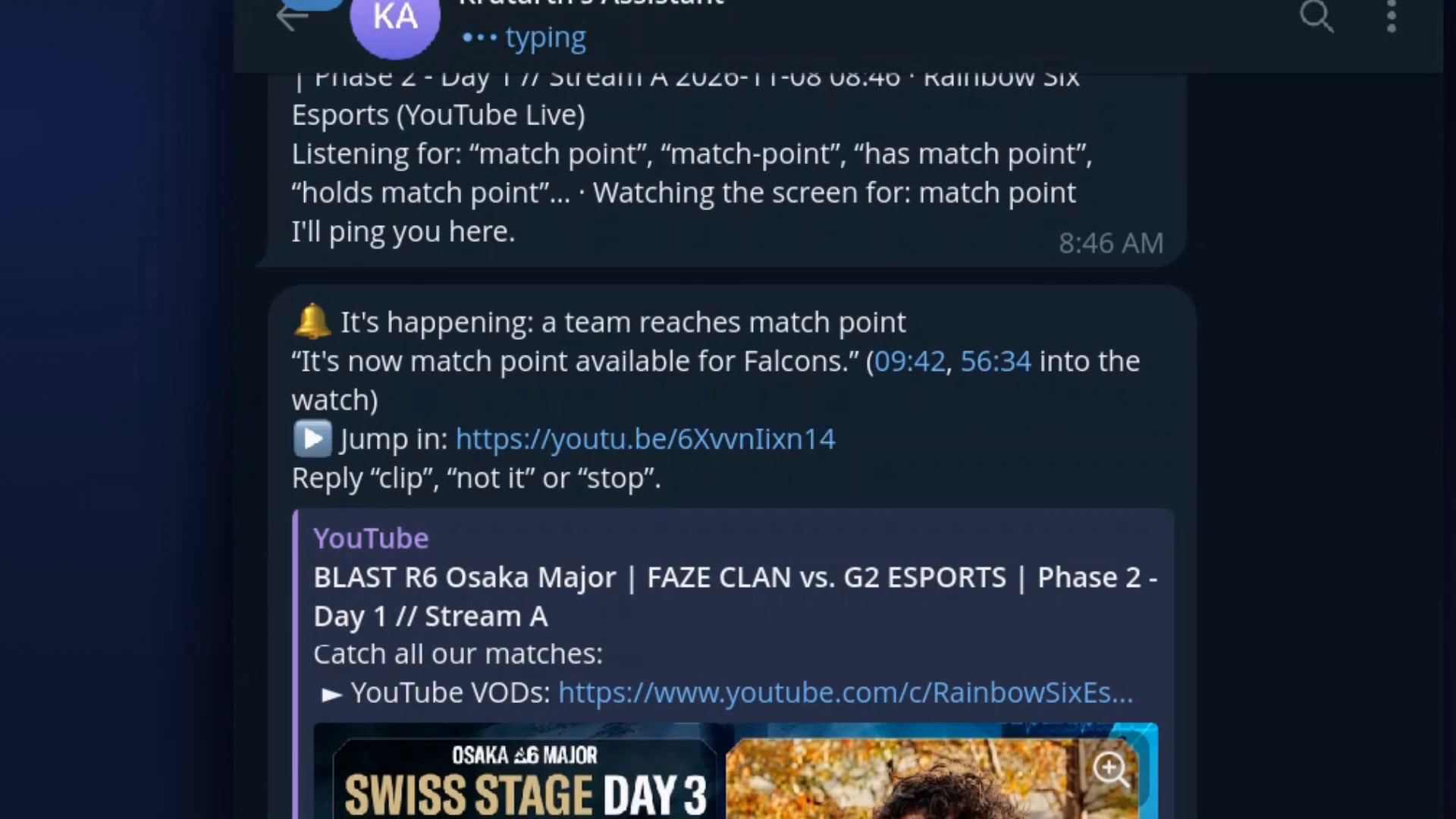
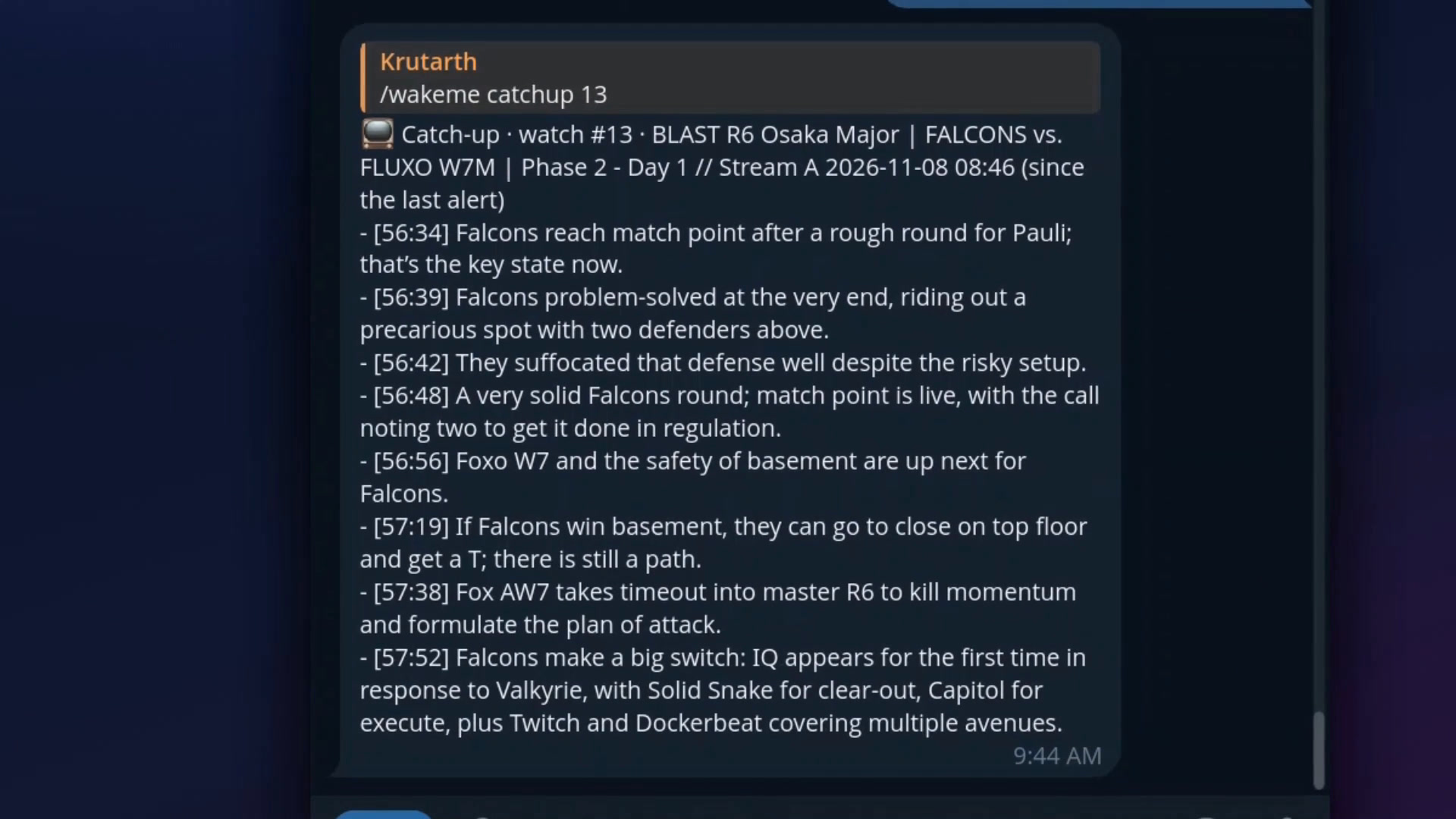
Rainbow Six on YouTube Live, when a team reaches match point: the alert came 56 minutes into the watch.
Examples
| You say | What it listens / looks for |
|---|---|
| /wakeme https://youtube.com/@acme/live when they announce the price | "price", "starts at", "$799" spoken or on a slide |
| /wakeme <earnings call link> when they give guidance for next quarter | "guidance", "outlook", "we expect revenue" |
| /wakeme https://twitch.tv/somestreamer when they reach the final boss | the streamer saying it, chat-free (ads are skipped) |
| /wakeme <council meeting stream> when agenda item 7 on the bike lane comes up | "item seven", "bike lane", the agenda slide |
| /wakeme <launch coverage> when it's T-minus 1 minute, or if it's scrubbed | "T minus one minute", "scrub", "hold", "T-01:00" on screen |
| /wakeme <nature cam> when a bear catches a fish | a vision-model check on changed keyframes |
| /wakeme https://twitch.tv/somestreamer every time they mention the giveaway | each mention, at most one alert per 5 min ("…, at most every 10 minutes" changes that) |
| /wakeme https://youtu.be/… where do they splash down | a recording plus a question: ranked timestamps with deep links (&t=…s) |
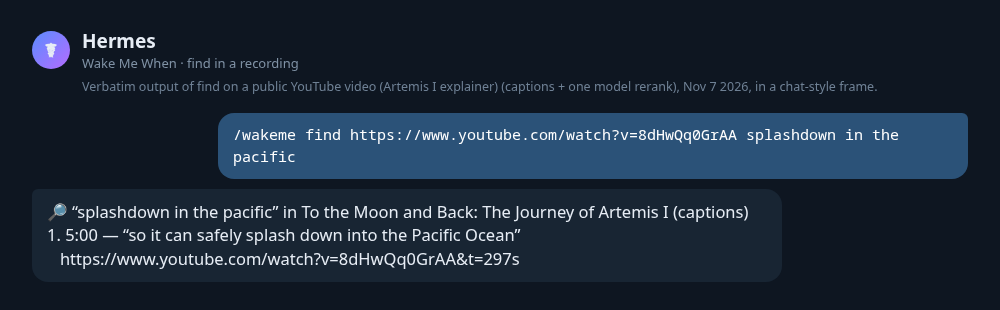
Verbatim find output from a dev run, shown in a chat-style frame.
"Every time …", "each time …" or "whenever …" keeps watching after the first alert, with a cooldown
(default 5 min). A recording link with a question ("where…", "what time…", "find…") searches it;
a live stream, or a condition starting with "when", is watched. /wakeme find <url> <question> always
searches.
How it works
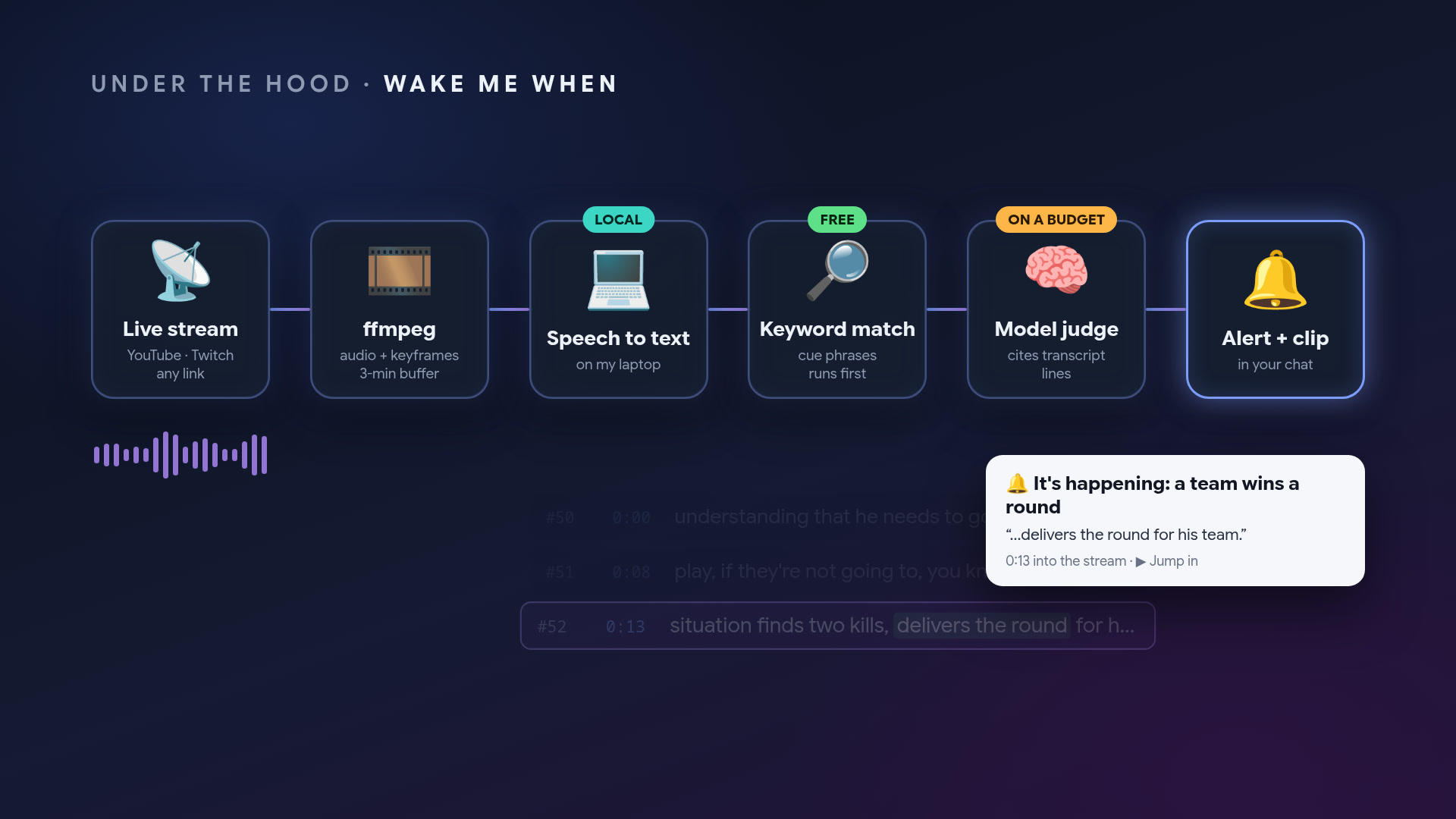
             ┌──── one ffmpeg per watch (+ streamlink for Twitch, HLS, web media) ────┐
 stream ───► │ 16 kHz PCM ─► reader thread ─► audio ring (drops oldest, never blocks)  │
             │ keyframes every 2 s (only if the plan needs visuals)                   │
             │ 5 s segments, stream copy ─► ~3 min ring (clips)                       │
             └────────────────────────────────────────────────────────────────────────┘
 audio ring ─► 10 s windows, 2 s overlap ─► ONE shared faster-whisper worker (all watches)
                                              │ transcript rows (id, stream time, wall time)
                                              ▼
  Stage A  free   fuzzy + phonetic cue match, OCR regex on changed keyframes ──┐ hit → now
  Stage B  LLM    judge (aux task wakeme_judge): rows since max(2.5 min ago, last alert) ◄┘ or every 60 s
  Stage C  LLM    vision question on changed keyframes (aux task wakeme_vision, optional)
                                              │ {matched, confidence, evidence_row_ids}
                                              ▼
  confirm/debounce: ≥ 0.85 fires; otherwise a 2nd positive after newer speech · never re-fires on old evidence
                                              ▼
  🔔 alert (time from the rows, never from the model) · evidence segments copied out of the ring
     → reply "clip" any time later · rolling 10-min summaries → /wakeme catchup
- One plan per watch. A single structured call turns your condition into cue phrases (with
speech-recognition misspellings), on-screen text patterns, an optional visual question, phrases
that mean "not yet" ("we'll get to that in a moment") and whether you asked for every occurrence.
The plan card shows the phrases and a plain label for the screen patterns, never the regexes. - The judge never invents times. It cites transcript row ids; the plugin maps them to stream
time and falls back to fuzzy-matching the quote. - "Not it" teaches it. Replying not it (or
/wakeme wrong) resumes the watch and shows the
judge that moment as a negative example. - Budgets. The periodic paraphrase check backs off from 60 s to 4 min while the stream stays
clearly off-topic and snaps back on any cue hit. At mostmax_llm_calls_per_hourmodel calls per
watch (default 60). When the
budget runs out, or the provider is down, it keeps watching with Stage A only and fires on strong
cue matches, clearly marked unconfirmed — it never misses silently. - Clips survive the ring. At alert time the segments around the evidence are copied out of the
rotating ring, so a clip reply minutes later still has the moment. The MP4 is cut on demand
and attached as native video.
Commands
Everything is one command, /wakeme:
/wakeme <url> when <condition>     watch (say "every time …" for repeats)
/wakeme <recording url> <question> find the moment in a recording
/wakeme list · /wakeme catchup [id] · /wakeme clip [id] · /wakeme stop [id|all]
After an alert, just reply: clip · not it · stop      (/wakeme doctor checks setup)
| Command | What it does |
|---|---|
| /wakeme <url> when <condition> | Start a watch. Replies instantly; the plan follows. |
| /wakeme <recording url> <question> | Search a recording (YouTube, media link, local file); /wakeme find <url> <question> forces a search |
| /wakeme list | Watches, status (planning, watching, behind, fired, stopped, ended), uptime, alerts, model calls/h, missed alerts |
| /wakeme catchup [id] [minutes] | What happened since the start, the last alert, or the last N minutes |
| /wakeme clip [id] | The clip of the last alert (or the last 20 s if none) |
| /wakeme stop [id\|all] | Stop watches |
| /wakeme doctor · hermes wakeme doctor | Dependency check + 20 s demo watch |
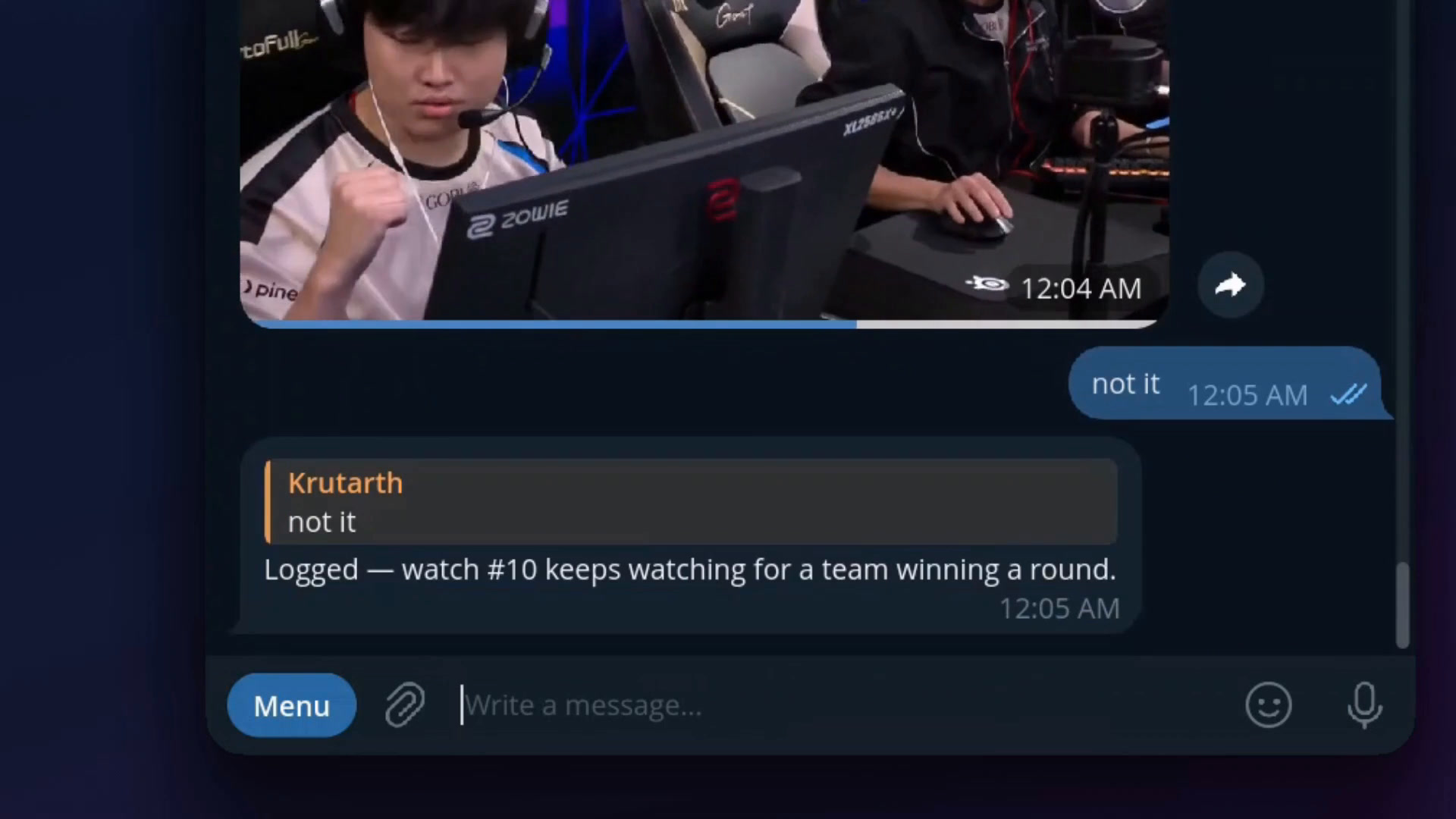
The id is optional when one watch is running. After an alert, a plain reply works: clip sends the
video, not it (or wrong, nope) resumes the watch and learns from the miss, stop ends it.
Hermes doesn't let a plugin read chat messages, so the agent handles these: while a chat has watches,
the plugin adds a short note to your turn naming the watch that just alerted, and the agent calls the
matching tool. /wakeme wrong [id] [why] does the same as not it without the agent.
Agent tools
wakeme_watch, wakeme_find, wakeme_list, wakeme_stop, wakeme_catchup, wakeme_clip,
wakeme_feedback — plus the bundled skill wake-me-when:wake-me-when that tells the agent when to
use each.
Configuration
plugins.entries.wake-me-when.settings.<key> in config.yaml, or the gear on the plugin in the
Desktop Plugins tab.
| Key | Default | Meaning |
|---|---|---|
| whisper_model | base | tiny, base or small |
| language | "" | speech language hint (en, …); empty = auto |
| stt_backend | local | local (faster-whisper) or captions (demo/sidecar captions only) |
| max_watches | 3 | live watches at once, across Hermes processes |
| max_llm_calls_per_hour | 60 | per watch |
| semantic_check_sec | 60 | periodic judge check for paraphrases (only when there's new speech) |
| min_confidence | 0.6 | lowest judge confidence that can fire |
| watch_ttl_hours | 6 | auto-stop |
| feedback_grace_min | 10 | how long a fired watch keeps its buffer for clip / not it |
| clip_seconds | 20 | clip length |
| auto_clip | false | cut the clip at alert time |
| auto_attach_clip | true | when allow_gateway_injection is granted, ask the agent to attach the clip right after an alert (one agent turn) |
| catchup_summary_min | 10 | minutes per rolling summary |
| keep_transcripts_days | 7 | transcripts and summaries |
| keep_clips_days | 2 | clips you asked for |
| allow_private_network | false | allow LAN addresses (local RTSP cameras); also lets ffmpeg fetch direct HLS and web-media links itself, unchecked |
| allowed_media_dirs | [] | folders whose files may be watched from messaging chats |
Route the judge to a cheap/fast model with hermes model → Configure auxiliary models →
Wake Me When judge, or in config.yaml:
auxiliary:
  wakeme_judge: {provider: openrouter, model: some/fast-model, reasoning_effort: none}
The vision stage has its own slot (Wake Me When vision, inherits your vision model), so a
text-only judge never breaks it.
Expected latency
Time from the moment being said to the alert ≈ source delay + up to 10 s transcript window +
speech recognition (~0.5 s for base on a laptop CPU) + one judge call (4–8 s with a typical hosted
model), plus one more judge round when the plan asks for confirmation (confirm: twice).
Measured on Nov 7 2026 (TESTING.md has the breakdown):
| Run | Moment → alert |
|---|---|
| demo://keynote, stub model (instant judge) | 6.5 s |
| demo://keynote, real model, plan chose confirm: twice | ~25 s (3 judge calls of ~4 s) |
| Twitch live (summit1g), real model, confirm: twice | 18 s after the transcript row, ~33 s after the words; add the source delay below |
| Source | Typical source delay (stream behind real life) |
|---|---|
| demo:// / local file | 0 |
| Twitch | ~5–10 s behind live |
| YouTube Live | ~15–30 s behind live |
| RTSP camera | ~1–3 s |
Limitations
- DRM-protected streams (Netflix, most paid sports) are not supported. You are responsible for
having the rights to what you watch and clip. - YouTube is the flakiest source: it rate-limits caption fetches (HTTP 429) and sometimes asks to
sign in. The plugin says so clearly and never reads browser cookies.findfalls back to local
speech recognition when captions are refused. - A watch lives in the Hermes gateway process. Restarting the gateway stops it (it shows as
stopped (gateway restart)in/wakeme list). - In the classic
hermes chatCLI, Hermes doesn't display plugin messages, so alerts there show up
in/wakeme list("Alerts you may have missed"). Telegram/Discord/Slack, the TUI and Desktop show them
live. - Audio-only sources produce audio-only clips.
- A moment that none of the plan's cue phrases or on-screen patterns catch waits for the periodic
judge check. That runs everysemantic_check_secand backs off to every 4 min on a quiet watch, so such
alerts can be minutes late. Phrase the condition with the words you expect to hear.
Troubleshooting
- Run
hermes wakeme doctorfirst. Every failed check prints the exact install command. - "installing speech recognition": the first real watch installs Hermes's
stt-whisperextra and
downloads the model;doctordoes this up front. If it says to restart, runhermes gateway restart. behindin /wakeme list: speech recognition can't keep up (too many watches orsmallon a slow
CPU). Usewhisper_model: baseor fewer watches; audio is dropped oldest-first, ingest never stalls.- YouTube: "Sign in to confirm you're not a bot" / 429: wait a few minutes or use another source.
Installing Deno (or having node/bun) helps yt-dlp read every format. - Twitch: "offline": the channel isn't live;
streamlink --json twitch.tv/<name>confirms. - Web media: "keeps its index at the end": that MP4 can't be read as it downloads (its index comes
after the video). Download it and watch the local file. - "the stream asked for an address on a private or local network": a playlist entry or redirect of
that link pointed at your LAN, and the network guard refused it (see Disclosure).
Disclosure
- Network calls: to the stream hosts you give it, through
yt-dlp,streamlinkandffmpeg
(andffprobe); a one-time download of the Whisper model from Hugging Face; Hermes's own package
index when it installs thestt-whisperextra. No other hosts. - External tools it runs:
ffmpeg/ffprobe(required),yt-dlp,streamlink,tesseract, and
a JavaScript runtime (Deno, node or bun) that yt-dlp may use for YouTube. None are bundled; all are
detected at runtime. Every subprocess uses an argv list (never a shell),--before user URLs, and
an explicit ffmpeg-protocol_whitelistper source type (network andfileprotocols are never
mixed). They run with a minimal environment, not Hermes's:PATH,HOME,TMPDIR,LANG/LC_*,
XDG_*, and when set the proxy variables, CA-bundle paths andTESSDATA_PREFIX. Provider keys and
bot tokens never reach them. - Private networks: a link that points at a private or local address is refused unless
allow_private_networkis on, and so is a stream URL that yt-dlp or streamlink resolves it to. Only
youtube.com,youtu.beandtwitch.tv(and their subdomains) go to yt-dlp and streamlink. A
direct HLS or web-media link is fetched bystreamlinkthrough the plugin's network guard, and
ffmpeg only reads streamlink's output from a pipe (-protocol_whitelist pipe). The guard checks
every connection streamlink makes, including playlist variants, segments, keys and redirects: it
resolves the host, refuses it if any address fails Hermes'sis_safe_url, and connects to the
address it checked. The plugin reads the playlist itself the same way to tell a VOD
(#EXT-X-ENDLIST) from a live stream. Not covered: withallow_private_networkon, or when you set
your own HTTP(S) proxy (the proxy then resolves names, as in Hermes's own policy), ffmpeg fetches
these links itself; and for YouTube, ffmpeg fetches the segments of the stream URLs yt-dlp returns
(those URLs are checked, the hosts are YouTube's). - Loopback listener: the network guard is an HTTP proxy on
127.0.0.1with a random port,
started the first time a direct HLS or web-media link is opened and closed when the plugin unloads.
It only accepts requests carrying the random credentials of a source that is open right now, and
only connects to public addresses. - Long-running processes: one
ffmpegper active watch (plus onestreamlinkfor Twitch, HLS and
web-media links), in
their own process group, killed on stop, plugin unload and gateway exit; one shared
speech-recognition worker thread. - Local files: accepted only from the Hermes CLI/TUI/Desktop or from folders you list in
allowed_media_dirs; refused from messaging chats. - Data sent to your model: transcript excerpts, on-screen text and (only when a watch has a visual
question) keyframes, via Hermes'sctx.llmwith your configured provider. - Local storage under
<hermes home>/plugin-data/wake-me-when/: a 3-minute rolling media buffer
per watch (deleted when the watch ends, after the grace window), clips you ask for (kept
keep_clips_days), transcripts and summaries (keptkeep_transcripts_days). - Optional permission:
plugins.entries.wake-me-when.allow_gateway_injection: truelets the
plugin (a) ask the agent in your chat to attach the clip right after an alert (auto_attach_clip),
which runs one agent turn on your main model, and (b) hand an alert it couldn't post to the agent.
Off by default; without it,/wakeme clip <id>is the way to get the clip. - No telemetry. Nothing is reported anywhere.
- Speech recognition install: on first use (or
doctor) it asks Hermes to install its own
stt-whisperextra (faster-whisper) through Hermes's package manager.
License
MIT. The demo streams in assets/demo/ are original: scripts written for this plugin, speech
synthesised with edge-tts, slides drawn by ffmpeg (scripts/make_demo_assets.py).
README from the reviewed commit 77e827a; it updates when the author re-pins.


