 Adolanium
Hermes Whiteboard
An agentic whiteboard for Hermes Desktop. You think a plan through on a board. Hermes lays it out, finds the groups in your notes, and sends agents to do the work, right there on the board.
Part of Hermes Folio, with Sheets and Data. Each works alone.
What it does
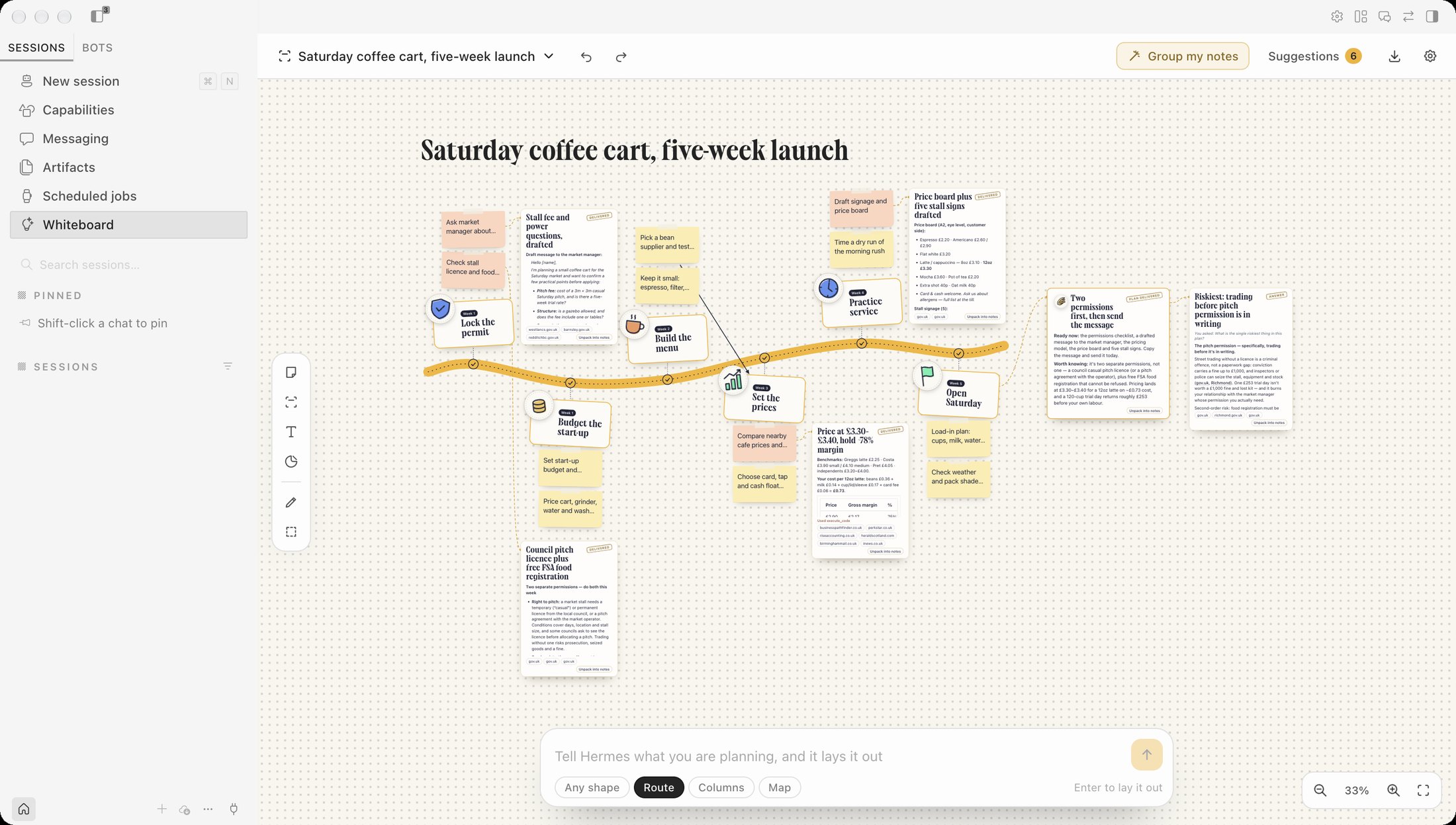
One sentence becomes a board. Tell Hermes what you are planning. It lays the plan out as a route (steps in order along a road), columns (groups side by side) or a map (ideas around one centre), with hand-drawn stamps, notes and action items. A gold Hermes cursor places each piece and the camera follows it.
Run the route. One click and Hermes travels the board stop by stop. At each stop its agents fan out over that stop's action items, each under its own cursor, up to three at a time. The road behind turns gold. What one stop delivered is handed to the next, so later work builds on earlier work. At the end Hermes writes one brief of everything that is ready.
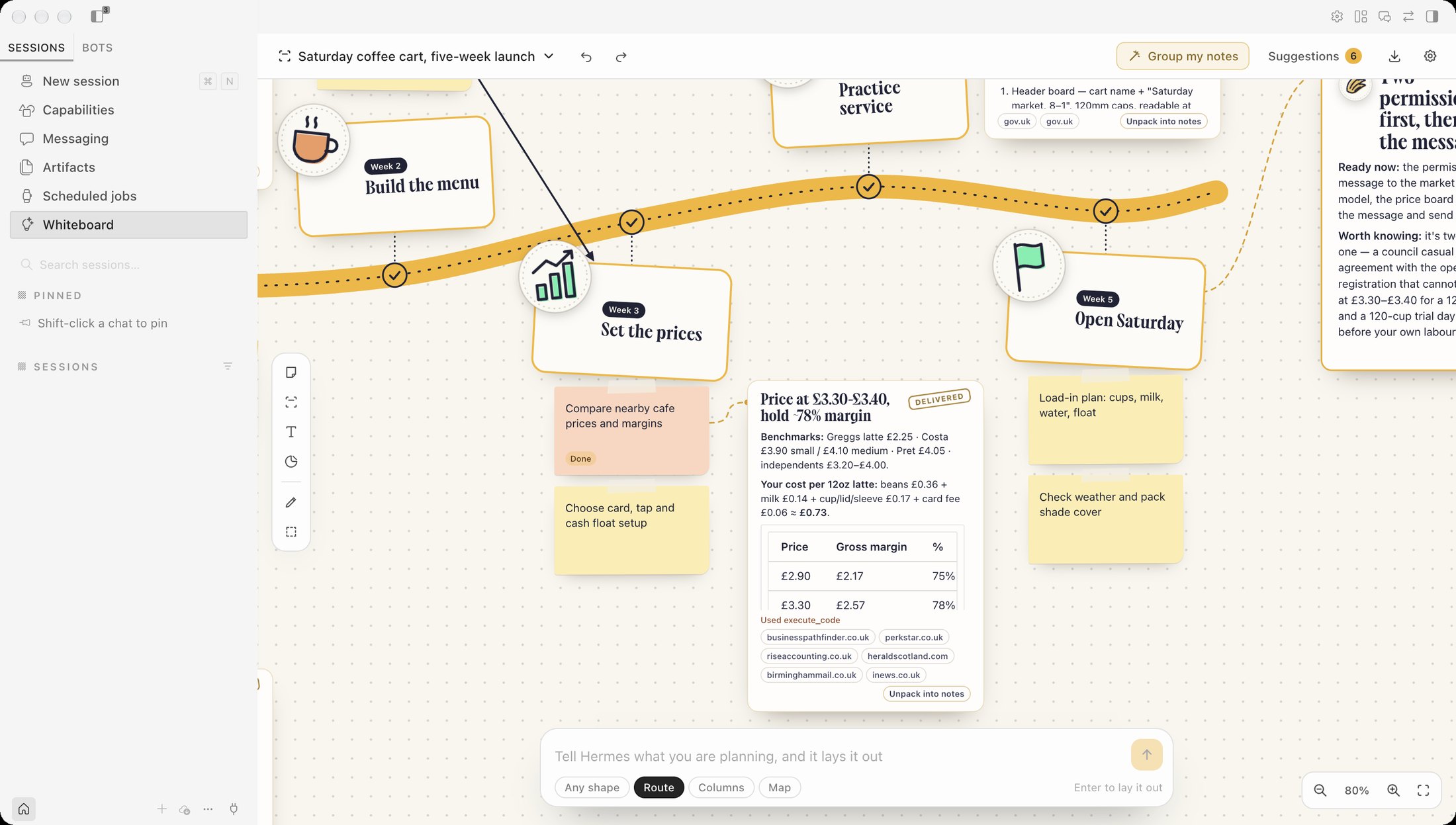
Hand any note to Hermes. Every note has a Hand to Hermes button. An agent does the item and delivers a finished result next to the note: the draft itself, the comparison itself, the answer with its sources.
Group my notes. Throw rough notes on the board. Hermes suggests groups, owners and action items, each with a reason. You accept or skip each one, and every accepted change can be taken back.
Ask about anything you select. Select notes, a group or a result, or drag a box around part of the board, and ask a question. The answer lands as a card beside what you asked about.
Unpack a result. Any delivered result can be unpacked into notes and next steps, which arrive as suggestions like everything else.
A real whiteboard underneath. Notes in six colours, groups, text, 32 stickers, arrows you draw between items, a pen, resize, duplicate, copy and paste, undo and redo, pan and zoom. Text grows as you zoom out, so a board fitted to the window still reads.
With Sheets and Data. When the Sheets or Data plugin is on, their Pin to board button puts ticked rows, or what each chart of a report says, on your open board as one new group of notes. One undo takes the group off again.
From any chat. Once you allow it, any Hermes chat can read your boards, start a new one, and propose notes, groups and action items that wait on the board for you.
A board linked to its chat. A board a chat made stays linked to that chat, and you can link any other board from the boards menu. On a linked board, Hand to Hermes and Run ask first where the work should go. Ask in the linked chat opens the chat with the request written in its message box, and you send it, so the chat that already owns the work does it, with its own approvals. Start separate work here runs agents from the board as before. While the chat works on it, the note says so. When the chat answers, the answer waits under Suggestions and becomes a result card beside the note once you accept it.
A linked board also follows work that started in the chat. The board's chat button shows when the chat is working and how its last turn ended, whoever started the turn. With Chats can read my boards on, the chat is told once that the board exists and marks its notes as it goes (Chat is on it, Chat: done, Blocked), and it sends outcomes as results for you to accept. A mark shows without review because it changes nothing else, and one click clears it. What you change on the board goes the other way: notes you add, edit or remove are told to the chat with the next message you send there, or straight away with Tell the chat now, which writes them into its message box for you to send.
To and from Kanban. Select notes and press Send to Kanban to make one card per note on a Hermes Kanban board you pick. Cards are parked in Blocked with nobody assigned, so nothing runs until you unblock them. Tick Let Hermes start on them and they go to Triage instead, where Hermes splits each one into tasks and its agents begin. A second click on the same note gives the same card, not a copy. A note shows where its card is now (Blocked, Running, Done), checked every half minute while the page is open. New board from Kanban lays a Kanban board out as a whiteboard, one column per status. When cards move or new ones appear in Kanban, the board offers Refresh, which moves the notes to match in one undoable step. Nothing you do on the whiteboard changes Kanban.
Take it with you. Export a board as Markdown, as CSV, or copy it as a table to paste into Hermes Sheets or any spreadsheet.
Install
hermes plugins install Adolanium/hermes-whiteboard
A desktop plugin installed from the command line starts switched off. Open Capabilities › Plugins, find Whiteboard, and switch it on. Then choose Whiteboard in the sidebar.
More than one Hermes profile
The Whiteboard page is part of the Desktop app, so it shows in every profile and your boards are the same in all of them. Hand to Hermes, Run the route and Ask run in the profile you have selected, with that profile's models.
The chat tools (whiteboard_list, whiteboard_read, whiteboard_propose, whiteboard_create) are the agent half, and Hermes installs and switches on agent plugins for each profile separately. To let chats in another profile reach your boards, install Whiteboard for that profile as well:
hermes -p <profile> plugins install Adolanium/hermes-whiteboard
Then switch it on in Capabilities › Plugins while that profile is selected. In a profile without it, the board works as usual and Settings says the chat tools are not running there.
Keys
| Key | Does |
|---|---|
| Double-click the board, or N | New note |
| Enter | Edit the selected item |
| P | Pen |
| L | Select an area |
| Shift-drag | Select an area |
| Cmd D, Cmd C, Cmd V | Duplicate, copy, paste |
| Cmd Z, Shift Cmd Z | Undo, redo |
| Backspace | Delete |
| Scroll, pinch or Cmd-scroll | Pan, zoom |
AI, when you ask
Nothing runs until you click.
- Laying out a board, grouping notes, unpacking a result and the final brief each start one hidden Hermes session. They are told to use no tools.
- Hand to Hermes, Run the route and Ask start hidden Hermes sessions that may use your Hermes tools, mainly web search and page reading. Each agent is told not to send messages, write files, run commands or schedule anything. If one uses such a tool anyway, its result card says which.
- Approval prompts inside these sessions are denied automatically, because nobody could see them.
- Budgets. An agent stops after 4 minutes or 24 tool calls. At most three run at once. Every run has a Stop button.
- Hermes gives plugins no way to delete sessions, so these stay hidden in your session store.
- Which model does the work. Settings has a Planning model (laying out, grouping, unpacking, the brief) and an Agent model (Hand to Hermes, Run the route, Ask). Both start on "Hermes default", which sends nothing extra, so your Hermes default model does everything. Pick another and Whiteboard names that model when it creates the session. The list holds the models Hermes says you are signed in to. Sign-in and keys stay in Hermes and never reach the plugin.
- No silent fallback. If Hermes cannot use a model you picked, that run stops and says so. It is not retried on your default. A result done by a picked model says which one at the bottom of its card.
Model calls apply normal usage costs, and each model is billed by its own provider.
Privacy
Your Hermes Desktop  →  local board storage  →  your Hermes model (only when you ask)
                     ↘  a copy in Hermes plugin data (only after you let chats read your boards)
                     ↘  the web, through your Hermes web tools (only when an agent researches)
- Boards live in Hermes plugin storage on this desktop.
- Chats can read my boards is off until you turn it on in Settings. While it is on, Whiteboard keeps a copy of each board under
plugin-data/whiteboard/in your Hermes home so the chat tools can read it. The copies live in the plugin data of the profile you are in, and each profile where Whiteboard is installed gets its own when you open Hermes on it. Turning it off deletes the copies in the profile you are in straight away, and in each other profile the next time you open Hermes on it. - Export writes the one Markdown or CSV file you name in the system save dialog. The page opens the dialog with the Desktop SDK and hands the path to Whiteboard's own backend, which refuses other file types and anything inside your Hermes home.
- Sheets and Data pin notes here inside the app window, with a browser event between the pages, and only when you click. Nothing is written to disk for it, no backend is called and no model is involved. The notes are added beside what is on the board and never change it. Any other Desktop plugin you have switched on runs in the same window and could send or read such an event.
- A linked chat is remembered as that chat's id on the board. Whiteboard never sends a message to it: Ask in the linked chat opens the chat and puts the request in its message box, and nothing goes until you press Enter. To list your chats for linking, the page asks Hermes for their titles. After you send a request from the board, the page listens to that one chat until its answer arrives, and reads the answer from the chat's transcript. It takes only an answer to the request the board wrote, and it stops listening after 30 minutes. Whiteboard's backend also registers Hermes hooks that run at the start and end of every chat turn. They check whether the chat is linked to a board and do nothing else for one that is not. For a linked chat they keep the state of its latest turn and the first line of its answer in
plugin-data/whiteboard/follow.json, and, while chat access is on, add your unsent board changes to the message you send in that chat. Which chat each board is linked to is kept inplugin-data/whiteboard/links.json, ids only. - Kanban is reached only when you click. Whiteboard's backend runs the
hermes kanbancommand, with no shell, to list your boards, create cards and read one board. While the page is open on a board that has Kanban cards, it reads those Kanban boards again about every 25 seconds to show each card's status. Cards are created in Blocked, where Hermes leaves them alone. They are created in Triage, which Hermes works through on its own on your model, only when you tick Let Hermes start on them. A card carries the note's text, its owner and due date, a line from its result if it has one, and the board's name. Note text is passed after--and on standard input, so it cannot be read as an option. - No telemetry, no credentials and no background processes of its own. The only command it runs is
hermes kanban, as above. The page makes no network requests of its own.
Limits
- One person per board. There is no live multiplayer.
- Stickers are a built-in set. Hermes picks among them; it does not generate images.
- Chats see boards only while Hermes Desktop is running with Whiteboard switched on.
- A board holds up to 600 items.
- A linked chat's turns are followed whether or not the board started them, but the board shows a chat, not a task inside it: a message still waiting in the chat's queue has no id in Hermes, so the board cannot point at it. Status marks and board changes need Chats can read my boards on. Board changes reach the chat with your next message there, never on their own. After an update from 0.1.8, restart the Hermes gateway so the hooks load. An answer to a request sent from the board is still picked up only while Hermes Desktop is open, and one answer covering several notes is attached to the first of them.
- Send to Kanban takes up to 24 notes at a time. Kanban is read, never changed, after a card is made: moving a note does not move its card.
Languages
Every string the page shows lives in MESSAGES at the top of desktop/plugin.js — one flat block per locale, the same keys in each. English and Chinese are filled in. A component asks for the translator once, const t = usePluginI18n('whiteboard'); handlers and other module-level code use tr. A message that counts things is a function, and it takes the same arguments in every locale.
To add a locale, copy the en block and translate the values. node --test tests/i18n.test.mjs fails when a key is missing from a locale, when a key does not resolve through the dot-path lookup Hermes uses, or when a component calls t without declaring it first — that last one blanks the whole page, so it is worth the check.
Development checks
node check.mjs
node --test tests/board.test.mjs
node --test tests/i18n.test.mjs
python -m pytest tests
hermes plugins validate .
The page is one hand-written, unminified file with no bundled third-party code. It uses only the Desktop SDK: no raw desktop bridge, no eval, no dynamic loading.
License
MIT. Independent community project, not affiliated with Nous Research.
README from the reviewed commit ffd8012; it updates when the author re-pins.