 omxhub
X Dashboard — Zero-Cost Creator & Agent Command Center for Hermes
Why X Dashboard?
Most X/Twitter analytics tools either lock creators behind expensive monthly SaaS subscriptions or burn paid X API credits on every page refresh. X Dashboard is engineered specifically for the Hermes Agent ecosystem:
- ⚡ 100% Free Mode ($0.00) by Default: Routine refreshes use zero-cost public syndication (
api.fxtwitter.com/api.vxtwitter.com), Jina Reader timeline discovery (r.jina.ai), and local snapshot caching (<hermes_home>/plugin-data/x-dashboard/) so viewing your dashboard never burns X API or xAI credits. Additional post and mention discovery via Hermes's paidx_searchtool is strictly opt-in (enable_x_search: true, defaultfalse). - 🔗 Scoped Hermes Account Resolution: Automatically resolves your X handle from dashboard settings (
<hermes_home>/plugin-data/x-dashboard/config.jsonorplugins.entries.***REDACTED***), Hermes-scopedX_DASHBOARD_HANDLE, orxurl auth status(whenxurlis installed onPATH), or lets you type any public@handleimmediately with zero API keys required (defaults to@NousResearchout of the box when no handle is configured). - 🖥️ Dual-Host Native Architecture: Ships both the Hermes Web Dashboard IIFE bundle (
dashboard/dist/index.js) and the Hermes Desktop ESM plugin (desktop/plugin.js) from a single TypeScript + React codebase — prebuilt and committed so installs never need to run a build step. The Desktop bundle follows the native Hermes Desktop design system (single-X header, dark-first, theme-adaptive) so the plugin feels like a first-party panel. - 📊 Bespoke Interactive SVG Visual Analytics:
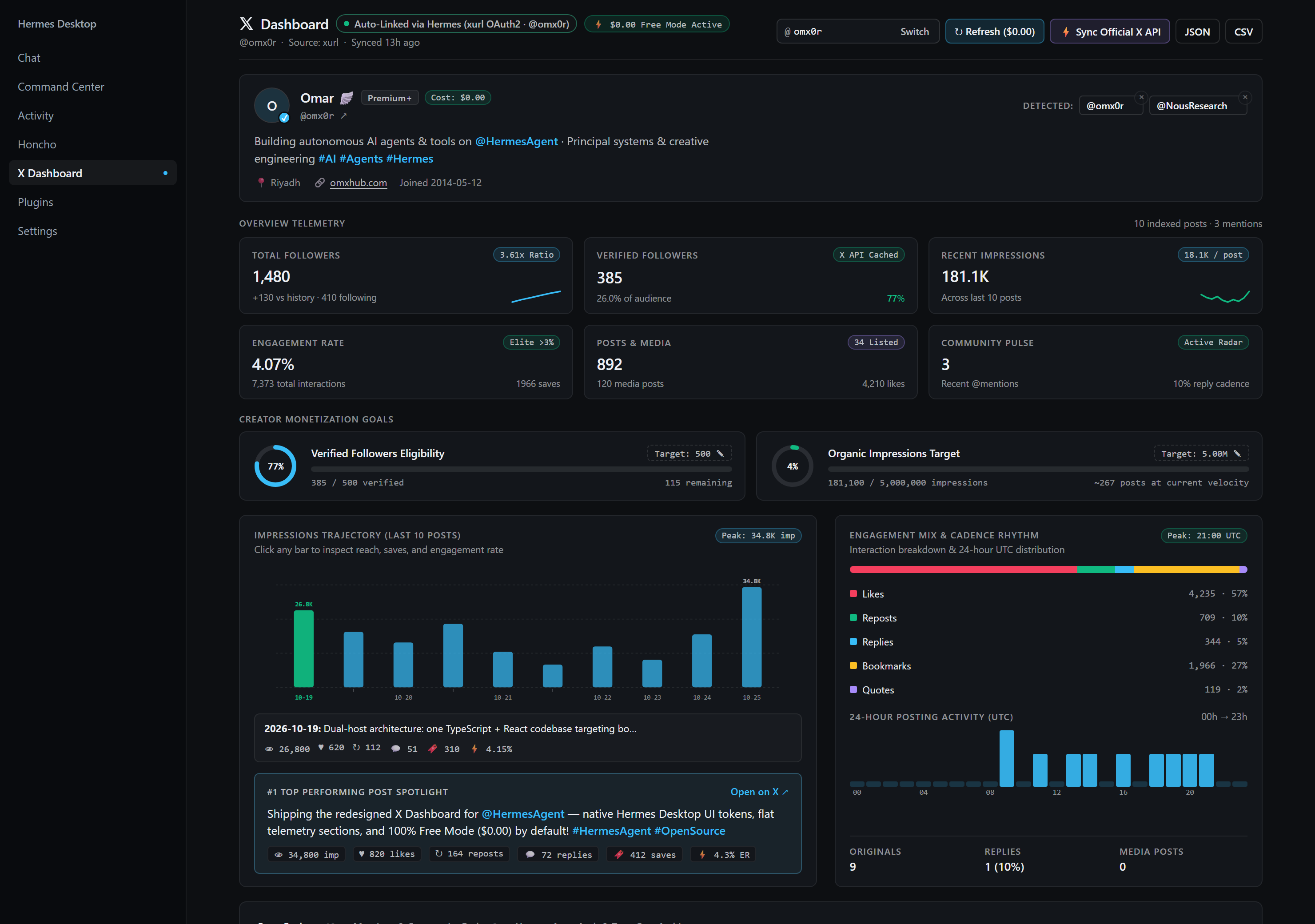
- 6-Card Executive KPI Bento Grid (3×2) with live follower/following ratios, history sparklines, engagement quality tiers (
Elite >3%,Strong >1.5%,Steady), and community pulse metrics — laid out as a clean 3×2 rhythm under a polished single-X header. - Editable Creator Monetization Goal Trackers for Verified Followers (default
500) and Organic Impressions (500K/5Mpresets or custom inline target) with radial + linear progress gauges and velocity pace estimates. - Bars-Only 20-Post Impressions & Engagement Trajectory SVG Chart with click-to-inspect bars (reach, saves, engagement rate HUD), peak pill, and deduplicated date labels so crowded days don't repeat, plus Engagement Mix Breakdown, 24-Hour UTC Posting Cadence Heatmap, and #1 Top Performing Post Spotlight.
- Interactive Posts Explorer, Mentions Radar & Auto-Auth Inspector with instant keyword/hashtag search, filter pills (
All,Originals,Replies,Media), multi-metric sorting, and CSV/JSON export.
- 6-Card Executive KPI Bento Grid (3×2) with live follower/following ratios, history sparklines, engagement quality tiers (
Detected Handle Management
- Always-visible remove (×) on detected handle pills: any auto-detected
@handlepill shows a small × button on its corner, even when it's the only handle present. - Persisted removals: removing a handle saves it to
hidden_handlesin the backend config (<hermes_home>/plugin-data/x-dashboard/config.json), so it stays hidden across reloads. - Smart active switch: if you remove the currently active handle, the dashboard switches to the next available detected handle — no empty states, no manual retyping.
- Parenthesized hidden filter: the
active_handleselection correctly excludes hidden handles (parenthesized filter), so a hidden handle can never resurface as active after a refresh.
Automatic Hermes X Account Detection Cascade
When X Dashboard loads, the backend (dashboard/plugin_api.py) resolves your account automatically using a zero-configuration cascade:
| Priority | Source | How It Works | Default Refresh Cost |
|---|---|---|---|
| 1 | Dashboard Config / Query | Saved @handle in <hermes_home>/plugin-data/x-dashboard/config.json, plugins.entries.x-dashboard.settings.handle, or live handle switcher input | $0.00 (Free Mode) |
| 2 | Hermes Scoped Env (X_DASHBOARD_HANDLE) | Resolves X_DASHBOARD_HANDLE via agent.secret_scope.get_secret | $0.00 (Free Mode) |
| 3 | xurl CLI (xurl auth status) | Queries xurl auth status if the xurl CLI is installed on PATH | $0.00 (Cached / Free Mode) · Optional on-demand X API sync |
| 4 | Public Handle Mode (@any_handle) | Works out-of-the-box for any X creator or agent handle with zero keys | $0.00 (100% Free) |
Opt-In Paid Capabilities:
- Live X API v2 Sync (
X_BEARER_TOKEN/xurl): Click ⚡ Sync Official X API in the header (or selectlive_v2mode) to queryhttps://api.x.com/2/...using your scopedX_BEARER_TOKENorxurlCLI.- Hermes xAI
x_searchEnrichment (enable_x_search): Disabled (false) by default so Free Mode stays strictly$0.00. Setenable_x_search: truein plugin settings to includex_searchpost and mention citation discovery whenXAI_API_KEYis configured.
Quick Installation
Option A — From the Hermes Web Dashboard (Recommended)
In the Hermes Web Dashboard, open Plugins → Install from GitHub / Git URL and paste:
omxhub/x-dashboard
Leave "Enable after install" on and click Install. Hermes clones the repo into plugins/x-dashboard, mounts /api/plugins/x-dashboard/*, and adds the X Dashboard tab automatically.
Option B — From the Hermes CLI
hermes plugins install omxhub/x-dashboard --enable
Option C — Hermes Desktop Native Plugin
Hermes Desktop has its own native plugin runtime (desktop-plugins/x-dashboard). After installing the plugin above (or cloning the repo), run the included cross-platform installer to link both the backend plugin and the native Desktop bundle:
Linux / macOS:
hermes plugins install omxhub/x-dashboard --enable
node "${HERMES_HOME:-$HOME/.hermes}/plugins/x-dashboard/scripts/install-desktop.mjs"
Windows (PowerShell):
hermes plugins install omxhub/x-dashboard --enable
$HermesHome = if ($env:HERMES_HOME) { $env:HERMES_HOME } else { Join-Path $env:LOCALAPPDATA "hermes" }
node (Join-Path $HermesHome "plugins\x-dashboard\scripts\install-desktop.mjs")
Then in Hermes Desktop:
- Open Capabilities → Plugins → Installed, select X Dashboard, and ensure both Agent and Desktop toggles are enabled (or press Ctrl/Cmd+K → Reload desktop plugins).
- Click X Dashboard in the left sidebar (or run Open X Dashboard from the command palette).
Update & Uninstall
# Update to latest release
hermes plugins update x-dashboard

# Uninstall
hermes plugins remove x-dashboard
Development, Build & Verification
Only required if you are modifying the TypeScript/React source or Python backend (prebuilt dashboard/dist/ and desktop/plugin.js bundles are committed in the repository):
# Install dev dependencies
npm install

# Typecheck TypeScript sources
npm run typecheck

# Build both Web Dashboard (dashboard/dist/index.js) and Desktop (desktop/plugin.js)
npm run build

# Run Frontend JSDOM, Desktop Contract & Installer tests
npm test

# Run Backend Python API tests
python -m unittest discover -s tests -p "test_*.py" -v
Repository Architecture
x-dashboard/
├── plugin.yaml                 # Hermes plugin metadata (v0.2.1)
├── __init__.py                 # Hermes plugin lifecycle & route registration
├── LICENSE                     # MIT License
├── CHANGELOG.md                # Release history
├── dashboard/
│   ├── manifest.json           # Web Dashboard tab manifest
│   ├── plugin_api.py           # Zero-cost Free Mode + Auto-Link + X API backend
│   └── dist/
│       ├── index.js            # Prebuilt Web Dashboard IIFE bundle
│       └── style.css           # Extracted stylesheet (also injected inline)
├── desktop/
│   └── plugin.js               # Prebuilt Hermes Desktop ESM bundle
├── src/
│   ├── XDashboardPage.tsx      # Main Creator & Agent Command Center UI (single-X header, 3×2 KPI bento, bars-only chart, handle pills)
│   ├── x-dashboard.css         # Dark-first, Hermes Desktop native, theme-adaptive glassmorphism CSS
│   ├── sdk.ts                  # Dual-host API bridge (Web fetchJSON + Desktop ctx.rest)
│   ├── types.ts                # Unified normalization & client analytics
│   ├── index.tsx               # Web Dashboard __HERMES_PLUGINS__ entry
│   └── desktop/                # Hermes Desktop contract, host adapter & ESM entry
├── scripts/
│   └── install-desktop.mjs     # Cross-platform installer for desktop-plugins/x-dashboard
├── docs/
│   └── index.html              # Interactive GitHub Pages product showcase & live demo
├── test/
│   └── x-dashboard.test.mjs    # JSDOM frontend, Desktop contract & installer test suite
└── tests/
    └── test_plugin_api.py      # Python backend unit tests
Live Preview & Interactive Showcase
Explore the live interactive demo at https://omxhub.github.io/x-dashboard/ (served directly from docs/index.html).
License
MIT — see LICENSE.
README from the reviewed commit 7d6ef0d; it updates when the author re-pins.