 latentJake
Zed Mode
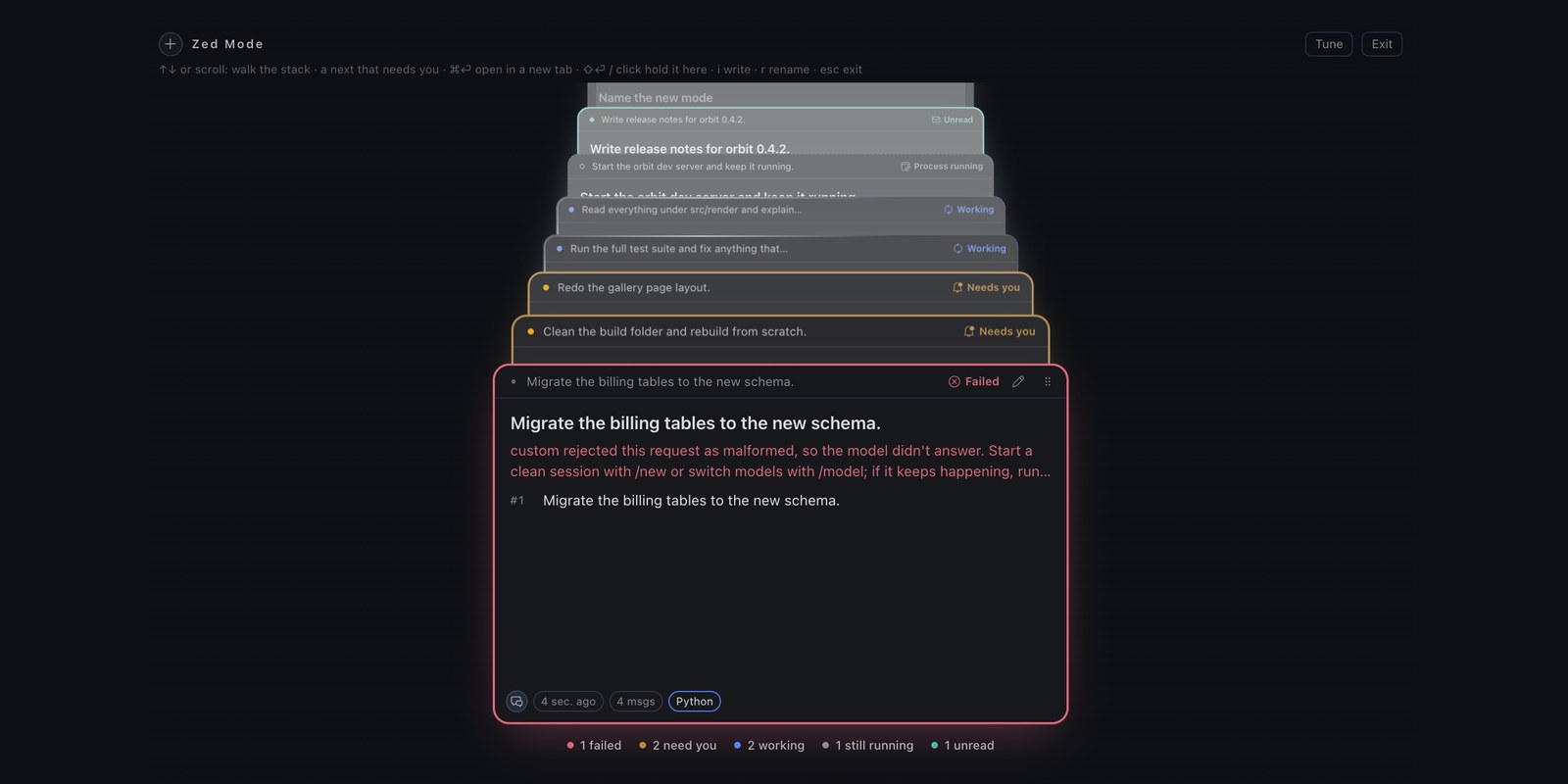
Every Hermes conversation in one stack that recedes into the screen, ordered like an inbox.
A plugin for the Hermes desktop app.
Status: early beta (0.19.0). Built and tested against Hermes v0.23.0 on macOS.
See Compatibility for what that does and doesn't promise.
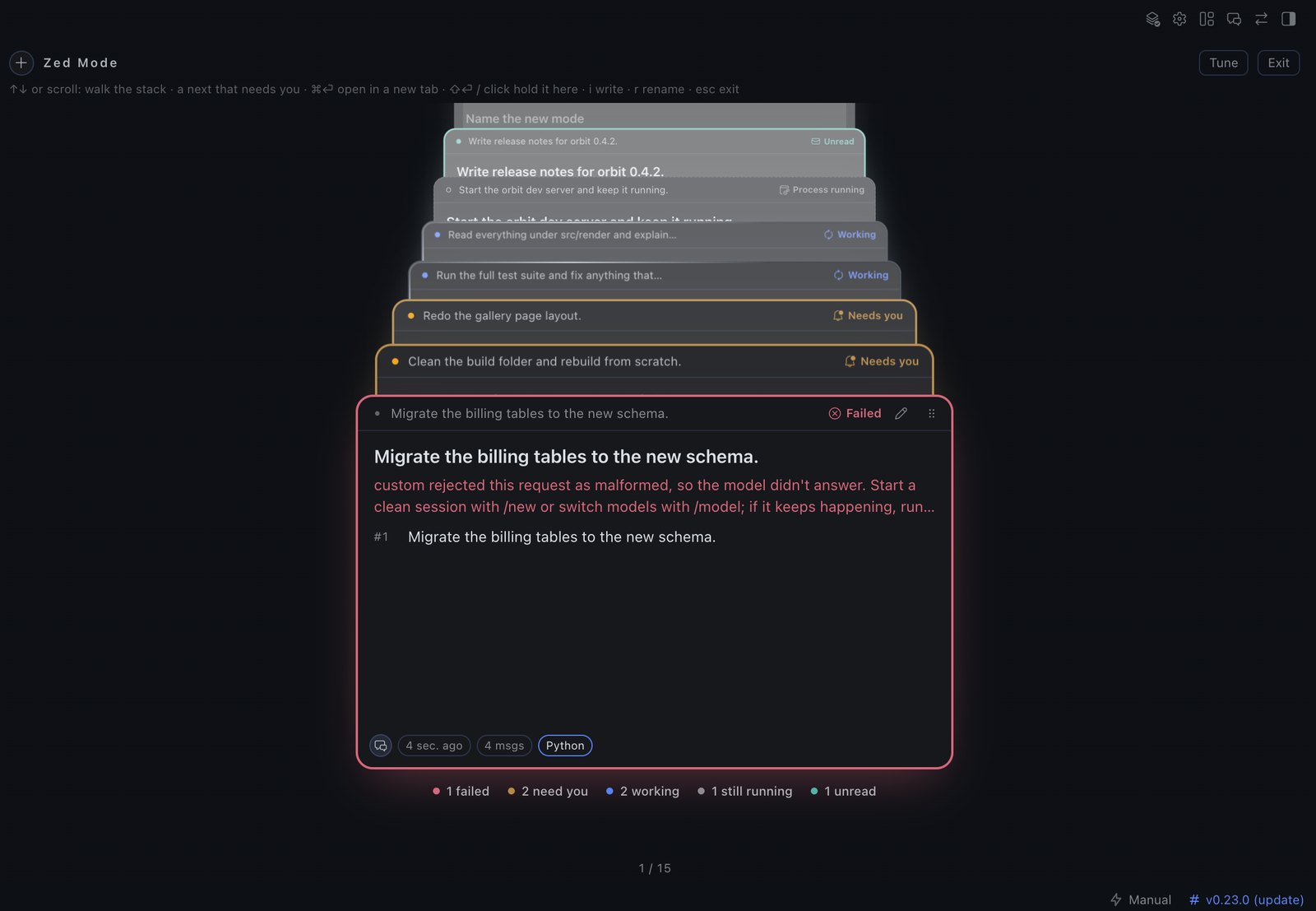
The screenshots in this README use sample conversations.
What it does
Press ⌘⌥Z (or the layers icon in the titlebar) and your conversations lift into a single
stack. The front of the stack is whatever needs you most:
| Front → back | State |
|---|---|
| 1 | Failed: red edge, the error on the card |
| 2 | Needs you: amber edge; an approval or a question |
| 3 | Working: the app's own running arc, and what the agent is doing right now |
| 4 | Process running: a dev server that outlived its turn |
| 5 | Unread: finished while you were away |
| 6 | Pinned |
| 7 | Everything else, most recent first |
On a quiet day the front of the stack is your pins (pin a chat in the Hermes sidebar). States come from the app's own status dot,
so Zed Mode agrees with the sidebar.
-
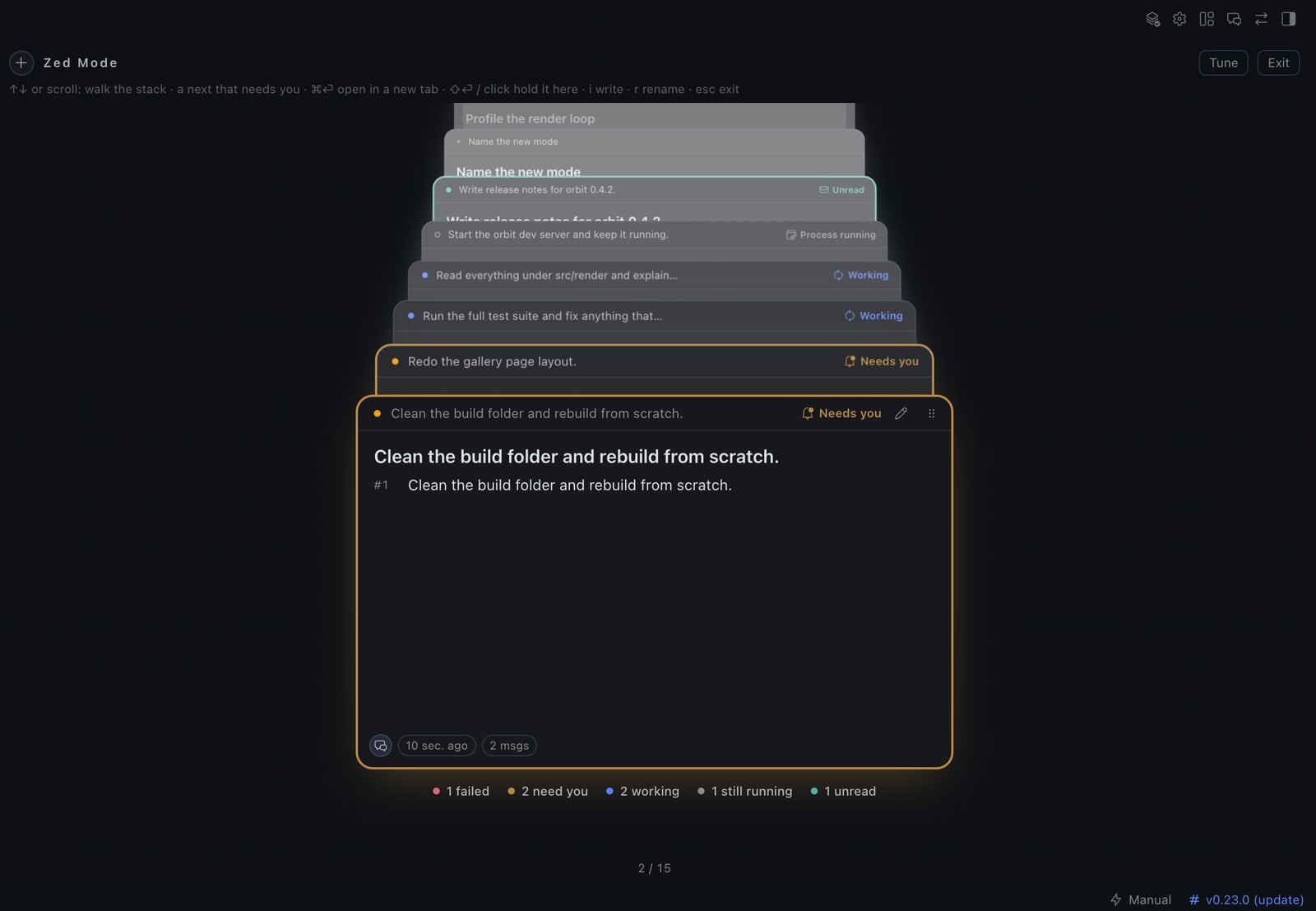
Answer on the card. An approval shows the exact command and the choices the gateway allows;
a question shows its choices. One click answers that one request. ⇧Y / ⇧N approve once /
deny, and are shifted on purpose so a stray keypress can't approve a command.
-
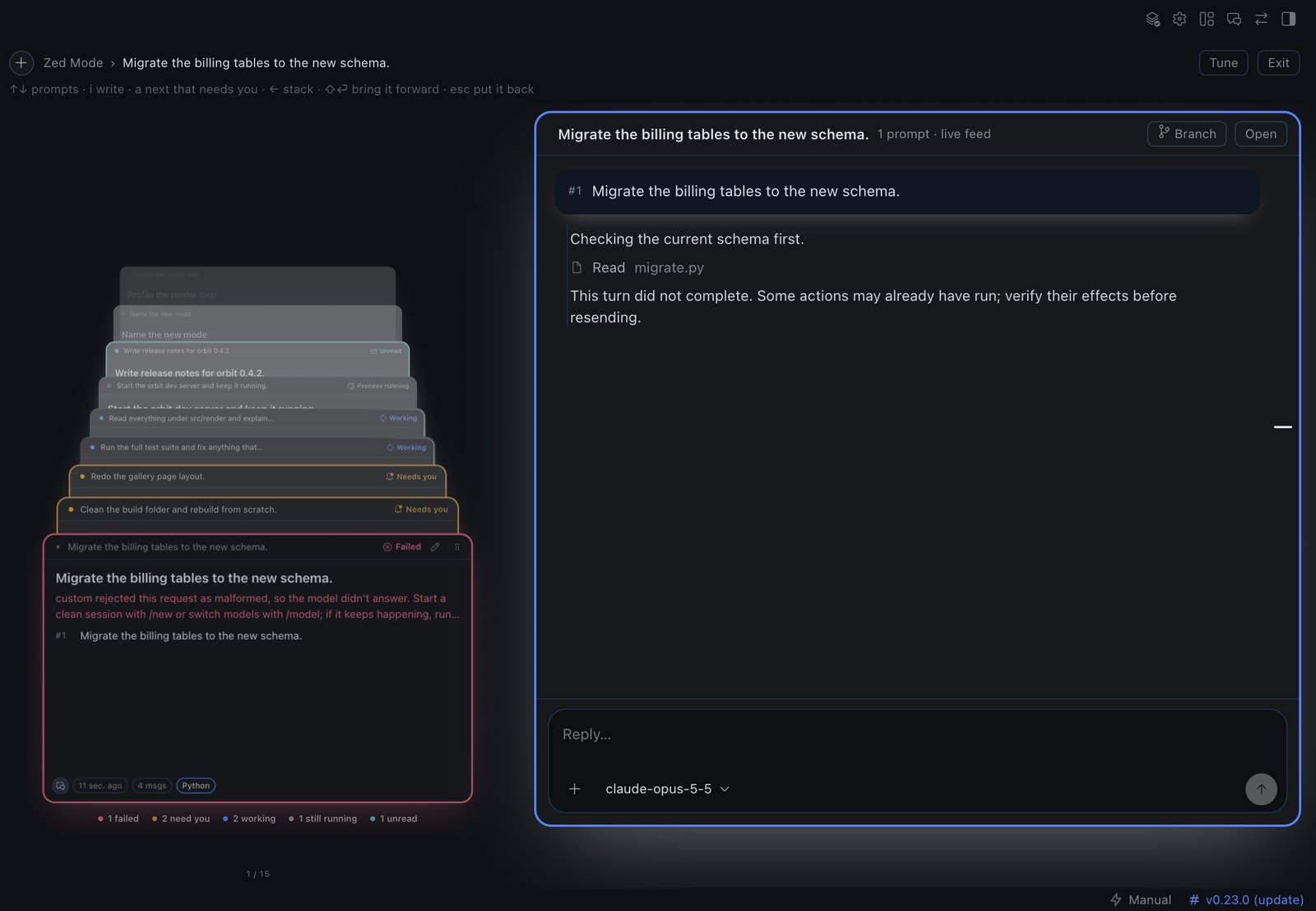
Hold a conversation (⇧⏎). The stack steps aside and the conversation floats in beside it as a
thread: sticky prompts, a prompt rail, edit cards in your theme's colours, and a composer with
images, files, URLs, the real model menu and Stop. Hold again to bring it to the foreground.
-
Start and branch chats without leaving Zed Mode: the round + (new chat, optionally in a
folder) and the Branch icon on a prompt. -
Tune the 3D live (**
**): sliders, presets and shareablezed1.…` codes.
Plain ⏎ never opens a chat; it is left for typing. Esc steps back one level at a time, all the
way to classic Hermes.
Quick start
git clone https://github.com/latentJake/hermes-zenmode.git
cd hermes-zenmode
./scripts/install.sh
Then in Hermes: ⌘K → Reload desktop plugins, and press ⌘⌥Z. Details, what the installer
changes, and troubleshooting are in docs/quickstart.md.
Keys
| ⌘⌥Z | open / close Zed Mode |
| ↑ ↓ (or k j, ⇥ ⇧⇥) | one card deeper / closer |
| ⇧⏎ or space | hold the front card; ⇧⏎ again: foreground |
| ⌘⏎ | open in classic Hermes, in a new tab |
| i or / | write in the conversation |
| a | jump to the next conversation that needs you |
| ⇧Y / ⇧N | approve once / deny the front card's request |
| esc | back one level |
Everything else, including mouse actions, is in docs/keybinds.md.
Compatibility
| Hermes | Requires ≥ 0.23.0 (plugin.yaml). Developed and tested on v0.23.0. Newer versions are untested. |
| OS | macOS only is tested. The plugin SDK is cross-platform, but nothing here has been run on Windows or Linux (the shortcut would be Ctrl+Alt+Z). |
| Needs | The Hermes desktop app. The CLI and web dashboard alone don't load desktop plugins. |
| Backend | A small Python half runs inside the gateway for pins and old transcripts. Without it, Zed Mode still works for live conversations. |
Zed Mode leans on a few parts of Hermes that are not documented plugin APIs. Which ones, how each
fails, and what you'd see are listed in docs/compatibility.md.
What it touches
| Network | None. No telemetry, no remote code, no updater. |
| Reads | Your session list and transcripts, read-only. state.db is opened read-only with query_only; live conversations come through the desktop SDK. Titles and folder paths appear on cards. |
| Writes | Only its own files: your tuning and presets and a short list of failed turns (the plugin's storage in the app), and a cache of derived card facts at $HERMES_HOME/plugin-data/zedmode/cache.db. Never state.db. Pins are Hermes's own (pin a chat in the sidebar); Zed Mode only reads them. |
| Acts for you | Only what you click or type in Zed Mode: send a prompt, answer an approval or question, rename, start or branch a chat, switch a live chat's model or reasoning effort. Each goes through the same gateway request the app itself sends. Approvals are never answered automatically. |
| Credentials | None read, stored or sent. |
| Processes | None started. The Python half is a request handler inside the Hermes gateway. |
| One private seam | To explain why a model can't be used, the backend calls Hermes' own model resolver. It isn't a public API; if it changes, Zed Mode shows the gateway's short reason instead. |
The desktop half is opt-in, and the Python half only runs once zedmode is listed under
plugins.enabled. scripts/install.sh adds that line (with a backup); it is a script you run by hand.
Known limits
- Unread and "process running" depend on how the app paints its status dot. If a Hermes update
changes that, those two states silently drop out of the ordering; the others keep working. - A failure is seen only while the app is open. A turn that fails while Hermes is closed won't
show as failed. - A conversation that isn't live can't take a message from Zed Mode, nor be branched from a single
prompt. Zed Mode shows its transcript and keeps your text; Open continues it in Hermes. - Visual behaviour is checked by hand on one machine. The automated suite has no layout or 3D,
so spatial polish is not something it can vouch for. - The 3D PAPER thread is parked behind an experimental dial.
Documentation
| Quick start | Install, first run, troubleshooting, uninstall |
| Keys and mouse | The full reference |
| Tuning | The dials, presets and share codes |
| Compatibility | Versions, what we depend on, failure modes |
| Architecture | How the two halves work |
| Design | The rules the UI follows |
| Development | Tests, the promote gate, writing your own plugin |
| Roadmap | What's next |
| Changelog | Releases |
License
README from the reviewed commit 0e6ebba; it updates when the author re-pins.


