jarrett-del

bae
your eBay sidekick for Hermes Agent (hermes-ebay-ops)
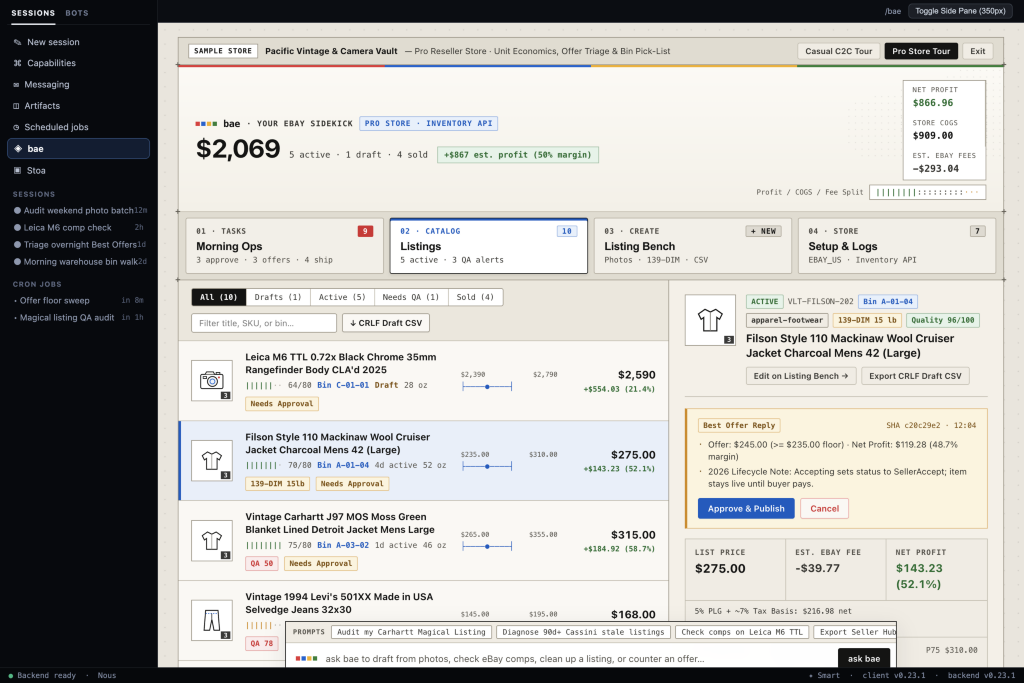
bae helps you turn item photos and quick notes into accurate eBay listings, check real comparable prices, see your true take-home profit after fees and shipping, and stay on top of offers and packing — with both a full-screen Seller Desk (/bae) and a compact Side Pane right inside Hermes.
Nothing ever goes live on eBay behind your back. Every new listing, edit, Best Offer reply, or bulk CSV import is staged locally first and waits for your approval before touching your live store: a click on Approve in the Seller Desk, or Hermes's own approval prompt when you approve in chat. The agent cannot approve its own staged changes.
What bae Does
- Draft from Photos & Clean Up Generic AI Copy — Drop photos and quick measurement or flaw notes into chat so
baecan build search-friendly 80-character titles, item specifics, and factual condition notes. You can also audit existing eBay "Magical Listings" to strip out vague AI filler (like "stunning rare gem") that leads to buyer returns. - True Net Profit & Shipping Box Math — Previews your real payout after Final Value Fees (including estimated buyer sales tax), Promoted Listings General (
PLG) ad rates (0% / 5% / 8%), and return-rate surcharges. Includes July 2026 USPS dimensional weight (L × W × H / 139for boxes over 1 cubic foot) so bulky jackets, shoes, or kitchenware don't lose money at the post office. - Built-In Category Rules — Checks eBay's latest category rules before you publish:
- Apparel & Footwear: Standardized size values, pre-owned fashion condition grades, flat-lay ruler measurements, and Ship With eBay protection reminders on $200–$500 items.
- eBay Motors Parts: Front-loaded OEM part numbers (
MPN), Year/Make/Model compatibility tables (replacingmyFitment), and 30-day free return checks on new parts over $10. - Vintage & Collectibles: Keeps mold or box numbers (such as Pyrex
#443) inPatterninstead ofMPNso eBay's catalog doesn't overwrite vintage listings with wrong stock descriptions. - Cards, Coins & Media: Grading/certification specifics and eBay Standard Envelope weight and value checks.
- Publish Directly or Export Seller Hub Draft CSVs — Push approved listings directly through eBay's API, or export clean Windows
CRLFCSVs that upload straight into Seller Hub Drafts (saved for 75 days) if you prefer adding mobile photos on your phone. Also imports legacyinkFrogandmyFitmentCSVs for bulk publishing (<=25SKUs per API batch). - Scales from Closet Cleanouts to Full-Time Stores — Casual sellers never have to deal with SKUs, cost of goods, or storage bins. As soon as you record a cost basis, minimum offer floor, or bin location on any item,
baeautomatically turns on reseller workflows: Best Offer floor comparisons, bin-sorted packing lists, 90+ day stale-listing checks, and haul break-even tracking. - Zero-Cost Scheduled Checks — Optional background scripts check for stale listings, pending Best Offers, buyer questions, or unlisted haul inventory on a schedule without calling an LLM (
\$0token cost), staying completely quiet whenever nothing needs your attention.
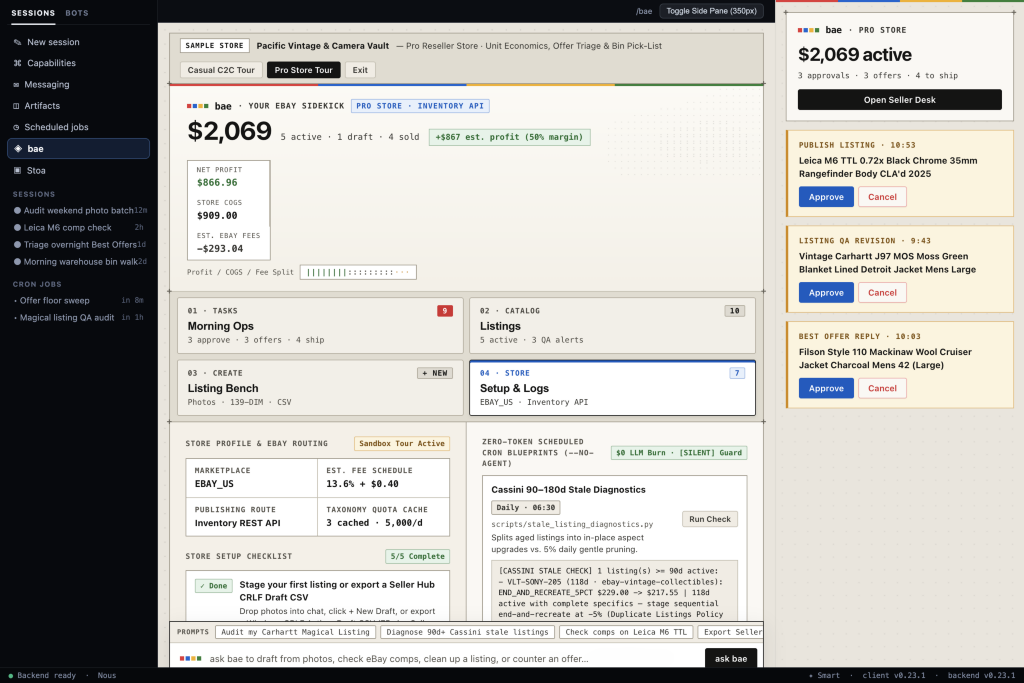
Inside the Seller Desk
01 · Morning Ops
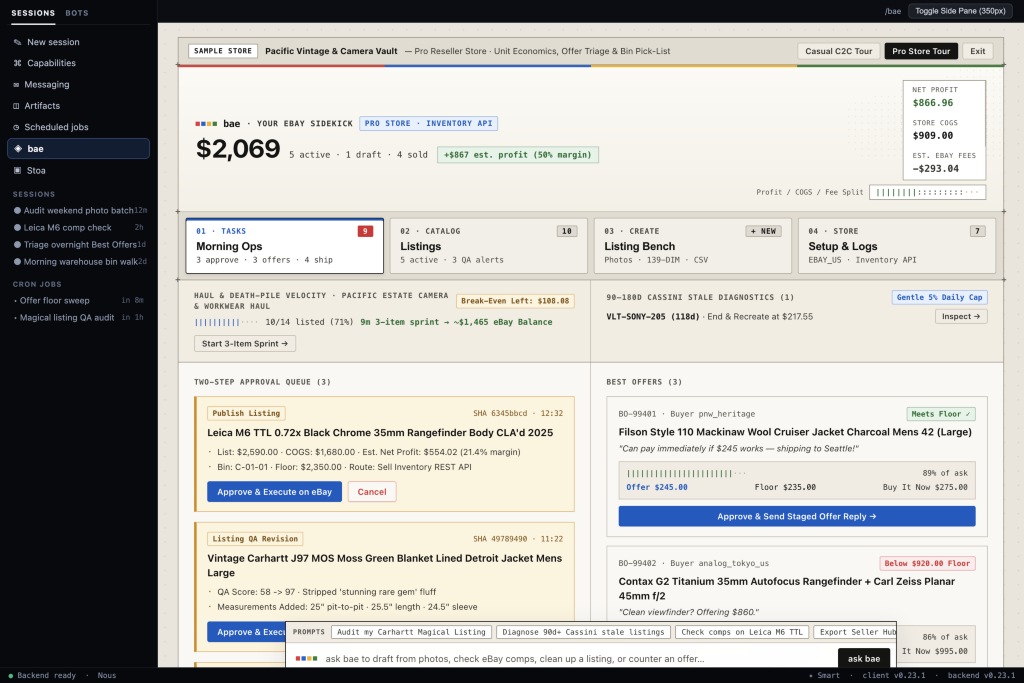
Review staged changes waiting for your approval, compare incoming Best Offers against your minimum floor price, check 90+ day stale listings, track haul break-even progress, and print bin-sorted packing slips.
03 · Listing Bench
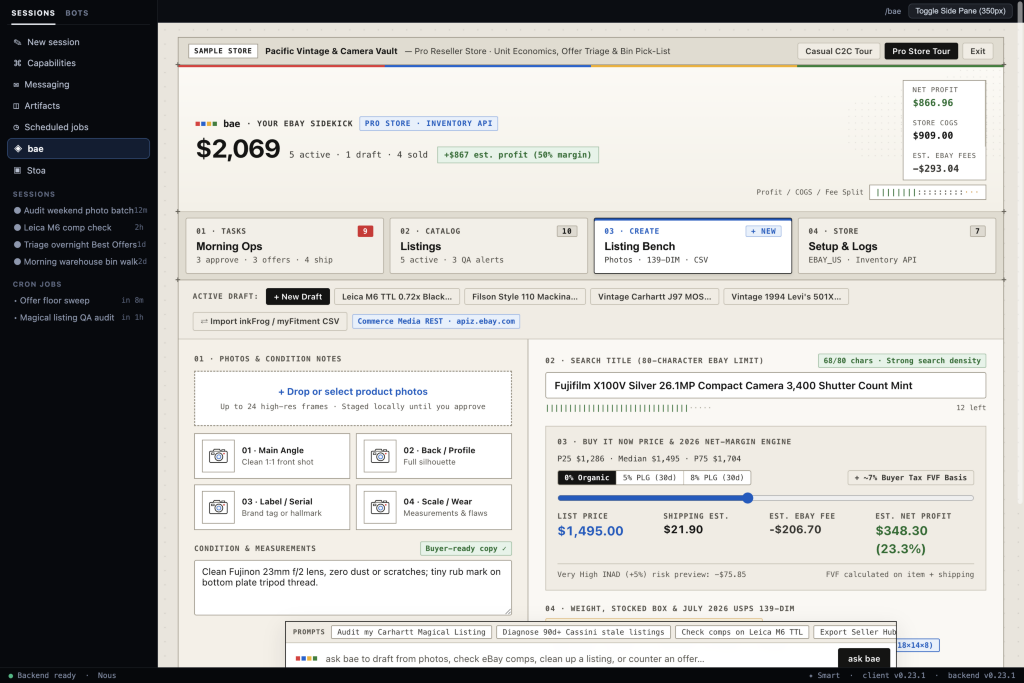
Add photos and measurements, tune your 80-character title, test pricing against active eBay comps and ad rates, check box dimensions against USPS dimensional-weight thresholds, or import inkFrog / myFitment CSVs.
04 · Setup & Logs
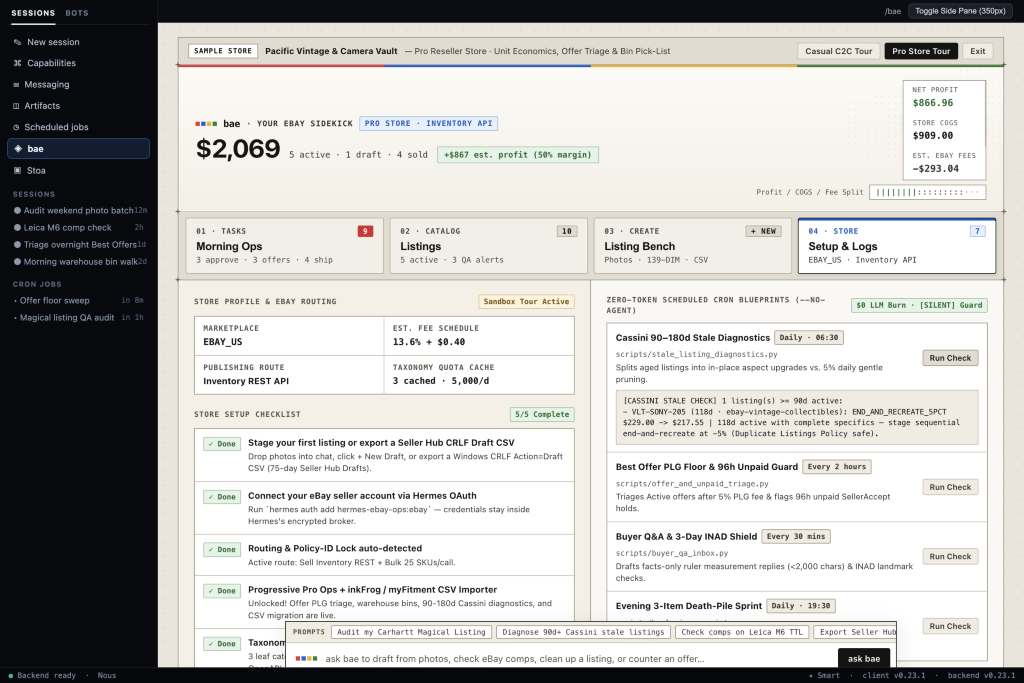
Check your eBay account connection and cached category quotas, run zero-cost scheduled checks on demand, view bundled category playbooks, and inspect the full activity log.
Compact Side Pane
Keep a 350px summary open right next to Hermes chat to check active store totals, approve or cancel staged changes, or switch sample store tours without leaving your conversation.
Quick Start
1. Install in Hermes
Once bae is listed in the Hermes Plugin Catalog:
hermes plugins install bae
Until then, install it straight from GitHub:
hermes plugins install jarrett-del/bae
Hermes asks before installing bae's two Python dependencies (pydantic and defusedxml) and asks whether to enable the plugin; say yes to both.
2. Turn on the Seller Desk in Hermes Desktop
Hermes Desktop loads a plugin installed from the command line with its screens switched off. Open Capabilities → Plugins, find bae (hermes-ebay-ops) and turn on Desktop. A bae item appears in the sidebar, along with a side pane and a bae: open eBay seller desk command. A plugin installed from Desktop's own install dialog is switched on for you.
No Desktop app? hermes webapp opens the same workspace in your browser.
3. Try it on sample data
bae starts in sample mode: it never contacts eBay, and every approval prompt says Sample data only, nothing is sent to eBay.
- Open bae and click Casual C2C Tour or Pro Store Tour at the top of the screen. Tours run in a separate
tour.db, so your own data stays untouched. - Or ask in chat: "Draft a listing: Patagonia fleece, men's L, pit to pit 23 in." Then say "approve it" to see Hermes's approval prompt.
4. Get listings onto eBay today: Seller Hub Drafts
You can use bae with your real store before live mode works. Draft listings with bae, then ask it to export them (or click ↓ CRLF Draft CSV in the Seller Desk) and upload the file in Seller Hub under Reports → Uploads. The listings land in Seller Hub → Listings → Drafts for 75 days, where you add photos and publish.
In sample mode the category and suggested price come from bae's sample data, so check both in Seller Hub before you publish.
5. Connect your eBay account (waiting on Hermes)
Live mode signs in through Hermes, and Hermes does not support eBay's sign-in yet: eBay wants your app's RuName in place of a callback address and the app keys sent as HTTP Basic auth. That support is requested in hermes-agent#142687. Until it ships, hermes auth add hermes-ebay-ops:ebay cannot finish, and this section will be updated when it does.
You can get ready now:
-
On developer.ebay.com, create an application keyset (start with Sandbox) and note its App ID (client ID) and Cert ID (client secret).
-
Under User Tokens, create a RuName for the app.
-
Add the keys to your Hermes profile's
.env(~/.hermes/.envfor the default profile). Hermes reads them from there, not from your shell:EBAY_PLUGIN_CLIENT_ID=your-app-id EBAY_PLUGIN_CLIENT_SECRET=your-cert-id
Once Hermes supports eBay sign-in, connect and switch bae to live mode:
hermes auth add hermes-ebay-ops:ebay
hermes config set plugins.entries.hermes-ebay-ops.settings.adapter_mode live
6. Run Tests Locally
python3 -m venv .venv
.venv/bin/pip install -e ".[dev]" fastapi httpx

node --input-type=module --check < desktop/plugin.js
node --input-type=module --check < dashboard/dist/index.js
.venv/bin/pytest -q
Agent Tools (toolset="ebay_ops")
| Tool | Availability | Write Behavior | What It Does |
|---|---|---|---|
ebay_stage_listing | Always on | Stages approval | Prepares a draft listing from photos and notes, checks category rules and shipping/fee math, and creates an approval token. |
ebay_audit_active_listing | Always on | Stages approval | Reviews a live eBay listing for generic AI filler, missing item specifics, or price drift, and stages a clean revision. |
ebay_check_comps | Always on | Read-only | Looks up comparable active eBay listings (by keyword or image) alongside your own past sold prices. |
ebay_confirm_action | Always on | Executes write | Runs a staged publish, revision, policy setup, offer reply, or bulk publish. Every APPROVE call opens Hermes's approval prompt first and runs only if you approve there; the token is then verified. |
ebay_export_draft_csv | Always on | Local CSV file | Exports staged drafts as a Windows CRLF CSV formatted for eBay Seller Hub Drafts. |
ebay_triage_offers | Pro mode | Stages approval | Compares active Best Offers against your floor price and ad fees, flags 96-hour unpaid accepted offers, or stages a reply. |
ebay_lookup_bin | Pro mode | Read-only | Builds a bin-sorted (A-1 -> A-2 -> A-10) warehouse pick-list for paid orders awaiting shipment. |
ebay_import_migration_csv | Pro mode | Stages approval | Imports inkFrog, myFitment (Year/Make/Model), or Seller Hub CSVs and stages a bulk publish (<=25 SKUs per API call). |
ebay_diagnose_stale | Pro mode | Read-only | Checks active listings older than 90 days and recommends either adding missing item specifics in place or gentle daily relisting. |
Project Layout
bae/
├── LICENSE                          # MIT License
├── README.md
├── SPEC.md                          # Core architectural specification
├── plugin.yaml                      # Hermes v2 plugin manifest (OAuth, settings, 9 tools, 1 hook)
├── pyproject.toml
├── __init__.py                      # Plugin registration & progressive Pro mode check
├── approval_hook.py                 # pre_tool_call hook: every chat APPROVE goes to Hermes's approval prompt
├── file_guard.py                    # Applies Hermes's read denylist to local photo paths
├── config.py                        # Mode flags, fee defaults, approval token TTL
├── models.py                        # Pydantic v2 data models
├── db.py                            # 4-table SQLite store (seller_profile, items, pending_actions, item_events)
├── cache_store.py                   # 7-day category aspect cache & haul break-even tracking
├── compliance.py                    # Category sizing, condition, MPN, duplicate-title & VeRO checks
├── csv_drafts.py                    # Seller Hub Draft CSV exporter & inkFrog/myFitment importer
├── diagnostics.py                   # 90+ day stale-listing checks, 96h unpaid offer guard, Q&A drafter
├── demo.py                          # Built-in Casual C2C & Pro Store sample tours
├── adapter/                         # Live eBay REST/XML client & offline mock fixtures
├── tools/                           # Tool handlers, fee math, and USPS 139-DIM shipping helpers
├── scripts/                         # Zero-token (--no-agent) scheduled background scripts
├── skills/                          # 5 bundled SKILL.md guides (general ops + 4 category playbooks)
├── dashboard/                       # FastAPI backend routes + 350px Side Pane bundle
├── desktop/                         # Full-screen 4-tab Seller Desk UI (/bae)
├── docs/                            # Reference documentation & screenshots
└── tests/                           # Offline automated test suite
Disclosure
- Network calls:
baemakes zero outbound network calls in sample mode (mock, the default), during sample tours, or in offline CSV mode. In live mode, after you connect an eBay account (hermes auth add hermes-ebay-ops:ebay), API requests go exclusively through Hermes's OAuth broker (credentialed_provider_request) toapi.ebay.com,apiz.ebay.com, andapim.ebay.com. Plugin code never reads.envfiles or raw OAuth tokens. - Filesystem access: Reads local item photo paths passed to
ebay_stage_listingand migration CSV files passed toebay_import_migration_csv. A local photo becomes a public listing image, so each path is checked against Hermes's read denylist (agent.file_safety: credential stores,.envfiles, internal caches) when it is staged and again right before upload; a blocked path is refused. Writes only inside Hermes's profile-scopedplugin_data_dir(SQLite databasesstate.db,tour.db, and exported Seller Hub draft CSV files). - Execution & sessions: Runs zero shell commands, subprocesses, or background daemons. Optional scripts in
scripts/run only when explicitly triggered by you or a Hermes--no-agentschedule. Submitting a prompt in the Seller Deskask baedock sends your message to a visible Hermes conversation, and every live eBay write (publish,revise,offer_reply,bulk_publish,bootstrap_policies) requires an explicit approval token. - Approvals: The plugin registers one
pre_tool_callhook. It escalates everyebay_confirm_action(decision="APPROVE")call from the agent to Hermes's own approval prompt, scoped to that one staged change, so a write runs only after a person approves it there or clicks Approve in the Seller Desk. With nobody present to answer (cron and other unattended runs), the call is blocked.
Further Reading
- Architecture, Security & API Routing — How OAuth isolation, two-step approval tokens, SQLite storage, and eBay REST/XML routing work under the hood.
- 2026 Fee Math, Shipping & Category Rules — Details on USPS
139dimensional weight, Promoted Listings attribution, and category-specific checks. - CSV Migration, Seller Hub Drafts & Scheduled Checks — Importing
inkFrog/myFitmentfiles, exporting Seller Hub Drafts, running--no-agentscheduled scripts, and eBay developer quota tips. - Original Specification (
SPEC.md)
License
MIT
README from the reviewed commit f450d48; it updates when the author re-pins.