hermes-day-panel
A Hermes Agent plugin that adds a Today page to Hermes Desktop. The page shows the sections you list in a YAML file, each read from a source you choose:
command: any program that prints a small JSON document. This is how you plug in anything the plugin does not know: a work tracker, a notes folder, a script of your own.github_prs: your open pull requests, and the ones waiting for your review, through theghCLI you are already logged into. Merging from the page is off by default; when you turn it on, each merge needs a preview and a confirmation, and GitHub refuses it if the branch moved after the preview.mcp_tool: one tool of an MCP server you already configured in Hermes, called only when the server marks that tool read-only.ai_usage: your AI providers' limit windows (session, week: percent used and reset time), ashermes usagereports them.
Everything is read-only (except the opt-in merge), nothing goes to a model, and nothing is written to disk.
Install
hermes plugins install brunosouzas/hermes-day-panel
hermes plugins enable day-panel
The Desktop page ships disabled, like every plugin's desktop half: turn it on in Capabilities → Plugins, then restart the backend (hermes gateway restart) so the page's routes load. Today appears in the sidebar and in the command palette.
Requires Hermes 0.22.2 or newer, macOS or Linux. gh is needed only for github_prs.
Try it
The plugin ships a demo page that needs no login, network or MCP server. Each of its sections runs examples/demo/demo_source.py with sample data:
hermes config set plugins.entries.day-panel.settings.sources_file ~/.hermes/plugins/day-panel/examples/demo/sources.yaml
hermes day show
Then open Today in Hermes Desktop:
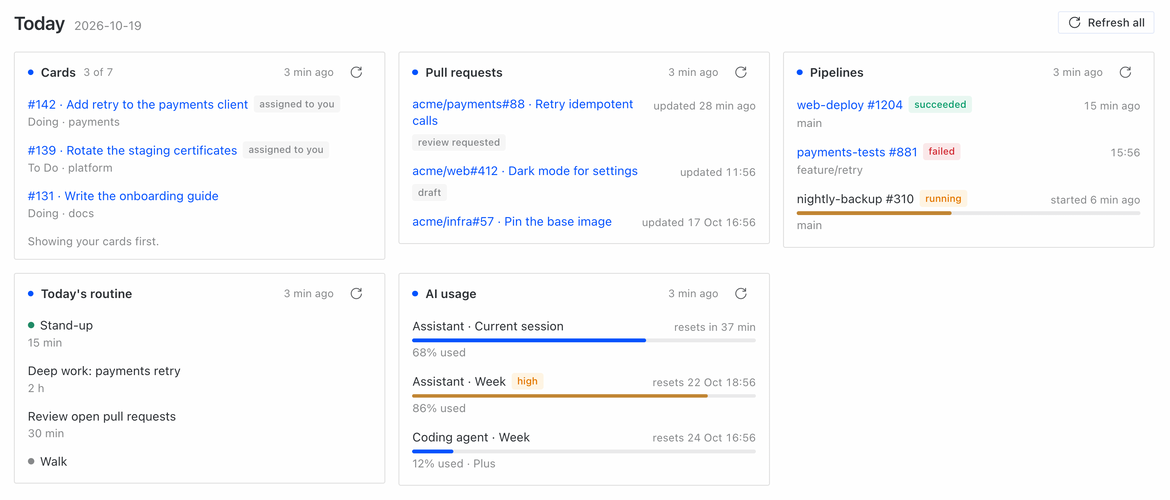
To build your own page, copy examples/demo/sources.yaml and demo_source.py to a folder of yours, point sources_file at the copy and replace the sections one at a time.
The sources file
By default the plugin reads $HERMES_HOME/day-panel/sources.yaml. To keep it somewhere else (a private repository, say), set the plugin's sources_file setting:
hermes config set plugins.entries.day-panel.settings.sources_file ~/my-setup/today/sources.yaml
The file is read again on every page refresh and CLI run, so an edit shows up at the next refresh. Check it with hermes day check. Edit it by hand, or ask Hermes to.
sections:
  - id: prs                 # lowercase letters, digits, hyphens; unique
    title: Pull requests    # default: the id
    kind: github_prs
    refresh_minutes: 10     # 1-1440, default 15
    options:
      merge: {enabled: true, method: squash}

  - id: tasks
    title: My tracker
    kind: command
    options:
      argv: ["{python}", tracker.py, --mine]   # runs in this file's folder

  - id: routine
    title: Today's routine
    kind: mcp_tool
    timeout_s: 60
    max_items: 20
    options:
      server: my-calendar
      tool: get_today
      args: {timezone: Europe/London}
      fields: {title: title, detail: note}

  - id: ai
    title: AI usage
    kind: ai_usage
    options:
      providers: [anthropic, openai-codex]
Section fields
| Field | Type | Default | Rule |
|---|---|---|---|
id |
text | required | 1-40 lowercase letters, digits and hyphens, starting with a letter; unique |
kind |
text | required | command, github_prs, mcp_tool or ai_usage |
title |
text | the id | shown as the section heading |
enabled |
boolean | true |
false hides the section and stops its reads |
refresh_minutes |
whole number | 15 | 1-1440; how old a result may get before the page reads it again |
max_items |
whole number | 10 | 1-50; items shown (the total is still reported) |
timeout_s |
whole number | 30 | 1-120; the read is stopped after this (for ai_usage: all providers together) |
options |
mapping | {} |
depends on the kind, below |
At most 20 sections. Anything else refuses the whole file: an unknown key, kind or option, a value of the wrong type or out of bounds, or a repeated id. The page and hermes day check name the section and the rule.
command
| Option | Rule |
|---|---|
argv |
required; 1-50 strings, the program first |
The program runs without a shell, with no standard input, in the sources file's folder, with the Hermes backend's environment. An element that is exactly {python} becomes the Python interpreter running Hermes; nothing else is expanded. It runs in its own process group, and that group is ended when the program exits or its time runs out. Anything it started in the background stops with it, so do the whole read in the foreground. It must print one JSON object, at most 256 KiB:
{"items": [{"title": "Card 42 · Fix rounding", "url": "https://tracker.example/42",
            "detail": "In progress", "badge": "assigned to you", "time": "2026-10-19T09:00:00Z"}],
 "total": 7, "note": "Showing open cards only."}
| Item field | Type | Shown as |
|---|---|---|
title |
text, required | the item's title; a link when url is set |
url |
http or https link |
opens in your browser |
detail |
text | a second, smaller line |
badge |
text | a small label after the title |
time |
ISO 8601 time | "12 min ago", "in 3 h" or "16 Oct 17:28" on the right |
time_label |
text, up to 40 characters | a word before the time: "resets in 40 min", "updated 2 h ago" |
tone |
good, warn, bad or muted |
the badge's colour (green, amber, red, grey); without a badge, a dot of that colour before the title |
progress |
number from 0 to 100 | a bar under the title, in the tone's colour |
Text is cut to 300 characters. An item without a text title is dropped; an optional field of the wrong type (a tone that is not one of the four words, a progress outside 0-100 or not a number) is dropped and the item kept; a total or note of the wrong type is ignored. A non-zero exit shows the exit status and the last line of standard error as the section's error.
github_prs
| Option | Rule |
|---|---|
include |
list of author and/or review_requested; default both |
exclude_owners |
list of repository owners to leave out; default none |
merge |
mapping with enabled (default false) and method (squash, merge or rebase; default squash) |
Each item is owner/repo#number · title, with badge draft or review requested. With merge.enabled: true, each non-draft item offers Merge…:
- The preview reads the pull request now and shows repository, title, base branch, head commit and method. Only a pull request listed in that section can be previewed, and drafts and closed pull requests are refused.
- Confirm merge works once, within 120 seconds. The plugin reads the sources file again (the section must still be enabled, with merge on and the same method), then runs
gh pr merge <n> --repo <owner/repo> --<method> --match-head-commit <head>. The branch is not deleted. - If anything changed (the branch moved, checks are pending, no permission),
ghrefuses and the page shows its error. A new attempt needs a new preview. One merge runs at a time.
mcp_tool
| Option | Rule |
|---|---|
server |
required; the name of a server in your Hermes mcp_servers |
tool |
required; the tool's name on that server (not the mcp__… name) |
args |
mapping of JSON values passed to the tool; default {} |
fields |
mapping of item fields (title, detail, badge, time, time_label, url, tone, progress) to keys of each result element; title required; default {title: title}. Values that are not text become text, except progress, which must be a number |
list_key |
when the result is a JSON object, the key of its list |
The call runs in a separate Hermes Python process that is stopped at timeout_s. It is refused, without calling the tool, unless the server marks the tool read-only (readOnlyHint: true). Hermes records that hint when it connects. The tool's text result is decoded as JSON, either the whole text or from the first line starting with [ or {. A list is the item list; an object needs list_key; null means no items; another value becomes one item. Text that is not JSON becomes one item per line. Elements without the mapped title are skipped, and the note says how many.
Tip: a server entry that includes only the read tools (tools.include in mcp_servers) keeps write tools out of reach entirely.
ai_usage
| Option | Rule |
|---|---|
providers |
list of up to 10 Hermes provider names; empty = the configured provider |
warn_percent |
1-100, default 80; windows at or above it get the badge high and turn amber |
labels |
mapping of a provider name to the name shown, 1-40 characters each; default none |
For each provider, in order, the plugin runs hermes usage --json --provider <name>. Each limit window becomes an item with a bar of the percent used, such as Claude · Current week, 62% used, "resets in 2 h". The name is the provider name hermes usage reports (else the one you listed), replaced by its label when you set one:
options:
  providers: [claude-subscription, openai-codex]
  labels: {claude-subscription: Claude, openai-codex: Codex}
A provider that fails is named in the note. When none can be read, or the section's timeout_s runs out first, the section shows the error.
The page
Sections appear as cards in file order, in as many columns as the window fits. Each card shows its status as a dot: the theme's primary colour for ok, amber for stale (the latest read failed; the last good items are still shown with the new error), red for error (no good read yet); stale and error are also written next to the title. Each card shows how long ago it was read (the exact time on hover), and times on items read the same way: "12 min ago", "in 3 h", "16 Oct 17:28". Items show their tone, progress and time_label as the item fields table above says. The page asks for the sections when it opens and every 60 seconds; only sections older than their refresh_minutes are read again. Refresh on a section, or Refresh all, reads now. At most four reads run at once, and a refresh for a section that is already being read waits for that read. Results live in memory: after a restart, the first page load reads every section.
Look and theme
The page uses the Desktop's own components and colour tokens, so it follows the theme you pick (light, dark, or any custom theme). To adjust it without touching the plugin, override these variables on .day-panel-page in your theme's custom CSS:
| Variable | What it sets | Default |
|---|---|---|
--dp-columns |
Minimum card width per column | minmax(360px, 1fr) |
--dp-radius |
Card corner radius | the theme's --radius-lg |
--dp-link |
Link colour | the theme's primary colour |
--dp-border, --dp-card, --dp-muted, --dp-danger |
Card border and fill, secondary text, errors and bad |
the theme's matching tokens |
--dp-good, --dp-warn |
The good and warn tones (dots and bars) |
the theme's green and yellow |
For example, .day-panel-page { --dp-columns: minmax(480px, 1fr); } gives wider cards and fewer columns.
Command line
hermes day check          # validate the sources file; exit 0, or 2 with the errors
hermes day show           # read every enabled section now and print it
hermes day show --json    # the same, as JSON
What it reads, sends and writes
Reads: the sources file; the plugin setting sources_file in config.yaml; your mcp_servers configuration (for mcp_tool).
Runs and sends:
command: the programs you list, with the Hermes backend's environment. What they read or send is up to them.github_prs:gh search prs(andgh pr viewandgh pr mergefor the merge) with yourghlogin; GitHub receives those requests.mcp_tool: one call of the tool you name, with theargsyou give, to that MCP server.ai_usage:hermes usage --json, which asks each provider for your account limits.- Nothing is sent to a model.
Writes: nothing on disk. The only change it can make anywhere is a pull request merge you turned on, previewed and confirmed. Logs get one warning per failed read, with the section id, kind and error, and never a source's output.
Security notes: routes take section ids and pull request references, never paths, programs or arguments: what runs is decided only by your sources file. Source text is shown as plain text, never as HTML, and only http(s) links open.
Compatibility
mcp_tool uses three Hermes internals, because Hermes has no public plugin API yet for calling an MCP tool or reading its readOnlyHint: tools.mcp_tool_discovery.discover_mcp_tools, tools.mcp_tool_handlers._tool_is_read_only and tools.mcp_tool_schema.mcp_prefixed_tool_name. hermes plugins validate lists them as a warning (catalog rule 9). If a Hermes release moves them, mcp_tool sections show an error and the other kinds keep working. The sources file is read with core's hermes_yaml.safe_load (the YAML policy Hermes uses for its own config: duplicate keys are refused), so the plugin declares no YAML library; hermes plugins validate lists that import under rule 9 too. Tested with Hermes 0.22.2.
Development
python3 -m venv .venv && .venv/bin/pip install pytest "ruamel.yaml>=0.18,<0.19" pyyaml fastapi httpx
.venv/bin/python -m pytest -q
node --import ./tests/desktop/register.mjs --test tests/desktop/
rm -rf tests/__pycache__ && hermes plugins validate . --install-deps
Tests never use the network. gh, hermes usage and Hermes' MCP client are replaced by fakes, and the command tests run small Python scripts. Behaviour is specified in openspec/specs/.
Licence
MIT. See LICENSE.