Hermes Adaptive Effort


A Hermes plugin that asks a separate scorer to judge a task, then adjusts the reasoning effort of the outgoing model request.
Your conversation model still answers the task. You choose the scorer: Jev (the default), OpenAI Decisions, an OpenRouter model, Cloudflare Clef / Clef Flash, or a custom hosted or local endpoint.
Preview: v0.3.0 is a pre-release. Live effort acceptance is only partially validated; see the release notes.
The plugin starts off. When you enable routing, it changes a supported effort field and can add a missing field on exact registered routes. If classification fails, the original request continues unchanged.
Quick start
1. Install and enable the plugin
hermes plugins install 'atostivint/hermes-adaptive-effort' --enable
The repository root is the plugin payload; install without a subdirectory suffix. Hermes manages installation and updates. The payload is not a Python package.
An older CLI may require installation without --enable, followed by:
hermes plugins enable hermes-adaptive-effort
2. Provide the scorer key
For the default Jev scorer, make TYPESAFE_API_KEY available before launching Hermes.
Linux / macOS:
export TYPESAFE_API_KEY="YOUR_KEY"
Windows PowerShell:
$env:TYPESAFE_API_KEY = "YOUR_KEY"
These examples apply to the current terminal session. For persistent keys, services, another scorer or a local model, follow the configuration guide. Keep secrets out of config.yaml.
3. Restart the serving Hermes process
Restart your local agent, or restart the gateway:
hermes gateway restart
Desktop connections can use separate agent processes. Reconnect the connection that will serve your requests.
4. Check readiness and choose a mode
In Hermes chat:
/hae status
/hae auto
Status checks readiness without classifying anything. Enabling a routing mode authorizes sharing bounded task text with the selected scorer. The chat command applies to future requests in the current process; save the mode in Desktop plugin settings if it should survive a restart.
Choose when to evaluate effort
| Mode | Behavior |
|---|---|
off (default) |
No scoring or request changes |
auto |
Evaluate each new user turn on exact verified dynamic routes; otherwise retain one decision per model and route |
once |
Retain one decision per model and route for the conversation |
always |
Evaluate every new user turn on eligible routes |
Every active mode reuses its decision during a tool loop. A route includes the provider, exact model and API mode. Bounded decision memory can be evicted or cleared on reset/reload.
Use /hae help for all commands. The usage guide explains mode selection, status, probing and troubleshooting.
How a request passes through the plugin
flowchart TD
    A["Outgoing model request"] --> B{"Routing enabled<br/>and eligible?"}
    B -->|"No"| U["Keep original request"]
    B -->|"Yes"| D["Reuse a decision<br/>or ask the selected scorer"]
    D -->|"No valid decision"| U
    D -->|"Named choice or legacy score"| C["Check the route's<br/>accepted effort values"]
    C -->|"No legal value"| U
    C -->|"Supported value"| R["Keep or update the effort field"]
    R --> M["Send to your<br/>conversation model"]
    U --> M
For exact registered routes, the selected scorer chooses directly from that route's allowed levels. For example, Kimi K3 offers low/high/max, OpenAI's GPT-6.1 Sol route offers low/medium/high/xhigh/max, and native Claude Opus 5.5 offers those same five levels. Claude Opus 4.6 offers low/medium/high/max, without xhigh. One-level routes are fixed without a scorer call. Routes without an exact choice vocabulary keep the legacy finite 0..2 score mapped to low, medium or high; /hae probe also keeps that score contract. A route change re-clamps the stored named level using the compatibility rules and never promotes xhigh to the new route's max automatically.
When an already classified turn falls back to a request with no writable effort field, its request continues unchanged and status names that fallback route as unsupported. The turn's earlier decision remains available if a later request reaches an eligible route. The exact OpenCode Go mimo-v2.6-flash Chat Completions route is registered to inject top-level reasoning_effort (low, medium, or high) on a fallback without a field. Direct Go requests have accepted these values, but Xiaomi currently treats all non-none levels as enabled reasoning; no cost or reasoning-depth difference is established. See the compatibility matrix.
The scorer receives the latest user text, or the parent-written goal for a registered subagent. Scoring and answering are separate calls with separate costs. The allowed levels are included in the scorer question; model identity and observed effort are shared only when use_target_model_context is enabled.
See Design for the component diagram and Contracts for the tool-loop sequence and failure rules.
Desktop and terminal
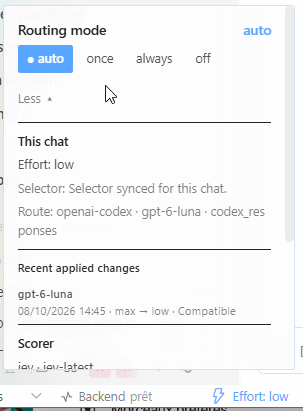
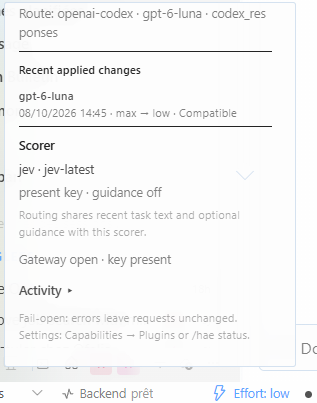
The optional Desktop extension adds an Effort chip with a compact Routing mode popup. More reveals conversation and scorer details plus recent applied changes for that chat; Activity shows aggregate status. In a Hermes chat, /hae opens the same conversation's recent history, and /hae status summarizes its model, selected effort and cache behavior.

The popup keeps the four routing modes together. More adds this chat's effort, whether the native selector is synced, and the route:
Further down, the popup lists the latest applied change and the selected scorer, with its key and guidance state but never the key itself:
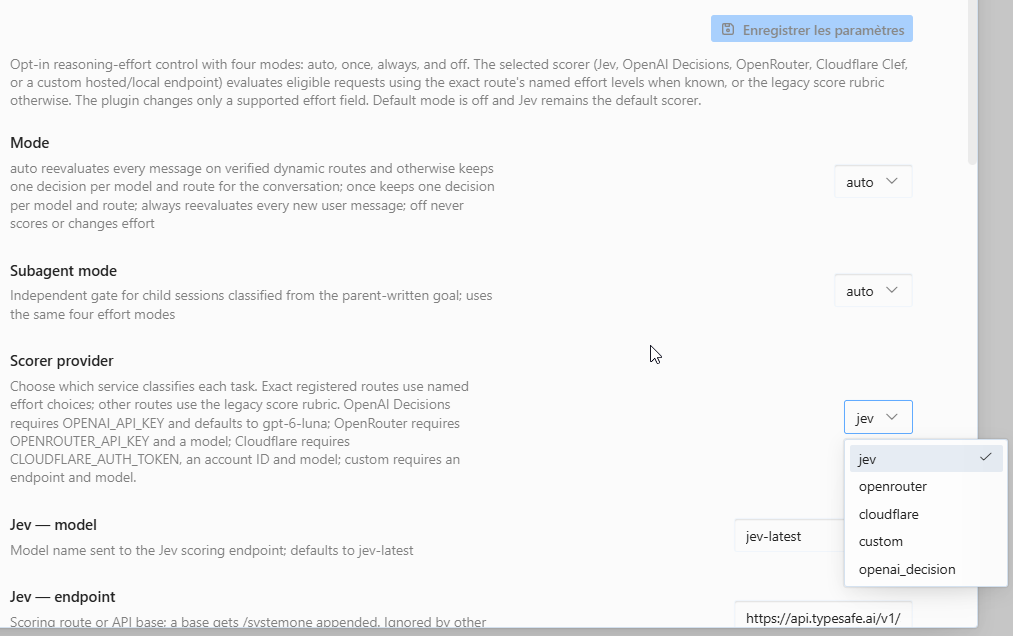
The plugin's settings page lists every scorer provider and its options. The screenshots are from a French-language Desktop.
See the interface guide for notifications, focused-chat status and the native effort selector.
The chip matches decisions to the chat's stored conversation ID; Desktop's temporary runtime ID is used only for session actions. Both live events and status polling follow this distinction.
Data sharing and limits
- Enabling routing sends at most
prompt_charstask characters (default 4,000), plus optional classifier guidance and the allowed level names for named-choice routes, to the selected scorer. Target model context is a separate opt-in setting. /hae probe <text>explicitly scores the text you type, even while routing is off. It stores no decision and may incur charges.- The plugin excludes prompts and guidance from status, logs and change events. Provider retention is separate; see data sharing.
- Applied-change history stores only effort transitions, model names and bounded decision metadata in the active Hermes profile. It retains at most 64 changes per conversation and 64 conversations; a conversation reset clears its history. It never stores task or prompt text.
- Reasoning support alone does not prove that a route accepts an effort field. The compatibility matrix distinguishes registered controls, documentation and live observations.
- Explicitly disabled or malformed reasoning controls stay untouched. Subagents have an independent mode that also defaults to
off. - Cost savings, cache benefits and answer-quality improvements remain unmeasured. Classification adds latency and may add cost.
Update or disable
hermes plugins update hermes-adaptive-effort
hermes plugins disable hermes-adaptive-effort
Restart the serving agent after updates or enable/disable changes. /hae off stops routing for future requests in the current process.
For migration from jev-auto-effort, follow migration instructions.
Documentation
| You want to… | Start here |
|---|---|
| Configure a scorer, keys or advanced settings | Configuration |
| Choose a mode or diagnose a missing change | Usage |
| Understand the implementation and trade-offs | Design · Version française expliquée |
| Check exact behavior and API contracts | Contracts |
| Check a model/provider route | Compatibility |
| Contribute and reproduce checks | Development |
| Find dated reports and operator notes | Documentation index |
License
MIT © 2026 Alexandre Tostivint and contributors.