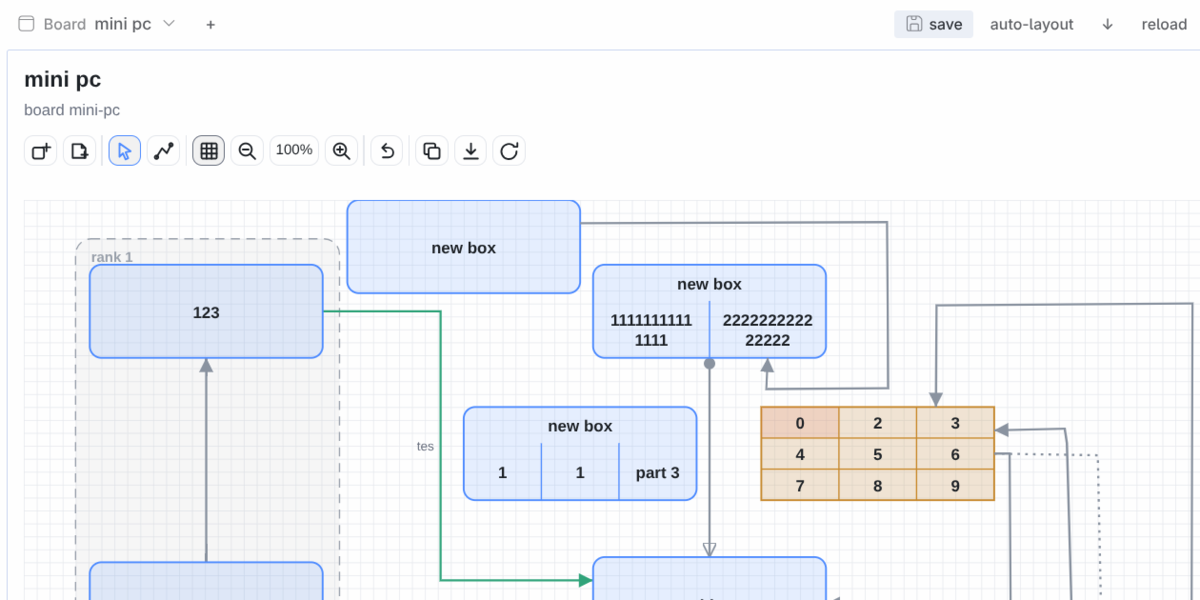
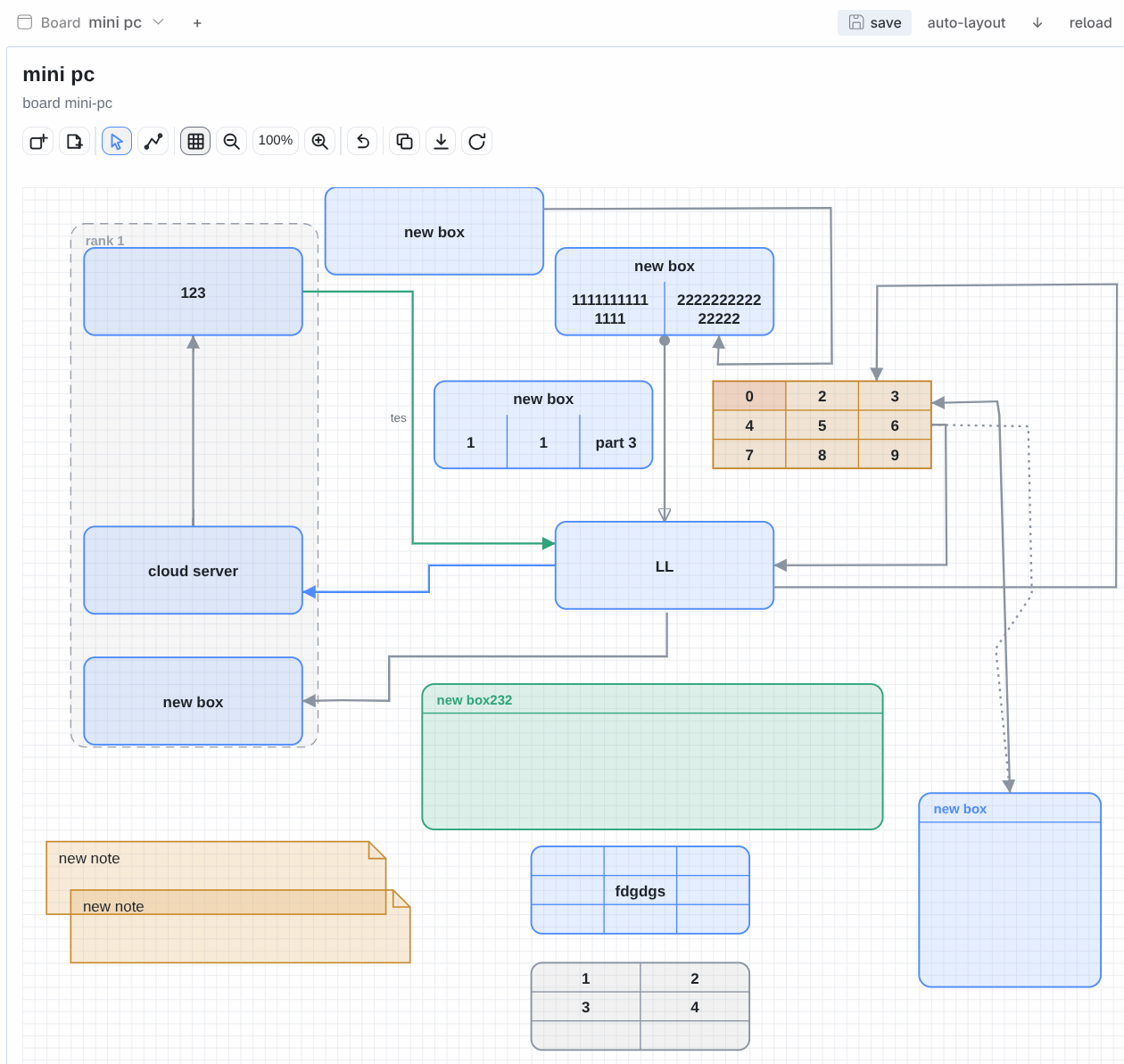
hermes-board
A Miro-like board for Hermes: the agent draws with tools, the user edits in a desktop pane, and both sides work on the same JSON document.
What it adds
- Agent tools (toolset
hermes_board) —board_list,board_get,board_new,board_delete,board_apply,board_render,board_watch.board_applytakes an ordered list of ops, so one call can build a whole diagram: nodes, edges, free lines, groups, notes, captions,layout(layered auto-placement) andbus(several connections sharing one trunk line).board_watchreports the user's own edits in the pane (see below). - Desktop pane — the same interactive editor the
chat-chartsskill ships (boardkit), docked to the right of the conversation: drag boxes, edit text, draw and re-shape a line, drag out a straight line (locked to 45° steps, Shift frees the angle), add or delete, undo, export JSON. Every edit is posted back to the plugin and saved. - HTTP namespace —
GET/POST /boards(list, create),GET/POST/DELETE /board(read, save, delete),GET /page(the editor HTML),POST /ops(ops over HTTP),POST /layout(re-place the graph; returns the new document so the pane can push it straight into its frame) under/api/plugins/hermes-board/. Writers broadcastplugin.hermes-board.board.changedwith anorigin, so an agent edit lands in an open pane without a reload while the pane's own writes are ignored by itself.
Disclosure
What this plugin does beyond reading and writing its own documents, stated for a reader deciding whether to install it:
- Shells out to a browser.
board_render(format: png) and the editor self-test run a headless Chrome/Chromium found onPATH(google-chrome,chromium,chromium-browserorchrome). Nothing is downloaded or bundled. With no browser onPATH, HTML rendering still works and PNG reports a plain error naming the missing binary. - Writes outside the plugin directory. Boards, renders and the edit log live under
~/.hermes/board/(orHERMES_BOARD_DIR/HERMES_BOARD_RENDER_DIR/HERMES_BOARD_WATCH). Nothing else on the host is written. - Serves an HTTP namespace on the plugin host —
/api/plugins/hermes-board/:GET/POST /boards,GET/POST/DELETE /board,GET /page,POST /ops,POST /layout. It is reachable by anything that can reach the gateway, so treat that host like the gateway itself. - Broadcasts one gateway event,
plugin.hermes-board.board.changed, so an open pane picks up an agent edit without a reload. The payload is the board id, version and origin — never the document. - Wakes the agent.
board_watchreports your own pane edits. Waking a messaging chat additionally needsplugins.entries.hermes-board.allow_gateway_injection: true; without it the edit log is still there for the agent to read on its next turn. - No network calls, no credentials, no telemetry. The plugin reaches nothing outside the host, stores no secrets, and declares no Hermes capability override (no tool, model or platform override).
Storage
~/.hermes/board/boards/<id>.json — one file per board, the document is the whole state.
Renders go to ~/.hermes/board/render/<id>.{html,png}. Every write is diffed against the previous
version and the result is appended to ~/.hermes/board/watch.json (the edit log board_watch
reads, capped at 300 events). Override the directories with HERMES_BOARD_DIR /
HERMES_BOARD_RENDER_DIR, the log with HERMES_BOARD_WATCH.
The renderer is bundled: the plugin ships vendor/boardkit.py + vendor/board_editor.js and looks
for them in this order — $HERMES_BOARDKIT, its own vendor/, then an installed chat-charts skill
(~/.hermes/skills/data-science/chat-charts/scripts, or any profile's). So it installs on a host
that never had the skill, and a local skill checkout still wins if you point HERMES_BOARDKIT at
it. Two guards keep the copies honest: python3 scripts/sync_boardkit.py [scripts-dir] copies the
skill's version into vendor/, and tests/test_vendor.py fails while the two differ.
Install
From the Hermes plugin catalog — the reviewed pin, and the path most readers want:
hermes plugins install hermes-board --enable
Straight from the repository instead (a development branch, or a host that cannot reach the catalog):
hermes plugins install https://github.com/skk2010/hermes-board-plugin.git --enable
Either way the repo is cloned into
~/.hermes/plugins/hermes-board/ (with provenance, so hermes plugins check-updates /
update hermes-board work later). Requirements on the target host: a Hermes install and nothing
else — the board library is bundled, the plugin has no Python dependencies to consent to, and no
credentials are needed. PNG rendering additionally wants a headless Chrome/Chromium on PATH;
the HTML editor does not (see Disclosure). The desktop half is picked up from the same
directory: open Capabilities → Plugins in Hermes Desktop, enable Board, and the pane
appears (drag it where you want it).
Cloned the repo by hand instead? hermes plugins adopt hermes-board turns it into a tracked
install. Restart the gateway/desktop backend after enabling — the backend routes mount at start.
The installed directory is a git checkout of this repository, so it carries the tests, the CI
config, the docs and the bundled library (vendor/) alongside the plugin — and that checkout is
what makes hermes plugins check-updates / update work. Hermes itself reads only plugin.yaml,
the Python package and desktop/; everything else is inert.
Enable
hermes plugins enable hermes-board # agent half (tools) — already done if you ran the setup
The desktop half ships disabled on purpose (the app's plugin toggle is separate from
plugins.enabled): open Capabilities → Plugins in Hermes Desktop, enable Board, and the
pane appears — drag it where you want it. Backend routes mount at gateway start, so restart the
gateway/desktop backend after enabling the agent half.
The pane
The header is one row: a Board switcher, save, auto-layout, a ↓ / → direction toggle,
reload and the version badge. save writes the board at once (the pane also saves by itself,
600 ms after you stop drawing) and carries the state of the last write in its own glyph and label —
saved, saving…, merged when the agent had changed the board under the pane, failed when the
backend refused it. That message lives in the control and in a live region for assistive tech, never
in a row of its own: a row that appears above the canvas moves the whole board out from under the
pointer mid-stroke. The boards live in their own window — the switcher opens a
menu-surface popover with a search field (id and title, case-insensitive), the current board ticked,
↑/↓ to walk the filtered list and Enter to open, then New board… and Delete board… at the
bottom. Deleting asks through the app's own confirmation dialog; nothing is removed on one click. A
host build that does not export the picker parts falls back to a chip strip in the header.
Closed the pane? Bring it back with ⌘K → Board: show pane (the palette row the plugin registers — the app remembers a close across restarts, so a plugin must not undo it on load). The layout Reset — ⌘-click the Layout button in the titlebar, or the Reset button inside layout edit mode (⌘⇧) — restores closed panes too.
auto-layout calls POST /layout on the backend — the pane does not carry its own copy of the
algorithm, so the button and the agent's layout op always agree. Board management lives in the
pane on purpose: creating a scratch board should not need the agent (window.prompt does not exist
in Electron). Under the header: the editor. The pane keeps working if the agent deletes the board
you are looking at — it moves to another one and says so.
Use
board_new {id: "plan", title: "Rollout"}
board_apply {id: "plan", ops: [
  {op: "add_node", id: "ui", text: "UI"},
  {op: "add_node", id: "api", text: "API"},
  {op: "add_node", id: "db", text: "DB"},
  {op: "layout", rows: [["ui"], ["api"], ["db"]], labels: ["front", "core", "store"]},
  {op: "bus", sources: ["ui"], targets: ["api", "db"], direction: "v"},
  {op: "add_caption", text: "one shared trunk", x: 640, y: 300}
]}
board_render {id: "plan", format: "png"}     # attach the path with MEDIA: so the user sees it
Editing round trip: the user drags boxes in the pane → the pane POSTs the board with a
based_on version → a stale write is refused and answered with the current board instead of
clobbering it. The agent edits through board_apply, and the pane receives the new document as
a ck-board-replace message (no reload, no lost drag).
Primitives (v1.2)
Frozen in docs/SPEC-v1.2-primitives.md; docs/fixture-v1.2.json is the shared parity fixture
(every shape, every head, the split boxes and the grid, in one board). The four document fields
below are optional — a board that has none of them renders exactly as it did before.
Shapes (kind): box, pill, diamond, note, caption as before, plus cloud,
cylinder, document, hexagon, parallelogram, the icon kinds server, computer and
actor (a pictogram with text as a caption line under it — sub is not drawn there), and
area, a titled backdrop drawn behind everything else.
Split boxes (parts, split, align): parts turns a box/pill into compartments — one
entry per part, each a bare string or {text, sub?} — stacked as rows (the default) or side by
side as columns; the node's own text becomes a header row. align: "left" left-anchors the
header and the part texts instead of centring them. An add_node that passes parts without an
h sizes the box itself: 28 when there is header text, + 24 per part, + 16.
Per-end heads (start, end): each end of an edge carries its own head — none, arrow,
open, triangle, circle, diamond, bar. The defaults reproduce the old behaviour
(end: "arrow", start: "none"), and the legacy bidir: true still means an arrow at both ends
(an op stores that as start: "arrow"; a head that is not in the list is refused with the list).
Grid (grid, grid_on, grid_style, snap): the background grid is off unless grid_on
is true, is drawn as lines (default) or dots at grid px spacing (10 when absent), and the
pane only snaps a dropped node to it while snap is not false.
Ops: add_node {…,parts?,split?,align?} and update_node {…,parts?,split?,align?} (parts: []
removes the split), add_edge/update_edge {…,start?,end?}, and the new
set_grid {size?,on?,style?,snap?} (grid: on, 20px, dots in the reply). board_get summarises
the grid, each node's align and parts count and each edge's effective start/end; the edit
log describes the new edits in plain language — split into 3 parts (n1), align left (n1),
head open -> diamond (n1→n2), grid on, 20px, dots — and still logs nothing for a re-save that
changed nothing.
Two gates cover the rendering half, run with the same interpreter as the suites below:
tests/test_render.py renders the shapes, the heads and the grid of the frozen spec,
tests/test_editor.py is the cross-renderer parity gate — the Python renderer and the JS editor
have to emit the same elements in the same order with the same attributes (float noise
normalised), so a shape fixed on one side alone fails the gate.
vendor/boardkit.py and vendor/board_editor.js are the working copies: a change to the library
is made there, and the copy the chat-charts skill installs is brought level with it at
integration. The two are the same file and tests/test_vendor.py fails while they differ, so run
it with HERMES_HOME=$(mktemp -d) on a machine with no skill checkout — the drift check then
skips loudly instead of failing on a file that is not yours.
Canvas (v1.3)
Frozen in docs/SPEC-v1.3-canvas.md; docs/fixture-v1.3.json is the shared parity fixture
(explicit attach sides on both ends and on one end only, all three head sizes, an unknown side and
an unknown size that must fall back to the defaults, and an edge that reaches its target through
waypoints). Nothing below is required of a document — a board that uses none of it renders, routes
and behaves exactly as it did in v1.2.
Pan and zoom (editor only — the document is untouched). ctrl/meta + wheel zooms anchored at
the pointer, the toolbar's −/+ zoom at the view centre, +/- do the same from the keyboard,
plain wheel pans, a middle-button drag or space + left-drag pans, and 0 or the toolbar's fit
draws the whole board again. The factor is clamped to 0.25 … 4 (×1.15 per notch) and the toolbar
shows it as 150%. The view lives in the editor, never in the document: the PNG and the chat
artifact always draw the whole board, so an agent's render and the pane cannot disagree about what
the board looks like.
Marquee and multi-select. A left-drag that starts on empty canvas draws a marquee and selects
every node, note and band it touches; a plain click selects one item, shift + click adds or
removes one, and a click on empty canvas clears the selection. The first selected item is the
primary one, and the panel edits exactly what it edits for a single selection. Dragging any selected
item moves the whole selection by the same (grid-snapped) delta, and Delete/Backspace removes
all of it — a node still takes its edges with it.
Duplicate and paste. ⌘/ctrl+D duplicates the selection with new ids, offset +20/+20; an edge
is duplicated only when both of its ends were, and it then connects the copies. ⌘/ctrl+C and
⌘/ctrl+V copy and paste through an in-editor clipboard — the system clipboard is not touched, so
there is no pasting into another tab or another board.
Attach sides (from_side, to_side): where an edge meets each box — left, right, top,
bottom, or auto (the default) for the side nearest the other end. An explicit side anchors at
the midpoint of that side, and one explicit end does not change the other end's own choice. auto
on both ends produces byte-identical output to v1.2, and an unknown value is read as auto rather
than rendered raw.
Head sizes (head_size): the marker box in user units — small (8), medium (the default,
11, which is what every earlier board draws) or large (16), so a busy fan-out can be drawn with
smaller arrowheads. The default keeps the existing ck-head-<tone>-<type> marker ids, so an older
document renders byte-identically.
Ops: add_edge/update_edge {…,from_side?,to_side?,head_size?}. An unknown value fails the whole
op list with the valid list in the message, and from_side: "auto" (or head_size: "medium") is how
a side is put back on the default. board_get reports the effective from_side/to_side/
head_size per edge, and the edit log describes the new edits in plain language —
edge a→b attaches right→top, edge a→b head size large — while still logging nothing for a
re-save that changed nothing (writing auto/medium out in full is not an edit).
The gate: tests/test_editor.py is still the cross-renderer parity gate, and it now renders the
v1.3 fixture in the Python renderer and in the real editor and compares them element for element, so
an attach side or a head size fixed on one side alone fails. Its self-test half also requires the
editor's own #selftest steps — zoom, pan, marquee, mselect, groupmove, duplicate
(interaction) and attach (edges) — to have run ok, so the new canvas behaviour is exercised, not
just drawn.
Limitations, from the frozen non-goals: the viewport (pan/zoom) is deliberately not in the document
and is not persisted, so reopening a board draws it whole again; duplicate/paste uses the in-editor
clipboard only (the system clipboard is never read or written); images and other asset nodes are not
here — they need storage and an HTTP path, so they are wave 3 — along with per-part tones, node
rotation, text formatting, alignment/distribution tools, smart guides, lock/hide, cross-tab
clipboard, touch gestures and edge start_label/end_label.
Content and layout (v1.4)
Frozen in docs/SPEC-v1.4-content.md; docs/fixture-v1.4.json is the shared parity fixture (a
zero-sized 3×2 header table, a 2×2 one and a one-cell one, text_size/bold on a box, an area and
a server icon, and the split box the count control acts on). Every field below is optional — a
document that uses none of them renders and behaves exactly as it did in v1.3.
The panel shows only what applies (X1). The panel is selection-driven: a control is shown only
when its field changes what is on the board, and one that does not apply is hidden rather than
disabled. A node shows text/sub/tone/kind/align/text size/bold/W/H, plus parts, split and the
count control for a box/pill alone; an edge shows its label, tone, style, route, sides and head
size; a table shows its own rows/cols/cells/header instead of the split fields; a note in the
notes list shows text/tone/text size/bold/W/H; a group shows no field editing — and with 2+ items
selected the panel shows N items selected plus the arrange row, which is also how arrange is
reached when the primary item is a group.
The split count is explicit (X2). parts still reads one compartment per line (the document
format did not change), but the pane now shows a stepper beside the textarea — + appends
part <N>, − removes the last line — with the live hint one part per line · 3 parts. A count
change preserves each surviving part's sub: the list is rebuilt by index, so +, − and undo no
longer drop every {text, sub} on the way through.
The table (X3). kind: "table" draws rows × cols cells — 2 × 2 when neither is given
— from a flat row-major cells list that is always normalised to exactly rows * cols entries
(missing ones become "", extras are dropped; an empty cell is a real, empty compartment, unlike a
blank split part). header: true makes the FIRST row the header band: its cells are drawn bold and
a divider separates it from the body. The table's own text and sub are never drawn. An absent
or non-positive w/h means "auto" — 90 per column, 24 per row, plus 28 for the header row —
resolved by one helper every reader uses, so the drawing, the edge anchors, the hit tests, the
marquee, the resize handles and the guides all agree about where the table is. add_node and
update_node write resolved numbers (180 × 100 for a 3-row, 2-column table with a header), never
0, and a table needs no text at all.
Text size and bold (X4). text_size is small (10), default (exactly what every earlier
board drew) or large (17), and bold: true emits font-weight="700" for the node's own text
whatever weight that path would otherwise use — a box title's 600, an icon caption's 400, or a
caption kind that emits no weight attribute at all. They apply to the node's own text only, never to
sub, a part or a cell, and both renderers wrap with the effective size, so a larger font wraps
earlier. An unknown text_size reads as default, and an absent one is byte-identical to v1.3.
Resize handles and smart guides (X5, X6, editor only — the document only ever gains new
x/y/w/h). A single selected item draws eight handles; dragging one keeps the opposite edge
put and stops at 40 × 28, the delta is grid-snapped while snap is not false, and one drag is one
undo step. While dragging, the item's left/right/centre and top/bottom/middle are compared with
every other item within 6 px, and a match draws a thin dashed guide spanning both; with snap: false
the guide is drawn and nothing is nudged, with snapping on the match wins over the grid rounding on
that axis.
Arrange (X7, editor only). With 2+ geometric items selected (nodes, notes and bands — an edge
never counts and is never moved, it follows its endpoints) the panel offers align-left,
align-h-centre, align-right, align-top, align-v-middle and align-bottom, and with 3+ also
spread-h/spread-v. Alignment works against the selection's bounding box; spread keeps the first
and the last item exactly where they are and equalises the gaps between them. Every action is one
undo step.
Ops: add_node/update_node {…,rows?,cols?,cells?,header?,text_size?,bold?}, with kind
including table. rows/cols must be integers of at least 1 and text_size one of the three
sizes — otherwise the whole op list fails with the valid values named in the message — and header
and bold must be booleans. board_get reports each node's effective text_size/bold and its
rows/cols/header, and the edit log describes the new edits in plain language —
table 3x2 cells changed (tbl), table header on (tbl), text size large (big), bold on (n) —
while still logging nothing at all for a re-save that changed nothing (padding a cell list or
writing header: false/text_size: "default" out in full is not an edit).
The new gates: tests/test_render.py asserts the table's divider count and offsets, that an empty
cell emits no <text>, the header row's weight and the 2×2 default, and tests/test_editor.py
compares the Python renderer with the real editor on docs/fixture-v1.4.json element for element —
the table, the text sizes and the bold override on both sides — and requires the editor's
panelhide, splitstep, resize, guides and arrange self-test steps to have run ok.
tests/test_tools.py covers the ops half: the validation, the cell normalisation, the summary shape
and the new diff lines.
Limitations, from the frozen non-goals: images and other asset nodes, viewport persistence,
per-cell/per-part/per-sub formatting, rotation, lock/hide, merged or spanning table cells,
cell-level tone or alignment, column resizing, marquee resize, multi-column sorting, touch gestures,
a cross-tab clipboard and a second toolbar row are not here. text_size/bold do not apply to a
table's cells (a table is its own thing), and resize, guides and arrange exist only in the pane.
Panel and tables (v1.5)
Frozen in docs/SPEC-v1.5-panel.md; docs/fixture-v1.5.json is the shared parity fixture (a 3×2
header table with col_widths 2:1, one row tone, one column tone and one object cell; a 2×3
table with 1:2:1; a one-cell table; plus the text/bold/split/area/icon nodes v1.4 already had).
Every field below is optional — a document that uses none of them renders and behaves exactly as
it did in v1.4, and the v1.5 fields are written only when an op (or the pane) supplies them.
The panel is a set of collapsible sections (Y1). The rows are grouped into <details> with a
<summary> heading, in the order content, shape, layout, parts, table, edge, arrange,
cell; every section starts open, and collapsing one is a session-only editor state — never
written to the document. A section with no visible row for the current selection (X1's rule) is
hidden entirely, keyboard included.
Inline controls instead of dropdowns (Y2). Tone, kind, align, split, text size, head size and
start/end are button groups now: the group carries the id the old <select> had, so the control
surface keeps its meaning, and each button carries a stable data- attribute (data-tone,
data-kind, data-align, data-cell-align, data-row-tone, data-col-tone, …) with aria-pressed
on the current one. The tone swatches are filled with their own tone variable and the kind picker
draws a small inline SVG glyph per shape. Free text and numbers stay real inputs.
Hints and validation (Y3). Every editable control has a hint (w → width in board units,
cells → one cell per line, empty lines kept, parts → one part per line · 3 parts). An invalid
value never reaches the model: the row goes aria-invalid, the hint is replaced by the reason
(1 or more, 40 or more, a number, please) and the previous value stays; a valid value clears
the mark. header/bold are real booleans — the ops refuse "yes", "true" and 1 instead of
coercing them.
Table v2: widths, per-cell alignment and colour (Y4). A cell is still a string, or an object
{text, tone?, align?} — the object keeps only those keys (text stringified, a tone outside
TONES or an alignment outside left|center|right dropped, surplus keys dropped), and an object
with neither a tone nor an alignment is written back as the plain string, so a v1.4-shaped document
stays v1.4-shaped. col_widths is a list of positive numbers normalised to exactly cols entries
(short or bad → 1), and a column is simply its share of the width, so [2, 1] on a 180-wide table
puts the divider at 120. row_tones/col_tones are lists of tone names (or null) normalised to
exactly rows/cols entries. A cell's background tone is cell.tone || row_tones[r] || col_tones[c] || the table's tone, painted after the base rect and before the dividers; a table that
paints any cell/row/column tone draws its base rect with rx="0" instead of rx="9", because a
squared fill would poke out of a rounded corner. Cell text is font 12/600 (700 in the header row)
wrapped at cell_w - 12, anchored by the cell's own alignment, else the table's, else center —
which is what keeps a v1.4 table byte-identical. The effective-size helper is now
90 × cols by (28 if header else 24) + 24 × (rows - 1), so a 3×2 header table is 180×76 and a
one-row header table 180×28 (the old 28 + 24 × rows left a cell row under an empty header band and
disagreed with both renderers).
The panel controls for table v2 (Y5). One small number input per column (ck-colw-<j>,
min="0.1" step="0.5"), the unchanged cells textarea (no text syntax for tone/align), a cell
section that picks a row/column and gives that one cell a text, a data-cell-align group and a
data-cell-tone swatch row (with a "no own tone" swatch), and one swatch row each for the row and
column tones. The cell editor keeps the short form: it writes an object only when the cell needs
one and takes it back to a string when both are cleared.
The ops and the agent surface (Y6). A new op add_table
{op, id?, x?, y?, rows?, cols?, cells?, header?, col_widths?, row_tones?, col_tones?, tone?} —
table defaults before normalisation, a resolved w/h (never 0) and the same normalisation Y4 pins,
so an op and the pane write the same document; add_node {kind: "table", …} accepts the same fields
through the same code path. update_node accepts all of them on a table (cells as strings or
objects, col_widths, row_tones, col_tones), re-normalising each list to the table's shape and
raising ValueError for a wrong TYPE (col_widths/row_tones/col_tones not a list, a tone not in
TONES, a cell alignment outside the tri-state, cells not a list, header/bold not a boolean).
add_table answers added 3x2 table n1 at (40, 40), and the board description the tools hand the
model gains one line per table — table n1 3x2 header=yes filled=4/6 — next to the per-node
rows/cols/header the v1.4 summary already reports. A table that arrives on the board is
described in the edit log by its own sentence (table n1: 3x2 header, 4/6 cells filled, widths 2:1, 1 coloured row), and a table v2 edit names itself (column widths 2:1, row 2 tone warn,
cell 2/1 align right, cell 2/1 tone warn). A re-save that changed nothing still logs nothing,
and spelling the new defaults out in full (col_widths: [1, 1], row_tones: [null, …], a cell
object with neither tone nor alignment) is not an edit.
boardkit.table(id, x, y, rows, cols, cells, header=…, col_widths=…, row_tones=…, col_tones=…, tone=…) is the Python builder for a hand-written document; the ops do not depend on it (they set
the fields on the dict boardkit.box returns), so store.py and the renderer can land in either
order during a wave.
Non-goals (Y7). No change to node geometry, padding or default sizes; no keyboard-first field
navigation; no cell picking by clicking the canvas (the panel's row/col inputs are the picker); no
column drag-resize on the canvas; no merged or spanning cells; no per-cell text size or weight; no
images; no viewport persistence; no table sorting; no text syntax for cell colours.
The new gates: tests/test_render.py gains the Y4 cases (unequal widths, each precedence step, the
rx rule, the three alignments, an object cell with an empty text, the v1.4 byte-identity), and
tests/test_editor.py compares the Python renderer with the real editor on
docs/fixture-v1.5.json and requires the editor's sections, validate and cellcontrols
self-test steps to have run ok. tests/test_tools.py covers the ops half: add_table accepted and
defaulted, the normalisation Y4 pins (a hand-written document is read forgivingly), every rejected
type, the summary line, the diff lines and the no-op re-save.
Lines (v1.6)
Frozen in docs/SPEC-v1.6-lines.md; docs/fixture-v1.6.json is the shared parity fixture (a free
three-point stroke with an off-grid middle vertex; one stroke anchored to a table at one end and
drawn across the boxes at the other; one anchored at both ends, a box at one end and a note at the
other; a stroke whose ref names nothing; one whose from/to are malformed; one drawing a
circle/triangle head pair; one carrying a negative coordinate in an imported document; plus the
table and the note the panel's other kinds need) and docs/fixture-v1.6-route.json is the
reproduction of the user's own board — the router itself is untouched and keeps rendering it byte
for byte (see the non-goals).
The primitive: lines. A board gains one optional top-level list, a sibling of
nodes/notes/groups/edges, one entry per line:
"lines": [
  {"id": "line-9f3a1c20", "points": [[120, 300], [400, 320], [420, 380]],
   "tone": "default", "style": "solid", "start": "none", "end": "arrow",
   "from": {"ref": "n3", "side": "auto"}, "to": {"ref": "note-4711", "side": "right"}}
]
points is at least two [x, y] pairs in board units — finite and >= 0, never re-rounded or
normalised, so what you write is what is drawn. tone, style (solid|dashed|dotted), start and
end are the edge vocabulary exactly (none|arrow|open|triangle|circle|diamond|bar, drawn with the
medium head box), and a board that carries no lines key renders exactly as it did in v1.5.
from/to are OPTIONAL anchors, one per end: {ref: <node or note id>, side: auto|left|right|top|bottom}, resolved through the same anchors the edges use, so an anchored end
sits on the box edge and follows it when the box moves. A dangling anchor is not a vanished
line — a ref that names nothing (or a malformed anchor) leaves that end where its stored point
is and the line is still drawn. The one real rule behind this: a line is an annotation stroke, not
a connection, so its interior points are free to cross a box. The reader is lenient about all of it
(a stray value becomes the default); the ops below are not.
Use. board_apply {ops: [{op: "add_line", points: [[120,300],[400,320],[420,380]], from: {ref: "n3"}, to: {ref: "note-4711"}, style: "dashed"}]} draws one and answers
added line line-9f3a1c20 (3 points). update_line {id, points?, tone?, style?, start?, end?, from?, to?} re-shapes it — an explicit null in from/to takes that anchor away and leaves the
end free — and delete_line {id} removes it. Validation is identical for both writers, per field:
a points that is not a list, an entry that is not a pair of finite numbers, fewer than two
entries, a negative coordinate, an unknown tone/style/start/end (or anchor side), a
malformed anchor, or a ref that names nothing on THIS board all fail the whole op list with the
field named — so a typo in a ref is never written into the document as a silently dead anchor.
board_get reports lines in its summary: the path length, how it draws, and each end's anchor as
the renderer resolves it (null there means the end is free).
The pane. The toolbar's line tool is a MODE (crosshair): click to drop the first point, each
further click appends one, a rubber band follows the pointer, and a double-click or Enter commits
the line while Esc drops it (nothing reaches the document, and a draft with fewer than two points
is discarded without a word). Every point it places is locked to the nearest 45° step —
horizontal, vertical or diagonal ("parallel or perpendicular to the horizon") — with the length
taken as the pointer's projection onto that step, so the rubber band shows the point the click will
write; the first point has nothing to reference and stays where it lands. Holding Shift frees the
angle for the point being placed. (v1.9 removed the separate straight tool: it could only draw a
single A→B segment, and the line tool does that in two clicks with the same lock.) A committed line
is the same lines primitive the agent's ops produce: same panel, same edits. An END anchors to a
box — inside it or within the 12 screen px band — only while Shift is held, which is also when
the anchor hint (the candidate dots and the ring) appears: by default the lock wins and a line's
ends stay free. The point stays in the path as the fallback position, only the two ends anchor, and
an interior point is never touched. — the point stays in the path as the fallback position, only the two ends
snap, and an interior point is never touched. A committed line is editable: drag a vertex, Alt-click
a segment to insert one, Alt-click a vertex to remove it (never below two), Alt-click an anchored
vertex to detach its anchor. The old connect button is gone — start the stroke on a box edge and
the snap anchors it — while add_edge stays for the agent.
Edges you can re-route by hand. Both renderers and bus have always carried waypoints; the
ops now accept them too, so the loop closes: add_edge/update_edge {…, waypoints: [[x, y], …]}
routes an edge through the points you give, waypoints: [] puts it back on the auto-router, and the
agent reads the result back from the document. In the pane, dragging a middle segment of an edge
materialises that segment as two waypoints, Alt-click on a waypoint removes it, and a waypoint is
never left inside a box — it is pushed out through the boundary the segment heads for, with 12
units of clearance, before it reaches the model (the rule exists because a waypoint sitting behind
its own anchor draws the path backwards through the source box).
Ops: add_line, update_line, delete_line (plus waypoints on add_edge/update_edge). The
edit log describes them in plain language — drew 1 line (3 points), deleted 1 line, moved 1 line (line-9f3a1c20), line tone accent (line-9f3a1c20), line points 3 -> 4 (…), line head none -> open (…), line anchors none -> both (…) — and still logs nothing at all for a re-save that
changed nothing. Writing a default out in full ("start": "none", {"ref": r, "side": "auto"}) is
not an edit either. The plugin is version: 1.6.1 (the version badge in the pane header is how you
see the reload picked the change up); the .1 fixes the commit gesture — the editor rebuilds the
SVG on every draft click, so the browser never delivers dblclick there and v1.6.0 only answered
Enter. The commit now listens for the second mousedown (detail >= 2), the event real input
does deliver; scripts/repro_dblclick.py is the real-input proof.
Non-goals. No change to the auto-router's geometry: the four shipped fixtures render
byte-identically, defects included, and the crossing/intrusion reproduction is parked in
docs/fixture-v1.6-route.json for its own wave. No curves or beziers, no freehand brush, no
per-line labels, no z-order controls, no convert edge → line, no grouping a line with the boxes
it crosses, no clearance rule for a line's interior points (that rule is for edges), no keyboard
editing beyond Enter/Esc, and no new files or dependencies.
The gates: tests/test_render.py covers the primitive in the Python renderer and
tests/test_editor.py compares it with the real editor element for element, requiring the
line, linesnap, lineedit, edgepath, barfit and linepanel self-test steps to have run
ok. tests/test_tools.py covers the ops half: every rejected input for add_line and
update_line, the reader's leniency next to the writer's strictness, the lines summary, the diff
lines and the no-op re-save.
Keeping the agent in the loop (board_watch)
The pane saves while the user works, so the agent needs a way to notice. Two halves:
- Every write is logged with a plain-language diff —
moved 3 box(es) (ui, api, db), connected api→db, retitled the board to 'Plan'— tagged withorigin(panefor the user,apifor another caller,agentforboard_apply). Writes that change nothing are dropped, so the pane's per-drag saves do not spam the log. - The session that wants to be told arms itself:
board_watch {action: "arm"}records where the notification should go, and from then on a user edit wakes that session withPluginContext.inject_message(a message like[board plan] edited by the user: moved 3 box(es) (ui). Call board_get to see it.). Agent edits and mechanical re-layouts never wake anyone — they are logged, and the agent sees them on its nextboard_watch {action: "read"}. The tool handler is handed the agent'ssession_id, but the host routes on the durable session key (agent:main:telegram:dm:379020925:203268), soarmtranslates one into the other by reading this profile'sstate.db(read-only) and reports what it resolved — an unroutable session is called out instead of silently "armed".
board_watch {}                        # what the user changed since the last ack
board_watch {action: "arm"}            # wake THIS session on the next user edit
board_watch {action: "read", ack: true}  # read and drain
board_watch {action: "status"}         # armed target, pending count, last wake result
Waking a messaging chat (Telegram, Discord, …) additionally needs the host to allow it:
plugins:
  entries:
    hermes-board:
      allow_gateway_injection: true
That flag is a policy gate, not a wire: the wake is delivered by whichever process runs the
plugin's backend. If the desktop app serves the pane from its own backend while the messaging
gateway runs as a separate process (the usual split — the gateway holds the platform adapters, the
desktop backend holds the pane), an edit in the pane cannot reach that chat's session, and the
wake reports "no live gateway is available". Two reliable channels in that topology: the agent
reads the log on its next turn (board_watch {action: "read"}), or a scheduled job in this profile
reports pending edits to the chat. When the pane's backend and the gateway do share a process, the
armed wake goes straight through.
The wake follows the host's own routing rules: an origin mapping (the messaging chat) or a
durable session_key (a local desktop/TUI session) — exactly one is sent, because the host
refuses session_key and origin together; a classic CLI/REPL session needs neither, so the wake
is attempted even with nothing armed. Every event records wake: {ok, detail, sent}, and
board_watch {action: "arm"} reports the target it captured (from the host's session_key/
origin arguments, or an explicit session_key), so a silent failure is visible rather than
assumed. When the host refuses — or no gateway is live — the edit is still in the log and
board_watch says why.
Verify
PY=~/.hermes/installs/*/environments/*/venv/bin/python    # the Hermes environment
$PY tests/test_tools.py   # ops, layout geometry, bus trunks, render, edit diffs, watch/wake, ids
$PY tests/test_api.py     # the HTTP namespace over the real ASGI app (routes, stale guard, /layout)
$PY tests/test_vendor.py  # the bundled boardkit works alone and has not drifted from the skill
$PY tests/test_render.py  # v1.2 shapes, heads and grid, against docs/fixture-v1.2.json
$PY tests/test_editor.py  # Python renderer ≡ JS editor, element for element (the parity gate)
$PY tests/test_security.py # no caller-chosen output path, no id traversal, no `</script>` escape
node tests/pane_smoke.mjs # desktop/plugin.js with stubbed SDK + React: registers, renders, clicks
hermes plugins validate . # manifest, tool declarations, desktop-surface lint, security scan
test_api.py needs FastAPI and a live ASGI app, so run both Python suites with the Hermes
environment's interpreter (~/.hermes/installs/*/environments/*/venv/bin/python) — a bare
system python3 usually has an incomplete FastAPI/pytest install and fails at import.
The PNG checks skip themselves, loudly, on a machine with no Chrome/Chromium: the suite should not
fail for a reason unrelated to the change. .github/workflows/tests.yml runs these six suites plus
node --check vendor/board_editor.js on every pull request and every push to main — the runner's
browser is asserted before the tests (a suite that skips its PNG checks would otherwise turn the gate
green), node:22 for the pane — and deliberately does not install Hermes: hermes plugins validate / doctor stay the local, authoritative gates for the manifest and the desktop surface.
Known limits
- The pane itself needs the desktop app: there is no headless test of the frame, the drag and
the postMessage bridge —
pane_smoke.mjsproves the module loads, registers and renders in a stubbed environment. - One board per id; there is no merge — the version check prevents silent data loss, and the
editor keeps its own undo stack plus a
reset. board_renderwithformat=pngneeds Chrome/Chromium on the machine running Hermes.