 Adolanium
Borealis
A live dithered landscape behind your Hermes desktop.
One theme for Hermes Desktop, with a scene that moves behind the whole window.
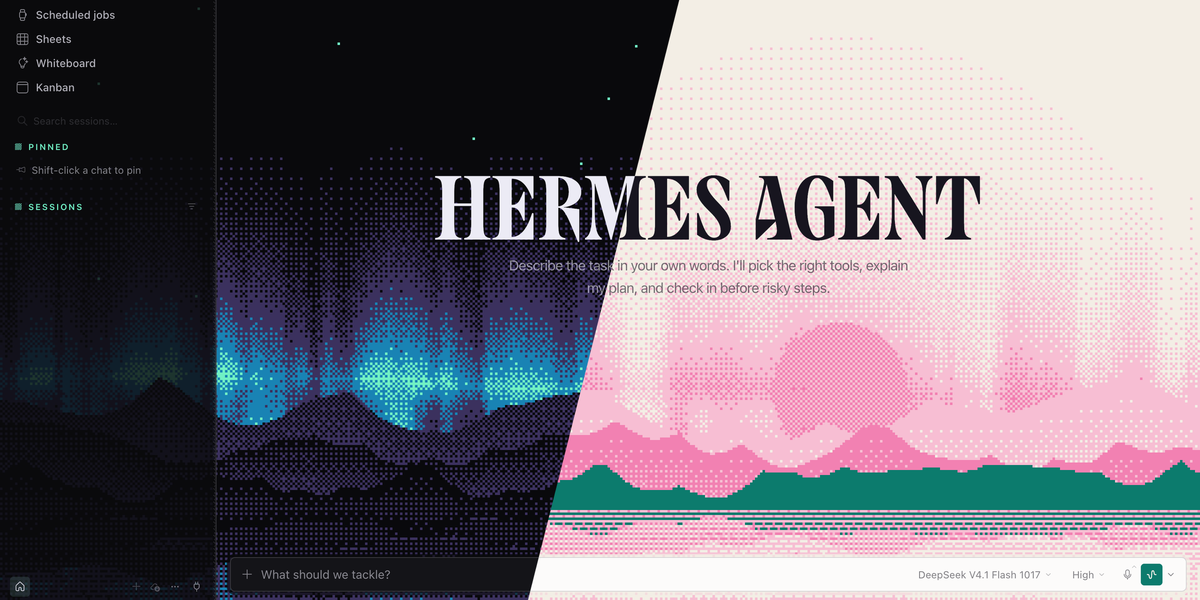
By night, tall aurora curtains rise behind three mountain ridges and a lake mirrors them, under stars, the moon in tonight's real phase and the odd shooting star.
By day, the same view turns into a two-ink print: pink and teal ridges on cream paper, with a low sun.
Everything is drawn in dots, one per 3 pixels, in the theme's own colours.
FOR HERMES DESKTOP · COMMUNITY THEME · VERSION 0.3.0
Try it in a minute · Night and day · Switch any time · In the terminal
Try it in a minute
You need Hermes Desktop 0.22.2 or later. You don't need a terminal.
1. Install. In Hermes Desktop, open Capabilities → Plugins and click Install from Git. Paste this address, click Review repository, then install:
https://github.com/Adolanium/hermes-borealis
hermes plugins install Adolanium/hermes-borealis
If it asks whether to enable the plugin, either answer works. That switch is for the agent side, and Borealis has nothing there.
2. Turn it on. Borealis now appears in Capabilities → Plugins. Flip its Desktop switch on. Desktop plugins installed from a package start turned off, and this is the step people miss.
3. Pick the theme. Type this in the message box and press Enter:
/skin borealis
The whole app changes on the spot, with no restart.
Night and day
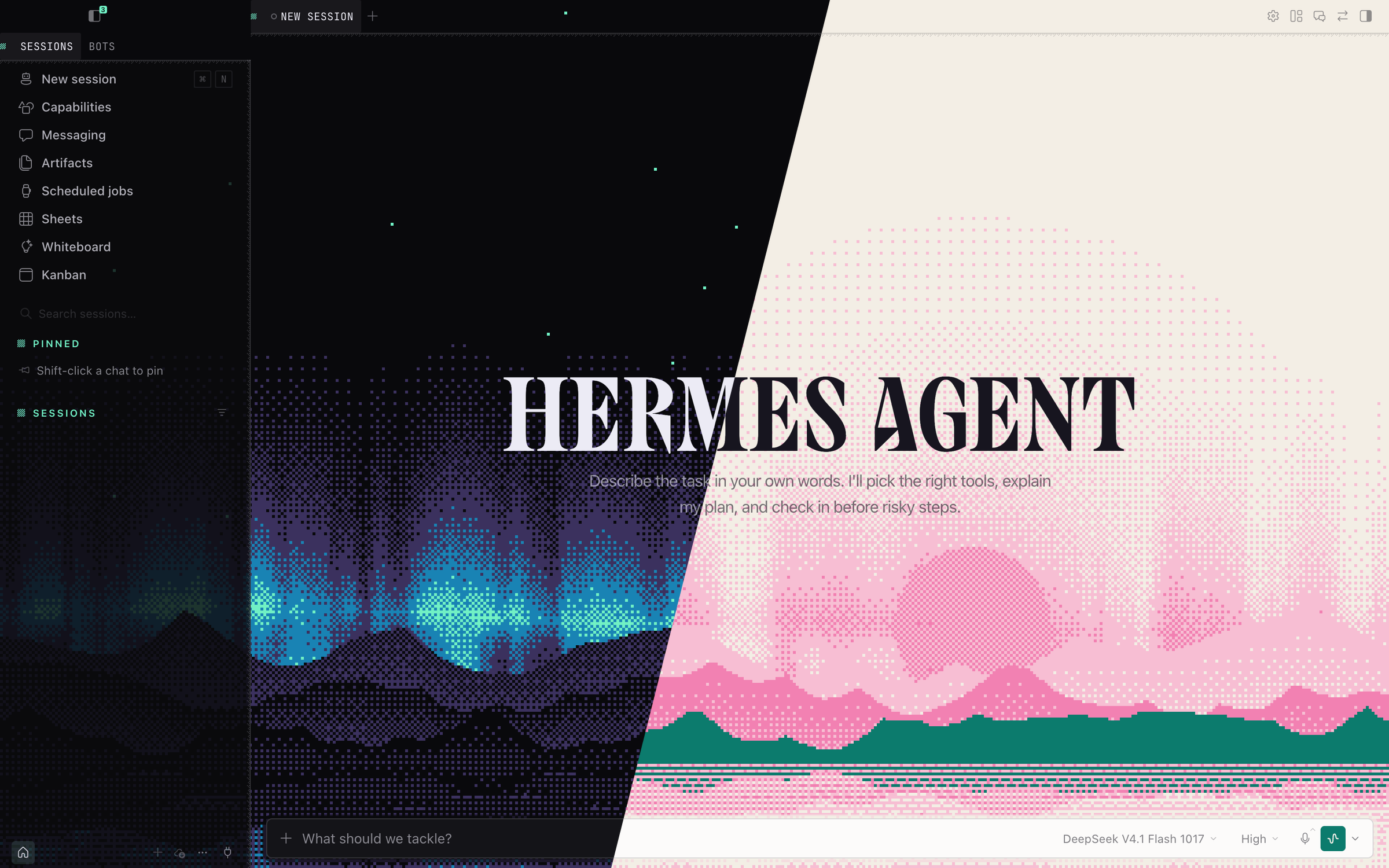
Borealis follows your Hermes light/dark setting. Click a picture to see the full window.
 |  |
|---|---|
| Night (dark mode) | Day (light mode) |
- Night. Near-black with an indigo cast and a mint accent. The aurora is mint at its lower edge and fades through blue to violet. The nearest ridge is a black silhouette, and the far ones sit in violet mist. Stars twinkle, and a shooting star crosses every 13 seconds.
- Day. Cream paper with teal and bright pink, like a two-colour riso print. The curtains thin out to streaks of dawn light, and there are no stars.
- The lake. A strip along the bottom mirrors the whole scene, with ripples that grow towards the near shore.
- A little depth. The ridges slide a few pixels as you move the mouse, the near ones more than the far ones.
Switch any time
Borealis is a normal Hermes theme, so all the usual ways to switch work:
| Where | What to do |
|---|---|
| Message box | /skin borealis. /skin list shows every theme; /skin alone moves to the next one. |
| Command palette | Press Ctrl K (⌘ K on macOS), choose Change theme, and pick Borealis. |
| Settings | Settings → Appearance → Theme. |
To go back to the stock look, type /skin nous.
In the terminal
Borealis also comes as a skin for the Hermes CLI and TUI, called borealis-cli. A terminal can't run the moving scene, so the skin brings the rest of the look: the night palette, a HERMES AGENT wordmark in the aurora's violet-to-mint ramp, and a still frame of the landscape drawn in braille dots, with curtains, ridges, the lake, stars and the crescent moon. On a light terminal the TUI switches to the day palette, pink and teal on cream. The classic CLI always uses the night palette.
 |
|---|
| Night (dark terminal) |
 |
| Day (light terminal) |
Hermes loads terminal skins from ~/.hermes/skins/, and a plugin can't put one there, so it's a one-line copy:
mkdir -p ~/.hermes/skins && curl -fsSL https://raw.githubusercontent.com/Adolanium/hermes-borealis/main/skins/borealis-cli.yaml -o ~/.hermes/skins/borealis-cli.yaml
Then type /skin borealis-cli in the CLI or TUI, or run hermes skin use borealis-cli.
Hermes keeps one active skin across the terminal and Desktop, so switching the terminal to borealis-cli also switches Desktop, to a plain version of it with no scene. Type /skin borealis in Desktop to get the scene back; Desktop keeps that choice until the terminal changes skin again.
The skin is generated by tools/build-cli-skin.py, which draws the still frame from the same scene as the Desktop shader.
Small decisions, already made
- The chat stays readable. The scene is at full strength only on an empty chat. Once there is text to read, in a conversation or on any other page, it fades back to about a quarter strength.
- The colours are yours to change. The scene reads its colours from the theme, so picking another accent in Settings → Appearance recolours the aurora too.
- The real moon. By night the moon shows tonight's phase, worked out from your computer's clock. Nothing is looked up online.
- Calm when you ask for it. With your system's reduced-motion setting on, the scene holds one still frame.
- Easy on the machine. The scene is drawn at one pixel per 3px dot, at 24 frames a second, and stops while the window is hidden.
- Works without a graphics card. If WebGL is not available, you get the plain palette with no scene.
- Hermes's own lettering. Borealis keeps the app's fonts, including the HERMES AGENT wordmark.
- Nothing leaves your machine. The plugin is one 30 KB file with no images, no fonts and no network requests.
Update or remove
hermes plugins update hermes-borealis
hermes plugins remove hermes-borealis
Or use Capabilities → Plugins: switch Borealis off to hide the theme, or remove it from there. If Borealis was active, Hermes goes back to its default theme.
What it touches
- Theme registration through the Desktop plugin SDK, the same way any theme plugin adds itself to the picker.
- Style rules that apply only while Borealis is active, and disappear when you switch away. They restyle parts of Desktop's own UI (tabs, the composer, the sidebar edge, keyboard hints) and make the window's main backgrounds transparent so the scene shows through.
- One canvas. While Borealis is active, the plugin adds a single
<canvas>behind the app and draws the scene on it with WebGL. It removes the canvas when you switch themes or turn the plugin off. - Three listeners. It watches Desktop's active theme, mode and accent (attributes on the page's root element) to know when to show, recolour or remove the scene. It listens for window resizes, and for mouse movement to slide the ridges. It reads only the pointer's horizontal position and stores nothing.
It makes no network requests, adds no agent tools, hooks, background processes or settings, and reads none of your data.
While Borealis is active, Hermes's Window Translucency setting has no visible effect, because the scene covers the window.
The restyled tabs, composer and edges style Hermes Desktop's own markup, because the plugin SDK has no slots for decoration yet. If a Desktop update renames that markup, those touches fall back to the plain palette. Nothing else breaks.
Compatibility
| Hermes Desktop | Platform | Status |
|---|---|---|
| 0.23.1 | Windows 11, macOS | Tested |
| 0.23.1 | Linux | Expected to work; not yet tested |
| 0.22.2 | any | Expected to work; not yet tested |
More themes
Borealis installs side by side with these packs, and none of their theme names overlap, so every theme shows up in the same picker.
- Pantheon: 18 Greek gods in dithered marble.
- Kemet: 12 Egyptian gods in painted relief and gold leaf.
- Asgard: Norse gods carved in runestone and wood.
- Nous: Nous Research characters as video game heroes.
License
MIT.
Community project
Borealis is an independent community theme. It is not affiliated with, endorsed by, sponsored by, or officially associated with Nous Research or the Hermes Agent project. Hermes, Hermes Agent, and Nous Research are names and marks belonging to their respective owners.
README from the reviewed commit c514f28; it updates when the author re-pins.