hermes-cron

A skill that teaches Hermes Agent to run its cron
scheduler like a careful operator: pick the right lifecycle action, keep jobs cheap and quiet, verify
every change and find the broken layer when a reminder does not arrive. It ships with a read-only
doctor script that complements the built-in hermes cron doctor.
Why
Cron failures in an agent look like success. The tool answers success: true, the record says
paused, last_status is ok — and the messages keep coming, or never arrive. Typical causes:
- a bare
30mwas meant as "in 30 minutes" but schedules a job every 30 minutes; - the prompt says "send a summary", so the agent sends it and the scheduler delivers it again;
deliver: originpoints at the chat where the job was created, not at the person it is for;- a record with
enabled: trueand a pause marker never fires, yet the list shows it as scheduled; - a pinned model ignores
hermes modeland skips the fallback chain when its provider is down.
The skill turns each of these into a rule the agent follows, and the doctor makes them visible.
What you get
| Part | What it does |
|---|---|
SKILL.md |
When to use, lifecycle table, cheap modes, procedure, pitfalls, verification |
scripts/cron-doctor.py |
Read-only health check: scheduler, jobs, delivery, incidents |
references/reference.md |
CLI, cronjob tool fields, schedules, statuses, markers, cron: settings |
references/troubleshooting.md |
Symptom runbook: missed, late, duplicated, misrouted, silent jobs |
Wake the model only when needed
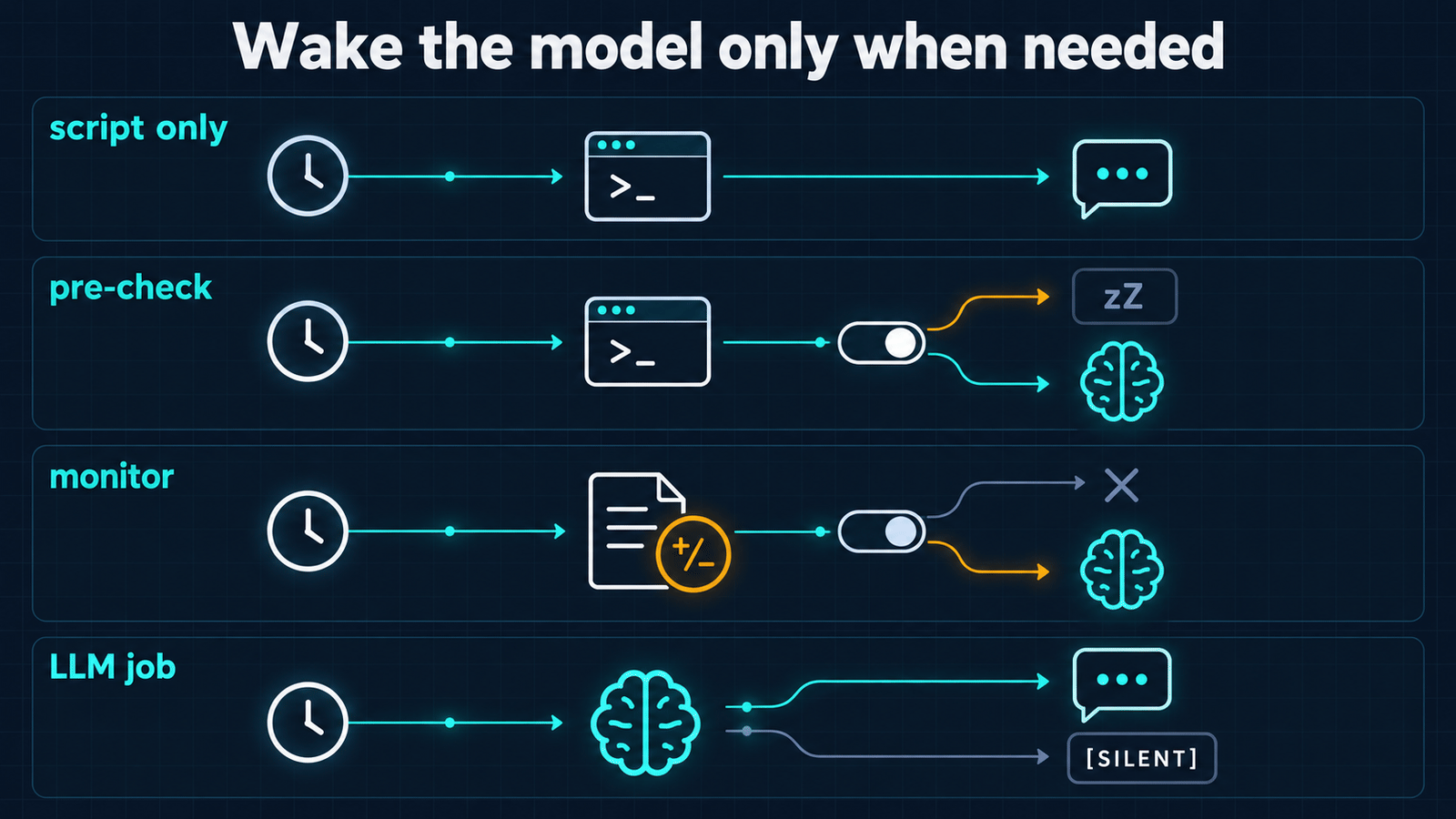
| Situation | Mode | How it stays silent |
|---|---|---|
| Text is known in advance; alert watchdog | no_agent: true + script |
empty stdout or {"wakeAgent": false} |
| Fresh data needed, real work is rare | script pre-check |
last line {"wakeAgent": false} |
| "Tell me when this changes" | monitor (script or URL) |
unchanged output skips the agent run |
| The model decides, but not always reports | LLM job | reply exactly [SILENT] |
Debug by layers
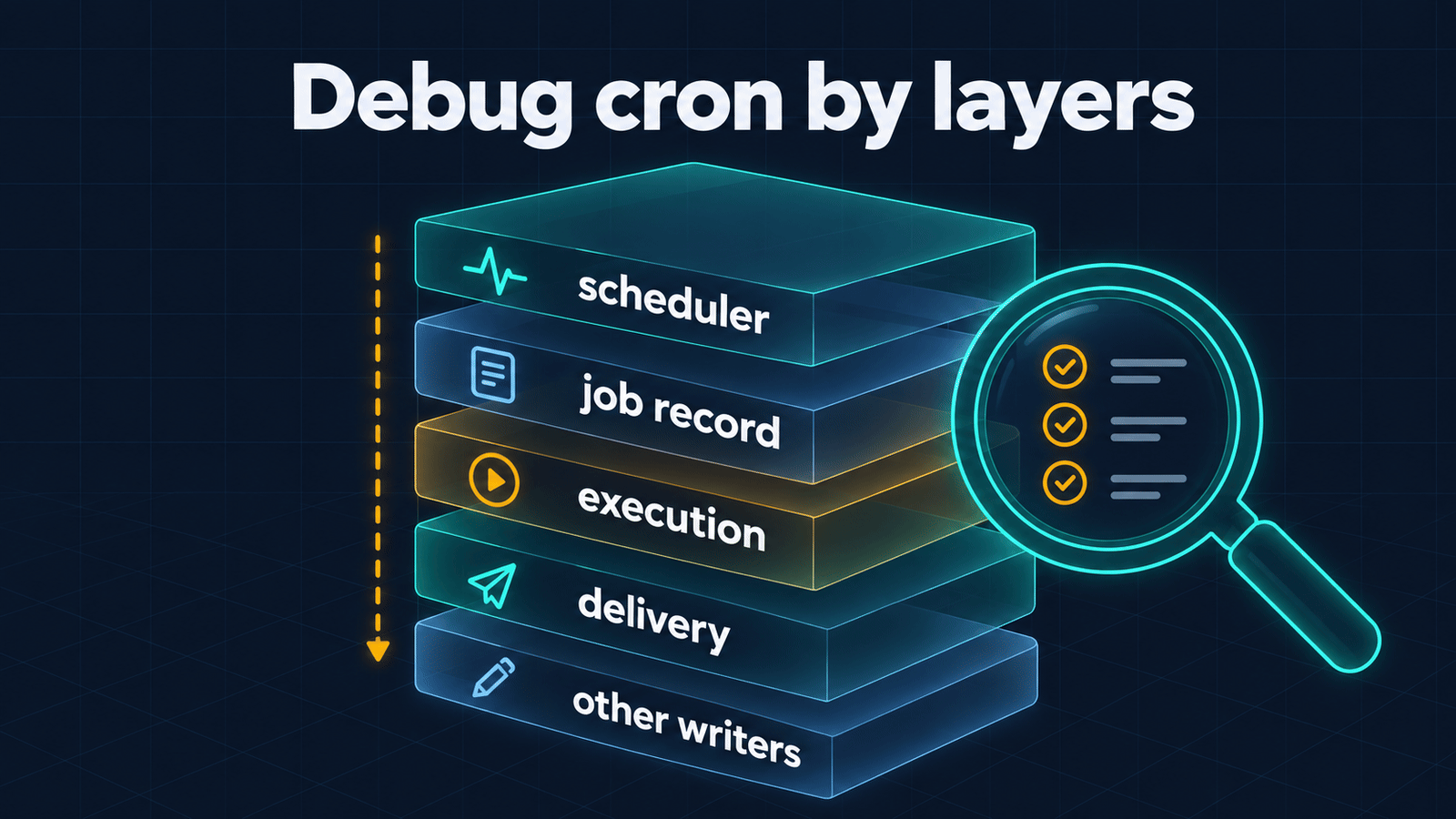
When a job misbehaves, the skill walks the layers top to bottom instead of rewriting the schedule: is the scheduler ticking, is the record consistent, was there an attempt, was the result delivered, and did a sync or deployment overwrite the change.
Install
Pick one. Option 1 is the usual choice: the skill lands in ~/.hermes/skills/ and the agent picks it
up from its description.
1. As a regular skill (recommended)
hermes skills install itpartypattaya/hermes-cron/skills/hermes-cron
2. As a portable plugin (Agent Plugins v1 package: plugin.json + skills/)
hermes plugins install itpartypattaya/hermes-cron --no-enable
hermes plugins enable hermes-cron
Plugin skills are read-only and namespaced. They are not listed in the system prompt; the agent finds
them through skills_list and loads them with skill_view.
3. Manually
git clone https://github.com/itpartypattaya/hermes-cron.git
cp -r hermes-cron/skills/hermes-cron ~/.hermes/skills/
Use it
Ask the agent in plain words; the skill covers the rest.
- "Remind me in 30 minutes to call the bank." → a one-shot
in 30m, verified, with the exact time. - "Pause the morning digest until Monday." →
pause, plus who resumes it on Monday — Hermes has no scheduled resume for recurring jobs — and no new duplicate job. - "Ping me only if the disk is over 90 %." → a script-only watchdog, tested for silence and for alert.
- "Why didn't the 9 am report arrive?" → doctor first, then the layer that broke, then the fix.
The doctor
python3 ~/.hermes/skills/hermes-cron/scripts/cron-doctor.py              # all jobs
python3 ~/.hermes/skills/hermes-cron/scripts/cron-doctor.py --job <id>   # one job + recent runs
python3 ~/.hermes/skills/hermes-cron/scripts/cron-doctor.py --json       # for automation
python3 ~/.hermes/skills/hermes-cron/scripts/cron-doctor.py --no-builtin # skip `hermes cron doctor`
Inside the skill the path is "${HERMES_SKILL_DIR}/scripts/cron-doctor.py", so it works wherever the
skill is installed. The doctor runs the built-in hermes cron doctor when the CLI is found (PATH,
~/.local/bin or HERMES_BIN) and adds what it does not check:
- ticker heartbeat and last successful tick, with the PID that wrote the stamp;
- a one-line count of jobs by state (
summaryin--json); - disabled, paused and half-paused jobs — the built-in check looks at active jobs only;
- duplicate ids, malformed entries, unknown schedule kinds,
no_agentwithout a script, failure streaks; - the delivery outcome of each job's latest completed run and open failure incidents from
executions.db(ordered by the real instant, not by timestamp text); - the same error in three or more jobs within 24 hours, reported once as a scheduler or host fault
(
shared_failuresin--json). Per-job fields hide it: they reset on the next good run, and a failed dispatch may open no incident at all. Run ids, timestamps and PIDs are masked before grouping; interruptions by a gateway restart are not counted; - pinned models and thread-less delivery into chats that use threads.
Without the CLI it performs the basic checks itself. Exit codes: 0 healthy, 1 findings (--job
included), 2 unreadable runtime state, 3 invalid arguments or an unknown job; with --json, errors
are JSON too.
== Scheduler ==
  heartbeat: 12 s ago, PID 41873
  successful tick: 12 s ago

== Built-in hermes cron doctor ==
  ✓ Cron doctor found no issues
    Checked 5 active job(s).

== Jobs ==
  7 total · 4 enabled · 1 half-paused · 1 paused · 1 completed
  …

== Findings ==
  🔴 3f2a9c1d7e44 "Weekly report": enabled=true with a pause marker — Hermes will not run it,
     yet `cron list` shows it as scheduled; pause or resume it properly

== Notes ==
  ℹ️ 8b1e6d0a2f93 "Nightly digest": pinned model (model-x · provider-y) — does not follow
     `hermes model` and does not use the global fallback chain
Safety and privacy
- Read-only. The doctor never ticks, runs, edits or removes a job.
- No network access and no API keys. The only subprocess is the local
hermes cron doctor, started as an argument list without a shell. Hermes' own job loader, like every scheduler tick, may repair malformed entries injobs.json. - It reads
~/.hermes/cron/jobs.json, the ticker stamps andexecutions.db(opened read-only). It writes nothing. - The skill registers no tools, hooks or middleware and needs no environment variables.
Compatibility
Written and tested against Hermes Agent 0.21.5:
in 30mis one-shot;30mandevery 30mrepeat;every monday 9amandweekdays at 9ambecome cron expressions;- jobs follow the main model at fire time unless pinned;
- a job runs only when
enabledis true and it carries no pause marker; - the ticker heartbeat is
<epoch> <pid>(older<epoch>stamps are still read).
On an older Hermes, check flags with hermes cron create --help before following the examples.
Scope
The skill covers the standard Hermes cron contract and assumes no repository, user, chat, timezone or delivery target. GitOps snapshots, three-way merges, persistent configuration and organization-specific alert routing are out of scope; keep them in a separate local skill loaded alongside this one.
Repository layout
plugin.json                      # Agent Plugins v1 manifest
skills/hermes-cron/
  SKILL.md
  scripts/cron-doctor.py
  references/reference.md
  references/troubleshooting.md
tests/test_cron_doctor.py        # stdlib unittest, no network
docs/                            # images used by this README
Development
python3 -m unittest discover -s tests -v
Issues and pull requests are welcome.
Author
Anton Vaskov — Telegram @passone, GitHub itpartypattaya.