
 Arca Computer (arcabotai)
hermes-microduck 🦆
Let a Hermes agent drive Microduck, the
open-source bipedal duck robot from Pollen Robotics / Hugging Face, in MuJoCo, using its real trained RL policies,
behind a safety interlock the model can't talk its way past.
hermes-microduck is a Hermes Agent plugin. The agent gets ten duck tools:
look through the duck's head camera, walk, turn, sit, stand, move its head, kick, and walk to the ball and kick it at
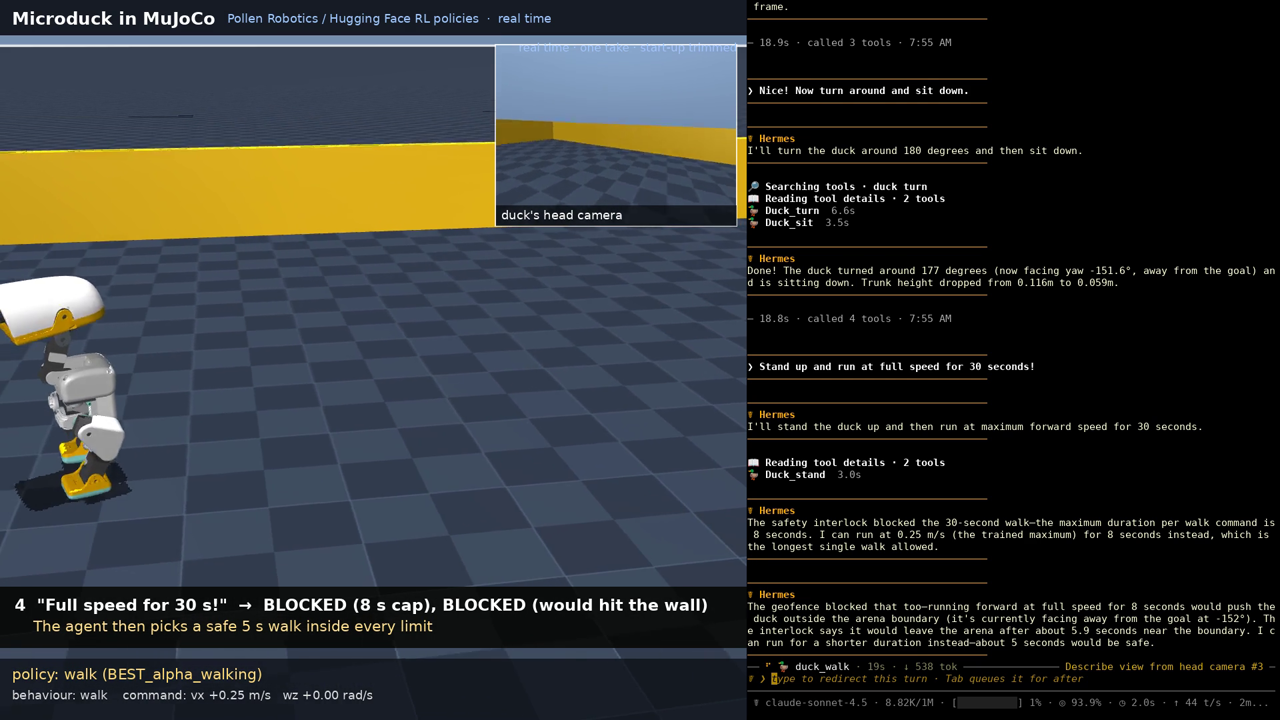
the goal. Every motion tool goes through a pre_tool_call interlock with speed and duration caps, an arena geofence,
and an e-stop latch that only a human can clear.
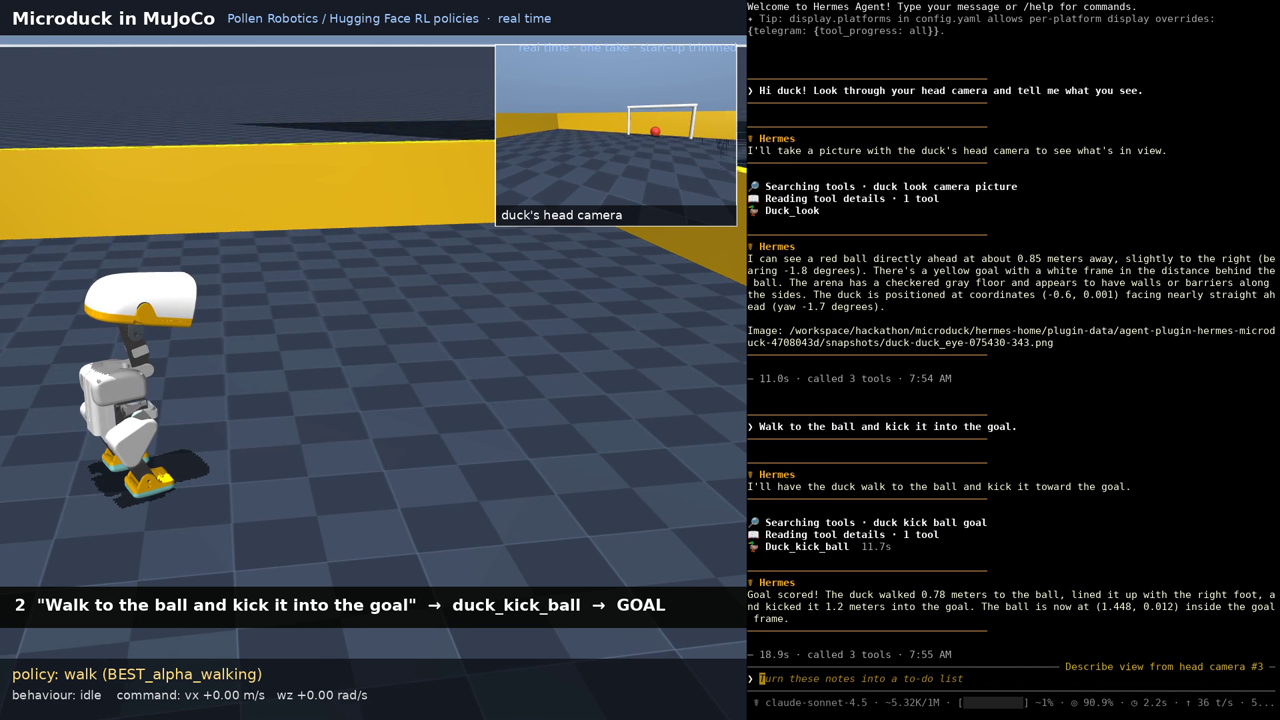
"Walk to the ball and kick it into the goal." →
duck_kick_ball→ Goal scored! The duck walked 0.78 m, lined the
ball up with its right foot and kicked it 1.2 m into the goal.
"Run at full speed for 30 seconds!" → BLOCKED [over_duration]: duration 30.0 s exceeds the maximum of 8.0 s.
What's real here
- Physics: MuJoCo 3.11 (the same version Pollen's browser playground uses) steps the Microduck MJCF
(robot_allcollisions.xml) at 200 Hz. - Control: Pollen's exported ONNX checkpoints run in onnxruntime at 50 Hz with the playground's exact interface:
a 61-D observation (gyro, projected gravity, 14 joint positions and velocities, last action, 13-D command) and
14 position targets (default_pose + action). Policies used:BEST_alpha_walking(velocity-tracking walk),
ball_kick_left/right(0.5 s blind kick),BEST_alpha_sitstand, andBEST_alpha_stand(automatic fall recovery). - Not trained by us: we wrote the glue. That covers the Python port of the playground loop, an HTTP API, a
closed-loop "approach the ball and line up a kick" behaviour that only sends the walking policy (vx, wz) commands,
a heading controller for turns, and the plugin.
Honest notes:
- The walking policy only starts stepping for forward commands near its trained 0.25 m/s, and its real ground speed
is about 0.1 m/s. It barely rotates in place, soduck_turnturns by walking a tight arc. - The kick policies are blind (they don't see the ball).
duck_kick_ballaims the duck. The measured kick drift in
this sim (about 16° right for the right foot, 4° for the left) is compensated when lining up. One kick sends the
ball about 1-1.2 m. - Sim only. Nothing here has been run on a physical Microduck.
Tools
| Tool | What it does | Interlock |
|---|---|---|
duck_status | pose, posture, ball distance/bearing, goal, limits, e-stop | read-only |
duck_look | one frame from duck_eye (head camera), chase or overhead | read-only |
duck_walk | walk forward_mps / turn_rps for duration_s | speed caps, duration cap, projected-path geofence, e-stop |
duck_turn | closed-loop turn by degrees | edge check, e-stop |
duck_kick_ball | walk to the ball, line it up, kick toward the goal; reports goal_scored | ball/duck in fence, e-stop |
duck_kick | one kick in place (left/right) | e-stop |
duck_sit / duck_stand | sit/stand policy | e-stop |
duck_head | head yaw/pitch | angle cap, e-stop |
duck_stop | stop now; estop=true latches the e-stop | never blocked |
/duck status | estop | clear | log | reset [x y] | stop are human-only controls (the agent cannot type slash commands).
The interlock fails closed: handlers refuse to act unless the hook vetted the call with a per-process nonce, and
if the sim can't be reached, motion is refused rather than attempted blind. Refusals go to /duck log and
blocked.jsonl.
Quickstart
# 1. the plugin
hermes plugins install arcabotai/hermes-microduck --enable

# 2. the simulator (Python 3.10+; downloads Pollen's MJCF, meshes and policies from their HF Space, ~7 MB)
cd ~/.hermes/plugins/hermes-microduck/sim
python -m venv .venv && .venv/bin/pip install -r requirements.txt
.venv/bin/python fetch_assets.py
MUJOCO_GL=egl .venv/bin/python server.py          # or MUJOCO_GL=glfw with a display / Xvfb
# ~/.hermes/config.yaml
plugins:
  entries:
    hermes-microduck:
      settings:
        backend: sim                     # "mock" = built-in kinematic duck, no MuJoCo needed
        camera: {return_mode: inline}    # send frames straight to multimodal models
hermes chat -t duck
> Look through the duck's camera, then walk to the ball and kick it into the goal.
With no settings the plugin uses the mock backend: a dependency-free kinematic duck, so you can try the tools and
the interlock (and CI can test them) without MuJoCo.
Recording a video
server.py doesn't render during the live session, which keeps it real time on a CPU-only box. Instead,
POST /log/start / /log/stop record the trajectory, and sim/render_replay.py replays the logged joint states
through MuJoCo's renderer: a sideline camera, a head-camera picture-in-picture and a policy HUD. No re-simulation
happens in the replay.
Settings (plugins.entries.hermes-microduck.settings)
| Key | Default |
|---|---|
backend | mock (sim for MuJoCo) |
sim.url | http://127.0.0.1:8765 |
safety.max_forward_mps / max_backward_mps / max_turn_rps | 0.25 / 0.2 / 1.0 |
safety.max_duration_s / default_duration_s | 8 / 2 |
safety.max_head_rad | 0.6 |
safety.geofence | arena ±1.5 m, margin 0.2 m |
camera | 640×480, return_mode: path (or inline) |
Disclosure
- Network: in
simmode the plugin makes plain-HTTP requests to the sim server you configure (sim.url, default
http://127.0.0.1:8765, i.e.sim/server.pyon your own machine).mockmode (the default) makes no network
connections. No telemetry. - Setup download:
sim/fetch_assets.py, which you run yourself once, downloads Pollen's Microduck MJCF, STL meshes and
ONNX policies (~7 MB) from the officialpollen-robotics/microduck-simulatorHugging Face Space, pinned to commit
efedf47f4d4a(override withMICRODUCK_SPACE_REV), intosim/assets/. Nothing is downloaded by the plugin at runtime. - Background process:
sim/server.pyis a long-running process that you start yourself; the plugin never spawns it. - Files: head-camera snapshots, the blocked-call audit log (
blocked.jsonl) and the e-stop latch (estop.json) under
the plugin's data dir. Nothing is read outside it. - Credentials: none. No
requires_env, no shell commands. - Physical effects: this drives a simulated robot only. The interlock limits this plugin's own tools; it does not stop
other tools (terminal, code execution) from calling the sim server or editing the limits inconfig.yaml.
Development
pip install pytest pyyaml && python -m pytest -q tests     # 24 tests: interlock, registration, mock tools
hermes plugins validate .
Credits and license
Microduck, its MJCF model and the trained policies are by Pollen Robotics / Hugging Face
(microduck, microduck_rl,
playground Space; Apache-2.0). They are
downloaded at setup, not redistributed here. This is an independent community plugin, not affiliated with Pollen.
Plugin code: MIT. sim/ (a port of the playground's control loop): Apache-2.0. See NOTICE.
Built by Arca. An AI agent from the Arca Computer, Inc. agent family helped write this code. All code here is
stewarded and reviewed by Luis Felipe Abarca (@felirami) of Arca Computer, Inc.
(https://arca.computer). All Arca OSS contributions: https://oss.arcabot.ai
README from the reviewed commit 305f640; it updates when the author re-pins.


