Hermes Limits Monitor
A desktop-only Hermes plugin that displays provider allowance windows exposed through Hermes. It discovers reachable profiles automatically and shows only quota fields Hermes actually provides; provider coverage and reset information vary.
Screenshot
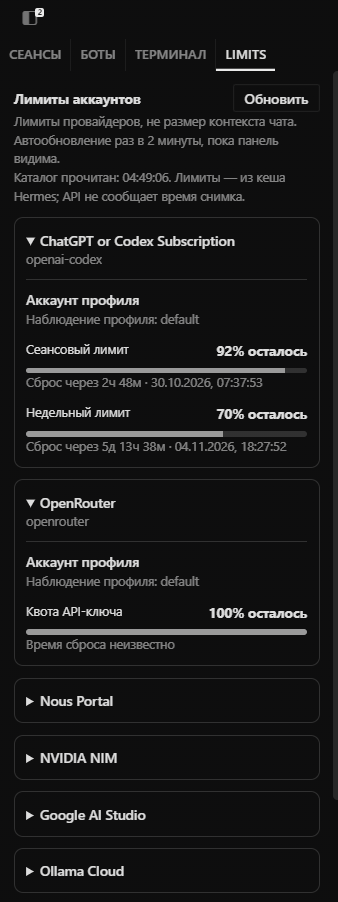
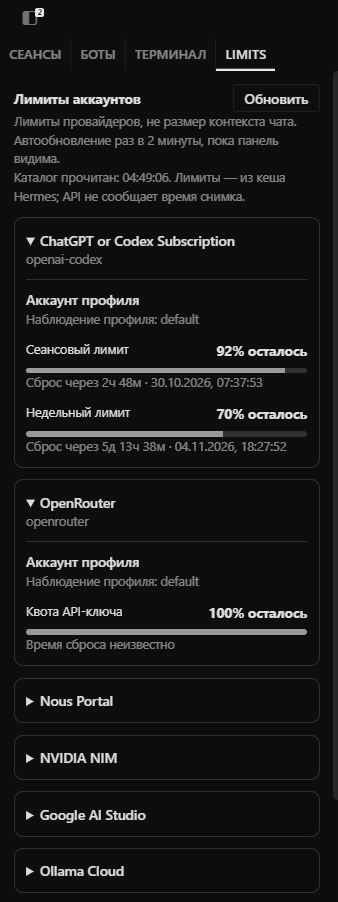
Original capture; the profile label, quota percentages, and reset times are visible.
Install
Once listed in the Hermes catalog, install it with:
hermes plugins install limits-monitor
The plugin is enabled by default after installation. For a direct Git install before a catalog listing exists, use hermes plugins install <repo-url>. To turn it off later, open Capabilities → Plugins in Hermes Desktop and disable Limits. Quota data is read only while the pane is visible and Hermes is connected.
What it reads
profiles.listwithinclude_sessions: falseto discover profile names.host.profileRoutes()andhost.requestProfile(route, 'model.options', { explicit_only: true, include_unconfigured: false })for routed profiles.host.request('model.options', ...)only for the active local profile when no route descriptor is available.- Hermes provider catalog allowance fields such as
usage.windows,usage.accounts[].windows,plan_usage.gauges, and provider state/limit metadata.
It does not read session transcripts or session/subagent lists, OAuth/credential files, API keys, cookies, or chat contents. It does not call vendor usage endpoints directly, log raw responses, or persist plugin-owned data. All queries use Hermes's existing RPC surface. When an accessible profile belongs to a remote connection, its model.options request goes to that profile's configured Hermes gateway, which handles its normal backend refresh/cache behavior. The plugin itself sends no telemetry or requests to other destinations. Results remain in the existing in-memory query cache while the app is running.
The panel reports provider allowances, not token counts or chat context size. Missing or invalid fields are shown as unavailable; they are never guessed as zero. Providers that do not expose quota through Hermes may show no data. Different observations are not added together or assumed to share an account unless Hermes itself establishes that relationship.
Refresh behavior
Reads run only while the pane is visible and the Hermes gateway is connected: two initial attempts five seconds apart, then every two minutes. Hiding or disabling the pane stops the query. Manual refresh requests a new Hermes catalog read, which may still return backend-cached usage.
The interface ships in English and Russian and follows the Hermes app locale. English is the fallback for other locales.
Development
Requires Node.js 22 or newer. Tests use synthetic data and do not access a live Hermes account:
npm ci
npm test
node --check desktop/plugin.js
The desktop plugin imports only the public @hermes/plugin-sdk surface plus the app's React runtime modules.
License
MIT License; see LICENSE.
Current distribution status
This repository is the public source for the plugin. The official Hermes catalog entry is pending review.