mock-review
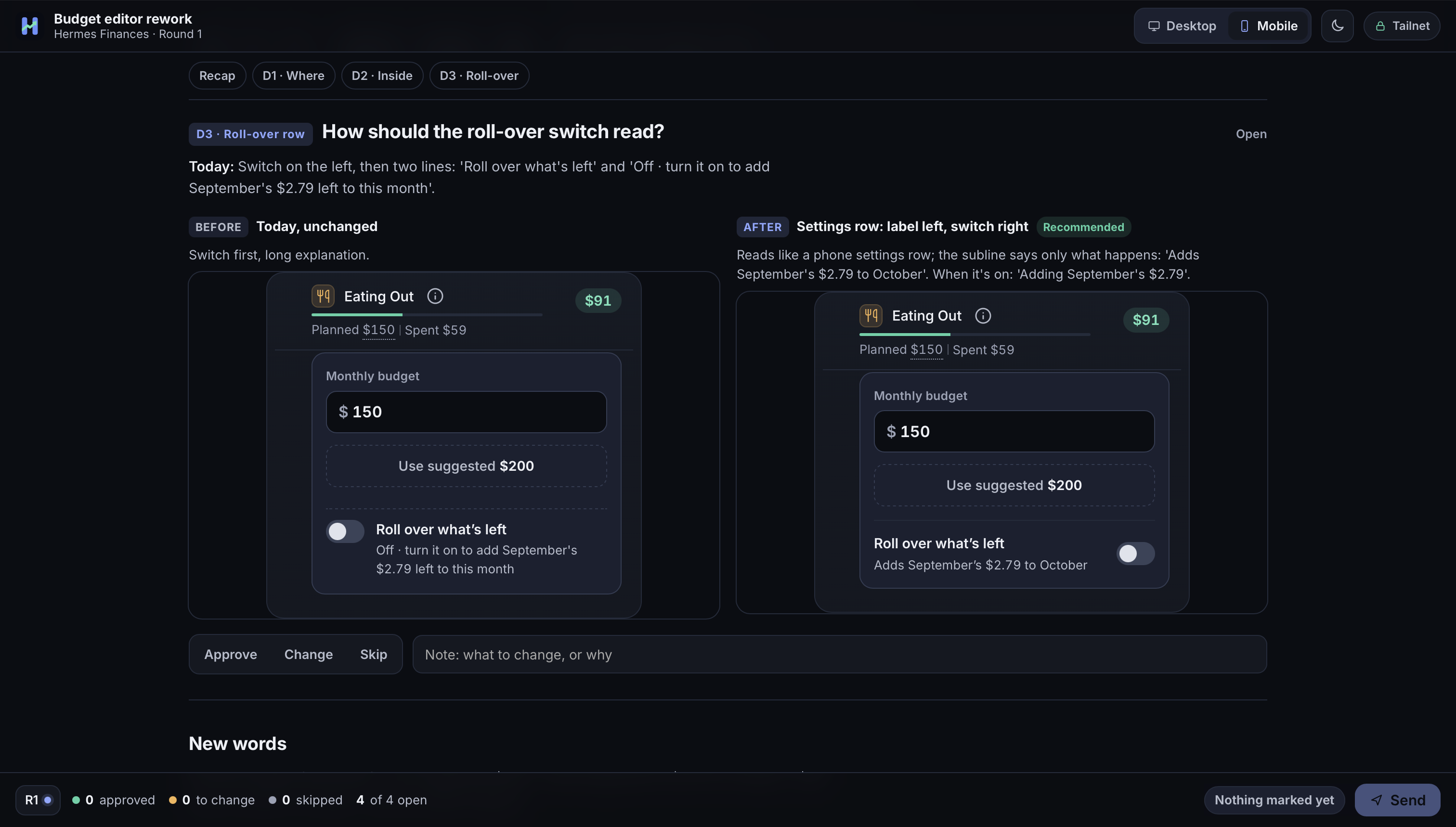
mock-review is a Hermes plugin for reviewing UI and design options. Your agent builds a decision round, the plugin serves it as a review board, and you open the link, mark each decision Approve, Change or Skip, add notes, drop pins on the mocks and press Send. Send wakes the agent in the chat the review came from, with your marks attached. Boards render inline mocks at desktop, tablet and phone widths, in light and dark, and wear a per-project design profile.
Install
Requires Hermes 0.22.0 or newer and Python 3.9 or newer. The plugin has no Python dependencies.
Once the plugin is in the Hermes catalog:
hermes plugins install mock-review
Until then, install it from GitHub:
hermes plugins install arspesk/hermes-mock-review
Enable it if the installer did not: hermes plugins enable mock-review.
Quickstart
hermes mockreview setup
The wizard checks your Hermes version, works out which chat platform to wake you in, enables the webhook platform if you
agree, creates the signing secret, adds a wake route and a notice route for that platform, picks the hosting mode, turns on
autostart, validates the plugin and creates a test review. Add --dry-run to see the plan without changing anything, or
--yes to accept the defaults without questions.
Which chat platform: setup reads the platforms in the Hermes config. The webhook ingress, the Microsoft Graph ingress, the
API server and the local CLI are not chats, so they never count. With one chat platform configured, setup uses it and says
so. With several, it asks (Enter means all of them); under --yes or --dry-run it stops and asks you to choose with
--origin-platform NAME (repeatable). With none, it stops the same way. Either stop happens before anything is changed.
An explicit --origin-platform is always used as given.
The first run usually ends with the test review marked pending (board not running): the review is saved and loads by
itself once the board runs, and setup prints no link until a board answers. The last lines of the output start with
next: and say what to do for your setup. In short:
- Start the board. Inside the gateway: if it is running, restart it (
hermes gateway restart, or stop and run again a gateway you started withhermes gateway run); if it is stopped, start it (hermes gateway run, orhermes gateway startfor the installed service). Wake-ups need the gateway either way. To run nothing inside the gateway, runhermes mockreview servein a terminal instead. - Optional: run
hermes mockreview setupagain. It is safe to repeat: it reuses the secret and routes, notices the board that is already running, closes the earlier test review, and creates a new one whoseboard url:you can open. - Ask your agent for a design review. It calls
mock_review_createand posts the link. This is the real test of the wake-up: press Send on the board and the agent answers in the chat.
Try a board without an agent
With a board running (step 1), create a review from a terminal. examples/demo-variants holds three full-page variants of
one pricing page; this one opens as a live prototype:
EXAMPLES="${HERMES_HOME:-$HOME/.hermes}/plugins/mock-review/examples/demo-variants"   # from a checkout: "$PWD/examples/demo-variants"
hermes mockreview create --title "Pricing page" --platform local --chat-id demo --no-wake --allow-live-demo \
  --prototype "$EXAMPLES/a-calm-editorial/index.html"
It prints the review's url. --no-wake makes it a board nobody is woken by, so no signing secret or route is needed.
Agents write decision rounds instead; see docs/decisions-format.md.
Hosting modes
A review is hosted in one of three ways. Set the default with default_host, or let the agent ask you.
local(the default): the board is served from this computer. With the default bind address the link opens on this computer only. Settinghostto0.0.0.0makes local links open on other devices on your network, with no login.tailnet: the board stays on loopback and you expose it withtailscale serve. The link is your Tailscale address, so only your tailnet can open it.setupoffers this when Tailscale is running, andsetup --hosting tailnetselects it.herenow: the board is published as a public site on here.now and feedback comes back through its Site Data. This needs the official here-now Hermes skill and aHERENOW_API_KEY.
docs/hosting.md covers each mode step by step.
Platforms
macOS and Linux run everything, including the board inside the gateway process (autostart). On Windows, run the board in
the foreground with hermes mockreview serve. The plugin installs no service files on any platform.
Known issue: here.now publishing runs the official skill's Bash helper. On Windows it requires Git Bash on PATH
with compatible paths, or running Hermes and the plugin inside WSL. Native Windows without Bash cannot publish
here.now reviews; local hosting does not need Bash. See hosting requirements.
Commands and reference
hermes mockreview <command> and the /mockreview slash command (list, open, close, settings). The agent uses four
tools: mock_review_create, mock_review_add_round, mock_review_feedback and mock_review_list.
- docs/cli.md: every command with its flags
- docs/settings.md: every setting, its default and its environment variable
- docs/decisions-format.md: the
decisions.jsonblocks an agent writes - docs/hosting.md, docs/security.md and docs/troubleshooting.md
Disclosures
What the plugin does that you may want to know before installing it.
Background server. When autostart is on, the plugin starts a board web server on a background thread inside the Hermes
gateway process, plus one worker thread that retries undelivered wake-ups, polls here.now and runs the optional
auto-close and cleanup of old reviews. autostart is off until hermes mockreview setup turns it on. The CLI,
hermes plugins validate and Kanban workers never start a server. hermes mockreview serve runs the same server in the
foreground instead.
Bind address and port. The server listens on 127.0.0.1:8790 by default (settings host and port). If you set host
to 0.0.0.0, every device that can reach your computer on that port can open every review and send feedback. There is no
login. Do this only on a network you trust. Setup prints this warning before it makes the change.
Outbound network calls:
- The Hermes webhook on
http://localhost:8644(settingwebhook_url): a signed POST when you press Send, to wake your agent. It stays on your computer. - The same local webhook again, on a second route (
<webhook_route>-<platform>-notice): up to two more signed POSTs, still loopback only. One right after the wake-up is accepted (an instant "got it, working on round N" in the origin chat, also mirrored into that chat's session), and one later, only when a sent round gets no new round withinstale_after_minutes, to say the agent may have stalled. Both carry the review title and counts, never your notes, and use the same signing secret as the wake-up. - here.now (
https://here.now/api/v1), only for reviews you host withherenow: the plugin publishes the board and reads submitted feedback using your key. It publishes through the official here-now skill'spublish.sh. - Nothing else. There is no telemetry, analytics or update check.
Credentials. The plugin reads two secrets through Hermes's secret scope and keeps none of its own:
MOCKREVIEW_WEBHOOK_SECRET (signs the wake-up request; setup generates it and stores it with hermes config set) and
HERENOW_API_KEY (optional, here.now hosting only). Both are declared as optional secrets in plugin.yaml.
Shell commands. bash <here-now skill>/scripts/publish.sh publishes a here.now review, with HERENOW_API_KEY passed in
the child environment. tailscale status --json and tailscale serve status --json find your tailnet address and existing
routes when you use tailnet hosting (on macOS, the app's own binary when the tailscale symlink crashes); they only
read, and setup prints any tailscale serve command for you to run. setup also
runs hermes subcommands: --version, gateway status and config get to read the current state, and config set,
config unset for obsolete settings, webhook subscribe, webhook remove (only for a self-delivering route left by an
older setup, and only after you confirm) and plugins validate to make its changes.
Files. Reviews are stored under $HERMES_HOME/workspace/mock-reviews (setting data_dir). The plugin reads the Hermes
config.yaml through Hermes, or directly for its own settings when it runs outside the gateway.
Development
python -m pytest -q
The suite needs pytest and pyyaml. AGENTS.md describes the layout and the rules a change has to keep.
CHANGELOG.md lists releases.
License
MIT. See LICENSE.