Olympus
Olympus is where you manage your Hermes Agent agents: every agent on one list, what each is doing, what is waiting on you, and how reliably its runs succeed. It is a Hermes dashboard plugin.
It exists for operators running several agents with cron jobs and Kanban
workers, who find out late that something failed, stalled or got stuck. The
problems it targets, and the Hermes issues that show people have them, are in
PRODUCT.md.
What you see
-
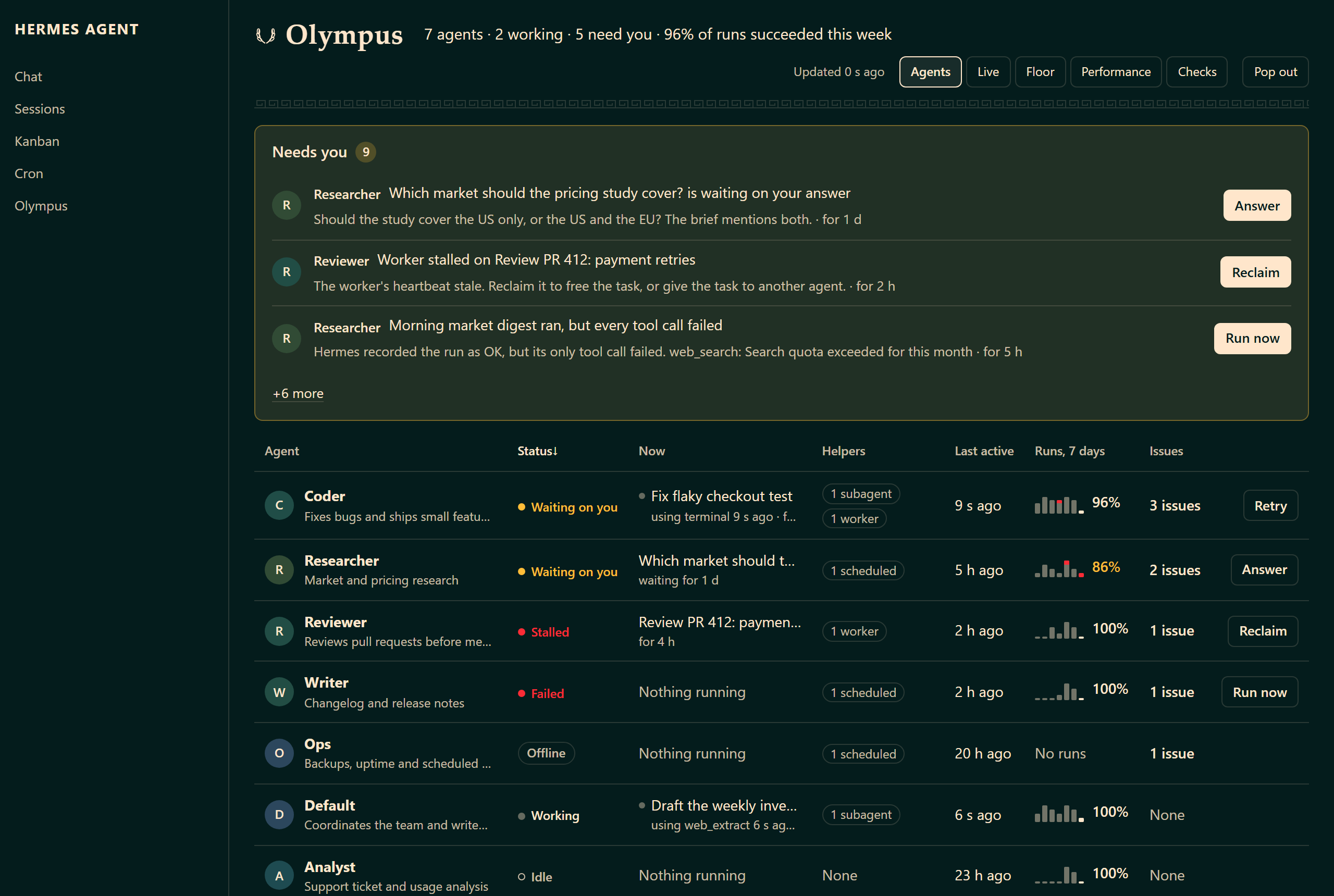
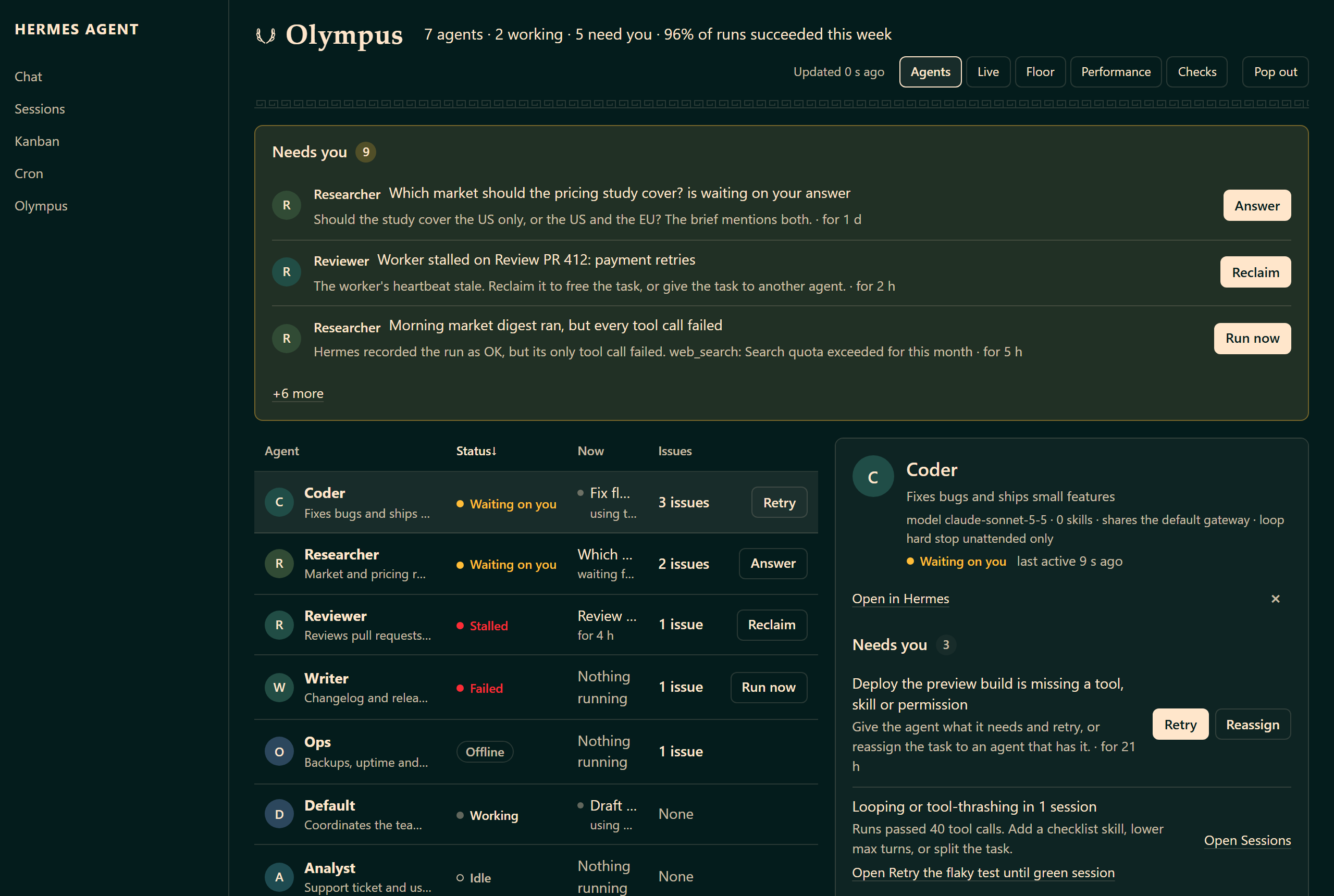
Agents. One row per agent (Hermes profile): status in a word, the task and tool it is on now, its helpers, last activity, and a week of runs with the failed ones marked. Above it, Needs you: every question waiting on an answer (with the question the agent asked), failed or overdue cron job (including a run Hermes recorded as OK in which every tool call failed), stalled or failing worker, blocked or unassigned task, offline gateway, and looping or expensive run, once each, with its action. Pick an agent to open its inspector: what it did recently, its scheduled jobs and Kanban work, how it works, and whether your fixes worked.
-
Live. Every open run as it happens, read again every five seconds: one lane per agent with a run going, the run's source and elapsed time, the tool it is on, and under it each subagent
delegate_taskopened that is still running, with its own last tool. Finished subagents fold under "Tasks done 1 of 3, 1 failed" (from Hermes' own batch manifest) and open on a click. A strip of the last minute's tool calls marks the failed ones. Lanes with a failed subagent come first, then the busiest; ties keep your profile order. A subagent slides in under its parent when it starts. Idle agents fold into one line.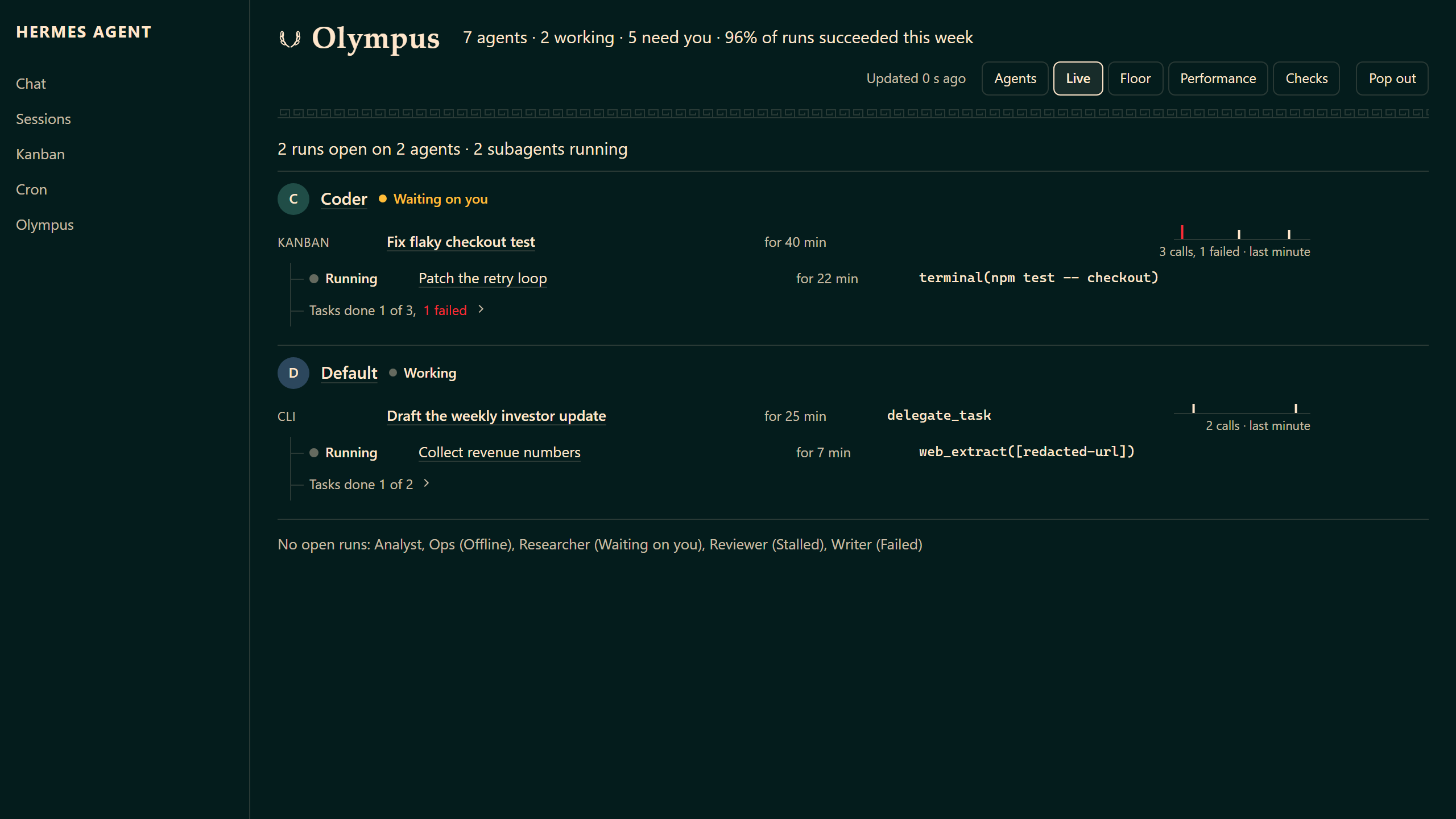
-
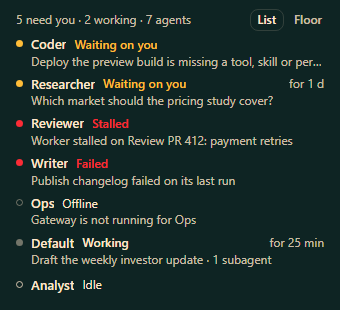
Pop out. Your agents in a small window that stays on top while you work elsewhere: one line per agent, the ones that need you first, with the status word, what each is on and for how long. A click opens that agent in the Olympus tab. Chrome and Edge open an always-on-top window (Document Picture-in-Picture); other browsers get a plain popup of the same list.
-
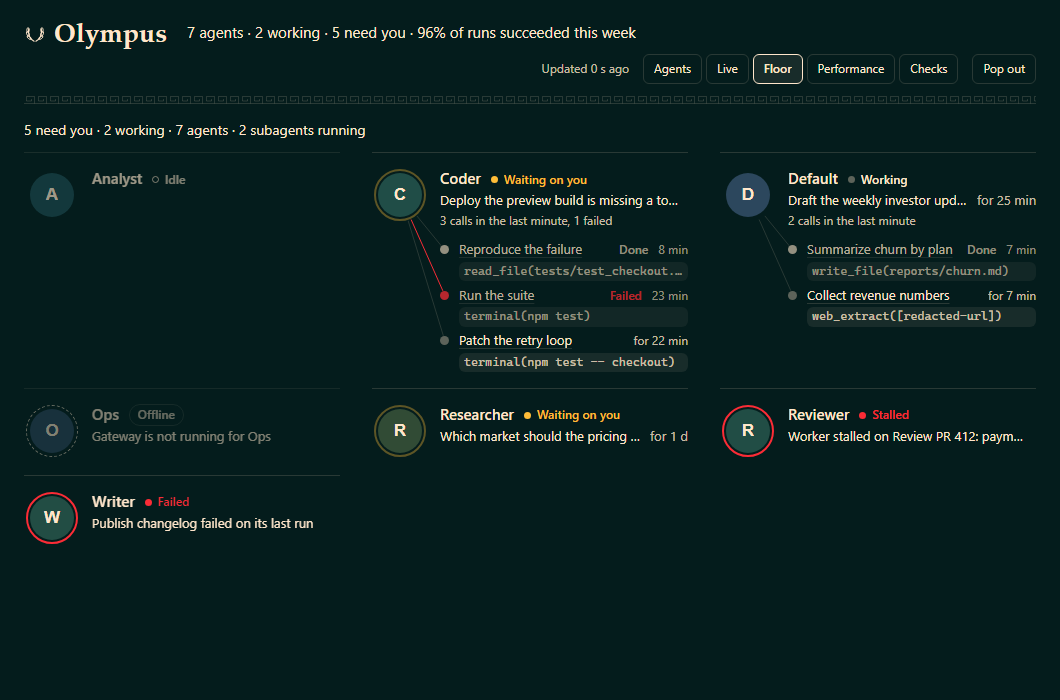
Floor. Every agent at a fixed place in one frame, in name order, so the whole fleet reads from across a room: the agent's disc with a ring only when it needs you (waiting breathes, failed and stalled hold still), what it is on, the last minute's call count, and its subagents joined to it by hairlines. Nothing moves unless Hermes recorded it: a tool call expands one ring from the disc and fades (red for a failed call), a new subagent enters from the disc, a finished one keeps its slot and turns Done. Idle agents dim. The popout can show the floor instead of the list.
-
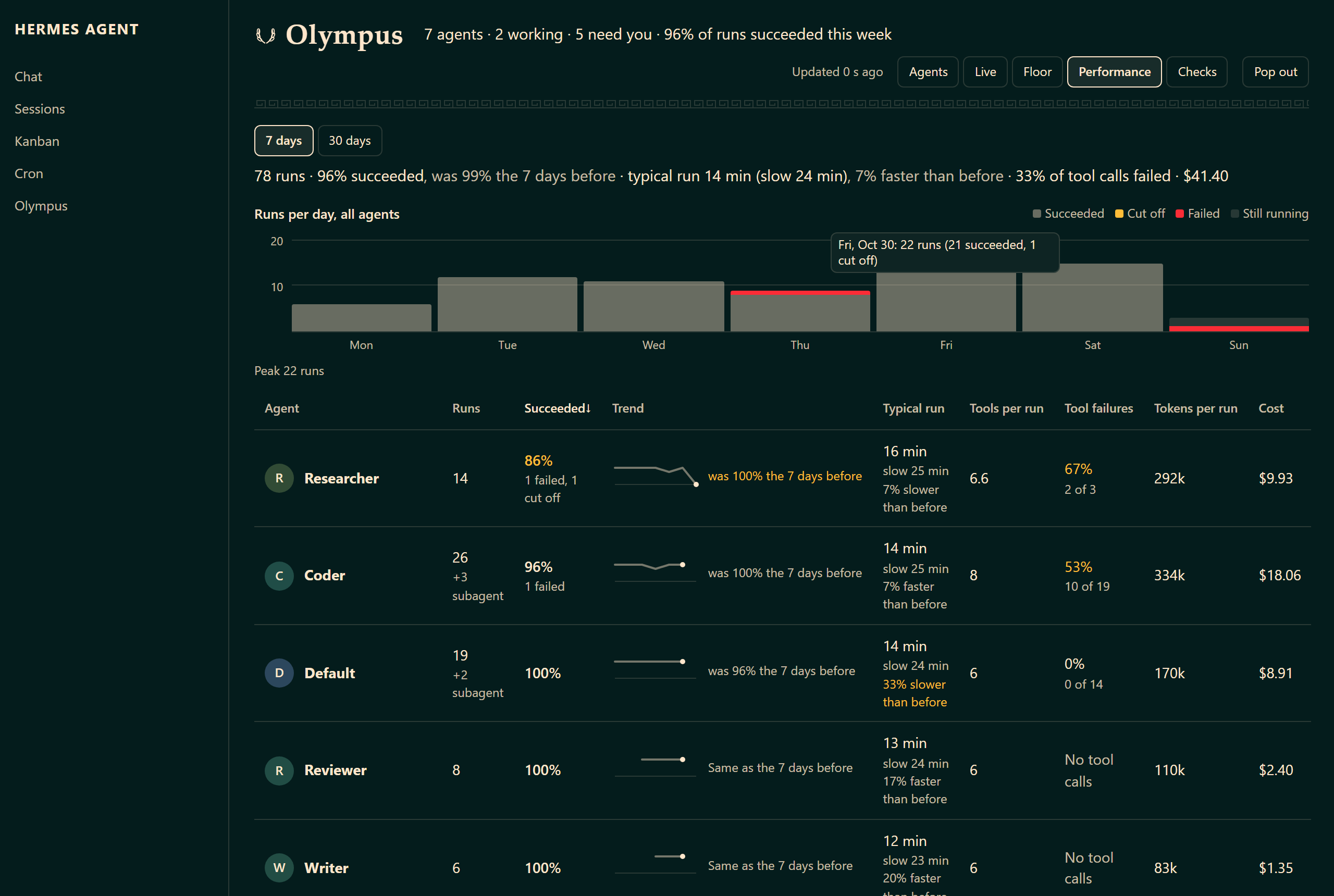
Performance. For 7 or 30 days: runs, how many succeeded, typical and slow run time, tool calls that failed, and cost, per agent and across all of them, each compared with the same number of days before ("96% of 25, was 100% the 7 days before", "7% faster than before") beside a success-rate-per-day line. The runs-per-day chart has a value axis, every bar tells its numbers on hover, and a click on a bar lists the runs of that day. Outcomes follow Hermes' own session status, except that a scheduled run in which every tool call failed counts as failed. Any run opens step by step.
-
Checks. Findings across your agents, Kanban backlog grouped by who has to act, skill hygiene, configuration risks, and where spend goes.
Everything works at phone width too; the roster becomes cards and each panel opens full screen with a Back button.
Controls
From the queue and the inspector you can pause, resume or run a cron job (or
pause all of an agent's jobs), and answer, retry, reclaim, reassign or assign a
Kanban task. Every control says exactly
what it will do and waits for you to confirm. Hermes' own API does the work
(/api/cron/jobs/... and the Kanban plugin's task routes), and Olympus records
each action in its log.
To turn every control off:
# $HERMES_HOME/config.yaml
dashboard:
  olympus:
    controls: false
Anything else (creating or deleting agents, jobs or tasks; editing prompts, models, skills, keys or config) stays on the Hermes page that owns it, and Olympus links there.
Install
Requires Hermes Agent v0.21.6 or newer; verified against v0.22.5. No Python dependencies and no build step.
hermes plugins install AIEngineerX/Olympus
hermes plugins enable olympus
hermes dashboard
Open the Olympus tab (default http://127.0.0.1:9119/olympus). Hermes loads
a user plugin's API only once it is in plugins.enabled; until then the tab
lists your agents from Hermes' own API and says how to enable the rest. If the
tab shows no data after enabling, restart hermes dashboard once.
Alerts (opt-in)
Olympus can tell you when a task is waiting on your answer, a cron job fails or stops running on time, a Kanban worker stalls or fails, an agent's gateway is not running while jobs or tasks wait on it, a session starts looping, or spend jumps to twice its daily average:
hermes olympus install-alerts --deliver telegram # any `hermes cron --deliver` target
This copies olympus_alerts.py into $HERMES_HOME/scripts/ and prints the
hermes cron create --no-agent ... command to run. Hermes cron runs it on your
schedule and delivers what it prints; no model is called, and a run with
nothing new is silent. An alert repeats at most every six hours while it is
still active. Preview with hermes olympus alerts --preview; stop with
hermes cron remove <job id>. With plugins.isolation: host, copy
alerts/olympus_alerts.py into $HERMES_HOME/scripts/ yourself.
What Olympus reads and writes
Olympus never writes Hermes files or databases. It opens every Hermes store read-only, makes no network calls of its own, runs no background processes and stores no credentials. Per request it reads, for each profile:
state.db: sessions and messages (timestamps, tokens, cost, tool calls, outcomes)cron/jobs.jsonandcron/usage_audit.jsonlconfig.yamlstructure and flags (never values such as keys or base URLs)- which messaging platforms each profile has configured, as Hermes itself
reports it (Olympus never opens a profile's
.env) - gateway process state, and the last 8 KB of the agent, gateway and error logs
skills/metadata and the skill hub lock
and the Kanban databases under the Hermes root. It writes only to
$HERMES_HOME/plugin-data/olympus/ (daily snapshots, findings you marked fixed,
the action log, alert state), plus $HERMES_HOME/scripts/olympus_alerts.py if
you install alerts.
Hermes Desktop
Desktop does not render web-dashboard tabs, so Olympus ships a Desktop page
too (desktop/plugin.js). Installing the plugin copies it into
$HERMES_HOME/desktop-plugins/olympus/; turn it on under Capabilities →
Plugins. Today it shows the findings that need you (with sessions that open
in Desktop and "I fixed this"), fix tracking, cron spend and backlog triage.
The roster, queue and inspector are coming to Desktop next.
Privacy
Session titles, task titles, cron names, model labels, message content and local paths are hidden by default. To show them on a private machine:
# $HERMES_HOME/config.yaml
dashboard:
  olympus:
    expose_local_labels: true
Both settings are re-read on every request. See SECURITY.md.
Keep the Hermes dashboard on localhost.
API
Olympus mounts its own routes under /api/plugins/olympus/; the full table
is in CONTRIBUTING.md.
Verify
npm run verify            # backend compiles, Python tests, frontend parses
npm run test:visual       # Playwright on fixture data, desktop and 390 px
npm run test:live         # the real Hermes dashboard, desktop and 390 px
npm run test:security     # live payload: no secrets, paths or raw ids
npm run test:performance  # live /overview and /performance response budgets
npm run test:compat       # whether Hermes mounted the Olympus API
npm run test:desktop      # Desktop page preflight
The live, security and performance smokes use an existing Hermes dashboard at
OLYMPUS_SMOKE_URL (default http://127.0.0.1:9119/olympus), or start one.
Layout
dashboard/plugin_api.py   FastAPI backend: reads Hermes, builds every view
dashboard/dist/           hand-authored SDK React (index.js) and styles; no build step
desktop/plugin.js         Hermes Desktop page
alerts/olympus_alerts.py  script for the opt-in alert cron job
plugin.yaml, __init__.py  catalog manifest and the `hermes olympus` command
scripts/                  smokes, dev link, fixture builder
tests/                    Python tests and Playwright fixture checks
PRODUCT.md, DESIGN.md     what Olympus is for, and how it looks
Known issues
Seen on the test install; not yet fixed.
- A Kanban worker that has finished can read as Working for up to ten minutes, because Hermes leaves the worker's session open after the task run ends. The next release will end the agent's status with the run.
- While a worker runs, "Now" shows its task but not the tool it is using.
- At 390 px the confirm popup for a control can overflow its row by a pixel.
If you hit anything else, open an issue and say what Olympus showed and what Hermes' own page showed.
Contributing, security, license
See CONTRIBUTING.md and SECURITY.md.
MIT, AIEngineerX.