Project Manager
Git workbench for Hermes Agent: turn a folder of git repositories into a browsable, committable, pushable surface in the Dashboard and in Hermes Desktop.
Both interfaces are separate delivery artifacts. They share one Python backend router.
dashboard/— the Dashboard plugin: manifest, the FastAPI router, and a hand-written browser bundle.desktop/plugin.js— a standalone, uncompiled ESM disk plugin. It imports only the Hermes Desktop SDK and React; there is no npm build.
Screenshots
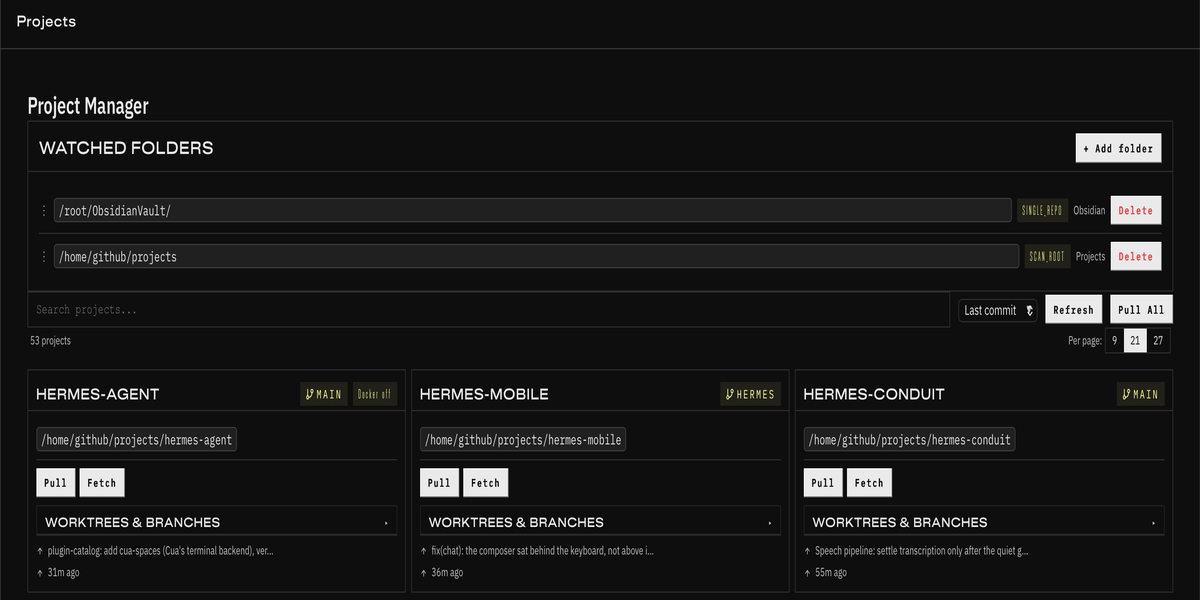
The Dashboard Projects tab: the watched folders that drive discovery, then a searchable, paginated card list with per-project git controls.
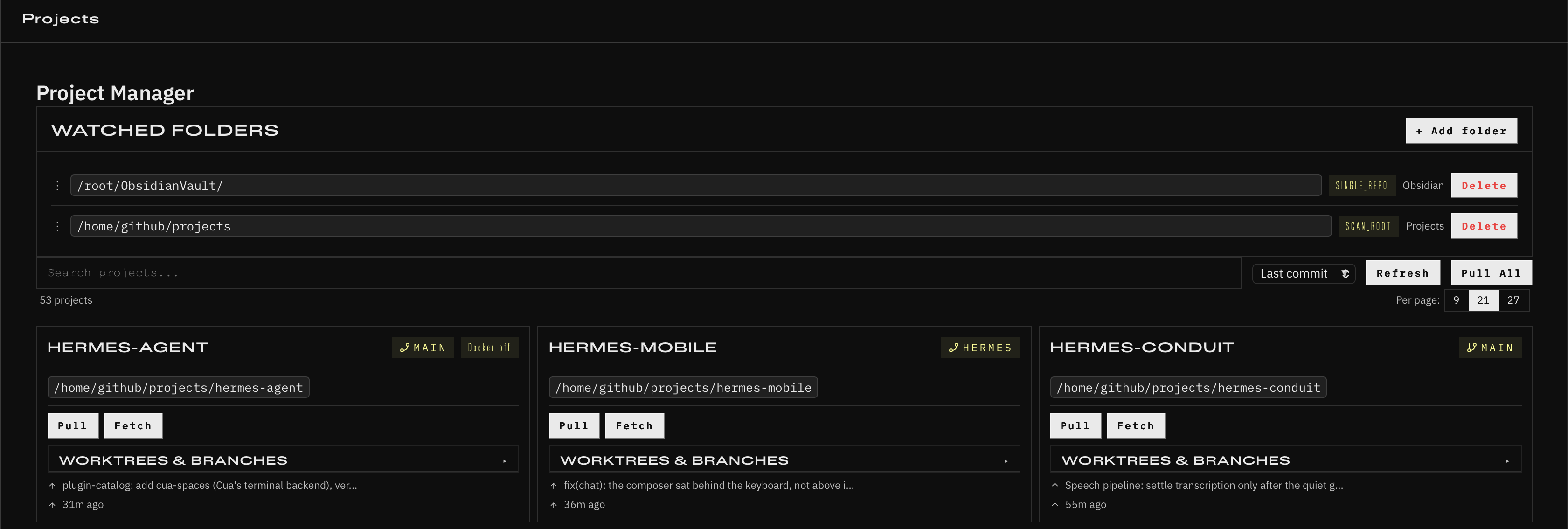
The Desktop interface is a native full-page view registered at /projects, with
a Projects sidebar item — it speaks the same REST router.
Requirements
- Hermes Agent with Hermes Dashboard or Hermes Desktop.
- For Dashboard: dashboard plugin support.
- For Desktop: Hermes Desktop Plugin SDK.
giton thePATH. Docker is optional — it only adds a running/stopped badge.
What it does
- Watch paths. Point the plugin at folders; it finds the git repositories
inside them.
scan_rootwalks the immediate subdirectories,single_repotreats the folder itself as one repository. Reorderable, with path autocomplete. The table starts empty, so it never scans anything you did not ask it to. - Project list. Branch, ahead/behind, dirty flag, remote URL, last commit and
a Docker badge. Search and pagination (
page_sizeis 9, 21 or 27). - Desktop shortcuts. On the Desktop surface the project name opens the repository and the branch chip opens that branch on the remote; a Chat button on each card starts a new session whose working directory is that project's own folder.
- Working tree, per file. Stage, unstage, view the diff, or discard — each on its own file, rather than staging the whole tree blind.
- Commit and push, with an optional automatic push after the commit, plus stash-all for a dirty tree.
- Pull, per project or for every tracked project at once.
- Branches and commits, per project.
- Worktrees. List, create, select and delete, plus branch checkout that makes an explicit stash-or-force choice on a dirty tree.
Installation
The default profile lives at ~/.hermes. A named profile lives at
~/.hermes/profiles/<name>; use hermes -p <name> ... for plugin commands and
set HERMES_HOME="$HOME/.hermes/profiles/<name>" for the copy commands below.
Install directly from GitHub
hermes plugins install AiSolve-me/hermes-project-manager --enable
Then restart the running Hermes process so the plugin's tools are discovered. For the gateway:
hermes gateway restart
If the directory already exists and you intentionally want to replace it:
hermes plugins install AiSolve-me/hermes-project-manager --enable --force
--force deletes the existing plugin directory before reinstalling, so back up
any plugin-local changes first.
To enable the Hermes Desktop interface, copy the disk plugin to
$HERMES_HOME/desktop-plugins/project-manager/plugin.js:
HERMES_HOME="${HERMES_HOME:-$HOME/.hermes}"
mkdir -p "$HERMES_HOME/desktop-plugins/project-manager"
cp "$HERMES_HOME/plugins/project-manager/desktop/plugin.js" \
  "$HERMES_HOME/desktop-plugins/project-manager/plugin.js"
Hermes Desktop inventories the UI separately under Settings → Plugins;
enable Projects there if it is disabled.
Updating
Installed with the Hermes plugin command:
hermes plugins update project-manager
hermes gateway restart
For a clean reinstall from GitHub instead of a pull into the existing directory:
hermes plugins install AiSolve-me/hermes-project-manager --enable --force
hermes gateway restart
Installed or developed as a manual git clone:
cd ~/.hermes/plugins/project-manager
git pull --ff-only
hermes gateway restart
Use the git pull path when you want to keep a normal local checkout; use
hermes plugins install --force when you want Hermes to replace the plugin
directory from the remote.
After either path, refresh the Desktop half too — it is a separate copy:
HERMES_HOME="${HERMES_HOME:-$HOME/.hermes}"
cp "$HERMES_HOME/plugins/project-manager/desktop/plugin.js" \
  "$HERMES_HOME/desktop-plugins/project-manager/plugin.js"
Install from a local checkout
Manual clone, for development:
git clone https://github.com/AiSolve-me/hermes-project-manager \
  ~/.hermes/plugins/project-manager
hermes plugins enable project-manager
hermes gateway restart
Or copy the tree from an existing checkout:
HERMES_HOME="${HERMES_HOME:-$HOME/.hermes}"
mkdir -p "$HERMES_HOME/plugins/project-manager"
cp plugin.yaml __init__.py "$HERMES_HOME/plugins/project-manager/"
cp -R dashboard "$HERMES_HOME/plugins/project-manager/"
mkdir -p "$HERMES_HOME/desktop-plugins/project-manager"
cp desktop/plugin.js "$HERMES_HOME/desktop-plugins/project-manager/plugin.js"
Both interfaces are enabled separately: the package must be in
plugins.enabled so Hermes mounts dashboard/plugin_api.py, and copying only
the Desktop disk plugin is not sufficient.
Standalone server
The router also runs on its own, for direct API access without Hermes:
python3 project_manager_server.py # http://127.0.0.1:9120
| Variable | Default | Meaning |
|---|---|---|
PROJECT_MANAGER_PORT |
9120 |
listen port |
PROJECT_MANAGER_HOST |
127.0.0.1 |
bind address |
Dashboard and Desktop delivery
dashboard/dist/index.jsis a hand-written ES5 bundle tracked in the repo. There is no build step; edit it directly.desktop/plugin.jsis a single self-contained file. The Desktop runtime loader evaluates a plugin from a blob URL and refuses every import specifier outside@hermes/plugin-sdkandreact*, so a relative import cannot resolve. Do not split it into sibling modules without re-reading that loader.- Desktop requests use the plugin-scoped
ctx.restclient, which reaches the same/api/plugins/project-manager/backend the Dashboard uses. - The plugin
idmust equalnameinplugin.yaml.ctx.restbuilds every URL as/api/plugins/<id>, so a mismatch 404s every call while the plugin still reports as loaded.desktop/test_api_paths.pyasserts this. - The package and the Desktop disk plugin are enabled separately: the
package must be in
plugins.enabledso Hermes mountsdashboard/plugin_api.py, and copying only the Desktop plugin is not enough.
REST API
Mounted under /api/plugins/project-manager by Hermes; at the root standalone.
Projects
| Method | Path | Notes |
|---|---|---|
GET |
/projects?page=1&page_size=21&q= |
page_size ∈ {9, 21, 27} |
GET |
/projects/{name} |
one project |
GET |
/projects/{name}/branches |
branches |
GET |
/projects/{name}/commits |
commit history |
POST |
/projects/refresh |
drop the cache, re-scan every watch path |
POST |
/projects/pull-all |
pull every tracked project |
Git
| Method | Path | Body / query | Response |
|---|---|---|---|
POST |
/projects/{name}/git-status |
— | branch, ahead/behind, modified_files, untracked_files |
POST |
/projects/{name}/git-pull |
{remote, branch?} |
fast-forwards to the upstream branch |
POST |
/projects/{name}/git-push |
{remote, branch?} |
pushes the current or the given branch |
POST |
/projects/{name}/git-commit |
{message, commit_and_push} |
stages everything, commits, optionally pushes |
POST |
/projects/{name}/git-stash |
— | git stash push -u |
POST |
/projects/{name}/git/fetch |
{remote}, body optional, defaults to origin |
{success, message, stderr} |
POST |
/projects/{name}/git/stage |
{filepath} |
{success, message, stderr, deleted} |
POST |
/projects/{name}/git/unstage |
{filepath} |
same |
POST |
/projects/{name}/git/discard |
{filepath} |
same; deleted true only when the file is gone |
GET |
/projects/{name}/git/diff?file= |
— | {success, filepath, worktree_diff, staged_diff, binary, truncated, message} |
worktree_diff and staged_diff are snake_case on the wire, deliberately.
The binary and truncated flags are load-bearing. A binary file returns both
diffs empty with binary: true, and a diff longer than 400 000 characters
is cut to that length with truncated: true — render the warning, do not
silently show a partial diff as if it were the whole one.
Worktrees
/projects/{name}/worktrees/… — list, create, select, delete, and
/worktrees/checkout with stash / force handling for a dirty tree.
Watch paths
GET / POST /watch-paths, PATCH / DELETE /watch-paths/{id},
POST /watch-paths/reorder, GET /watch-paths/suggest?prefix=.
Error shape
A missing project is HTTP 404 with a machine-readable body:
{"error": "Project 'x' not found.", "code": "PROJECT_NOT_FOUND"}
Git failures are HTTP 200 with success: false and a human message — a
failed fetch is not a transport error. Clients must check success, not just
that the promise resolved.
Security
Every client-supplied filepath is anchored to the repository root. The
plugin resolves it, requires is_relative_to(repo_root), and passes the
resolved absolute path to git — never the raw string — behind a --
separator, so a filename that looks like a flag stays a filename. A path that
escapes the repo is refused with HTTP 200 and success: false.
A watch path may not be / or any of /etc, /var, /usr, /proc, /sys,
/dev, /boot, ~/.gnupg, ~/.ssh, and the check re-runs on the
symlink-resolved path.
Disclosure
What this plugin touches on the machine it runs on. Nothing leaves the host.
Reads
- The watch paths in its own SQLite database (
watch_paths,$HERMES_HOME-scoped). - Git metadata in the repositories under those paths: branch, remote URL,
ahead/behind, commit subjects and dates,
git status/git diffoutput. File contents are only ever read as diff text returned to the requesting UI — never copied elsewhere or persisted. - Docker presence — whether a project directory carries a compose or Dockerfile and whether a matching stack is running. Read-only.
Writes
-
Git mutations, on request only.
git add,git commit,git push,git stash push,git fetch,git merge --ff-only,git restore,git clean -f, and through the worktree routesgit worktree removeandgit switch. Every one is a button press; there is no background writer, and no endpoint touches a repository the user did not name. -
Commit stages everything (
git add -A). The per-filestage/unstageroutes are how you control what goes in. -
discarddeletes files. On a tracked file it restores it from HEAD, discarding uncommitted local edits. On a file that is in no commit (untracked, or staged-newA) it removes it from the commit and the index — the bytes stay on disk, untracked, but nothing here can restore a version of it. Both paths sit behind a confirmation that names which one you are doing. -
git worktree removedeletes a whole worktree directory. It refuses the current worktree, a locked worktree, a protected branch and a dirty worktree unlessforceis passed. -
Its own SQLite database (
project_scans,watch_paths) and its in-memory scan cache. Nothing else on disk is written. -
A Desktop-only session. The Chat button creates one gateway session whose working directory is the project folder, and opens it. It creates an empty session and sends no message; the agent in it has no more access than any session you start in that folder yourself.
Network — none. The plugin makes no outbound requests, calls no model and
reads no API keys. git fetch / git push do reach the remote of the
repository being operated on, but that is git's own transport, driven by your
own remotes. The Desktop surface hands a repository URL to your system
browser when you click the project name or the branch chip — that is the
browser's own request, and the plugin itself opens no connection.
Not implemented, on purpose — no commit-message-suggestion (there is no
model access here, and a git diff --stat stand-in would not match the shape
such a feature implies); no add / rename / delete project, because the plugin
has no projects entity of its own — it discovers repositories from watch paths.
Development and repository layout
plugin.yaml               agent-side manifest (name, version, provides_tools)
__init__.py               agent plugin entry
project_manager_server.py standalone FastAPI entry point
dashboard/
  manifest.json           tab: path /projects, position after:kanban
  plugin_api.py           the router — every endpoint lives here
  worktrees.py            worktree helpers
  git_scanner.py          repo discovery and the read-only git helpers
  db.py, models.py, cache.py, schema.sql
  docker_status.py        the optional Docker badge
  dist/index.js           hand-written ES5 Dashboard bundle (no build step)
  test_*.py               endpoint tests
desktop/
  plugin.js               the Desktop page — ONE self-contained file
  plugin.single.mjs       loader-contract + render harness
  test_working_tree.mjs   behavioural harness (confirm gate, success:false, diff states)
  test_parity.mjs         surface-parity harness (every card action, the worktree
                          section, the watch-folder panel, the git link, the session)
  test_api_paths.py       routes, namespace, path anchoring
docs/assets/              screenshots
Tests
# backend endpoints
python3 -m pytest dashboard/test_git_*_endpoint.py dashboard/test_pull_stale_lock.py -q

# desktop: renders the shipped plugin.js and drives its real handlers
cd desktop && node plugin.single.mjs          # 14 checks
cd desktop && node test_working_tree.mjs      # 12 scenarios
cd desktop && node test_parity.mjs            # 33 scenarios
cd desktop && python3 test_api_paths.py

# syntax gates for the two hand-written bundles
node --check dashboard/dist/index.js
node --check desktop/plugin.js
The desktop harnesses load plugin.js itself through a data: URL with the
SDK mapped to a stub — the same seam the runtime loader uses — so an invented
import fails here the way it would in the app.
Troubleshooting
404 on every endpoint, but the plugin shows as loaded. The plugin id
does not match name in plugin.yaml — ctx.rest prefixes URLs with the id.
A diff renders as an empty box for a binary file. That is correct; binary
files have no text diff. Check the binary flag before blaming the UI.
The Dashboard tab does not appear. The package must be in
plugins.enabled; copying the Desktop disk plugin alone is not enough.
The Desktop page does not appear. Check that
$HERMES_HOME/desktop-plugins/project-manager/plugin.js exists — that copy step
is separate from the package install — and that Projects is enabled under
Settings → Plugins.
A watch path is refused. /, /etc, /var, /usr, /proc, /sys,
/dev, /boot, ~/.gnupg and ~/.ssh are blocked, as is anything resolving
into one of them through a symlink. Pick a parent such as ~/projects instead.
Discard on a staged-new file left it untracked instead of restoring it. That file is in no commit, so there is no HEAD version to restore; discard takes it out of the index and leaves the bytes on disk.
License
MIT License. See LICENSE.