hermes-runbox: a quick dev box for Hermes
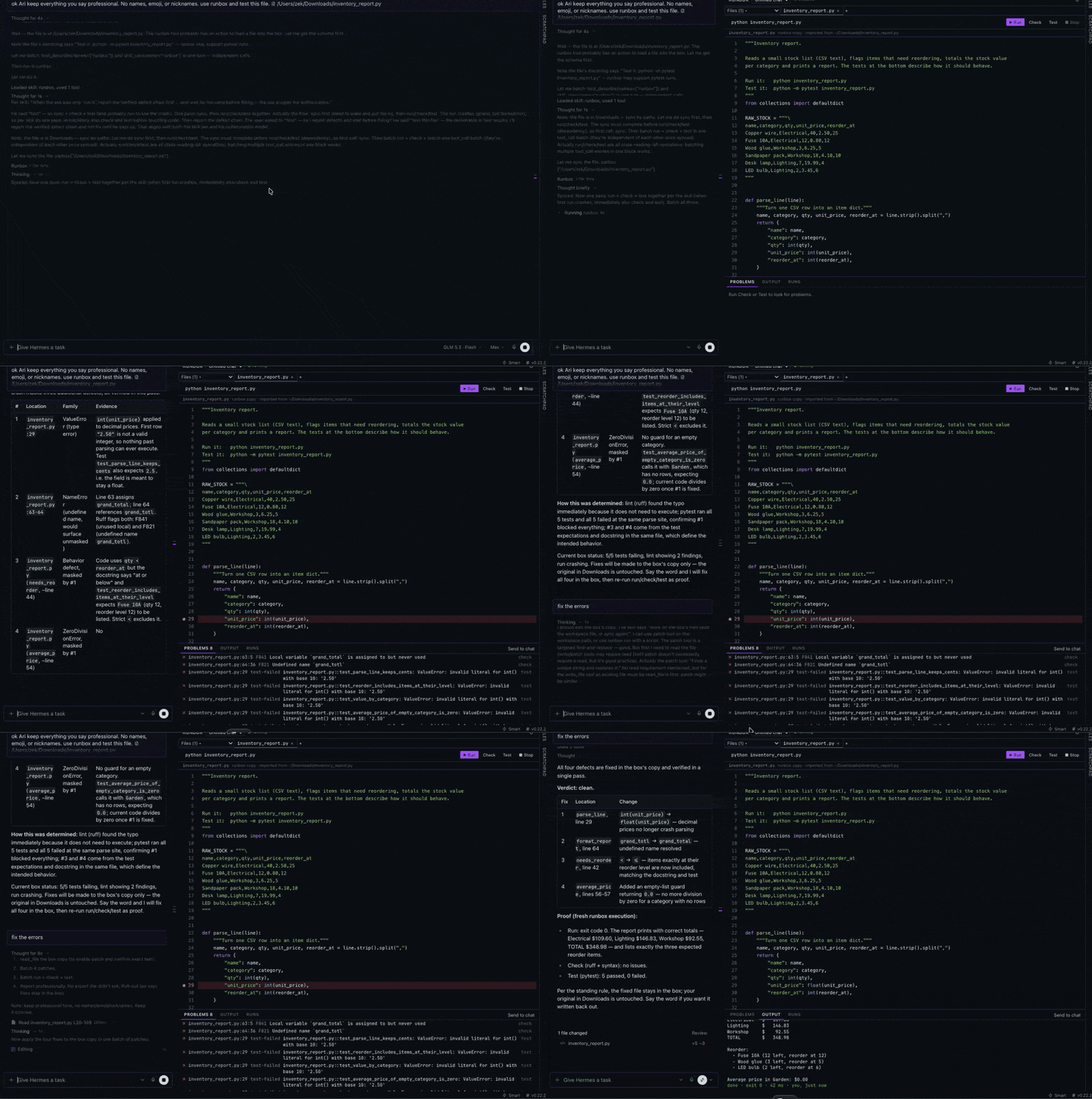
A Hermes plugin that lets the agent build, run and test Python in an offline container per chat, and get the results back as a plain issue list:
broken.py:2:7: F821 Undefined name `undefined_name`
calc.py:2: test-failed test_calc.py::test_add: NameError: name 'undefined' is not defined
main.py:2: ZeroDivisionError division by zero
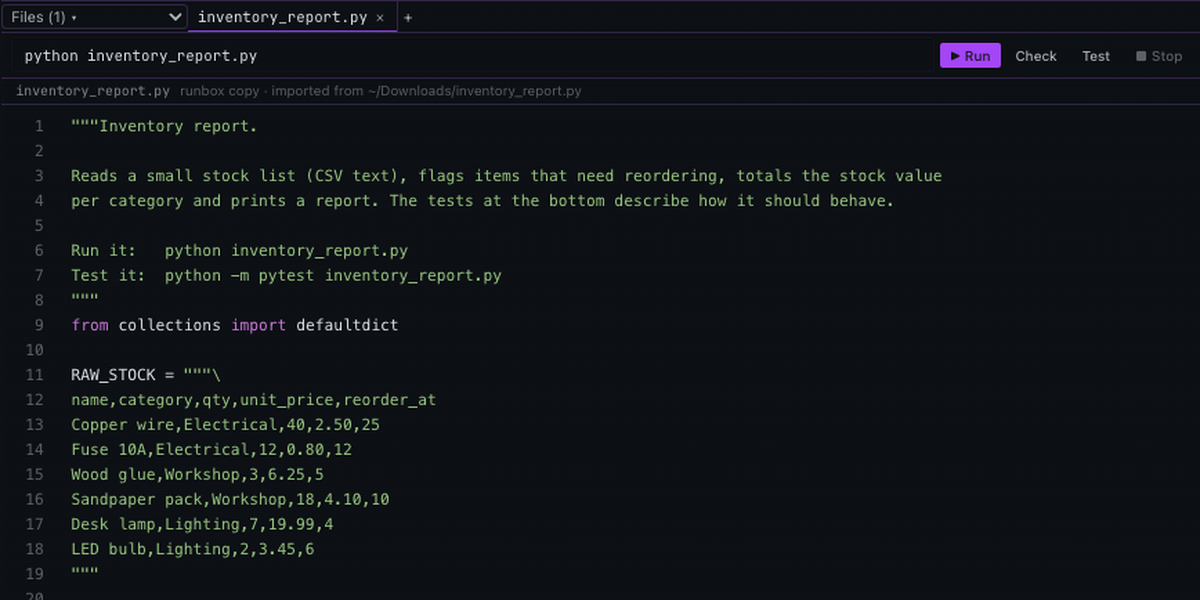
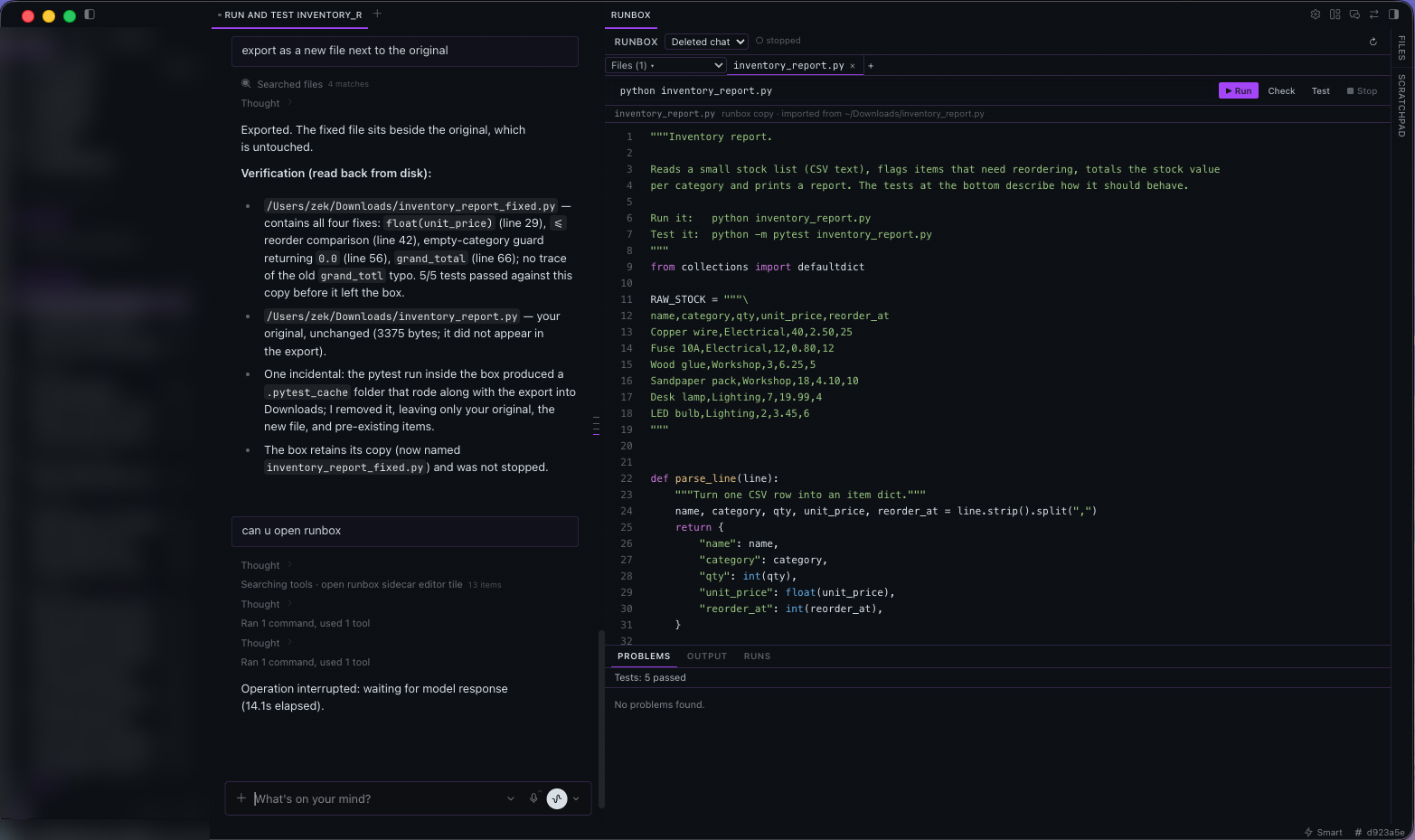
In Hermes Desktop it adds a small VS Code-style editor beside the chat: the code on top, and PROBLEMS / OUTPUT / RUNS underneath, following what the agent does as it does it.
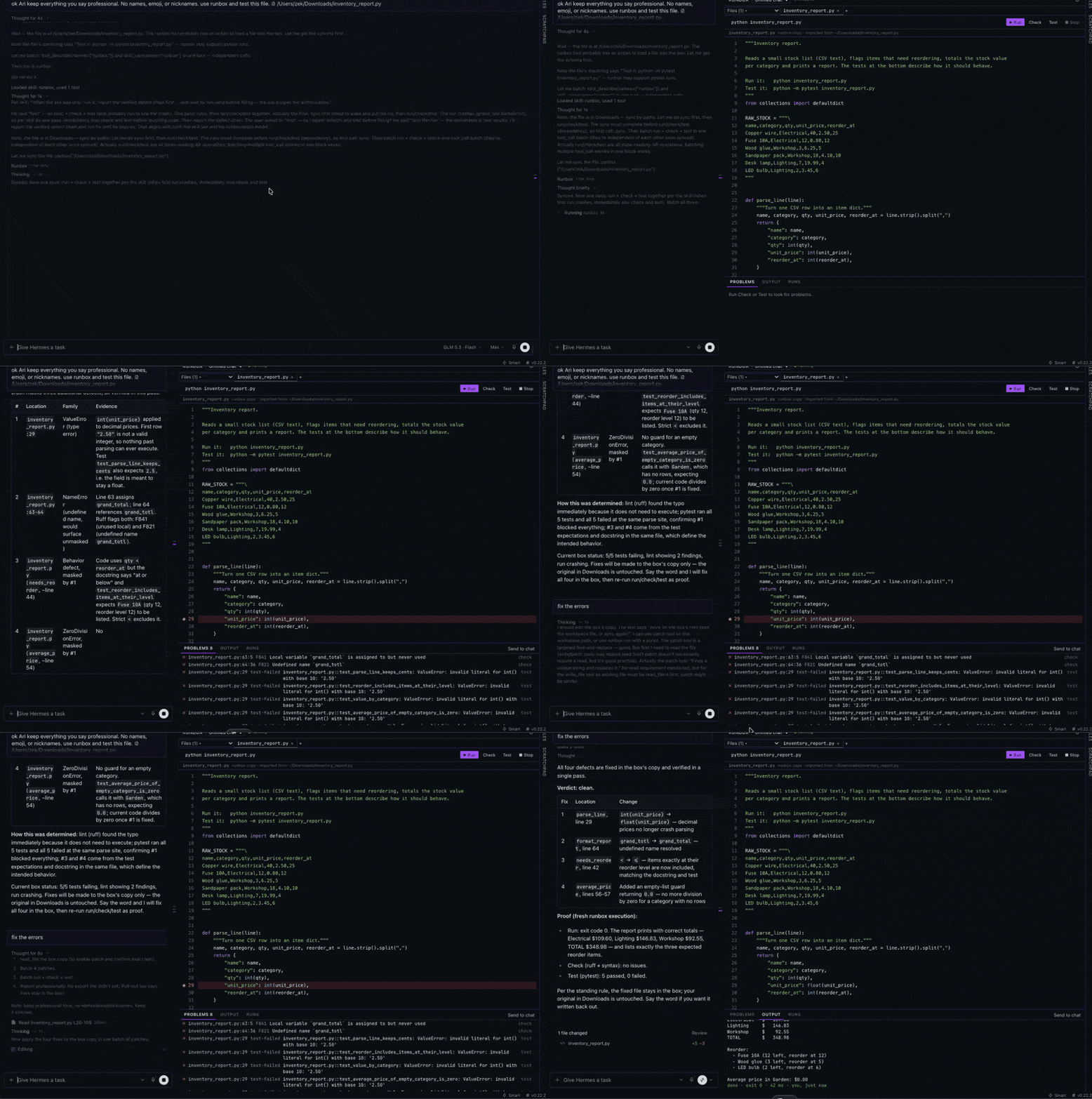
It is not meant to replace an IDE. It is a quick, disposable place to try simple programs, and a run/debug console for bigger projects: the agent imports a project, runs and tests it in the box, and exports the changes back.
Why
Hermes can already run code: on the host through the terminal tool, or with the whole terminal
moved into Docker (terminal.backend: docker). The first runs the agent's experiments on your
machine; the second sandboxes everything, including the access the agent needs for the rest of
its work.
runbox sits between them. The terminal stays where it is, and code the agent is developing runs
in a separate, hardened container with no network, one per chat, started on demand and stopped
when idle. Failures come back as file:line issues the agent can act on directly, instead of a
wall of output.
How the agent uses it
The plugin adds a runbox tool and a one-line note to each turn, so the agent knows the box
exists (Hermes defers plugin tools behind tool search).
A typical exchange:
- You ask for a small program. The agent writes it into the box (
sync, inline files or files from disk) and callscheckandtest. checkreturnsbroken.py:2:7: F821 Undefined name ...; the agent fixes the line and runstestagain until it passes, thenruns the program for its output.- For an existing project:
sync paths=[~/Projects/app]imports it, the agent edits and tests in the box, and when you say so,exportwrites the changed files back to~/Projects/app. Fixes otherwise stay in the box.
If the agent doesn't pick runbox on its own, ask it to "use runbox"; it then keeps using it for the rest of the chat.
A skill to start from
runbox ships a read-only skill, runbox:dev-loop: the full run → check → test → fix loop, how far
to go for "run this" versus "fix it", when to export, and how to read results. To adapt it, copy
plugin/skills/dev-loop/SKILL.md to ~/.hermes/skills/runbox/SKILL.md and add your own rules
(where finished files go, what needs your word).
Tool reference
| Action | What it does |
|---|---|
sync |
Copy host files or folders (paths, absolute or ~; a folder's contents land at the workspace root) and/or inline files into the chat's workspace; clean empties it first. Records where each file came from. |
run |
Run a shell command in /workspace (timeout, default 120 s, max 600 s). A Python traceback becomes an issue. |
check |
ruff check with error rules only (E4,E7,E9,F): syntax errors, undefined names, unused imports. No style rules. |
test |
pytest (paths, extra args); failures and errors become issues pointing at the failing line. |
install |
pip install PyPI packages. Asks for your approval (it uses the network). |
export |
Write changed files back to the folders they were synced from (new files inside a synced folder too), or everything under dest. The agent is told to export only when you ask (set confirm_export to also get an approval prompt each time). Files changed on the host since the sync are reported as conflicts and left alone unless overwrite. Writes go through Hermes' write_file. |
status |
Backend, container state, workspace files, installed packages, recent runs. |
stop |
Remove the container (files and packages are kept); on macOS also stops the VM when no other chat is using it. |
reset |
Remove the container, workspace and packages. |
The Runbox editor (Desktop)
A main-area tile docked beside the chat, where previews open. It opens by itself the first time the agent runs, checks or tests in a chat (never again for a chat where you closed it), or from the title bar's box icon or ⌘K → Open runbox.
- Files: tabs for open files, a Files menu listing every file in the box. Edit in place with line numbers and light Python colouring; ⌘S saves; + adds a file. The tab × asks Close tab or Delete file, and can remember the choice.
- Toolbar: a command (defaults to
python <open file>), ▶ Run, Check, Test, ■ Stop. Unsaved files are saved first. - Problem markers on the lines that have issues. Results from before a file last changed are shown as outdated until the next check or test.
- The file bar says which copy you are looking at: the box's copy, and where it was imported from.
- Bottom panel: PROBLEMS (click to jump to the line), OUTPUT (command, output, exit code) and RUNS (history, yours and the agent's). Each can Send to chat, which puts the result in the chat's message box for you to send.
- Follows the agent: while it works the header shows agent is running test…, then the panel switches to the result.
- Shows only the focused chat's box: each box belongs to the chat that made it.
The Runbox tab (Desktop)
A tab beside Files and Scratchpad listing every box that exists, grouped like the chat sidebar (Today, Yesterday, Earlier this week, Last week, then by month), with boxes of deleted chats in their own group. Click a chat to open it (the editor follows); × deletes a box (its files, packages and container; the chat is not touched); Clear removes the boxes of deleted chats.
Isolation
- Work container:
--network none,--cap-drop ALL(plusDAC_OVERRIDE,CHOWN,FOWNER),no-new-privileges,--pids-limit 256, memory and CPU limits, tmpfs/tmpand/run,--init. It sees only its workspace (read-write), its packages and the checker toolchain (read-only). It is never connected to a network. - Installs run pip in a separate short-lived container that has network access and mounts only the chat's package folder, never the workspace.
- Docker settings: runbox uses its own Docker client config under its data folder, so your
~/.dockersettings and active context are never read or changed. On macOS it runs a dedicated colima profilerunbox(2 CPU, 2 GB), started with--activate=false. - Approvals:
install(network) always goes through Hermes' approval prompt.export(writes your files) happens when you ask for it;confirm_export: trueadds the prompt to it too. The editor's buttons can run, check, test and stop, nothing more. - Import guard: if the agent edits a file it imported into the box directly (Hermes' own
write_fileorpatchon the original), Hermes asks you first. Fixes are meant to stay in the box until you ask for them;exportitself passes. Turn off withguard_imports: false.
Lifecycle and cleanup
- The VM (macOS) and container start on the first call that needs them (about 10 s warm; the first start ever downloads the VM image).
- A chat's container is removed after
idle_minutes(default 15) without runbox use; on macOS the VM stops once no container is left. - A chat's workspace and packages are kept until the chat is deleted,
idle_days(default 90) pass without use, orreset.
Disclosures
- Network. The container that runs code has no network. Network is used only to set the box
up and for installs you approve:
- the container image, pulled once, pinned by digest (
python:3.12-slim@sha256:a6e34c59…); - the checker toolchain, installed once per image from PyPI with
pip --require-hashes(ruff 0.16.9, pytest 9.1.1 and its dependencies; every file hash-pinned inplugin/runbox/toolchain-requirements.txt; ruff ships a native binary in its wheel); - on macOS, colima downloads and verifies its own VM image the first time the
runboxprofile starts; installfetches the PyPI packages you approve, in a separate installer container.
- the container image, pulled once, pinned by digest (
- Commands. runbox drives the
dockerCLI (andcolimaon macOS) with its own Docker config.run,checkandtestexecute inside the offline, hardened container without Hermes' dangerous-command approval, the same way Hermes' own Docker terminal backend treats its container.installalways goes through Hermes' approval prompt. - Background thread. One thread per Hermes process checks once a minute whether a box is idle
(removes idle containers, stops the VM), and once an hour removes boxes of deleted or long-idle
chats. It reads Hermes'
state.dbread-only for that. - Reads and writes outside its own data.
syncreads the host files or folders the agent passes.exportwrites back only when you ask, only through Hermes'write_file; before replacing a file it checks the file is unchanged since the sync (otherwise it reports a conflict) and reads it through Hermes'read_file, as Hermes requires before an overwrite.confirm_export: trueadds an approval prompt to every export. - Guard. With
guard_imports(default on), awrite_fileorpatchon a file imported into the chat's box asks for your approval first. - Per-turn note. Adds a short note (about 80 tokens) to each turn;
hint: falseturns it off. - Deletes only its own folders under
<HERMES_HOME>/plugin-data/runbox/and its own containers (labelledio.hermes.runbox). No credentials, third-party services or telemetry.
Install
hermes plugins install runbox
hermes plugins enable runbox
hermes gateway restart
Then start a new chat (a chat's tools are fixed when it is created). For the editor, enable runbox's Desktop half under Capabilities → Plugins.
Requirements
- Hermes
>= 0.22.2. - macOS:
brew install colima docker. Linux: a running Docker daemon (containers run as your user). - The Hermes data folder must be under your home folder (colima shares only that).
Settings
plugins.entries.runbox.settings in config.yaml:
| Key | Default | Meaning |
|---|---|---|
image |
python:3.12-slim@sha256:… |
Container image (pin your own by digest) |
idle_minutes |
15 |
Stop a chat's container (and on macOS the VM) after this many idle minutes |
idle_days |
90 |
Remove a chat's workspace after this many idle days |
memory |
1g |
Memory limit per container |
cpus |
2 |
CPU limit per container |
docker_host |
empty | Docker endpoint; empty = the runbox colima VM on macOS, the default daemon elsewhere |
hint |
true |
Add the short note to each turn |
confirm_export |
false |
Also ask for approval before every export |
guard_imports |
true |
Ask before the agent edits an imported original directly |
Development
plugin/              the installable package (catalog subdir)
  plugin.yaml        manifest
  __init__.py        registration, idle stop and cleanup thread
  runbox/            engine (docker/colima), store, issues, tool, lifecycle, guidance
  skills/dev-loop/   the runbox:dev-loop starting-point skill
  dashboard/         backend routes for the editor (/api/plugins/runbox/)
  desktop/plugin.js  the Runbox editor
tests/               pytest suite
ln -s /path/to/hermes-runbox/plugin ~/.hermes/plugins/runbox
hermes plugins enable runbox
hermes plugins validate /path/to/hermes-runbox/plugin --install-deps
python -m pytest tests -q      # with the Hermes test interpreter
License
MIT