
Session Relay — a Hermes Agent plugin
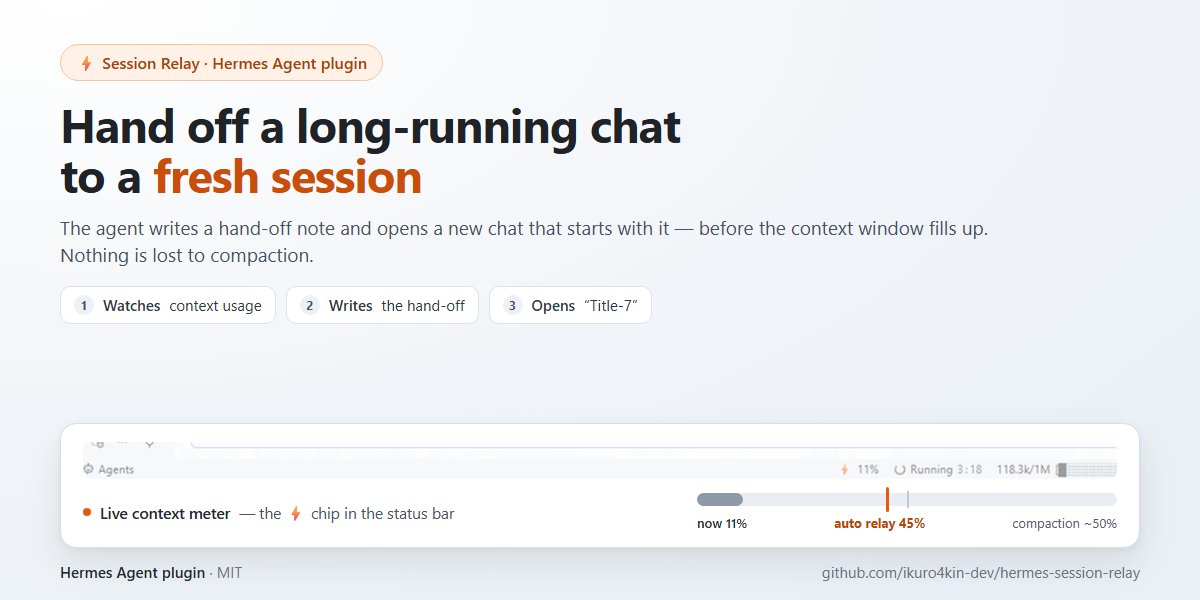
Hand your long-running chat over to a fresh session before the context window fills up.
Hermes compacts a conversation when its context reaches ~50% of the model window. Compaction keeps a summary and drops details; after two or three compactions a long working session turns into a soup of half-remembered facts and duplicated messages. Session Relay solves the same problem the other way round: as the context approaches the threshold, the agent writes a hand-off note and opens a new chat that starts with that note — while the old chat stays untouched and readable.
How it works
- The desktop half watches the focused session's context usage.
- When usage crosses the threshold (45% by default) and the current turn has finished, it submits a hidden service message: the agent replies with a hand-off note (current task, state, what was done, next step, important details).
- The plugin opens a new chat through the SDK (
host.newChat()) and submits the note into it (host.composer.submit('new', note)) — the fresh session starts with the hand-off as its first user message, exactly as if you had typed it. - The new chat is named after the current one with the number incremented —
Bugfix-6→Bugfix-7. - A toast and an OS notification announce the new chat; clicking the notification opens it.
- The ⚡ chip in the status bar starts a relay manually, below the threshold too.
Nothing is deleted: the previous session remains in the sidebar as the full record.
On channels outside the desktop app (Telegram and other messaging platforms) the flow is manual: the agent prepares the hand-off, you send /new, and the gateway half attaches the note to the first ordinary message you send in the new session — that message opens with the hand-off as its heading block.
Requirements
- Hermes Agent 0.22.0 or newer, with the Desktop app (
apps/desktop) and/or the gateway. - No agent tool is required: the desktop half opens and seeds the new chat through the plugin SDK (
host.newChat,host.composer), and the gateway half ships its ownsession_relay_handofftool.
Package layout
This is a unified package: one plugin, two halves.
session-relay/
├── plugin.yaml      # manifest (name, version, declared hooks/tools)
├── __init__.py      # gateway half: per-chat hand-off store, carry after /new, pre_gateway_dispatch hook
└── desktop/
    └── plugin.js    # desktop half: context meter, threshold, service message
Install
From Git (recommended):
hermes plugins install https://github.com/ikuro4kin-dev/hermes-session-relay
This puts the package in $HERMES_HOME/plugins/session-relay/. Then:
-
Gateway half (optional) — enable it in
config.yaml:plugins: enabled: [session-relay] entries: session-relay: allow_gateway_injection: true -
Desktop half — open Hermes Desktop → Capabilities → Plugins → Rescan, then enable Session Relay. Both halves are opt-in and default to off.
-
Restart the gateway after enabling the Python half (
hermes gateway restart).
Desktop-only, without the gateway half: copy desktop/plugin.js to
$HERMES_HOME/desktop-plugins/session-relay/plugin.js (Windows: %LOCALAPPDATA%\hermes\desktop-plugins\session-relay\plugin.js) and enable the plugin in Settings → Plugins. No build step, no dependencies: it is a single ESM file.
Settings (desktop)
| Setting | Meaning |
|---|---|
| Automatic relay | Fire the hand-off automatically when the threshold is reached. |
| Trigger threshold | 30 / 40 / 45 / 50 %. The default is 45 % — below the point where Hermes compacts on its own (~50 %). |
| Reset marks | Forget that a relay already ran for the current session (useful for testing). |
Using the gateway half (Telegram and other channels)
- Ask the agent for a relay / hand-off for the current conversation. It calls the
session_relay_handofftool with the note astext; the note is stored in$HERMES_HOME/plugin-data/session-relay/under the chat's session id. - Send
/new(or/reset). - The plugin parks the prepared hand-off for this chat and gives the new session the previous title with the number incremented.
- Your next ordinary message in that chat — not a command — opens with the hand-off as its heading block. This is deliberate: a brand-new session has not committed a turn yet, and the gateway's session authority refuses to seed one (
not_found), so the note rides the first real message instead of being lost. - A hand-off is bound to the chat that prepared it (its session id): only that chat can pick it up — a note written in another conversation is never attached. A parked note is dropped when the chat has moved on (another
/new, a restored session). - A prepared hand-off is valid for 24 hours; if it is older, it is ignored.
The tool lives in the session_relay toolset. It is enabled with the plugin; if you turned the toolset off in hermes tools, turn it back on for the platform you use.
These channels are manual by design: the plugin cannot watch a context meter from the gateway side.
Disclosure
What the plugin does with your data and tokens:
- Each relay submits one service message to the agent, which starts a normal agent turn — this consumes model tokens like any other turn.
- The hand-off text is produced by the agent from the current conversation and submitted into the new chat's composer; it becomes the first user message of the new session.
- The desktop half keeps two keys in the plugin's own storage:
prefs(your settings) andrelayed(session ids already relayed, pruned after 30 days). - The gateway half writes one hand-off file per chat under
$HERMES_HOME/plugin-data/session-relay/(hand-off text, the chat's session id, timestamp); after/newit moves the note into a per-chat carry file and deletes it once the chat's next message has picked it up (or when the chat has moved on). Files older than 24 hours are pruned. - No network calls, no telemetry, no shell access, no access to files outside the plugin's own folder and its
plugin-datadirectory. Everything goes through Hermes's own plugin APIs.
Limitations
- Both halves rely on Hermes plugin APIs (
session.context_breakdown,prompt.submit,host.newChat,host.composer, themessage.completeevent, and theon_session_reset+pre_gateway_dispatchhooks). A future Hermes release may change them — the plugin would need an update. - The automatic trigger exists only for the desktop app; Telegram and other gateway channels use the manual flow described above.
- The relay runs only when the session is idle (it never interrupts a running turn).
License
MIT — see LICENSE.