YouTube Dock for Hermes Desktop
Browse your YouTube recommendations and Shorts beside your conversation, without opening your external browser or pasting video URLs.
A small, desktop-only launcher built with the public @hermes/plugin-sdk. It reuses Hermes' existing internal Browser; it is not a separate browser engine or a replacement YouTube player.
Install
Requires Hermes 0.22.2 or later and the native Desktop app. This release was exercised on Windows 11 with Hermes 0.22.2. The SDK-based UI is not OS-specific, but macOS/Linux playback has not been manually verified.
Desktop
Open the Desktop plugin installation dialog (Capabilities → Plugins → Install from Git), enter:
https://github.com/metamindedu/hermes-youtube-dock
Select the Desktop component and confirm installation. Enable YouTube Dock in Capabilities → Plugins if it is not already enabled. Public packages are opt-in; the plugin itself defaults to disabled.
CLI
hermes plugins install https://github.com/metamindedu/hermes-youtube-dock
Then open Hermes Desktop, rescan plugins if necessary, and enable YouTube Dock. There is no Python backend to configure or enable.
A catalog submission is pending; installation by the short catalog name is not available until the maintainers merge the entry and publish the catalog.
Use
- Click ▶ YouTube in the titlebar, or search YouTube in the command palette.
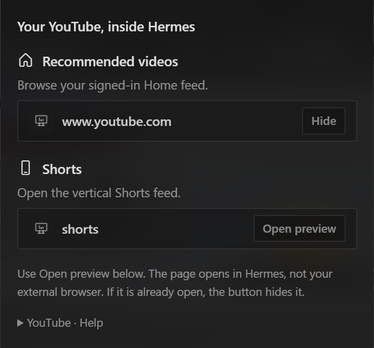
- Under Recommended videos or Shorts, click Open preview.
- Browse, select and watch videos inside the native Browser next to the chat. No video URL is needed.
- Drag the Browser tab or its panel boundary to arrange/resize it. Existing Hermes Browser tab actions handle pinning and opening a separate Hermes window.
English and Korean UI strings are included. Other locales fall back to English.
Important behavior and limitations
- The preview buttons are toggles. An already-open original destination shows Hide, even if you navigated from Home to a video. Clicking it hides that Browser tab; clicking Open preview afterward opens the destination again. To return Home without hiding the tab, use YouTube's own logo inside the page.
- The existing native Browser decides which tab to reuse. This plugin does not create or manage its own browser session.
- A dedicated PIP button is not included. This release uses Hermes' docked Browser and its existing separate-window feature; neither is a promise of always-on-top PIP.
- An existing internal-Browser login can be reused. The plugin does not copy your external Chrome/Edge login. Google may restrict sign-in on embedded browsers; sign-in and playback are owned by the host and YouTube, not bypassed by this plugin.
- YouTube region, account, age and playback restrictions still apply. No Premium features or ad blocking are provided.
- Disabling this launcher removes its menu and command, not an already-open Browser/video tab. Close that tab to stop playback and release its resources.
- Keeping an external browser closed may help your workflow, but no measured CPU or RAM savings are claimed.
- The native preview cards and
#preview/link behavior depend on the host's current SDK-rendered Markdown pipeline. A scoped stylesheet hides the unrelated Download button only inside the plugin's own cards; no other app markup is queried or modified.
Privacy and permissions
| Surface | What happens |
|---|---|
| Third-party network | After an explicit click, the native Browser loads YouTube and its normal service/CDN requests. YouTube's own privacy terms apply. |
| Credentials | None requested or read by this plugin. Any saved sign-in remains managed by the native Browser. |
| Local data | No cookie, account, recommendation, watch-history or filesystem reads. No plugin persistence. |
| Agent capabilities | No tools, hooks, middleware, model calls or environment variables. |
| Native execution | No shell commands, backend service, extra browser process launcher, background worker or polling loop. |
| Telemetry | None. |
| Updates | No self-updater or remote code loader. Catalog versions, if accepted, are exact-SHA pinned and updated through Hermes. |
Development and tests
Node is required for development tests only, not to run the installed plugin.
npm ci --ignore-scripts
npm run check
The portable unit tests use real React server rendering with a small, explicitly mocked SDK. To additionally verify round-tripping through the real Hermes native preview decoder, set HERMES_SOURCE_ROOT to a Hermes source checkout before running the same gate:
HERMES_SOURCE_ROOT=/path/to/hermes-agent npm run check
CI runs both on Windows and Linux against a pinned Hermes 0.22.2 source revision. Tests do not read or write a user's Hermes profile. Actual Desktop verification additionally covered the titlebar menu, signed-in Home feed, Shorts navigation and playback. The screenshot above is a crop of only the plugin menu; no account details or recommendation feed are published.
Support and license
Report bugs through GitHub Issues. Include Hermes version, OS, and whether the native Browser itself can play the same page. Do not include cookies, tokens or account credentials.
MIT. An independent community plugin, not affiliated with or endorsed by YouTube, Google or Nous Research.
한국어
앱 상단 ▶ YouTube → 추천 피드 / 쇼츠 → Open preview에서 내 유튜브를 Hermes 내부 브라우저로 엽니다. 개별 영상 URL을 넣을 필요가 없습니다. 기존 내부 브라우저의 로그인 상태를 사용하며, 외부 브라우저의 쿠키를 복사하거나 계정 정보를 읽지 않습니다. 설치 후 Capabilities → Plugins → YouTube Dock을 켜세요. 이 버전은 도킹형 패널 방식이며 전용 PIP 버튼은 없습니다.