Kanban tutorial
A walkthrough of the four use-cases the Hermes Kanban system was designed for, with the dashboard open in a browser. If you haven't read the Kanban overview yet, start there — this assumes you know what a task, run, assignee, and dispatcher are.
Setup
hermes kanban init           # optional; first `hermes kanban <anything>` auto-inits
hermes dashboard             # opens http://127.0.0.1:9119 in your browser
# click Kanban in the left nav
The dashboard is the most comfortable place for you to watch the system. Agent workers the dispatcher spawns never see the dashboard or the CLI — they drive the board through a dedicated kanban_* toolset (kanban_show, kanban_list, kanban_complete, kanban_block, kanban_heartbeat, kanban_comment, kanban_attach, kanban_attach_url, kanban_attachments, kanban_create, kanban_link, kanban_unblock). All three surfaces — dashboard, CLI, worker tools — route through the same per-board SQLite DB (~/.hermes/kanban.db for the default board, ~/.hermes/kanban/boards/<slug>/kanban.db for any board you create later), so each board is consistent no matter which side of the fence a change came from.
This tutorial uses the default board throughout. If you want multiple isolated queues (one per project / repo / domain), see Boards (multi-project) in the overview — the same CLI / dashboard / worker flows apply per board, and workers physically cannot see tasks on other boards.
Throughout the tutorial, code blocks labelled bash are commands you run. Code blocks labelled # worker tool calls are what the spawned worker's model emits as tool calls — shown here so you can see the loop end-to-end, not because you'd ever run them yourself.
The board at a glance
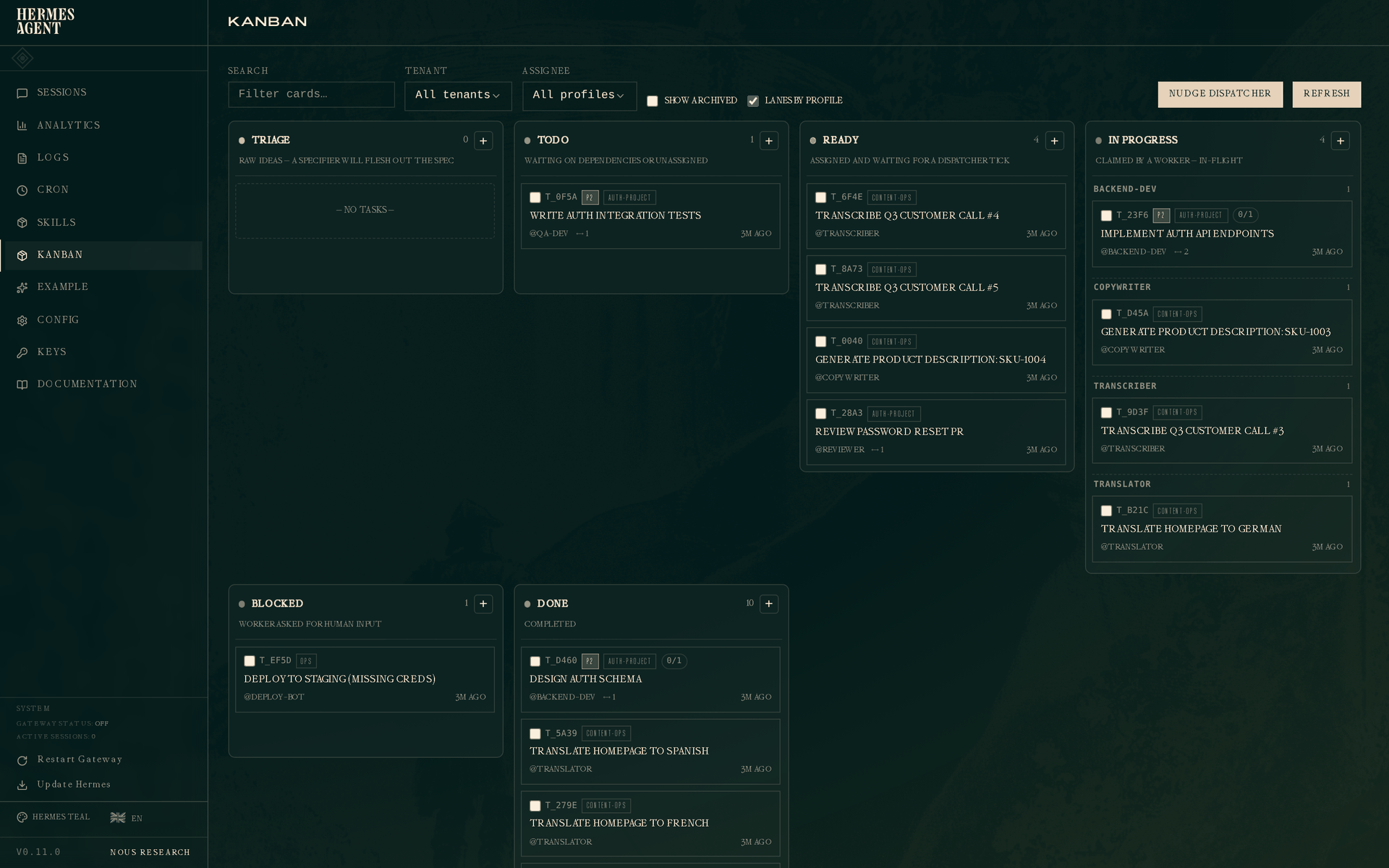
Six columns, left to right:
- Triage — raw ideas. By default the dispatcher auto-runs the decomposer on tasks here: the built-in decomposer uses
auxiliary.kanban_decomposer, reads your profile roster + descriptions, and produces a graph of child tasks routed to the best-fit specialists. The original task is held alive as the parent so its assignee (kanban.orchestrator_profile, or the active default profile when unset) wakes back up to judge completion when everything finishes. Flip the Orchestration: Auto/Manual pill at the top of the kanban page to switch modes. In Manual mode click ⚗ Decompose on a card, or runhermes kanban decompose <id>//kanban decompose <id>. For single tasks that don't need fan-out, ✨ Specify does a one-shot spec rewrite (goal, approach, acceptance criteria) and promotes totodo. Configure the models underauxiliary.kanban_decomposerandauxiliary.triage_specifierinconfig.yaml. See Auto vs Manual orchestration in the main Kanban guide. - Todo — created but waiting on dependencies, or not yet assigned.
- Ready — assigned and waiting for the dispatcher to claim.
- In progress — a worker is actively running the task. With "Lanes by profile" on (the default), this column sub-groups by assignee so you can see at a glance what each worker is doing.
- Blocked — a worker asked for human input, or the circuit breaker tripped.
- Done — completed.
The top bar has filters for search, tenant, and assignee, plus a Lanes by profile toggle and a Nudge dispatcher button that runs one dispatch tick right now instead of waiting for the daemon's next interval. Clicking any card opens its drawer on the right.
Flat view
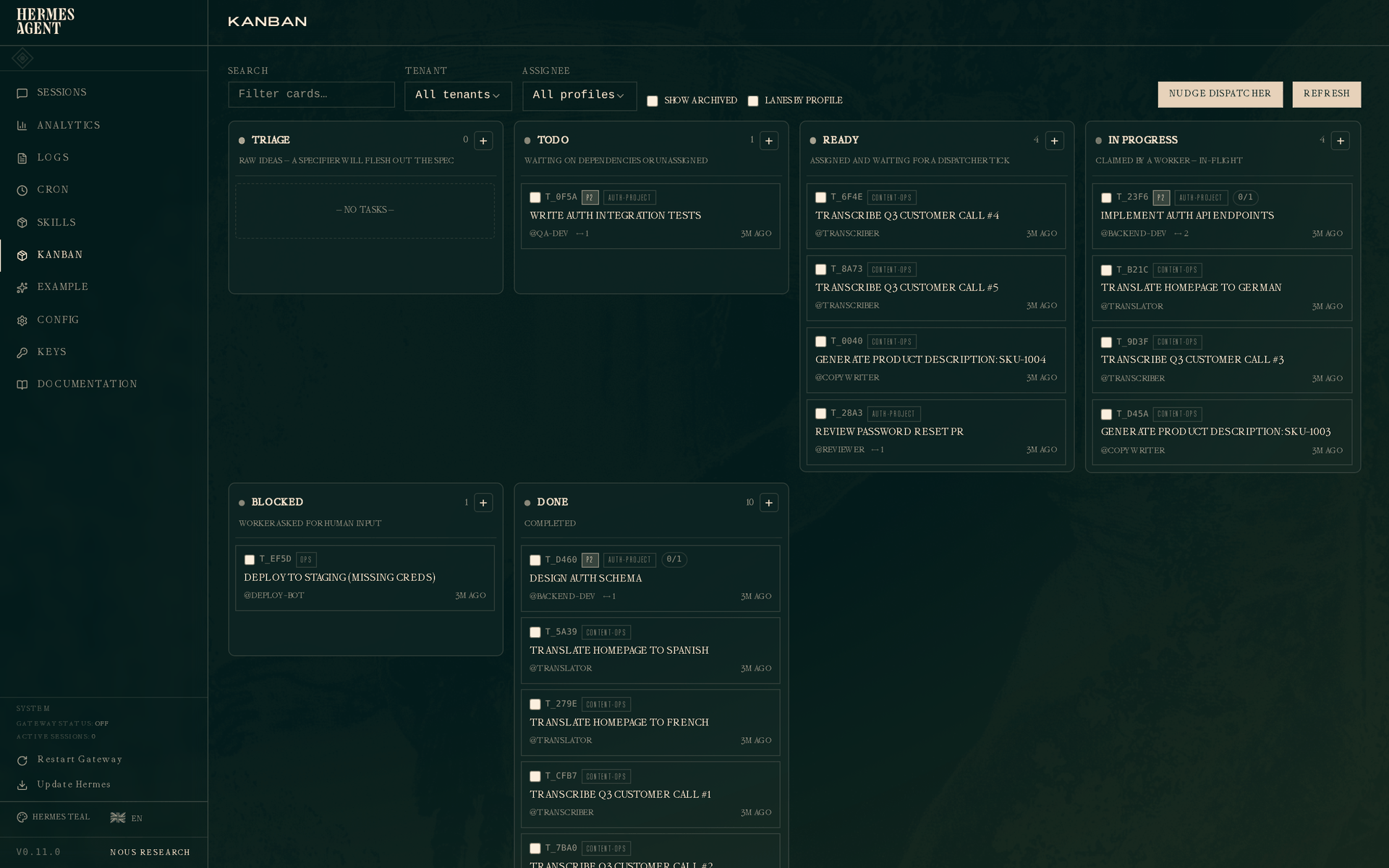
If the profile lanes are noisy, toggle "Lanes by profile" off and the In Progress column collapses to a single flat list ordered by claim time:
Story 1 — Solo dev shipping a feature
You're building a feature. Classic flow: design a schema, implement the API, write the tests. Three tasks with parent→child dependencies.
SCHEMA=$(hermes kanban create "Design auth schema" \
    --assignee backend-dev --tenant auth-project --priority 2 \
    --body "Design the user/session/token schema for the auth module." \
    --json | jq -r .id)

API=$(hermes kanban create "Implement auth API endpoints" \
    --assignee backend-dev --tenant auth-project --priority 2 \
    --parent $SCHEMA \
    --body "POST /register, POST /login, POST /refresh, POST /logout." \
    --json | jq -r .id)

hermes kanban create "Write auth integration tests" \
    --assignee qa-dev --tenant auth-project --priority 2 \
    --parent $API \
    --body "Cover happy path, wrong password, expired token, concurrent refresh."
Because API has SCHEMA as its parent, and tests has API as its parent, only SCHEMA starts in ready. The other two sit in todo until their parents complete. This is the dependency promotion engine doing its job — no other worker will pick up the test-writing until there's an API to test.
On the next dispatcher tick (60s by default, or immediately if you hit Nudge dispatcher) the backend-dev profile spawns as a worker with HERMES_KANBAN_TASK=$SCHEMA in its env. Here's what the worker's tool-call loop looks like from inside the agent:
# worker tool calls — NOT commands you run
kanban_show()
# → returns title, body, worker_context, parents, prior attempts, comments

# (worker reads worker_context, uses terminal/file tools to design the schema,
#  write migrations, run its own checks, commit — the real work happens here)

kanban_heartbeat(note="schema drafted, writing migrations now")

kanban_complete(
    summary="users(id, email, pw_hash), sessions(id, user_id, jti, expires_at); "
            "refresh tokens stored as sessions with type='refresh'",
    metadata={
        "changed_files": ["migrations/001_users.sql", "migrations/002_sessions.sql"],
        "decisions": ["bcrypt for hashing", "JWT for session tokens",
                      "7-day refresh, 15-min access"],
    },
)
kanban_show defaults task_id to $HERMES_KANBAN_TASK, so the worker doesn't need to know its own id. kanban_complete writes the summary + metadata onto the current task_runs row, closes that run, and transitions the task to done — all in one atomic hop through kanban_db.
When SCHEMA hits done, the dependency engine promotes API to ready automatically. The API worker, when it picks up, will call kanban_show() and see SCHEMA's summary and metadata attached to the parent handoff — so it knows the schema decisions without re-reading a long design doc.
Click the completed schema task on the board and the drawer shows everything:
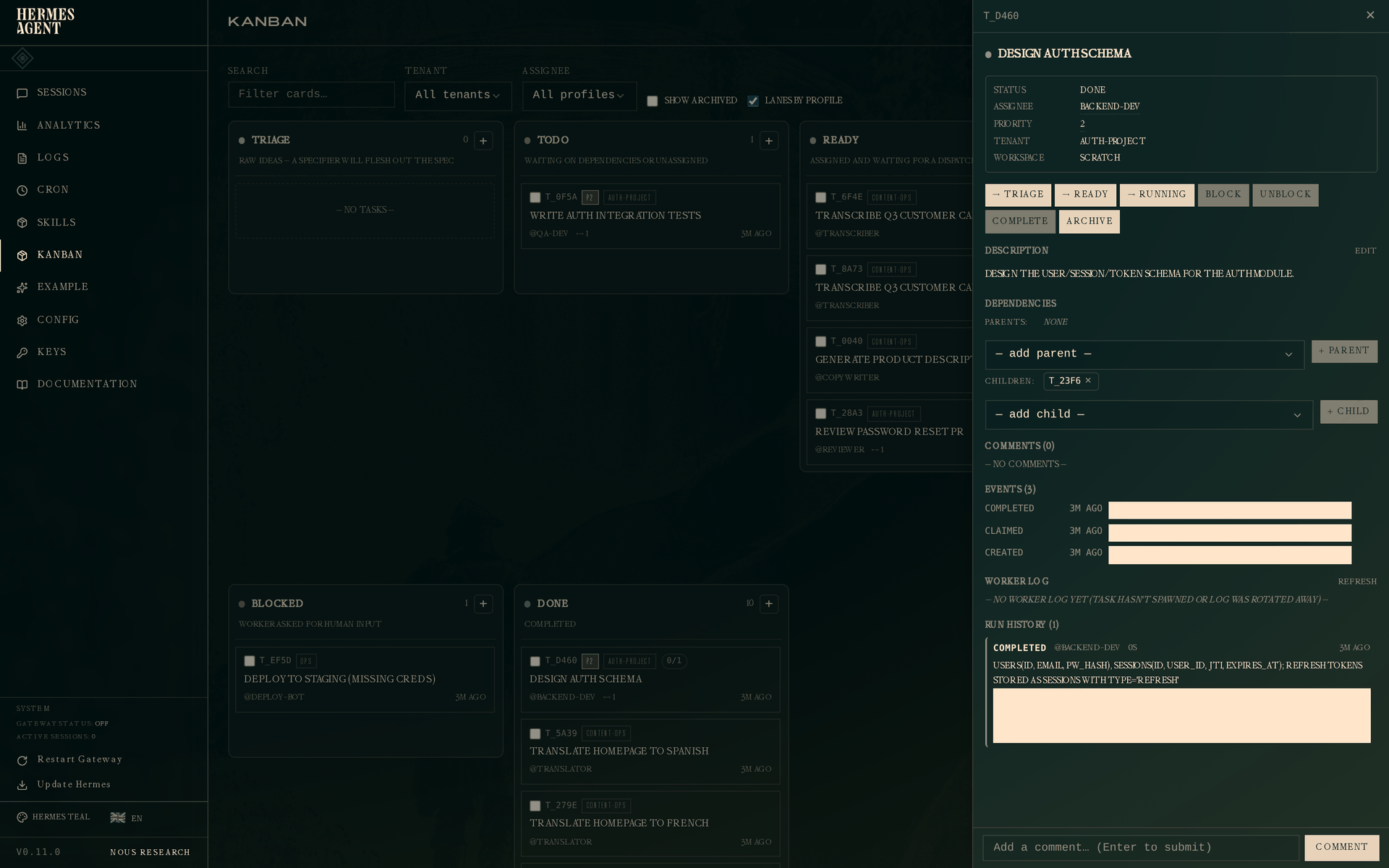
The Run History section at the bottom is the key addition. One attempt: outcome completed, worker @backend-dev, duration, timestamp, and the handoff summary in full. The metadata blob (changed_files, decisions) is stored on the run too and surfaced to any downstream worker that reads this parent.
You can inspect the same data from your terminal at any time — these commands are you peeking at the board, not the worker:
hermes kanban show $SCHEMA
hermes kanban runs $SCHEMA
# #  OUTCOME       PROFILE       ELAPSED  STARTED
# 1  completed     backend-dev        0s  2026-04-27 19:34
#     → users(id, email, pw_hash), sessions(id, user_id, jti, expires_at); refresh tokens ...
Story 2 — Fleet farming
You have three workers (a translator, a transcriber, a copywriter) and a pile of independent tasks. You want all three pulling in parallel and making visible progress. This is the simplest kanban use-case and the one the original design optimized for.
Create the work:
for lang in Spanish French German; do
    hermes kanban create "Translate homepage to $lang" \
        --assignee translator --tenant content-ops
done
for i in 1 2 3 4 5; do
    hermes kanban create "Transcribe Q3 customer call #$i" \
        --assignee transcriber --tenant content-ops
done
for sku in 1001 1002 1003 1004; do
    hermes kanban create "Generate product description: SKU-$sku" \
        --assignee copywriter --tenant content-ops
done
Start the gateway and walk away — it hosts the embedded dispatcher that picks up all three specialist profiles' tasks on the same kanban.db:
hermes gateway start
Now filter the board to content-ops (or just search for "Transcribe") and you get this:
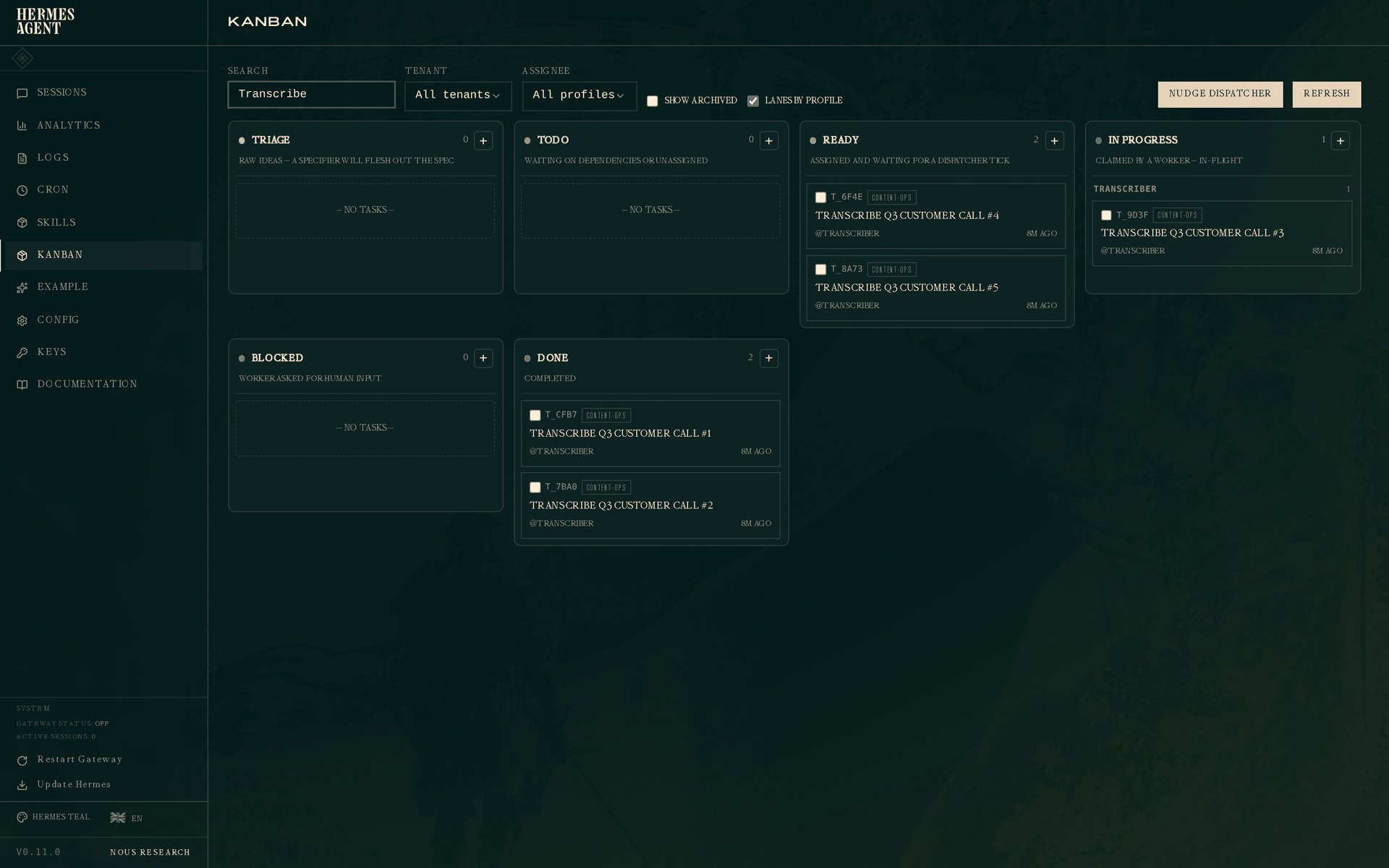
Two transcribes done, one running, two ready waiting for the next dispatcher tick. The In Progress column is grouped by profile (the "Lanes by profile" default) so you see each worker's active task without scanning a mixed list. The dispatcher will promote the next ready task to running as soon as the current one completes. With three daemons working on three assignee pools in parallel, the whole content queue drains without further human input.
Everything Story 1 said about structured handoff still applies here. A translator worker completing a call emits kanban_complete(summary="translated 4 pages, style matched existing marketing voice", metadata={"duration_seconds": 720, "tokens_used": 2100}) — useful for analytics and for any downstream task that depends on this one.
Story 3 — Role pipeline with retry
This is where Kanban earns its keep over a flat TODO list. A PM writes a spec. An engineer implements it. A reviewer rejects the first attempt. The engineer tries again with changes. The reviewer approves.
The dashboard view, filtered by auth-project:
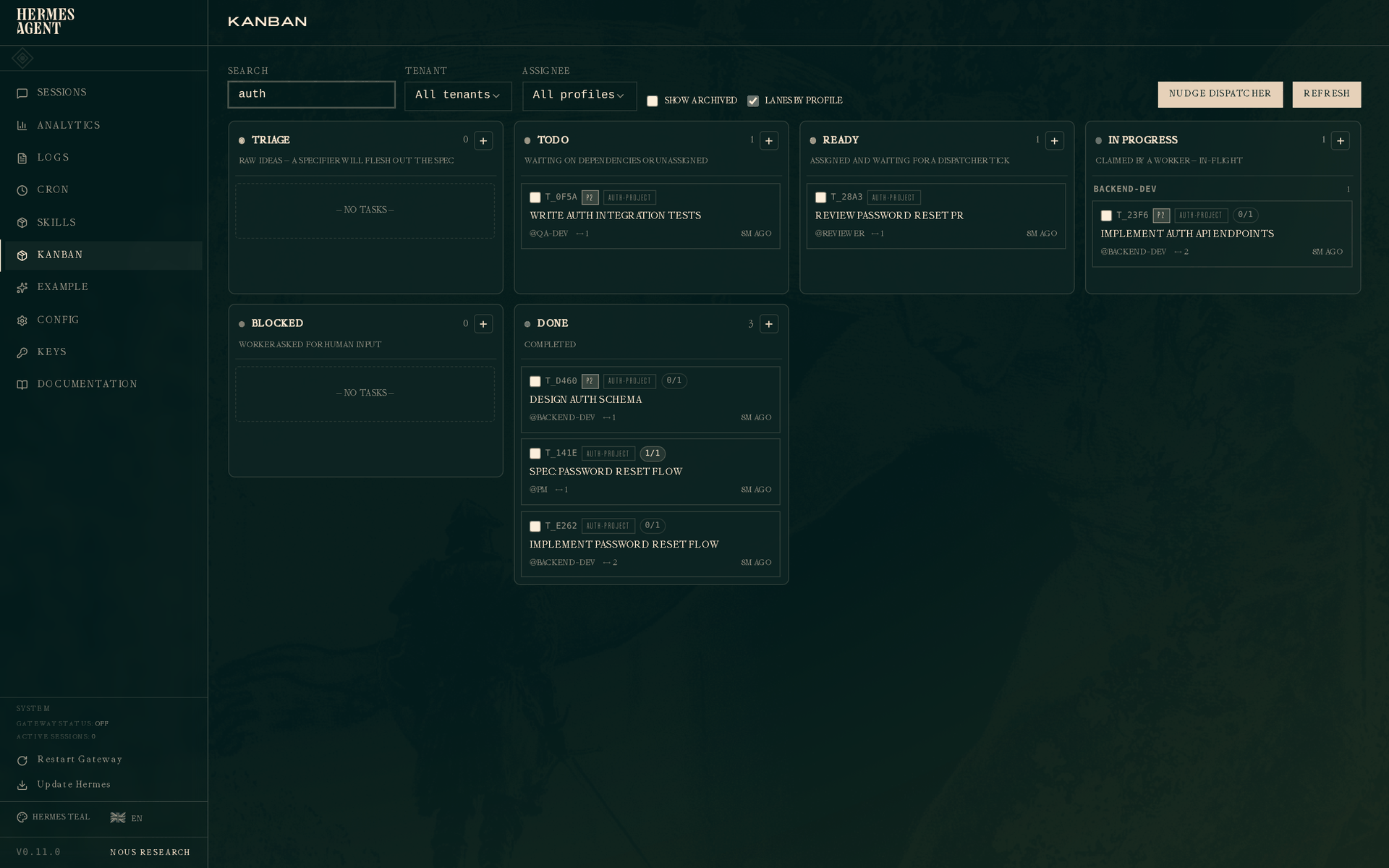
The screenshot uses the pre-created downstream card model: the implementation card has a dedicated reviewer child. In that model the engineer must call kanban_complete when implementation is ready so the reviewer child can leave todo. Never block the implementation parent merely to ask for review.
For workflows where the same card owns implementation and review, use the first-class review lifecycle instead. The full implement → review → changes → re-review choreography is:
# --- Engineer: first implementation attempt ---
kanban_show()
# (write code, run tests, prepare the candidate)
kanban_request_review(
    summary="implemented reset flow; candidate is ready for review",
    metadata={"changed_files": ["auth/reset.py"], "tests_run": 8},
    reviewer="reviewer",
)
# → the same card enters review; the implementation run closes as
#   outcome='review_requested'

# --- Reviewer: request concrete changes ---
kanban_show()
# (inspect the handoff and candidate)
kanban_request_changes(
    reason="Add password-strength validation and make reset tokens single-use."
)
# → the review run closes as outcome='changes_requested'; the card returns
#   to backend-dev in ready/todo without touching block-loop accounting

# --- Engineer: second implementation attempt ---
kanban_show()  # prior review evidence is in worker_context
# (apply feedback and re-run tests)
kanban_request_review(
    summary="added zxcvbn validation and single-use reset tokens",
    metadata={
        "changed_files": [
            "auth/reset.py",
            "auth/tests/test_reset.py",
            "migrations/003_single_use_reset_tokens.sql",
        ],
        "tests_run": 11,
        "review_iteration": 2,
    },
    reviewer="reviewer",
)

# --- Reviewer: approve ---
kanban_complete(summary="review passed; acceptance criteria verified")
# → done
The task's run history now records review_requested → changes_requested → review_requested → completed. Each attempt has its own actor, summary, metadata, and outcome, so the second engineer sees exactly what the reviewer rejected and the final approval remains auditable. kanban_block is reserved for a real external escalation (missing access, a product decision, unavailable infrastructure), not normal review feedback.
If you intentionally use the downstream-card model shown in the screenshot, the reviewer opens Review password reset PR after its implementation parent completes:
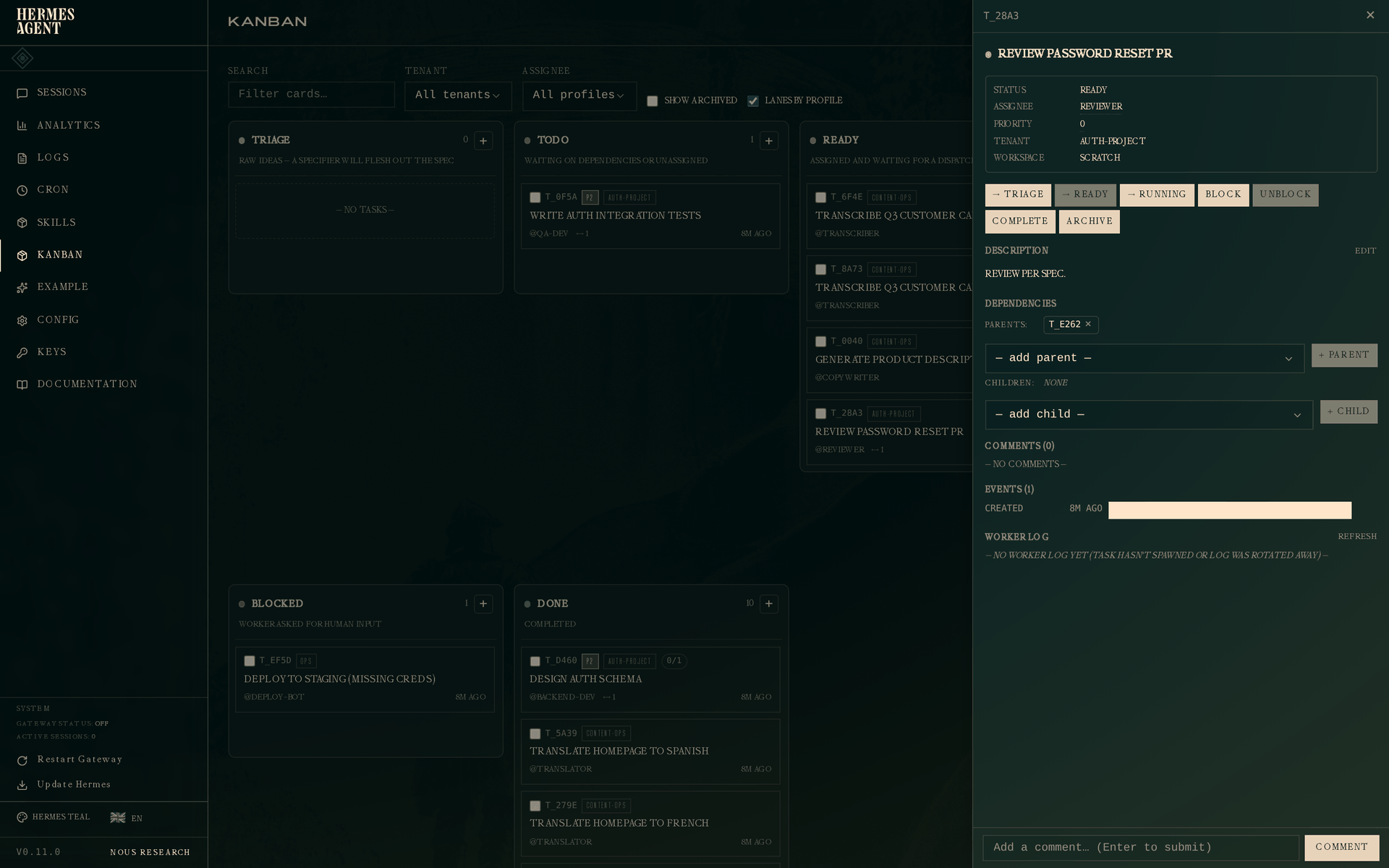
The reviewer card's worker_context includes the completed implementation handoff. That is a separate card workflow; do not combine it with same-card kanban_request_review or you will duplicate the review lane.
Story 4 — Circuit breaker and crash recovery
Real workers fail. Missing credentials, OOM kills, transient network errors. The dispatcher has two lines of defense: a circuit breaker that auto-blocks after N consecutive failures so the board doesn't thrash forever, and crash detection that reclaims a task whose worker PID went away before its TTL expired.
Circuit breaker — permanent-looking failure
A deploy task that can't spawn its worker because AWS_ACCESS_KEY_ID isn't set in the profile's environment:
hermes kanban create "Deploy to staging (missing creds)" \
    --assignee deploy-bot --tenant ops \
    --max-retries 3
The dispatcher tries to spawn the worker. Spawn fails (RuntimeError: AWS_ACCESS_KEY_ID not set). The dispatcher releases the claim, increments a failure counter, and tries again next tick. Because this example sets --max-retries 3, the circuit trips after three consecutive failures: the task goes to blocked with outcome gave_up. If you omit the flag, Hermes uses kanban.failure_limit (default: 2). No more retries until a human unblocks it.
Click the blocked task:
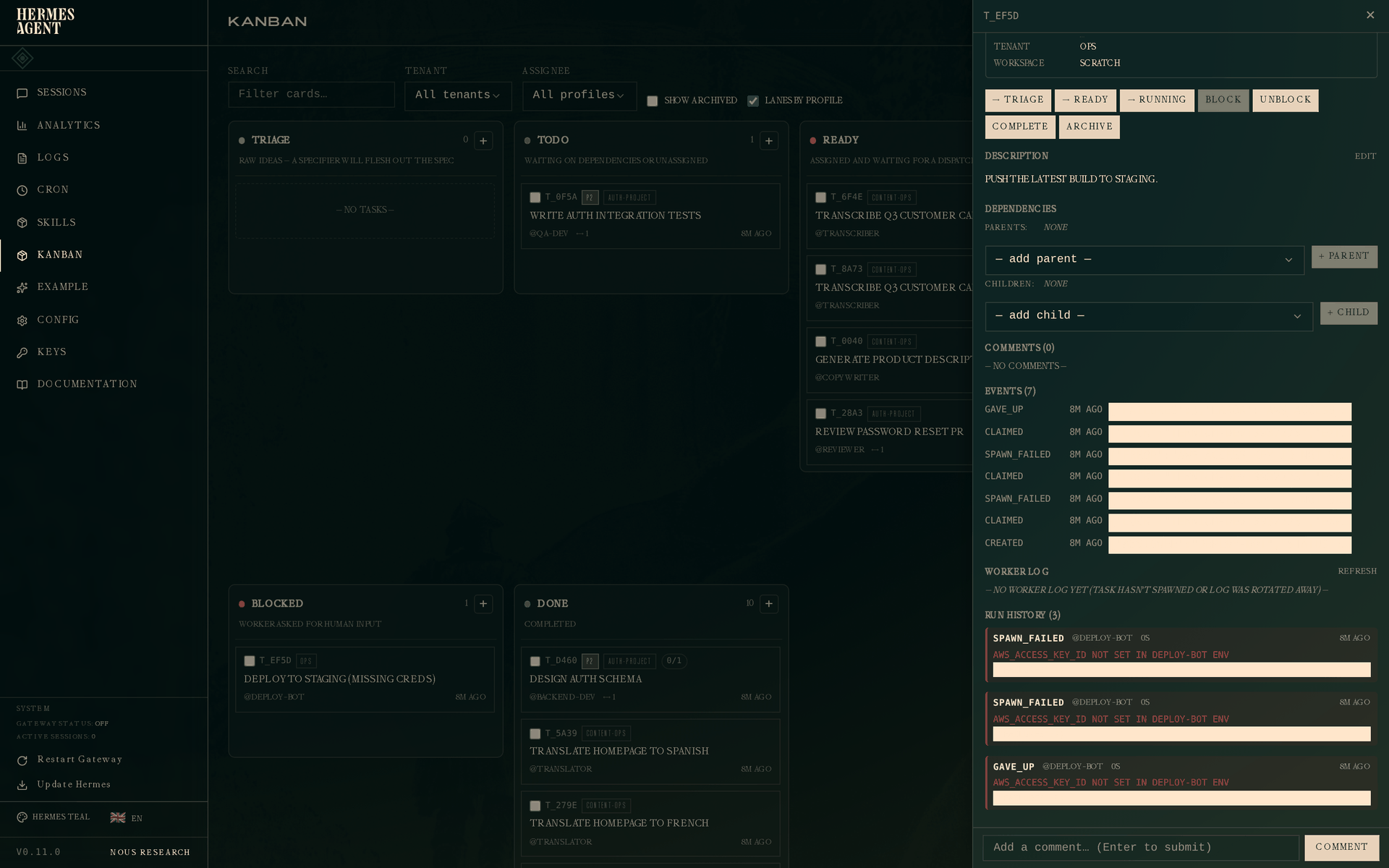
Three runs, all with the same error on the error field. The first two are spawn_failed (retryable), the third is gave_up (terminal). The event log above shows the full sequence: created → claimed → spawn_failed → claimed → spawn_failed → claimed → gave_up.
On the terminal:
hermes kanban runs t_ef5d
# #   OUTCOME        PROFILE        ELAPSED  STARTED
# 1   spawn_failed   deploy-bot          0s  2026-04-27 19:34
#       ! AWS_ACCESS_KEY_ID not set in deploy-bot env
# 2   spawn_failed   deploy-bot          0s  2026-04-27 19:34
#       ! AWS_ACCESS_KEY_ID not set in deploy-bot env
# 3   gave_up        deploy-bot          0s  2026-04-27 19:34
#       ! AWS_ACCESS_KEY_ID not set in deploy-bot env
If Telegram / Discord / Slack is wired in, a gateway notification fires on the gave_up event so you hear about the outage without having to check the board.
Crash recovery — worker dies mid-flight
Sometimes the spawn succeeds but the worker process dies later — segfault, OOM, systemctl stop. The dispatcher polls kill(pid, 0) and detects the dead pid; the claim releases, the task goes back to ready, and the next tick gives it to a fresh worker.
The example in the seed data is a migration that was running out of memory:
# Worker claims, starts scanning 2.4M rows, OOM kills it at ~2.3M
# Dispatcher detects dead pid, releases claim, increments attempt counter
# Retry with a chunked strategy succeeds
The drawer shows the full two-attempt history:
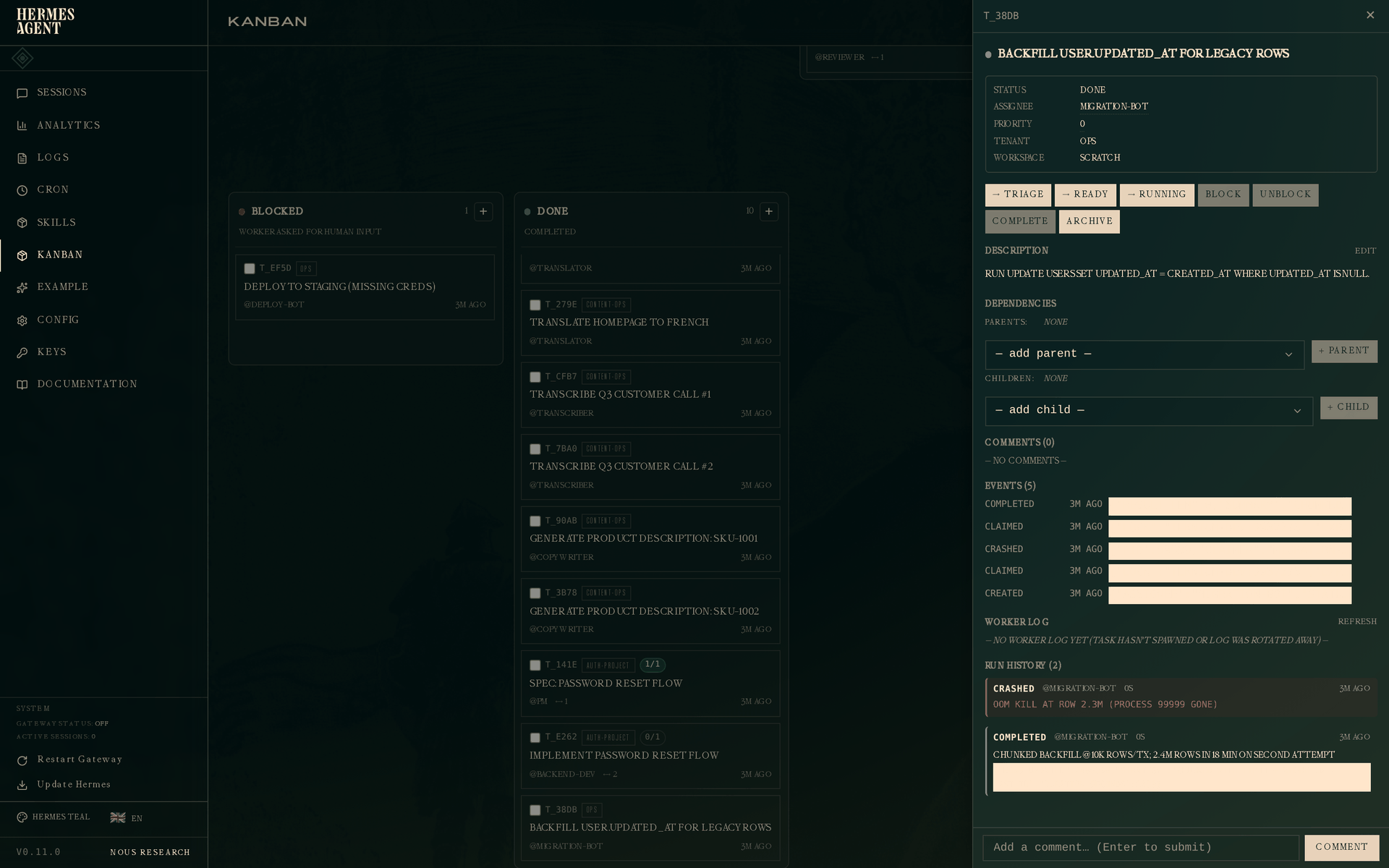
Run 1 — crashed, with the error OOM kill at row 2.3M (process 99999 gone). Run 2 — completed, with "strategy": "chunked with LIMIT + WHERE id > last_id" in its metadata. The retrying worker saw the crash of run 1 in its context and picked a safer strategy; the metadata makes it obvious to a future observer (or postmortem writer) what changed.
Structured handoff — why summary and metadata matter
In every story above, workers called kanban_complete(summary=..., metadata=...) at the end. That's not decoration — it's the primary handoff channel between stages of a workflow.
When a worker on task B is spawned and calls kanban_show(), the worker_context it gets back includes:
- B's prior attempts (previous runs: outcome, summary, error, metadata) so a retrying worker doesn't repeat a failed path.
- Parent task results — for each parent, the most-recent completed run's summary and metadata — so downstream workers see why and how the upstream work was done.
This replaces the "dig through comments and the work output" dance that plagues flat kanban systems. A PM writes acceptance criteria in the spec's metadata, and the engineer's worker sees them structurally in the parent handoff. An engineer records which tests they ran and how many passed, and the reviewer's worker has that list in hand before opening a diff.
The bulk-close guard exists because this data is per-run. hermes kanban complete a b c --summary X (you, from the CLI) is refused — copy-pasting the same summary to three tasks is almost always wrong. Bulk close without the handoff flags still works for the common "I finished a pile of admin tasks" case. The tool surface doesn't expose a bulk variant at all; kanban_complete is always single-task-at-a-time for the same reason.
Follow-up on a done card — CI remediation via the parent link
Story 1's implementation card is done. Two hours later CI fails on the merged branch. Don't reopen the done card — completed cards are history, and their handoff flows forward. Create a remediation card with the done card as its parent:
hermes kanban create "Fix CI: test_backoff_jitter flakes on 3.11" \
    --assignee backend-dev \
    --parent t_impl \
    --workspace worktree --branch wt/ci-fix-backoff \
    --body "CI run #4812 failed after t_impl completed.
FAILED tests/test_retry.py::test_backoff_jitter - TimeoutError
Acceptance: tests/test_retry.py green on 3.11 and 3.12."
Three things make this work:
- Immediate dispatch. Because the parent is already
done, the child is created straight intoready— the dispatcher can claim it on the next tick. (A child of a still-open parent would wait intodo.) - Inherited context. The remediation worker's context includes a Parent task results section carrying
t_impl's completion summary and metadata — the changed files and decisions the original worker recorded — so it knows why the code is shaped the way it is before reading a line of it. - Fresh evidence in the body. The CI log didn't exist when
t_implcompleted, so it can't be in the parent's handoff — it goes in the new card's body, alongside explicit acceptance criteria.
Prefer a fresh worktree/branch for the remediation card. Checking out the original branch gives the worker repo state but none of the rationale — the parent handoff carries that. Same assignee profile is usually right: the profile that wrote the code has the skills to fix it.
Inspecting a task currently running
For completeness — here's the drawer of a task still in flight (the API implementation from Story 1, claimed by backend-dev but not yet complete):
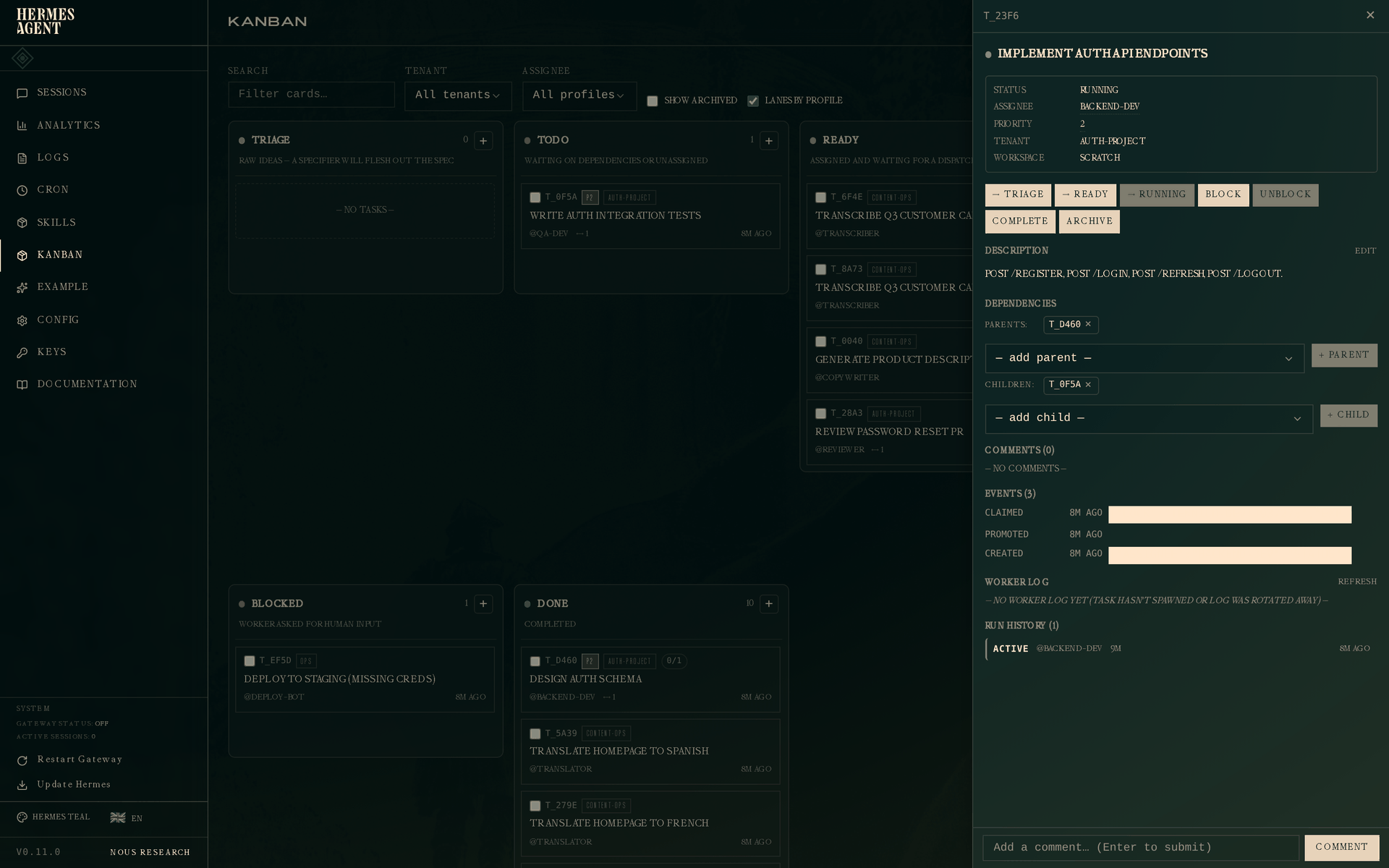
Status is Running. The active run appears in the Run History section with outcome active and no ended_at. If this worker dies or times out, the dispatcher closes this run with the appropriate outcome and opens a new one on the next claim — the attempt row never disappears.
Next steps
- Kanban overview — the full data model, event vocabulary, and CLI reference.
hermes kanban --help— every subcommand, every flag.hermes kanban watch --kinds completed,gave_up,timed_out— live stream terminal events across the whole board.hermes kanban notify-subscribe <task> --platform telegram --chat-id <id>— get a gateway ping when a specific task finishes.