Sessions
Hermes Agent automatically saves every conversation as a session. Sessions enable conversation resume, cross-session search, and full conversation history management.
How Sessions Work
Every conversation — whether from the CLI, Telegram, Discord, Slack, WhatsApp, Signal, Matrix, Teams, or any other messaging platform — is stored as a session with full message history. Sessions are tracked in:
- SQLite database (
~/.hermes/state.db) — structured session metadata with FTS5 full-text search, plus full message history
The SQLite database stores:
- Session ID, source platform, user ID
- Session title (unique, human-readable name)
- Model name and configuration
- System prompt snapshot
- Full message history (role, content, tool calls, tool results)
- Token counts (input/output)
- Timestamps (started_at, ended_at)
- Parent session ID (for compression-triggered session splitting)
Authenticated gateway session access and attribution
The gateway owns execution; a client does not own the running agent. Verified operators of the same gateway profile can attach to canonical local CLI, TUI, or Desktop sessions created through another operator authentication method. For example, a native local operator and an authenticated dashboard operator can access the same conversation without creating another runtime. Closing a client connection detaches that client; accepted work remains with the gateway.
This deliberately replaces creator-only access for verified operators, preserving the dashboard's existing operator permissions. Password and OAuth identities stay distinct but do not create separate access barriers to canonical local sessions when both connections have operator access to the profile. The trusted server paths include native interactive bootstrap, authenticated dashboard tickets, internal credentials used by server-spawned PTY clients, and the verified legacy dashboard token. HTTP session mutations also accept the verified native HTTP owner grant. This does not grant operator permissions to restricted worker, messaging, room, or service credentials, or remove profile and operation-specific checks.
Attribution remains identity-specific. Dashboard identities include the provider, verified OAuth issuer (when present), and subject. Creation receipts retain the original identity; submissions and mutation retries retain the acting identity. An operator joining a session does not replace its recorded owner or merge retry identities. Native bootstrap owner keys and session IDs remain unchanged.
Older remote sessions whose receipts contain only a bare subject cannot establish which provider owned them. They remain stored but are not automatically assigned to the first authenticated account requesting them. Operator access does not permit remote first-claim adoption of unowned historical transcripts.
Cross-device attachment also requires a supported, authenticated route to the same
gateway. Shared operator access does not itself expose a remote listener or add
OpenAI-compatible API continuation of local sessions. A gateway crash is different
from a client disconnect: interrupted work becomes unknown rather than being
automatically replayed, and may need resolution before queued followers proceed.
What Counts Toward Context
Hermes stores session history so it can resume conversations, but it does not keep re-sending every byte it has ever handled. On each turn, the model sees the selected system prompt, the current conversation window, and any content Hermes explicitly injects for that turn.
Media attachments are handled as turn-scoped inputs:
- Images may be attached natively to the next model call, or pre-analyzed into a text description when the active model does not support native vision.
- Audio is transcribed into text when speech-to-text is configured.
- Text documents can have their extracted text included; other document types are usually represented by a saved local path and a short note.
- Attachment paths and extracted/derived text can appear in the transcript, but the raw image, audio, or binary file bytes are not repeatedly copied into future prompts.
For example, if a user sends an image and asks Hermes to make a meme from it, Hermes may inspect that image once with vision and run an image-processing script. Future turns do not automatically carry the original JPEG in context. They carry only whatever was written into the conversation, such as the user's request, a short image description, a local cache path, or the final assistant response.
The most common cause of context growth is not the media file itself. It is verbose text: pasted transcripts, full logs, large tool outputs, long diffs, repeated status reports, and detailed proof dumps. Prefer summaries, file paths, focused excerpts, and tool-backed lookups over copying large artifacts into chat.
Use /compress when a session gets long, /new for a fresh thread, and
hermes sessions prune only when you want to delete old ended sessions from
storage. If state.db has simply grown large, start with the non-destructive
option first: hermes sessions optimize merges FTS5 index segments and
VACUUMs the database without touching any session data. With the gateway running, prune
asks the gateway to delete the sessions it selected. optimize, and prune with no gateway
running, refuse while another Hermes process (Desktop, dashboard, cron) holds state.db. Stop
it first, or pass --force; see Session storage recovery.
Compression reduces the active context; it is not a privacy delete.
Pass a name to /new (e.g. /new payments-refactor) to set the new session's
initial title up front — useful for finding it later with /resume <name> or
in the /sessions picker.
Session Sources
Each session is tagged with its source platform:
| Source | Description |
|---|---|
cli | Interactive CLI (hermes or hermes chat) |
oneshot | Finite non-interactive runs: hermes chat --oneshot -q, -Q, hermes -z, and -q on non-TTY stdio. Hidden from the TUI, Desktop and dashboard session pickers (like kanban and tool), even when launched from inside a TUI or Desktop session — the run inherits that transport's environment but is not that conversation. Still counts as CLI history: hermes -c / --resume latest continue the last one-shot, and hermes sessions list shows it. An explicit --source <tag> always wins (hermes chat -q --source tui is stored as tui). |
telegram | Telegram messenger |
discord | Discord server/DM |
slack | Slack workspace |
whatsapp | WhatsApp messenger |
signal | Signal messenger |
matrix | Matrix rooms and DMs |
mattermost | Mattermost channels |
email | Email (IMAP/SMTP) |
sms | SMS via Twilio |
dingtalk | DingTalk messenger |
feishu | Feishu/Lark messenger |
wecom | WeCom (WeChat Work) |
weixin | Weixin (personal WeChat) |
bluebubbles | Apple iMessage via BlueBubbles macOS server |
qqbot | QQ Bot (Tencent QQ) via Official API v2 |
homeassistant | Home Assistant events (plugin) |
webhook | Incoming webhooks |
api-server | API server requests |
acp | ACP editor integration |
cron | Scheduled cron jobs |
batch | Batch processing runs |
kanban | Kanban dispatcher workers (read on the board, hidden from session pickers) |
tool | Third-party integrations (--source tool), hidden from session pickers |
A session compressed mid-conversation continues under the same source: the compression child of a --source tool or oneshot run is tagged the same way, so it inherits the same picker visibility.
CLI Session Resume
Resume previous conversations from the CLI using --continue or --resume:
Continue Last Session
# Resume the most recent CLI session
hermes --continue
hermes -c

# Or with the chat subcommand
hermes chat --continue
hermes chat -c
This looks up the most recent cli session from the SQLite database and loads its full conversation history.
Per-Terminal Continue
A bare -c is terminal-aware: each CLI session drops a small breadcrumb file under ~/.hermes/terminal-sessions/ keyed by the terminal it runs in (tty device, tmux pane, kitty window, wezterm pane, Zellij pane, Windows Terminal session, ...). When you run hermes -c again in the same terminal, Hermes resumes that terminal's own session — so two panes side by side each continue their own conversation instead of both grabbing the globally most-recent one. If there's no breadcrumb for the terminal (first use, deleted session, or a stale breadcrumb older than 30 days), -c falls back to the most-recent-session behavior. -c "name" and --resume are unaffected. Disable with session.terminal_continue: false in config.yaml.
Resume by Name
If you've given a session a title (see Session Naming below), you can resume it by name:
# Resume a named session
hermes -c "my project"

# If there are lineage variants (my project, my project #2, my project #3),
# this automatically resumes the most recent one
hermes -c "my project"   # → resumes "my project #3"
Resume Specific Session
# Resume a specific session by ID
hermes --resume 20250305_091523_a1b2c3d4
hermes -r 20250305_091523_a1b2c3d4

# Resume by title
hermes --resume "refactoring auth"

# Resume the most recent session — same lookup as -c
hermes --resume latest

# Or with the chat subcommand
hermes chat --resume 20250305_091523_a1b2c3d4
Session IDs are shown when you exit a CLI session, and can be found with hermes sessions list.
latest is a reserved keyword for --resume. A session literally titled "latest" is still reachable by its ID or via -c latest (title match).
Resume in a Specific Directory
Pass --in <dir> to change into a directory before starting or resuming. Combined with --resume latest (or -c), the most recent session for that directory's workspace is picked — no need to cd first or remember session IDs:
# Resume the latest session that belongs to ./my-project
hermes --resume latest --in ./my-project

# Works with the TUI too
hermes --tui --resume latest --in ./my-project
--in also pins the session to that directory: the resumed session's recorded working directory is not restored (as if --no-restore-cwd were passed).
Resume Restores the Working Directory
Resuming a CLI session also cds back into the session's recorded working directory (its git repo root or project dir), so the conversation picks up in the workspace it belonged to. If you'd rather stay where you are, pass --no-restore-cwd:
hermes --resume 20250305_091523_a1b2c3 --no-restore-cwd
A ↪ restored workspace dir: … line confirms the switch. Restore failures never break the resume itself.
Resuming an idle session picks up the profile's current config: toolsets, MCP servers, terminal settings, max_turns, checkpoints and the default reasoning effort. The session keeps its model, its launch flags and any /reasoning or workspace change you made. Any difference starts a new prompt-cache prefix, so the first turn after the resume costs more. A change to the terminal settings, even an unrelated one like terminal.timeout, also resets an earlier cd to the session's directory.
Filtering Sessions by Workspace
hermes sessions list accepts --workspace <needle> to show only sessions whose workspace key (git repo root, else cwd) matches — by path substring or exact directory basename:
hermes sessions list --workspace my-project
hermes sessions list --workspace ~/code/hermes-agent
Conversation Recap on Resume
When you resume a session, Hermes displays a compact recap of the previous conversation in a styled panel before the input prompt:
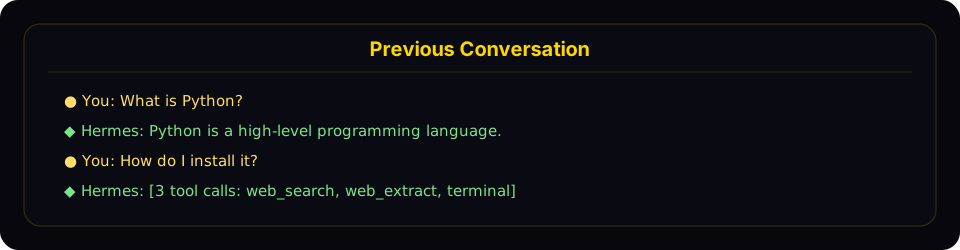
Resume mode shows a compact recap panel with recent user and assistant turns before returning you to the live prompt.
The recap:
- Shows user messages (gold
●) and assistant responses (green◆) - Truncates long messages (300 chars for user, 200 chars / 3 lines for assistant)
- Collapses tool calls to a count with tool names (e.g.,
[3 tool calls: terminal, web_search]) - Hides system messages, tool results, and internal reasoning
- Caps at the last 10 exchanges with a "... N earlier messages ..." indicator
- Uses dim styling to distinguish from the active conversation
To disable the recap and keep the minimal one-liner behavior, set in ~/.hermes/config.yaml:
display:
  resume_display: minimal   # default: full
Session IDs follow the format YYYYMMDD_HHMMSS_<hex> — CLI/TUI sessions use a 6-char hex suffix (e.g. 20250305_091523_a1b2c3), gateway sessions use an 8-char suffix (e.g. 20250305_091523_a1b2c3d4). You can resume by ID (full or unique prefix) or by title — both work with -c and -r.
Cross-Platform Handoff
Use /handoff <platform> from a CLI session to transfer the live conversation to a messaging platform's home channel. The agent picks up exactly where the CLI left off — same session id, full role-aware transcript, tool calls and all.
# Inside a CLI session
/handoff telegram
What happens:
-
The CLI validates that
<platform>is enabled and has a home channel set (run/sethomefrom the destination chat once to configure it). -
The CLI marks the session pending and block-polls the gateway. It refuses if the agent is mid-turn — wait for the current response to finish first.
-
The gateway watcher claims the handoff and asks the destination adapter for a fresh thread:
- Telegram — opens a new forum topic (DM topics if the bot owner has enabled Threaded Mode via BotFather, or a forum supergroup topic).
- Discord — creates a 1440-min auto-archive thread under the home text channel.
- Slack — posts a seed message and uses its
tsas the thread anchor. - Matrix — posts a seed message and uses its event id as the thread root (
m.threadrelation). - WhatsApp / Signal / SMS — no native threads, falls back to the home channel directly.
-
The gateway re-binds the destination key to your existing CLI session id, then forges a synthetic user turn asking the agent to confirm and summarize. The reply lands in the new thread.
-
When the gateway acknowledges success, the CLI prints a
/resumehint and exits cleanly:↻ Handoff complete. The session is now active on telegram.Resume it on this CLI later with: /resume my-session-title -
From that point, the conversation lives on the platform. Reply in the new thread — anyone authorized in that channel shares the same session, and any later real user message in the thread joins seamlessly because thread sessions key without
user_id.
Resume back to CLI: when you want to come back to a desktop, just run /resume <title> (or hermes -r "<title>" from the shell) and pick up where the platform left off.
Failure modes:
- No home channel configured → CLI refuses with a
/sethomehint. - Gateway not running (nothing ever claims the request) → CLI times out at 60s with a clear message and your CLI session stays intact.
- Slow transfer: once the gateway claims the handoff it replays your full session through a real agent turn, which can take a few minutes on long sessions. The CLI shows "Still transferring..." heartbeats and waits up to 15 minutes — it never misreports a slow transfer as "gateway not running".
- Thread creation fails (permissions, topics-mode off) → falls back to the home channel directly and still completes; no thread isolation but the handoff itself works.
adapter.sendfails (rate limit, transient API error) → handoff marked failed with the reason; the row clears so you can retry.
Limitation worth knowing: for non-thread-capable platforms with multi-user group home channels, the synthetic turn keys as a DM-style session. This works for self-DM home channels (the typical setup) but isn't ideal for genuinely shared group chats. Threading covers Telegram / Discord / Slack / Matrix — by far the common case — so most setups never hit this.
Session Naming
Give sessions human-readable titles so you can find and resume them easily.
Auto-Generated Titles
Hermes automatically generates a short descriptive title (3–7 words) for each session after the first exchange. This runs in a background thread using a fast auxiliary model, so it adds no latency. You'll see auto-generated titles when browsing sessions with hermes sessions list or hermes sessions browse.
Auto-titling only fires once per session and is skipped if you've already set a title manually.
Setting a Title Manually
Use the /title slash command inside any chat session (CLI or gateway):
/title my research project
The title is applied immediately. If the session hasn't been created in the database yet (e.g., you run /title before sending your first message), it's queued and applied once the session starts.
You can also rename existing sessions from the command line:
hermes sessions rename 20250305_091523_a1b2c3d4 "refactoring auth module"
Title Rules
- Unique — no two sessions can share the same title
- Max 100 characters — keeps listing output clean
- Sanitized — control characters, zero-width chars, and RTL overrides are stripped automatically
- Normal Unicode is fine — emoji, CJK, accented characters all work
Auto-Lineage on Compression
When a session's context is compressed (manually via /compress or automatically), Hermes creates a new continuation session. If the original had a title, the new session automatically gets a numbered title:
"my project" → "my project #2" → "my project #3"
When you resume by name (hermes -c "my project"), it automatically picks the most recent session in the lineage.
/title in Messaging Platforms
The /title command works in all gateway platforms (Telegram, Discord, Slack, WhatsApp):
/title My Research— set the session title/title— show the current title
Session Management Commands
Hermes provides a full set of session management commands via hermes sessions:
List Sessions
# List recent sessions (default: last 20)
hermes sessions list

# Filter by platform
hermes sessions list --source telegram

# Show more sessions
hermes sessions list --limit 50
When more sessions exist than --limit allows, the listing ends with a … more not shown (use --limit N to see more) footer, so a capped page is never mistaken for the full list.
When sessions have titles, the output shows titles, previews, and relative timestamps:
Title                  Preview                                  Last Active   ID
────────────────────────────────────────────────────────────────────────────────────────────────
refactoring auth       Help me refactor the auth module please   2h ago        20250305_091523_a
my project #3          Can you check the test failures?          yesterday     20250304_143022_e
—                      What's the weather in Las Vegas?          3d ago        20250303_101500_f
When no sessions have titles, a simpler format is used:
Preview                                            Last Active   Src    ID
──────────────────────────────────────────────────────────────────────────────────────
Help me refactor the auth module please             2h ago        cli    20250305_091523_a
What's the weather in Las Vegas?                    3d ago        tele   20250303_101500_f
Export Sessions
hermes sessions export is one surface for every export format, selected with --format:
| Format | Output | Use it for |
|---|---|---|
jsonl (default) | one JSON object per session | backups, machine round-trip |
md / qmd | one Markdown/Quarto file per session + manifest | readable archives, notes |
html | single self-contained page (sidebar for multi-session) | sharing, browsing |
trace | Claude Code JSONL | HF Agent Trace Viewer, --upload |
Plus --only user-prompts for a prompts-only view (jsonl or md).
All formats share the same selection knobs: --session-id for one session, or the full prune/archive filter set for bulk — --older-than / --newer-than / --before / --after (durations like 5h/2d/1w, bare days, or ISO timestamps), --source, --title, --model, --provider, --cwd, --min/--max-messages, --min/--max-tokens, --min/--max-cost, --min/--max-tool-calls, --user, --chat-id, --chat-type, --branch, --end-reason. --dry-run previews the match set without writing. --redact scrubs secrets (API keys, tokens, credentials) from exported content on any format — recommended for anything you plan to share. Note: bulk filters match ended sessions; unfiltered export dumps everything, including active ones.
JSONL (default)
# Export all sessions to a JSONL file
hermes sessions export backup.jsonl

# Export sessions from a specific platform
hermes sessions export telegram-history.jsonl --source telegram

# Export a single session
hermes sessions export session.jsonl --session-id 20250305_091523_a1b2c3d4

# Point at a directory (existing, or ending in /) and the file is named for you:
# ~/exports/hermes_session_20250305_091523_a1b2c3d4.jsonl
hermes sessions export ~/exports/ --session-id 20250305_091523_a1b2c3d4

# Redact API keys/tokens/credentials from the exported content
hermes sessions export backup.jsonl --redact
Exported files contain one JSON object per line with full session metadata and every stored message, each with its active/compacted flags. That includes turns archived by in-place compaction and messages removed by rewind or edit. Importing the file (the dashboard's session import) restores those rows as archived history, not as live model context. A /save json snapshot (CLI, messaging, TUI, or Desktop) holds the same rows. Treat a backup as holding everything the session ever contained. To share a conversation, export a display format (--format md or html, which holds only the history the session shows) with --redact. Each session's backup is built in memory, so a session with more stored rows than sessions.max_export_messages is refused (see Oversized-Transcript Guards).
Filtered exports include matching pinned and archived sessions. Pinning protects a session from pruning, rather than excluding it from a backup. If an explicit --session-id cannot be resolved, export exits with a non-zero status and creates no output file.
Each record also carries a timings block derived from the message timestamps, so a reader of an export attached to a bug report can tell a single long model gap from many small tool round-trips without reconstructing it by hand. It holds only ids, roles, counts and durations — wall_clock_ms, largest_gap_ms, role_counts, tool_calls_emitted and per-message intervals — never prompt text, tool arguments or results, so it survives --redact unchanged. Hermes does not persist a model/tool stopwatch, so complete is always false; when a session has no timestamped messages, available is false and unavailable_reason says why. The block is rebuilt on every export and ignored (and not counted toward size limits) on import.
HTML
--format html writes a single self-contained HTML file — no remote dependencies — with styled message bubbles, collapsible tool output, and (for multi-session exports) a sidebar to switch between sessions:
# One session as a standalone HTML page
hermes sessions export --format html --session-id 20250305_091523_a1b2c3d4 transcript.html

# All Telegram sessions from the last week in one file, secrets redacted
hermes sessions export --format html --newer-than 1w --source telegram --redact archive.html
Prompts Only
--only user-prompts exports just the prompts you wrote — no assistant replies, tool output, or system context. Useful for building prompt libraries or reviewing what you asked:
# One JSONL record per prompt (session id, index, timestamp, text)
hermes sessions export prompts.jsonl --session-id 20250305_091523_a1b2c3d4 --only user-prompts

# Markdown, straight to stdout
hermes sessions export - --session-id 20250305_091523_a1b2c3d4 --only user-prompts --format md
Works with --format jsonl (default) or md, honors the same filters for bulk export, and combines with --redact.
Traces (HF Agent Trace Viewer)
--format trace emits Claude Code JSONL — the transcript shape the Hugging Face Hub auto-detects for its Agent Trace Viewer. Write it locally, or add --upload to push it to your own private hermes-traces dataset (reads HF_TOKEN):
# Trace of the most recent session, to stdout
hermes sessions export --format trace

# One session to a local trace file
hermes sessions export --format trace --session-id 20250305_091523_a1b2c3d4 trace.jsonl

# Upload straight to your private HF traces dataset
hermes sessions export --format trace --session-id 20250305_091523_a1b2c3d4 --upload
Trace exports are secret-redacted by default (they're meant to leave the machine); --no-redact opts out after manual review. --upload is private unless --public. Bulk trace export with filters writes one <id>.trace.jsonl per session.
Markdown / QMD
Pass --format md or --format qmd when you want a readable, file-based archive before hiding or deleting old sessions. Markdown/QMD exports write one file per session into a directory (default: ~/.hermes/session-exports).
# Export one session to Markdown
hermes sessions export --format md --session-id 20250305_091523_a1b2c3d4

# Export a compression lineage as one logical document
hermes sessions export --format md --session-id 20250305_091523_a1b2c3d4 --lineage logical

# Preview ended sessions older than 90 days without writing files
hermes sessions export --format md --older-than 90 --dry-run

# Export ended Telegram sessions older than 2 weeks to QMD files
hermes sessions export --format qmd --older-than 2w --source telegram

# Export long Claude sessions, secrets redacted
hermes sessions export --format md --model sonnet --min-messages 50 --redact

# Only after verification, export and delete one explicitly named session
hermes sessions export --format md --session-id 20250305_091523_a1b2c3d4 --delete-after-verified --yes
Markdown/QMD export writes one .md or .qmd file per exported session plus a manifest.jsonl with the file path, message count, lineage ids, and SHA-256. Bulk export requires at least one filter; a bare bulk export is refused. --delete-after-verified is intentionally limited to --session-id and requires --yes. Because deleting a parent session also removes its delegate/subagent sessions, this mode exports and verifies each delegate in a separate file before deleting anything. Markdown/QMD files hold the full history shown by the session, including turns archived by in-place compaction. Deletion compares that exact display transcript and the delegate set again inside the same database transaction that performs the delete; any intervening append, rewrite, rewind, compaction, or delegate change refuses deletion. The same display-history rule applies to --format html, --only user-prompts (with either Markdown or JSONL output), and /save md|html. Full-session JSON/JSONL exports (hermes sessions export without --only) and /save json (CLI, messaging, TUI, Desktop) are backups of every stored row, archived rows included (see Export Sessions). --redact scrubs secrets (API keys, tokens, credentials) from message content and tool output before writing — recommended for any export you plan to share.
Delete a Session
# Delete a specific session (with confirmation)
hermes sessions delete 20250305_091523_a1b2c3d4

# Delete without confirmation
hermes sessions delete 20250305_091523_a1b2c3d4 --yes
Deleting a session that is still open in a running chat does not stop that chat: its next save recreates the session under the same id with the full in-memory transcript. Close the chat first if you want the session gone.
Deleting a session while a turn is actively executing or compressing is refused (exits with code 1) to prevent transcript loss under the live agent. Wait for the active turn or compression to complete before deleting.
Rename a Session
# Set or change a session's title
hermes sessions rename 20250305_091523_a1b2c3d4 "debugging auth flow"

# Multi-word titles don't need quotes in the CLI
hermes sessions rename 20250305_091523_a1b2c3d4 debugging auth flow
If the title is already in use by another session, an error is shown.
Discard a Turn Lost in a Gateway Crash
If the gateway stops in the middle of a turn, that turn's outcome is unknown and it is never replayed. It blocks
the session until you acknowledge it. Interactive hermes chat --resume <id> lists it and accepts
/discard <admission_id>. A scripted hermes chat --resume <id> -q refuses with exit code 3 and submits nothing.
To clear it from a script:
# Acknowledge every unknown (lost) turn on the session, then continue it
hermes sessions discard 20250305_091523_a1b2c3d4 --yes
hermes chat --resume 20250305_091523_a1b2c3d4 -q "next question"

# Only one specific admission (repeatable); the session may also be named by title
hermes sessions discard "debugging auth flow" --admission a9b59ad3ee914d75967def2a33435c88 --yes
Without --yes the command asks for confirmation, and it refuses (exit code 2) when stdin is not a terminal.
The lost input stays in the transcript. Some of its actions may already have run, so check their effects before
you resend it. Inputs queued behind it run once it is discarded.
Pin a Session
Pinning sets a durable "keep" flag: pinned sessions are exempt from the
sessions.auto_archive stale sweep and always appear in listings. It is the
same flag the Desktop sidebar's Pinned section uses — pin from either surface
and both see it.
Restoring a session export (the dashboard import, or a profile adopting a
stranded session) keeps the pinned, archived and hidden flags, and whether an
archive came from the sessions.auto_archive sweep. A restored pinned session
stays exempt from retention cleanup, an adopted Bot Mode chat stays hidden, and
a restored sweep archive still comes back when you resume it. Exports that
predate these flags restore as ordinary, unpinned, visible sessions.
# Pin one or more sessions (unique ID prefixes work)
hermes sessions pin 20250305_091523_a1b2c3d4
hermes sessions pin 20250305 20250306

# Remove the pin
hermes sessions unpin 20250305_091523_a1b2c3d4

# List pinned sessions
hermes sessions pinned

# Machine-readable output, e.g. for a nightly backup of your pin set
hermes sessions pinned --json > pinned-sessions.json
Prune Old Sessions
# Delete ended sessions inactive for 90 days (default)
hermes sessions prune

# Custom age threshold — bare numbers are days
hermes sessions prune --older-than 30

# Durations work too: 5h, 30m, 2d, 1w
hermes sessions prune --older-than 12h

# Delete only a specific time window (e.g. a batch of test sessions
# created in the last 5 hours)
hermes sessions prune --newer-than 5h

# Explicit window with absolute timestamps
hermes sessions prune --after "2026-07-05 09:00" --before "2026-07-05 14:30"

# Only prune sessions from a specific platform (all ages — any filter
# disables the implicit 90-day default)
hermes sessions prune --source telegram
hermes sessions prune --source cron --older-than 60   # add a time flag to narrow

# More filters — all AND together
hermes sessions prune --newer-than 5h --title "smoke test"   # title substring
hermes sessions prune --older-than 30 --max-messages 3        # tiny sessions
hermes sessions prune --cwd ~/scratch --end-reason done       # by cwd / end reason
hermes sessions prune --model gpt-5 --older-than 1w           # by model (substring)
hermes sessions prune --provider openrouter --older-than 60   # by billing provider
hermes sessions prune --branch feature/old-experiment         # by git branch
hermes sessions prune --user 12345678 --chat-type group       # by messaging origin
hermes sessions prune --max-tokens 500 --older-than 7         # by token usage
hermes sessions prune --max-cost 0.01 --max-tool-calls 0      # cheap, tool-less runs

# Preview what would be deleted, without deleting anything
hermes sessions prune --newer-than 5h --dry-run

# Skip confirmation
hermes sessions prune --older-than 30 --yes
Time values (--older-than, --newer-than, --before, --after) accept a
duration (5h, 30m, 2d, 1w), a bare number of days, or an ISO
timestamp (2026-07-05, 2026-07-05 14:30). --older-than/--before set
the upper bound; --newer-than/--after set the lower bound. The
--older-than/--newer-than pair uses last activity — the freshest of live
activity, latest message, or session start — while --before/--after
explicitly use session start time. Combine either pair for a window.
Attribute filters: --source (platform, exact), --title / --model /
--branch (case-insensitive substring), --provider (billing provider,
exact), --end-reason, --user, --chat-id, --chat-type (exact),
--cwd (path prefix), plus numeric bounds --min/--max-messages,
--min/--max-tokens (input+output), --min/--max-cost (USD, actual falling
back to estimated), and --min/--max-tool-calls. Using any filter disables
the implicit 90-day default, so hermes sessions prune --source cron or
--model gpt-4o matches all ages — add a time flag to narrow it. Only a
completely bare hermes sessions prune keeps the 90-day cutoff. Every
non---yes run shows the match count plus the oldest and newest matching
session before asking for confirmation.
Archived sessions are skipped by default; pass --include-archived to
delete them too.
Pruning only deletes ended sessions (sessions that have been explicitly ended or auto-reset). Active sessions are never pruned. A conversation that compression split into several sessions is pruned as a unit: its older segments stay while any later segment does.
Bulk-Archive Sessions
If you want sessions out of your listings without deleting anything,
hermes sessions archive takes the same filters as prune but soft-hides
matching sessions instead (sets the same archived flag as archiving a single
session from the Desktop/Dashboard UI — messages and search stay intact):
# Archive everything from the last 5 hours (e.g. 75 CI smoke-test sessions)
hermes sessions archive --newer-than 5h

# Archive by title substring, preview first
hermes sessions archive --title "dry run" --dry-run
hermes sessions archive --title "dry run" --yes
Archive matches ended sessions by default. Desktop and other gateway-owned
local sessions are never "ended", so the command tells you how many matching
sessions it skipped as still open; add --include-open to archive them too
(prune never deletes open sessions):
hermes sessions archive --title "Review Hermes" --include-open --yes
At least one filter is required — a bare hermes sessions archive refuses to
archive your entire history. A compacted conversation is archived as a unit
through its live tip: an old compression segment never matches on its own age,
so a chat that is still active is never hidden because its history is long.
Archived sessions are hidden from
hermes sessions list and /resume but remain in the database and can be
unarchived from the Desktop/Dashboard session list.
A chat hidden by the sessions.auto_archive idle sweep comes back on its own
once it is live again — when it is resumed, or when new activity compresses it
into a fresh continuation. A chat you archived yourself (sidebar, API, or
hermes sessions archive) stays archived until you unarchive it.
Session Statistics
hermes sessions stats
Output:
Total sessions: 142
Total messages: 3847
  cli: 89 sessions
  telegram: 38 sessions
  discord: 15 sessions
Database size: 12.4 MB
For deeper analytics — token usage, cost estimates, tool breakdown, and activity patterns — use hermes insights.
Repair Stranded Gateway Sessions
If a gateway conversation ever "jumps back in time" after a restart — resuming a days-old topic as though recent messages never happened — the live conversation may be stranded in a session row that lost its routing identity (the damage class fixed in the v0.21 session-continuity work; current versions prevent it by construction and self-heal at runtime).
hermes sessions repair-routing finds message-bearing session rows with no
routing identity and re-attaches each one to the conversation it continues —
but only when the evidence is unambiguous:
# Report only — shows each orphan, the proposed adoption, and the evidence
hermes sessions repair-routing

# Perform the adoptions (stop the gateway first — a running gateway holds
# the old routing in memory and would write it back over the repair)
hermes sessions repair-routing --apply

# Widen/narrow the contiguity window (default 900 seconds)
hermes sessions repair-routing --max-gap-seconds 300
Evidence rules:
- lineage — the orphan's
parent_session_idpoints at a keyed row of the same platform (a recorded fact; no time window applies) - contiguity — exactly one keyed row of the same platform fell quiet within the window of the orphan's start
Anything ambiguous (two candidate predecessors, two orphans claiming the same
predecessor) is reported with a reason and left untouched — a wrong adoption
would splice one conversation into another chat. The superseded row is retired
under superseded_by_repair, so restart recovery can never resurrect it.
Repair is deliberately not automatic: if the chat has since built up a
second history, choosing which thread it continues is your call. The stranded
conversation stays readable via /resume and session search either way —
routing is the only thing the repair changes. Back up first
(cp ~/.hermes/state.db ~/.hermes/state.db.bak).
Repair Degraded Stored Prompts
Older builds affected by #122822 could let gateway hygiene or gateway /compress
persist a detached maintenance agent's reduced-toolset system prompt over the
live session. After the root fix in PR #122825 is installed, use
hermes sessions repair-prompts to find rows that were already degraded.
The scan is conservative: it only proposes a repair when the stored prompt is
missing the ## Skill Safety guidance and the persisted tools[] pin
contains skill_manage (which always emits that guidance). Rows with no
readable pin, or with a memory-only pin (which is also a legitimate
toolsets: [memory] setup), are reported as unverifiable and are not
changed by this scan; clear them explicitly by SESSION_ID if needed. A
memory-only row also becomes repairable on its own: once the session is resumed, its
tools[] pin re-pins the full tool surface, after which a scan sees
skill_manage without the Skill Safety guidance and clears it.
# Report verified candidates and unverifiable rows; writes nothing
hermes sessions repair-prompts

# Clear verified degraded prompts after confirmation
hermes sessions repair-prompts --apply

# Machine-readable report
hermes sessions repair-prompts --json

# Non-interactive automation: apply and report the ids actually cleared
hermes sessions repair-prompts --apply --json

# Explicit destructive override for one session (id or unique prefix).
# This clears the stored prompt even when it is healthy.
hermes sessions repair-prompts SESSION_ID --apply
Clearing the prompt intentionally stores NULL; the next turn rebuilds and persists healthy bytes,
which causes one expected
Stored system prompt ... is null; rebuilding from scratch warning for each
repaired session. That warning is the consequence of this explicit repair, not
evidence of a new corruption.
Run the repair only after the #122822 root fix is present; otherwise a later maintenance compaction can degrade the row again.
A running gateway keeps each cached session's old prompt in memory, so restart
the gateway after --apply (hermes gateway restart) for repaired rows to
take effect.
Repair State Crossed Between Profiles
Every profile owns one state.db, and every gateway session key names the
profile that owns the conversation (agent:main:… for the default profile,
agent:<name>:… for a named one). Older releases could leave the two
disagreeing — a named profile's rows written into the default store, a child
session inheriting from another profile's row, a routing row copied into the
wrong store, a Telegram topic or /voice setting saved without the bot's
profile. Current versions put new state in the right place; hermes sessions repair-profiles settles what is already crossed.
# Report only — every store is scanned, nothing is written
hermes sessions repair-profiles

# Perform the repairs (stop the gateway first; a snapshot of every store is taken)
hermes sessions repair-profiles --apply

# Machine-readable report
hermes sessions repair-profiles --json
What it finds and does:
| Finding | Repair |
|---|---|
profile_name disagrees with the row's own session key | relabel from the key |
| rows sitting in another profile's store | move (with all messages) to the owning profile's store |
parent_session_id pointing at another profile's row | sever the link; the row's own identity is kept |
| routing rows outside the default store (under multiplexing) | move to the default store; an existing row there wins |
routing rows / sessions.json entries for a profile that no longer exists | delete |
| Telegram topic bindings and voice-mode entries missing their bot's profile | relabel from the sessions that hold the chat |
Two cases are reported but never repaired without being told what they are:
rows keyed to a profile that does not exist (create the profile, or
hermes profile migrate-identity <old> <new>), and agent:main:… rows inside
a named profile's store. The latter are either the history of a gateway that
used to run standalone for that profile (--legacy-main rekey gives them the
profile's namespace) or default-profile chats that leaked in under a scoped
write (--legacy-main move sends them to the default store) — the rows
themselves cannot tell the two apart.
--apply refuses while a gateway owns any of the stores (it holds the routing
index in memory and would write it back), and is safe to re-run: a second run
finds nothing.
Convert the Store Between WAL and DELETE Journal Mode
database.journal_mode: delete only applies to databases Hermes creates. An
existing state.db that is already in WAL mode is never live-downgraded at
open — other gateway, dashboard or cron processes may hold uncheckpointed WAL
commits, and a downgrade underneath them destroys those commits — so Hermes
keeps WAL and logs one ERROR per process telling you the configured delete
did not apply. The self-service conversion is:
# stop every process using the profile's store first (gateway, dashboard, CLIs, cron)
hermes sessions set-journal-mode delete     # WAL -> rollback journal
hermes sessions set-journal-mode wal        # back to WAL
hermes sessions set-journal-mode delete --db ~/.hermes/kanban.db   # another Hermes store
The command refuses — naming each PID and command — while any process still
holds the file or its -wal/-shm sidecars, switches the mode without
waiting out openers (a holder that appears mid-way makes SQLite refuse instead
of racing it), and verifies the file header reports the new mode. It reminds
you to set database.journal_mode to the same value when the config disagrees,
because the next open re-applies the configured mode. The holder scan is local
(open-file tables on Linux/macOS, the Restart Manager on Windows), so it
cannot see a process in another container or VM sharing the volume. If the
scan itself fails the command refuses because it cannot prove the store is
quiet; --force waives only that case after you have stopped every Hermes
process yourself — a process the scan does find is always refused. Enabling
WAL is also refused when the store sits on a cross-VM filesystem (virtiofs/9p),
where WAL shared memory corrupts silently.
Importing Sessions from Claude Code and Codex CLI
Started a conversation in another agent CLI? You can pull it into Hermes and
continue it here. Hermes reads Claude Code's session logs
(~/.claude/projects/, or $CLAUDE_CONFIG_DIR/projects/ when Claude Code's
config dir is relocated) and Codex CLI's rollouts (~/.codex/sessions/, or
$CODEX_HOME/sessions/) — the foreign files are only read, never modified.
# Interactive picker across both tools, newest first
hermes sessions import

# Limit to one tool, or point at a specific file
hermes sessions import --from claude
hermes sessions import --from codex ~/.codex/sessions/2026/08/15/rollout-....jsonl

# Import-and-resume in one step
hermes --resume @claude
hermes --resume @codex
hermes sessions import creates a new Hermes session titled
Imported from Claude Code: <first user message> (or Codex CLI) and prints
the id plus a ready-to-paste hermes --resume <id> command.
--resume @claude / --resume @codex show the same picker and drop you
straight into the imported conversation.
Hermes Desktop has the same importer in the command palette (Import session). It lists the logs on the machine the connected backend runs on — not the computer running the app — shows a read-only preview, and Continue in Hermes copies the conversation into the selected profile. Browsing never writes to your session store, importing never touches the source file, and importing the same log twice opens the existing copy instead of making another.
What carries over: the ordered user/assistant conversation, with tool
activity condensed to short [ran tool: …] notes inside assistant turns.
System prompts, injected context, reasoning traces, and raw tool output are
left behind — the import is a clean transcript, not a byte-for-byte replay.
Session Search Tool
The agent has a built-in session_search tool that performs full-text search across all past conversations using SQLite's FTS5 engine — and lets the agent scroll through any session it finds. It makes no LLM calls and returns views of actual messages from the DB rather than generating summaries.
Four calling shapes
The tool infers what you want from which arguments you set. There's no mode parameter.
1. Discovery — pass query:
session_search(query="auth refactor", limit=3)
Runs FTS5, dedupes hits by session lineage, and returns the top N sessions. Discovery uses adaptive detail by default: the highest-ranked result includes its full context window and bookends, while lower-ranked results stay compact. Pass detail="full" to fully hydrate every result.
Each result carries:
session_id,title,when,sourcesnippet— FTS5-highlighted match excerptdetail—fullorcompactbookend_start/bookend_end— first/last 3 user+assistant messages for full results; empty lists for compact resultsmessages— ±5 messages around the FTS5 match for full results; only the flagged anchor message for compact resultsmatch_message_id,messages_before,messages_after
The top result reconstructs goal → match → resolution immediately. If another compact result looks more promising, use its session and message IDs with the scroll shape. Typical wall time is tens of milliseconds on a real session DB.
2. Scroll — pass session_id + around_message_id:
session_search(session_id="20260510_174648_805cc2", around_message_id=590803, window=10)
Returns a window of ±window messages centered on the anchor. No FTS5, no bookends — just the slice. Use after a discovery call when you need more context than the ±5 default window.
- To scroll forward: pass
messages[-1].idback asaround_message_id - To scroll backward: pass
messages[0].idback asaround_message_id - The boundary message appears in both windows as an orientation marker
- When
messages_beforeormessages_afteris less thanwindow, you're at the start or end of the session
Typical wall time: 1–2ms per scroll call.
3. Read — pass session_id without an anchor:
session_search(session_id="20260510_174648_805cc2")
Returns the whole session, or a bounded head/tail view for large sessions. This shape is also used to resolve an @session:<profile>/<id> link.
4. Browse — no args:
session_search()
Returns recent sessions chronologically (titles, previews, timestamps). Useful when the user asks "what was I working on" without naming a topic.
FTS5 query syntax
The keyword mode supports standard FTS5 query syntax:
- Simple keywords:
docker deployment(FTS5 defaults to AND) - Phrases:
"exact phrase" - Boolean:
docker OR kubernetes,python NOT java - Prefix:
deploy*
Optional parameters
sort—newestoroldest, on top of FTS5 ranking. Omit for relevance-only ordering (the default; suitable for exploratory recall). Usenewestfor "where did we leave X" questions,oldestfor "how did X start" questions.detail—adaptive(default) fully hydrates only the top discovery result;fullhydrates every discovery result.role_filter— comma-separated roles to include. Discovery defaults touser,assistant(tool output is usually noise). Passuser,assistant,toolto include tool output (debugging tool behaviour) ortoolto search tool output only.
When It's Used
The agent is prompted to use session search automatically:
"When the user references something from a past conversation or you suspect relevant prior context exists, use session_search to recall it before asking them to repeat themselves."
Typical triggers: "we did this before", "remember when", "last time", "as I mentioned", or any reference to a project/person/concept that isn't in the current window.
Per-Platform Session Tracking
Gateway Sessions
On messaging platforms, sessions are keyed by a deterministic session key built from the message source:
| Chat Type | Default Key Format | Behavior |
|---|---|---|
| Telegram DM | agent:main:telegram:dm:<chat_id> | One session per DM chat |
| Discord DM | agent:main:discord:dm:<chat_id> | One session per DM chat |
| WhatsApp DM | agent:main:whatsapp:dm:<canonical_identifier> | One session per DM user (LID/phone aliases collapse to one identity when mapping exists) |
| Group chat | agent:main:<platform>:group:<chat_id>:<user_id> | Per-user inside the group when the platform exposes a user ID |
| Group thread/topic | agent:main:<platform>:group:<chat_id>:<thread_id> | Shared session for all thread participants (default). Per-user with thread_sessions_per_user: true. |
| Channel | agent:main:<platform>:channel:<chat_id>:<user_id> | Per-user inside the channel when the platform exposes a user ID |
When Hermes cannot get a participant identifier for a shared chat, it falls back to one shared session for that room.
Shared vs Isolated Group Sessions
By default, Hermes uses group_sessions_per_user: true in config.yaml. That means:
- Alice and Bob can both talk to Hermes in the same Discord channel without sharing transcript history
- one user's long tool-heavy task does not pollute another user's context window
- a running turn is keyed to the sender that started it, but
/stopstill reaches it — see below
/stop means "stop what is running in this chat": it first tries the caller's own session key,
then any live turn in this chat — other participants' runs in the caller's own thread included —
authorization-gated, and never another room, workspace or profile. So an idle Alice's /stop can
end a turn Bob (or a bot) started in the room she is in. A /stop sent from inside a thread is
narrower: it reaches runs belonging to that thread and a room-wide run that carries no thread slot
(the rolling-DM shape), but never another thread of the same channel and never a peer's per-sender
top-level run.
If you want one shared "room brain" instead, set:
group_sessions_per_user: false
That reverts groups/channels to a single shared session per room, which preserves shared conversational context but also shares token costs, interrupt state, and context growth.
Session continuity
Gateway conversations do not reset after inactivity or at a daily boundary. Use /new
or /reset for an explicit new conversation; context compression remains automatic.
Core ignores legacy session_reset settings, reset-policy overrides and reset-timer
environment variables. If your config still sets session_reset.mode to idle, daily
or both, gateway startup and hermes doctor warn about it. To keep time-based resets,
install the catalog plugin that reads the same block unchanged:
hermes plugins install hermes-session-reset-policy. Cached agents may be released to reclaim resources without
replacing the durable conversation. Restart-recovery freshness limits automatic
continuation, not the history loaded when you send a message.
/new moves only the view that ran it. One session can be open in several
places at once — a Desktop window, the TUI, a hermes chat --resume terminal, an
ACP editor, a Telegram topic — all attached to the same live conversation on the
gateway. Running /new (or /reset) in one of them creates a fresh session and
rebinds that window or chat route to it. The other viewers stay on the original
session, its history is untouched, and a turn already running there keeps running.
Ending or clearing the shared conversation is a separate, explicit action (Stop, then
/new; or a delete, which is refused while a turn is live).
Session hygiene: why you should still run /new
Because gateway conversations never expire on their own, it is easy to run one session for weeks. That works, but it quietly defeats the learning loop and inflates costs:
- Memory only pays off at boundaries.
MEMORY.md/USER.mdare injected at session start, andsession_searchexists to recall what fell out of context. In a never-ending session everything is still in context, so the agent has no reason to consult memory — the "self-learning" machinery barely runs. Memory distillation (the save before reset) also only happens when a session actually ends. - Cost grows with history. Compression keeps a long session functional, but every turn still carries a large (compacted) prefix. A fresh session with distilled memory is almost always cheaper than a month-old thread.
Practical rule: end a session when you finish a task or topic. Run /new
(optionally named, e.g. /new payments-refactor) at natural stopping points —
daily or per-project both work. Before the reset, ask the agent to "remember
anything worth keeping" if the work surfaced durable preferences or
procedures; it saves memories and skills from the expiring session
automatically, but an explicit nudge helps. Restarting the machine or the
gateway is not a boundary — the same session resumes.
See Memory for what gets carried across boundaries.
Continuity After Crashes and Restarts
A gateway chat is designed to be one continuous session — compacted
repeatedly as it grows — until you explicitly run /new (or /reset). This
holds across gateway crashes, restarts, and updates:
- Session identity (routing key, chat, origin) is written atomically when
the session row is created, on every creation path (
/new, first message,/branchchildren). If that write ever fails, the very next turn's routing refresh repairs the row automatically. - After a restart, the gateway re-resolves each chat to the session with the most recent actual activity — an older, stale row can never win over the conversation you were actually having.
- Recovery respects
/newboundaries: if the most recent event for a chat is an intentional reset, recovery starts fresh rather than reaching behind the reset to resurrect an older session. Elapsed time alone never prevents recovery of a durable conversation.
Storage Locations
| What | Path | Description |
|---|---|---|
| SQLite database | ~/.hermes/state.db | All session metadata + messages with FTS5 |
| Gateway messages | ~/.hermes/state.db | SQLite — canonical store for all session messages |
| Gateway routing index | gateway_routing table in ~/.hermes/state.db | Maps session keys to active session IDs (origin metadata, expiry flags) |
| Legacy routing mirror | ~/.hermes/sessions/sessions.json | Backward-compat mirror of the routing index, written when gateway.write_sessions_json: true (the default) |
The SQLite database uses WAL mode for concurrent readers and a single writer, which suits the gateway's multi-platform architecture well.
sessions.json is not the session listThe gateway routing index lives in the gateway_routing table inside
state.db; ~/.hermes/sessions/sessions.json is a legacy mirror of it,
kept for backward compatibility (disable with
gateway.write_sessions_json: false). It maps messaging session keys
(agent:main:<platform>:...) to active session IDs.
It only ever contains gateway/messaging entries, so if you run a messaging
platform you'll see only those (e.g. agent:main:whatsapp:dm:...).
This is expected and does not mean your CLI sessions are missing.
hermes sessions list, /sessions, and the dashboard all read state.db,
which holds every session (CLI, TUI, and gateway). The /save snapshots
under ~/.hermes/sessions/saved/*.json are convenience exports, not the index.
If CLI sessions genuinely don't appear in hermes sessions list, the cause is
state.db not receiving them — run hermes sessions repair and watch for a
⚠ Session store unavailable warning at CLI startup, which means SQLite
persistence failed for that run.
Sessions created before state.db became canonical may have leftover
*.jsonl files in ~/.hermes/sessions/. They are no longer written or
read by Hermes. Safe to delete after verifying the corresponding session
exists in state.db.
Database Schema
Key tables in state.db:
- sessions — session metadata (id, source, user_id, model, title, timestamps, token counts). Titles have a unique index (NULL titles allowed, only non-NULL must be unique).
- messages — full message history (role, content, tool_calls, tool_name, token_count)
- messages_fts — FTS5 virtual table for full-text search across message content
Session Expiry and Cleanup
Automatic Cleanup
- Gateway conversations persist across inactivity; use
/newor/resetfor an explicit boundary - Before reset, the agent saves memories and skills from the expiring session
- Auto-pruning (off by default; opt in): when
sessions.auto_pruneistrue, ended sessions inactive forsessions.retention_days(default 90) are pruned at CLI/gateway/cron startup - Low-disk prompt. While your
config.yamlhas nosessions.auto_prunekey, Hermes checks the disk holdingstate.dbat session start (two filesystem calls, no measurable cost). When that disk is low (under 2 GB free, or under 10% free with less than 20 GB left) it asks once: the classic CLI asks at startup (the first low-disk launch only measures, in the background, and the question appears from the next launch on, so startup never waits on the database), the TUI and Desktop show a notice, and a gateway posts the question to its home channel. The prompt estimates how much history a prune would delete (weighted by stored bytes, so many small old messages don't overstate it) and says plainly when pruning will not fix the disk (no session older thanretention_days, or the history is a small share of the full disk). Deleted history frees space insidestate.db; the automaticVACUUMbelow rarely triggers after a single prune, so runhermes sessions optimizeto give the space back to the disk. Answer with/autoprune on,/autoprune off(keep everything; never asked again) or/autoprune later(reminded in a week);/autoprunealone shows the current state sessions.retention_daysmust be a whole number of days>= 0. A negative value (or a missing one) is rejected: startup maintenance logs a warning naming the allowed range and skips the sweep instead of treating the future cutoff as "everything" —sessions.auto_prune: falseis the switch that disables pruning- After a prune that actually removed rows,
state.dbisVACUUMed to reclaim disk space only when both gates pass: at leastsessions.min_vacuum_interval_days(default 30) have elapsed since the last successfulVACUUM, and more than 25% of the file's pages are reclaimable (PRAGMA freelist_count / page_count). A dense database never pays for a full rewrite to reclaim a few MB (SQLite does not shrink the file on plain DELETE) - Pruning runs at most once per
sessions.min_interval_hours(default 24); the last-run timestamp is tracked insidestate.dbitself so it's shared across every Hermes process in the sameHERMES_HOME
Without pruning, state.db grows without bound — multi-GB files within weeks were reported on gateway + cron installs. To bound it, turn it on in ~/.hermes/config.yaml (or answer /autoprune on):
sessions:
  auto_prune: true          # default is false — true deletes ended sessions past retention_days
  retention_days: 90        # keep ended sessions active within this window
  vacuum_after_prune: true  # reclaim disk space after a pruning sweep
  min_vacuum_interval_days: 30 # don't rewrite the DB more often than this
  min_interval_hours: 24    # don't re-run the sweep more often than this
Installs that set any of these keys explicitly keep their values; only unset keys follow the defaults.
Only ended sessions are ever deleted. Active sessions are never auto-pruned, regardless of age. Ended sessions are aged from their last activity — the freshest of live activity, latest message, or session start — so a long-lived conversation used recently is not deleted merely because it began before the retention window. The same holds for a conversation that compression split into several sessions: its older segments are kept while any later segment is, and are pruned together with it once the whole conversation qualifies.
Stale open sessions from automation. Some producers — cron jobs, kanban
workers, subagents, one-shot CLI runs — can die without ever marking their
session ended, and pruning only deletes ended rows. To keep those from
accumulating forever, each auto-prune pass also closes open sessions from
those state-owned sources (cli, cron, kanban, acp, api_server,
subagent, tool, plus the recovered placeholders that
hermes sessions recover synthesizes for orphaned messages) whose last
activity is older than retention_days
(end_reason: startup_orphan_reap). Closing is non-destructive — the
session stays resumable — and the row is aged from its close, so it is only
deleted by a later pass after a further full retention window. Messaging
platform sessions (Telegram, Discord, …), TUI/desktop sessions, pinned
sessions, and sessions with a live turn or compression in progress are
never closed by this sweep.
Oversized-Transcript Guards
Two limits stop a runaway transcript from being loaded into memory all at once
(both default to 20000 messages; 0 disables the guard):
sessions:
  max_resume_messages: 20000   # interactive resume (CLI / TUI / Desktop)
  max_export_messages: 20000   # one-shot in-memory export of a single session
max_export_messages applies per session to the JSON/JSONL backup (hermes sessions export,
sessions export in hermes console, and /save json in the CLI, messaging, TUI and Desktop). It counts every stored row, archived included, because
the backup holds all of them. A heavily compacted session with a small live tail can still exceed it.
The dashboard Sessions page's Export action streams the rows instead and is not capped.
max_resume_messages bounds what the resume actually loads, not the whole
history of the conversation:
- A plain interactive resume (CLI
--resume, the TUI) materializes the full compression lineage — every compacted segment plus the live tip — so it is bounded across the lineage. - Desktop's cold resume pages the transcript over REST and only holds the live tip segment in memory, so it is bounded by the tip alone. A long-lived chat that has been compacted many times (dozens of segments, tens of thousands of archived rows behind a small tip) is exactly what compression is meant to produce and opens normally; its footer message count reflects the stored lineage, not the live prompt.
When a resume is refused the client receives error code 4130 with the count
and the scope it was measured against (across its lineage or
in its tip segment). A TUI/Desktop /save refused by max_export_messages returns error code 4131.
hermes sessions export still works for such sessions; its JSON/JSONL
backup needs each session to stay under max_export_messages.
Manual Cleanup
# Prune sessions older than 90 days
hermes sessions prune

# Delete a specific session
hermes sessions delete <session_id>

# Export before pruning (backup)
hermes sessions export backup.jsonl
hermes sessions prune --older-than 30 --yes
Auto-prune is off by default, and Hermes asks you once when the disk holding state.db runs low (see Automatic Cleanup above). When on, ended sessions inactive for sessions.retention_days (default 90) are removed at startup and active sessions are never touched. Session history powers session_search recall across past conversations, so the choice is yours: /autoprune on|off, or sessions.auto_prune in config.yaml. With auto-prune off, hermes sessions prune remains available for one-off cleanup (observed failure mode without any pruning: a 384 MB state.db with ~1000 sessions slowing down FTS5 inserts and /resume listing).