Cadence
A local usage page for Hermes Desktop and Hermes Web. It shows a year heatmap, streaks, model mix, and where you used Hermes.
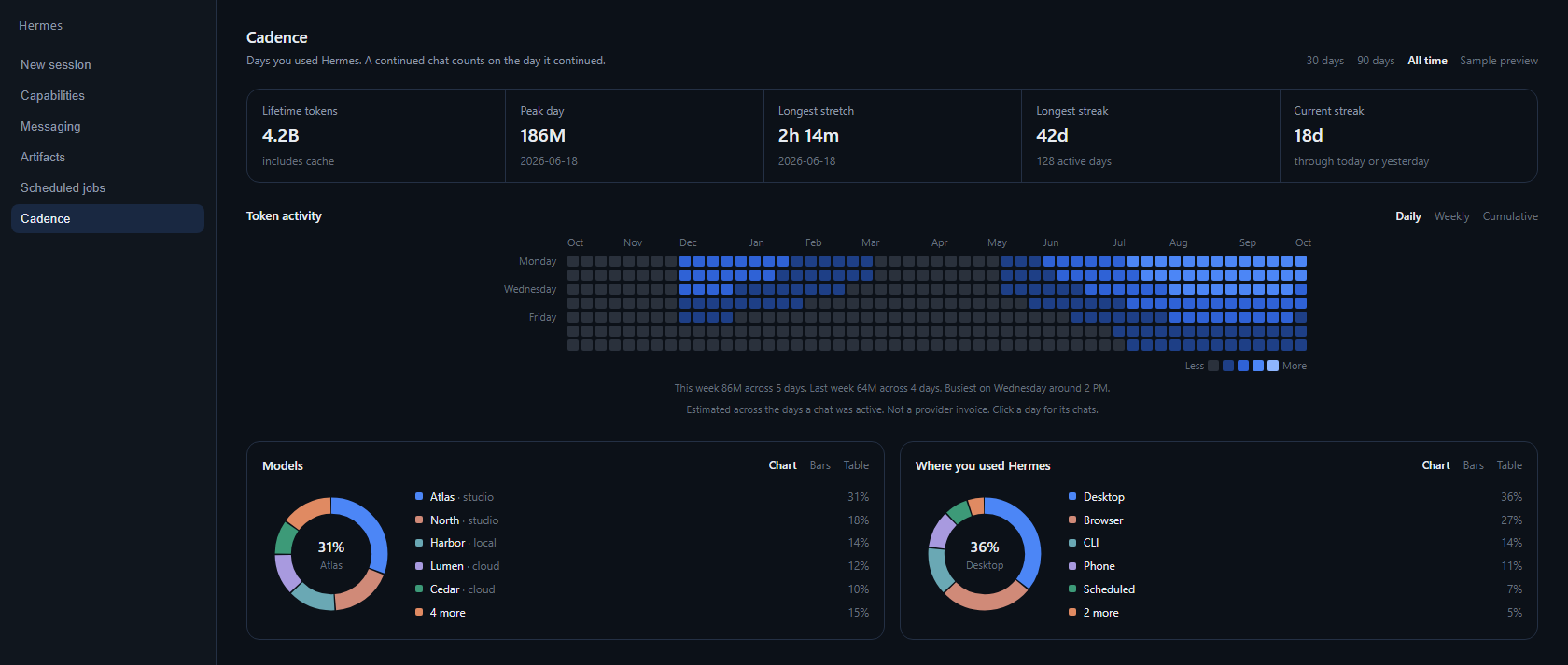
The picture uses sample numbers, not a real account.
What it shows
- Current streak and longest streak, counted on days a chat was actually used
- A year heatmap with Monday, Wednesday, and Friday labels
- 30 day, 90 day, and all time ranges for tokens, peak day, models, and places
- This week against last week
- Busiest weekday and hour
- Chart, bars, or table for models and places
- Click a day to see the chats from that day
A continued chat counts on the day it continued. A model switch inside one chat is counted on each model. Cron and other automated sources do not keep a personal streak. Token totals are estimated across the days a chat was active. They are not a provider invoice.
Privacy
Cadence reads the selected profile's state.db in SQLite read-only mode. The desktop page asks Hermes to run cadence summary through the local cli.exec route. Nothing is uploaded. There are no network calls, no secrets, and no telemetry.
Install
After the catalog listing is merged:
hermes plugins install cadence
hermes plugins enable cadence
Then turn on the Cadence desktop page in Settings, then Plugins. It appears in the sidebar and in the command palette as Open Cadence.
Commands
hermes cadence summary --json
hermes cadence day 2026-01-15 --json
/cadence in a Hermes session prints the current streak.
Requirements
Hermes Agent >=0.21.7. Python comes with Hermes. No extra packages.
License
MIT. See LICENSE.