
Hermes.Crew
You ask once. A coordinator owns the card until its proof passes.







Website · Watch the 53 s film · Install · Reference
Crew is a plugin for Hermes Agent that turns one chat message into verified work on the Hermes kanban board.
/crew launch the Pro plan: pricing page, Stripe checkout, launch post and email
Crew asks only what it needs to deliver a good result (five questions at most, often none), writes a card contract - goal, artifact, where it lands, done when, a proof command, a token budget - and hands the card to a coordinator that owns it until the proof command exits 0. You get the verified result back in the same chat, or one concrete question when it truly needs you.
Why
| One ask | /crew <ask> is the only thing you type. Normal chat stays untouched. |
| Up to six cards in parallel | One ask fans out into independent cards, one writer each. |
| Done means proven | A card cannot be marked done until its proof command passes - enforced by a tool guard, in every profile. |
| An owner for every card | The coordinator heals, retries, rescopes or splits a stuck card, and asks you only when it needs you. |
| Hard budgets | Every card carries a token budget; a run that reaches it stops instead of burning on. |
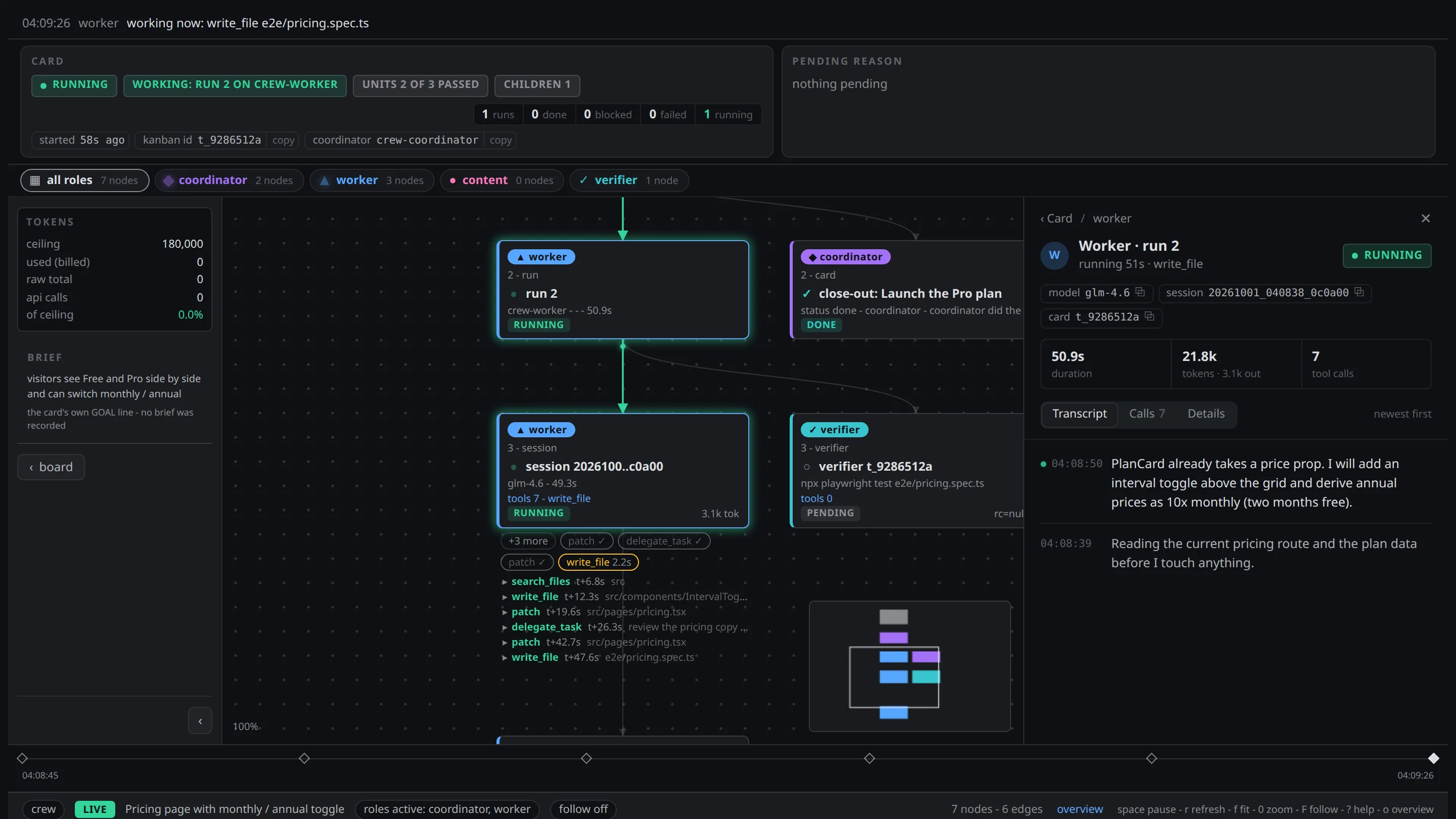
| See everything | A local dashboard shows every card, run, session, tool call and verdict, live. |
| Self-hosted | Runs inside your own Hermes, on your own machine. No telemetry. |
Install
Requires Hermes Agent with the kanban board, and Python 3.11+.
# 1. get the plugin
hermes plugins install macd2/Crew

# 2. set it up for your chat profile (role profiles, the dashboard service)
python3 ~/.hermes/plugins/crew/install.py --profile NAME

# 3. check it
python3 ~/.hermes/plugins/crew/install.py --check --profile NAME
hermes -p NAME plugins doctor crew
NAME is the profile you chat with (default if you do not use profiles). Running the installer twice
changes nothing; --check is a dry run that prints exactly what would change. The installer never asks
anything and never approves a shell hook for you.
What install.py changes
By default:
- Role profiles. Creates
crew-coordinator,crew-worker,crew-contentandcrew-verifierwithhermes profile create --clone-from NAME. Hermes has no partial clone, so each role profile gets a copy of your profile'sconfig.yaml(including itshooks:), its whole.env(provider keys),SOUL.md, skills and memories (MEMORY.md,USER.md); Hermes strips the messaging channels. Then, in each role profile:- sets the keys from
templates/profiles/<role>/settings.confwithhermes config set. Models are Anthropic's, andmodel.base_urlis pinned tohttps://api.anthropic.com: edit the template before installing to use your own; - replaces
SOUL.mdwith the role's persona (only while it is still the shipped one); - deletes every skill that is not crew's, printing each path. This only happens in a role profile crew
created (it carries
crew/template-shipped.json); - installs the plugin, skills and roles file, and runs
plugins enable crew --no-allow-tool-override.
- sets the keys from
- Your profile. Copies the plugin (with its
scripts/) to<profile>/plugins/crew/, the skills toskills/crew/and the roles file toroles/crew/; setscrew.roles_pathandcrew.source_dir; records the owner profile in~/.hermes/crew/owner.json. - Other profiles that already have crew. Each is updated to the same version (plugin, skills, roles), and every update is printed. Profiles without crew are not touched.
- Old copies. Deletes the crew scripts earlier versions put in
<profile>/scripts/, only the files crew shipped, printing each one, and retires the old self-heal and observer cron jobs. - Dashboard. Writes and starts the user service
crew-graph-http(Restart=always), bound to127.0.0.1:8799(--graph-port N).--no-serviceskips it.
Only when you ask for it:
| Flag | What it adds |
|---|---|
--nightly-proofs |
A Hermes cron job at 03:00 that runs the proof suite and speaks only on a failure, plus the shim <profile>/scripts/crew_proofs.sh (Hermes cron runs scripts from there only). Output stays local unless --proofs-deliver TARGET. |
--chat-kanban |
Enables the kanban toolset on the zulip and telegram platforms of your profile. |
--telegram-menu |
Puts the crew commands first in your Telegram command menu. |
--spill-cap |
Sets hooks.output_spill.max_chars on your profile, so the /crew intake reads its brief in one tool call. |
--publish |
Serves the dashboard on your tailnet with tailscale serve (tailnet only, never the internet). Only one tailnet login gets in (--publish-user LOGIN, or the tailnet's single human login; otherwise it refuses), plus devices with a tag from --publish-tag (a tagged device carries no login). |
The installer reports shell hooks your profiles declare but you have not approved. It never approves them:
review them with hermes -p P hooks list and confirm them at Hermes's own prompt.
Use
| Command | What it does |
|---|---|
/crew <ask> |
The intake: asks what is missing, writes the contract, opens the card(s). |
| (reply to a crew report) | Answer the card-ended message crew posts into your chat with "rework it" and the intake runs for a follow-up card, no /crew retyped (your next message only, within 30 min). |
/crew-status |
Cards in flight, the coordinator's last decision, any question for you. No model call. |
/crew-graph <card|latest> |
One card's flow graph in the terminal (--watch N, --html). No model call. |
/crew-stop [<card>] |
Park one card, or every open crew card: worker killed, card held with its history, nothing archived. --archive <card> drops one for good. No model call. |
/crew-unstuck <card> |
Put a card the coordinator gave up on, or one you parked with /crew-stop, back in the queue (out of triage unchanged, or unblocked). No model call. |
/crew-safety [brave|safe] |
Show or set how careful unattended proof commands are (see below). No model call. |
/crew-proof <card> <yes|brave> |
Answer a card's proof question: yes accepts a proposed proof command, brave runs a blocked one. No model call. |
/crew-diagnose [state] |
Read-only: every card in that state, why it is there and how it would resume. |
Or paste this into an agent and let it set crew up for you:
Set up Hermes.Crew for my Hermes profile NAME: from the Hermes.Crew package run python3 install.py --profile NAME,
then hermes -p NAME plugins doctor crew and fix anything it reports. Finish by sending /crew-status in my chat
and tell me what it answered.
Lessons
What agents learn on a card lives in <base home>/crew/lessons.md, one dated line per lesson with the roles it
applies to. It is never shipped and the installer and crew_parity_check leave it alone. Agents record a lesson
with python3 "$HERMES_HOME/plugins/crew/scripts/crew_card.py" lesson --role content,verifier --text "..."
(identical lessons are stored once; the newest 50 entries / 8 KB are kept); editing a crew skill with
skill_manage is refused in every profile, because an installed skill is overwritten by the next install. The
The plugin adds a role's lessons (and the all ones) to that role's turn, and the all ones to /crew's intake.
An agent may not write --role all lessons (that is the owner's intake channel); it tags its own role and the
owner promotes it. To make a lesson permanent, move it into the matching skills/*/SKILL.md in a release and delete it from the file.
Proof safety
A proof command is a shell command, and crew runs it unattended. When the intake shows you the proof, it asks once:
Proof commands run unattended. How careful should crew be?

  1) Hermes safety (default): a flagged command (rm, chmod, a download piped into a shell, ...)
     stops the card and asks you.
  2) Be brave 🫡 (YOLO): nothing stops a proof except Hermes's hardline list
     (wiping the root, formatting a disk, fork bombs). Crew will happily rm what the proof says.
     Your call, your disk.
- The command you confirm is the only one that runs. It is saved when the card opens. Editing the card, or a coordinator rescope, cannot change it; a new proof needs your yes again.
- Hermes decides what is dangerous. Crew uses Hermes's own checks: the hardline list and your
approvals.denyrules always block; in safe mode Hermes's dangerous-command and tirith checks block too. If the proof you are confirming would be flagged, the card opens in safe mode and the coordinator asks you; answer/crew-proof <card> braveto run it for that card. The intake's ownProof mode/Proof approvedbody lines are ignored for a flagged command, so a model cannot approve it on your behalf. - Proofs run with a clean environment. Provider and tool keys are stripped, the same way Hermes's terminal tool does it.
/crew-safety bravestops the question for good. It sets Hermes'sapprovals.mode: offin the crew role profiles, which also lets the workers' own terminal commands run unprompted./crew-safety safeputs back the value each profile had before.
Proof scripts are model-written (by the verifier role, never by the writer). The command that runs them is owner-confirmed; the script runs with a scrubbed environment, is bound by hash after its first run, and changes only through a coordinator decision carried out by the verifier. Hermes's command checks see the command, not the script's content.
Reports
Crew reports back into the chat a card came from, through Hermes's own hermes send (any platform Hermes is
connected to), and only when there is something to say: one report when a card is done, one message per new
question for you, one line if a card is abandoned. Blocks, retries and heals the coordinator is handling stay
silent.
How a card travels
you ──/crew──▶ intake ──contract──▶ coordinator ──▶ writer (worker | content) ──▶ proof ──▶ verifier ──▶ you
                (asks what is        (owns the card,    (one per card,            (exit 0 is    (runs the proof
                 missing, once)       every stop gets    inside the scope)         the only      itself, never
                                      one decision)                                pass)         trusts a summary)
The full design - the contract fields, the close rule, verification modes, the coordinator's decisions, the dashboard and the role profiles - is in REFERENCE.md.
Configuration
Everything works with no configuration. Optional environment variables:
| Variable | Default | Meaning |
|---|---|---|
CREW_OWNER_PROFILE |
the profile install.py was run for |
the chat profile cards are opened from and reported to |
CREW_DASHBOARD_URL |
http://127.0.0.1:8799 (or the --publish URL) |
the board link used in messages |
Uninstall
hermes plugins disable crew && hermes plugins remove crew
systemctl --user disable --now crew-graph-http.service
The role profiles stay until you remove them (hermes profile delete crew-worker, ...). With
--nightly-proofs, also remove the cron job (hermes cron list, hermes cron remove <id>) and
<profile>/scripts/crew_proofs.sh.
License
Apache-2.0 © macd2