Hermes Duty Board
See what's waiting on you across every Hermes conversation, in one live dashboard tab.
If you run Hermes Agent in Discord, Telegram or Feishu, the work spreads across dozens of threads. It gets easy to miss things:
- the agent asked you something two days ago and is still waiting;
- you sent a message and no reply ever came;
- a background job finished after the original thread had moved on;
- a cron job has been failing quietly since Tuesday.
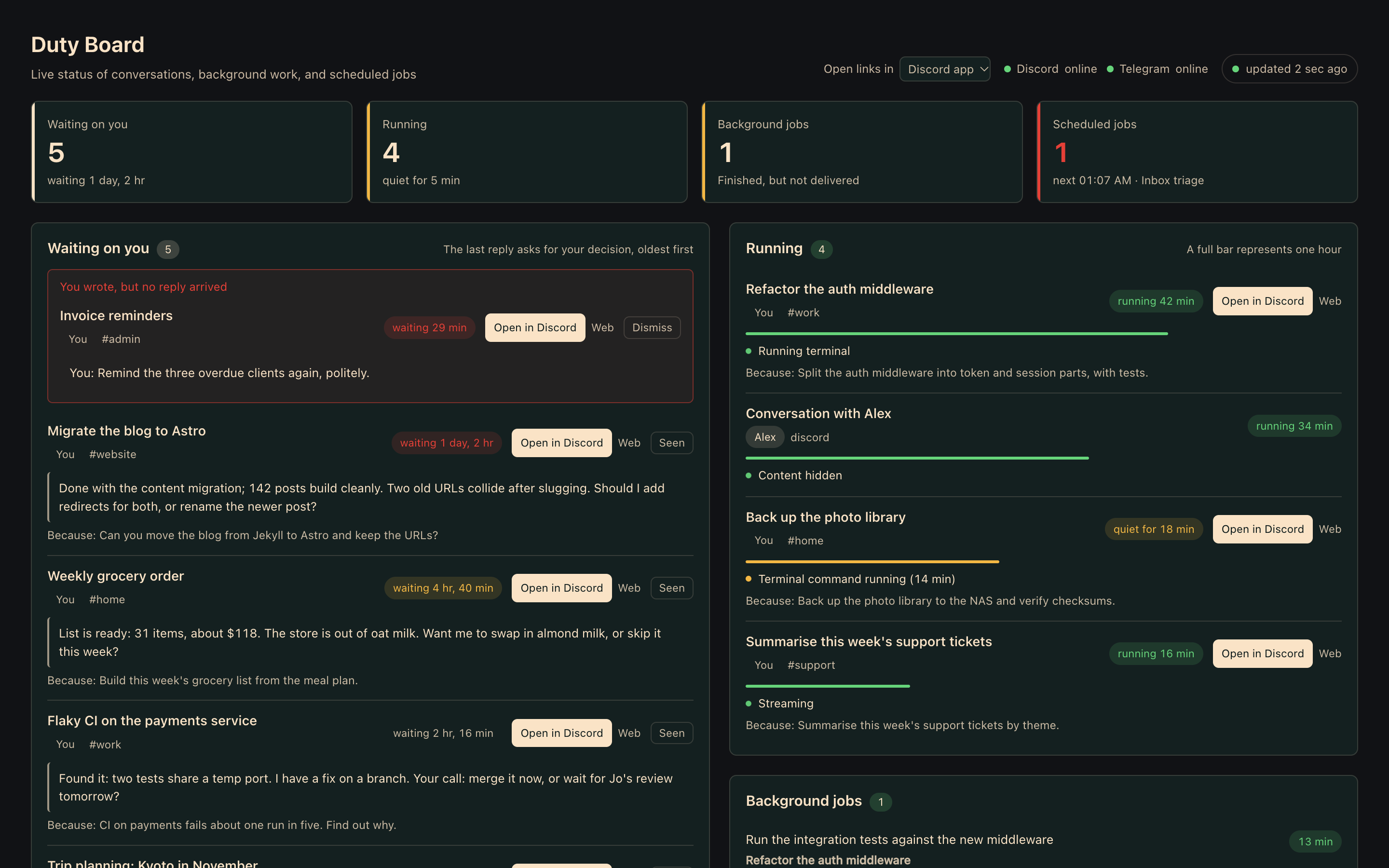
Duty Board puts all of it on one page that refreshes every five seconds. Each conversation has a button that takes you straight back into it.
What it shows
| Section | What you see |
|---|---|
| Waiting on you | Conversations whose last reply asks you a question or waits for your decision, oldest first, with what was asked and what started it. |
| You wrote, but no reply arrived | Conversations where you wrote last and no turn is running. These usually point to a dropped message. Shown at the top of Waiting on you. |
| Running | Turns in progress right now: elapsed time, what the agent is doing ("calling a model", "running terminal"), and a warning when a turn has gone quiet for 10 minutes. |
| Background jobs | Running delegate_task work. Also lists finished delegations whose result could not be delivered because the parent session was switched. |
| Scheduled jobs | Cron jobs that errored, failed delivery, are paused or overdue, plus a timeline of what runs next. |
| Recently completed | Replies from the last 24 hours that are reports rather than questions. Flags any reply that promised to come back later. |
| Standing goals | Active and paused /goals with turn budget and the judge's last reason. |
Jump straight in. Cards in Waiting on you and Running have an Open in Discord button. It opens that thread in the Discord desktop app through discord://, scrolled to your message when the ID is known. A switch in the header lets you open links in the browser instead.
Clear it when done. Seen hides a card until that conversation gets a new message.
Requirements
- Hermes Agent 0.21.1 or newer with the web dashboard (
hermes dashboard). - Covers Discord, Telegram, Slack, WhatsApp, Signal, Matrix, Mattermost, Feishu, DingTalk, WeCom, Weixin, QQ, BlueBubbles, email and SMS sessions by default (
messaging_sourceschanges the list). Jump buttons are Discord-only for now; other platforms show their conversations without one.
Install
hermes plugins install xiaoyaner0201/hermes-duty-board
hermes plugins enable duty-board
Then restart the dashboard so it mounts the plugin's API routes:
hermes dashboard --stop && hermes dashboard
Open the dashboard. A Duty Board tab appears before Sessions.
Configuration
Everything is optional. To change the defaults, create ~/.hermes/duty-board/settings.json (or <HERMES_HOME>/duty-board/settings.json):
{
  "owner": "123456789012345678",
  "hide_other_people_content": true,
  "people": { "123456789012345678": "Me", "234567890123456789": "Alex" },
  "window_days": 7,
  "stall_seconds": 600
}
| Key | Default | Meaning |
|---|---|---|
owner |
unset | Platform user ID whose conversations count as yours. If unset, every conversation counts and nothing is hidden. Also settable via DUTY_BOARD_OWNER. |
hide_other_people_content |
true |
When owner is set, other people's conversations are left out of Waiting on you and Recently completed. Their running turns and background jobs show only as "Conversation with …", with no content and no link. |
people |
{} |
Display labels for user IDs. Without one, the platform user name is shown. |
window_days |
7 |
How far back to look for conversations. |
stall_seconds |
600 |
How long a running turn can be silent before it is flagged. |
unanswered_grace_seconds |
180 |
How long your last message can go unanswered before it is listed as You wrote, but no reply arrived. |
recent_done_hours |
24 |
Window for Recently completed. |
goal_lookback_days |
14 |
Older goals are counted, not listed. |
messaging_sources |
see above | Hermes session sources to include, e.g. ["discord", "telegram"]. |
Shared threads. Hermes shares one session per thread by default, so several people can talk in it. When Hermes recorded who sent the latest message, the board attributes the conversation to that person. Otherwise it attributes it to whoever started the thread. Either way, everything shown from a shared thread is already visible to everyone in that thread. Direct messages and per-user group sessions are never mixed.
How "waiting on you" is decided
The plugin calls no model. It reads only the last one or two meaningful lines of the final reply, skipping attachments, links and footnotes. It looks for a question mark (?, ?, ؟) or a hand-off phrase ("should I…", "let me know", "your call"; "要不要我…", "你定"; "よろしいですか", "教えてください"). Questions in the middle of a long report do not count.
This is a heuristic. You will see the odd false positive; Seen clears it. The question-mark rule covers every language; hand-off phrases without a question mark are matched for English, Chinese and Japanese, and contributions for other languages are welcome.
Privacy and safety
- Read-only. Opens
state.dbwith SQLitemode=roand readscron/jobs.jsonandgateway_state.json. - One file written. Writes only its own dismiss list at
<HERMES_HOME>/duty-board/dismissed.json. - No network, no model calls, no credentials. It never reads
.env,auth.jsonor any token store. - Behind the dashboard's auth gate. The API is mounted under
/api/plugins/duty-board/like any other dashboard plugin. - Stable for one Hermes version, not across all of them. The plugin reads Hermes's internal tables. If a future Hermes release changes one, the affected section shows an empty list and a warning banner instead of breaking the page. Please open an issue when that happens.
Languages
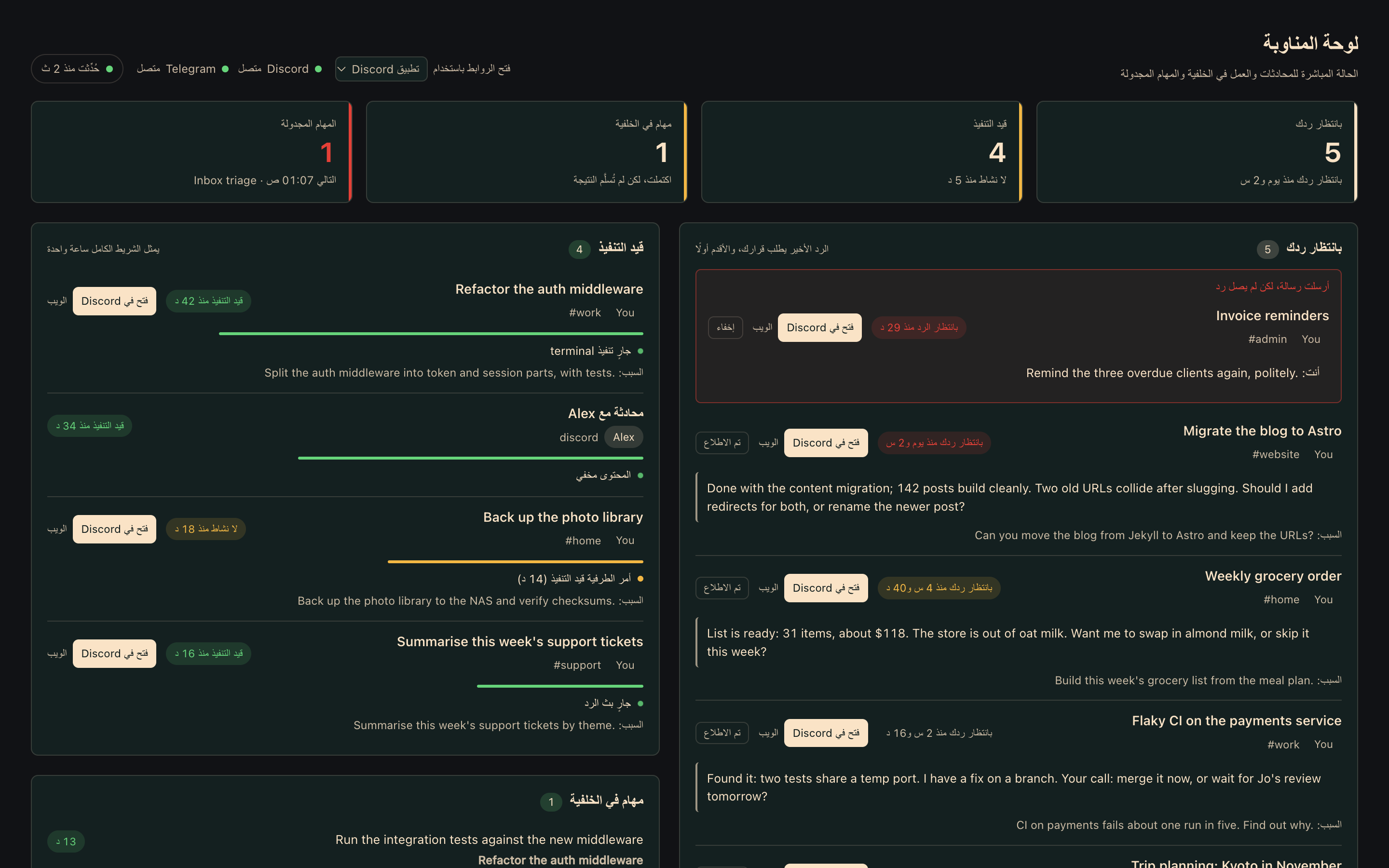
The tab speaks every language the Hermes dashboard ships, 17 in all: English, 简体中文, 繁體中文, 日本語, 한국어, Deutsch, Español, Français, Italiano, Português, Русский, Українська, Türkçe, Magyar, Afrikaans, Gaeilge and العربية (right-to-left). It follows the dashboard's language switch live. Counts use each language's plural rules, and durations, numbers and lists are formatted by the browser's Intl APIs.
Translations live in dashboard/i18n/<locale>.json, with en.json as the source of truth. Corrections from native speakers are very welcome; see CONTRIBUTING.md.
Development
python -m venv .venv && . .venv/bin/activate
pip install -r requirements-dev.txt
python -m pytest
node --check dashboard/dist/index.js && node tools/build_i18n.mjs --check && node tests/js/i18n_check.mjs
dev/harness/ renders the tab outside Hermes against a synthetic Hermes home, which is how the screenshot above was made. See dev/README.md.
Contributing
Issues and pull requests are welcome; see CONTRIBUTING.md. Report security problems privately as described in SECURITY.md.