git-tasks
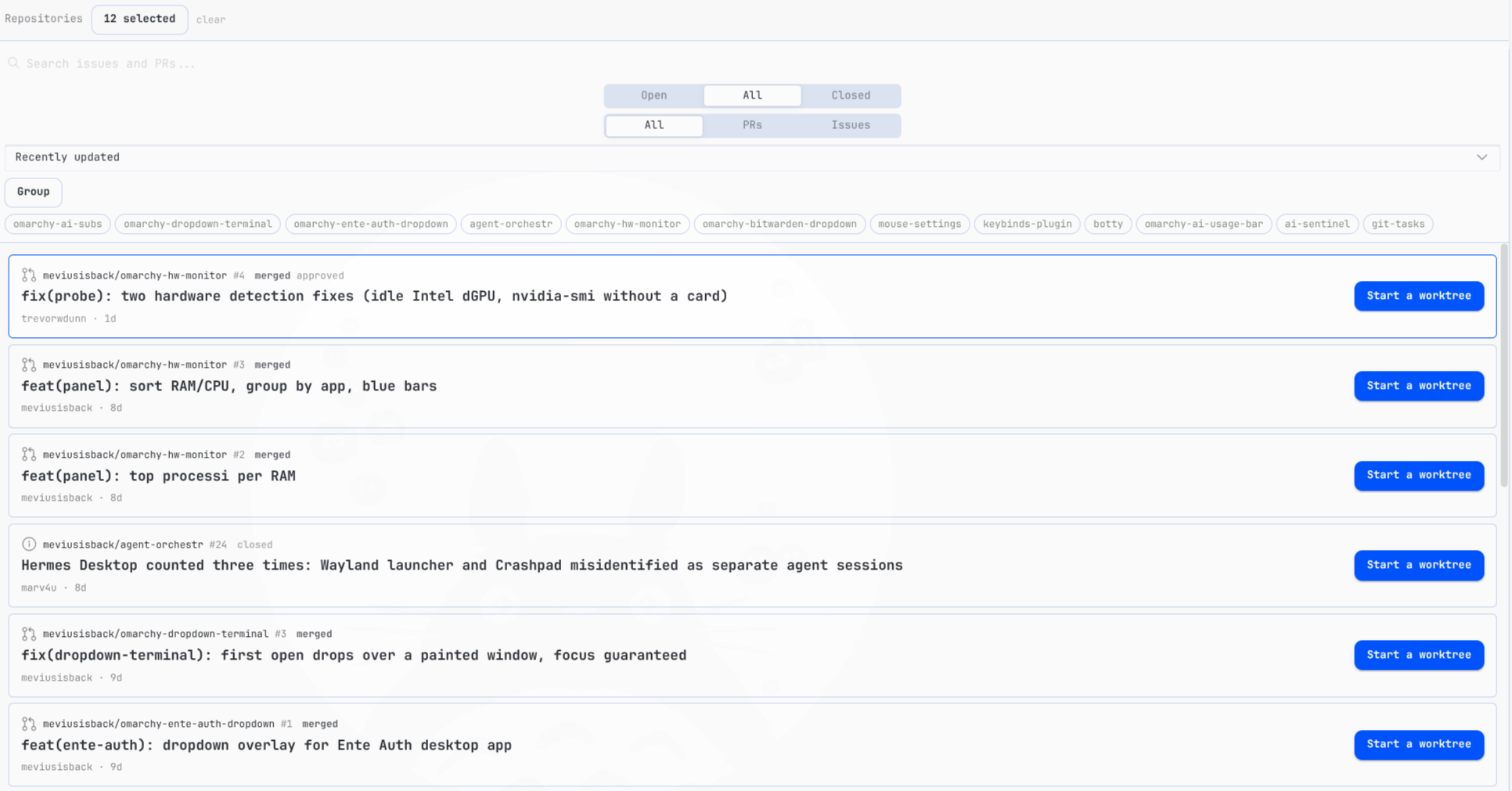
A Hermes Desktop plugin that shows GitHub issues and pull requests from all your repositories in one Orca-style Tasks view — and lets you jump into the work with a single click.
What it does
- One list for every repo. Pick which repositories to follow; filter by Open / All / Closed and by PRs / Issues. Lists refresh automatically.
- Orca-style detail. Click a card to see sections (meta, body, comments, labels, checks, merge) with readable, wrapping text.
- Start a worktree. One button creates a git worktree under your local clone and opens a new Hermes session already working in it, with the issue/PR in context. If the worktree already exists, the button becomes “Go to worktree”.
- Choose your bot. Before creating, you pick which profile/bot opens the session and which branch to start from (default branch,
origin/main, or the PR’s branch). - Missing clone? If the repo isn’t on disk, the plugin offers to
gh repo cloneit into one of your folders and keeps going. - Review actions. Approve PRs, close/reopen issues and PRs, merge (merge / squash / rebase with confirm), comment — all without leaving Hermes.
- CI at a glance. A dot on each PR card: green (checks passing), red (failing), yellow (running).
Requirements
- Hermes Desktop (recent version)
ghCLI, authenticated (gh auth login)
Install
./scripts/install.sh
Then in Hermes Desktop: Ctrl+K → Reload desktop plugins → open /tasks.
Settings
Settings → Plugins → Git Tasks:
- Repositories — which
owner/repoto follow (up to 50). You can also pick them from your GitHub account inside the plugin. - Clone folders — where your local clones live (
~/repo,~/repos, …). Used to find clones and as the default clone destination.
How the worktree flow works
- Click Start a worktree on any card.
- Pick the bot profile and the starting branch, confirm.
- The plugin creates
<clone>/.worktrees/<type>-<number>-<slug>on a new branch and opens a session there with the task in context. - Work normally: commit, push, open the PR, merge. Afterwards clean up with
git worktree removefrom the clone.
Security
- Every shell interpolation is quoted; repository names are allowlist-validated.
- Merge methods are allowlisted and always confirmed; external links only open on
https://github.com/. - Third-party issue/PR text is labelled untrusted in seeded agent sessions.
npm run test— pure-function tests, all passing.
Development
Single-file ESM plugin, no build step:
node --check desktop/plugin.js   # syntax
npm run test                     # tests
./scripts/install.sh             # deploy to ~/.hermes/desktop-plugins/git-tasks/
License
MIT