Original satellite concept art, not a product screenshot.
God’s Eye View for Hermes Desktop
A wider perspective. One sidebar away.
Explore Bilawal Sidhu’s God’s Eye View without leaving Hermes Desktop. The native globe, scenes, layers and provider controls stay intact. A compact flight deck puts the local engine within reach.
Install · Official GEV · Verification · Report an issue
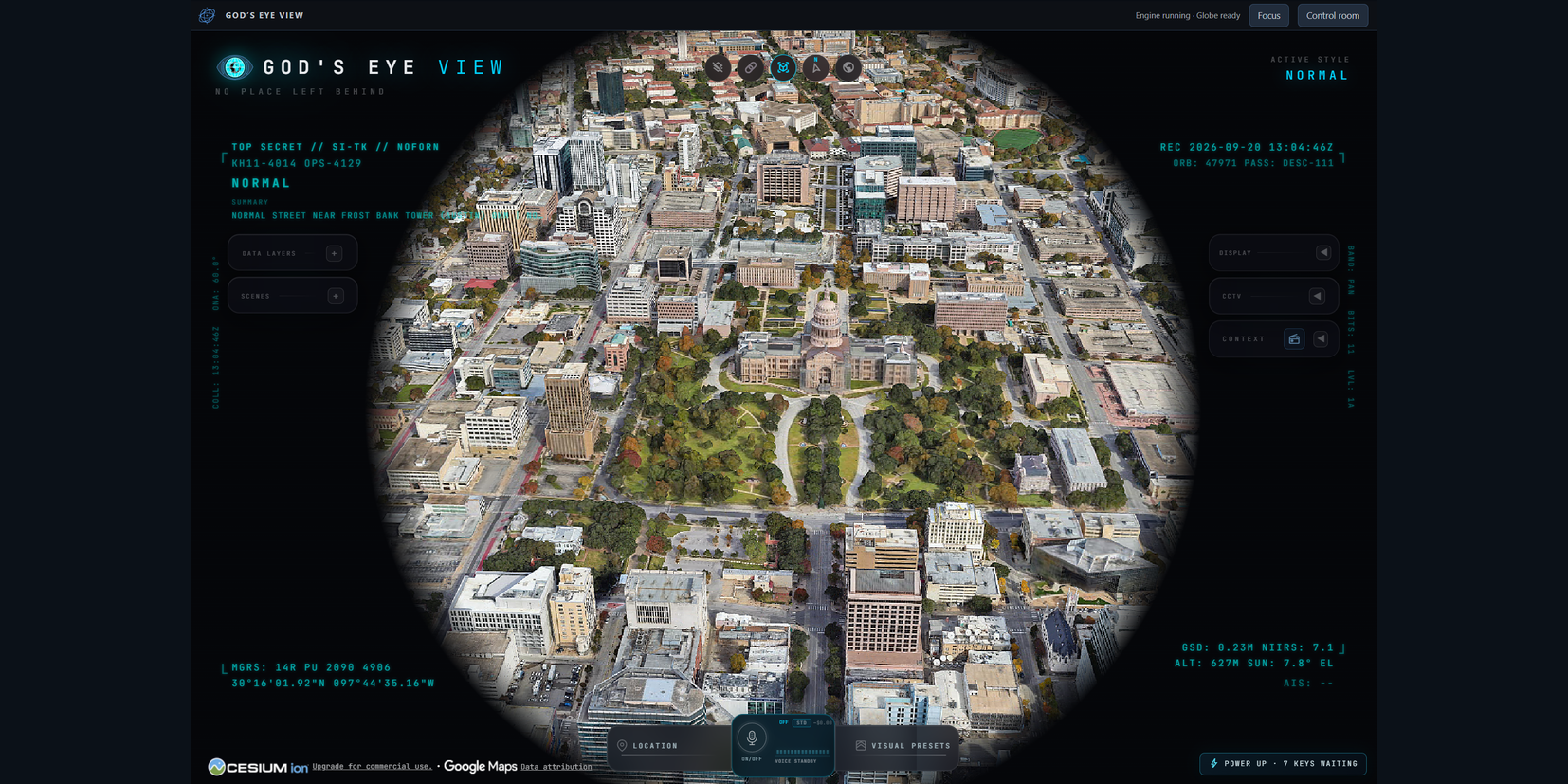
v0.1.0 Windows capture (before the SDK frame migration), cropped to the plugin; imagery attribution retained. Photorealistic imagery depends on your GEV providers. Classification and recording labels are part of GEV’s visual styling, not actual classification or recording status.
Your view. Your controls.
| In the workspace | What you can do |
|---|---|
| Native globe | Explore GEV’s places, scenes, layers and visual styles in its own interface. |
| Flight deck | See backend engine status. Enter Focus mode to give the view more room. |
| Control room | Start or stop the engine, recreate the view with Reload globe, and find GEV’s own Provider Settings chip. |
| Engine maintenance | Check for upstream GEV updates, then explicitly apply them. Local source changes block the update before the engine is stopped. |
GEV remains a separate installation. The plugin connects it to Hermes Desktop; it doesn’t replace or fork the engine.
Voice belongs to GEV
GEV already has its own voice controls for actions such as navigation and orbiting, using an OpenAI API key and microphone permission. They remain part of the upstream application; voice and microphone permissions in the embedded view have not been verified. This release is a user-operated workspace, not a Hermes agent-control bridge.
Install
You’ll need Hermes Desktop 0.21.5 or newer, Windows or macOS, Git, and a separate official GEV Git checkout with its npm dependencies installed. Use Node 24.x (24.14.0 or later), or 26.x, subject to that checkout’s engine requirements.
1. Add the plugin
Install directly from this repository:
hermes plugins install https://github.com/cygnostik/Hermes-Plugin-Gods-Eye-View --enable
Catalog approval is pending. The direct-repository command works independently of catalog approval.
2. Connect your GEV checkout
macOS — with a supported Node version on your PATH:
hermes gev configure --root "$HOME/Projects/gods-eye-view" --node "$(command -v node)"
Windows — replace the example paths with your installations:
hermes gev configure --root "C:/Apps/gods-eye-view" --node "C:/Program Files/nodejs/node.exe"
Keep GEV outside Hermes’ replaceable plugin directory. If npm is installed separately, supply its npm-cli.js path with --npm-cli. Run hermes gev configure --help for all options.
3. Enable the Desktop view
Restart Hermes Desktop after your active runs finish. Open Capabilities → Plugins → God’s Eye View and turn on Desktop. The Desktop switch is separate from the agent-side enable switch.
Select God’s Eye View in the sidebar, then Start engine. The flight deck reports Engine running from the backend; check the visible globe separately. Engine status does not verify rendering or provider access.
Start with GEV’s keyless imagery and terrain. For optional providers, including photorealistic 3D, select Control room → Provider Settings for directions to GEV’s own settings chip inside the globe. They have their own terms, quotas and billing. Nothing starts automatically at login. Windows foreground acceptance passed on v0.1.0 (results); the v0.1.1 SDK frame has not yet had live Desktop acceptance; Reload globe recreates the embedded view.
Everyday operation
- Focus hides the flight deck. Show flight deck restores it.
- Reload globe creates a fresh embedded view. Use it if GEV looks incomplete after a restart or provider change; it can reset the current view.
- Update engine updates your separate GEV checkout, not Hermes or this plugin. Updates are explicit, never part of status polling.
- Stop the engine before disabling or uninstalling the plugin if you want GEV to stop running too. Removing the plugin does not remove GEV, its keys, or the plugin’s saved configuration.
Providers, data and support
Provider keys normally stay in GEV’s native configuration. An optional compatibility bridge can copy supported Hermes environment keys when you explicitly allow it; Hermes OAuth subscriptions are not interchangeable with provider API keys.
The engine runs on the same machine as Hermes Desktop. Imagery and feeds may use external services. This wrapper does not certify their freshness or provider authentication. See security and data boundaries.
Verification: v0.1.0 had Windows/macOS automated checks and live Desktop acceptance. v0.1.1 replaces the embedding with the SDK’s opaque-origin frame; see verification and known limitations for its scoped checks and pending live acceptance.
Development
npm ci
npm test
python -m pip install -r requirements-dev.txt
python -m unittest discover -s tests/backend -p "test_*.py" -v
hermes plugins validate .
hermes plugins doctor . --ci
Built on good work
God’s Eye View: Bilawal Sidhu. Hermes Agent: Nous Research. Community integration: cygnostik / ProDyn.
This is an independent community integration, not an official GEV or Nous Research release. The wrapper is MIT-licensed; upstream software, datasets and imagery retain their own licenses and terms.