Hermes AAC
0.1.1 — experimental Windows desktop plugin by TREE Industries. MIT licensed.
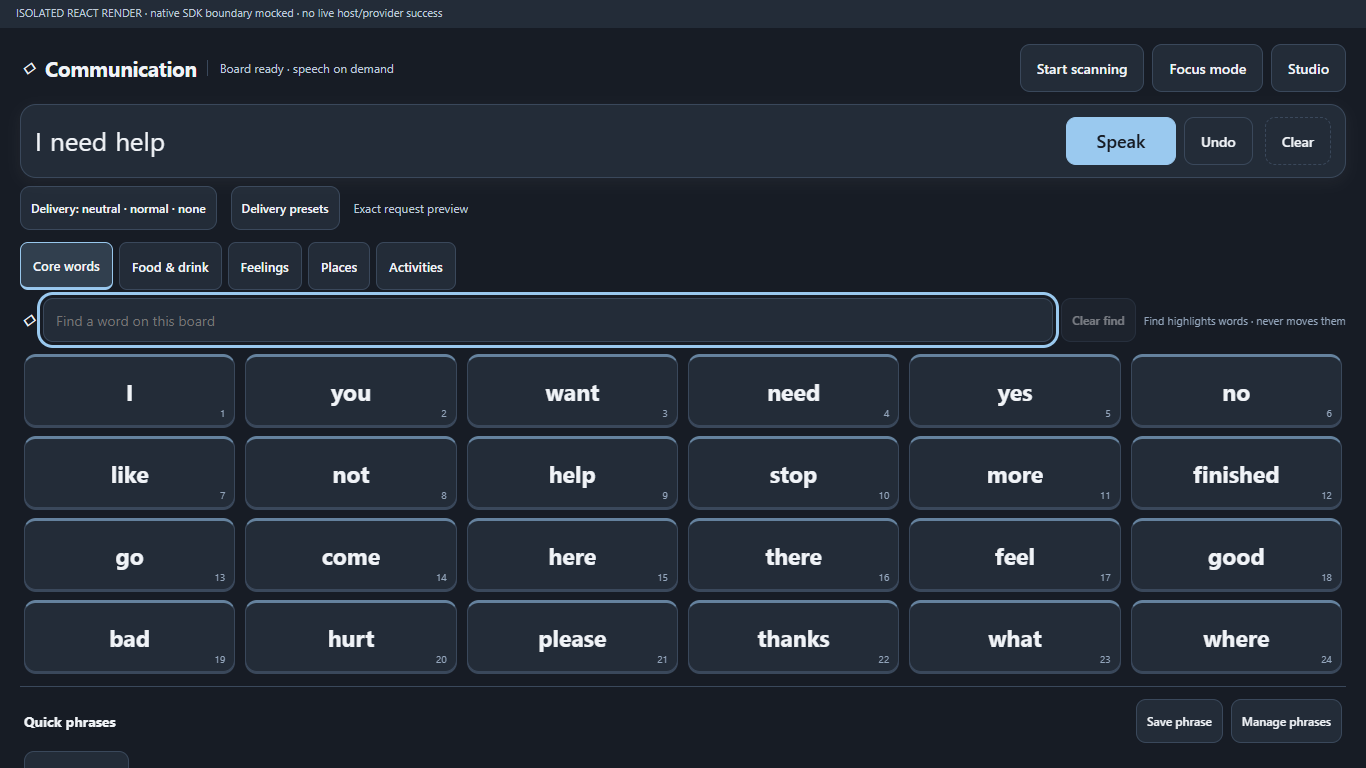
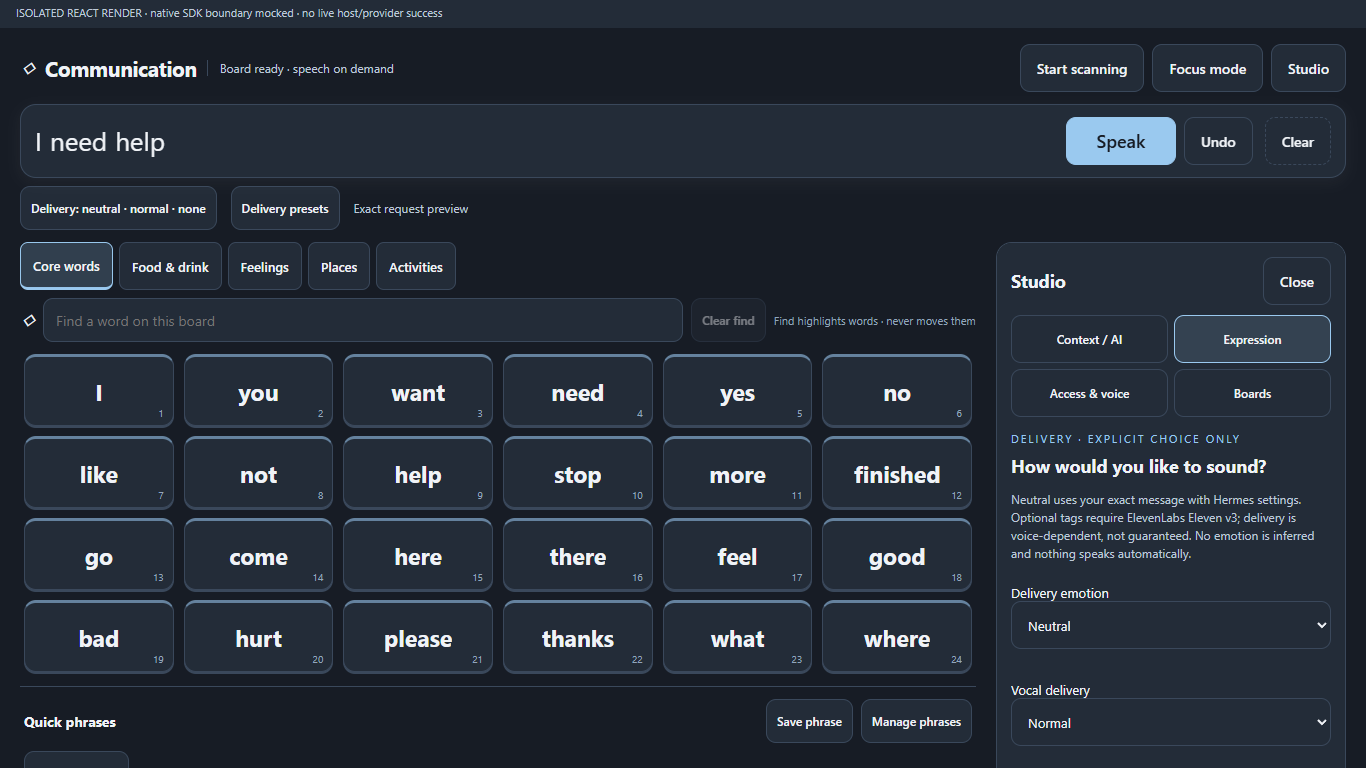
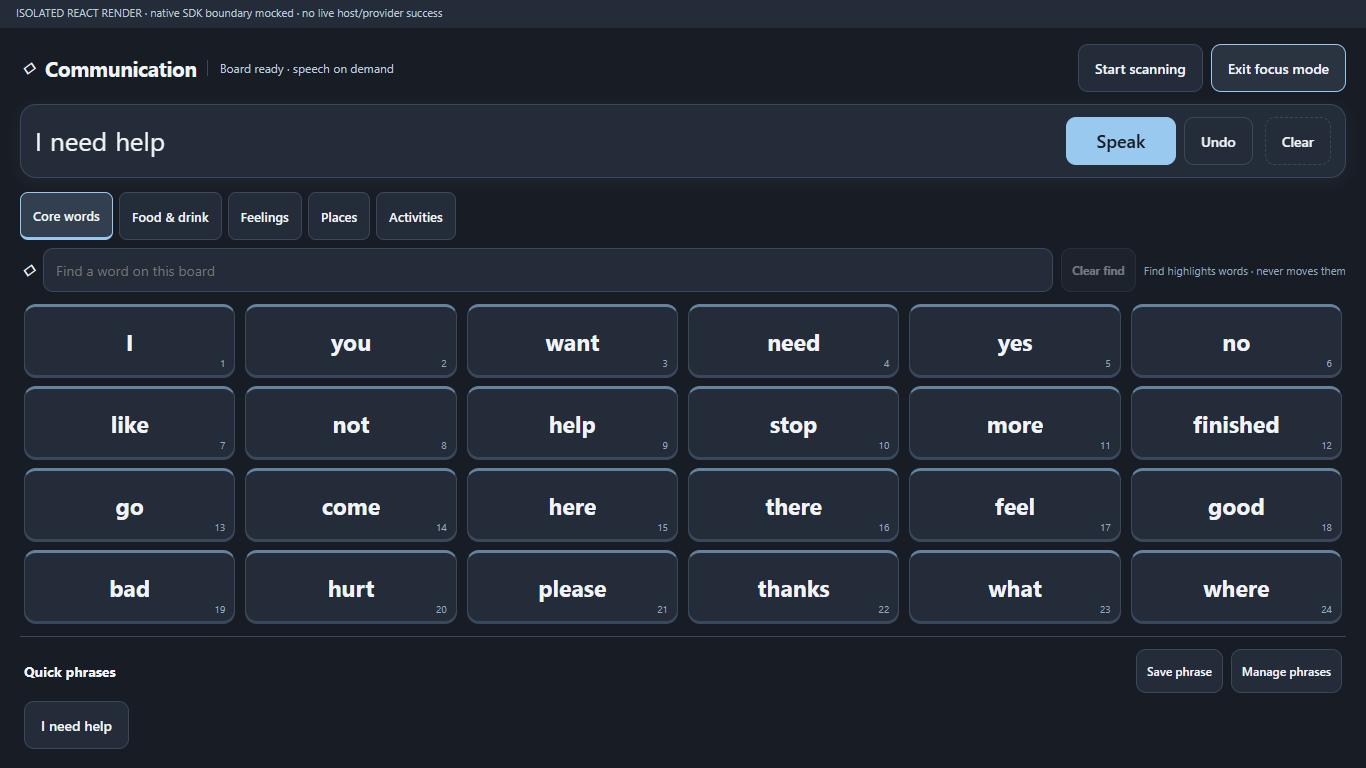
A communication-first workspace for Hermes Desktop: fixed-position core vocabulary, category boards, an utterance strip with explicit Speak, keyboard switch scanning, find-in-place highlighting, focus mode and explicitly saved quick phrases. Studio adds personal boards, a constrained Open Board Format JSON import/export, reviewed AI proposals, read-only voice/model information and optional ElevenLabs v3 delivery tags.
Install from the public repository
Requires Hermes Desktop v0.21.7 or later. Windows is the only supported platform in this initial release; Linux/macOS have not been exercised. Configure Hermes itself and any desired AI/TTS provider first. The plugin does not bundle providers or keys.
hermes plugins install https://github.com/TREE-Ind/hermes-aac --ref v0.1.1
For reproducible review, replace v0.1.1 with the full commit SHA shown on the
GitHub release. Review the source/disclosures before approving installation. In
Desktop Settings → Plugins, enable Communication · AAC, then open Communication
in the sidebar (or the Open Communication board (AAC) palette command). A packaged
plugin is opt-in. Reload desktop plugins from the palette if necessary. No core patch
or gateway restart is required.
This repository has been submitted for catalog review. It is not an accepted catalog
listing until NousResearch maintainers merge the catalog PR; do not assume that
hermes plugins install hermes-aac works before then. Updates use new reviewed pins,
not a plugin self-updater.
Use
- Select tiles to build a message; Speak is always explicit. It submits speech to Hermes. Undo removes the last selection; Clear clears the strip. Stop scanning is independent. There is no speech Stop: the SDK does not expose request-scoped cancellation.
- Find highlights the fixed grid without moving words. Focus mode hides Studio.
- Start scanning cycles enabled visible targets. Space selects; Escape exits. This is keyboard switch scanning, not eye tracking or a certified switch interface.
- Save phrase explicitly persists the current phrase. Manage phrases removes favorites.
- Studio → Boards: create/duplicate a board, preview and approve before activation.
.obfsupport is a limited plainopen-board-0.1JSON subset: no.obzarchives, media, linked boards or executable actions. Imported text is rendered literally. - Studio → Context / AI: review exact text before sending. Suggestions require a click; generated boards require approval. AI never automatically speaks or inserts words.
- Studio → Access & voice reads current configured voice/model information; Settings opens the native Hermes settings page. No voice browser or provider/model/settings writes.
- Expressive speech requires a fresh config snapshot matching
elevenlabs+eleven_v3. Only explicitly selected allowlisted tags are prefixed; neutral words are sent exactly. Snapshot checks are not atomic guarantees or provider attestation. Hermes may fall back or normalize text. Changing/resetting delivery never submits or cancels speech.
Authority, privacy and limitations
Not a medical device, clinical treatment or emergency communication service. No clinical efficacy, accessibility certification or reliable offline speech guarantee is claimed. Keep another communication method available.
- The renderer has the desktop app's authority; error isolation is not a sandbox.
SDK requests use
session.create,prompt.submitand session events. AI is the full configured Hermes agent, not a restricted vocabulary-only model: configured tools, approvals, provider services, session retention and costs still apply. - SDK-only: speech uses
host.request('voice.tts', {text, profile}); read-only settings usehost.request('config.get', {key:'full', profile})and unwrapconfig. No raw desktop bridge, REST fallback, client audio playback or settings mutation. Full config reads inspect data outside plugin storage; only displayed voice/model fields are retained in UI state. No credentials are displayed or persisted. - The SDK routes the active connection. AAC snapshots profile/connection and refuses
changed scope before dispatch, but cannot undo a dispatched request. The backend
voice.ttshandler acknowledges{status:'speaking'}and owns playback asynchronously: submission acknowledged is not provider success, audible delivery or completion. Backend audio may play on the remote gateway host, not this desktop. The profile parameter is not an attestation of per-profile playback ownership. - Hermes attaches authentication. AAC does not separately access credential stores,
.env,auth.jsonor browser profiles. Full config snapshots can include sensitive values; they are not rendered, logged or persisted. No plugin-owned secrets, telemetry, shell children, updater or background daemon is registered. - Explicitly submitted questions/topics and spoken text can go to third-party configured AI/TTS providers. Provider policies/costs apply; fallback TTS providers may be used by Hermes. Reviewing a prompt is not a promise about provider retention.
- Plugin storage persists approved custom boards, scan settings and explicitly saved phrases in plaintext, not encrypted. The unsaved utterance strip and proposals are not persisted by this plugin. AI requests can be retained in Hermes sessions. Board export downloads plaintext JSON. Avoid sensitive content on shared devices.
- No speech cancellation, request-scoped completion or later synthesis/playback error
tracking. Immediate RPC errors are shown. Duplicate submissions are refused only
while the RPC is pending; acknowledgement can precede the end of backend playback.
Unmount, delivery changes, scope changes after dispatch and Stop scanning cannot
silence backend speech or reverse charges/sharing. No process-global
voice.toggle. AI cancellation/timeout stops waiting, not necessarily accepted agent work. - No cross-platform, live-provider, screen-reader or full released-Electron end-to-end compatibility certification is claimed. Isolated source-contract execution against latest-main and released v0.21.7 checks actual RPC acknowledgement/wrapper shapes; React tests use mocked SDK/provider boundaries. The conservative minimum is v0.21.7, not a claim that earlier releases cannot work.
Verification and screenshots
The screenshots are actual mounted React renders of this plugin, using a mocked SDK, synthetic theme and placeholder icon glyphs—not screenshots of a live provider session. Each screenshot labels that limitation. No private desktop was captured.
This reduced-feature release was checked with 37 React/jsdom tests, syntax/import checks,
Python packaging/provider-source fixtures, and native hermes plugins validate --install-deps --json on isolated latest-main and released v0.21.7 sources.
The desktop-only package intentionally has no Python __init__.py; the native validator
warns that its Python capability probe is skipped. Empty catalog capabilities describe
Python registrations, not a JavaScript permission boundary. No live speech generation
or shared user-config write was performed during publication.
Develop from a fresh checkout
Node 24+ and Python 3.11+ are required for development. Runtime imports resolve from
Hermes (@hermes/plugin-sdk, react, react/jsx-runtime); npm dependencies below are
development-only, locked publicly, and no Hermes internals are vendored.
git clone https://github.com/TREE-Ind/hermes-aac.git
cd hermes-aac
npm ci
npm test
npm run check
python scripts/verify.py
verify.py runs all JavaScript tests and Python packaging tests; the optional provider
source fixture is explicitly skipped without HERMES_SOURCE. It does not install by
default. --install --target /explicit/authorized/plugin.js copies only tested source;
--package builds a source-only archive. Never pass another profile as a target unless
you intend to modify it.
For released-source contract/provider fixtures (no provider network or credentials):
git clone --depth 1 --branch v0.21.7 https://github.com/NousResearch/hermes-agent.git ../hermes-source
# POSIX shell syntax; on PowerShell set $env:HERMES_SOURCE to the absolute checkout path.
HERMES_SOURCE="$(cd ../hermes-source && pwd)" python scripts/check-hermes-contract.py
HERMES_SOURCE="$(cd ../hermes-source && pwd)" python -m unittest discover -s tests -p test_verify.py
Use HERMES_NODE_MODULES only if intentionally using another checkout's development
dependencies; normal npm ci tests need neither that nor HERMES_SOURCE.
To reproduce screenshots, npx playwright install chromium then npm run render.
The harness opens only an ephemeral loopback server, forbids live gateway/provider
calls and tests three viewport geometries. Generated evidence/caches are not committed
unless separately privacy-reviewed. Optional AAC_BROWSER_EXECUTABLE selects a local
Chromium binary; it is not bundled. AAC_TEST_SCRATCH overrides test scratch space.
Native admission should run on the exact pinned tree in an isolated Hermes install:
hermes plugins validate /absolute/path/to/hermes-aac --install-deps --json
Dependency preparation can change the validating install's environment even with no plugin Python dependencies: do not run it against an active gateway environment.
License and assets
Copyright (c) 2026 TREE Industries. MIT. Vocabulary is plain text; no third-party AAC symbol library, font, audio or binary is redistributed. Development dependencies retain their respective upstream licenses. Hermes SDK/React/icon resources are supplied by the host, not copied into the plugin.