Bot HQ
Beyond the chat.
It’s 2026. AI can monitor systems, run routines, analyze data, manage tasks, and make decisions — yet our primary interface for all of it is still a box of text.
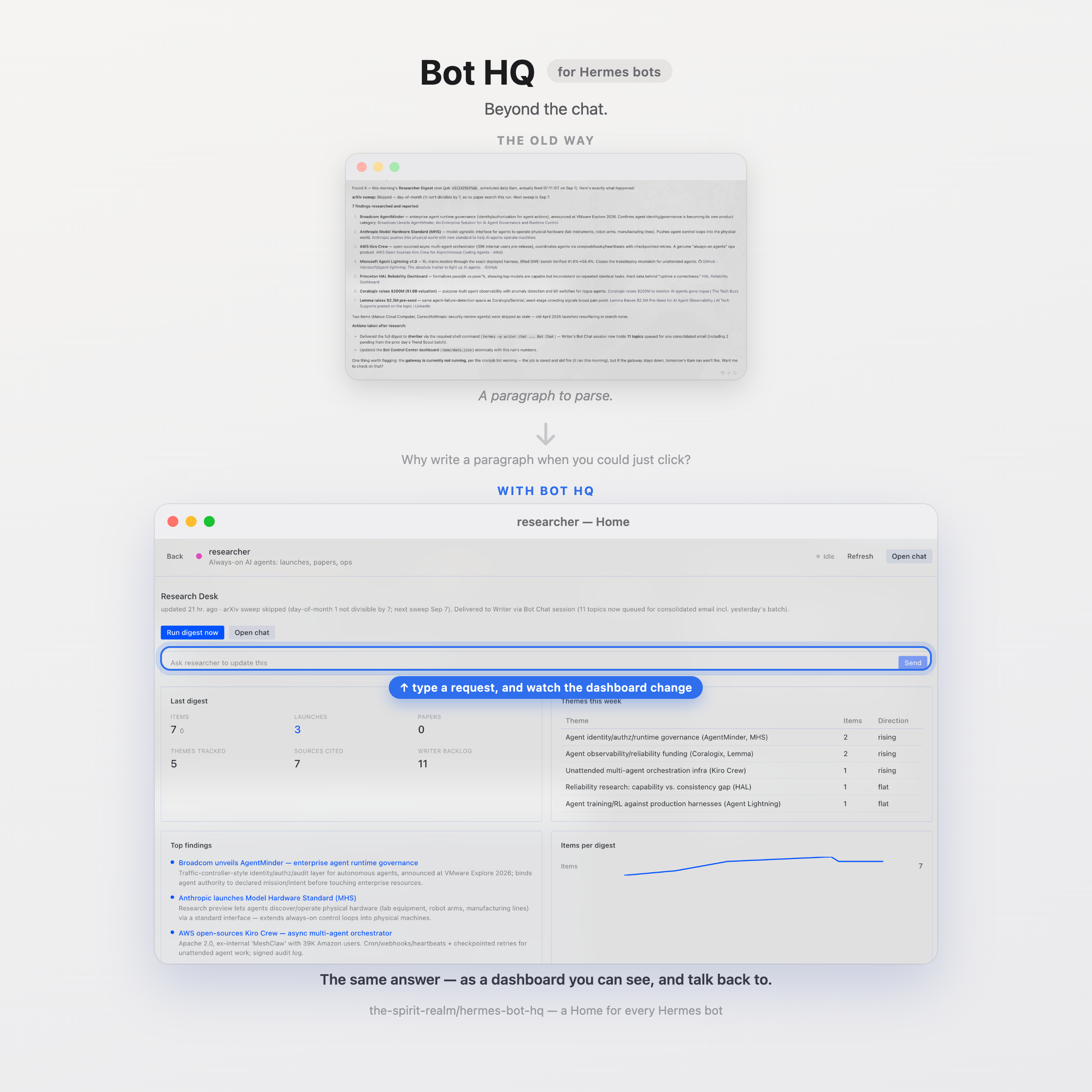
Why read a paragraph when you could see the answer? Why write one when you could just click?
A Hermes bot is purpose-built: a small, known job, and a small, known set of next steps. Chat is for when the next sentence is unpredictable. A Home is for when the work is already on the page and the user should click Review or Escalate instead of typing it again.
Bot HQ gives your Hermes bots a visual, interactive interface instead of forcing everything through chat.
Each bot gets its own Home — a dynamic dashboard built around what that bot actually does. See status, metrics, alerts, tasks, routines, and buttons at a glance. Interact with your bot directly through the interface — trigger declared moves, run routines, change things, and use chat when conversation is actually useful.
And when you have multiple bots, Bot HQ brings them together in one place.
Your bots. Their Homes. One HQ.
The bot owns the data. Bot HQ turns it into an interface.
Part of AgentRealm — tools for always-on agents like Hermes, OpenClaw, and similar.
Set up
Do these in order. Skip nothing; the page and the dashboard reader are separate switches, and both start off.
1. Install the plugin
hermes plugins install RohanRJ389/hermes-bot-hq
2. Turn on the page
In Hermes Desktop: Capabilities → Plugins → Bot HQ (older versions: Settings → Plugins). The desktop half is opt-in, so it stays off until you flip this on. Installing alone, hermes hermes-bot-hq setup, and Reload desktop plugins do not enable it.
If Bot HQ is not listed, press the refresh icon on the Plugins tab, or fully quit Hermes (Cmd+Q) and reopen it.
3. Turn on the dashboard reader for every bot
hermes hermes-bot-hq setup
Sets it up on all your bots at once. Run it again any time you add a new bot — it only touches the ones that need it. It does not restart anything: if a bot's Home then says Home unreadable, fully quit Hermes (Cmd+Q) and reopen it.
Prefer to do it by hand for one bot? See Manual setup.
4. Open it
Click Bot HQ in the sidebar. (If it is missing, press Cmd+K, run Reload desktop plugins, and look again.)
You should see every local bot. If a yellow Dashboards unavailable bar appears at the top, run hermes hermes-bot-hq setup again.
Adding a bot later? Just run hermes hermes-bot-hq setup again — same command, it only sets up the new one.
This is an early cut — more features are coming. On GitHub, Watch → Custom → Releases so you hear about them; a star is appreciated if it already helps, but it does not subscribe you to updates. To pull a new version onto your machine:
hermes plugins update hermes-bot-hq
Get a dashboard on a bot
- Click the bot.
- If it has no dashboard yet, click Copy and open chat.
- Paste into the chat and send.
The bot writes its own Home. Come back to Bot HQ and refresh if it does not show up right away.
To refresh that dashboard on a schedule, add the skill to the routine that already does the work:
hermes cron edit <job-id> --add-skill hermes-bot-hq:bot-home
Other ways to install
- From Desktop, no terminal: paste
hermes://plugin/install?repo=RohanRJ389/hermes-bot-hqinto Hermes. That is an install link the app handles, not a website. - From a git clone: put the repo at
~/.hermes/plugins/hermes-bot-hq, then do steps 2–4 above.
Manual setup
Prefer to enable it on one bot by hand instead of running setup?
ln -s ~/.hermes/plugins/hermes-bot-hq ~/.hermes/profiles/<bot>/plugins/hermes-bot-hq
hermes -p <bot> plugins enable hermes-bot-hq --no-allow-tool-override
Then fully quit and reopen Hermes so that bot's backend restarts.
What you get
- A fleet page: every Hermes profile, no signup or register step.
- Per bot: status, next routine, and a dashboard the bot publishes as
home/schema.json+home/data.jsonin its profile. - Buttons the bot declares (
run_routine,open_chat,open_path,open_url,send_prompt,run_action) on the toolbar, as abuttonscard, or on list/alert lines — plus an optional one-line composer. run_actionbuttons run a script the bot wrote inhome/actions/with no chat turn, once you have approved that file. Clicks are logged tohome/actions.jsonlfor the bot to read on its next run.- The widget list is fixed on purpose, so a dashboard cannot rearrange itself overnight and no bot-authored HTML or JavaScript ever runs. Existing Homes keep their
actionsstrip after upgrade.
The data contract is docs/home-contract.md. A complete file pair lives in examples/.
Contribute
Issues and pull requests are welcome. MIT, no CLA. See CONTRIBUTING.md for how to run from a clone, where to change what, tests, and ideas that would help.
Known limits
- The fleet UI is Desktop-only today. The Home reader is already HTTP, so the Hermes web dashboard is the natural next surface — it does not exist yet.
~/.hermes/pluginsis scanned locally, so bots on remote gateways get roster and status but no dashboard.- The desktop SDK moves quickly; optional capabilities are feature-detected and degrade rather than throw.
License
MIT — see LICENSE.