Context Overview for Hermes Desktop
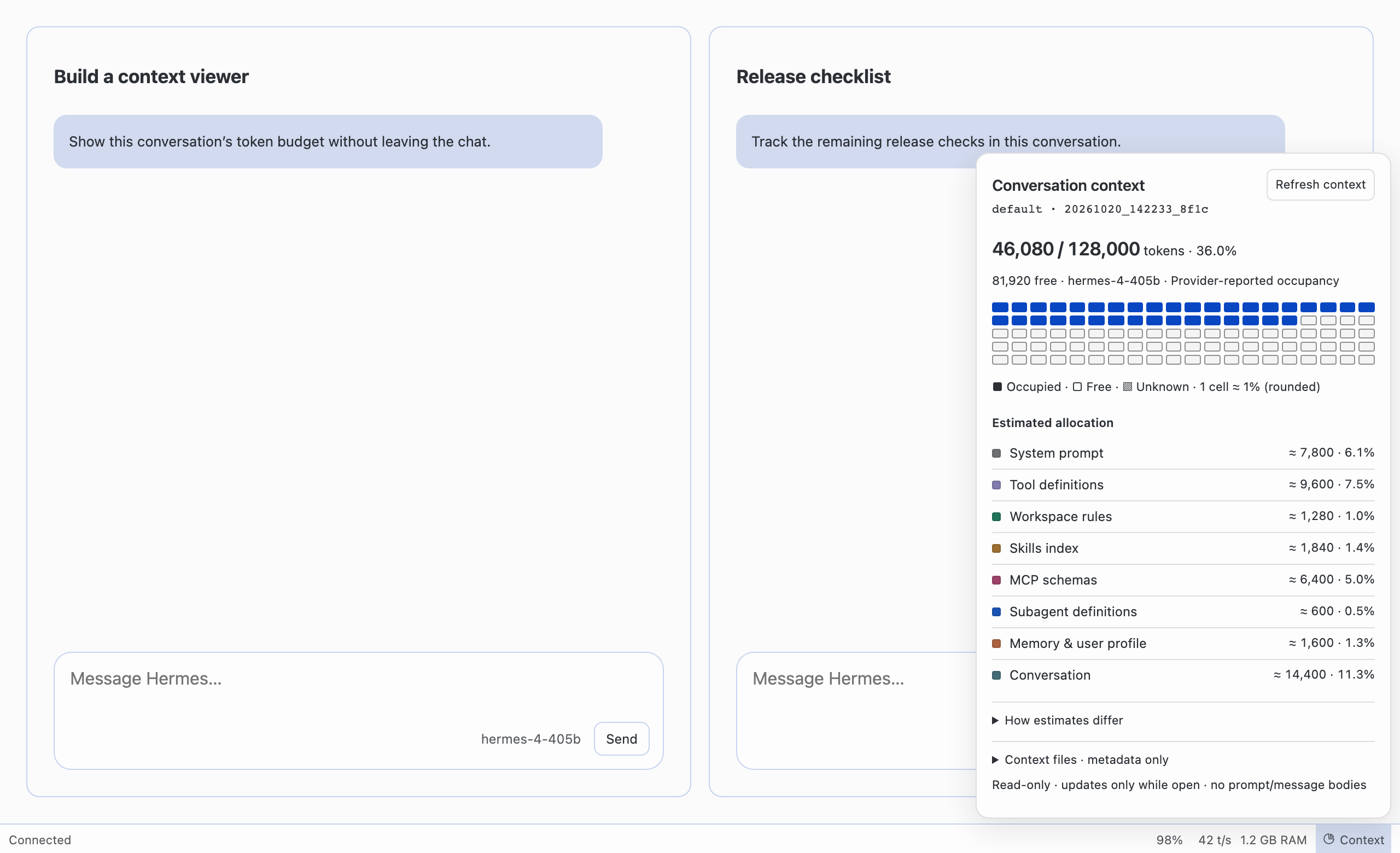
See how full the focused conversation's context window is without leaving the chat. Context Overview adds one Context button to the bottom status bar. It opens a read-only popover with the token budget, an occupancy grid, estimated allocation by category and context-file metadata, and it keeps working during a running turn.
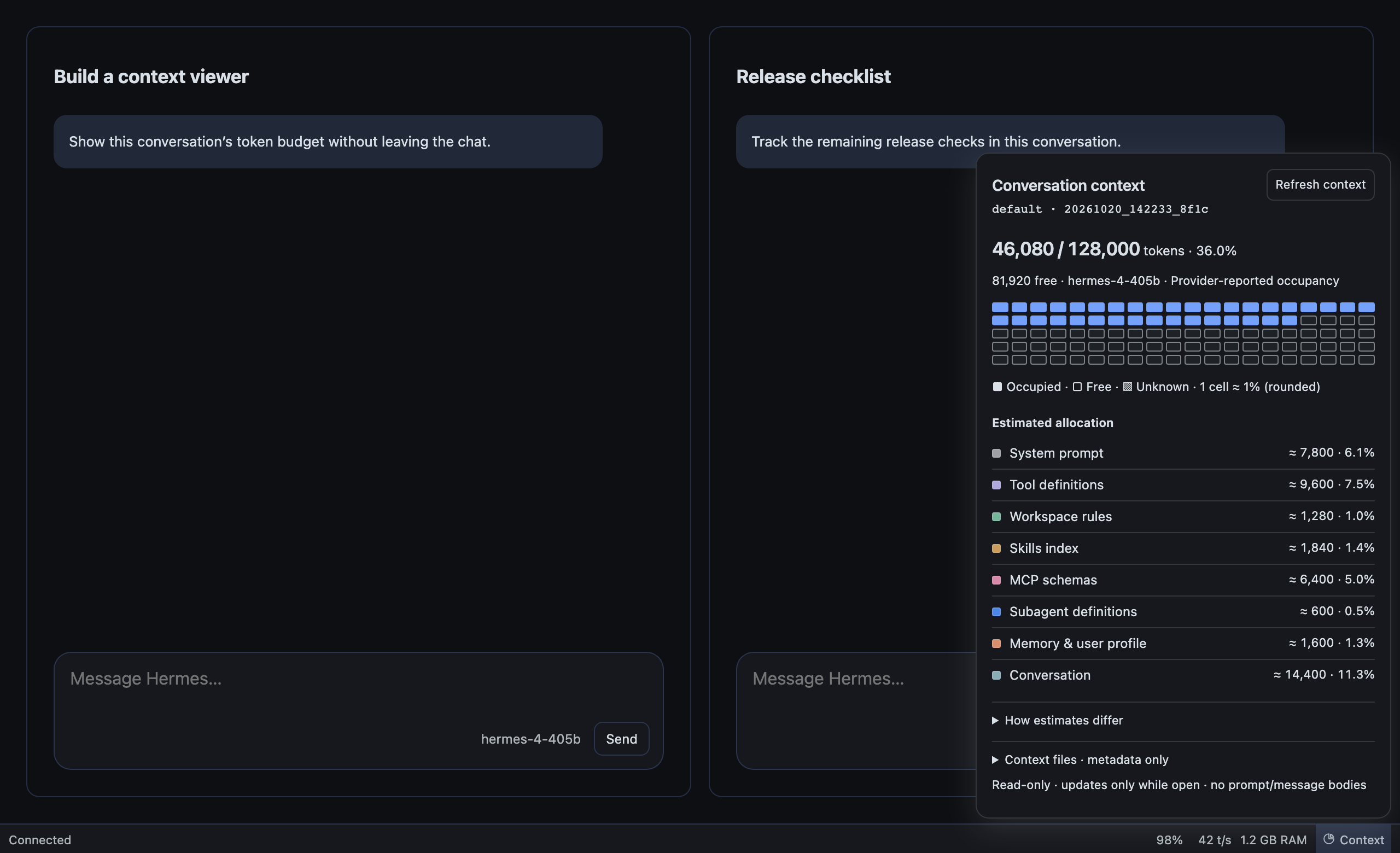
The existing prompt-cache, t/s and RAM indicators are untouched. There is no Python backend, collector, telemetry or network call beyond the existing session.context_breakdown RPC. Light mode.

Themes
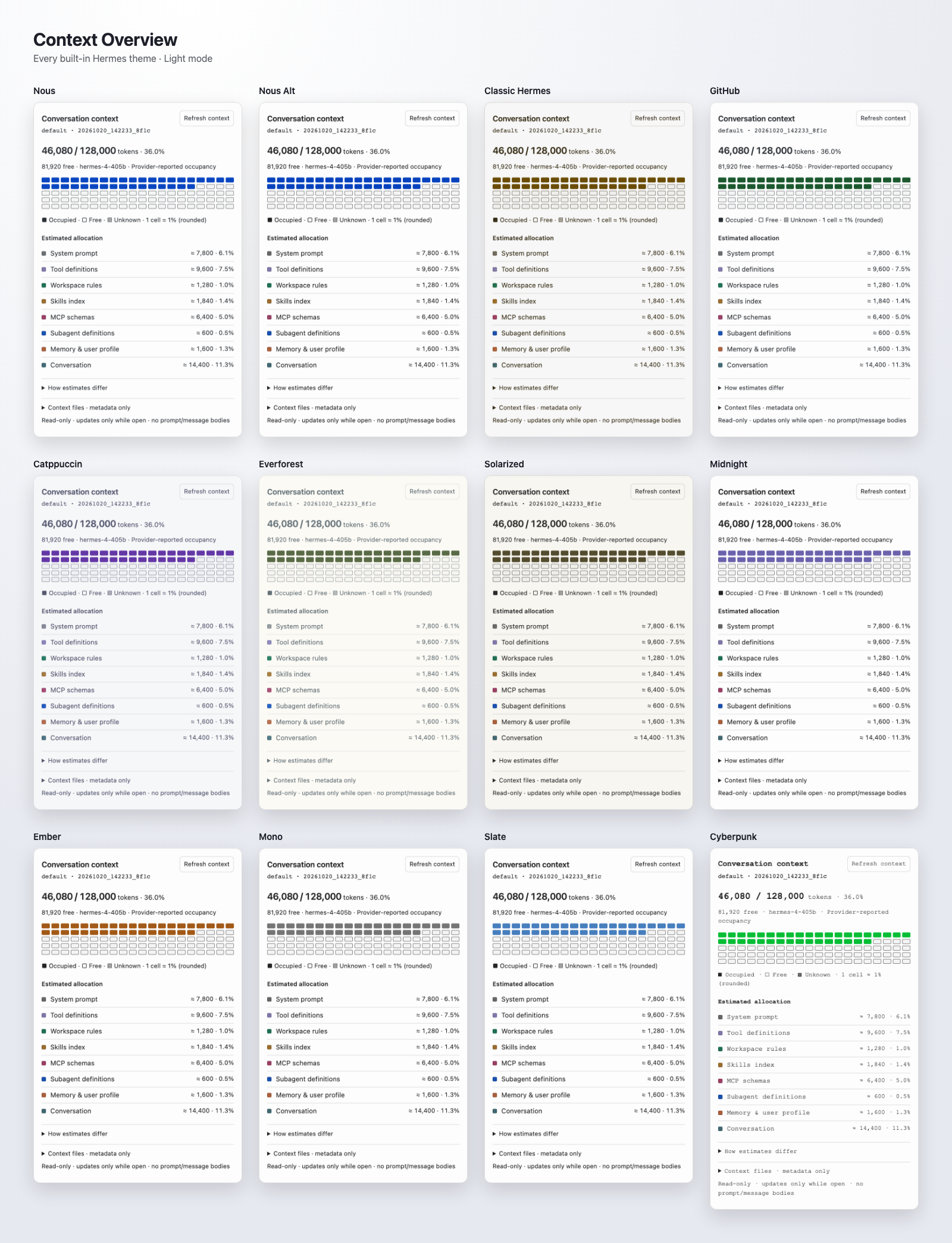
The popover uses native Hermes CSS tokens, so it follows all 12 built-in themes in light and dark mode.
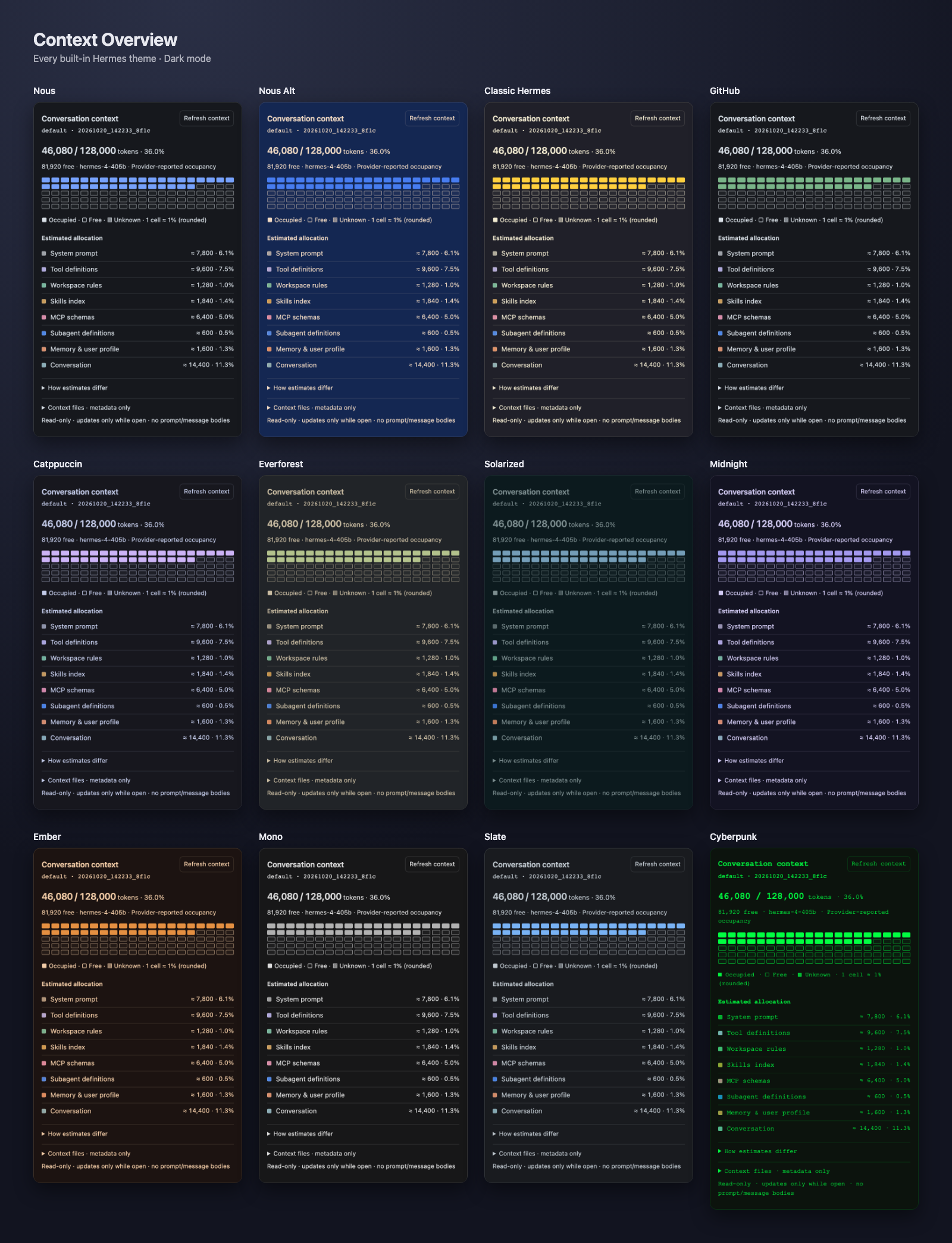
Light-mode gallery. Screenshots render the real plugin entry with demo data; regenerate them with pnpm screenshots:docs. See theme design and limits.

Use
Focus the conversation you want to inspect, then click Context in the bottom status bar, or focus the button and press Enter/Space. The button does not select or focus a different composer. A native SDK popover opens above the status-bar button, with:
- Occupied / capacity tokens, percent occupied, free budget, model and occupancy provenance.
- A 100-cell overall occupancy grid and compact estimated category list.
- Optional, initially collapsed explanations, context-file metadata and data-quality notes.
- An explicit refresh button; idle refresh every 60 seconds only while open.
Escape or an outside interaction dismisses it. Escape returns focus to the trigger. Moving to another conversation, changing owner/profile/connection or reconnecting closes the old popup rather than silently retargeting it. Open Context again when needed. Running turns still show the latest available metadata, with “Turn in progress — latest available snapshot; usage may lag until completion.” This is not a live per-token counter: manual refresh, open-only 60-second polling and completion/compression events update the snapshot. A fresh conversation without a runtime session shows an empty state.
Per-conversation ownership
statusBar.right registers exactly one stateful render contribution. The closed button deliberately says only Context; no query or route discovery runs until activation.
Binding happens at user activation to the host’s already focused conversation. The instance captures the public focusedSessionId and connection-qualified focusedSessionOwner, ambient connection/profile, gateway identity and lifecycle epoch. It keeps that identity fixed until dismissal. Any identity change immediately gates content and unmounts the query; pending old-scope responses cannot paint a new conversation. Forced dismissal suppresses focus return so it cannot steal focus from a newly focused conversation; normal Escape returns focus to the status-bar trigger.
RPC dispatch awaits host.profileRoutes() inside the query and uses the exact descriptor plus requestProfile() for a foreign owner, or host.request() only for a matching ambient owner. After asynchronous discovery, captured session/owner/connection/profile/gateway authority is checked again before dispatch. Missing/ambiguous routes, rejected discovery or incomplete owner metadata fail closed with no ambient fallback. Busy state comes from busyBySession[capturedSession] when available, otherwise the focused busy atom only while captured identity still matches. Busy is only a lag notice, not a query/cache identity or dispatch block. Same-owner replies remain usable across busy transitions. Other sessions’ busy updates do not hide or refetch this popup.
The host publishes focused ownership; the status bar preserves it. The plugin does not invent session render props, import private composer hooks, scan host DOM, or patch core. Source references and the explicitly emulated host seam are recorded in verification. Browser tests are not proof of live native integration or alternate host layouts.
What the numbers mean
- Occupied/free:
context_usedandcontext_maxfrom the existing metadata-onlysession.context_breakdownRPC. Provenance is provider usage, provider usage plus estimated delta, local estimate, or unknown. Free budget never comes from estimated category totals. - 100 cells: overall window occupancy, rounded to nearest 1%; not estimated category attribution. Over-budget pictures cap at 100% with an excess warning. Unknown occupancy is never painted as free.
- Estimated allocation: gateway counts and order are preserved, including zero-token rows. Percentages mean percent of the model window. Missing optional categories are not invented zeros. Row sum, reported estimate and occupancy remain separate and are never stretched to match.
- Context files: reported label/path, character count, token estimate, loaded flag and status only. The plugin does not open files or add file estimates to categories again.
- Raw system prompts, messages, memory contents, individual tool/skill costs and session titles are not fetched or fabricated. The existing conversation heading provides the name; the popup shows profile/runtime ID as secondary metadata.
Requirements
plugin.yaml declares Hermes >=0.22.2 as the RPC baseline, not a guarantee that every older Desktop build has the necessary SDK. The host must expose the public statusBar.right render contribution, native Button/Popover*, React Query, focusedSessionId, focusedSessionOwner, connection/profile/gateway state and the existing tree ownership routing. Foreign-owner sessions also need profileRoutes() / requestProfile().
The implementation was checked against runtime d923a5eb487a17c0a68801bba9ef0f56c81040a8 and the SDK reference supplied during development. Missing RPC methods show a compatibility message without retries. Transient errors and missing model windows retry twice, then stop; no stale budget is presented. There is no legacy active-session fallback without focused ownership.
Install / enable / remove
For versioned release assets, checksum verification, upgrades and rollback, follow release installation. Releases contain an allowlisted root-layout package and a standalone plugin.js; npm publishing is intentionally disabled. See CHANGELOG, contributing and security reporting.
Source validation does not install the plugin or establish that Desktop loaded it. For a standalone disk installation, place desktop/plugin.js at:
~/.hermes/desktop-plugins/hermes-context-overview/plugin.js
Use the running Desktop app's plugin root if customized; connected gateway/profile selection does not change this app-level frontend path. The directory must match the plugin ID. The standalone entry defaults enabled while respecting an explicit disabled choice. Check Context Overview in Desktop’s Plugins UI; use Reload desktop plugins if necessary. Unified package installation is also supported by Hermes’s plugin installer. For a package-managed copy, use Desktop Rescan to synchronize the package source, then enable its Desktop half if needed. No Python backend is included or needs enabling. No restart is required by this plugin.
To roll back, disable the plugin and remove/uninstall it through its owning installation mechanism. It writes no session data, settings, files or plugin storage. Do not remove a package-managed app-root copy while leaving its source installed.
Read-only / privacy boundary
Production imports only @hermes/plugin-sdk, react and react/jsx-runtime. The only RPC is session.context_breakdown, with only session_id. There are no filesystem/config/credential reads, transcript requests, vendor calls, inference, tools, telemetry, navigation or global DOM patches. Paths/labels returned by the gateway may still be sensitive metadata; they remain local and are not exported or used in test fixtures/logs/screenshots.
Queries and event listeners exist only while a popup is open. Explicit refresh, completion/compression/reclaim events and idle polling are scoped to its captured identity. Closing, unmounting or disabling removes observers/listeners; gateway/profile/connection changes invalidate pending snapshots.
Development and evidence
pnpm install --offline --frozen-lockfile --ignore-scripts
# Set PLAYWRIGHT_BROWSERS_PATH to an existing Chromium cache when available.
pnpm gate
# Optional local native tooling, separate from the portable gate:
hermes plugins doctor --ci .
hermes plugins validate . --install-deps
Dev dependencies only; production is plain ESM with no build step. Browser tests mount the actual registered contribution in one synthetic bottom status bar and two simultaneous conversations using real React/React Query and Radix UI 1.6.7, the inspected host’s popover primitive/version. Gateway state, focus routing, contribution registry and Button/native wrapper styling remain explicit seams. Tests cover pointer/keyboard ownership, exact owner RPC routing, different budgets, stale-result isolation, lifecycle/retry/privacy behavior, and all 24 native palettes at wide and narrow widths.
pnpm gate checks syntax, version/changelog consistency, all entry/browser tests, release negative tests, deterministic packaging and archive/content/checksum verification without Hermes installed. Node 22/24, pnpm 10.33.0 and Python 3.10+ stdlib are supported tooling targets. node scripts/verify.mjs runs that gate plus optional native tooling and retains ignored local command logs and candidate hashes, excluding build outputs and evidence itself. The known doctor No __init__.py failure is reported as a Desktop-only tooling limitation, not hidden with a dummy Python shim. See verification for results and limits. No live native renderer, connected gateway, catalog approval or publication is claimed.
This package adds a separate bottom status-bar inspector by reusing the existing RPC, not by changing native cache/performance indicators, forking core or adding a collector.
MIT · AsoTora. Theme-token provenance: tests/harness-theme.css and LICENSE.