Hermes Switchyard
Picks the right specialist skill for Hermes more often, sets the reasoning effort for each turn, and drives computer-use tasks with receipts. Cheap, fast, and careful not to invent one when you don’t need it.
Version: 0.5.3
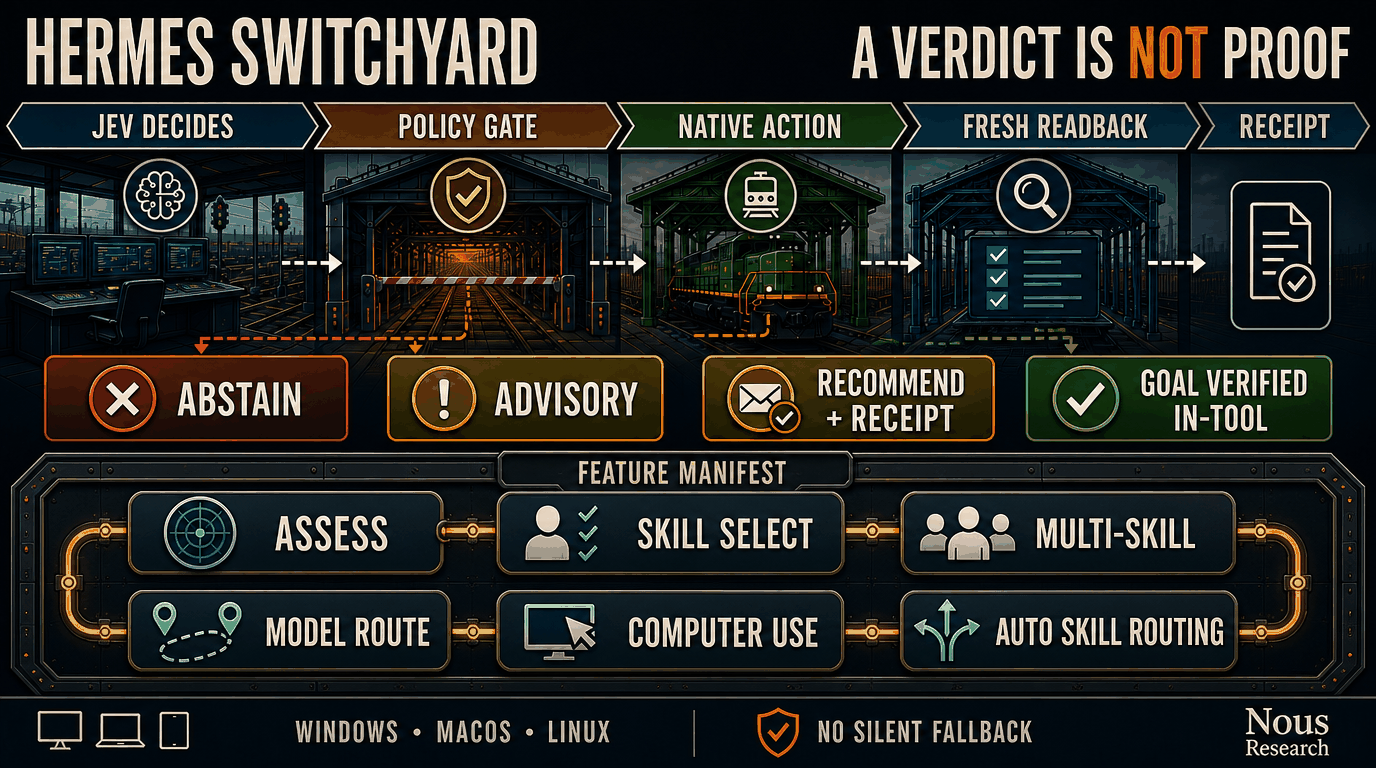
Hermes Switchyard is a plugin that helps Hermes choose skills, models, and computer-use actions. Under the hood it uses Jev for structured decisions; Switchyard applies local policy and keeps actions bounded. Flow: Jev decides → Switchyard validates → Hermes executes and verifies. Deployed surface: seven Jev-backed tools, two lifecycle hooks (pre_llm_call and post_tool_call), and one middleware (llm_request) that applies adaptive reasoning effort, which is on by default. After install, automatic skill routing defaults to hosted_sanitized + load with standing acknowledgement on: Switchyard can recommend and load one accepted skill per turn when a live Jev key is present. Model routing stays recommend+receipt (applied: false until a Hermes apply seam exists). For computer use, receipt-level dual-gate verification sets goal_verified only when Hermes agreed DONE and a local completion condition is satisfied (verification_owner: hermes_and_url); a local_predicate early-stop may still be completion_candidate but keeps both flags false. Switchyard does not modify Hermes core or silently change your active model. Opt down to local_only / advisory for privacy. Explicit deny/unknown/malformed/restricted host envelopes and restricted local scans still fail closed.
Why install
Feature scorecard last collected for 0.5.0: selector and microbench rows were measured at commit c8e6008c6314e182fd7b100a30efb384db542ee8; computer-use DOM was re-bound to tip-main commit a8dae196b0b9892eeb627829d97363ec3d4bb9c9 after #57+#58. It was not re-collected for 0.5.1, 0.5.2, or 0.5.3. Comparison arms vary by row, not always “product without Switchyard.” Human-readable benefits first; verification hashes live under Proof.
| Feature | What this row measures | Comparison arm | Measured arm |
|---|---|---|---|
| Skill pick | Choosing the one right specialist skill for a task | Lexical baseline: 7/12 correct | jev_skill_select: 12/12 correct |
| Multi-skill pick | Completing a task that needs several skills together | One-skill API (jev_skill_select): 0/5 sets complete |
jev_skill_select_many: 5/5 sets complete |
| Model route | Switchyard jev_model_route: recommend a model for the task and leave a receipt |
No Switchyard recommendation | Ships in 0.5.0 — 3/3 agree with a local filter + receipt; does not switch Hermes’ active model yet (applied: false) |
| Assess | Answering a small typed multiple-choice check | First-option baseline: 2/3 correct | jev_assess: 3/3 correct |
| Automatic skill routing | Quietly suggesting a skill before the model acts (local match) | Off → always silent | 1/2 needed skills caught; no false suggest |
| Computer use | Driving the browser/desktop toward a goal | Stock Hermes computer_use A/B still pending fair Session-1 GUI run |
Cat→Felidae DOM (tip a8dae19): 1 click, Jev ~365 ms, ~$0.00021, local url_contains satisfied; goal_verified: false (dual-gate: local_predicate early-stop does not self-certify) |
- Cheap: about $0.000055 per skill-select decision (~$0.055 per 1,000)
- Fast: about 0.19 s typical; 0.30 s at p95 on the frozen 24-task skill bench
- Also true, not table rows: Switchyard does not invent a skill when none fits (0/6 on both arms).
- Honest gaps: Automatic routing is not yet a counterbalanced Hermes-session win. Computer-use dual-gate (PR #57 on main) sets
goal_verified: trueonly when HermesDONEand a local condition match; local-predicate early-stops staygoal_verified: false. Stock Hermes GUI A/B is still the open comparison arm.
This shows better single-skill routing and a working multi-skill API. It is not a claim that every Hermes task improves. Adaptive reasoning effort has no row here: the table measures decision quality, and effort selection is a different claim.
Proof: method, limitations, per-feature tables, and verification hashes → docs/BENCHMARKS.md · selector JSON · feature battery JSON
Install
Ready to try it? One command from the public repo — no GitHub login or token:
hermes plugins install bgrablin/hermes-switchyard --enable
The command installs and enables the plugin. To inspect the installed files before enabling it:
hermes plugins install bgrablin/hermes-switchyard --no-enable
hermes plugins list
hermes plugins enable hermes-switchyard
The repository command requires no GitHub login or token. Do not put a GitHub token in a clone URL, command, issue report, or repository file. Catalog installation is not available until a human admits the plugin to the Hermes catalog; use the repository command above.
After installing or updating, start a fresh Hermes session so it loads the new plugin. Restart only the Hermes process that needs to load the change.
Setup requirements
A working Jev call requires one of these profile-scoped secrets:
TYPESAFE_API_KEYfor the direct TypeSafe endpoint. This is the preferred low-latency route when available.OPENROUTER_API_KEYfor OpenRouter's Decisions endpoint.- Enough account credit or allowance for the selected route.
jev_provider: auto prefers direct TypeSafe when TYPESAFE_API_KEY exists and otherwise uses OpenRouter. Set jev_provider to typesafe or openrouter to pin the route. A ChatGPT or Codex subscription is separate from both accounts and does not pay Jev request charges.
The supported endpoints are https://api.typesafe.ai/v1/systemone and https://openrouter.ai/api/alpha/decisions. Arbitrary endpoints, redirects, and provider fallbacks are rejected. The client keeps a connection alive across decisions so a multi-step CUA loop does not pay a new TLS setup on every step.
Use the secure setup steps in docs/SETUP.md. Never pass an API key with a command-line argument or store it in a URL, repository file, fixture, or issue report.
Supported features
Deployed surface, as registered at this version:
| Surface | Deployed | Default |
|---|---|---|
| Tools (7) | jev_assess, jev_skill_select, jev_skill_select_many, jev_model_route, jev_model_route_approved, jev_session_search_rerank, jev_computer_use |
Registered under two toolsets; see Toolsets and session exposure |
| Hooks (2) | pre_llm_call (automatic skill recommendation), post_tool_call (adaptive effort after tools) |
On after install |
| Middleware (1) | llm_request (adaptive reasoning effort per turn) |
On after install |
- General assessment:
jev_assessexposes Choice, Score, and Noul through validated bounded requests. Large independent question sets are batched without dropping questions; the plugin never turns a probability into an unreviewed side effect. - Session search re-rank:
jev_session_search_rerankre-ranks a stock Hermessession_searchFTS shortlist with a Jev Choice (optional message-id Choice). Cards are redacted and capped; full transcripts stay local. Fail-open returns the first FTS hit when Jev is down or low-confidence. Seedocs/SESSION-SEARCH-RERANK.md. - Skill selection:
jev_skill_selectrecommends one skill from the candidate list supplied by Hermes. Catalogs larger than Jev's per-Choice limit are searched with partition fan-out and recursive reduction; no tail is silently discarded. It never loads the skill. - Multi-skill selection:
jev_skill_select_manyindependently scores the complete bounded catalog and returns a typed list of exact skill identifiers. It is a separate advisory contract and never loads or mutates skills. - Adaptive reasoning effort (default on): Jev picks the per-turn
reasoning_effortthrough Hermes'llm_requestmiddleware. Defaults and the disable command are in Adaptive reasoning effort. - Model routing:
jev_model_routeis recommend + receipt (advisory). It filters candidates using explicit code-owned metadata and requirements, then recommends the lowest-cost qualified candidate and leaves an auditable receipt. It does not auto-apply or change Hermes' active model (applied: falseuntil a Hermes apply seam exists).route_model_from_registryandhermes_switchyard.model_route_adapter.recommend_model_routesupply a first-class approved-registry path with the same receipt contract.jev_model_route_approvedinstead reads a profile-owned approved registry with policy validated locally, including operator-managed version and expiry fields. Neither tool changes the active Hermes model or tries another provider when Jev fails. Stale registry generations abstain asstale_registry; an empty registry abstains asempty_registry. - Cua Driver computer use:
jev_computer_useis registered by default in thecomputer_usetoolset on Windows, macOS, and Linux (cross-platform). Public web goals (start_urlor an https URL in the goal) run a DOM browser loop: one Jev request per step, page clicks, no Hermescomputer_usebetween actions. Desktop apps without a URL still use Cua Driver. Standingpublic_or_sanitized_data_ackis on after install, so callers may omit it. A live Jev route is still required. A session only exposes the tool when thecomputer_usetoolset is selected; see Toolsets and session exposure. The DOM backend runs a fresh headless profile, reports itsbackend,session_mode,browser, and confinement class, offers scroll-relative targets with stable identities, and evaluates an optional caller-suppliedcompletion_conditionlocally so it can stop without another request. Receipt-level dual-gate verification setsgoal_verified: true/verified: trueonly when Hermes agreedDONE(completion_source: provider_decision) and a local completion condition is satisfied (verification_owner: hermes_and_url); alocal_predicateearly-stop may still becompletion_candidatebut keeps both flags false. It can type into ordinary text fields whentext_inputsare supplied; it does not upload, authenticate, or attach to an existing browser session. Those goals, and typing goals without values, returnunsupported_capabilitybefore any request. See docs/DOM-BROWSER-BACKEND.md.
Adaptive reasoning effort
Adaptive reasoning effort is on by default. On Hermes 0.21 or newer, Switchyard registers the llm_request middleware, and Jev chooses reasoning_effort for the turn from the task and the recent results. It raises effort when the work is stuck or ambiguous and lowers it for routine steps. The plugin re-evaluates after tool results when the host exposes the post_tool_call hook. This is the one capability Switchyard applies to the live request instead of only recommending.
Levels are none, minimal, low, medium, high, xhigh, max, and ultra. Switchyard sends only levels the host accepts. For transports that reject the lowest levels, such as Codex, Responses, and Astra, it maps none and minimal to low, so adaptive effort never causes a rejected request.
| Setting | Default | What it controls |
|---|---|---|
adaptive_reasoning_effort |
true |
Runs the effort middleware. |
adaptive_reasoning_effort_default |
medium |
Effort for the first turn and after a fail-closed decision. |
adaptive_reasoning_effort_deadline_seconds |
8.0 |
Wall-clock budget for the effort choice, so the middleware stays quick. |
Fail closed: if the Jev route is unavailable, slow, or low-confidence, the previous effort stays. Switchyard does not change the active model and does not fall back to another provider.
hermes config set plugins.entries.hermes-switchyard.settings.adaptive_reasoning_effort_default high
hermes config set plugins.entries.hermes-switchyard.settings.adaptive_reasoning_effort false
Automatic skill recommendations
When the plugin is enabled, the pre_llm_call lifecycle hook is on by default. It discovers the full active profile skill registry through Hermes' supported skills_list API, performs a fast local match, and (with the install defaults) may call hosted Jev when a provider key is available. Install defaults are automatic_skill_routing_mode: hosted_sanitized, automatic_skill_consumer_mode: load, and automatic_skill_public_or_sanitized_data_ack: true. Advisory mode cannot authorize hosted work (consumer_contract_unmet). Set automatic_skill_jev_mode to uncertain_only only when latency matters more than Jev coverage.
Happy path after install: save one key via hermes switchyard setup, start a fresh session. No config-set commands are required to turn automatic features on.
Opt down for privacy
hermes config set plugins.entries.hermes-switchyard.settings.automatic_skill_routing_mode local_only
hermes config set plugins.entries.hermes-switchyard.settings.automatic_skill_consumer_mode advisory
hermes config set plugins.entries.hermes-switchyard.settings.automatic_skill_public_or_sanitized_data_ack false
The local scan rejects high-confidence secrets and payment or verification values before the hosted client is constructed. Topic words such as "private" or "verification" do not skip Jev. Hosted construction requires load consumer mode and standing acknowledgement. When the host forwards a turn_egress_policy allow envelope (version: 1, decision: "allow", data_class: "public" or "sanitized", bounded allowed_payload), that envelope authorizes the turn (egress_authority: host_envelope). When no envelope is present and the local scan is clean, standing acknowledgement authorizes the turn (egress_authority: standing_ack) using the bounded task text that passed the scan. Explicit denied, unknown, restricted, or malformed envelopes fail closed. Restricted local scans fail closed. Hosted automatic routing is never constructed while the routing mode remains local_only, regardless of the acknowledgement setting.
Automatic hosted Jev receives only the authorized bounded payload and exact candidate identifiers. Candidate descriptions, conversation history, and full skill bodies remain local. A valid Jev abstention is preserved; a transport failure may preserve a local winner. The hook exposes only redacted routing status/reason metadata.
With automatic_skill_consumer_mode: load (install default), Switchyard passes one accepted exact identifier to Hermes' normal skill_view loader once per turn. Set it to advisory to add model-visible context without loading anything (and without authorizing hosted construction). Explicit skill instructions, abstention, invalid results, conflicts with configured mandatory skills, and loader errors do not trigger an automatic load. Typed callback metadata and the local receipt report the selected identifier, source, consumer status, and whether the load occurred.
Inspect the active profile's redacted routing mode and provider readiness without displaying a credential:
hermes switchyard status --json
Privacy and data handling
Jev tools treat public_or_sanitized_data_ack as on after install. Callers may omit it. Pass false or set plugins.entries.hermes-switchyard.settings.public_or_sanitized_data_ack to false to refuse. Hermes owns data classification; this flag is not a scanner. Automatic skill recommendations still use their own persistent setting plus a local per-turn scan.
For Cua Driver computer use, Jev may receive the goal, target application, window title, safe control labels, visible context, and recent actions through the selected Jev endpoint. Text-field operations use only bounded caller-supplied values from text_inputs; the registered tool never calls a conversational Hermes LLM between Jev actions and abstains when no caller value is supplied. Do not send private, employer, regulated, credential, password, API-key, token, payment, or verification-code data.
Evidence, reconciliation, and deadlines
jev_computer_use returns one typed receipt that records what is known, not a single success boolean. A dispatched action records the native verdict, whether the executor effect_confirmed the change, the effect_status string, and any escalation. These are distinct evidence levels: a native verdict is not proof a downstream task finished, load-mode verification is not proof a recommendation was correct, and an observed postcondition is not proof the whole goal was satisfied. Receipt-level dual-gate verification sets goal_verified / verified true only when Hermes agreed DONE (completion_source: provider_decision) and a local completion condition is satisfied; verification_owner is then hermes_and_url. A local_predicate early-stop (caller-supplied or derived) may still be completion_candidate but keeps both flags false. Provider DONE without a satisfied condition stays unverified (verification_owner: coordinator).
Expected exceptions preserve partial progress instead of discarding it. If a later action, fresh capture, or native dispatch fails, the receipt still lists every prior action, decision, provider request, and cost, and it sets reconcile_before_retry: true when any side effect may already exist. That flag asks the coordinator to inspect before replaying; it is not a claim that replaying is safe.
Provider usage after a partial failure can be incomplete. A missing usage value is not zero usage. A receipt may report a partial subtotal from completed responses and mark the operation cost incomplete rather than claiming a finished total.
Operation deadlines are cooperative, not hard. The loop checks operation_remaining_deadline() before each Jev request and native action and bounds each request by the time left. Native operations such as a blocking dispatcher call or a lock acquisition may not be interruptible mid-flight, so the plugin does not claim to force a desktop action to stop instantly and never retries silently after the caller believes the operation stopped.
Tools and limits
The tools are advisory and bounded:
- A high confidence score is not proof that a choice is correct.
- Switchyard can return no selection when eligibility or confidence checks fail. This valid result is called abstention.
- The default
loadconsumer invokes Hermes' normal loader once for an accepted turn. Setadvisoryto recommend without loading; neither skill mode changes runtime models. Model routing stays recommend+receipt (applied: false). Computer use sets in-toolgoal_verifiedonly under dual-gate (HermesDONE+ local condition); that is not a claim that every GUI task is certified. - Provider fallback is disabled. A failed Jev request does not silently move to another provider.
- Each assessment, skill-selection, or model-routing operation has one aggregate 64-request budget. A CUA run has one aggregate 256-request budget across its 100-action ceiling; serialized request size is also bounded.
- Skill selection and model routing work wherever Hermes can expose the plugin toolset.
jev_computer_useis available on Windows, macOS, and Linux when Hermes' Cua Driver-backedcomputer_usetool is available. - The repository's offline tests use synthetic transports and do not call OpenRouter or drive a real GUI.
Future work includes reviewed catalog admission, independent real-GUI coverage, multi-skill planning/coordination beyond jev_skill_select_many, and a counterbalanced whole-agent benchmark. Those are not provided by this release.
Safe credential setup
The plugin can use either TYPESAFE_API_KEY or OPENROUTER_API_KEY. Both are optional alternatives, so plugin installation does not prompt for either one. Hermes prints after-install.md at the end of install; hermes switchyard guide reprints those next steps. After installation, save one key through Switchyard's masked setup command. With jev_provider: auto, direct TypeSafe is preferred when both are present.
hermes plugins install bgrablin/hermes-switchyard --enable
hermes switchyard setup --provider typesafe
hermes config set plugins.entries.hermes-switchyard.settings.jev_provider auto
Do not use hermes auth add openrouter for this plugin. Switchyard reads profile-scoped secrets through Hermes' secret scope. Check readiness without displaying a key:
hermes plugins list --enabled
hermes plugins doctor /path/to/hermes-switchyard --ci
Cua Driver prerequisites
jev_computer_use reuses Hermes' existing Cua Driver-backed computer_use tool. Install and diagnose that toolset through Hermes, not by vendoring a second driver into Switchyard:
hermes computer-use install
hermes computer-use doctor
hermes -t computer_use chat
Cua Driver supports background desktop actions on Windows, macOS, and Linux. Switchyard adds the Jev decision layer, application-owned candidate IDs, partitioned target choices, fresh identity checks, and independent-completion semantics. It does not bypass Hermes approval or Cua Driver safety controls.
Toolsets and session exposure
Hermes puts a tool in a session's callable catalog only when the toolset the tool is registered under is selected for that session. Switchyard registers its seven tools under two toolsets:
| Toolset | Tools | Notes |
|---|---|---|
computer_use |
jev_computer_use |
Hermes' own low-level computer_use tool is in the same toolset. |
hermes_switchyard |
jev_assess, jev_skill_select, jev_skill_select_many, jev_model_route, jev_model_route_approved, jev_session_search_rerank |
The plugin's own toolset; nothing else is registered in it. |
Selecting one of the two toolsets does not select the other, and Switchyard adds no tool to any other core toolset.
- No pin. A session started without
--toolsetsuses Hermes' default selection for the CLI. With Hermes' default configuration that selection includes both toolsets. A toolset list saved byhermes toolsthat leaves Computer Use off keepsjev_computer_useout of sessions while the six decision tools stay callable. Enable Computer Use inhermes tools, or pin the toolset for the session. - Explicit pin.
--toolsets(-t) replaces the default selection and does not add plugin toolsets.hermes -t computer_use chatexposesjev_computer_useand no decision tool.hermes -t hermes_switchyard chatexposes the six decision tools and no computer-use tool. A pin such asterminal, or thehermes-clicomposite alone, exposes none of the seven tools even though all six stay registered. To expose all seven, name both toolsets. In PowerShell, quote the list, because an unquoted comma is PowerShell's array operator. Hermes also subtracts the configuredagent.disabled_toolsetslist from every CLI session, including one with an explicit pin, so a toolset named there stays unreachable whatever--toolsetssays. Remove the name from that list inconfig.yaml, or enable the toolset inhermes tools, which also removes it from the list for the CLI. - Outside the selection means unreachable. Hermes' Tool Search bridge (
tool_search,tool_describe,tool_call) is scoped to the same selection, sotool_describereports a tool outside it as not found. That is a toolset-selection or registration problem, not a Jev outage.
hermes -t computer_use,hermes_switchyard chat
Registered and callable are different facts. Registered means Hermes' registry holds this plugin's own registration for the tool. Callable means the tool is in the catalog Hermes builds for a session with a given toolset selection. hermes switchyard status --json reports both for each tool, so an operator can tell which one failed. With no --toolsets it evaluates the selection Hermes' CLI would use for a new session; with --toolsets it evaluates that pin, as hermes chat --toolsets would:
hermes switchyard status --json
hermes switchyard status --json --toolsets computer_use,terminal
status never reports ready while a registered tool is missing from the evaluated catalog. Its values are ready, credential_required, tools_not_registered, tools_not_callable, and exposure_unverified. ready and credential_required follow the key of the provider the configured route uses, reported as effective_provider; a key for the other provider does not count. docs/SETUP.md explains each field and reason. status evaluates a fresh session. It does not read the catalog of a session that is already running, so start a fresh session after changing the plugin, its configuration, or the toolsets.
Configuration
Settings are profile-scoped under plugins.entries.hermes-switchyard.settings:
hermes config set plugins.entries.hermes-switchyard.settings.jev_provider auto
hermes config set plugins.entries.hermes-switchyard.settings.computer_max_steps 100
jev_provider is auto, typesafe, or openrouter. api_endpoint may only be the fixed direct TypeSafe or OpenRouter endpoint. Leave jev_model empty to select the provider default. Each Hermes profile has its own settings and secret scope.
Missing-key symptoms
When neither TYPESAFE_API_KEY nor OPENROUTER_API_KEY is available, Hermes can disable the plugin during loading. If a handler is reached without a key, the plugin fails closed with a generic request-validation error; it does not print credentials or provider response text.
The supported recovery is:
- Run
hermes switchyard setup --provider typesafeor use--provider openrouterand enter the key only in the masked prompt. - Start a fresh Hermes session.
- Run
hermes plugins list --enabled. - From the plugin root, run the native check:
hermes plugins doctor . --ci
Plugin Doctor checks whether Hermes can import and register the plugin. It does not test a live Jev request or prove that a GUI task succeeded. It runs plugin code in-process, not in a sandbox, so use it only with trusted code.
Updating and rollback
For an unpinned repository install:
hermes plugins update hermes-switchyard
An exact-SHA install does not move implicitly. Remove the installed copy, reinstall the reviewed commit with --ref as described in docs/RELEASE.md, then enable the plugin if required. Check the result with hermes plugins list and hermes plugins doctor . --ci before enabling it.
These operations replace only the plugin under the active profile's plugin directory. They do not patch Hermes core. Keep the previous reviewed SHA as the rollback target.
Offline verification
The repository has no runtime Python dependency beyond Hermes for native loading and requires Python 3.11 or newer for offline checks:
python -m unittest discover -s tests -v
python evaluation/evaluate.py --validate
python scripts/check_portability.py
Release archives use an exact Git source commit, include SOURCE-MANIFEST.json and embedded SHA256SUMS, and are extracted and verified before the builder returns. Release and candidate review instructions are in docs/RELEASE.md.
Documentation
- Setup
- Release instructions
- Feature and test matrix
- Benchmark methods and live results
- Approved model-routing policy
- Contributing
- Security reporting
- Third-party references
- Changelog
- Brand assets

Own work is MIT-licensed. See THIRD_PARTY.md for conceptual upstream references.