

Hermes Vitals Light

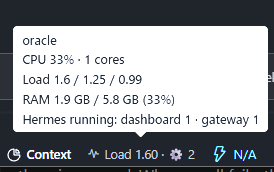
Hermes Desktop and TUI plugin. The Desktop status-bar chip shows the CPU, load average, free
RAM, CPU pressure (Linux PSI) and RTT of the server it is connected to:
CPU 23% · Load 1.20 · 3.8G free · waited 15s/60 · RTT 12 ms · 👥 2 · ⚙ 3. On a remote gateway (SSH, URL + token) it
measures the remote box, not your PC. Load is the 1-minute average (omitted when the server reports
none); the tooltip adds hostname, cores, 5/15-min load, RAM used / total, free RAM, waited and RTT.
waited 15s/60 is Linux PSI CPU pressure: the seconds of the last minute at least one task was
runnable but stalled waiting for a CPU, computed as round(avg60 * 0.6) from the some line of
/proc/pressure/cpu. It is omitted when PSI is unreadable (macOS, Windows, containers without PSI).
3.8G free is MemAvailable from /proc/meminfo on Linux and psutil's available RAM on macOS and
Windows, in GiB, one decimal. The Linux figures come from one stateless two-file read, with no
psutil, subprocess or cache. If free RAM is unreadable, the chip falls back to the old percentage;
waited is simply omitted where the kernel has no PSI.
RTT 12 ms is the round trip of a WebSocket ping over the Desktop's live gateway socket,
measured in the Desktop half (host.request('ping')); it is left out when that socket cannot
answer. It is the connection the app actually uses, not ICMP ping and not the /stats request
(whose process scan can take ~50 ms). The TUI has no server to ping, so its card does not offer
it. RTT does not change the chip colour.
The chip colour comes from the waited verdict, not from CPU or load: red (stuck) at
waited >= 25 or less than 1 GiB free, amber (busy) at waited >= 10, otherwise normal. On
macOS and Windows, where there is no PSI, only the free-RAM rule applies. When a poll fails, the
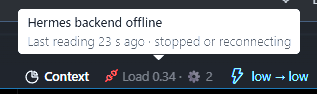
chip keeps the last figures, dimmed, and its tooltip says how old they are and why; it shows
CPU — only when it has never received a reading from the current server.
The first icon is a health light: pulse normally, watch when the last successful poll took
1.5 s or more, clock after a timeout, debug-disconnect when the backend is stopped or
unreachable, plug when the backend half is missing, and warning for another backend error.
The badge itself stays short: the icon carries the state. A stale or unavailable chip gets a
compact two-line tooltip (state title + last-reading/attempt line) instead of the full host/load
detail, so an offline backend does not open a large panel. Healthy polls keep the full tooltip.
👥 N is the number of active sessions on the connected server: Hermes's own
active_sessions figure from its public GET /api/status (sessions not ended and active in
the last 5 minutes, among the 50 most recent, current profile). It is a total, not a count
per client; the tooltip reads Active sessions: N. The backend half asks the server it runs
in, over loopback, on the socket address the request arrived on, and keeps the answer for
15 s, refreshed in the background (/api/status does much more than count). That needs the
route to run inside the server, which is the default (plugins.isolation: in_process): in the
plugin host (isolation: host) there is no address to ask and 👥 is left out.
⚙ N counts the Hermes executables running on the server right now, all profiles and
users it can see: each hermes command (serve, chat, gateway, dashboard…),
hermes-agent, hermes-acp. The tooltip breaks it down by command
(Hermes running: chat 3 · serve 1), so several agents launched in parallel show up as
chat 3. A Hermes started by another one counts once, under its top-level ancestor: the
Windows launcher and its python children, the TUI's tui_gateway, a hermes an agent runs
from its terminal. The Desktop app itself (Hermes, capitalised) is not counted.
Settings ▸ Plugins ▸ Hermes Vitals Light has one switch per figure (CPU, Load average, RAM,
Waited on CPU, RTT, Active sessions, Hermes processes), all on by default and saved per Desktop. A
hidden figure is only hidden; the colour still comes from the waited verdict. With everything off
the chip is just its icon. The tooltip shows the full detail of what is measured. Active sessions
and Hermes processes switched off are not measured at all: the chip polls
/stats?skip=clients,processes and the server skips the /api/status ask and the process scan
(the TUI does the same for its process option). RTT switched off sends no ping.
TUI
In hermes --tui the same figures sit in a card docked above the prompt, coloured like the
chip (the TUI's skin colours), without 👥 or RTT: both come from the Desktop's gateway
(/api/status and a WebSocket ping), and the TUI has no server to ask. The TUI measures the
machine it runs on: the card runs plugin_api.py with the TUI's own Hermes python, which prints
the /stats body every 3 s (/vitals every <s> changes it) for as long as the card is docked.
| Command | Effect |
|---|---|
/vitals |
dock / undock the card |
/vitals ram off |
hide a figure: cpu, load, ram, waited, processes (on shows it, no on/off flips it) |
/vitals detail on |
add the Desktop tooltip lines (hostname, cores, 5/15-min load, RAM used / total, free RAM, waited, per-command counts) |
/vitals all on · all off |
every figure (not detail) |
/vitals reset |
back to the defaults: every figure on, detail off |
/vitals help |
usage and the current options |
Several go in one command (/vitals cpu off load off detail on); changing an option
docks the card. Options are saved in <HERMES_HOME>/vitals.json, shared by every TUI
of that home (the Desktop keeps its own, in Settings ▸ Plugins).
Three halves, one package (same layout as other unified Hermes plugins):
| Half | Where it runs | What it does |
|---|---|---|
desktop/plugin.js |
Hermes Desktop (renderer) | Chip in statusBar.right; polls /stats every 3 s by default (Refresh every), times a gateway ping for RTT, skips while the window is hidden, re-polls at once when it becomes visible or on a connection/profile switch. A failed poll keeps the last figures, dimmed. |
dashboard/plugin_api.py |
The Hermes backend you connect to | Read-only GET /api/plugins/hermes-vitals-light/stats via psutil (a Hermes core dependency), a loopback GET /api/status on the server it runs in, and, on Linux, one two-file /proc read for PSI/free RAM. Returns only load figures, the hostname, the session total, per-command process counts and the waited verdict. Both counts are cached and refreshed in the background, so a request never waits for them. |
tui/hermes-vitals-light.mjs |
Hermes TUI (<HERMES_HOME>/tui-widgets/) |
Ambient widget app /vitals; inlines plugin_api.py and runs it as a child (python -c) for the figures. |
Without the backend half on the server, the chip shows CPU — (tooltip explains) and the
poll backs off up to 30 s.
/stats is read-only and goes through the backend's usual authentication. It exposes the
hostname, the load figures and the two counts; no session ids, process list, paths or environment.
What it reads, and where it goes. The backend half reads psutil's CPU / load / memory figures
(including available RAM), two Linux /proc files (PSI and MemAvailable) when it runs on Linux,
the process table (pid, parent pid and command line) to count Hermes executables, and the server's
own loopback GET /api/status for the session total. Beyond the Desktop/TUI's normal connection to
its Hermes backend, the only network call the plugin makes is that loopback ask; it sends nothing
to a third party and has no telemetry or self-updater. The TUI half runs the same plugin_api.py
as a python -c child of the TUI, so it reads the machine the TUI runs on.
The dashboard half is API-only: dashboard/manifest.json registers a hidden /vitals page so the
web dashboard has a bundle to load beside plugin_api.py; the visible UI is the Desktop chip and the
TUI card.
Requirements
- Hermes 0.22 or newer, with Hermes Desktop plugin support (Desktop half) or
hermes --tui(TUI half). - The backend half needs
psutiland FastAPI, both already present in ahermes serveenvironment; no extra dependency is installed. - Backend and TUI halves run on Linux, macOS and Windows.
waitedneeds Linux PSI;freeusesMemAvailableon Linux and psutil's available RAM on macOS/Windows. - Node.js 20+ is needed only to build from source.
Install
Desktop half (the machine running the Desktop app; it ships off and must be enabled):
- From the catalog: open Capabilities → Plugins, find Hermes Vitals Light, and install it;
the app copies
desktop/plugin.jsintodesktop-plugins/. Then enable it. - From a source checkout:
node scripts/build.mjs && node scripts/install.mjs --desktop
Backend half (the machine running the backend your Desktop connects to, e.g. over SSH):
hermes plugins install hermes-vitals-light --enable       # from the catalog
# or:
hermes plugins install https://github.com/atostivint/hermes-vitals-light --enable
hermes plugins enable hermes-vitals-light                 # user plugins must be in plugins.enabled
# then restart that backend (hermes serve / dashboard)
TUI half (optional, the machine running hermes --tui; it measures that machine):
cp ~/.hermes/plugins/hermes-vitals-light/tui/hermes-vitals-light.mjs ~/.hermes/tui-widgets/
# Windows: %LOCALAPPDATA%\hermes\plugins\hermes-vitals-light\tui\hermes-vitals-light.mjs
#          -> %LOCALAPPDATA%\hermes\tui-widgets\
The TUI picks the widget up live, no restart. From a source checkout, use
node scripts/build.mjs && node scripts/install.mjs --tui.
Uninstall
- Desktop: disable it in Capabilities → Plugins, then delete
<hermes home>/desktop-plugins/hermes-vitals-light/. - TUI: delete
<HERMES_HOME>/tui-widgets/hermes-vitals-light.mjs; remove<HERMES_HOME>/vitals.jsontoo to drop its saved options. - Backend:
hermes plugins disable hermes-vitals-light, then restart that backend.
Footprint
Measured on Windows 11, 528 processes, Hermes venv python (2026-10-19). The session count was
added after these figures and was not measured separately: it adds one ask of the server's own
/api/status every 15 s, with everything on, refreshed in the background.
| What | Cost |
|---|---|
/stats in hermes serve, everything on |
the load figures only (well under 1 ms warm); at most one process scan per 5 s (~55 ms of CPU on 500 processes) and one /api/status ask per 15 s run in the background |
/stats?skip=processes |
~0.1 ms, plus the session count refreshed in the background every 15 s |
/stats?skip=clients,processes |
~0.1 ms |
| PSI + free RAM read (Linux) | two small /proc files; ~41 µs mean / ~38 µs median of CPU per call on the deployment host (p99 84 µs), no psutil, subprocess, thread or cache |
| First process scan after start | runs in the background; ~5 s of one core on Windows (no request waits for it) |
TUI card child (python -c) |
~60 MB RSS (launcher + python); ~2 % of a core with processes on (scan cached 5 s), ~0.4 % off |
| Desktop half | one ~260-byte request every 3 s, none while the window is hidden; RTT adds one gateway ping per poll while shown |
Tests
node --test test/dashboard.test.mjs test/load.test.mjs test/plugin.test.mjs test/tui.test.mjs  # manifest + Desktop + TUI halves (build first)
python -m unittest discover -s test -p "test_*.py"                           # backend unit
pip install psutil fastapi httpx && python -m unittest discover -s test -p "test_*.py"
                                                                             # also mounts the real FastAPI route
CI runs both suites on Linux, macOS and Windows on every push and pull request, and fails if the
committed halves do not match src/ after npm run build.
Known limits
-
The session count is Hermes's
active_sessions: sessions not ended and active in the last 5 minutes, among the 50 most recent of the current profile, so it stops at 50 and is not per client. It is left out when the route runs in the plugin host, behind a unix socket, or when the server's/api/statusdoes not answer on its own address (a TLS certificate that does not match127.0.0.1, for one). It is cached for 15 s and refreshed in the background, so it can be up to 15 s old; the first answer after a backend restart can omit it. -
The process count is by command line: a Hermes run some other way (
python -c, renamed script) is not seen, and processes of other users whose command line is unreadable are skipped. It includes thehermes serveanswering the chip. The scan is cached for 5 s, so the count can be up to 5 s old; the first answer after a backend restart can omit it. -
A failed poll keeps the last figures (dimmed) and their age in the tooltip; polls back off to 30 s.
CPU —appears only when no reading has arrived for the current server. A timeout is not treated as a missing backend half (a 404 is). A stopped backend and a dropped SSH connection both showoffline; a backend that is merely too slow showstimeout. -
The lag warning is fixed at 1.5 s; it is not a setting. A healthy
/statsanswers well under 100 ms, so this leaves room for a slow remote link while still flagging a struggling backend. -
RTT is the Desktop↔gateway WebSocket path: it includes the app's own scheduling, and is left out when the gateway socket is down or the host has no
host.request. It is not an ICMP ping, and it does not affect the health icon or the chip colour. -
waitedis Linux-only: it is omitted when/proc/pressure/cpuis unreadable (macOS, Windows, or a container without PSI).freeisMemAvailableon Linux and psutil's available RAM elsewhere, one decimal GiB; the chip falls back to the old RAM percentage only when neither source is readable. The chip colour uses the waited verdict and free RAM:stuckat 25 waited seconds or under 1 GiB free,busyat 10 waited seconds,okotherwise. -
Client polls are clamped to at least 0.5 s.
-
Load average is native on Linux and macOS; on Windows psutil emulates it, so the first minutes after a backend start can read
0.00. It is display-only and does not affect the chip colour. -
CPU % is measured between two polls (
psutil.cpu_percent(interval=None)); several windows polling the same server share that window, so each sees a shorter sample. It is displayed only; the chip colour no longer uses CPU % or load average. -
Verified in the real Hermes Desktop status bar. The backend route is tested against a plain FastAPI router and a local stand-in for
/api/status, not a livehermes serve; the TUI card is tested against a stub TUI/SDK, not a livehermes --tui. -
English-only tooltip and settings; fixed thresholds. The refresh period is a setting (Settings ▸ Plugins ▸ Refresh every: 1, 3, 5, 10, 30 or 60 s, default 3 s;
/vitals every 10in the TUI). Hosts older than Settings ▸ Plugins show every figure. -
CPU, load and RAM are always measured (one psutil call each, under 2 ms), and on Linux waited/free are one two-file
/procread; switching any figure off only hides it. -
TUI: a TUI attached to a remote gateway still shows its own machine. On Windows psutil's first process scan takes ~13 s of one core (750 processes; later scans ~0.1 s), so
⚙ Nshows up that long after the card's first figures — the other figures are not delayed. -
TUI: the Desktop and TUI options are separate (the Desktop's live in its local storage).