hyatlas — HyAtlas v4 memory provider for Hermes Agent
Persistent 7-layer memory for Hermes backed by HyAtlas v4: a pure-Go, single-binary, local-first memory server (Apache-2.0). Chromem-go embedded vector store, in-process BGE-small embeddings via onnxruntime-go (no Python, no GPU, no external embedding service), LLM fact extraction with a selectable mode ladder (lite makes no LLM call at all), and a bitemporal knowledge graph with source citations.
This plugin is the Hermes-side integration: a MemoryProvider implementation
(thin HTTP client), four agent tools, a hermes hyatlas CLI, a Desktop pane
with a starmap graph view, and a web dashboard.
What you get
- Cross-session memory — conversation turns are persisted and LLM-extracted into facts/summaries/knowledge/intentions (7 layers, L1–L7)
- Agent tools —
hyatlas_status,hyatlas_search(3-channel semantic),hyatlas_recent,hyatlas_add - Recall injection — relevant memories are prefetched into context automatically each turn
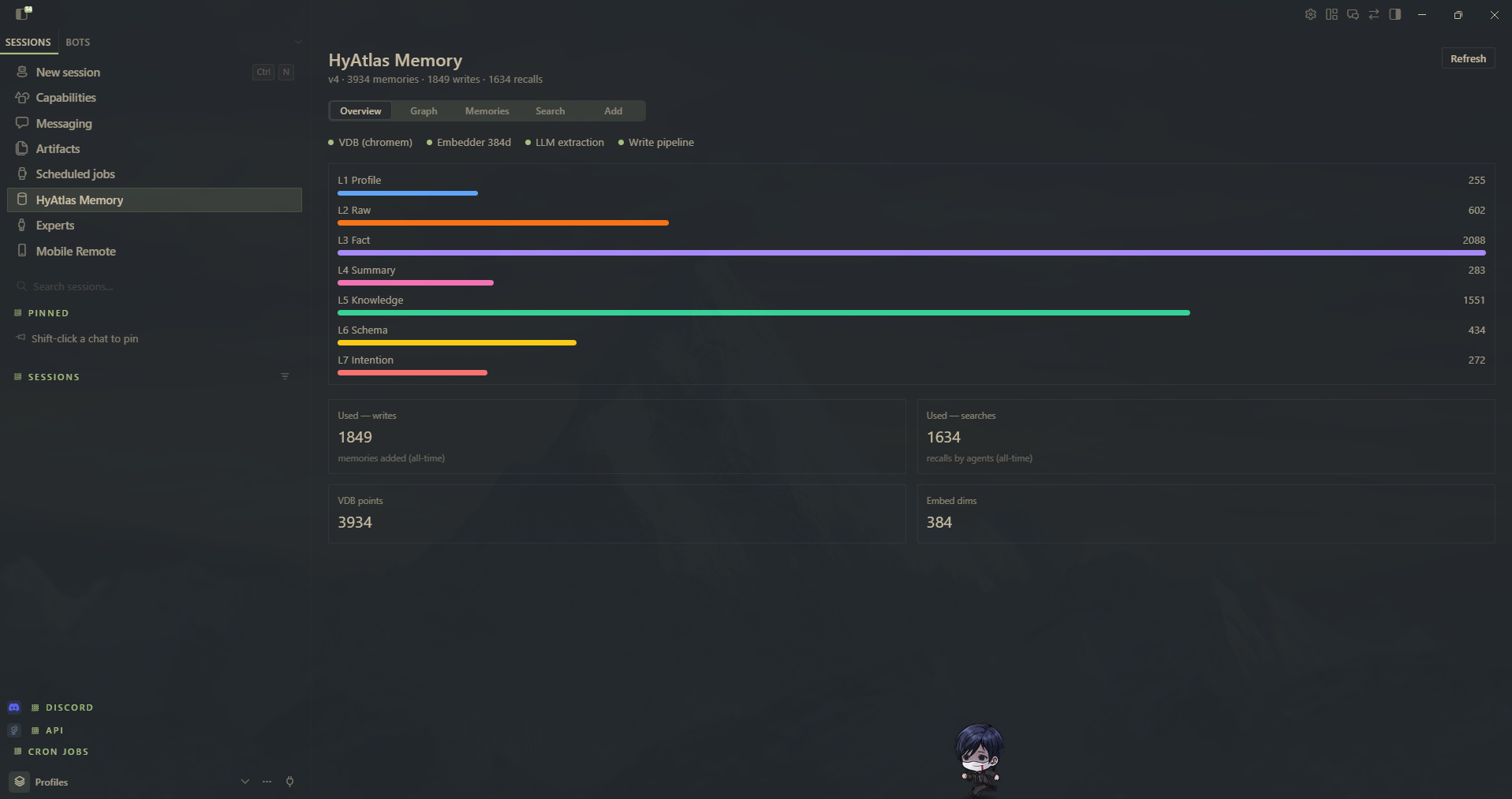
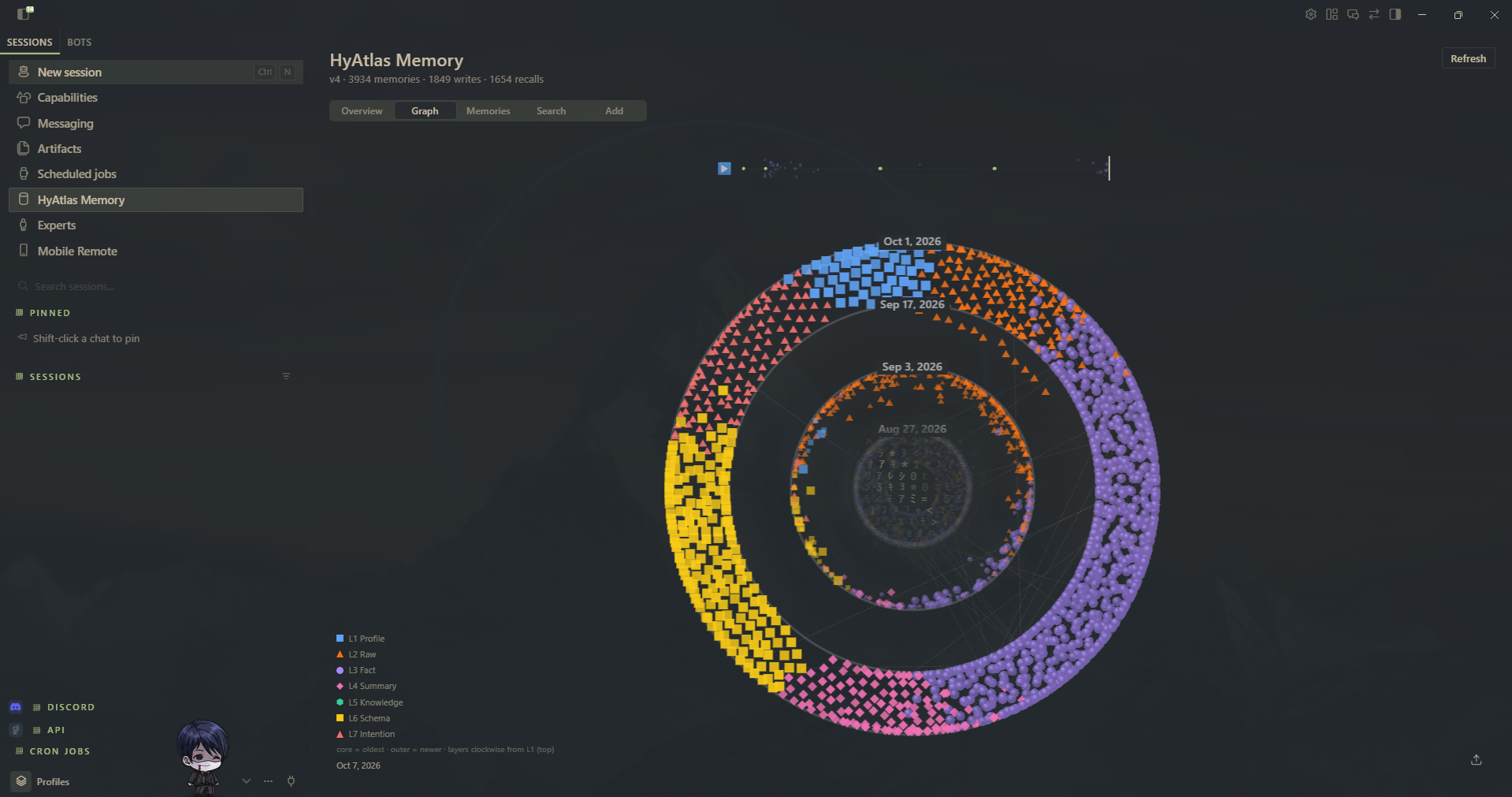
- Desktop pane — Overview (health + layer bars), Memories, Search, Add, and a Graph tab with a starmap visualization of the knowledge layers
- CLI —
hermes hyatlas status|search|add|recent|start|stop
Install
The plugin requires the HyAtlas v4 Go server (hyatlas-go) running
locally. The server is not bundled and not downloaded by this plugin —
install it once from the project repository (see its README for the
one-line installer, or grab a release binary from
Releases):
hyatlas start # starts hyatlas-go on 127.0.0.1:19528
Then install and enable the plugin:
# from the catalog, once the entry is merged:
hermes plugins install hyatlas

# or straight from this repo — the subdirectory must be part of the identifier:
hermes plugins install tuancookiez-hub/HyAtlas-Memory/plugins/hyatlas

hermes plugins enable hyatlas
Do not use the bare tuancookiez-hub/HyAtlas-Memory shorthand: it clones the
repository root, so the security scan sees the prebuilt dashboard/dist bundle
and the large assets/ images and returns a CAUTION verdict instead of the
safe verdict this directory gets.
And select it as the memory provider (hermes memory setup or in
~/.hermes/config.yaml):
memory:
  provider: hyatlas
Setup
Three fields, then it works:
hermes memory setup # pick hyatlas, then:
- Extraction mode —
lite,pro, orultra - LLM endpoint — any OpenAI-compatible base URL
- LLM API key — prompted masked, written to
.envat0600
lite needs neither 2 nor 3: it makes no LLM call, so nothing leaves the
machine. Choose lite and you are done.
The key is declared secret in the schema, which is not cosmetic:
hermes memory setup masks the prompt, routes the value to .env through
env_var instead of the provider JSON, and prints the url as
"Get yours at ...". save_config() strips llm_key defensively even if handed
one, so a hand-edited config cannot land a credential in hyatlas.json.
A spawned server receives llm_base and llm_model from settings. If a mode
that needs an LLM has no credential, the server prints an actionable warning at
startup, /api/v1/status reports llm: "unconfigured" rather than ok, and
writes return extraction_status: "unconfigured" instead of failing silently.
Settings
The mode setting is the one that decides whether conversation text leaves
the machine — see the extraction-mode table under Disclosure.
| Key | Env var | Default | Purpose |
|---|---|---|---|
server_host |
HYATLAS_SERVER_HOST |
127.0.0.1 |
Server host the plugin connects to |
server_port |
HYATLAS_SERVER_PORT |
19528 |
Server port |
user_id |
HYATLAS_USER_ID |
default |
Default user scope for memories |
agent_id |
HYATLAS_AGENT_ID |
default |
Default agent scope (overridden per session) |
auto_start |
HYATLAS_AUTO_START |
false |
Spawn the server binary when unreachable |
binary_path |
HYATLAS_BINARY_PATH |
(discover) | Path to hyatlas-go |
launcher_path |
HYATLAS_LAUNCHER_PATH |
(none) | Optional hyatlas-go.ps1 that owns the server environment |
request_timeout |
HYATLAS_REQUEST_TIMEOUT |
15.0 |
HTTP timeout, seconds |
data_dir |
HYATLAS_GO_DATA |
(conventional) | Server data directory, for hermes backup |
llm_base |
HYATLAS_LLM_BASE |
(server default) | Base URL of an OpenAI-compatible extraction endpoint |
llm_model |
HYATLAS_LLM_MODEL |
(server default) | Model id at that endpoint |
llm_key |
HYATLAS_LLM_KEY |
(none) | Secret — stored in .env (0600), never in hyatlas.json |
mode |
HYATLAS_MODE |
(server default) | Extraction mode forwarded to a spawned server: lite | pro | ultra |
sync |
HYATLAS_SYNC_EXTRACT |
(follows mode) | Whether a write blocks on extraction: on | off |
All fourteen are editable in Desktop → Settings → Plugins → hyatlas, or
via plugins.entries.hyatlas.settings in config.yaml, or the
HYATLAS_SERVER_HOST / HYATLAS_SERVER_PORT / HYATLAS_USER_ID /
HYATLAS_AGENT_ID / HYATLAS_AUTO_START / HYATLAS_BINARY_PATH /
HYATLAS_LAUNCHER_PATH env vars (env wins). Defaults work out of the box for a
local server on port 19528. launcher_path is optional: point it at a
hyatlas-go.ps1 if your install ships one beside the binary; otherwise
start/stop spawn the binary directly. The plugin does not configure the
server's LLM — HYATLAS_LLM_* are read from your environment or the server's
own config, never set by the plugin.
The Desktop pane loads automatically from this plugin's desktop/plugin.js
(the unified-package door) — no separate install step.
Updating
The plugin never updates itself. A catalog entry pins one exact commit, and that pin is the trust model: a self-updater would let an installed copy drift to a commit nobody reviewed. So updates arrive only when a re-pin PR lands in the catalog, and you apply them deliberately:
hermes plugins check-updates          # read-only: is anything newer available?
hermes plugins update hyatlas         # apply it
Then restart the gateway so the new code loads. The version on the card matches
the pinned code — hermes plugins list shows it, and the Desktop pane's badge
reads it from the running server's /api/v1/status.
If you installed straight from this repo instead of the catalog
(hermes plugins install tuancookiez-hub/HyAtlas-Memory/plugins/hyatlas),
hermes plugins update hyatlas works the same way; only the source of truth
differs.
The server binary is a separate thing. hermes plugins update hyatlas
updates the plugin (the client). It does not touch hyatlas-go, which lives
outside the plugin directory and is yours to manage — re-run the project's
installer or drop in a newer release asset when you want to move it. The plugin
reports whatever version the server it talks to actually is, so a stale server
shows up as a stale badge rather than as a mismatch you have to guess at.
Disclosure (what this plugin does at runtime)
-
Conversation text leaves your machine only if you point it somewhere. This is the important one. After each turn the plugin posts that turn to the server, and — if you have configured an extraction LLM — the server sends it there to derive facts, summaries and intentions.
No endpoint is assumed. The server ships with
HYATLAS_LLM_BASE,HYATLAS_LLM_MODELandHYATLAS_LLM_KEYall unset, and without all three it makes no LLM call at all: writes store the raw trace plus local embeddings and reportextraction_status: "unconfigured". Nothing is transmitted. You opt in by setting those three to any OpenAI-compatible API, including a local one (hermes memory setup, the Desktop settings form, orscripts/install.shall ask; the installer offers a free Nous Portal endpointhttps://inference-api.nousresearch.com/v1/poolside/laguna-s-2.1:freeas a starting point, which you can accept or overwrite).Once configured, extraction runs on every write in
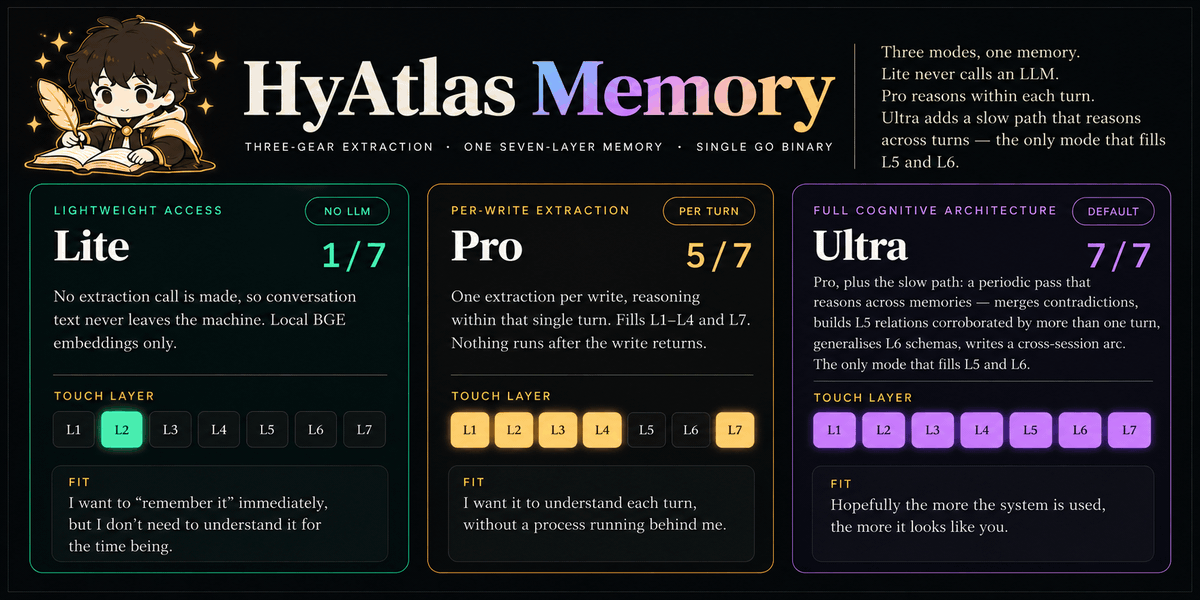
proandultra, and only the current turn is sent, never the whole conversation history. SetHYATLAS_MODE=litefor no LLM call regardless of configuration — raw trace and local embeddings only. Or point the endpoint at a local server, or turn memory off.HYATLAS_MODELLM calls Reasoning scope Layers Consolidation litenone — 1 / 7 — L2 Raw only no proone per write within one turn 5 / 7 — L1, L2, L3, L4, L7 no ultra(default)one per write + periodic batch across memories and time 7 / 7 yes The two systems own disjoint layers:
- System1 (per turn) — L1 Profile, L2 Raw, L3 Fact, L4 Summary, L7 Intention. What one turn can actually evidence.
- System2 (slow path) — L5 Knowledge, L6 Schema. A relation worth keeping is corroborated by more than one turn, and a schema is a recurring pattern, so neither can come from a single turn. Ultra is the only mode that runs System2, which is why it is the only one that fills L5 and L6.
Ultra is the only mode that reasons across memories: a periodic consolidation pass merges contradicting facts, generalises schemas that are visible only across many turns, synthesises a cross-session arc, and optionally decays raw history no graph edge still cites. Pro extracts within the single turn it was handed and stops.
Whether a write blocks is a separate knob,
HYATLAS_SYNC_EXTRACT=on|off(unset = follow the mode). Pro blocks by default, ultra does not; either can be overridden. Capability follows the mode, latency follows the knob. -
Network calls (plugin → server): all plugin traffic goes to the HyAtlas server you configure (default
127.0.0.1:19528, loopback). The plugin itself contacts nothing else, sets noHYATLAS_LLM_*variable, forwards no credential, and invents no endpoint — whatever you exported reaches the server unchanged, and the server owns the extraction call. The subprocess environment is built from an explicit allowlist (OS essentials plusHYATLAS_*), not from a copy of the agent's environment, so provider tokens and API keys do not reach the spawned server. -
Subprocess spawning: only when you enable
auto_start(default off); it then spawns thehyatlas-gobinary you point it at. -
Data written: conversation turns and memories are stored by the server in its own data directory (default alongside the binary). Nothing is sent to the plugin author, and there is no telemetry or usage reporting.
-
Reads outside its own data: none. The plugin reads only its own settings (
plugins.entries.hyatlas.settings,HYATLAS_*overrides,hyatlas.json). It never readsauth.json, another tool's token store, or a browser profile.
Requirements
- Hermes Agent >= 0.21.4
- HyAtlas v4 Go server (see Install above); Linux, macOS (arm64), Windows (amd64)
- No Python dependencies beyond Hermes core
Links
- Server + full docs: https://github.com/tuancookiez-hub/HyAtlas-Memory
- License: Apache-2.0