Magi 1.7.3
Hermes plugin for reviewing pending memory proposals and maintaining the
built-in Hermes MEMORY.md and USER.md stores from Hermes Desktop.
Desktop
Version 1.7.3 provides a native Magi workspace in Hermes Desktop. After the plugin is installed, enable both halves independently:
- Enable the Agent plugin for the active profile under Capabilities → Plugins.
- Enable the Desktop Magi plugin in the same Plugins screen.
- Open Magi from the Desktop sidebar.
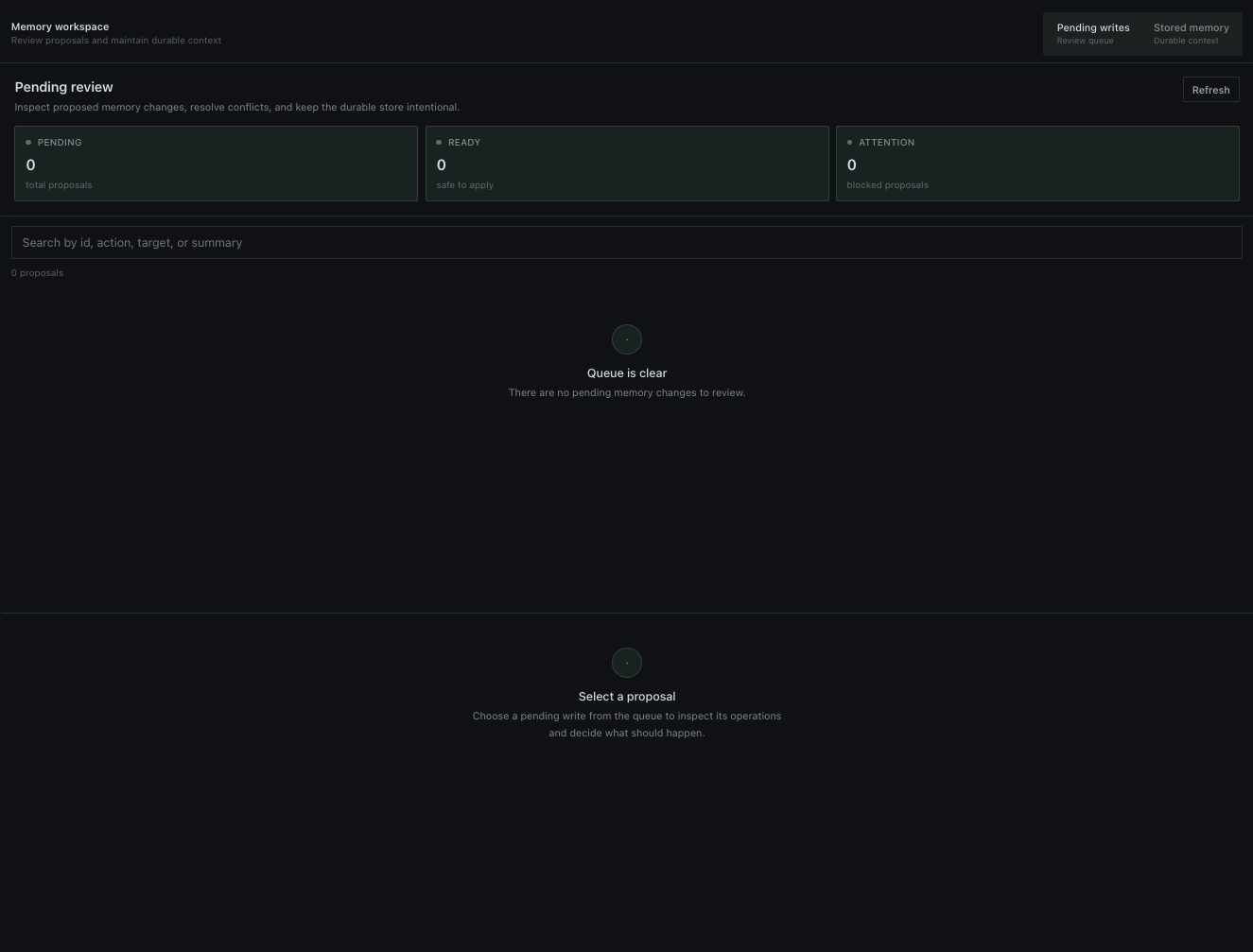
Use the compact workspace switch to alternate between Pending writes and Stored memory. The dashboard is organized around task state rather than raw records: queue/budget metrics stay visible, actions are contextual, search reports its filtered count, selected records are visually distinct, and loading/empty/error states explain the next useful action. Short 100–150 ms transitions, fade-ins, progress movement, and loading pulses provide feedback without an animation library; reduced-motion preferences disable transition motion.
Pending writes open on a formatted Overview with proposal status, metadata, intent, and readable operation cards. Proposal, Diff, Raw, and Verify remain available for deeper inspection. Text in all five inspection views is selectable, so standard copy shortcuts work directly from the review pane. Queue health shows total, ready, and attention-required proposals; obsolete/unverifiable items are visually distinct. Each pending write can be approved or rejected in place; Approve all and Reject all require an explicit confirmation click. It polls every five seconds so changes remain visible even when a live plugin socket is unavailable. Approval and rejection run through the plugin backend and do not require an open, active, or focused Hermes chat session. Pending replace/remove proposals are also checked against the current stored entries. If a pinned target has already been deleted, the proposal is marked obsolete, approval is disabled, and Delete obsolete rejects/removes the stale proposal through Hermes' native memory decision path.
Stored memory exposes separate Memory (MEMORY.md) and User (USER.md)
views with entry count, character usage, estimated tokens, free capacity, and a live
budget bar. Every stored entry is listed with its size and is searchable. Select an
entry, edit its complete text, and choose Save changes to replace that exact entry;
the editor distinguishes saved, unsaved, and externally stale states.
Use Add entry to create a new entry in the active target. Delete entry uses
a second Confirm delete click before removing the selected exact entry.
The backend delegates the write to Hermes' own MemoryStore, so locking, limits,
content scanning, drift detection, and atomic persistence remain enforced by
Hermes. Both targets also show exact character usage against the active profile's
configured memory_char_limit / user_char_limit, plus the equivalent approximate
token usage using Hermes' documented memory-budget scale of 2.75 chars/token. The
percentage is based on the exact character limit that Hermes actually enforces.
Choose Compact with AI on either target to ask Hermes' active/default model
for a leaner representation. The model receives the current entries as one untrusted
memory corpus and is explicitly told not to preserve source entry boundaries. It
extracts the durable, actionable core, merges related facts into a small number of
thematic entries, and removes examples, explanations, narrative history, temporary
status, repeated qualifiers, and low-value nuance that would not change a future
answer or action. The structured output schema also caps the proposal entry count
based on the source size. The invariant compaction policy is sent through Hermes'
supported system_prompt channel, while the stored memory remains lower-authority
input data. Magi makes up to three progressively stricter passes. The first has a
hard budget of 60% of the source footprint and the next two require at most 45%; the
preferred targets tighten from 40% to 30% and finally 22%. Retry passes continue
from the shortest candidate produced so far, which prevents discarded detail from
being reintroduced, and explicitly challenge premature claims that no further safe
compression is possible. Only the final pass may return cannot_compact_further,
and only when further shortening would lose material durable information. In that
case Magi reports an informational "no change" result with the model's reason and
leaves memory untouched instead of surfacing a generic budget failure. The plugin
also validates the output entry count itself after the LLM returns: if a
provider/model ignores the JSON Schema maxItems, the proposal is retried rather
than shown with too many entries; repeated violations fail closed without changing
memory. While generation is running, Desktop shows an activity indicator and
live elapsed time. The review panel is height-bounded with its own scrolling area,
and reports before/after entry counts, percentage reduction, token estimate, and
model attribution.
Preview generation runs through the plugin backend and does not require an open,
active, or focused chat session.
Nothing is written until Apply compaction is selected. Applying verifies that
the source entries have not changed since the preview and then performs one
atomic MemoryStore.apply_batch() update.
Commands
Session:
/magi list [page] [limit]
/magi show <id|prefix|oldest|newest>
/magi diff <id|prefix|oldest|newest>
/magi raw <id|prefix|oldest|newest>
/magi find <text>
/magi stats
/magi verify [id|all]
/magi path <id|prefix>
/memory-show <id|prefix>
/memory-compact-preview <memory|user>
Terminal:
hermes magi list
hermes magi show newest
hermes magi diff <id> | less
hermes magi raw <id> | less
hermes magi verify all
Use the terminal form for very large payloads because messaging platforms may impose their own message limits.
Install
hermes plugins install https://github.com/MarcosAlves90/magi
hermes plugins enable magi
For Desktop, use Capabilities → Plugins → Rescan if the app was already open, then enable the Desktop half separately. Hermes keeps the Agent and Desktop enable switches independent by design.
Local verification
./verify.sh
This checks Python syntax, runs the test suite, and enforces Cobertura line
coverage above 95%, then runs the same hermes plugins validate --install-deps
admission check used by the Hermes catalog. Test dependencies are isolated by
uv; the installed plugin itself uses Hermes plus the Python standard library.
Catalog disclosures
Magi reads the active Hermes profile's staged pending-memory records and the built-in MEMORY.md / USER.md stores in order to render its review and maintenance UI. The optional home_override setting can point Magi at another Hermes home/profile path selected by the user.
Memory changes happen only after an explicit user action in Magi. Approve/reject operations and stored-memory add/edit/delete/compaction writes are delegated to Hermes' native memory APIs and safeguards rather than rewriting the built-in stores directly.
Magi makes no direct third-party network requests, runs no shell commands or subprocesses at runtime, starts no long-running background process, and emits no telemetry or usage reporting. While the Desktop page is open it polls Magi's local profile-scoped backend every five seconds for UI freshness.
AI compaction uses Hermes' ctx.llm surface with the user's active/default model. The selected memory content is therefore sent according to that Hermes provider configuration; Magi does not read, persist, refresh, or otherwise manage the provider credentials itself.
Mutation paths
For pending proposals, the backend reads JSON records under the active profile's
pending/memory directory. Desktop approve/reject buttons do not edit those
files directly. They call the plugin's profile-scoped REST backend, which replays
approved writes through tools.memory_tool.apply_memory_pending() and removes
rejected or successfully applied pending records. This preserves Hermes' pinned-entry
approval semantics without routing through a session-bound slash command.
For stored memory, the plugin backend exposes profile-scoped GET /memory,
PUT /memory/{target}, POST /memory/{target}/compact/preview, and
POST /memory/{target}/compact routes. The GET route
reports Hermes' rough token estimate for each target. The PUT route loads Hermes'
on-disk store with
tools.memory_tool.load_on_disk_store() and calls MemoryStore.replace() with
the complete original entry pinned as the reviewed match. The plugin never
rewrites MEMORY.md or USER.md directly, so a stale, invalid, over-budget, or
blocked replacement is rejected by Hermes instead of silently overwriting newer
state.
AI preview generation reuses the Agent plugin's bound context from the backend and
calls ctx.llm.complete_structured() without a provider or model override, so Hermes
keeps provider selection, credentials, fallback, and the active/default model.
The preview carries a fingerprint of the exact source entries. The compact POST
route rejects a stale fingerprint and delegates the complete consolidation to a
single MemoryStore.apply_batch() transaction; failed validation leaves the
store unchanged.
The equivalent native commands are:
/memory approve <id>
/memory reject <id>
Validation
Version 1.7.3 targets Hermes >=0.21.5 and passes the repository verification
suite: complete tests, Cobertura
coverage above 95%, and Hermes plugin validation.