OpenRouter Spend for Hermes
An independent Hermes plugin showing OpenRouter API-key spend in USD and estimated INR, with a local request ledger and a desktop status-bar popup. Version 0.4.1 · MIT license.
The closed status bar shows total key spend and This chat. The popup adds daily, weekly and monthly totals, chat cost, a configurable monthly comparison, and profile/model tables. Both tables keep unassigned key spend in their existing Other row.
Install
Requires Hermes 0.21.5 or newer with the Desktop plugin SDK.
Requires Hermes with agent plugins, the desktop plugin SDK, dashboard plugin API routes, and the llm_execution middleware. This-chat cost additionally requires host.state.focusedStoredSessionId. Older desktop builds show that cost as unavailable. This package needs no frontend build and no additional Python dependencies beyond Hermes itself.
- In Hermes Desktop, open Capabilities → Plugins → Install from Git.
- Enter
AllenRobinHubert/openrouter-spend(or the full URL of your fork). - Install both the agent and desktop components for your selected local profile, and enable the plugin. Install the agent component in each profile whose new requests you want recorded.
- Set your own
OPENROUTER_API_KEYin that profile's environment using Hermes's credential settings or.envfile. Never paste a key into this repository or intoapi_key_env: that setting is the environment-variable name. - Restart the profile's backend if routes are unavailable, then refresh the popup. Newly recorded costs accumulate from installation onward.
The agent component can also be installed with:
hermes plugins install AllenRobinHubert/openrouter-spend --enable
For a ZIP/manual install, extract this entire folder into your profile's plugins/openrouter-spend/, enable it with hermes plugins enable openrouter-spend, and restart Hermes. Hermes Desktop discovers the included desktop/plugin.js from a unified package. Keep the folder name openrouter-spend.
What the numbers mean
| Display | Source and scope |
|---|---|
| Total / today / week / month | OpenRouter's reported counters for the selected API key; includes other apps using that key. Periods follow the provider's UTC counters. |
| Key spend in each table | Confirmed requests with a matching key fingerprint, plus the unassigned remainder in Other. Uses decimal accounting. |
| Other | Confirmed charges with no matching profile/model, plus key total minus all confirmed charges tied to that key. Unassigned tokens remain unknown. |
| Outside key | Confirmed history with a different or unknown key, and manual entries. Excluded from the key-spend column. |
| Tokens / tracked average | Recorded Hermes history across OpenRouter keys. The average uses only records with both cost and token counts. |
| This chat | Confirmed recorded charges for the focused stored conversation, including captured image calls and compression continuations. Forks and resets stay separate. Missing history is marked partial or unavailable. |
| INR | Estimate using a daily reference rate or your manual rate; not your card's actual exchange rate or tax-inclusive bill. |
When the provider snapshot trails newly confirmed requests, Other shows syncing instead of a negative remainder. Refresh after the provider catches up. Historical calls before installation cannot be reconstructed fully. Unknown-key charges remain outside the breakdown even when they might have used this key: guessing would double count them.
Image accounting requires the tool response to include cost/token metadata. OpenRouter costs absent from responses can sometimes be recovered with /spend reconcile when a generation ID is available. The popup itself makes no LLM requests.
Settings
Merge these settings into the selected profile's existing config.yaml, preserving other enabled plugins:
plugins:
  enabled: [openrouter-spend]
  entries:
    openrouter-spend:
      settings:
        api_key_env: OPENROUTER_API_KEY
        cache_seconds: 30
        timeout_seconds: 8
        usd_inr_rate: ""          # empty: fetch reference rate
        fx_cache_seconds: 43200
        comparison_label: Budget
        comparison_usd: "110"     # positive USD amount
        comparison_inr: ""       # empty: convert USD baseline using FX
The shipped comparison defaults (Codex, $110, ₹10,699) preserve the original personal comparison. They are illustrative amounts, not a claim about current subscription pricing. Set your own price or budget. A nonempty INR baseline is independent of the USD conversion. The percentage always uses USD.
Privacy and network access
The backend sends the selected key only to OpenRouter's read-only accounting endpoints. It also contacts api.frankfurter.dev for public USD/INR reference rates unless you set a manual rate. The desktop UI never receives the key. Local SQLite stores request IDs, session IDs, models, profiles, key fingerprints, numeric usage, costs and cached totals; it stores no prompts or message text. History readers select accounting metadata only from the local default profile and named profile session databases and OpenRouter Spend ledgers. The plugin reads these files in read-only mode for aggregation; it does not modify Hermes history. The local manual-usage actions write only to this plugin’s ledger. It does not access browser profiles, vendor CLI credentials, or other tools’ login stores. It launches no shell commands or background processes and sends no telemetry. Share this source package, not your installed plugin-data directory.
Commands and development
/spend supports today, week, month, total, refresh, ledger, models, status, reconcile and help. The equivalent CLI is hermes spend.
python3 -m unittest discover -s tests -v
node tests/test_ui.cjs
hermes plugins validate . --install-deps
hermes plugins doctor . --ci
Backend tests run with Python's standard library; the UI harness uses Node.js built-ins and mocks the SDK. Hermes supplies React, its plugin SDK, FastAPI and Pydantic at runtime. No npm install or compilation is needed.
Package layout: plugin.yaml and __init__.py register the agent; spend.py records costs; analytics.py reads history; dashboard/ exposes profile-scoped routes; desktop/plugin.js renders the status bar.
Preview
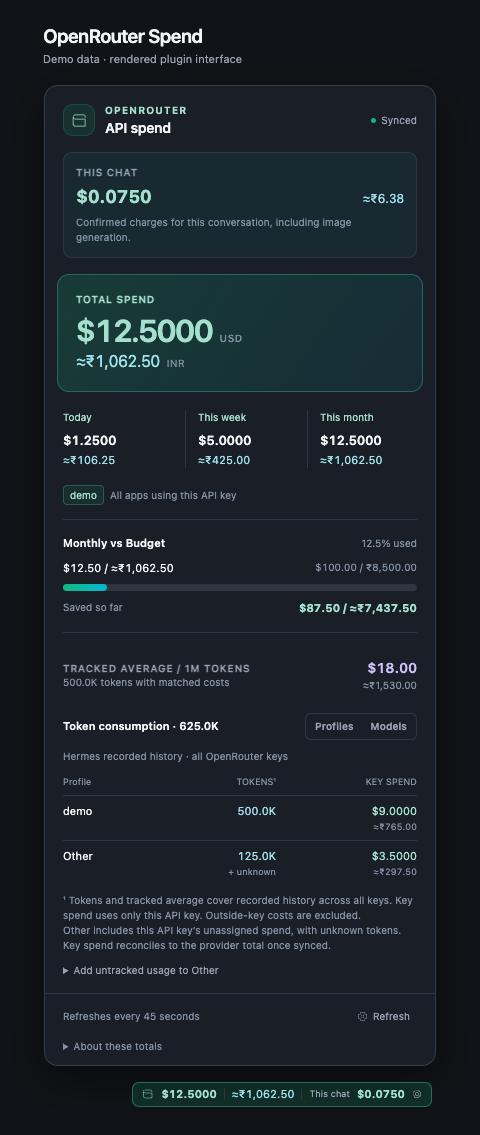
The preview uses synthetic values rendered from the plugin components with a mocked SDK popover frame; it contains no user configuration or spend history.
See CHANGELOG.md. This is a community plugin, independently maintained and unaffiliated with Hermes, OpenRouter or OpenAI.