Hermes Perf HUD
A performance HUD for the Hermes Agent desktop app: a status-bar chip that shows what the current turn is actually costing, and a popover with the full picture — throughput, time to first token, tokens, cache hit rate, tool time, session duration — plus a local history you can benchmark models against.
Observation only. The plugin reads public observer hooks, never blocks a tool, never transforms a message, and never modifies Hermes core. Turn the plugin off and the agent behaves exactly the same.
status bar   ● 96.6 t/s                        ← click the chip
─────────────────────────────────────────────────────────────────
popover      TPS · Session Avg TPS · TTFT · LLM calls ·
             tokens · cache hit rate · tool time · duration ·
             history · [Reset current statistics] [Clear history]
Features
| Live TPS | Core-compatible gauge: Σ output_tokens / Σ api_duration over the last 10 completed API calls — the same window and arithmetic as Hermes' own CLI status bar. |
| Session Avg TPS | The same ratio over every call in the session, always shown under its own label. |
| TTFT | Real time from request start to the first streamed chunk, median of the samples Hermes reports. |
| LLM calls | Authoritative call count, one per completed provider request (success or failure). |
| Token counts | Input, output, cache-read, cache-write and reasoning tokens. |
| Cache metrics | Cache hit rate using Hermes' cache_read / (cache_read + input) bucket definition. |
| Tool timing | Per-tool totals, tool error count, and tool time as a share of measured time. |
| Session duration | Wall clock from the first observed event to the latest — never the span of a single API call. |
| Status-bar chip | tps (96.6 t/s), tps_ttft (96.6 t/s · 980ms) or calls (29 calls). |
| Performance popover | Every metric above in one table, with model and provider identity. |
| History | On by default: performance metadata for the last 50 sessions, one JSON file per profile. No content, ever. |
| Reset / clear controls | Reset current statistics zeroes the plugin's own counters; Clear history empties the history file. Neither touches Hermes session state. |
Screenshots
Real captures from a packaged Hermes Desktop build (no mockups):
 |
The chip at rest (123.3 t/s), cropped from the real status bar of the capture below. |
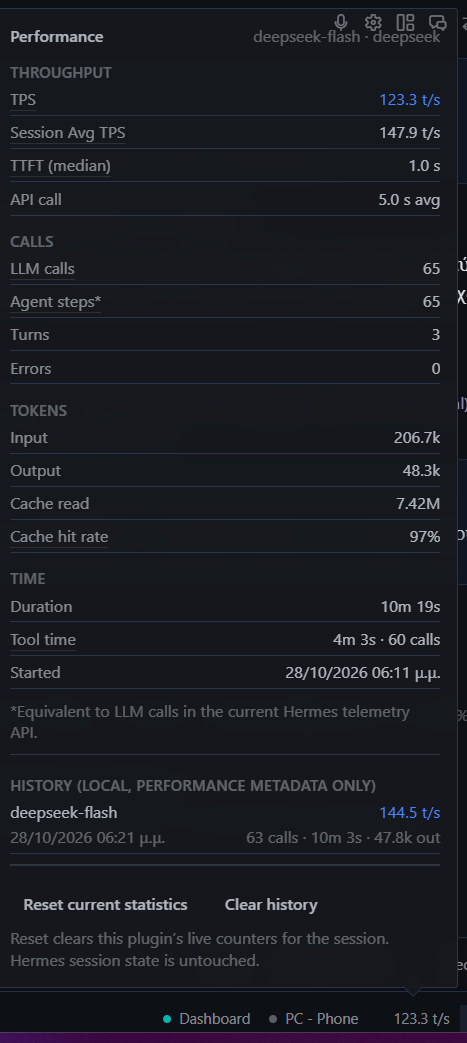 |
The statistics popover: throughput, calls, tokens, time, history and the two controls. |
Installation
# 1. put the plugin where Hermes looks for user plugins
git clone https://github.com/g3org3yo/hermes-perf-hud \
  "$LOCALAPPDATA/hermes/plugins/perf-hud"                 # Windows
#  ~/.local/share/hermes/plugins/perf-hud                   # Linux
#  ~/Library/Application Support/hermes/plugins/perf-hud    # macOS

# 2. optional: structural check (manifest, hooks, SDK surface, security scan)
hermes plugins validate "$LOCALAPPDATA/hermes/plugins/perf-hud"

# 3. enable it — the running gateway picks up the hooks immediately
hermes plugins enable perf-hud

# 4. restart the Hermes desktop app once
Why the restart? The backend half (hooks, history, REST routes) is live as soon
as the plugin is enabled. The desktop half (desktop/plugin.js) is materialised
into <HERMES_HOME>/desktop-plugins/ by the Electron app at startup, so the
chip is painted after the first restart. Until then the numbers are already being
collected — nothing is lost.
Requirements: Hermes Agent >=0.22.5 (the first release whose desktop SDK exports
STATUSBAR_AREAS). Python standard library only; no third-party dependencies.
Uninstall: hermes plugins disable perf-hud, or delete the folder. History lives in
<HERMES_HOME>/plugin-data/agent-plugin-perf-hud-*/history.json and is yours to delete.
Configuration
Settings live in the plugin's own documented subtree,
plugins.entries.perf-hud.settings.*:
| Key | Default | Meaning |
|---|---|---|
chip_enabled |
true |
Show the chip in the status bar. |
chip_metric |
tps |
Chip text at rest: tps (96.6 t/s), tps_ttft (96.6 t/s · 980ms), calls (29 calls). |
history_enabled |
true |
Keep local performance metadata for recent sessions. |
history_max_sessions |
50 |
Records kept in the history file (oldest dropped). |
poll_ms |
5000 |
Fallback poll interval for the popover when the live bridge is quiet. |
broadcast_min_interval_ms |
400 |
Minimum gap between live snapshot pushes to the desktop. |
hermes config set plugins.entries.perf-hud.settings.chip_metric calls
or edit config.yaml directly:
plugins:
  entries:
    perf-hud:
      settings:
        chip_metric: tps_ttft
        history_max_sessions: 50
Metrics
The two throughput numbers are different metrics and are never mixed. Full
formulas, edge cases and rounding: docs/METRICS.md.
TPS
Hermes-core-compatible throughput over the latest 10 API calls:
TPS = Σ output_tokens / Σ api_duration (last 10 completed calls)
Sum over sum — not the mean of per-call rates — matching agent/turn_usage.py
(deque(maxlen=10)) and the CLI status bar. Fewer than one sample → —.
Session Avg TPS
Session-wide output tokens divided by total API latency:
Session Avg TPS = Σ output_tokens / Σ api_duration (every call in the session)
Useful for benchmarking a model across a whole session; not a saturation gauge. Always labelled in full.
TTFT
Actual time from the start of an LLM request until the first streamed model chunk,
from Hermes' authoritative telemetry (first_chunk_at − started_at), reported as
the median of the session's samples with the mean and sample count alongside. A
call without a first-chunk timestamp produces no sample.
Cache hit rate
Hermes' bucket definition:
cache_hit_pct = cache_read_tokens / (cache_read_tokens + input_tokens) × 100
A ratio of reported token buckets, not a billing statement. No tokens → —.
LLM calls
Number of recorded LLM/API calls: one increment per completed provider request, whether it succeeded or errored.
Agent steps
If your client shows an Agent steps* field, it is a compatibility alias:
Agent steps*is equivalent to LLM calls because the current Hermes telemetry API does not expose a separate agent-step counter.
The footnote travels inside the snapshot (agent_steps_note), so no consumer can
display the alias without it.
Privacy
Stored — the complete history record, nothing else:
session_id · model · provider · started_at · updated_at · duration_ms ·
ttft_ms · tps_core · input_tokens · output_tokens · cache_hit_pct ·
tool_time_ms · llm_calls
Never stored, and not present in any snapshot, event or disk record: prompts, model responses, conversation contents, tool arguments, tool results, request bodies, API keys.
Three gates enforce it: handlers copy a fixed field list, snapshot() builds a new
dict with no text key, and the history writer persists an allow-list
(RECORD_FIELDS). Tests feed payloads carrying a marker string in
prompt/response/argument/result fields and then scan the snapshot, the broadcast
payload and the JSON on disk for it.
Network requests: none. The plugin makes no outbound connections. The only
cross-process path is the in-process desktop event bridge
(broadcast_plugin_event); the REST routes are served by your own local dashboard.
No credentials, no OAuth, no background service, no subprocess.
Architecture
observer hooks → aggregation → runtime registry → Python→Desktop event bridge
              → Desktop SDK → status-bar chip → popover → optional local history
__init__.pyregisters nine observer hooks and wraps each in a fail-open guard, so a telemetry bug can never break a turn.aggregation.pyis pure — events in, snapshot out, no I/O, no host imports.runtime.pyis the single process-wide registry, shared by the hook half and the dashboard half through a fixed module name.history.pypersists an allow-listed record per session, atomically, capped at 50, quarantining a corrupt file instead of crashing.desktop/plugin.jsrenders the chip and popover using only the public@hermes/plugin-sdk(STATUSBAR_AREAS,Popover,Button,Separator) — no DOM patching, no internal component access.
Details — hook payload filtering, session identity, process/isolation behaviour,
the privacy boundary and the REST surface — are in
docs/ARCHITECTURE.md.
REST routes (served by your dashboard at /api/plugins/perf-hud/)
| Route | Purpose |
|---|---|
GET /snapshot |
Focused (or most recent) session snapshot + plugin status. |
GET /sessions |
All live sessions + fleet totals. |
GET /history?limit= |
Stored records, newest first (1–200). |
GET /config · POST /config |
Read / write one setting through ctx.set_config. |
POST /reset |
Zero the plugin's in-memory aggregation for one session (or all). |
POST /clear-history |
Empty the history file. Keeps live counters. |
GET /status |
Version, tracked sessions, broadcast counters, history stats. |
Controls
- Reset current statistics — clears this plugin's in-memory counters for the session and starts counting again from the next event. It does not modify Hermes session state: no session row, no transcript, no agent counter.
- Clear history — empties the plugin's history file. Live counters and Hermes session state are untouched.
Troubleshooting
The chip does not appear. The desktop half is copied into
<HERMES_HOME>/desktop-plugins/ at app startup. Quit and reopen the desktop app
after enabling, then confirm the backend is alive with hermes plugins list and
GET /api/plugins/perf-hud/status (with the dashboard's auth ticket).
TTFT shows —. Hermes did not report first_chunk_at for those calls (some
providers and some non-streaming paths do not). No sample is invented; other
metrics are unaffected.
TPS shows — right after a reset. The core window needs one completed call.
It fills within the first response.
Numbers differ between windows. If dashboard.turn_isolation runs turns in a
compute-host child process, the child keeps its own in-memory counters: live events
still arrive, but /snapshot in the parent will not see them. History is on shared
disk, so /history stays complete. hermes plugins validate prints the isolation
mode.
Turns stays at 0 while LLM calls keeps climbing. Correct behaviour: a turn is
counted when it completes, and one turn can contain dozens of LLM calls (an agent
loop, sub-agents, retries). The counter moves at the end of the turn, so a single long
turn shows Turns 0 with a high LLM calls until it finishes.
History is empty. history_enabled must be on and the session needs a real
session_id (events without one are aggregated but never persisted). Writes are
throttled to one per session per 5 seconds, so a brand-new session may take a
moment to appear.
History file looks broken. It is quarantined automatically as
history.json.corrupt-<stamp> and a fresh file is started; nothing else is affected.
Popover shows stale numbers. The bridge throttles pushes to
broadcast_min_interval_ms (400 ms). Lower it for faster updates; the popover also
polls every poll_ms.
REST calls return 404. Every /api/plugins/* route requires the dashboard's
auth ticket; unauthenticated requests get a masked 404, not a 401.
Development
cd tests
python -m unittest discover -v          # 65 tests, stdlib only — no pytest needed
hermes plugins validate "$LOCALAPPDATA/hermes/plugins/perf-hud"
node --check desktop/plugin.js          # after copying it to a .mjs file
tests/test_api.py mounts the real FastAPI router through TestClient and skips
cleanly when FastAPI is absent. Contributions: keep the aggregation layer pure, keep
handlers read-only, and keep every persisted field inside RECORD_FIELDS.
License
MIT — see LICENSE.