Personae — Agent Messenger
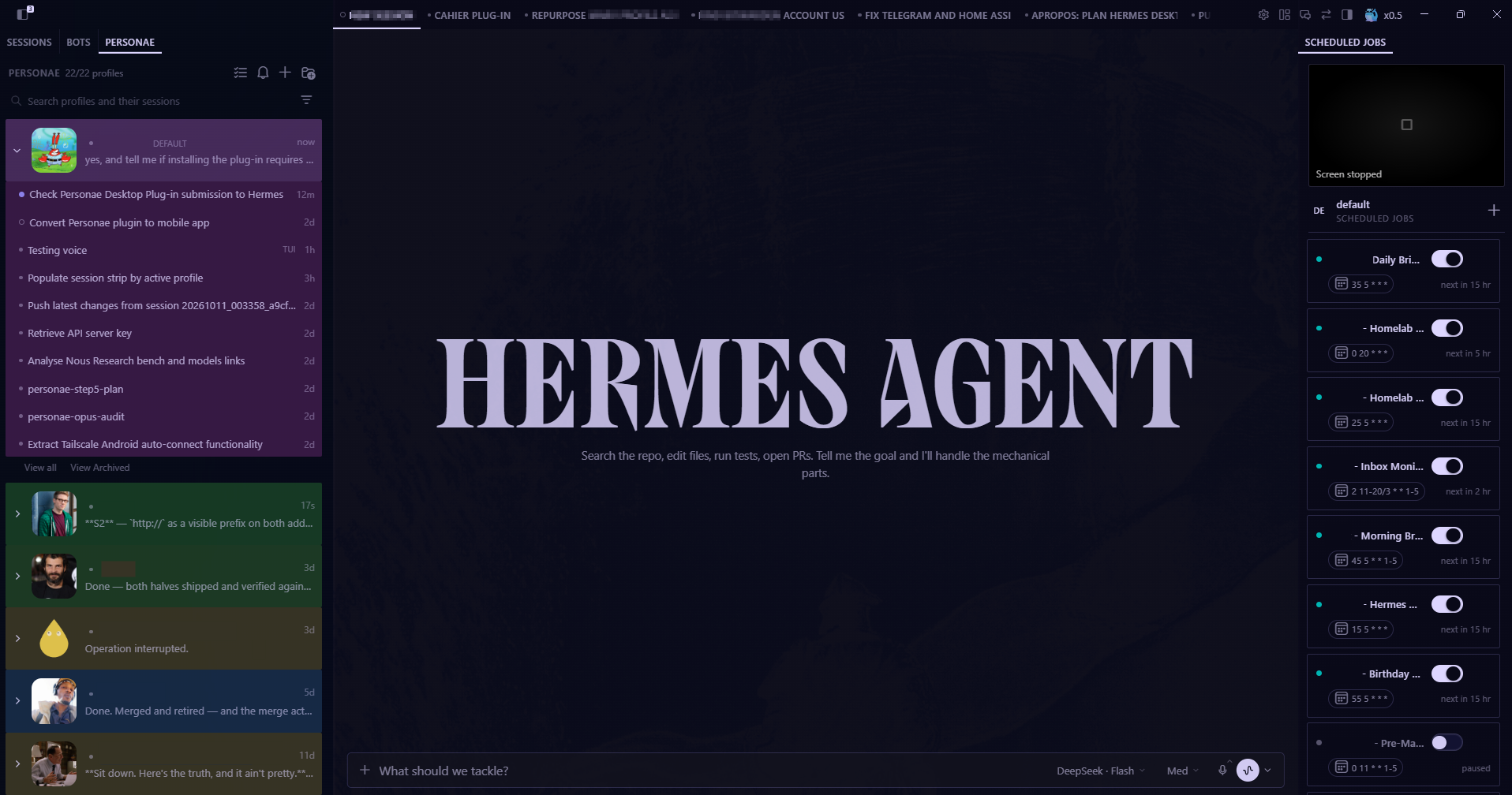
Personae is my take on what "Bots" should be. A simple messenger app, with all your profiles, along with their corresponding sessions. Nothing else. Right now, it is a plugin for the Hermes Desktop app.
✨ What it does
| Capability | What it gives you |
|---|---|
| 🗂️ Messenger-style | One row per profile: face, name, a preview of the last session, its age |
| 🔽 Expand a face | Its sessions — status dot, title, preview, age — newest first |
| 🟡 Status lights | Amber: waiting on you. Emerald: unread. Neutral: nothing. Numbered at 2+ |
| 🎨 Colour that fills | A profile's colour tints every session under it. Session → group → profile |
| 🔍 Search & filter | Profiles and sessions, server-side; filter by activity, kind, or a profile set |
| 🖱️ Right-click menus | Profile, session, group heading — the same verbs in each |
| 🖱️ Profile-aware clicks | A session under another profile moves the app there, and the tab strip follows |
| ✅ Multi-select | Tick a set, then archive, delete, or Apropos them in one go |
| 🗂️ Groups | Named sections shared by both panes; an empty one explains how to fill it |
| 🌱 Apropos (beta) | A fresh session that already knows the background of the ones you picked |
| 🗑️ Honest deletes | Deleting a group never deletes sessions; a chain goes only when you say so |
| 🧩 Bots-compatible | Name, avatar and colour are the Bots tab's own store — change one, both change |
🚀 Quick Start
Install from Git (recommended)
- Settings → Plugins → Install from Git
- Identifier:
SmoothMarx/personae— a fullhttps://github.com/…URL works too - Confirm. The app installs
plugin.jsinto its own<hermes home>/desktop-plugins/personae/ - The Personae tab appears beside Sessions | Bots
If the tab doesn't show: open the command palette (⌘K / Ctrl+K) and run Reload desktop plugins.
Manual
Copy desktop/plugin.js into <hermes home>/desktop-plugins/personae/, then reload the plugins.
Requirements
- Hermes Desktop. Plugins are loaded by the app — not by the CLI or the gateway.
- Optional: the built-in Bots tab, whose profile store Personae shares.
- Optional: a backend of its own (
dashboard/plugin_api.pyon the machine that serves the app —/api/plugins/personae/*). It carries cross-device sync and server-side message-body search. Without it the pane is fully usable and local-only: sync switches itself off on the first404and body search falls back to the session metadata the RPC surface already gives it — never an error, never a retry loop.
There is nothing to build: the app executes desktop/plugin.js as it stands.
🧠 The story
One agent, a dozen faces. Ada drafts. Scout books. Dobbs remembers the birthdays. You open the app to ask one of them something, and you're back to the same two questions — which profile was that? and what did it just do? — with the answers living in two different tabs.
Personae answers both at once. It's a messenger for your agents: each profile is a person, each session is what that person has been doing. Faces down the left, their conversations underneath, and a light that says who is waiting on you before you click anything.
You keep the roster. You drop the tab-hopping.
🤔 Why "Personae"?
A persona is the mask an actor wears — one actor, many faces. Your profiles are exactly that: one agent, many personae.
The machine id is personae — the same as the name, the folder and the plugin key,
because an id is a key and half-matching ones are how you get a plugin that works in
one install and not the next. Getting here meant a rename (messenger → personae in
1.2.0), and a rename is a key change:
- What moved: the app's storage namespace (
hermes.plugin.personae.*) and the pane's own backend mount (/api/plugins/personae/…). On first load after the upgrade,migrateLegacyStorage()copies every value out of the old namespace into the new one — a copy, never a move, so a downgrade still finds your groups, colours and sort orders where you left them. A key the new id has already written is never overwritten, so running it twice does nothing. - What stayed: every key name inside those namespaces (
messenger-sections-v1, themessenger-sync prefix, theui_meta.messengerflags on your profile rows). Those are the contract with the backend and with Personae Mobile — renaming them would need a migration on both ends for no visible gain. Profile flags written by an older build are still read.
🎭 The rail
One row per profile: face, name, a preview of the last session, and its age. The rows sit a touch taller than the Bots rail and the faces are larger, on purpose — one of the first notes this plugin ever got was "make it bigger than bot mode."
Expand a face → its sessions, newest first: status dot, title, preview, age. Parents stay where they are: a parent session and its Apropos child are both listed, and nothing gets hidden or yanked around. Sort a profile's sessions by hand or by last activity from its right-click menu.
🟡 Status lights
The app only knows the live state of the profile it's currently on — Personae feeds the other rows itself, so a remote profile that just finished a turn lights up too.
The dot answers one question — is anything here waiting for me? — in priority order:
| Dot | Means |
|---|---|
| amber | a session is blocked on you: a question, a clarification |
| emerald | unread activity |
| neutral | nothing awaits you |
The number beside it counts what awaits you — waiting + unread — and appears only
at 2 or more: one pending thing is already said by the colour. Read one of two and
the colour stays, the number disappears; read both and the colour goes with it. A
session that is merely running is never counted here, and never colours the profile:
blue belongs to the session dot, where "this conversation is working right now" is a
true statement about that conversation.
Emerald leans on the read/unread watermark the app writes when you open a session. On a profile that has never been read through, it can stay quiet — the dot is honest about what it knows.
🎨 Colour
Give a profile a colour and it tints the profile row and every session under it. Overrides, in order:
| Layer | Beats |
|---|---|
| Session colour | everything |
| Group colour | the profile's colour |
| Profile colour | the neutral default |
No colour is the default — and no fill is always an option: the status dot still carries the identity if you'd rather keep the list quiet.
🗂️ Groups
Groups are named sections, and they're the same object in both panes: file a profile into a group here and it's filed in Bots too.
An empty group tells you how to fill it instead of looking broken. Deleting a group never deletes sessions — its members fall back into the flat list.
🖱️ The menus
Right-click a profile, a session, or a group heading. The verbs are shared; each menu offers the ones that make sense on the thing you clicked.
| Verb | What it does |
|---|---|
| Open | Open the session in the app |
| Rename… | Set the display name (a profile's name is written to the Bots store) |
| Colour | Pick from the palette, or clear it |
| File into a group | Move it into a section |
| Sort | Manual, or by last activity |
| Copy id | The exact profile or session id |
| Apropos (On that topic, beta) | A new child session that knows this background |
| Delete | Delete the session or the group — see below |
Every option carries a small glyph. Where core has the same verb it is core's own — Rename… a pencil, Branch a fork, Export… a download, Delete a bin — so a verb looks the same wherever you meet it, and the rest come from the app's wider menu vocabulary (Appearance is the same colour wheel core draws next to it).
🖱️ What a click does
Clicking a session opens it. If it belongs to a profile the app is not on, the app moves to that profile first and the tab strip follows — that profile's visible sessions (up to ten) dock beside the one you clicked, which stays in front.
| Where you click | What happens |
|---|---|
| A session under the profile the app is already on | The session opens; the strip is left alone |
| A session under another profile | The app moves to that profile, the strip swaps to it, and its list (≤10, minus the row you clicked) docks as tabs |
The order is the point: the move lands before anything docks, because core files session tabs into per-profile buckets and a tab is filed into the bucket that is visible when it is created. Open all in tabs (right-click a profile) docks the same list without moving anything.
One consequence worth knowing: the move is the app's own workspace switch, so the Sessions sidebar collapses onto the profile you moved to — widen it again with All profiles there.
✅ Multi-select
Tick several sessions and act once: archive, delete, or Apropos them into a single topic group. The selection bar shows what's ticked; the verbs do the rest.
🌱 Apropos (beta)
Apropos means "on that topic". It's how you start a fresh session that already knows the background without copying anything into it.
Right-click a session → Apropos (On that topic, beta):
| Verb | What you get |
|---|---|
| From this session | one child that can consult this transcript |
| Create group | an Apropos group whose members all join one digest |
Right-click a group heading → Apropos this group (beta) — or New child session (beta) once it is an Apropos group — to start another child from the same membership. Select several sessions and press Apropos (beta) in the selection bar to make one from the whole tick set.
The mechanics are deliberately cheap: the child copies nothing. It gets a single hidden header naming the source(s), and re-reads the transcript when it needs depth — so an Apropos child is a focused question, not a bloated fork. A parent and its child are both listed; the child wears a ↳ inside its group, and a ↩ chips back from the parent.
It is labelled beta on every surface that offers it, and that label is the whole marker: the machinery is finished, the edges are still being pinned down. Use it, enjoy it, and don't build your morning on it yet.
🗑️ Delete, without the guilt trip
Deleting a session deletes it. Deleting a session group never deletes sessions — its members fall back into the flat list.
A chain travels together: delete a parent and its Apropos children are orphaned by default, or taken with it if you ask for that instead.
🛡️ Safety
- Nothing in the app's core is modified. Personae is a plugin: it reads the app's stores and writes only the ones you already own through the Bots tab. Remove it and the app is exactly what it was.
- Your data stays put. Groups, colours and Apropos links live in the app's own database; uninstalling the plugin doesn't move or delete them.
- Nothing destructive happens as a side effect. Grouping, colouring and sorting never delete. The only destructive verb is Delete, and you have to click it.
- No third-party server, no telemetry. It talks to the app it lives in, and (for cross-device sync) only to its own backend on your Hermes — see Sync contract.
- Loads uncompiled. The app executes
plugin.jsas it stands, so every line that runs is a line you can read.
🔄 Sync contract
Since 1.1.0 the roster arrangement follows you across machines through the pane's own
backend (/api/plugins/personae/state, dashboard/plugin_api.py). Local storage stays
the source the pane reads: every edit is written locally first and immediately, and
the server only hears about it afterwards.
- What syncs. Exactly seven keys, named on the server without the
messenger-prefix:session-sort-v1,session-order-v1,sections-v1,session-groups-v1,session-colors-v1,hidden-v1,apropos-v1(local key =messenger-+ name). Everything else is device-local, never pushed and never read back: expanded profiles (expanded-v1), activity toasts, search, scroll, pane width. - Wire.
GET /state→{"version":1,"keys":{<key>:{"value","rev","updated_at"}}}.PUT /statewith{"keys":{<key>:{"value","rev"}},"tombstones":[{"key","entry","rev"}]}→200and the merged view of all keys.400= unknown/device-local key or bad shape,413= body over 256 KB (both: the batch is dropped, local is kept, no retry loop). - Debounce. A shared-key change arms one push after 1500 ms idle; a burst of
edits goes out as a single
PUTcarrying only the changed keys. - LWW by rev. Each key carries a Lamport rev:
newRev = max(last rev seen from the server, last rev this device wrote) + 1, recomputed per attempt, so a device's revs only ever rise. Non-object values are whole-value last-writer-wins by rev. Object values are merged entry-wise on their top-level keys: an incoming entry replaces the stored one only if its rev is higher (equal keeps the server's); entries absent from a write are kept, so two devices adding different entries both survive. - Tombstones. Because absence means "keep", removing a top-level entry is sent as a
tombstone
{key, entry, rev}— computed by diffing the last view both sides agreed on (last pushed or adopted) against the new value. The server removes the entry if the tombstone's rev is higher and remembers it, so a lower-or-equal-rev write cannot resurrect it; a higher-rev write re-creates it. - Seed-then-authoritative. On first contact (per key, remembered device-locally):
if the server has no value, a non-empty local value is pushed as the seed; if the
server has a value, it is adopted — through the same
normalize*functionsloadPrefsuses, and written to local storage — and the local one is never pushed over it. Afterwards, any server value with a rev above the last one seen (on thePUTresponse, or the pull when the window becomes visible again) is adopted, except while that key has unpushed local edits. - Offline is a no-op. A failing request never throws into the pane: the dirty keys
stay queued (persisted), retried with exponential backoff (2 s, 4 s, … capped at 60 s),
and flushed at once on the window's
onlineevent or when it becomes visible. - 404 degrades. An older backend without
/state(a404, or an answer withoutkeys) switches sync off for the session: local-only, silently, no retries. - Bookkeeping. Revs, seeded flags, last-seen server revs and the queue live in the
device-local
messenger-sync-meta-v1, which is itself never pushed.
📦 Project layout
personae/
├── plugin.yaml       # the manifest: name, version, license, tags — no tools, no hooks
├── desktop/
│   └── plugin.js     # the plugin: the pane, the rail, groups, colours, Apropos, delete chains
├── tests/
│   ├── run.mjs       # headless harness — renders the pane with react-dom/server, asserts on the tree
│   ├── classes.mjs   # every utility class must already exist in the app's compiled stylesheet
│   ├── icons.mjs     # every codicon name must exist in the font the app pins
│   ├── codicon-names.txt  # that font's own name list, snapshotted
│   ├── run.sh        # runs all three
│   └── sdk/          # a stand-in for @hermes/plugin-sdk, so the harness runs without the app
├── assets/           # the icon, the logo, the screenshot at the top
├── deploy.sh         # copies desktop/plugin.js into the app's plugin folder, prints both hashes
├── package.json      # name, license, scripts — no dependencies
├── LICENSE           # GPL-3.0
└── README.md         # this file
The plugin lives under desktop/ on purpose: Install from Git publishes that
folder — and only that folder — into the app's own desktop-plugins/personae/, so
what lands on a user's disk is one file, not this README and its test fixtures. The
manifest is what the catalog and hermes plugins validate read; the app itself needs
no agent-side code, so there is no __init__.py beside it.
🔧 Development
./tests/run.sh # 690 render checks + 136 class tokens + 36 glyph names, no app
The harness needs node ≥ 20.6 and a checkout of the desktop repo, for the same React
the app ships. It looks for it in ~/.hermes/hermes-agent by default:
HERMES_DESKTOP_REPO=/path/to/hermes-agent ./tests/run.sh
Deploying to a running app (hot-reloads in seconds):
HOST=user@box WIN_DIR='C:/Users/you/AppData/Local/hermes/desktop-plugins/personae' ./deploy.sh
Three rules worth keeping if you fork this:
- Every class token must already exist in the app's stylesheet. A plugin loads at
runtime; a utility the app never used isn't in the CSS and does nothing.
tests/classes.mjsfails the build instead of letting you ship a silent no-op. - Every glyph name must exist in the font the app pins. A codicon name the font
doesn't carry paints nothing — an empty slot beside the label that reads as "that
option has no icon", not as a bug.
tests/icons.mjschecks every name this pane asks for against@vscode/codicons0.0.45's own stylesheet; core has been bitten by exactly this (git-forkisn't in the font,repo-forkedis). - Test the markup, not your intentions. The harness asserts on rendered output — labels included — so a rename shows up as a failing check rather than as a surprise in the UI.
🙏 Acknowledgements
Personae is a thin layer standing on the shoulders of:
Hermes Desktop
The app it lives in — its plugin SDK and its stores. The Sessions and Bots panes gave the rail its whole vocabulary.
The Bots tab
Profile identity — name, avatar, colour — is Bots' store. Personae reads and writes the same one, so the two panes can never disagree about who someone is.
© 2026 SmoothMarx · GPL-3.0-or-later — free to use, modify, and share. See LICENSE.