
Hermes Session Lens
See what your Hermes agent spent, did, and broke. Session Lens is a read-only observability page inside Hermes Desktop. It shows what every session consumed and did, the live allowances and balances of the AI providers and services Hermes holds credentials for, how well each model follows the instructions you give your agent, and the runtime health, profiles, and schedules behind all of it — grounded in Hermes' own records, never in guesses.
It installs as one Hermes plugin: a native Desktop page plus its namespaced Python API. No iframe, no separate server, no telemetry service, and no write path — the backend defines zero mutation routes and never touches a credential store.
This documentation describes Hermes Session Lens 0.53.2, verified on Hermes Agent 0.21.5 (2026-10-02 build). MIT licensed. A community plugin, not affiliated with or endorsed by Nous Research.
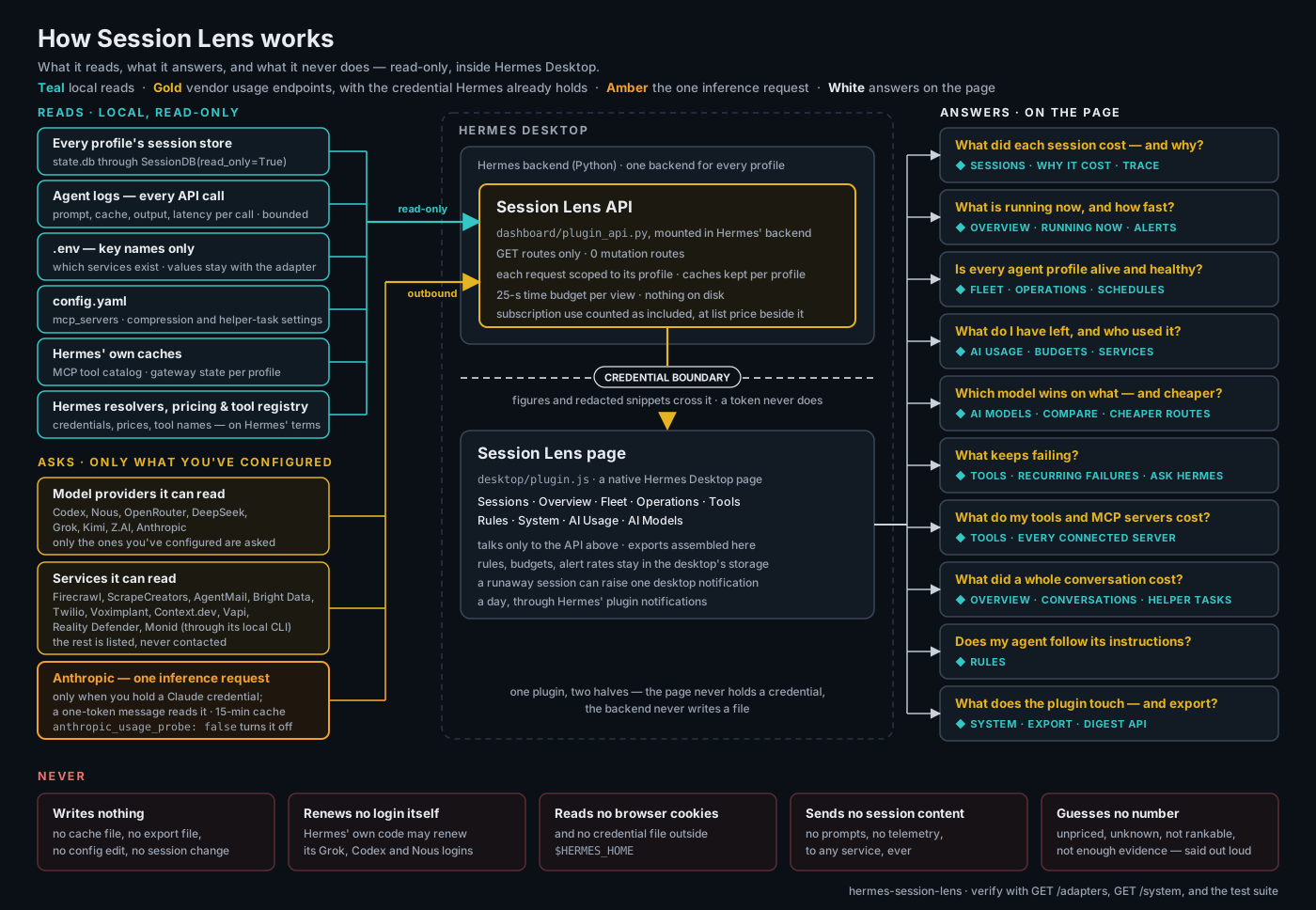
Left to right: what the plugin reads (local records, read-only, plus the vendor usage endpoints it can ask — only for credentials you have configured), the plugin itself (a GET-only API inside Hermes' single backend, scoped to each request's profile, and a native Desktop page, separated by a boundary no credential crosses), and the ten questions the page answers. The strip along the bottom is what it never does; the Trust section states each claim in full and how to verify it.
Install
From a local checkout:
-
Place this repository at
$HERMES_HOME/plugins/session-lens. -
Enable its backend:
hermes plugins enable session-lens -
Restart Hermes Desktop so its embedded backend mounts
dashboard/plugin_api.py. Session Lens appears in the left sidebar.
Or use Hermes' confirmation-based install link — Hermes shows the source and components before installing anything:
hermes://plugin/install?repo=abualnassr/hermes-session-lens&enable=1
Hermes Agent updates never remove the plugin, because it lives under $HERMES_HOME/plugins/, outside the Hermes source checkout. To update Session Lens, replace that folder with a newer release and restart Hermes Desktop. During development, Reload desktop plugins from the command palette picks up desktop/plugin.js changes; backend changes still need a restart. The Desktop half can be switched off live under Settings → Plugins.
Hermes keeps telemetry per profile (each has its own state.db). The header chip ("data: default profile") always names the profile whose records you are looking at, and its popover widens the scope to any set of profiles.
What you get
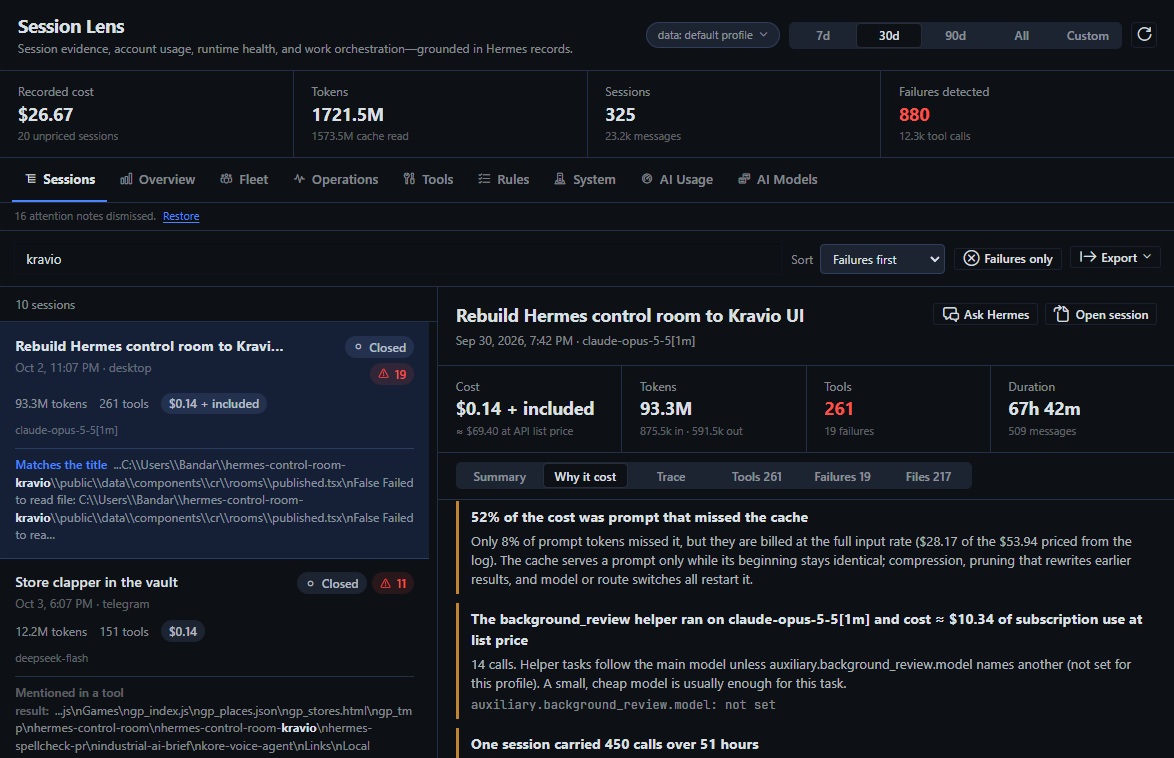
Every view honours the same period selector (7/30/90 days, all time, or a custom range) and the same profile scope; on AI Usage the account readings are live and the period governs the local "recorded locally" figures. A period holds every session that was active in it — a bot session that began days earlier and is still running counts in each period it touches — and, because Hermes records usage per session rather than per day, a session that straddles a boundary counts whole; the daily bars place a session on the day it was last active. Sessions hidden from the Hermes sidebar are counted everywhere and labelled in their detail view: hiding is a listing preference, and their spend is real. Hermes keeps two accounting records per session — a running total on the session row and one row per model — and the session row lags on long sessions, so every view reads the higher of the two, column by column. Usage on a flat-rate subscription route — a Claude Pro/Max plan driven through Hermes' Claude subscription plugin — costs no cash: Hermes records its API list-price equivalent as an estimate, and Session Lens counts it as Included, keeps the list-price figure beside it ("≈ $69.40 at API list price"), and charges it against the Claude subscription windows on AI Usage instead of any budget. Numbers carry their denominators, samples that are too small render as fractions rather than percentages, and anything Session Lens cannot know — an unpriced route, a window without a span, a failure in a language its signatures do not read — says so instead of showing a comforting zero.
Sessions — failure-first, with the full trace
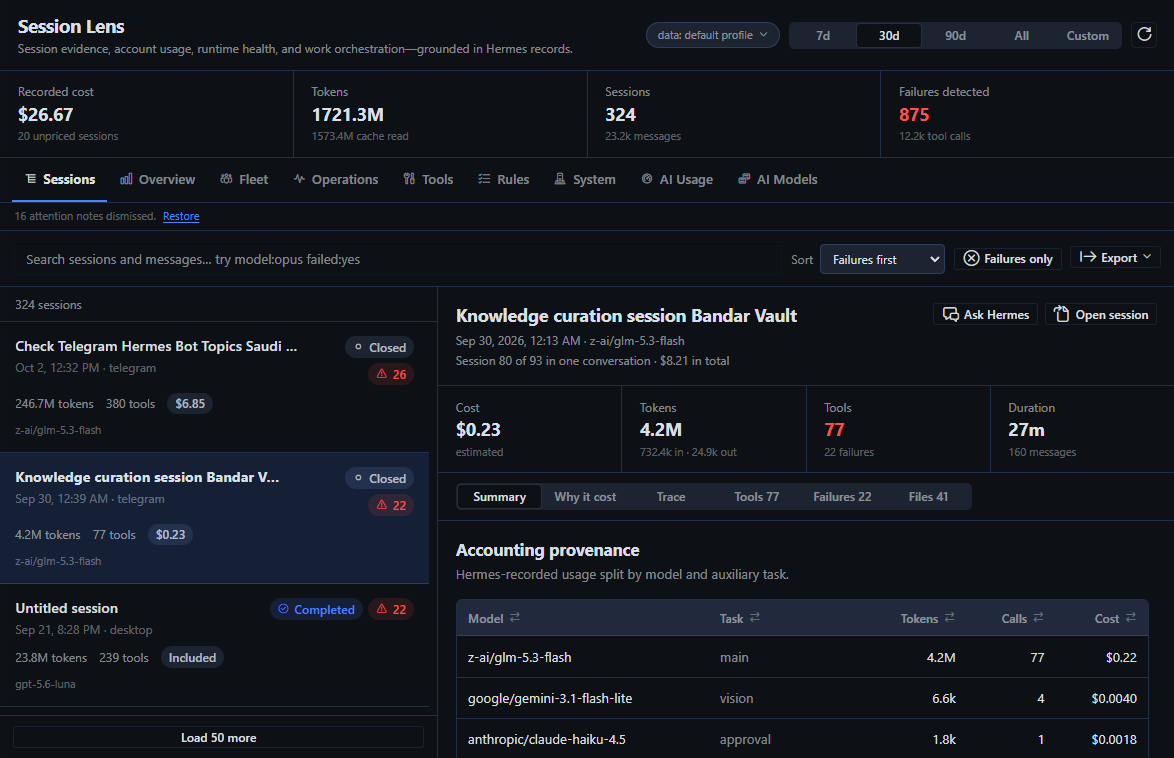
Every recorded session, sorted failures-first by default. The search box takes free text or filters — model:opus project:deepcore failed:yes tokens:>500k cost:>1 — and full-text search returns the matching snippets. A session opens beside the list with its cost provenance (recorded actual or estimated cost, or an explicit Included / Unpriced state — never a false $0), token mix per model and auxiliary task, every tool call, every confirmed failure with a bounded, secret-redacted result snippet, the files it touched, and the sessions it delegated to.
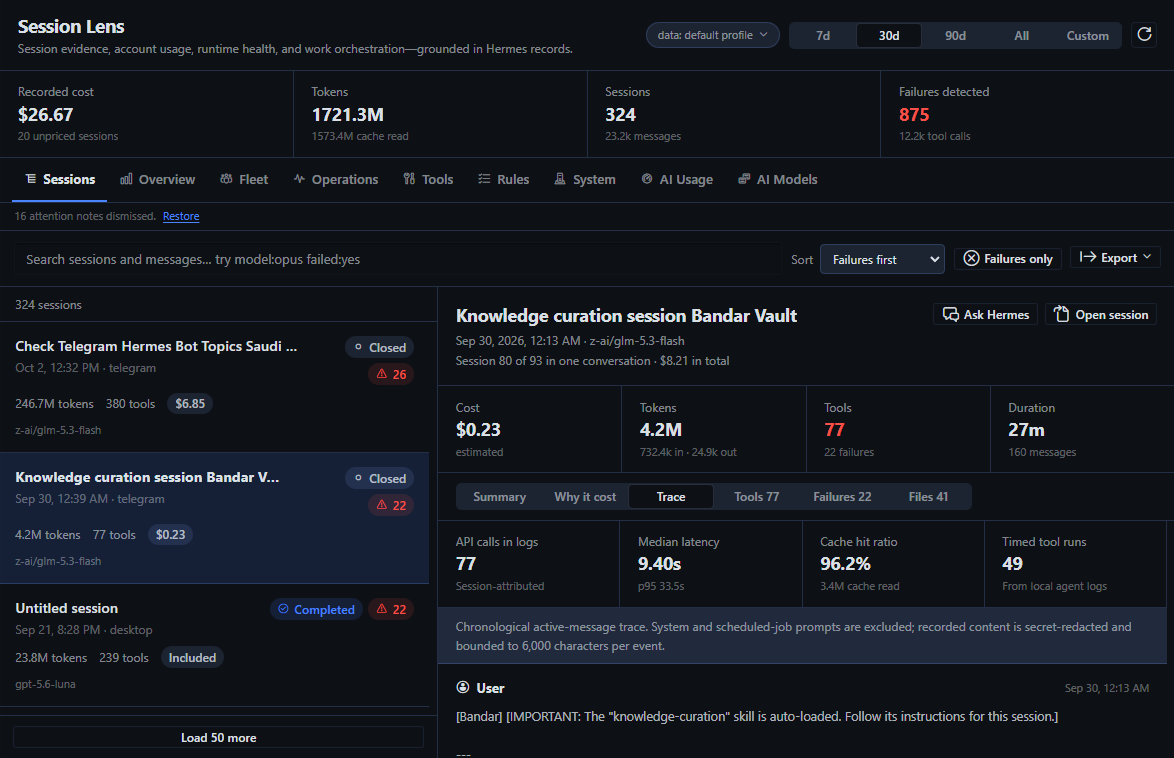
The Trace tab replays the session in order — user, assistant, reasoning, tool call, tool result — with system prompts excluded and content redacted and bounded. Latency, cache-hit ratio, and tool durations come from Hermes' local agent logs. An attention banner above the list flags runaway work (sessions open past 24 hours that are still active or idle on five million tokens, and reaped or timed-out sessions at the same size); each note can be dismissed and restored.
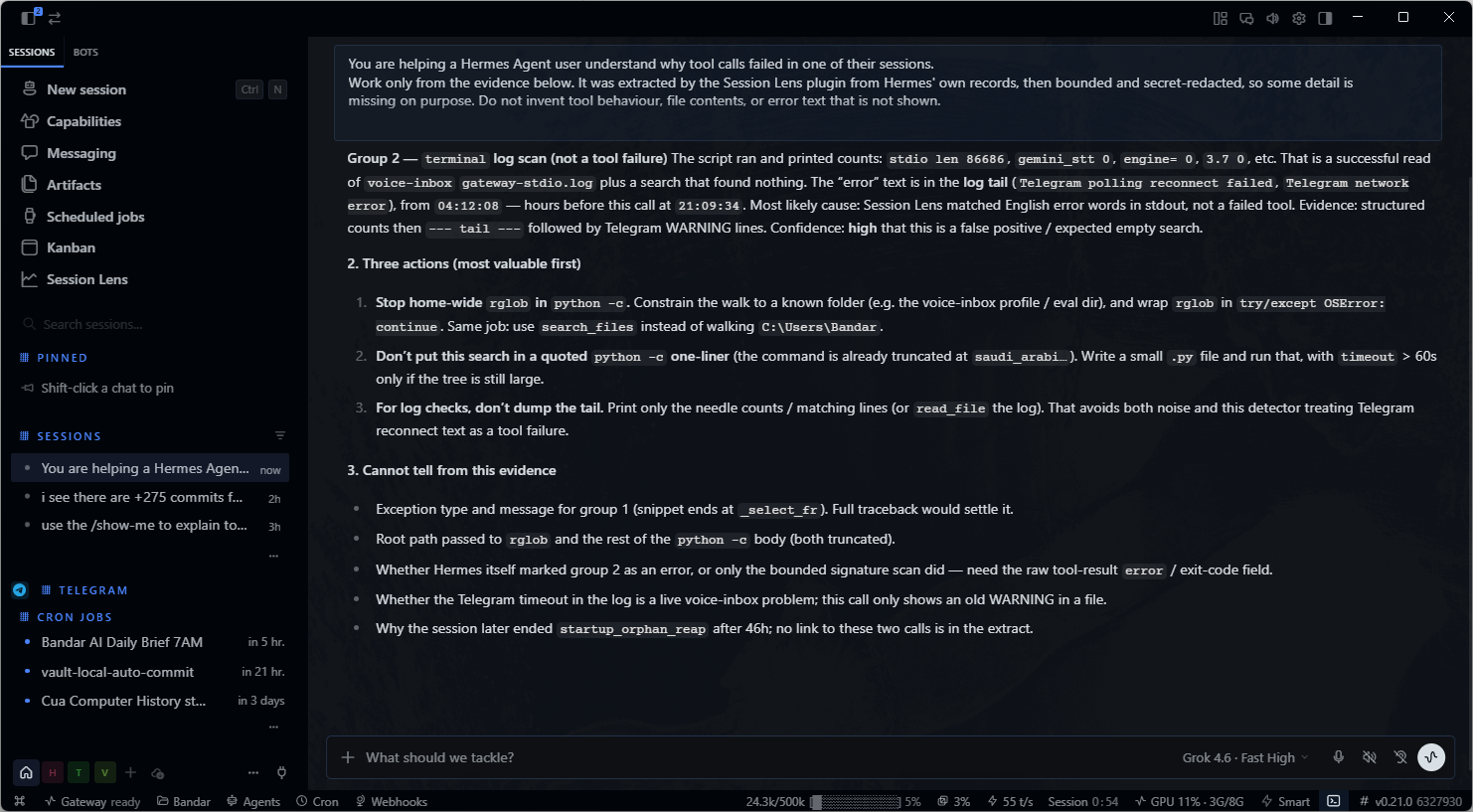
Ask Hermes. A session with failures gets an Ask Hermes button beside Open session. It builds a failure-analysis prompt from the evidence the Failures tab already shows — failures grouped by tool and error signature with counts, timestamps, and bounded, secret-redacted result snippets, plus the session's model usage and outcome — copies it to the clipboard, and opens a fresh Hermes chat in the session's profile for you to paste it into. Session Lens never submits the prompt or creates a session itself: you see exactly what the model will read, and no tokens are spent until you press send. The prompt stays under 12,000 characters; user and assistant message text is deliberately left out. The same text is available as GET /api/plugins/session-lens/sessions/{id}/analysis-prompt.
Why it cost. A long agent session's bill is rarely new work; it is the same context re-read on every call. A session's Why it cost tab reads its API calls from Hermes' agent log and shows the prompt size of every call (the cached part shaded, compressions marked), the cost split between prompt that missed the cache, prompt read from it, and output, which tools' results filled the context, and the helper tasks that ran beside it. Each finding states its numbers and the setting that governs it, with its current value — compression.threshold_tokens, compression.proactive_prune_min_result_chars, or auxiliary.<task>.model for a helper task that ran on an expensive model. Helper tasks on Overview totals what titles, vision, approvals, background reviews and compression cost across sessions, and which model each ran on.
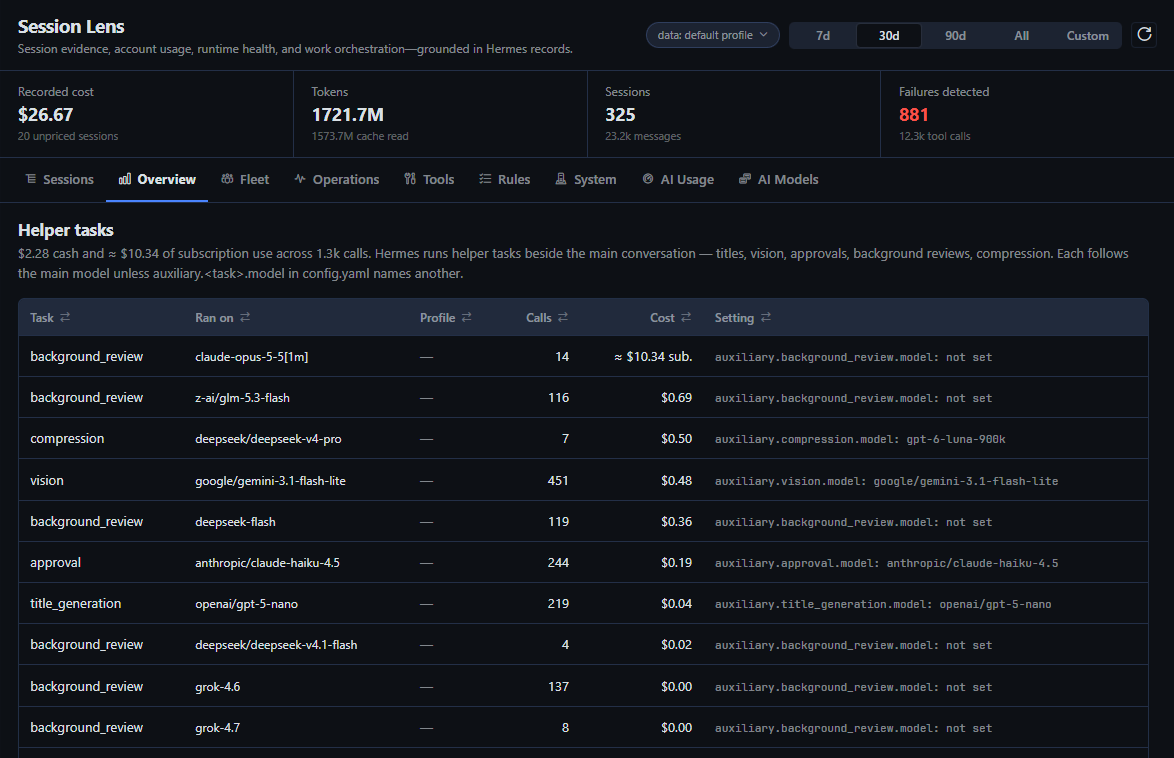
Overview — where the spend goes
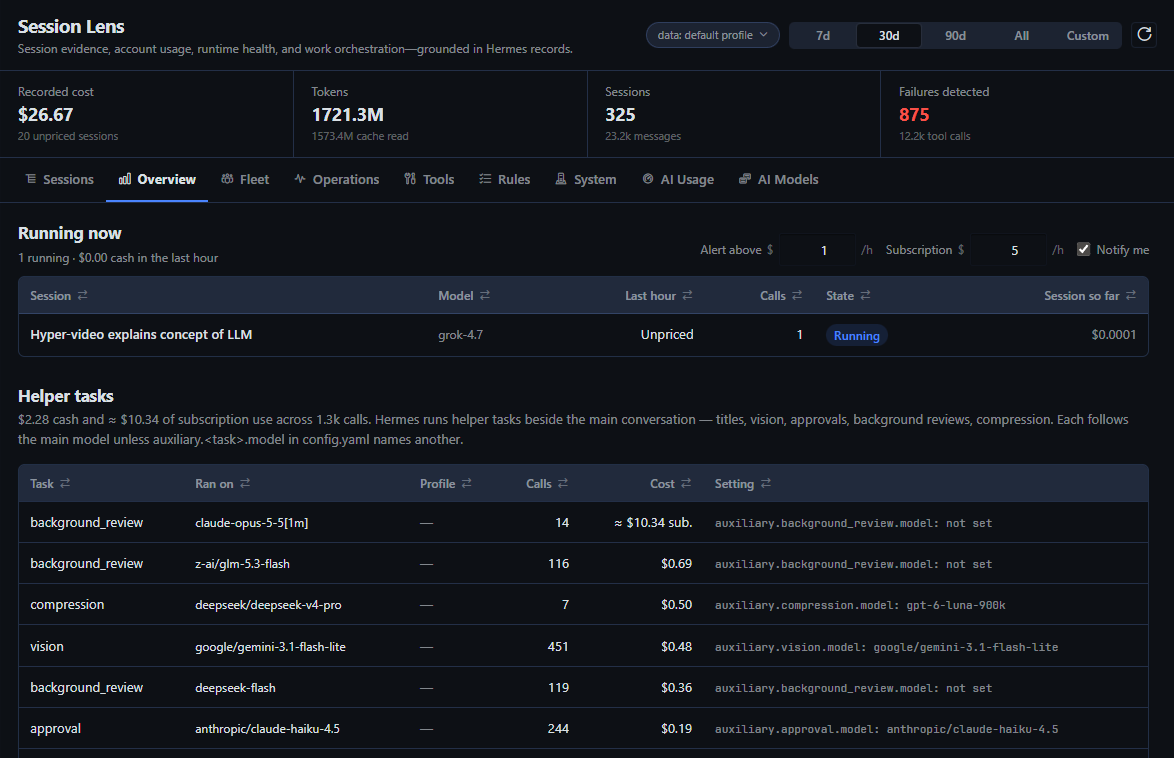
Running now opens the tab: every session that called a model in the last hour, read from Hermes' agent logs and priced with Hermes' own tables — what it burned in that hour (cash, or subscription use at API list price), its calls, and what it has cost so far. A session still running past your alert rate (default $1/h cash, $5/h subscription use; both editable in place) is flagged there, in the attention strip on every tab, and — unless you switch it off — by one desktop notification per session per day, so a runaway is caught while it runs rather than in next week's totals.
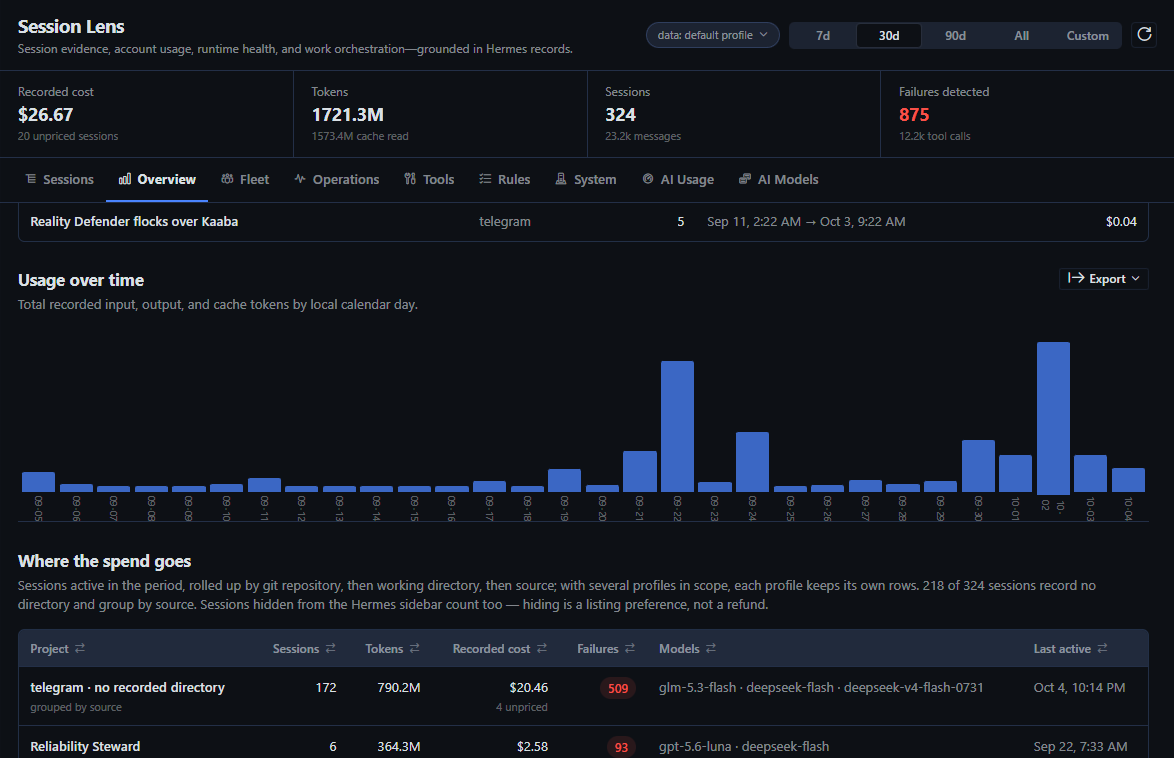
Tokens by day, then the spend rolled up by git repository, working directory, or source for sessions that recorded no directory: sessions, tokens, recorded cost with unpriced counts, confirmed failures, top models, last activity. Every row drills through to the filtered session list.
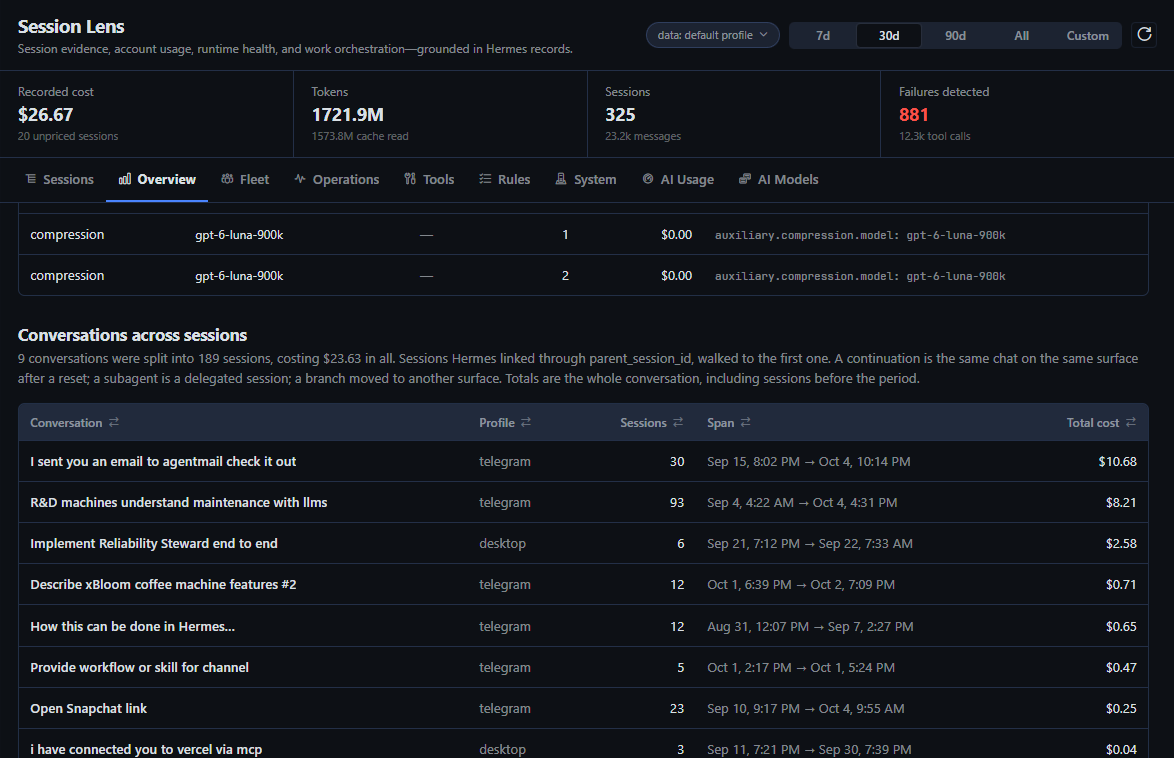
Conversations across sessions. A Telegram topic or bot chat that hits session_reset continues in a new session Hermes links to the old one, so a long conversation reads as many cheap sessions. Overview walks those links to each conversation's first session and ranks the conversations by what they cost in all — sessions, span, and total, with continuations, subagents and moves to another surface told apart — and a session's detail says which conversation it belongs to ("Session 24 of 24 in one conversation · $9.68 in total").
Fleet — every profile at a glance
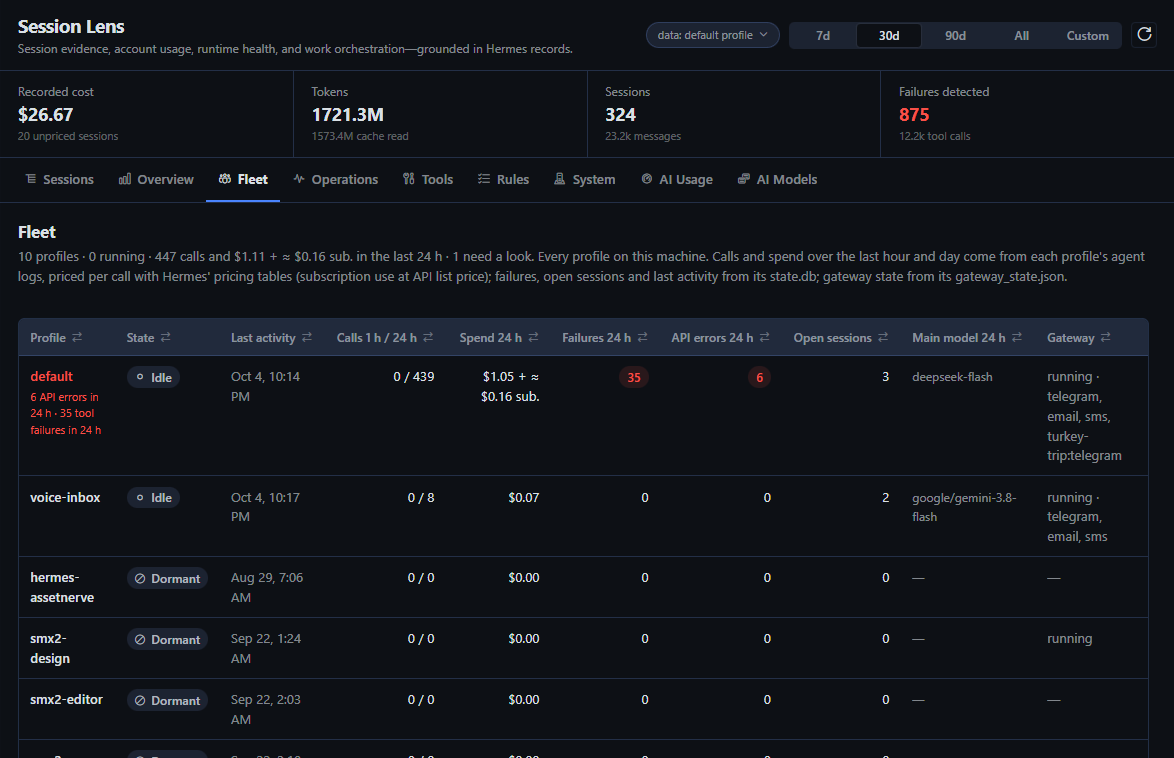
One row per Hermes profile on this machine: running (a model call in the last 15 minutes), idle, quiet this week, or dormant; calls in the last hour and day; spend in the last 24 hours, as cash and subscription use at API list price; tool failures and API errors in 24 hours; open sessions; the main model; and gateway state with its platforms. Bot profiles keep sessions open for weeks, so their spend over time is read from each profile's logged API calls, priced per call with Hermes' pricing tables, never from session totals. A profile with a stopped gateway, a platform that needs attention, three or more API errors, or ten or more tool failures in a day is flagged with the reason, and its name opens its sessions.
AI Usage — what you have left, and who used it
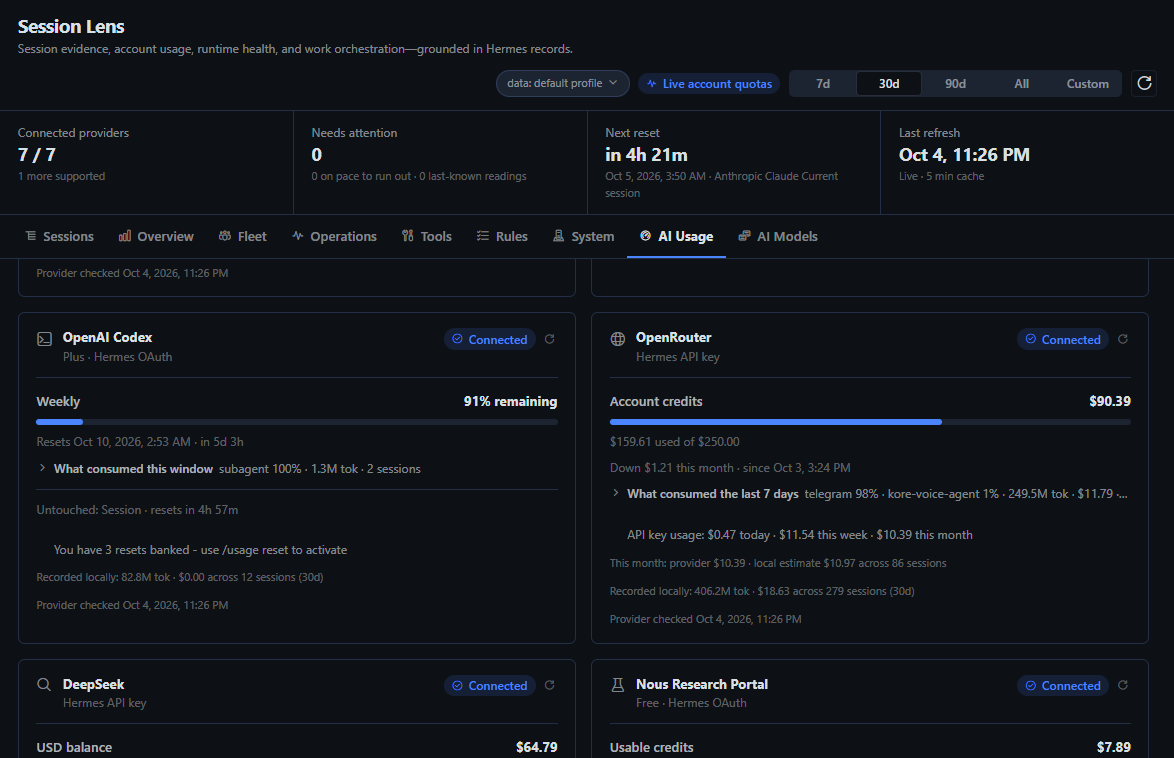
Live account-level allowances and balances for the providers Hermes already holds credentials for, ordered by what needs a look first and kept short (untouched windows and per-minute rate limits collapse to one line each; vendor noise such as zero-valued lines and update nags is hidden on the card and kept in the export): OpenAI Codex, Anthropic Claude, Nous Research Portal, OpenRouter, DeepSeek, Grok, Kimi Code Plan, and Z.AI GLM Coding Plan. Each window shows what remains, when it resets, and — when it is burning faster than the period elapses and would run out at least a tenth of the window before the reset — when it will run out at the current pace, with the two numbers the forecast rests on; every such window counts under Needs attention. What consumed this window joins Hermes' own usage records — from every profile in the selected scope — to the window's span and ranks the projects, sessions, models and, with several profiles in scope, profiles behind it; money windows state how much of the account figure local sessions explain, and that the rest came from other machines or tools; a provider that reports its own month-to-date spend shows it beside the local estimate for the same calendar month. A provider that reports only a balance (DeepSeek, Nous Portal, Bright Data, Monid) gets a drawdown line — how far the balance fell between this desktop's readings this month, and what was topped up — and that drawdown feeds the monthly budgets as the provider's own figure. Readings live in this desktop's plugin storage, next to the budget caps.
Anthropic gets one card per product Hermes holds a credential for: the Claude subscription (5-hour and 7-day windows, extra-usage state) and the Console API key (per-minute request and token limits). Anthropic's usage endpoint only answers full OAuth logins, so for a setup token or an API key those cards can be read from the response headers of a one-token message — the single inference request Session Lens makes. It is off by default; anthropic_usage_probe: true turns it on, and Trust describes it in full.
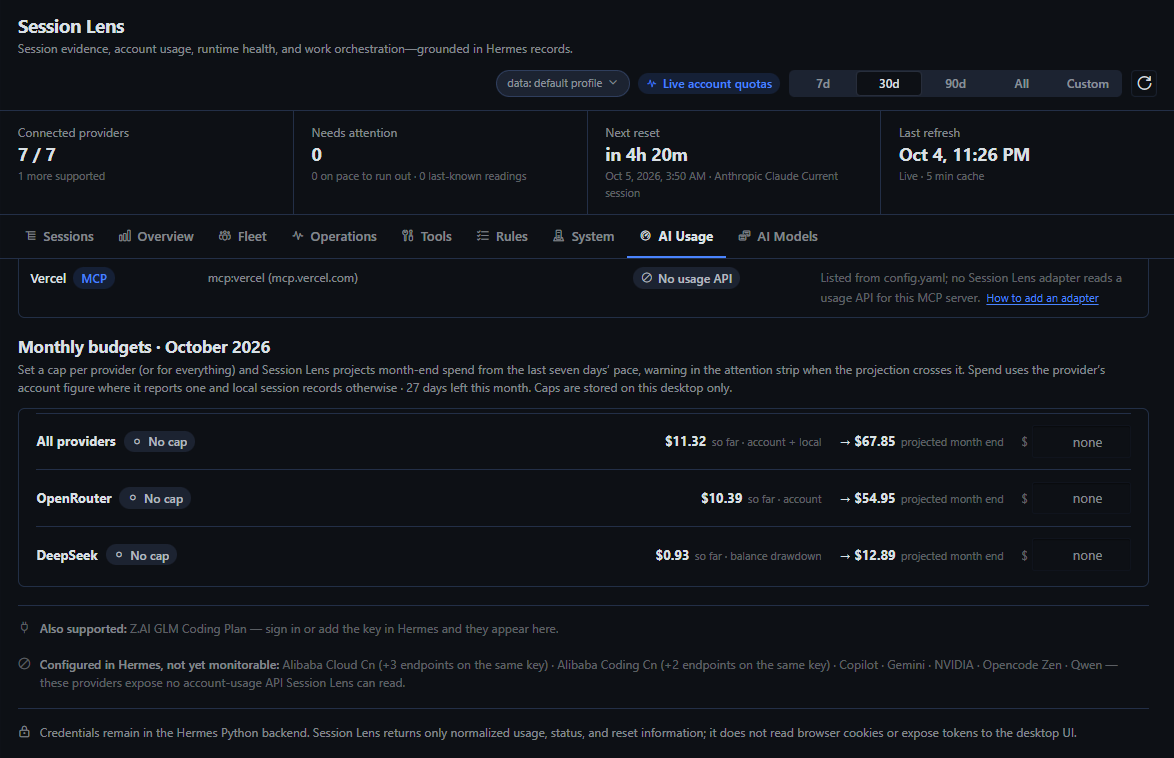
Monthly budgets take a USD cap per provider or for everything, and project month-end spend from the last seven days' pace using the provider's own account figure where it reports one and local session records otherwise. Over-cap and on-pace-to-exceed budgets join the quota notes in the attention strip on every tab. Caps live in the desktop's plugin storage; the backend stores nothing.
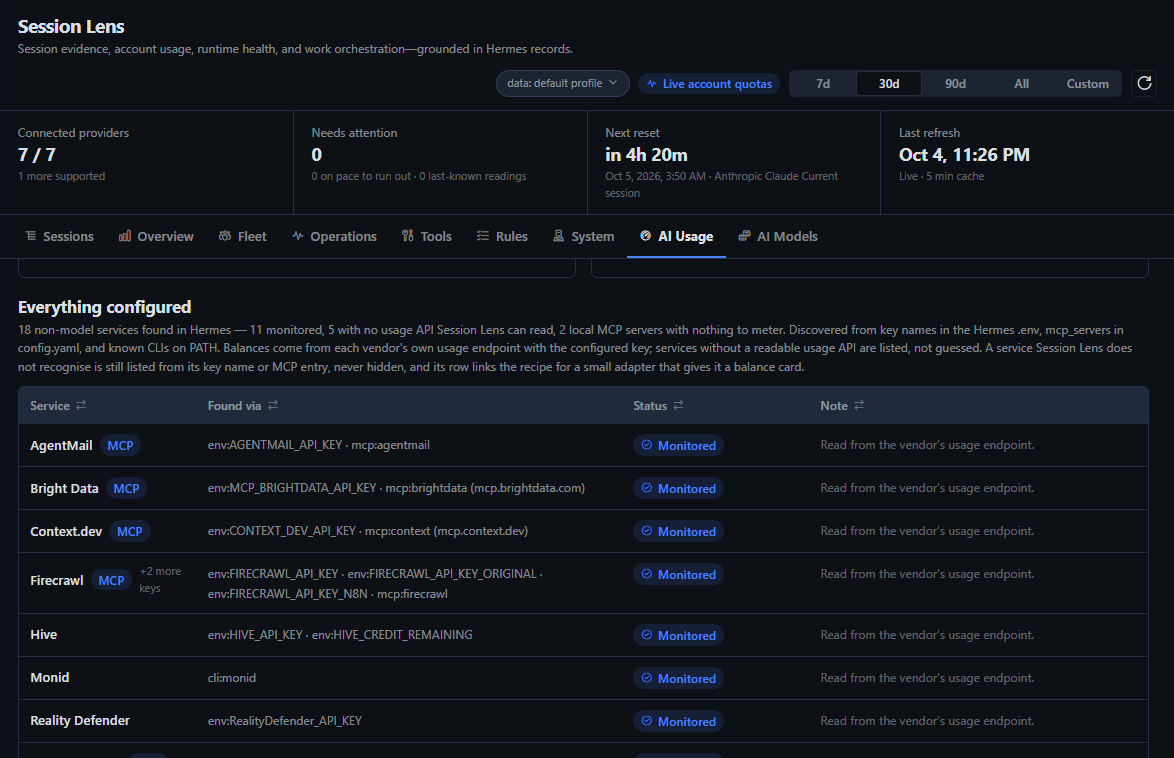
Services inventories every non-model service Hermes is configured with — from key names in the profile's .env, mcp_servers in config.yaml, and known CLIs on PATH, never from skill folders or credential files elsewhere — and shows the balance for those whose usage endpoint was verified against the live API (Firecrawl, ScrapeCreators, AgentMail, Bright Data, Monid, Twilio, Voximplant, Context.dev), this month's spend or scan count where a vendor reports only that (Vapi, Reality Defender), and a hand-kept figure for Hive. Services with no readable usage API are listed with the reason, not guessed. A service Session Lens has never heard of is still listed from its key name or mcp_servers entry, never hidden; giving it a balance card is a small adapter module written to the recipe in ADAPTERS.md, which every such row links to. Name the vendor in an issue and, if its usage endpoint can be read, it becomes an adapter.
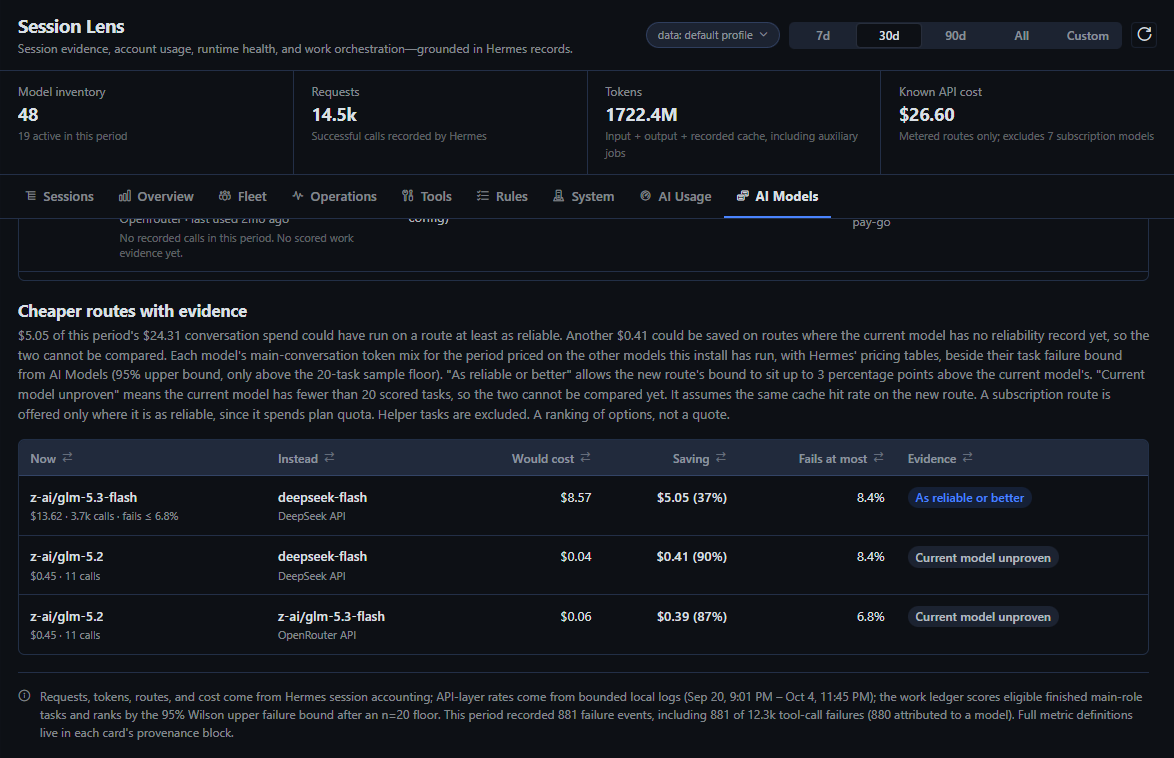
AI Models — a verdict per model from two kinds of evidence
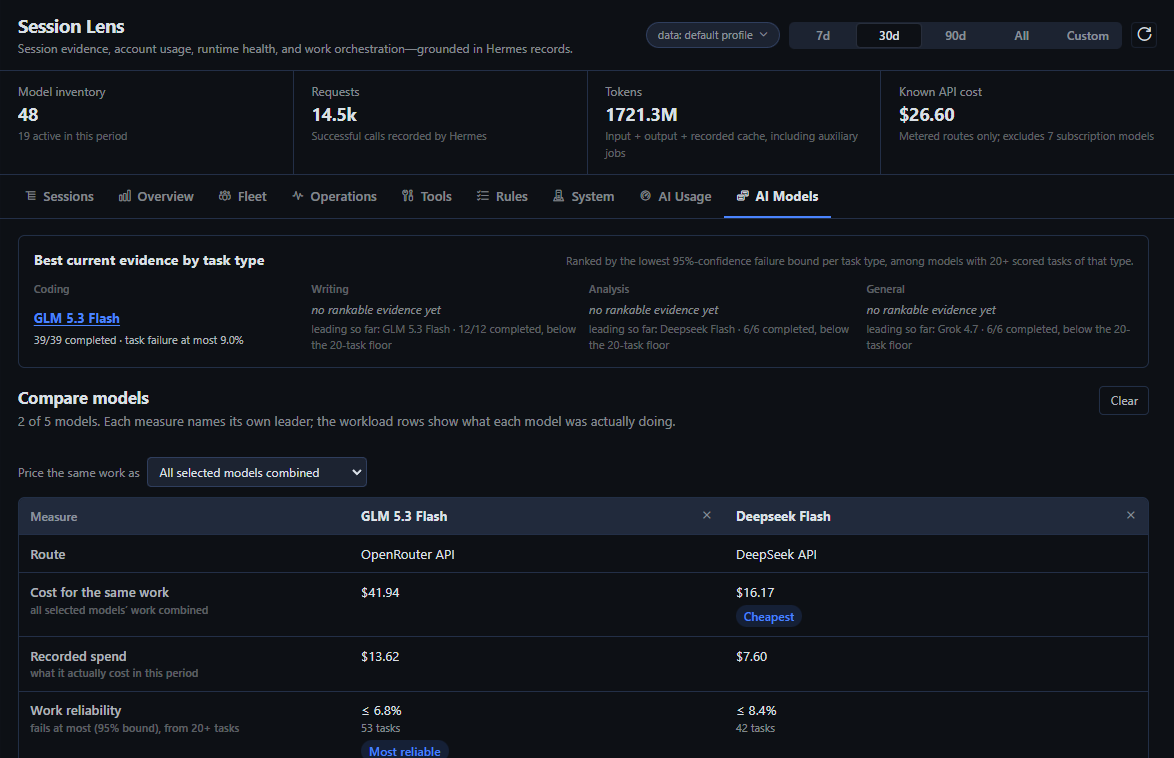
An automatic inventory of every model Hermes has ever recorded, with the selected period's requests, token mix, cost or quota burn, fail rate, retry/switch sessions, work evidence, latency, and trend. Each row leads with a one-sentence verdict that fuses two separate layers: the API layer (what the bounded local logs say about errors, rate limits, timeouts, and latency) and the work ledger (what recorded sessions say about tasks actually completed). A task counts as finished when its session completed or was closed by a Desktop reset or restart with no failure end reason; the bounded logs then decide whether it was clean, recovered, or abandoned on an API failure. Models rank by the lowest 95%-confidence upper bound on their failure rate (a Wilson score) once they clear a configurable sample floor; below it they show plain fractions and a "not rankable yet" banner rather than any percentage, and every excluded task states why.
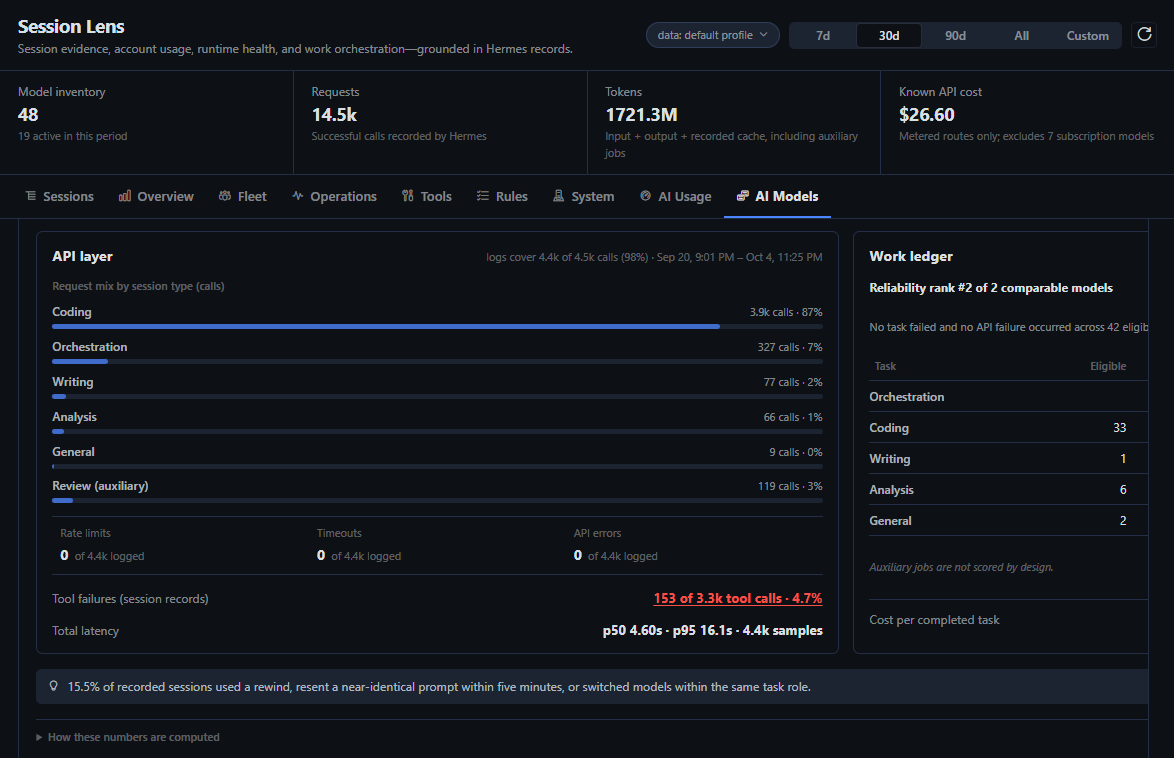
Expanding a row opens the full evidence card. The scoring rules — how a session gets its task type, what counts as completed, clean, or recovered, and what can never improve a rate — are written down in DESIGN.md.
Compare models puts up to five models side by side: tick them in the AI Models table. Each measure names its own leader instead of one overall winner — cost for the same work (one recorded token mix, the selected models' combined work or any one model's own, priced on every model; a subscription model shows its list price, marked as included in your plan), work reliability above the sample floor, median speed, and cache hit rate. Beside them sits what each model was actually doing — context per call, where it ran, what kind of task — with a plain warning when the workloads differ too much to compare, and a "cheapest model at least as reliable as …" pick. History shows whether tasks finished without model or API failures, not whether the answers were right.
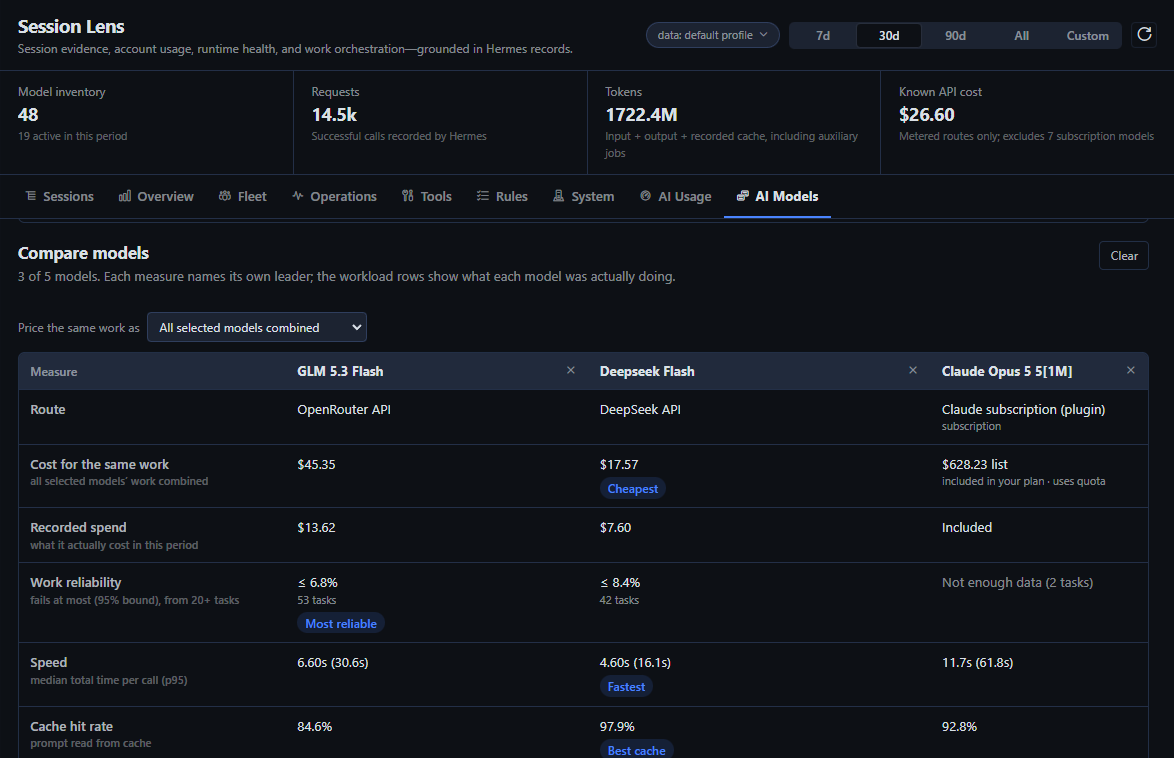
Cheaper routes with evidence prices each model's main-conversation token mix for the period on the other models this install has actually run, with Hermes' pricing tables, beside each candidate's task failure bound. A candidate is offered only above the sample floor, so a saving on a model nobody has measured is never suggested; a subscription route you already pay for is offered only where it is at least as reliable, since it spends plan quota; helper tasks, which need particular abilities, are left out. "As reliable or better" allows the new route's failure bound to sit up to 3 percentage points above the current model's, and the headline keeps two sums apart: the saving on routes proven as reliable, and the saving where the current model has no reliability record yet, so the two cannot be compared. The estimate assumes the same cache hit rate on the new route — a ranking of options, not a quote.
Tools — every tool and MCP server, priced
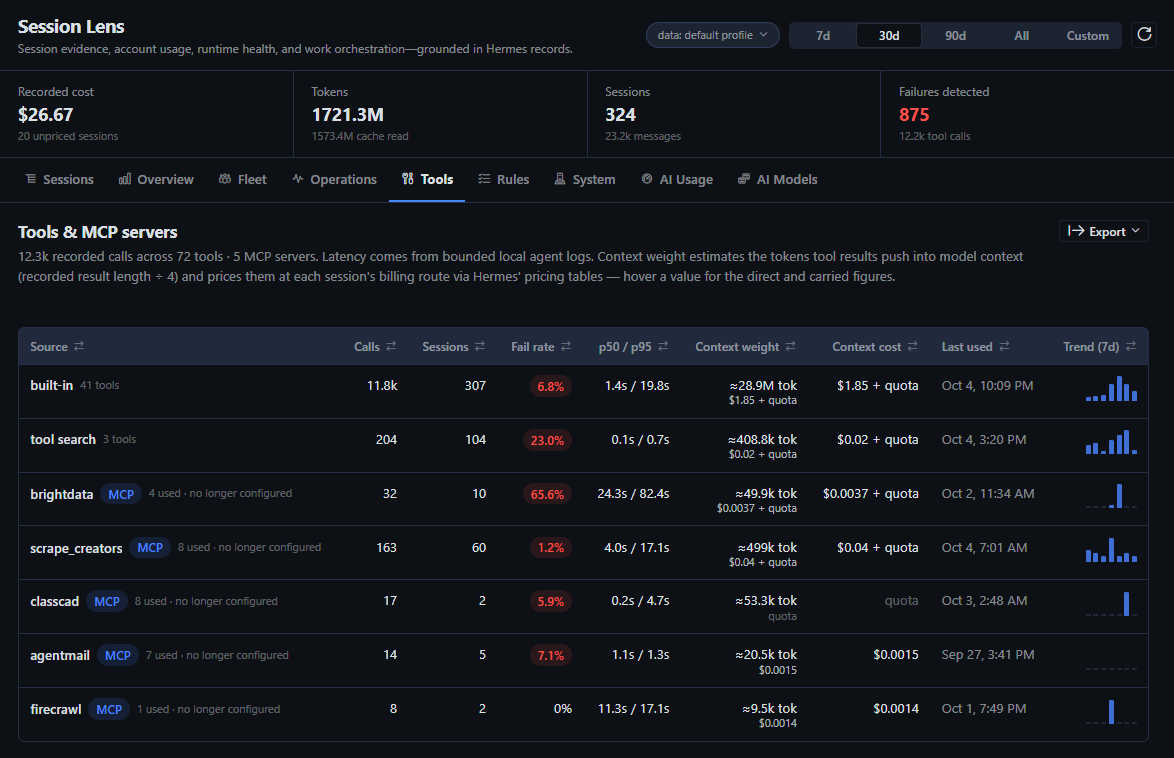
Call volume, sessions, fail rate, p50/p95 latency, and last use for every tool and every MCP server — including connected servers with no calls yet, listed from config.yaml with the number of tools each offers (from Hermes' local MCP schema cache) and marked when switched off. Tools Hermes runs through its tool-search bridge (tool_call) are credited to the tool that actually ran, and tools of apps linked through Hermes connectors form their own groups. Then per-tool reliability ranked failures-first with a dedicated failed-call inspector. Context weight estimates the tokens each tool's results push into model context (recorded result length ÷ 4) and prices them at each session's billing route through Hermes' own pricing tables — direct entry at the input rate plus a carried upper bound for re-sends, "quota" on subscription routes, "unpriced" where Hermes has no rate. Explicit skill invocations are counted from recorded skill_view / skill_manage calls; available skills are never mislabelled as used.
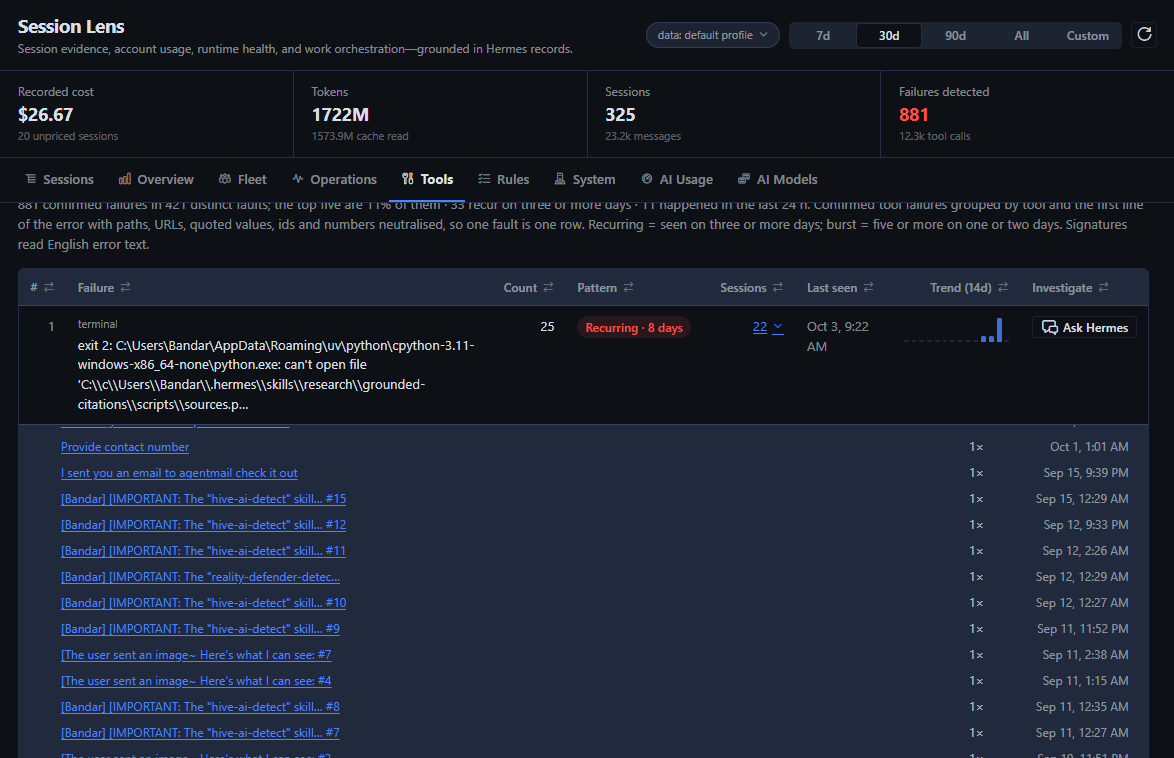
Recurring failures ranks the agent's bad actors: confirmed tool failures from every session in the scope, grouped by what went wrong — the tool plus the error's telling line (a JSON result's error field or its failing output line with the exit code, a traceback's final exception) with paths, URLs, quoted values, ids and numbers neutralised, so the same fault in two repositories is one row. Each row shows its count and share, whether it recurs (three or more days), came in one burst, or happened once, the sessions it hit, a 14-day trend, and whether it happened in the last 24 hours; clicking its session count lists every session it hit, most recent first, with how many times it failed there, each one a click away. Each row's Ask Hermes copies a prompt to investigate that fault and opens a new Hermes chat to paste it into: the pattern (count, sessions, days, profiles, the last 14 days), up to five of the most recent distinct cases with the tool call that produced each — the arguments usually hold the cause — and the sessions it hit, bounded to 12,000 characters and secret-redacted. The prompt asks for the root cause, a fix concrete enough to apply today, and how to confirm it worked, and tells the agent to propose changes rather than make them; nothing is sent until you press send.
Rules — grade your agent against its own instructions
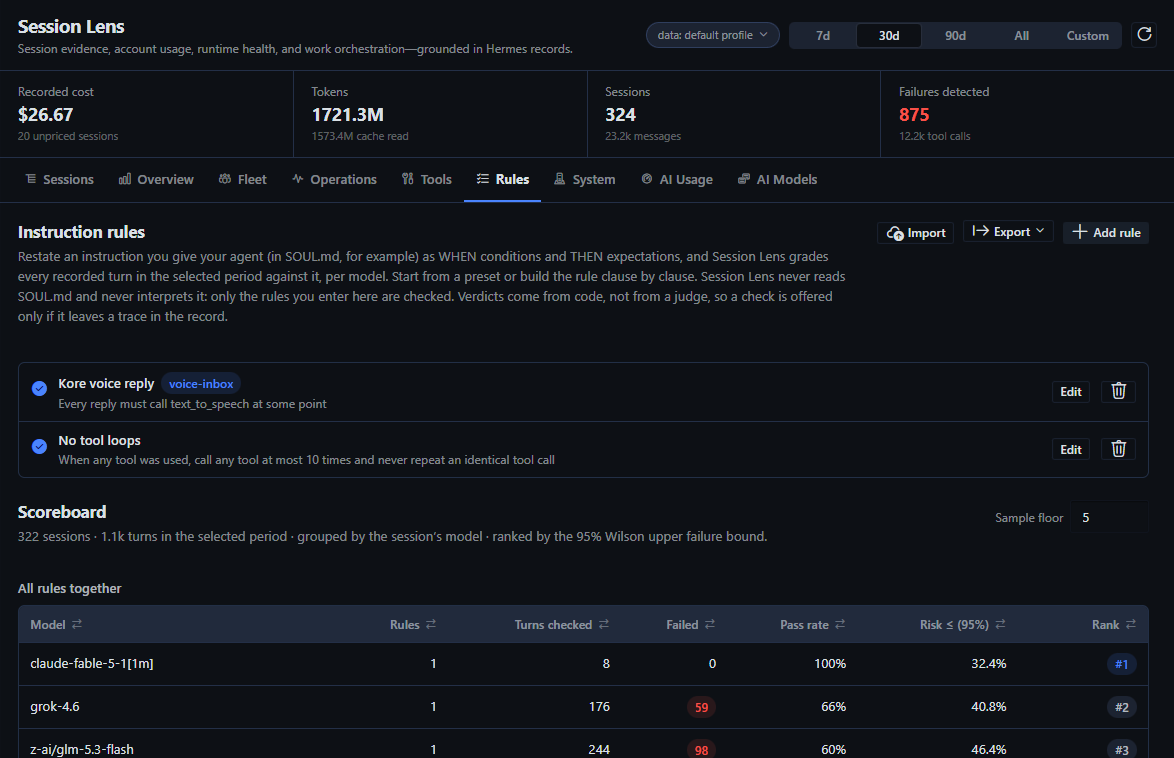
Restate an instruction you give your agent as WHEN conditions and THEN expectations, and Session Lens grades every recorded turn in the period against it, per model. Twelve presets cover the common sentences (every reply must call a tool, no tool loops, cite when searching, never run a destructive command, reply in the user's language, …); the builder composes any rule from a catalog of conditions and expectations, each clause negatable, with tool fields fed by Hermes' live tool registry and every name the records have seen.
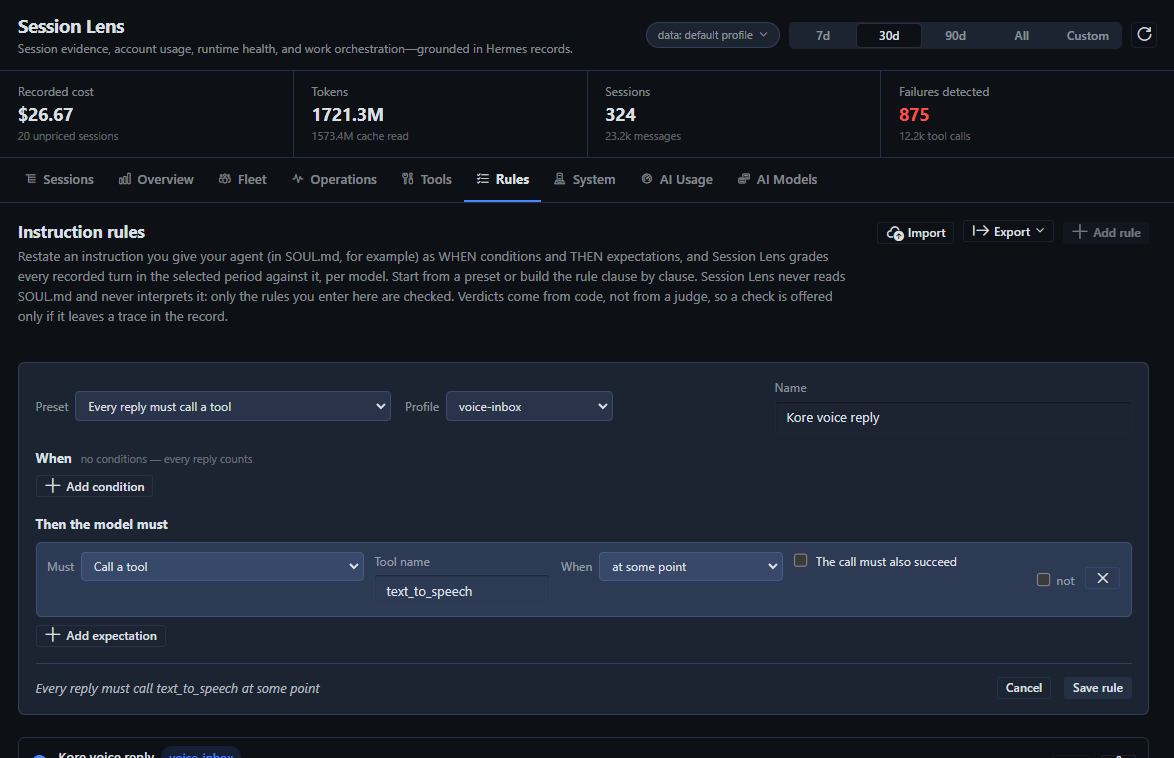
Verdicts are pass, fail, or not applicable; every failure links to the turn; scores rank by the 95% Wilson upper failure bound above a sample floor. Verdicts come from code, not from a model: nothing reads SOUL.md, nothing judges tone, and a check is offered only if it leaves a trace in the record. Rules export and import as JSON.
Operations and System
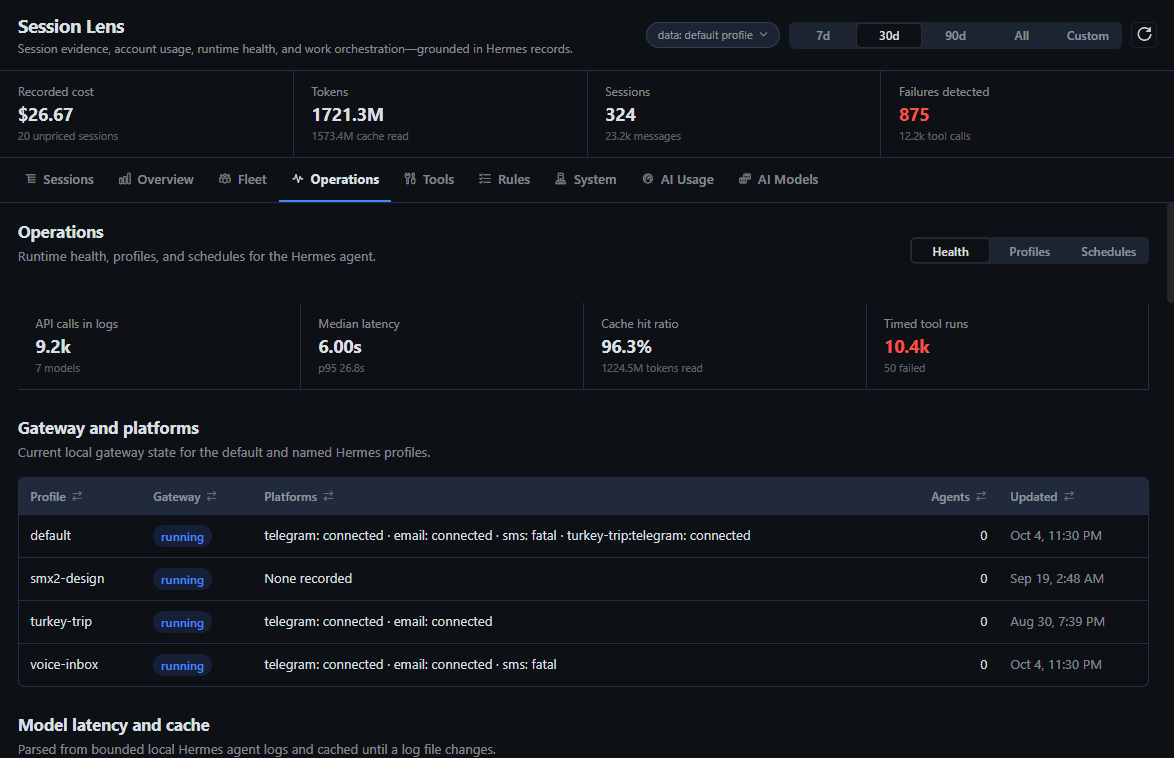
Operations covers gateway and platform health for every profile, context-compression distress (fallback streaks, ineffective passes, cooldowns), profiles, and schedules — with an agent run-health scoreboard per cron job: latest runs, failures, streaks, average duration and cost, and click-through to the runs. Schedule prompts are never returned.
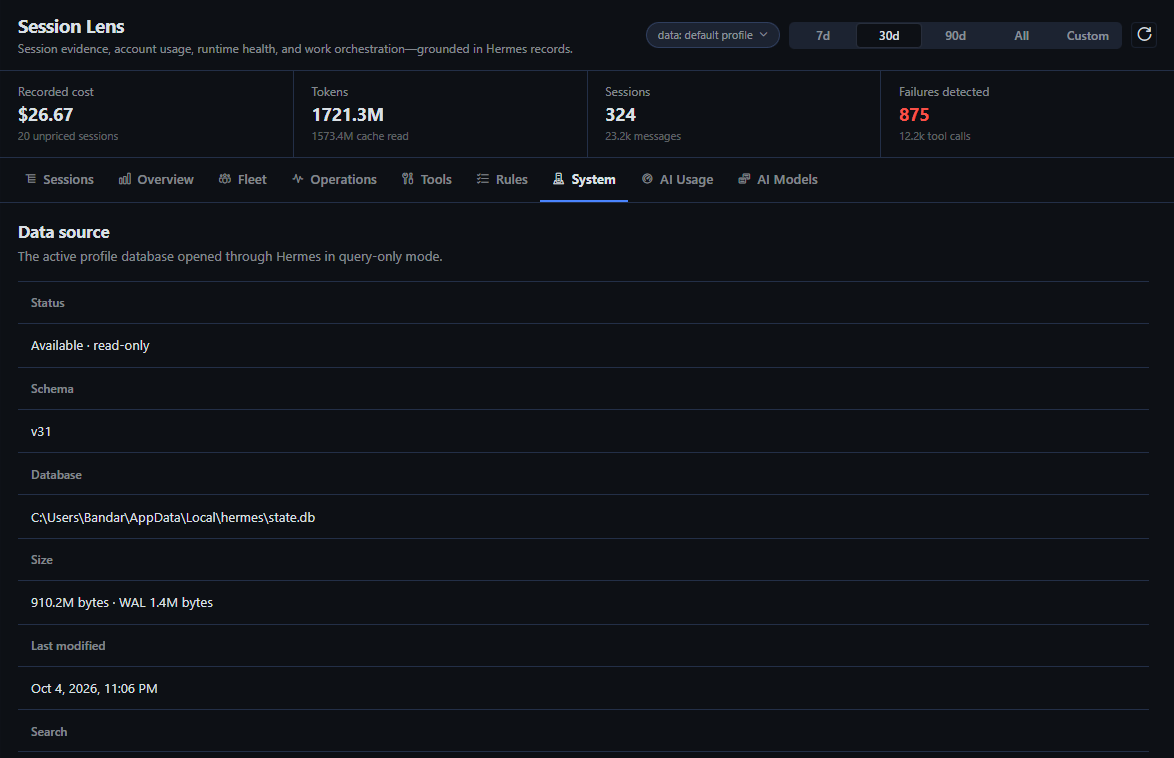
System states the plugin's posture at runtime: database connection and schema, the external hosts the backend can contact, the one inference probe it sends, mutation endpoints (zero), redaction, the language limit of its failure signatures, and the plugin version — so compatibility and trust claims are visible after every update.
Export, anywhere
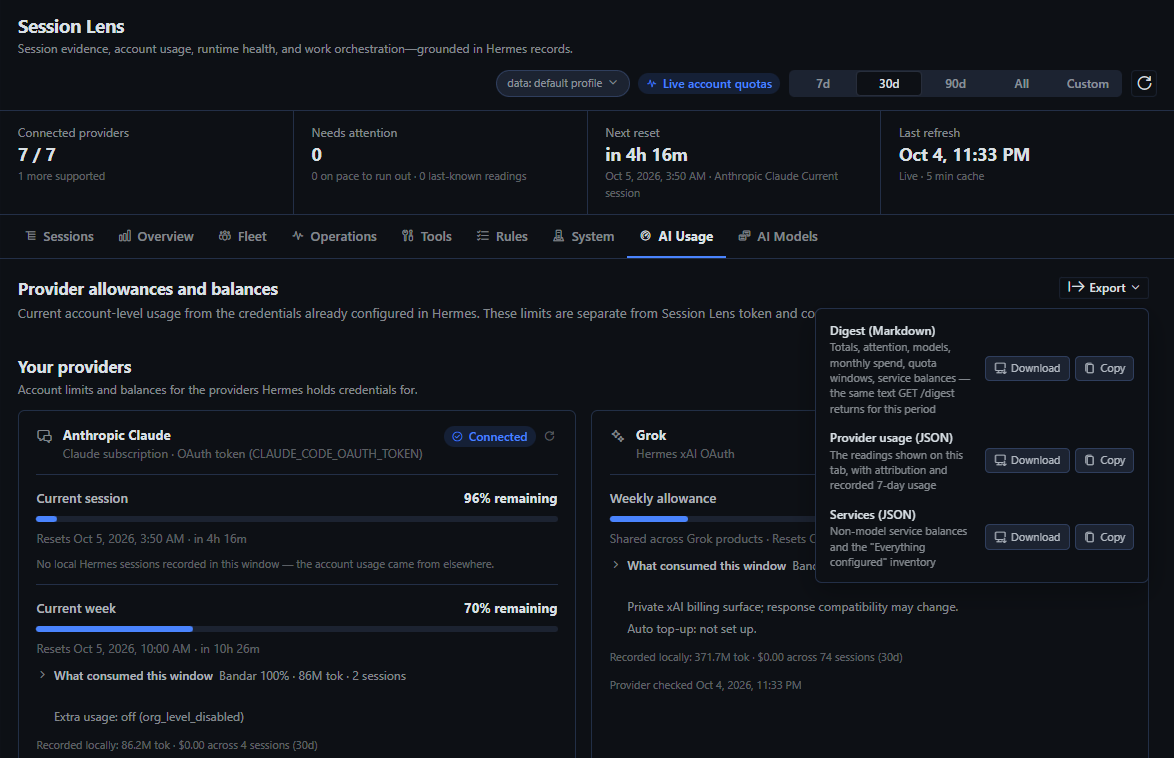
Every data view exports what it shows as CSV (tables), JSON (the full payload behind the tab), or a Markdown digest for the period, as a download through the desktop's Save File dialog or a copy to the clipboard. Exports are assembled in the desktop from the same read-only routes; the backend gains no export route and writes no file.
The API and the digest
Everything the page shows comes from GET /api/plugins/session-lens/… routes inside Hermes' own backend, so any local automation that can call the Hermes API can read them. The one built for that purpose is the digest:
GET /api/plugins/session-lens/digest?days=7&budgets=openrouter:150,all:300
It returns period totals with prior-period deltas, the attention list, monthly spend per provider with projections and cap status, top models with work-reliability evidence, quota windows with pace, exhaustion forecasts and attribution, money windows with how much local sessions explain, service balances, instruction-rule scores when rules are passed, and a ready-made markdown field — for cron agents, notification pipelines, or a Hermes agent that reads its own telemetry. GET /adapters publishes the vendor registry credential-free, and GET /system the privacy posture.
Settings
Everything optional lives under the plugin's namespaced Hermes configuration:
plugins:
  entries:
    session-lens:
      settings:
        rate_sample_threshold: 20
        model_route_mappings:
          "gpt-5.6-*": "OpenAI OAuth"
        anthropic_usage_probe: true
        route_budget_seconds: 25
rate_sample_threshold is the sample floor before fail and retry/switch rates rank and colour (default 20). model_route_mappings are model-id globs that override the route label Session Lens infers from a model's recorded history. anthropic_usage_probe controls the one request Session Lens makes that is not a usage or balance endpoint (see Trust). It is off by default: the Anthropic card then reads only logins that answer the account-usage endpoint, and a setup token or API key shows "Not configured" with the reason. Set it to true to send the one-token Claude message and read those allowances too. route_budget_seconds is how long one view may spend building its data (default 25, under the 30 s Hermes Desktop itself waits by default; Session Lens asks the desktop to wait 90 s so a raised budget still reports). The Hermes Desktop backend is a single process, so a build that grinds for minutes would stall every other request behind it, the gateway indicator included; past the budget the backend interrupts its own query, and the view shows a sentence saying so with the scope that caused it. Raise it for a very large install, or set 0 to disable.
Trust
Session Lens is meant to be inspected, not trusted on its word. This is what the backend can and cannot do, and how to check each claim from the code.
What it reads. Hermes' session store through SessionDB(read_only=True) (dormant profile stores in SQLite immutable mode when no WAL exists), the profile's agent logs, key names from the profile's .env (never values, except inside an adapter that needs the key for its own request), mcp_servers from config.yaml, Hermes' own credential resolvers for the provider adapters, and Hermes' tool registry for the tool-name directory. Session Lens itself never opens skill folders, browser profiles or cookies, or credential files outside $HERMES_HOME, and it does not read another client's login (such as Claude Code's own credential store); the credentials it uses are the ones Hermes' resolvers return for Hermes' own use.
What it writes. Nothing. There is no mutation route (/system reports mutation_endpoints: 0), no cache file, no export file — CSV, JSON, and Markdown exports are assembled in the desktop from the read-only routes, and rules, budgets, alert rates, and dismissals live in the desktop's plugin storage and travel as query parameters. The runaway watch can show a desktop notification through Hermes' plugin notification API, which Hermes gates under Settings ▸ Notifications. The only things Session Lens places outside its own storage are clipboard copies you ask for — an export, or an Ask Hermes prompt — and Ask Hermes opens a new chat for you to paste into without ever submitting a prompt or creating a session itself. Runtime logs and AI Models classification use bounded in-memory caching only. Session Lens itself never rotates or rewrites a login. Three adapters read through Hermes' own login code — OpenAI Codex through Hermes' account-usage module, Grok through Hermes' xAI resolver, and the Nous Portal through Hermes' portal client — and that code may renew an expiring Hermes OAuth login through Hermes' normal path, under Hermes' own lock, exactly as Hermes does when it runs a model. The Anthropic adapter deliberately does not, and an expired Anthropic login is reported as expired.
What it contacts. Only the hosts below, each with the credential Hermes already holds for that vendor, and only for the vendor's own usage or balance endpoint — with one exception, stated in full in the next paragraph. Every host is declared by its adapter module, published credential-free by GET /adapters, shown on the System tab under "External hosts", and this table is checked by the test suite against the registry:
| Adapter | Host | How |
|---|---|---|
| OpenAI Codex | chatgpt.com |
Hermes' own account-usage code with the Hermes Codex OAuth login |
| Anthropic Claude | api.anthropic.com |
the account-usage endpoint for full OAuth logins; with anthropic_usage_probe: true (off by default), a one-token message whose response headers carry the allowance (see below) |
| Nous Research Portal | portal.nousresearch.com |
Hermes' own portal client with the Hermes Nous login |
| OpenRouter | openrouter.ai |
Hermes OpenRouter API key |
| DeepSeek | api.deepseek.com |
Hermes DeepSeek API key |
| Grok | cli-chat-proxy.grok.com |
Hermes xAI OAuth credentials; also reads the account's auto-top-up rule (a billing setting, never changed) |
| Kimi Code Plan | api.kimi.com |
Hermes Kimi API key |
| Z.AI GLM Coding Plan | api.z.ai |
Hermes Z.AI API key |
| Firecrawl | api.firecrawl.dev |
FIRECRAWL_API_KEY from the Hermes .env (cloud only; a self-hosted URL is never called) |
| ScrapeCreators | api.scrapecreators.com |
SCRAPECREATORS_API_KEY from the Hermes .env |
| AgentMail | api.agentmail.to |
AGENTMAIL_API_KEY from the Hermes .env |
| Bright Data | api.brightdata.com |
BRIGHTDATA_API_KEY (or the MCP key) from the Hermes .env |
| Monid | none directly | the local monid CLI, which talks to Monid itself |
| Twilio | api.twilio.com |
TWILIO_ACCOUNT_SID + TWILIO_AUTH_TOKEN from the Hermes .env: the account balance and this month's total price |
| Voximplant | api.voximplant.com |
the service-account key in the Hermes .env (VOXIMPLANT_ACCOUNT_ID, VOXIMPLANT_KEY_ID, VOXIMPLANT_PRIVATE_KEY), signed locally into a one-minute token for GetAccountInfo |
| Context.dev | api.context.dev |
CONTEXT_DEV_API_KEY from the Hermes .env: one log line (free) whose key metadata carries the credit balance |
| Vapi | api.vapi.ai |
VAPI_API_KEY from the Hermes .env: an analytics query summing this month's call cost (Vapi has no balance API) |
| Reality Defender | api.prd.realitydefender.xyz |
the Reality Defender key from the Hermes .env: this month's scan count (no quota API) |
No request is made for a provider whose local credential probe shows nothing configured, no request carries session content, prompts, or telemetry, and nothing is sent to any analytics or telemetry service. Provider checks never read browser cookies, and usage checks accept a credential only when Hermes resolves it for the official provider host. Brave Search, Telegram, here.now, TypeSafe, Reef, and unknown keys or MCP servers are inventoried by name and never contacted. Hive publishes no balance API either: its card shows the figure you keep in HIVE_CREDIT_REMAINING in the Hermes .env, labelled as kept by hand, and contacts nothing.
The one inference request: the Anthropic probe (off by default). Anthropic's account-usage endpoint answers only OAuth logins that carry the user:profile scope. A Claude setup token (CLAUDE_CODE_OAUTH_TOKEN / ANTHROPIC_TOKEN) carries user:inference alone and an API key is not OAuth at all, so for those credentials the only readable source is the anthropic-ratelimit-* headers Anthropic attaches to every message response. With anthropic_usage_probe: true (it is off by default), Session Lens sends one message to Claude Haiku — the single character ., max_tokens: 1, no session content — per Anthropic credential, reads the headers, and discards the reply. For a subscription token that yields the 5-hour and 7-day allowance and whether extra usage is on; for a Console API key it yields the per-minute request and token limits, and each becomes its own card. The cost is one request against the subscription window or a fraction of a cent on the key, and the call appears in the Anthropic Console request log. Every outcome is cached for 15 minutes per credential (a manual refresh re-probes), a full login is tried against the usage endpoint first and probed only if that fails, the adapter is registered with request_kind: inference_probe so GET /adapters and the System tab ("Inference probes") name it, and anthropic_usage_probe: false (the default) keeps it off. Subscription tokens are sent with the same Claude Code identity headers Hermes itself uses for its OAuth inference; API keys are sent plain. Nothing is refreshed, rotated, or written.
What reaches the desktop. Normalized usage figures, redacted and length-bounded snippets, and never a credential (/system reports provider_credentials_returned_to_desktop: false). Tool results, transcript events, schedule errors, and gateway errors are secret-redacted and length-bounded before they leave the backend. System prompts and schedule prompts are never returned.
Where the limits are. Failure detection combines Hermes' authoritative finish and effect states with conservative text signatures in tool results; SQL only finds candidates, and the Python signature confirms the content before any metric counts it. The text signatures are English-only. They match words such as error, failed, traceback, permission denied, timed out, and non-zero exit codes; a tool that reports its failure in another language is counted only when Hermes recorded an error state, so failure rates on Tools, Sessions, and AI Models are a floor, not a ceiling, for non-English output. The System tab states this limit and /system carries it as failure_signatures_language. Quota attribution explains only what local records can explain and says so. Cost is recorded actual or estimated cost, or an explicit unpriced state, never a guess. File paths are observed evidence, not an audit of every filesystem operation. Rules are deterministic checks over recorded turns; nothing reads SOUL.md and no model judges anything.
How to verify. grep -rn "https://" dashboard/ finds every vendor URL in the backend, and each one lives in an adapter module under dashboard/_providers/ or dashboard/_services/ (the only other hit is a URL-prefix check in _common.py). GET /adapters lists the registry at runtime. python -m unittest discover -s tests runs the checks that keep this section, the System tab, and the registry in agreement.
Compatibility
Verified on 2026-10-03 with:
- Hermes Agent
0.21.5(commit46904a3b46, 2026-10-02) and the Hermes Desktop built from it - Hermes state schema
31 - Hermes Desktop Plugin SDK from the same build
- Windows 11
Hermes Desktop now serves every local profile from one backend and scopes each request to the active profile. Session Lens follows that scope: the header chip, local records, provider quotas and service balances all belong to the profile the desktop is on, and cached account readings are kept per profile. Enabling the plugin once covers every profile.
The first release was verified on Hermes Agent 0.20.5 with state schema 26, and every release since has been checked against the Hermes build installed at the time. The plugin uses Hermes' public Desktop SDK and SessionDB(read_only=True); the System view shows the active schema and data source so compatibility is visible after an update.
Development
The Desktop entry is uncompiled ESM. It may import only @hermes/plugin-sdk, react, and react/jsx-runtime, and must use jsx()/jsxs() rather than JSX syntax.
Provider and service adapters are one module each under dashboard/_providers/ and dashboard/_services/; the packages import every module they contain, and each module registers itself with register_provider(...) or register_service(...). ADAPTERS.md is the recipe, including the rule that an adapter is added only after its usage endpoint was verified against the live API. DESIGN.md records the visual system and the scoring rules; PRODUCT.md the product commitments.
Run the tests with the Python environment used by Hermes:
python -m unittest discover -s tests -v
node --input-type=module --check < desktop/plugin.js   # plain `node --check` skips .js files that contain `import`
Credits and license
Hermes Session Lens is MIT licensed. See UPSTREAM.md and THIRD_PARTY_NOTICES.md for transparent credit to TokenTelemetry, Hermes Session Analyzer, Hermes Agent, and the projects whose response-shape and behaviour references informed the provider adapters. No upstream logo is reused, and nothing here implies endorsement by any upstream author or by Nous Research.